
Provides translation capabilities using the DeepL API, including text translation between numerous languages, text rephrasing, batch translation, document translation, automatic language detection, formality control, and usage/quota reporting.
Click on "Install Server".
Wait a few minutes for the server to deploy. Once ready, it will show a "Started" state.
In the chat, type
@followed by the MCP server name and your instructions, e.g., "@DeepL MCP Servertranslate 'Hello, how are you?' from English to Spanish"
That's it! The server will respond to your query, and you can continue using it as needed.
Here is a step-by-step guide with screenshots.
DeepL MCP Server
A Model Context Protocol (MCP) server that provides translation capabilities using the DeepL API using python and fastmcp.
Working Demo
Features
Translate text between numerous languages
Rephrase text using DeepL's capabilities
Access to all DeepL API languages and features
Automatic language detection
Formality control for supported languages
Batch translation and document translation
Usage and quota reporting
Translation history and usage analysis
Support for multiple MCP transports: stdio, SSE, and Streamable HTTP
Installation
Standard (Local) Installation
Clone the repository:
git clone https://github.com/AlwaysSany/deepl-fastmcp-python-server.git
cd deepl-fastmcp-python-server
Install uv (recommended) or use pip:
With pip,
pip install uvWith pipx,
pipx install uvInstall dependencies:
uv syncSet your environment variables:
Create a
.envfile or exportDEEPL_AUTH_KEYin your shell.You can do this by running the following command and then update the.envfile with your DeepL API key:cp .env.example .envExample
.envfile,DEEPL_AUTH_KEY=your_deepl_api_keyRun the server:
Normal mode:
uv run python main.py --transport stdioTo run with Streamable HTTP transport (recommended for web deployments):
uv run python main.py --transport streamable-http --host 127.0.0.1 --port 8000To run with SSE transport:
uv run python main.py --transport sse --host 127.0.0.1 --port 8000Development mode:
uv run mcp dev main.py
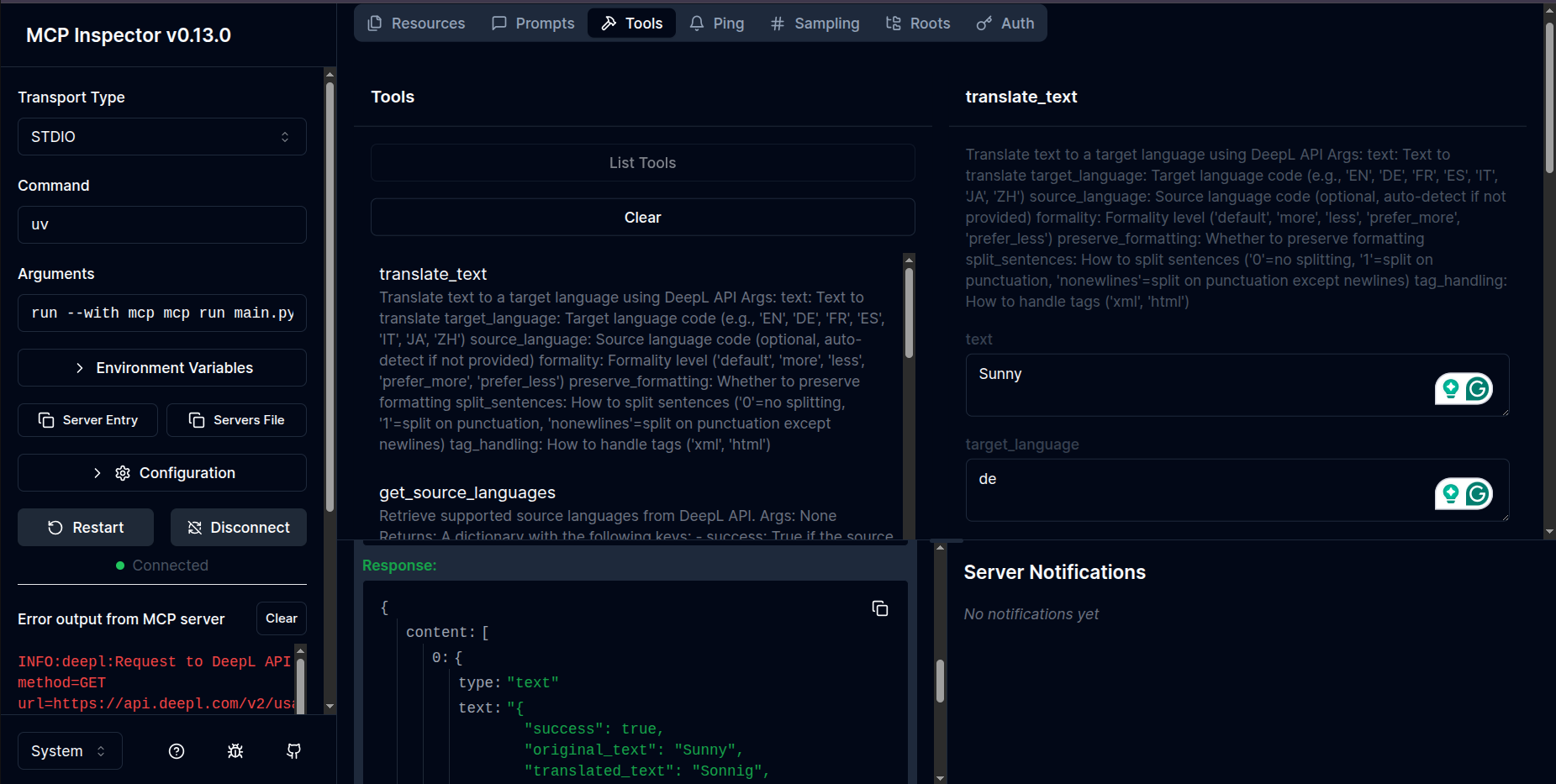
It will show some messages in the terminal like this:
Spawned stdio transport Connected MCP client to backing server transport
Created web app transport
Set up MCP proxy
🔍 MCP Inspector is up and running at http://127.0.0.1:6274
MCP Inspector,
Dockerized Installation
Build the Docker image:
docker build -t deepl-fastmcp-server .Run the container:
docker run -e DEEPL_AUTH_KEY=your_deepl_api_key -p 8000:8000 deepl-fastmcp-server
Docker Compose
Create a
.envfile in the project root:DEEPL_AUTH_KEY=your_deepl_api_keyStart the service:
docker compose up --buildThis will build the image and start the server, mapping port 8000 on your host to the container.
Configuration
DeepL API Key
You'll need a DeepL API key to use this server. You can get one by signing up at DeepL API. With a DeepL API Free account you can translate up to 500,000 characters/month for free.
Required environment variables:
DEEPL_AUTH_KEY(required): Your DeepL API key.DEEPL_SERVER_URL(optional): Override the DeepL API endpoint (default:https://api-free.deepl.com).
MCP Transports
This server supports the following MCP transports:
Stdio: Default transport for local usage.
SSE (Server-Sent Events): Ideal for real-time event-based communication.
Streamable HTTP: Suitable for HTTP-based streaming applications.
To configure these transports, ensure your environment supports the required protocols and dependencies.
Usage
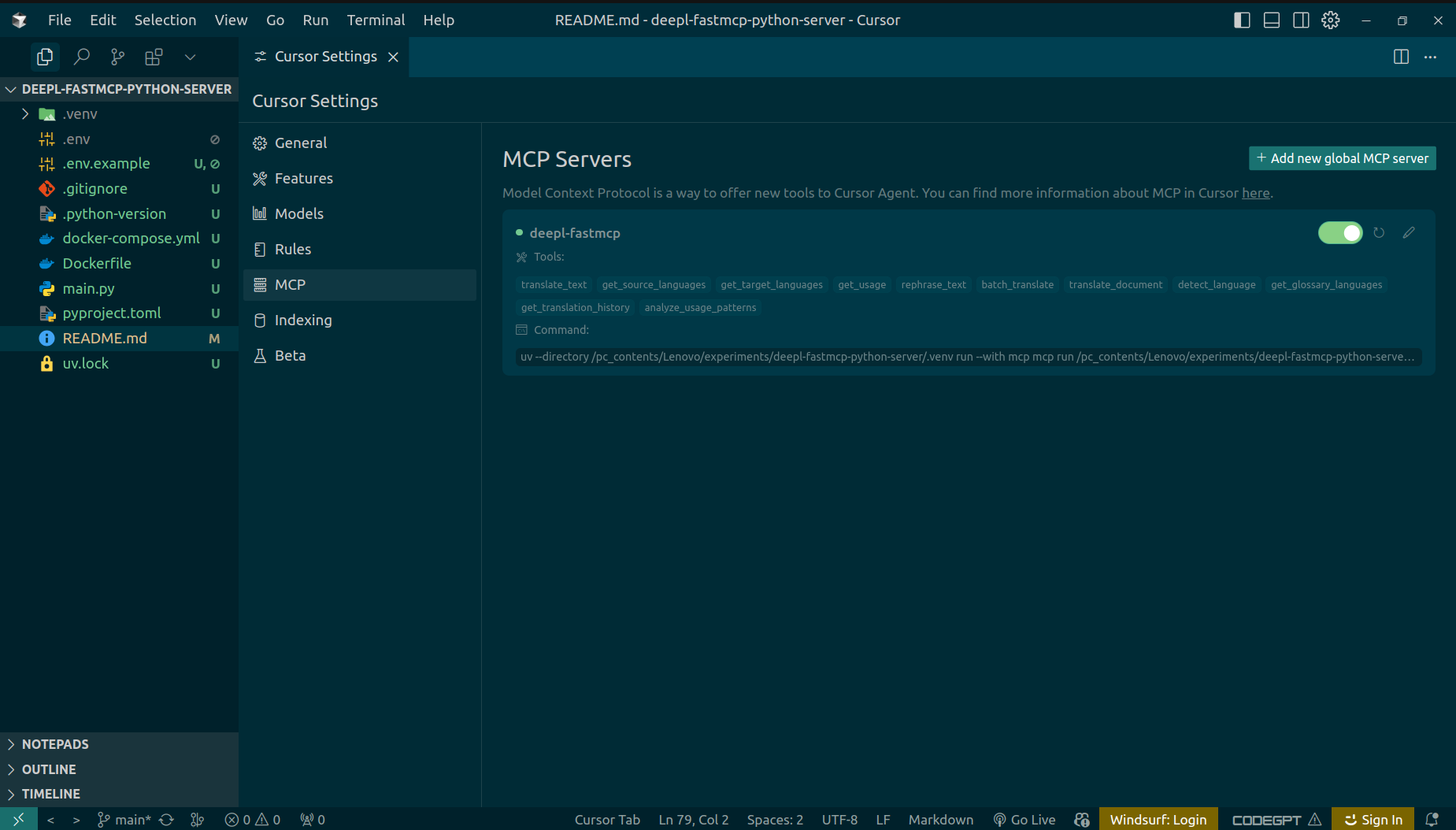
Use with Cursor IDE,
Click on File > Preferences > Cursor Settings > MCP > MCP Servers > Add new global MCP server
and paste the following json:
{
  "mcpServers": {
    "deepl-fastmcp": {
      "command": "uv",
      "args": [
        "--directory",
        "/path/to/yourdeepl-fastmcp-python-server/.venv",
        "run",
        "--with",
        "mcp",
        "python",
        "/path/to/your/deepl-fastmcp-python-server/main.py",
        "--transport",
        "streamable-http",
        "--host",
        "127.0.0.1",
        "--port",
        "8000"
      ]
    }
  }
}Note: To use Streamable HTTP or SSE transports with Cursor IDE, change the "--transport", "stdio" line to "--transport", "streamable-http", "--host", "127.0.0.1", "--port", "8000" or "--transport", "sse", "--host", "127.0.0.1", "--port", "8000" respectively, and adjust the host and port as needed.
For example,
  "mcpServers": {
    "deepl-fastmcp": {
        "type": "sse",
        "url": "http://127.0.0.1:8000/sse"
    }
  }
and then run mcp server from terminal uv run main.py --transport sse --host 127.0.0.1 --port 8000
Cursor Settings,
Use with Claude Desktop
This MCP server integrates with Claude Desktop to provide translation capabilities directly in your conversations with Claude.
Configuration Steps
Install Claude Desktop if you haven't already
Create or edit the Claude Desktop configuration file:
On macOS:
~/Library/Application Support/Claude/claude_desktop_config.jsonOn Windows:
%AppData%\Claude\claude_desktop_config.jsonOn Linux:
~/.config/Claude/claude_desktop_config.json
Add the DeepL MCP server configuration:
{
  "mcpServers": {
    "deepl-fastmcp": {
      "command": "uv",
      "args": [
        "--directory",
        "/path/to/yourdeepl-fastmcp-python-server/.venv",
        "run",
        "--with",
        "mcp",
        "python",
        "/path/to/your/deepl-fastmcp-python-server/main.py",
        "--transport",
        "streamable-http",
        "--host",
        "127.0.0.1",
        "--port",
        "8000"
      ]
    }
  }
}Note: To use Streamable HTTP or SSE transports with Claude Desktop, change the "--transport", "stdio" line to "--transport", "streamable-http", "--host", "127.0.0.1", "--port", "8000" or "--transport", "sse", "--host", "127.0.0.1", "--port", "8000" respectively, and adjust the host and port as needed.
Available Tools
This server provides the following tools:
translate_text: Translate text to a target languagerephrase_text: Rephrase text in the same or different languagebatch_translate: Translate multiple texts in a single requesttranslate_document: Translate a document file using DeepL APIdetect_language: Detect the language of given textget_translation_history: Get recent translation operation historyanalyze_usage_patterns: Analyze translation usage patterns from history
Available Resources
The following resources are available for read-only data access (can be loaded into LLM context):
usage://deepl: DeepL API usage info.deepl://languages/source: Supported source languages.deepl://languages/target: Supported target languages.deepl://glossaries: Supported glossary language pairs.history://translations: Recent translation operation history (same asget_translation_historytool)usage://patterns: Usage pattern analysis (same asanalyze_usage_patternstool)
Available Prompts
The following prompt is available for LLMs:
summarize: Returns a message instructing the LLM to summarize a given text.Example usage:
@mcp.prompt("summarize")
def summarize_prompt(text: str) -> str:
    return f"Please summarize the following text:\n\n{text}"
Tool Details
translate_text
Translate text between languages using the DeepL API.
Parameters:
text: The text to translatetarget_language: Target language code (e.g., 'EN', 'DE', 'FR', 'ES', 'IT', 'JA', 'ZH')source_language(optional): Source language codeformality(optional): Controls formality level ('less', 'more', 'default', 'prefer_less', 'prefer_more')preserve_formatting(optional): Whether to preserve formattingsplit_sentences(optional): How to split sentencestag_handling(optional): How to handle tags
rephrase_text
Rephrase text in the same or different language using the DeepL API.
Parameters:
text: The text to rephrasetarget_language: Language code for rephrasingformality(optional): Desired formality levelcontext(optional): Additional context for better rephrasing
batch_translate
Translate multiple texts in a single request.
Parameters:
texts: List of texts to translatetarget_language: Target language codesource_language(optional): Source language codeformality(optional): Formality levelpreserve_formatting(optional): Whether to preserve formatting
translate_document
Translate a document file using DeepL API.
Parameters:
file_path: Path to the document filetarget_language: Target language codeoutput_path(optional): Output path for translated documentformality(optional): Formality levelpreserve_formatting(optional): Whether to preserve document formatting
detect_language
Detect the language of given text using DeepL.
Parameters:
text: Text to analyze for language detection
get_translation_history
No parameters required. See tool output for details.
analyze_usage_patterns
No parameters required. See tool output for details.
Supported Languages
The DeepL API supports a wide variety of languages for translation. You can use the get_source_languages and get_target_languages tools, or the deepl://languages/source and deepl://languages/target resources, to see all currently supported languages.
Some examples of supported languages include:
English (en, en-US, en-GB)
German (de)
Spanish (es)
French (fr)
Italian (it)
Japanese (ja)
Chinese (zh)
Portuguese (pt-BR, pt-PT)
Russian (ru)
And many more
Debugging
For debugging information, visit the MCP debugging documentation.
Error Handling
If you encounter errors with the DeepL API, check the following:
Verify your API key is correct
Make sure you're not exceeding your API usage limits
Confirm the language codes you're using are supported
Deploy on server
To deploy on a server(render.com), you need to compile your pyproject.toml to requirements.txt
because it doesn't support uv right now. So to do that, you can use the following commands:
uv pip compile pyproject.toml > requirements.txtthen, create a runtime.txt file with the python version,
echo "python-3.13.3" > runtime.txt finally, set the environment variable PORT, DEEPL_SERVER_URL and DEEPL_AUTH_KEY with your DeepL API key on render.com workspace before you set the entry point,
python main.py --transport sse --host 0.0.0.0 --port 8000 Deployment
The MCP server is live and accessible on Render.com.
Live Endpoint:
https://deepl-fastmcp-python-server.onrender.com/sse
You can interact with the API at the above URL.
License
MIT
TODOs
Add more test cases
Add more features
Add more documentation
Add more security features
Add more logging
Add more monitoring
Add more performance optimization
Contributing
Contributions are welcome! If you have suggestions for improvements or new features, please open an issue or submit a pull request.
See more at Contributing
Contact
Author: Sany Ahmed
Email: sany2k8@gmail.com
Links
This server cannot be installed
Resources
Unclaimed servers have limited discoverability.
Looking for Admin?
If you are the server author, to access and configure the admin panel.