
Enables seamless interaction with Salesforce organizations, supporting full CRUD operations on records, SOQL querying, schema discovery of custom objects and fields, and comprehensive data backup with historical recovery.
Click on "Install Server".
Wait a few minutes for the server to deploy. Once ready, it will show a "Started" state.
In the chat, type
@followed by the MCP server name and your instructions, e.g., "@MCP Salesforce ServerFind all open opportunities over $10,000 closing this month"
That's it! The server will respond to your query, and you can continue using it as needed.
Here is a step-by-step guide with screenshots.
MCP Salesforce Server

A Model Context Protocol (MCP) server that provides seamless integration with Salesforce using OAuth authentication. This server enables AI assistants like Claude to interact with any Salesforce organization through a secure, generic interface.
✨ Features
🎯 Seamless Authentication - Claude automatically detects when authentication is needed and handles it transparently
🚀 Zero Manual Setup - No need to run terminal commands or manual OAuth flows
🔐 OAuth-Only Authentication - Secure browser-based setup with automatic token refresh
🌐 Universal Salesforce Integration - Works with any Salesforce org, including custom objects and fields
🧠 Smart Installation Learning - Analyzes your complete Salesforce setup to provide intelligent assistance
🔍 Dynamic Schema Discovery - Automatically adapts to your Salesforce configuration
🔒 Secure Token Storage - File-based storage with strict permissions for production-grade security
🏠 Cross-Platform Home Directory Storage - Credentials and cache stored in user's home directory
📝 Full CRUD Operations - Query, create, update, and delete any Salesforce records
📊 Schema Inspection - Get detailed information about objects and fields
💡 Context-Aware Suggestions - Provides intelligent field and object name suggestions
💾 Comprehensive Backup System - Complete data and file backup with support for all Salesforce file systems
⏰ Time Machine Feature - Point-in-time data recovery and historical analysis
📁 Multi-Format File Support - Backs up ContentVersions, Attachments, and Documents with proper metadata
🚀 Quick Start
Prerequisites
Node.js 18+
macOS (required for secure credential storage)
Salesforce Connected App with OAuth configured
Installation Options
🎯 Recommended: NPX Usage (No Installation Required)
Use NPX to run the MCP server without any permanent installation:
✅ Benefits of NPX Usage:
🔄 Always Latest: Automatically uses the latest published version
💾 No Disk Space: No permanent installation required
🛡️ No Conflicts: No global package conflicts
⚡ Easy Updates: Just restart - gets latest version automatically
📋 Simple Config: Copy-paste ready MCP configuration
NPX Command Line Usage:
🔧 Alternative: Development Setup
For development or customization:
Clone and install dependencies:
git clone https://github.com/AiondaDotCom/mcp-salesforce.git cd mcp-salesforce npm installConfigure credentials: Use the
salesforce_setuptool to configure your credentials when promptedAdd to Claude Desktop using local path (see Configuration below)
🎯 Start Using
That's it! Claude will automatically handle setup and authentication when you first use any Salesforce tool.
✨ Interactive Setup Process!
Use the
salesforce_setuptool to configure your credentialsClaude will ask you for your Salesforce Connected App details
Credentials are stored securely in your home directory
Seamless OAuth flow directly from Claude Desktop
🧠 Smart Learning System
Use
salesforce_learnto analyze your complete Salesforce installationClaude learns all your custom objects, fields, and relationships
Provides intelligent suggestions based on your specific setup
Context-aware assistance for complex Salesforce environments
📦 NPM Package Status
✅ Package Successfully Published!
The package @aiondadotcom/mcp-salesforce is now live on NPM and ready for use.
Using the Published Package
NPX usage is now available for all users:
Publication Details
Package Name:
@aiondadotcom/mcp-salesforceVersion:
1.0.7(latest)Registry: NPM Public Registry
Organization:
@aiondadotcomAccess: Public
Status:
✅ Package published to NPM
✅ NPX compatibility verified
✅ Binary wrapper implemented
✅ Setup command functional
✅ MCP configuration ready
✅ Available for immediate use
🎉 All NPX functionality now works for end users worldwide!
🔧 Configuration
Salesforce Connected App Setup
In Salesforce Setup, create a new Connected App:
App Name: MCP Salesforce Integration
API Name: mcp_salesforce_integration
Contact Email: Your email
Enable OAuth Settings: ✅ Yes
Callback URL:
http://localhost:8080/callback(will be auto-generated)Selected OAuth Scopes:
Manage user data via APIs (api)
Perform requests at any time (refresh_token, offline_access)
After saving, copy the Consumer Key and Consumer Secret
Credential Configuration
Configure your credentials using the salesforce_setup tool when you first use the application:
Interactive Setup: Claude will prompt you for your Salesforce credentials
Client ID: Your Salesforce Connected App Consumer Key
Client Secret: Your Salesforce Connected App Consumer Secret
Instance URL: Your Salesforce organization URL (e.g.,
https://mycompany.salesforce.com)
The tool will validate your input and store credentials securely in ~/.mcp-salesforce.json with restricted permissions (600).
📁 File Locations:
Credentials:
~/.mcp-salesforce.json(contains OAuth tokens and credentials)Cache:
~/.mcp-salesforce-cache/(contains learned Salesforce schema and context)Cross-Platform: Works on Windows, macOS, and Linux
Example interaction:
Claude Desktop Integration
🎯 NPX Configuration (Recommended)
Add this to your Claude Desktop MCP configuration (~/Library/Application Support/Claude/claude_desktop_config.json):
🔧 Development/Local Configuration
For development or customized installations:
🌐 VS Code MCP Configuration
For VS Code with MCP extension:
📸 Demo Screenshots
Here's a step-by-step walkthrough of the MCP Salesforce Server in action, showing a real-world use case of verifying and updating company address information:
Step 1: Address Verification Request
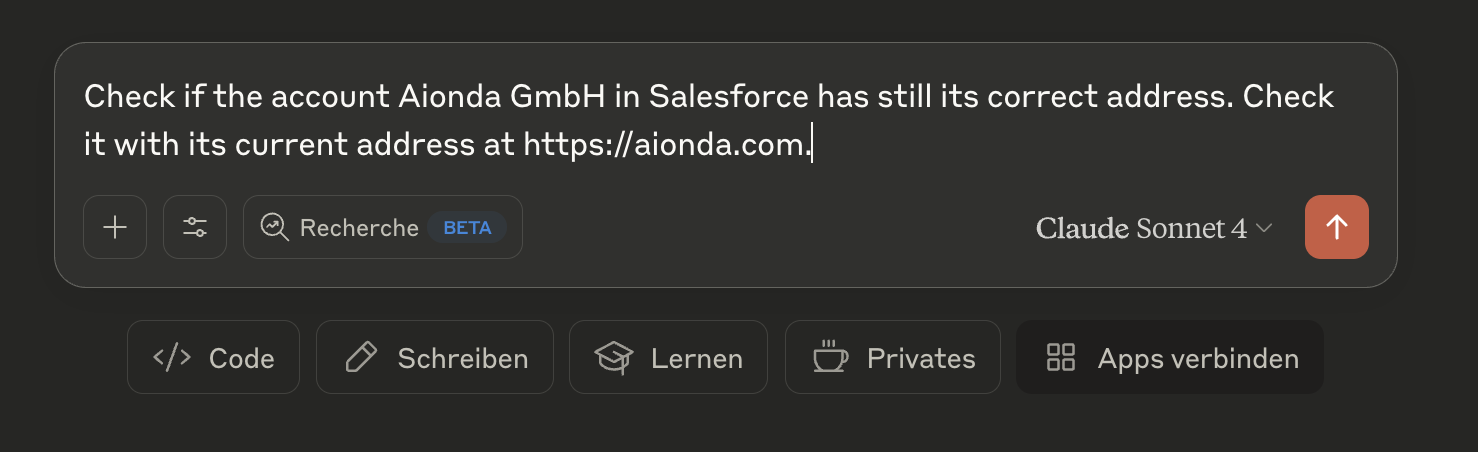 Claude checking if the Aionda GmbH account in Salesforce has the correct address by comparing it with their current website address
Step 2: Address Comparison Results
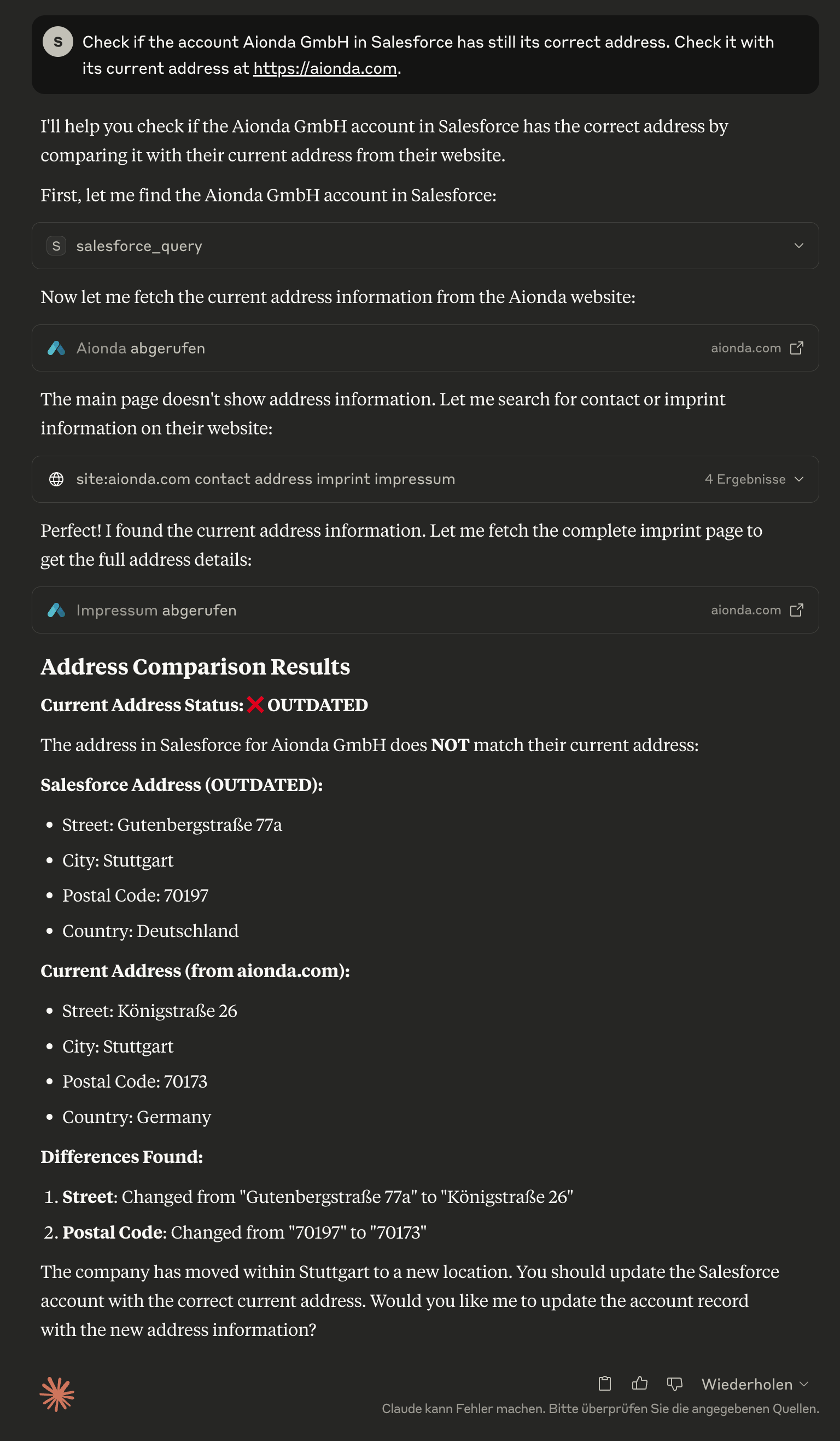 Claude identifying that the Salesforce address is outdated, showing detailed comparison between the current Salesforce data and the actual address from the company website
Step 3: Automated Address Update
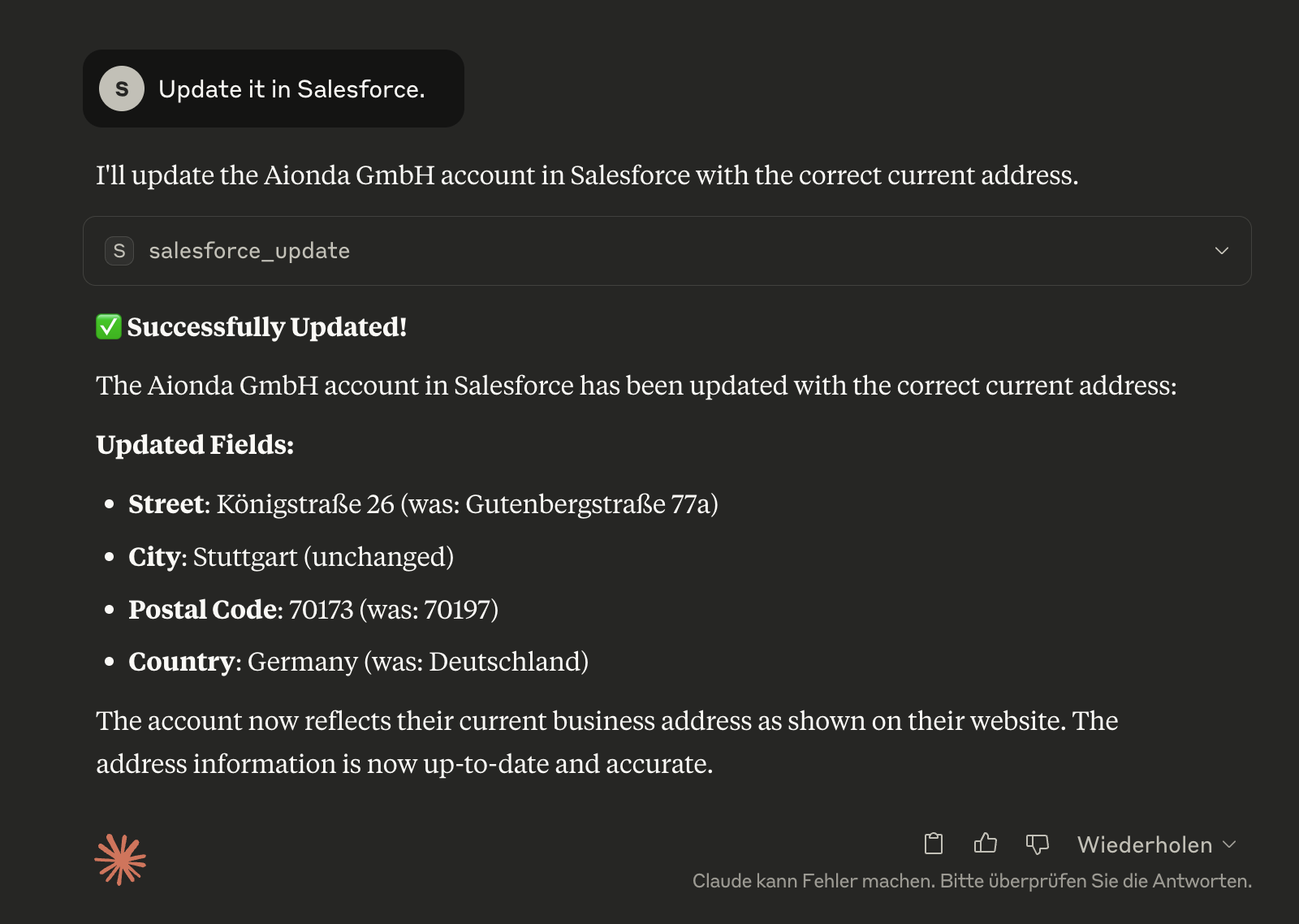 Claude successfully updating the Salesforce account with the correct current address, showing exactly which fields were changed
Step 4: Verification in Salesforce
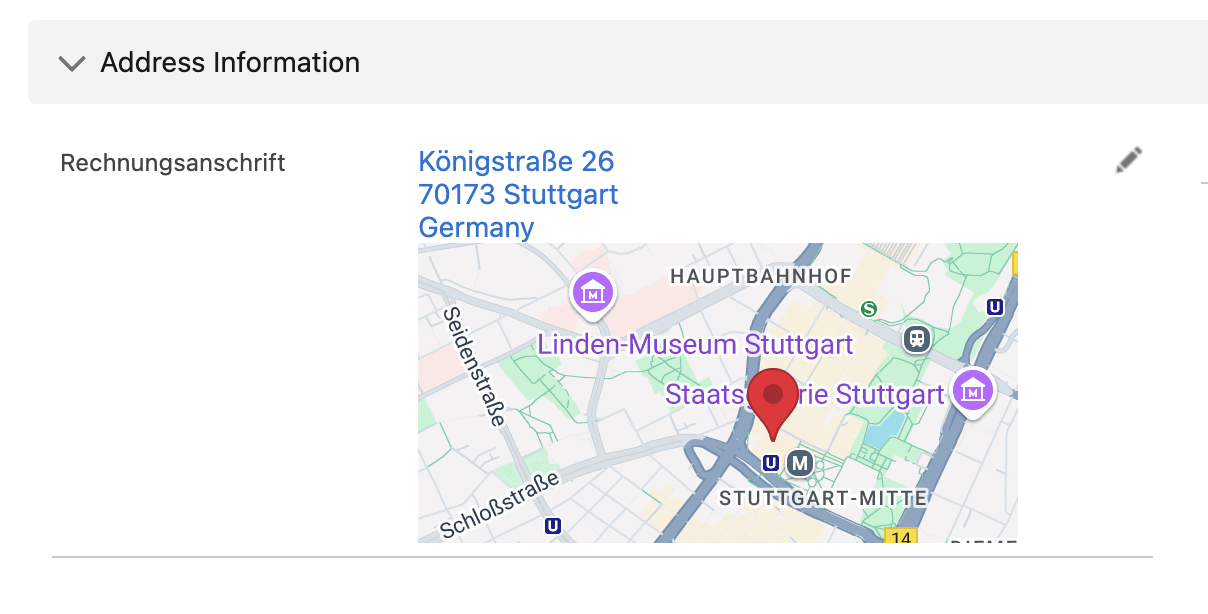 The updated account record in Salesforce showing the corrected address information is now accurate and up-to-date
🛠️ Available Tools
salesforce_learn
🧠 Learns your complete Salesforce installation - Analyzes all objects, fields and customizations once and stores this information locally for intelligent assistance.
Why important?
Claude learns your Custom Objects like "TimeTracking__c", "Project__c", etc.
Recognizes all Custom Fields and their data types
Provides intelligent suggestions based on your specific configuration
Run once, then the AI benefits from it permanently
salesforce_installation_info
📊 Overview of your learned Salesforce installation - Shows available objects, Custom Fields and customizations.
salesforce_query
Execute SOQL queries against any Salesforce object.
🧠 Smart Learning Integration:
Automatically warns when installation has not been learned yet
Suggests available objects and fields
Helps with correct API names
salesforce_create
Create new records in any Salesforce object.
🧠 Smart Context: Automatically shows required fields for the selected object when the installation has been learned.
salesforce_update
Update existing records.
🧠 Smart Context: Considers field permissions and data types from the learned installation.
salesforce_delete
Delete records (⚠️ permanent action).
salesforce_describe
Get schema information for objects and fields.
salesforce_backup
💾 Comprehensive Backup System for Salesforce - Creates complete backups of all data and files with detailed recovery information.
What is backed up:
📊 All Object Data - All queryable objects with up to 20 fields per object
📁 Modern Files - ContentVersions with complete metadata
📎 Legacy Attachments - Classic attachments with correct file extensions
📄 Documents - Folder-based documents from the legacy system
🏗️ Schema Information - Complete object structures and relationships
📋 Backup Manifest - Detailed statistics and recovery information
Backup Structure:
salesforce_backup_list
📋 Show Available Backups - Overview of all local backups with statistics and metadata.
salesforce_time_machine
⏰ Time Travel Through Salesforce Data - Analyzes data changes between different backup time points and enables targeted recovery.
Time Machine Features:
📊 Data Comparison - Shows differences between backup and current state
🔍 Change History - Which fields were changed when
🗑️ Deleted Records - Finds records that were deleted since the backup
📈 Growth Analysis - Statistical evaluation of data development
🎯 Targeted Recovery - Precise identification of changes
salesforce_auth
Authenticate with Salesforce. Automatically detects if authentication is needed and handles OAuth flow.
✨ Key Features:
Automatic Detection: Claude automatically suggests this tool when authentication is needed
No Manual Setup: Eliminates the need to run
npm run setupmanuallySmart Authentication: Only authenticates when necessary, checks existing tokens first
Seamless Integration: Works transparently in the background
This tool is automatically suggested when:
You try to use Salesforce tools without authentication
Your tokens have expired
Authentication errors occur
First-time setup is needed
🧠 Smart Learning System
Why is Learning Important?
Every Salesforce installation is unique with:
Custom Objects like "TimeTracking__c", "Project__c", "CustomerCare__c"
Custom Fields on standard objects
Specific Workflows and validation rules
Individual Data Structures
The AI's normal training model only knows standard Salesforce objects. Without knowledge of your specific installation, the AI cannot provide intelligent assistance.
How Does Learning Work?
One-time Analysis:
salesforce_learnanalyzes your complete installationLocal Documentation: All objects, fields and relationships are stored locally
Intelligent Support: Claude can then make precise suggestions and answer complex questions
Example Workflow:
When Should You Use Learning?
During initial setup - Once after installation
After major changes - When new Custom Objects are added
When having problems - When Claude doesn't find objects or fields
What is Learned?
All SObjects (Standard and Custom)
All Fields with data types and permissions
Relationships between objects
Picklist Values and validation rules
Required Fields for better validation
💡 Learning runs only once and then makes all further interactions much more intelligent!
💡 Usage Examples
🚀 First Steps After Installation
Authentication: Claude automatically detects when authentication is needed
Start Learning:
You: "Learn my Salesforce installation" Claude: Automatically uses the salesforce_learn toolExplore Installation:
You: "Show me an overview of my Salesforce installation" Claude: Uses salesforce_installation_info for a summary
🔍 Intelligent Queries with Learned Installation
Query Examples
Working with Custom Objects
The server automatically discovers custom objects:
💾 Backup & Time Machine Features
🚀 Salesforce Backup System
The MCP Salesforce Server offers a professional backup system that can secure your complete Salesforce installation:
What Makes the Backup System Special?
🎯 Complete Coverage: Backs up all three Salesforce file systems
Modern Files (ContentDocument/ContentVersion)
Legacy Attachments (classic attachments)
Documents (folder-based legacy documents)
📊 Intelligent Data Collection:
All queryable objects (Standard + Custom)
Up to 20 fields per object for comprehensive data backup
Automatic filtering of binary fields
⚡ High Performance:
Parallel downloads with configurable concurrency
Retry logic with exponential backoff
Batch processing for large data volumes
Creating a Backup
Backup Result:
Backup Structure
⏰ Time Machine Feature
The Time Machine enables you to travel through time and analyze data changes:
Main Features
🔍 Data Comparison: Compares current state with historical backups
📊 Change Analysis: Shows exactly which fields have changed
🗑️ Deleted Records: Finds records that were deleted since the backup
📈 Trend Analysis: Statistical evaluation of data development
Using Time Machine
Example Result:
Practical Use Cases
📋 Compliance & Audit: Evidence of data changes
🔧 Error Analysis: "What was different before the problem?"
📊 Data Quality: Monitoring data integrity
🚨 Change Management: Control over critical changes
💡 Business Intelligence: Trend analysis over time
🎯 Recommended Backup Workflow
💡 Pro Tip: Combine Learning + Backup + Time Machine for maximum Salesforce control!
🔒 Security
Token Storage: Refresh tokens stored securely in
cache/salesforce-tokens.jsonwith restricted file permissions (600)No Plaintext Secrets: Access tokens kept in memory only
Automatic Refresh: Tokens refreshed automatically before expiration
Secure Cleanup: Tokens removed from memory after use
Input Validation: All inputs validated and sanitized
Migration: File-based token storage with 600 permissions for secure credential management
🧪 Testing
🐛 Troubleshooting
Authentication Issues
🎯 Automatic Authentication: Claude automatically detects authentication issues and suggests the salesforce_auth tool. No manual troubleshooting needed!
Common Scenarios:
First-time use: Claude will automatically suggest authentication when you first try to use Salesforce tools
Token expiration: When tokens expire, Claude detects this and prompts for re-authentication
Invalid credentials: Clear error messages guide you to fix configuration issues
Session expired: Automatic detection with friendly prompts to re-authenticate
Token Security
🔒 Secure Token Storage: Authentication tokens are stored securely in the local file system with strict permissions.
Security Features:
File Permissions: Token files are created with
0600permissions (readable/writable only by owner)Location: Tokens stored in
cache/salesforce-tokens.json(excluded from git)Automatic Security: Permission verification and automatic fixing if needed
No Network Exposure: Tokens never leave your local machine
File-based Security: Secure token storage with strict file permissions for credential protection
Security Verification:
What this means:
Other users on your system cannot read your Salesforce tokens
Only your user account has access to the authentication data
Prevents unauthorized access to your Salesforce organization
Complies with security best practices for credential storage
Quick Fix in Claude Desktop
If you get authentication errors, simply tell Claude:
Or Claude will automatically suggest: Use the salesforce_auth tool to authenticate with Salesforce
✨ No more manual terminal setup! Everything happens seamlessly through Claude Desktop.
Connection Issues
"Cannot connect to Salesforce": Verify your Instance URL
"Insufficient permissions": Check user permissions in Salesforce
"CORS errors": Ensure Connected App callback URL is correct
Common SOQL Errors
Field not found: Use API names, not field labels
Object not found: Check spelling and API name of objects
Syntax errors: Ensure proper SOQL syntax with single quotes
📚 Documentation
OAuth Setup Guide - Detailed Connected App configuration
Setup Instructions - Step-by-step setup process
Usage Examples - Comprehensive usage examples
Architecture Plan - Technical architecture details
🤝 Contributing
Fork the repository
Create a feature branch:
git checkout -b feature-nameMake your changes and test thoroughly
Submit a pull request with detailed description
📄 License
MIT License - see LICENSE file for details.
🆘 Support
Issues: Report bugs and feature requests via GitHub Issues
Documentation: Check the
docs/folder for detailed guidesCommunity: Join discussions in GitHub Discussions
Made with ❤️ for the MCP ecosystem