
Provides scaffolding templates and boilerplate generation for Next.js 15 projects, enabling AI agents to create standardized project structures and add features following Next.js conventions
Offers scaffolding capabilities for React projects through Vite integration, allowing AI agents to generate React components, pages, and services with consistent patterns
Enables scaffolding and template generation for Vite-based projects, providing AI agents with tools to create and manage modern frontend build configurations and project structures
Click on "Install Server".
Wait a few minutes for the server to deploy. Once ready, it will show a "Started" state.
In the chat, type
@followed by the MCP server name and your instructions, e.g., "@AI Code Toolkitcreate a new React component with TypeScript using our design system"
That's it! The server will respond to your query, and you can continue using it as needed.
Here is a step-by-step guide with screenshots.
AI Code Toolkit


Enforce AI coding agents your team's conventions and existing practices. Setup once, work across multiple AI tools.
Why This Exists
As projects grow from MVP to production, you accumulate patterns, conventions, components, and style guides. Your AGENTS.md, CLAUDE.md and rule files keep growing — consuming precious context window and documentation maintenance becomes difficult.
This toolkit encodes your team's conventions in a centralized, shareable location with hierarchical inheritant. Instead of preloading AI agents with plain-text documentation, you encode your best practices and guideline in yaml, and our tools with extract the configs to get relevant patterns and enforce boundaries before and after AI agent writing code in progressive discovery manner.
If you use multiple AI tools to assist your development, this toolkit enable your team to encode your knowledge and workflow once; and reuse it across AI tools seamlessly.
Quick Start
Requirements: Node.js >= 18, MCP-compatible agent (Claude Code, Cursor, Gemini CLI)
1. Initialize
Use aicode-toolkit to help you setup the project quickly. This includes download templates, setup MCPs and spec tool to assist with your development.
Creates templates/ with scaffold definitions, patterns, and rules. Your development knowledge stayed within templates folder, and is linked to actual project via project.json's sourceTemplate setting.
2. Configure MCP
We recomment to use MCP for plug-and-play capabilities. For folks who don't liked context hog problem with MCP, our libraries also have cli commands equivalent to the MCP's tools; or you can use our one-mcp to support progressive discovery.
The init command configures MCP automatically. For manual setup:
Claude Code (.mcp.json):
Cursor: Same config in .cursor/mcp.json
Flags:
--admin-enable- Allow template creation--design-pattern-tool claude-code- AI-powered pattern analysis--review-tool claude-code- AI-powered code review
3. Verify
When the MCPs are setup, you can interact with the agent using natural language.
Ask your agent: "What boilerplates are available?"
Should call list-boilerplates. If not recognized, restart the agent.
Architecture
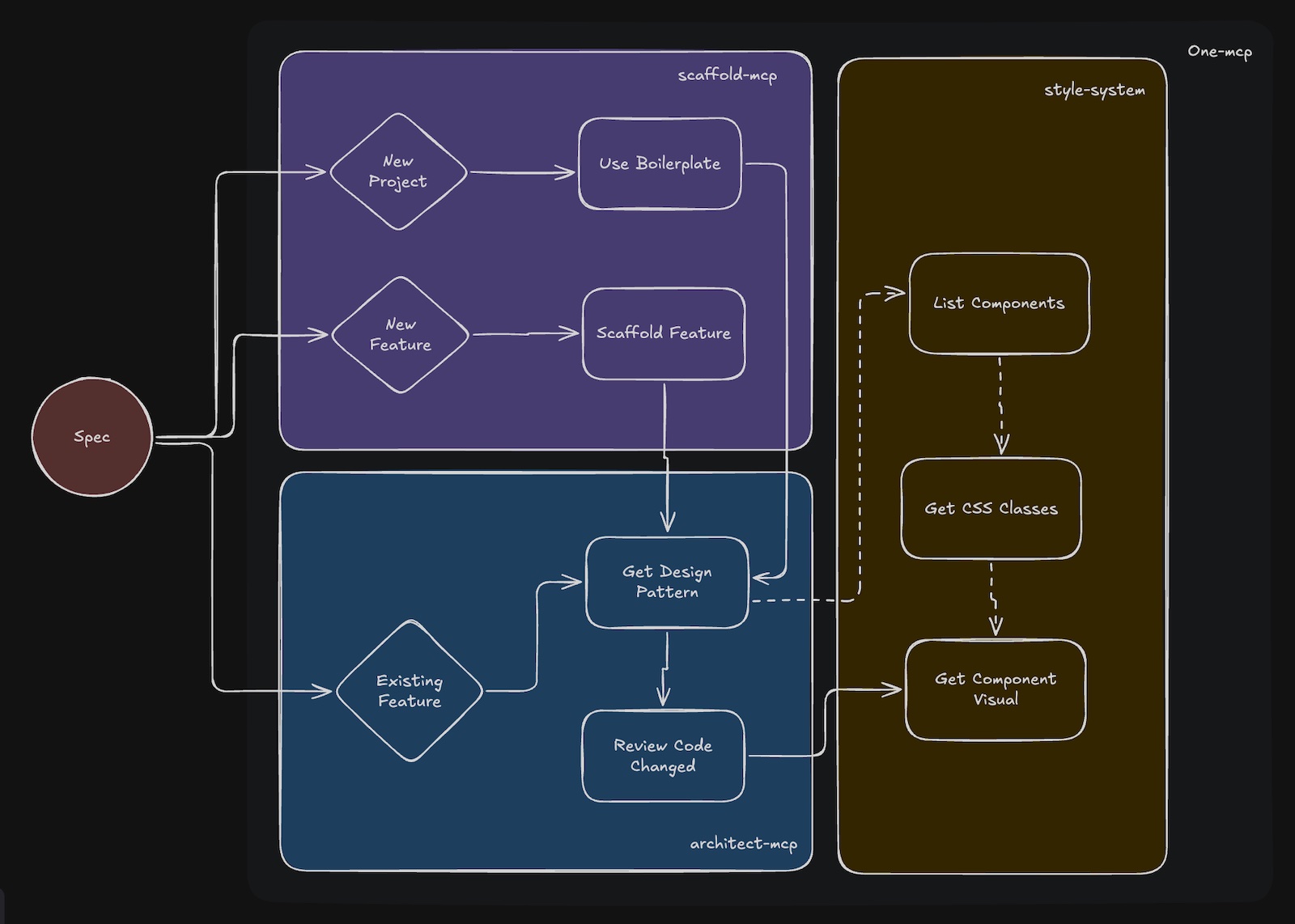
We recommend to use scaffold-mcp, architect-mcp and style-system together for full-stack development. This will help you creating new project quickly, add new feature at the right place, write code which follow your conventions and design guideline.
scaffold-mcp
Add new apps, libraries, or features that follow your company conventions. Generates minimal boilerplate code and uses guided generation to fill in the blanks.
Tool | Description |
| Available project templates |
| Create project from template |
| Available features for a project |
| Add feature (page, route, service) |
Admin tools (--admin-enable):
Tool | Description |
| Create project template |
| Create feature scaffold |
| Add template files |
architect-mcp
Pre-flight suggestions to ensure AI-generated code follows best practices and design patterns based on your file structure. Post-check with RULES.yaml to enforce styles and patterns using an LLM as a judge.
Tool | Description |
| Get patterns/rules before editing |
| Validate code after editing |
Admin tools (--admin-enable):
Tool | Description |
| Add to |
| Add to |
style-system (NEW)
Design system operations for theme management, CSS class discovery, and component visualization. Helps AI agents use existing design tokens and components instead of creating duplicates.
Tool | Description |
| List available theme configurations |
| Extract CSS classes from theme (use before styling) |
| Preview UI component without running the app |
| Find shared UI components (use before creating new ones) |
| List app-specific and package components |
NOTE: This package hasn't been integrated to aicode-toolkit yet.
Workflow
We suggest to plan your task in advanced. Then simply give the task to agent to run autonomously. In copilot mode, you can prompt the agent using natural language or troubleshoot with the packages' cli commands.
Creating Projects
Before Editing Files
Adding Features
After Editing
Styling Components
Template Structure
scaffold.yaml
This is where you configure the template for scaffolding. We use structured output (supported by mcp) to generate minimal files with Comment header to guide the AI tool to fill-in the blank.
architect.yaml
Before the AI tool actually write the code, architect.yaml is where you steer the AI by giving it clues how to actually write the code. Don't wait until the code violates your conventions, steer it first.
RULES.yaml
There is no guarantee the AI follow your guidance. This file defines enforceable rules that the AI must, must not or should follow. The toolkit provide capability for a different AI agent to do code review and enforce the rules and not being affected by noisy context.
First, we extract the rules based on the file pattern; then we give the file diff plus rules to another agent to identify violation. Anything in must_do or must_not_do rules violations we explicitly ask the agent to fix (and other agent also provide fixing recommendation). You can inherit global RULES.yaml file in templates/RULES.yaml for maximum reusability.
Built-in Templates
Below templates are examples; you can clone the repo and start exploring how the mechanism works using existing templates.
Template | Stack | Includes |
| Next.js 15, App Router | TypeScript, Tailwind 4, Drizzle, Storybook |
| TypeScript Library | ESM/CJS, Vitest, TSDoc |
| MCP Server | Commander, MCP SDK |
Custom Templates
We suggest to build your own template from your existing repo. It's quite simple by using slash command:
Use this slash command and reference your directory to create template. This will create scaffold.yaml with boillerplate config and relevant files extracted from your production application.
After boilerplate is generated, you can now use this command to add feature scaffolding. Think of feature as a group of files that generated together per your requirement (new page, new service, etc...)
The scaffold-mcp will automatically add this new template to the discovery.
NOTE: MPC's prompts are added as commands in Claude Code; other tools might not have the same implementation. We plan to fix it with aicode-toolkit soon.
Custom Design Pattern
add-design-pattern is the tool from architect-mcp (with --admin-enable flag) that help you add a new design pattern to architect.yaml the template.
Simply ask the AI agent to add a design pattern to a template by giving it a source file reference.
Custom Rule
add-rule is the tool from architect-mcp (with --admin-enable flag) that help you add a new rule to the RULES.yaml in template.
Simply ask the AI agent to add a new rule to a template by giving it a source file reference and your rule requirement.
Project Types
The toolkit exists because we had scaling problem with mono-repo. Mono-repo has first-citizen support in this toolkit. Monolith is also support and we plan to make it more robust on single-purpose project ASAP!
Monorepo
Mono-repo can be complex for root level blob matching. Considering you can have multiple apis built with different languages, or same language but support different design patterns. Then you need to create duplicated rule files just to match a file within particular project. Eg:
Backend lib utils.
Frontend lib utils.
A slightly diverted pattern requires your team to write a different rule file. With our toolkit, your package/project reference template in project.json; so the match can be collocated per project. (We will support architect and rules override per project soon if you have edge cases).
Monolith
Single purpose project follow same template approach but simplier. Configuration in toolkit.yaml is enough for most use cases.
Auto-detected based on config files.
Token Optimization
For daily development work, the MCP context hog lies in the json-schema input definition. We create one-mcp to help you save context token by progressively disclose tools' schema per request.
If you want to use Anthropic skills for agent to automatically invoke commands for you on tools which does not support skills. One-mcp also support that. By the end of the day, skill is just a tool call.
See @agiflowai/one-mcp.
Supported Agents
Agent | Config Location | Status |
Claude Code |
| Supported |
Cursor |
| Supported |
Gemini CLI |
| Supported |
Codex CLI |
| Supported |
GitHub Copilot | VS Code settings | Supported |
Windsurf | - | Coming Soon |
Packages
Package | Description |
CLI for init and template management | |
Code scaffolding server | |
Patterns and review server | |
Design system and component server | |
MCP proxy for token reduction |
Contributing
See CONTRIBUTING.md.