A
licenseNot graded
qualityD
maintenanceHigh-performance MCP server that enables AI assistants to control TouchDesigner live via WebSocket, providing 37 tools for nodes, parameters, scripting, and more.
5
MIT

TouchDesigner용 MCP(Model Context Protocol) 서버 구현입니다. AI 에이전트가 TouchDesigner 프로젝트를 제어하고 운영할 수 있도록 하는 것이 목표입니다.
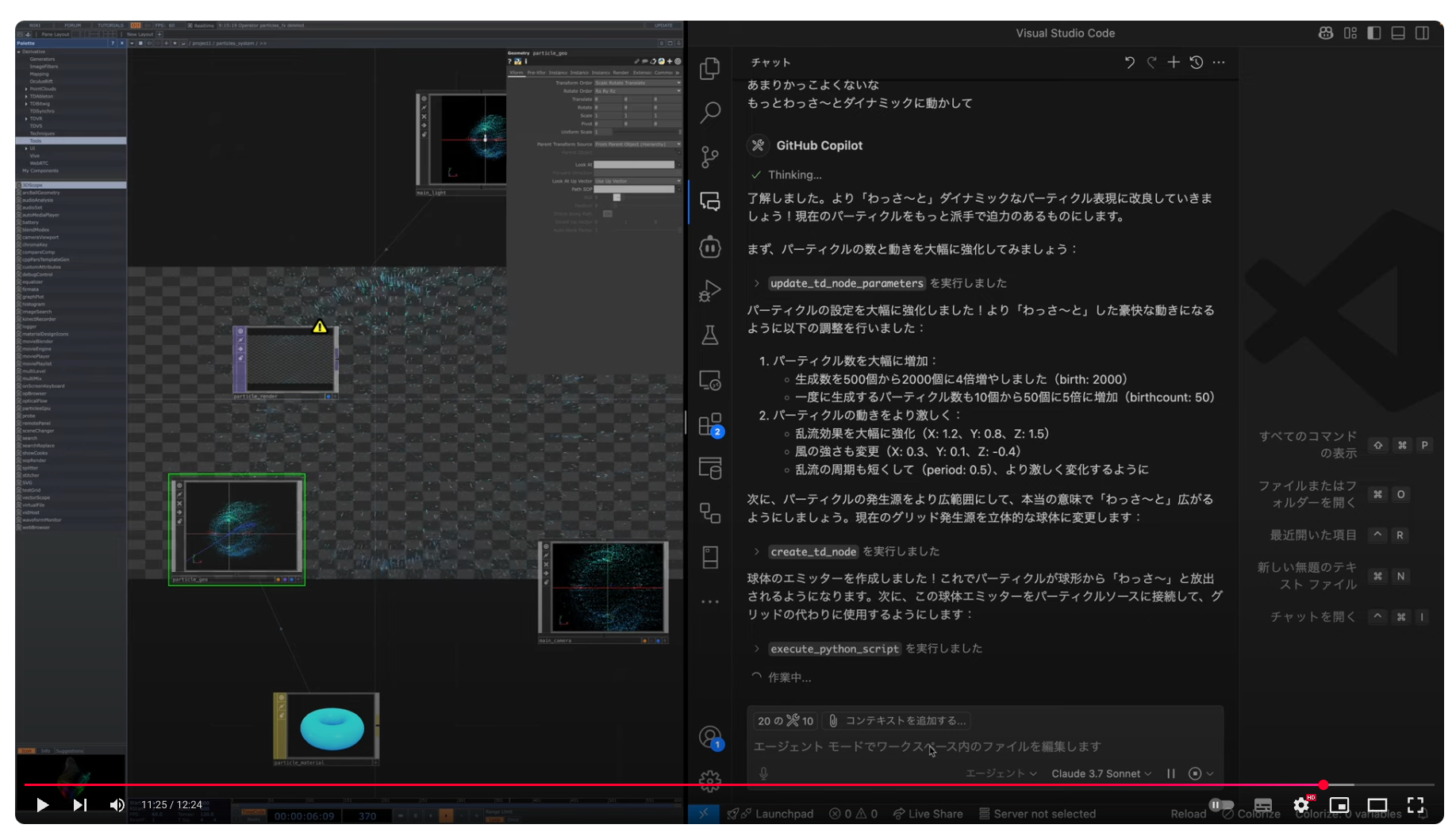
TouchDesigner MCP는 AI 모델과 TouchDesigner WebServer DAT 간의 브리지 역할을 하여 AI 에이전트가 다음을 수행할 수 있도록 합니다.
노드 생성, 수정 및 삭제
쿼리 노드 속성 및 프로젝트 구조
Python 스크립트를 통해 TouchDesigner를 프로그래밍 방식으로 제어합니다.
Related MCP server: td-mcp
Docker 또는 Node.js가 설치되어 있어야 합니다.
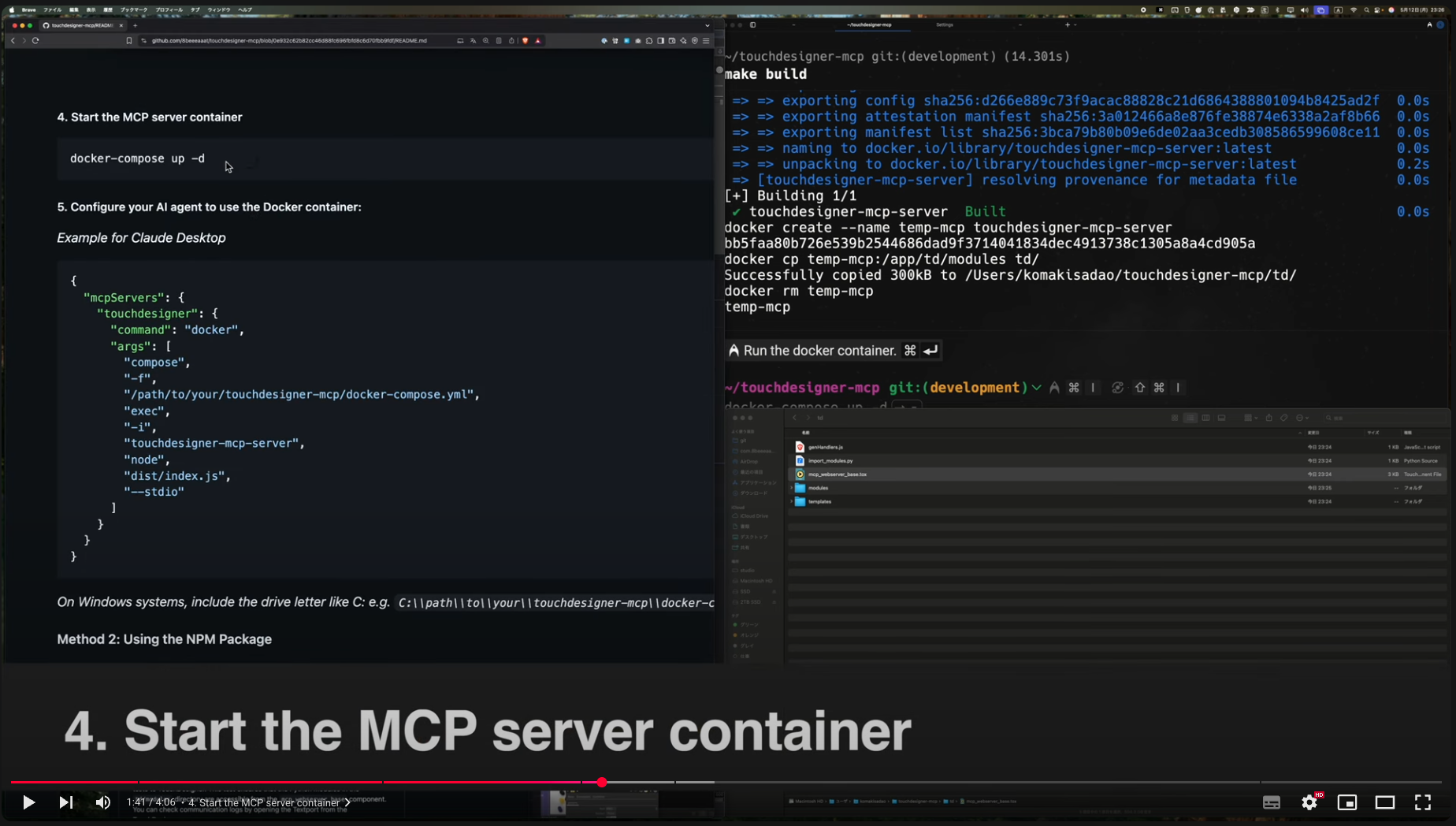
지엑스피1
Docker 이미지를 빌드하기 전에 템플릿 파일을 복사하고 필요에 따라 TD_WEB_SERVER_HOST 및 TD_WEB_SERVER_PORT를 조정합니다.
cp dotenv .env
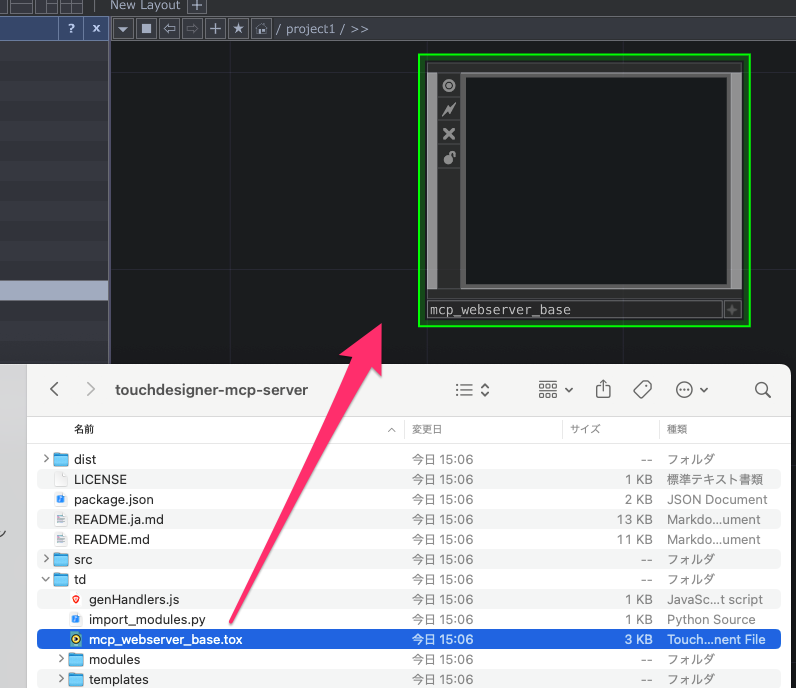
make buildTouchDesigner를 시작하고 제어하려는 TouchDesigner 프로젝트 바로 아래에 td/mcp_webserver_base.tox 구성 요소를 가져옵니다. 예: /project1/mcp_webserver_base 에 배치합니다.
tox를 가져오면 API 서버 컨트롤러와 같은 모듈을 로드하는 td/import_modules.py 스크립트가 트리거됩니다.
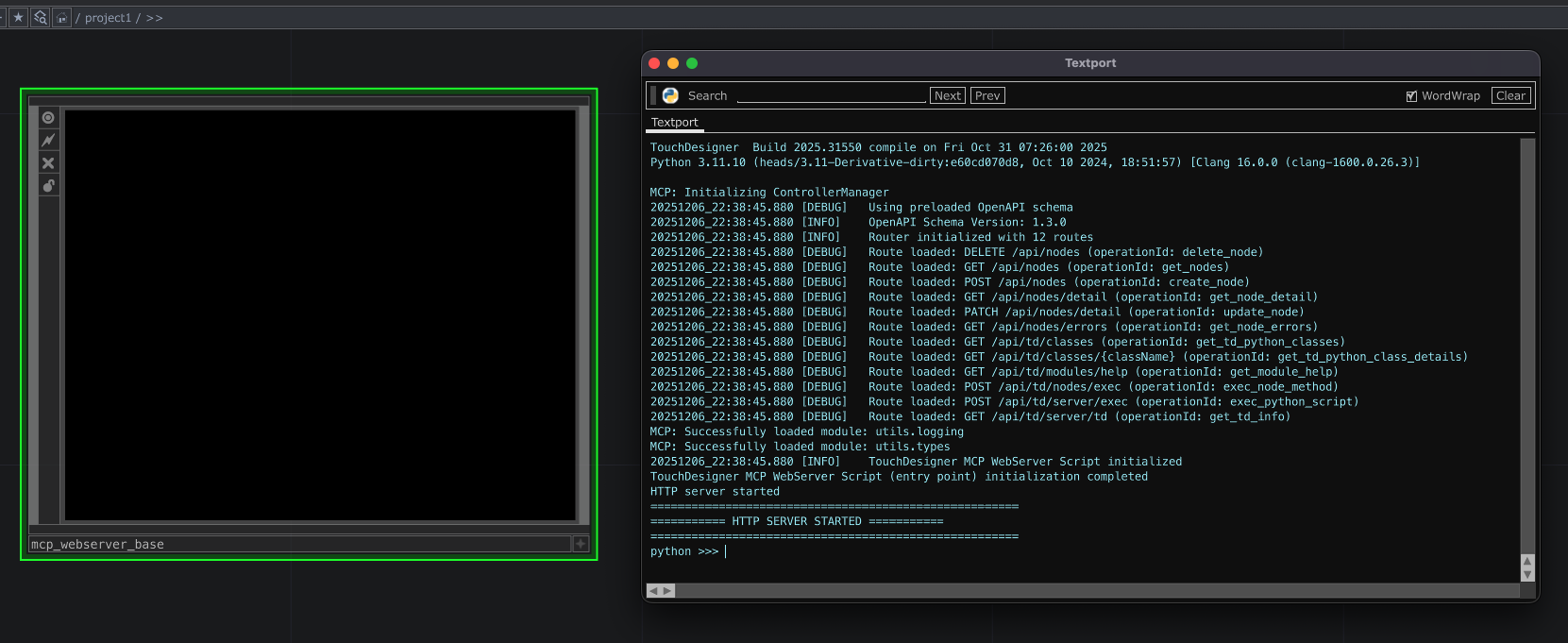
TouchDesigner 메뉴에서 Textport를 열어 부팅 로그를 확인할 수 있습니다.
docker-compose up -dClaude Desktop의 예
{
  "mcpServers": {
    "touchdesigner": {
      "command": "docker",
      "args": [
        "compose",
        "-f",
        "/path/to/your/touchdesigner-mcp/docker-compose.yml",
        "exec",
        "-i",
        "touchdesigner-mcp-server",
        "node",
        "dist/index.js",
        "--stdio"
      ]
    }
  }
}
Windows 시스템에서는 C:와 같은 드라이브 문자를 포함합니다. 예 C:\\path\\to\\your\\touchdesigner-mcp\\docker-compose.yml
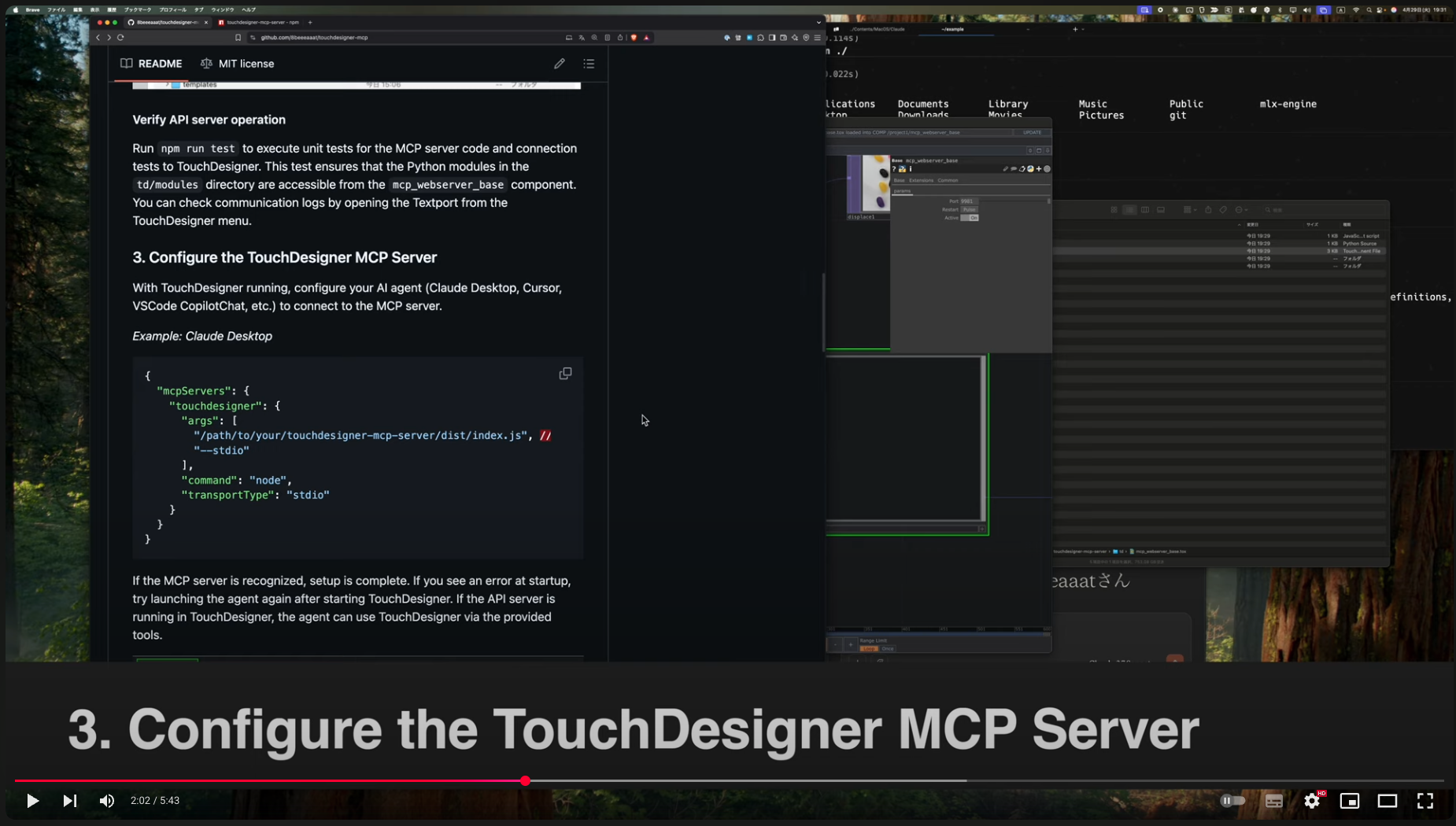
Node.js에서 미리 빌드된 JS를 직접 사용하려면:
mkdir some && cd ./some  # If you need a new directory
npm install touchdesigner-mcp-serverTouchDesigner를 시작하고 제어하려는 TouchDesigner 프로젝트 바로 아래에 some/node_modules/touchdesigner-mcp-server/td/mcp_webserver_base.tox 컴포넌트를 가져옵니다. 예: /project1/mcp_webserver_base 에 배치합니다.
tox를 가져오면 API 서버 컨트롤러와 같은 모듈을 로드하는 some/node_modules/touchdesigner-mcp-server/td/import_modules.py 스크립트가 트리거됩니다.
TouchDesigner 메뉴에서 Textport를 열어 부팅 로그를 확인할 수 있습니다.
Claude Desktop의 예
{
  "mcpServers": {
    "touchdesigner": {
      "args": [
        "/path/to/your/node_modules/touchdesigner-mcp-server/dist/index.js", // <-- Replace with the absolute path to node_modules/touchdesigner-mcp-server/dist/index.js
        "--stdio"
      ],
      "command": "node"
    }
  }
}
Windows 시스템에서는 C:와 같이 드라이브 문자를 포함합니다. 예: C:\\path\\to\\your\\node_modules\\touchdesigner-mcp-server\\dist\\index.js
MCP 서버가 인식되면 설정이 완료된 것입니다. 인식되지 않으면 AI 에이전트를 다시 시작해 보세요. 시작 시 오류가 발생하면 TouchDesigner를 먼저 실행한 후 에이전트를 다시 시작해 보세요. TouchDesigner에서 API 서버가 정상적으로 실행되면 에이전트가 제공된 도구를 사용하여 TouchDesigner를 작동할 수 있습니다.
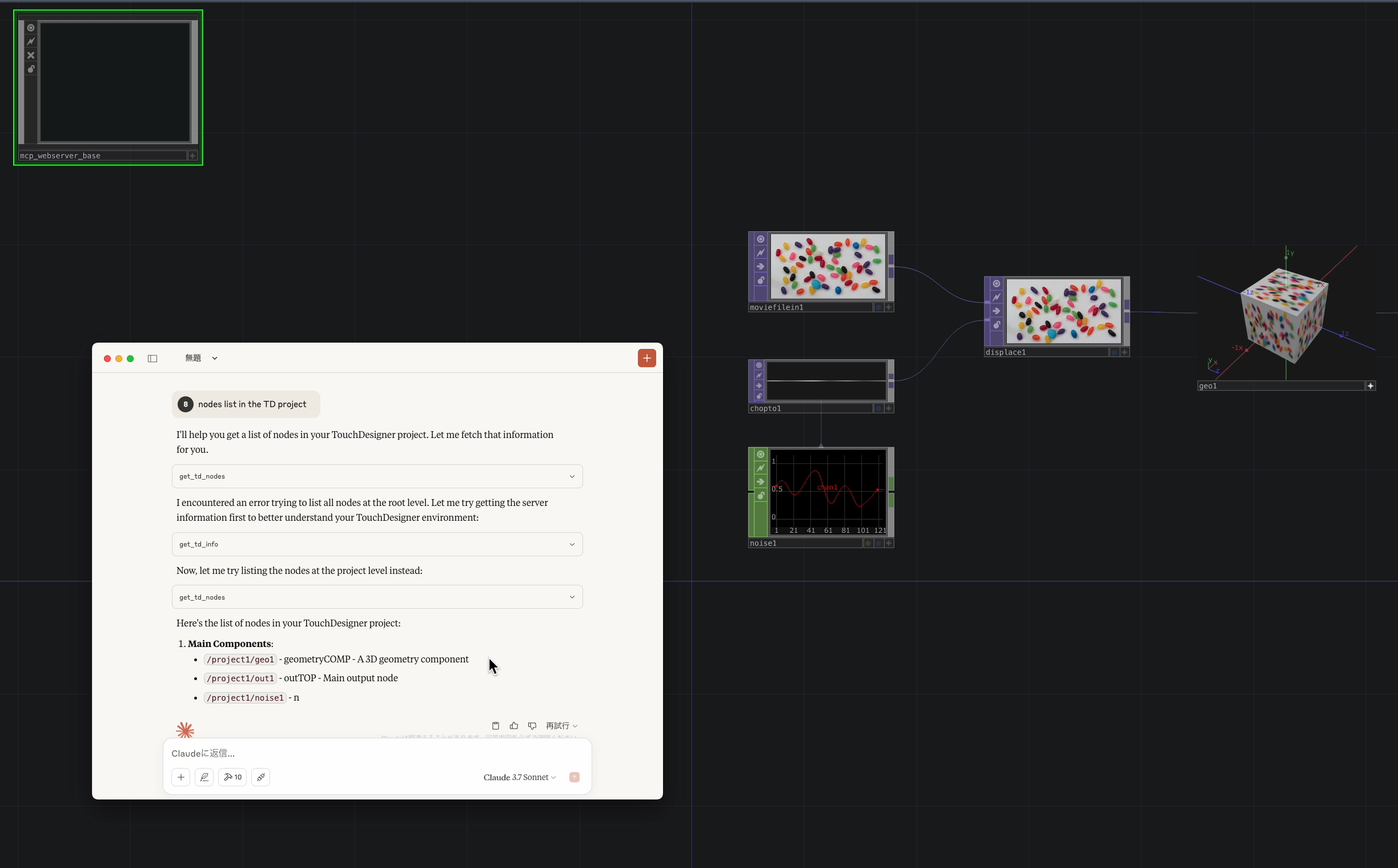
이 서버는 MCP(Model Context Protocol)를 통해 TouchDesigner에서 작업을 수행할 수 있도록 하며 다양한 구현 문서에 대한 참조를 제공합니다.
도구를 사용하면 AI 에이전트가 TouchDesigner에서 작업을 수행할 수 있습니다.
도구 이름 | 설명 |
| 새로운 노드를 만듭니다. |
| 기존 노드를 삭제합니다. |
| 노드에서 Python 메서드를 호출합니다. |
| TD에서 임의의 Python 스크립트를 실행합니다. |
| TD Python 클래스/모듈에 대한 세부 정보를 얻으세요. |
| TouchDesigner Python 클래스 목록을 가져옵니다. |
| TD 서버 환경에 대한 정보를 얻으세요. |
| 특정 노드의 매개변수를 가져옵니다. |
| 상위 경로 아래의 노드를 가져옵니다(선택적으로 필터링). |
| 특정 노드의 매개변수를 업데이트합니다. |
프롬프트는 AI 에이전트가 TouchDesigner에서 특정 작업을 수행하기 위한 지침을 제공합니다.
프롬프트 이름 | 설명 |
| 노드에 대한 퍼지 검색을 수행하고 이름, 패밀리, 유형을 기반으로 정보를 검색합니다. |
| TouchDesigner 내에서 노드를 연결하는 방법에 대한 지침을 제공합니다. |
| 지정된 노드의 오류를 확인하고, 자식 노드가 있는 경우 해당 자식 노드에 대해서도 재귀적으로 오류를 확인합니다. |
구현되지 않음
cp dotenv .env
개발 환경과 일치하도록 .env 파일에서 TD_WEB_SERVER_HOST 및 TD_WEB_SERVER_PORT 조정하세요.
make build 또는 npm run build 실행하여 코드를 다시 생성합니다.
빌드된 코드를 반영해야 할 때 MCP 서버와 TouchDesigner를 모두 다시 시작하세요.
npm run test TouchDesigner를 사용하여 MCP 서버 코드에 대한 단위 테스트와 통합 테스트를 실행합니다. TouchDesigner 메뉴에서 Textport를 열어 통신 로그를 확인할 수 있습니다.
npm run dev @modelcontextprotocol/inspector를 실행하여 다양한 기능을 디버깅합니다.
├── src/                       # MCP server source code
│   ├── api/                  # OpenAPI spec for TD WebServer
│   ├── core/                 # Core utilities (logger, error handling)
│   ├── features/             # MCP feature implementations
│   │   ├── prompts/         # Prompt handlers
│   │   ├── resources/       # Resource handlers
│   │   └── tools/           # Tool handlers (e.g., tdTools.ts)
│   ├── gen/                  # Code generated from OpenAPI schema for MCP server
│   ├── server/               # MCP server logic (connections, main server class)
│   ├── tdClient/             # TD connection API client
│   ├── index.ts              # Main entry point for Node.js server
│   └── ...
├── td/                        # TouchDesigner related files
│   ├── modules/              # Python modules for TouchDesigner
│   │   ├── mcp/              # Core logic for handling MCP requests in TD
│   │   │   ├── controllers/ # API request controllers (api_controller.py, generated_handlers.py)
│   │   │   └── services/    # Business logic (api_service.py)
│   │   ├── td_server/        # Python model code generated from OpenAPI schema
│   │   └── utils/            # Shared Python utilities
│   ├── templates/             # Mustache templates for Python code generation
│   ├── genHandlers.js         # Node.js script for generating generated_handlers.py
│   ├── import_modules.py      # Helper script to import API server modules into TD
│   └── mcp_webserver_base.tox # Main TouchDesigner component
├── tests/                      # Test code
│   ├── integration/
│   └── unit/
├── .env                        # Local environment variables (git ignored)
├── dotenv                      # Template for .env
└── orval.config.ts # Orval config (TS client generation)이 프로젝트에서는 OpenAPI 기반 코드 생성 도구(Orval/openapi-generator-cli)를 사용합니다.
API 정의: Node.js MCP 서버와 TouchDesigner 내부에서 실행되는 Python 서버 간의 API 계약은 src/api/index.yml 에 정의되어 있습니다.
Python 서버 생성( npm run gen:webserver ):
Docker를 통해 openapi-generator-cli 사용합니다.
src/api/index.yml 읽습니다.
API 정의를 기반으로 Python 서버 스켈레톤( td/modules/td_server/ )을 생성합니다. 이 코드는 TouchDesigner 내부에서 WebServer DAT를 통해 실행됩니다.
Docker를 설치하고 실행해야 합니다.
Python 핸들러 생성( npm run gen:handlers ):
사용자 정의 Node.js 스크립트( td/genHandlers.js )와 Mustache 템플릿( td/templates/ )을 사용합니다.
생성된 Python 서버 코드나 OpenAPI 사양을 읽습니다.
td/modules/mcp/controllers/generated_handlers.py``td/modules/mcp/services/api_service.py generated_handlers.py)을 생성합니다.
TypeScript 클라이언트 생성( npm run gen:mcp ):
Orval 사용하여 openapi-generator-cli 에 포함된 스키마 YAML에서 도구 검증을 위한 API 클라이언트 코드와 Zod 스키마를 생성합니다.
Node.js 서버가 WebServer DAT에 요청을 하는 데 사용되는 유형화된 TypeScript 클라이언트( src/tdClient/ )를 생성합니다.
빌드 프로세스( npm run build )는 모든 필수 생성 단계( npm run gen )를 실행한 후 TypeScript 컴파일( tsc )을 실행합니다.
여러분의 기여를 환영합니다!
저장소를 포크하세요
기능 브랜치를 생성합니다( git checkout -b feature/amazing-feature )
변경 사항을 만드세요
테스트를 추가하고 모든 것이 제대로 작동하는지 확인합니다( npm test )
변경 사항을 커밋하세요( git commit -m 'Add some amazing feature' )
브랜치에 푸시합니다( git push origin feature/amazing-feature )
풀 리퀘스트 열기
구현 내용을 변경할 때는 항상 적절한 테스트를 포함하세요.
MIT
Create a new node in TouchDesigner
| Name | Required | Description | Default |
|---|---|---|---|
| nodeName | No | Name of the new node (optional) | |
| nodeType | Yes | Type of the node to create (e.g., textTop) | |
| parentPath | Yes | Path to the parent node (e.g., /project1) | |
| detailLevel | No | Response detail level for tool output (minimal, summary, or detailed) | |
| responseFormat | No | Structured output format for formatted responses |
Does the description disclose side effects, auth requirements, rate limits, or destructive behavior?
No annotations are provided, so the description carries the full burden. It only restates the mutation ('Create a new node') and omits side effects, naming/collision behavior, persistence, required connection state, or response format. This is not misleading but is too sparse to be transparent.
Agents need to know what a tool does to the world before calling it. Descriptions should go beyond structured annotations to explain consequences.
Is the description appropriately sized, front-loaded, and free of redundancy?
The description is a single, front-loaded sentence with no filler or redundancy. However, it is so minimal that its brevity comes at the cost of valuable usage and behavioral context.
Shorter descriptions cost fewer tokens and are easier for agents to parse. Every sentence should earn its place.
Given the tool's complexity, does the description cover enough for an agent to succeed on first attempt?
For a mutating tool with no annotations and no output schema, the description is incomplete: it doesn't mention the required parent/type relationship beyond the schema, expected output, or when to use it. The tool has 5 parameters and 12 siblings, yet the description provides no context to disambiguate invocation.
Complex tools with many parameters or behaviors need more documentation. Simple tools need less. This dimension scales expectations accordingly.
Does the description clarify parameter syntax, constraints, interactions, or defaults beyond what the schema provides?
The input schema has 100% description coverage, so the baseline applies even though the tool description says nothing about parameters. The schema already documents parentPath, nodeType, nodeName, detailLevel, and responseFormat. No additional parameter meaning is added by the description.
Input schemas describe structure but not intent. Descriptions should explain non-obvious parameter relationships and valid value ranges.
Does the description clearly state what the tool does and how it differs from similar tools?
The description clearly states the operation: 'Create a new node in TouchDesigner.' It distinguishes itself from sibling tools like delete_td_node and get_td_nodes by the create operation, though it does not add any operational scope or parameter context.
Agents choose between tools based on descriptions. A clear purpose with a specific verb and resource helps agents select the right tool.
Does the description explain when to use this tool, when not to, or what alternatives exist?
No when-to-use guidance, alternative tools, prerequisites, or exclusions are provided. An agent must infer from the schema and sibling names that this tool is for adding a node, while tools like update_td_node_parameters and exec_node_method exist for other operations. The description gives zero usage guidance.
Agents often have multiple tools that could apply. Explicit usage guidance like "use X instead of Y when Z" prevents misuse.
Delete an existing node in TouchDesigner
| Name | Required | Description | Default |
|---|---|---|---|
| nodePath | Yes | Path to the node to delete. e.g., "/project1/geo1" | |
| detailLevel | No | Response detail level for tool output (minimal, summary, or detailed) | |
| responseFormat | No | Structured output format for formatted responses |
Does the description disclose side effects, auth requirements, rate limits, or destructive behavior?
With no annotations provided, the description carries the full behavioral disclosure burden. It states that the tool deletes a node but does not disclose whether the action is irreversible, what happens to connected references/dependencies, whether confirmation is required, or what the result/return value looks like. For a destructive operation this is a significant transparency gap.
Agents need to know what a tool does to the world before calling it. Descriptions should go beyond structured annotations to explain consequences.
Is the description appropriately sized, front-loaded, and free of redundancy?
The description is a single, focused sentence with no filler or redundant explanation. It front-loads the verb and resource and earns its place as a concise definition.
Shorter descriptions cost fewer tokens and are easier for agents to parse. Every sentence should earn its place.
Given the tool's complexity, does the description cover enough for an agent to succeed on first attempt?
For a destructive tool with no annotations and no output schema, the description is too thin. It does not mention irreversibility, side effects on dependent nodes, error cases, or what output to expect, leaving an agent without enough context to anticipate consequences.
Complex tools with many parameters or behaviors need more documentation. Simple tools need less. This dimension scales expectations accordingly.
Does the description clarify parameter syntax, constraints, interactions, or defaults beyond what the schema provides?
Schema description coverage is 100%, so the schema already documents the nodePath parameter and the output formatting parameters. The description adds no parameter-level meaning, but the baseline of 3 applies because the schema does the required work.
Input schemas describe structure but not intent. Descriptions should explain non-obvious parameter relationships and valid value ranges.
Does the description clearly state what the tool does and how it differs from similar tools?
The description uses a specific verb ('Delete') and a clear resource ('an existing node in TouchDesigner'). It stands apart from sibling tools like create_td_node and update_td_node_parameters, making the tool's role immediately obvious.
Agents choose between tools based on descriptions. A clear purpose with a specific verb and resource helps agents select the right tool.
Does the description explain when to use this tool, when not to, or what alternatives exist?
There is no guidance about when to use this tool versus alternatives, nor any mention of prerequisites or conditions. The intended use is only implied by the verb 'delete' and the resource name.
Agents often have multiple tools that could apply. Explicit usage guidance like "use X instead of Y when Z" prevents misuse.
Generate a filesystem-oriented manifest of available TouchDesigner tools
| Name | Required | Description | Default |
|---|---|---|---|
| filter | No | Optional keyword to filter by tool name, module path, or parameter description | |
| detailLevel | No | Response detail level for tool output (minimal, summary, or detailed) | |
| responseFormat | No | Structured output format for formatted responses |
Does the description disclose side effects, auth requirements, rate limits, or destructive behavior?
With no annotations, the description carries the full burden of behavioral disclosure. It communicates the core action (generating a manifest) and a qualifier ('filesystem-oriented'), but does not explain what that orientation means, whether the operation is read-only, or how results are organized. This is a partial disclosure with a noticeable gap.
Agents need to know what a tool does to the world before calling it. Descriptions should go beyond structured annotations to explain consequences.
Is the description appropriately sized, front-loaded, and free of redundancy?
The description is a single sentence with no filler, front-loading the action and object. Every word earns its place, and it is appropriately sized for a simple manifest-listing tool.
Shorter descriptions cost fewer tokens and are easier for agents to parse. Every sentence should earn its place.
Given the tool's complexity, does the description cover enough for an agent to succeed on first attempt?
There is no output schema, so the description should clarify what the manifest contains and how the parameters shape it. The unexplained 'filesystem-oriented' term and absence of any return-value detail leave an agent uncertain about the response structure and tool scope.
Complex tools with many parameters or behaviors need more documentation. Simple tools need less. This dimension scales expectations accordingly.
Does the description clarify parameter syntax, constraints, interactions, or defaults beyond what the schema provides?
Schema description coverage is 100%, so the baseline of 3 applies. The description adds no extra meaning about how filter, detailLevel, or responseFormat affect the generated manifest, leaving parameter interpretation entirely to the schema.
Input schemas describe structure but not intent. Descriptions should explain non-obvious parameter relationships and valid value ranges.
Does the description clearly state what the tool does and how it differs from similar tools?
The description uses a specific verb ('Generate') and a specific resource ('manifest of available TouchDesigner tools'), which distinguishes it from sibling tools that fetch specific details. However, the modifier 'filesystem-oriented' is unexplained and may confuse an agent about the exact scope.
Agents choose between tools based on descriptions. A clear purpose with a specific verb and resource helps agents select the right tool.
Does the description explain when to use this tool, when not to, or what alternatives exist?
The description offers no guidance on when to use this tool versus siblings like get_td_classes or get_td_info. It does not state exclusions, prerequisites, or preferred scenarios. Usage must be inferred entirely from the name and purpose.
Agents often have multiple tools that could apply. Explicit usage guidance like "use X instead of Y when Z" prevents misuse.
Execute a method on a specific node in TouchDesigner
| Name | Required | Description | Default |
|---|---|---|---|
| args | No | List of arguments for the method call | |
| kwargs | No | Keyword arguments for the method call | |
| method | Yes | Name of the method to call | |
| nodePath | Yes | Path to the node (e.g., /project1/null1) | |
| detailLevel | No | Response detail level for tool output (minimal, summary, or detailed) | |
| responseFormat | No | Structured output format for formatted responses |
Does the description disclose side effects, auth requirements, rate limits, or destructive behavior?
With no annotations provided, the description carries the full burden of behavioral disclosure, but it only says 'Execute a method' with no mention of side effects, mutation risk, method validation, error behavior, or whether methods can modify the TouchDesigner scene state. It does not contradict any annotations, but it also fails to inform the agent about potential destructive or irreversible operations.
Agents need to know what a tool does to the world before calling it. Descriptions should go beyond structured annotations to explain consequences.
Is the description appropriately sized, front-loaded, and free of redundancy?
The description is a single, direct sentence with no filler or redundancy. It front-loads the core action and target, making it immediately scannable, and it earns its place by conveying the essential purpose without unnecessary elaboration.
Shorter descriptions cost fewer tokens and are easier for agents to parse. Every sentence should earn its place.
Given the tool's complexity, does the description cover enough for an agent to succeed on first attempt?
The tool has six parameters, no output schema, and no annotations, yet the description supplies only the basic action and target. It does not explain what the method call returns, whether arbitrary methods are allowed, how arguments map to the call, or any safety considerations — leaving significant gaps for an agent attempting to invoke it correctly.
Complex tools with many parameters or behaviors need more documentation. Simple tools need less. This dimension scales expectations accordingly.
Does the description clarify parameter syntax, constraints, interactions, or defaults beyond what the schema provides?
Schema description coverage is 100%, so the schema itself documents all six parameters, including the nodePath example and the args/kwargs purpose. The description adds no parameter-level detail beyond the schema, so the baseline of 3 applies — adequate but not enhanced by tool-level context.
Input schemas describe structure but not intent. Descriptions should explain non-obvious parameter relationships and valid value ranges.
Does the description clearly state what the tool does and how it differs from similar tools?
The description states a clear verb and resource — 'Execute a method on a specific node' — which names the action and target distinctly. It partially distinguishes the tool from siblings like execute_python_script by focusing on node-specific methods rather than general Python execution, but it does not explicitly contrast with any sibling.
Agents choose between tools based on descriptions. A clear purpose with a specific verb and resource helps agents select the right tool.
Does the description explain when to use this tool, when not to, or what alternatives exist?
The description gives no guidance on when to use this tool versus alternatives such as execute_python_script or update_td_node_parameters. There is no mention of when a method call is preferred over parameter updates or arbitrary script execution, leaving the agent to infer appropriate usage.
Agents often have multiple tools that could apply. Explicit usage guidance like "use X instead of Y when Z" prevents misuse.
Execute a Python script in TouchDesigner (detailLevel=minimal|summary|detailed, responseFormat=json|yaml|markdown)
| Name | Required | Description | Default |
|---|---|---|---|
| script | Yes | e.g., "op('/project1/text_over_image').outputConnectors[0].connect(op('/project1/out1'))" | |
| detailLevel | No | Response detail level for tool output (minimal, summary, or detailed) | |
| responseFormat | No | Structured output format for formatted responses |
Does the description disclose side effects, auth requirements, rate limits, or destructive behavior?
With no annotations provided, the description carries the full burden of behavioral disclosure. It only says 'Execute a Python script' and lists output formatting options, but it does not warn about potential side effects (e.g., modifying the TouchDesigner environment, executing arbitrary code), require any permissions, or explain error handling. The description adds minimal behavioral context beyond what the name implies.
Agents need to know what a tool does to the world before calling it. Descriptions should go beyond structured annotations to explain consequences.
Is the description appropriately sized, front-loaded, and free of redundancy?
The description is a single, efficient sentence that states the core action and lists the two optional parameters inline. It is front-loaded with the purpose and avoids unnecessary verbosity. It earns a 4 because it is concise, though the parenthetical parameter listing is somewhat redundant with the schema.
Shorter descriptions cost fewer tokens and are easier for agents to parse. Every sentence should earn its place.
Given the tool's complexity, does the description cover enough for an agent to succeed on first attempt?
Given that this tool executes arbitrary Python code, the description is incomplete. It does not explain the execution environment (e.g., how to reference TouchDesigner objects), potential side effects, error handling, or what the script is expected to return. The output format options are mentioned, but the description lacks essential context for an agent to use the tool safely and effectively.
Complex tools with many parameters or behaviors need more documentation. Simple tools need less. This dimension scales expectations accordingly.
Does the description clarify parameter syntax, constraints, interactions, or defaults beyond what the schema provides?
The schema description coverage is 100%, so the baseline is 3. The description repeats the enum values for detailLevel and responseFormat but adds no additional meaning beyond what the schema already provides. It doesn't clarify the semantics of the 'script' parameter beyond the example, which is already in the schema. Thus, no extra value is added.
Input schemas describe structure but not intent. Descriptions should explain non-obvious parameter relationships and valid value ranges.
Does the description clearly state what the tool does and how it differs from similar tools?
The description clearly states a specific verb ('Execute') and resource ('Python script in TouchDesigner'), which distinguishes it from the sibling tools that are mostly about querying or modifying nodes. However, it doesn't explicitly differentiate itself from siblings like exec_node_method or update_td_node_parameters, so it loses a point for not naming alternatives. Overall, the purpose is unambiguous and specific.
Agents choose between tools based on descriptions. A clear purpose with a specific verb and resource helps agents select the right tool.
Does the description explain when to use this tool, when not to, or what alternatives exist?
The description provides no guidance on when to use this tool versus alternatives. It doesn't mention when to prefer it over update_td_node_parameters, exec_node_method, or any other sibling. There are no conditions, exclusions, or recommendations, leaving the agent without direction on selection.
Agents often have multiple tools that could apply. Explicit usage guidance like "use X instead of Y when Z" prevents misuse.
Get information about a TouchDesigner class/module (detailLevel+limit supported)
| Name | Required | Description | Default |
|---|---|---|---|
| limit | No | Maximum number of items to include in formatted output | |
| className | Yes | Name of the class or module. e.g., "textTOP" | |
| detailLevel | No | Response detail level for tool output (minimal, summary, or detailed) | |
| responseFormat | No | Structured output format for formatted responses |
Does the description disclose side effects, auth requirements, rate limits, or destructive behavior?
With no annotations provided, the description carries the responsibility for behavioral disclosure. 'Get information' implies a read-only operationaging, and the parenthetical hints at output controls, but the description does not state what information is returned, how formatting/detail levels behave, or any side-effect-free guarantee.
Agents need to know what a tool does to the world before calling it. Descriptions should go beyond structured annotations to explain consequences.
Is the description appropriately sized, front-loaded, and free of redundancy?
The description is a single efficient sentence with the core purpose front-loaded first. There is no redundant wording, though the parenthetical is somewhat terse and could be more informative.
Shorter descriptions cost fewer tokens and are easier for agents to parse. Every sentence should earn its place.
Given the tool's complexity, does the description cover enough for an agent to succeed on first attempt?
The schema richly documents all parameters)Skip retries and enums, but the description itself is minimal morale and there is no output schema. It does not explain what kind of class/module information is returned or how detailLevel affects the response, so it is minimally viable rather than complete.
Complex tools with many parameters or behaviors need more documentation. Simple tools need less. This dimension scales expectations accordingly.
Does the description clarify parameter syntax, constraints, interactions, or defaults beyond what the schema provides?
Schema description coverage is 100%, so the schema already fully documents className, limit, detailLevel, and responseFormat. The description mentions only 'detailLevel+limit supported', which adds little semantic value beyond restating parameter names that the schema already describes.
Input schemas describe structure but not intent. Descriptions should explain non-obvious parameter relationships and valid value ranges.
Does the description clearly state what the tool does and how it differs from similar tools?
The description states a specific action ('Get information') on a clear resource ('TouchDesigner class/module'), so an agent can understand what the tool does. However, it does not explicitly differentiate this from siblings like get_td_classes or get_td_module_help, so it stops short of full sibling differentiation.
Agents choose between tools based on descriptions. A clear purpose with a specific verb and resource helps agents select the right tool.
Does the description explain when to use this tool, when not to, or what alternatives exist?
The description gives no guidance on when to use this tool versus alternatives. It does not mention prerequisites, exclusions, or the relationship to sibling tools such as get_td_classes or get_td_module_help, leaving selection context entirely to the agent to infer.
Agents often have multiple tools that could apply. Explicit usage guidance like "use X instead of Y when Z" prevents misuse.
List TouchDesigner Python classes/modules (detailLevel+limit supported)
| Name | Required | Description | Default |
|---|---|---|---|
| limit | No | Maximum number of items to include in formatted output | |
| detailLevel | No | Response detail level for tool output (minimal, summary, or detailed) | |
| responseFormat | No | Structured output format for formatted responses |
Does the description disclose side effects, auth requirements, rate limits, or destructive behavior?
No annotations are provided, so the description must fully disclose behavior. 'List' implies a read-only operation, but the description does not state return format, default detail level, pagination behavior, or any side-effect guarantees. This is minimal but not misleading.
Agents need to know what a tool does to the world before calling it. Descriptions should go beyond structured annotations to explain consequences.
Is the description appropriately sized, front-loaded, and free of redundancy?
A single, front-loaded sentence conveys the core purpose with no filler. Every word earns its place, and the key parameters are highlighted compactly.
Shorter descriptions cost fewer tokens and are easier for agents to parse. Every sentence should earn its place.
Given the tool's complexity, does the description cover enough for an agent to succeed on first attempt?
For a low-complexity listing tool with fully documented parameters, the description is minimally viable. However, with no output schema and no annotations, it could better explain what the returned list contains or how to choose between sibling tools.
Complex tools with many parameters or behaviors need more documentation. Simple tools need less. This dimension scales expectations accordingly.
Does the description clarify parameter syntax, constraints, interactions, or defaults beyond what the schema provides?
Schema description coverage is 100%, so the schema already documents all three parameters. The description only adds 'detailLevel+limit supported', which does not enrich the meaning beyond what the enum descriptions already provide.
Input schemas describe structure but not intent. Descriptions should explain non-obvious parameter relationships and valid value ranges.
Does the description clearly state what the tool does and how it differs from similar tools?
The description uses an explicit verb-resource pair ('List TouchDesigner Python classes/modules'), which clearly states the tool's purpose. It partially distinguishes from siblings like get_td_class_details, though it does not explicitly name the alternative.
Agents choose between tools based on descriptions. A clear purpose with a specific verb and resource helps agents select the right tool.
Does the description explain when to use this tool, when not to, or what alternatives exist?
There is no guidance on when to use this tool versus get_td_class_details, get_td_module_help, or get_td_info. The mention of 'detailLevel+limit supported' hints at configurable output but provides no decision criteria for choosing this tool over its siblings.
Agents often have multiple tools that could apply. Explicit usage guidance like "use X instead of Y when Z" prevents misuse.
Get server information from TouchDesigner
| Name | Required | Description | Default |
|---|---|---|---|
| detailLevel | No | Response detail level for tool output (minimal, summary, or detailed) | |
| responseFormat | No | Structured output format for formatted responses |
Does the description disclose side effects, auth requirements, rate limits, or destructive behavior?
With no annotations provided, the description carries the full burden of behavioral disclosure. It only states 'get', which implies a read-only operation, but it does not explicitly confirm that, nor does it disclose any other behaviors such as output format, error handling, or performance implications. For a read-only tool this is minimal but still insufficient given the absence of annotations.
Agents need to know what a tool does to the world before calling it. Descriptions should go beyond structured annotations to explain consequences.
Is the description appropriately sized, front-loaded, and free of redundancy?
The description is a single short sentence, which is concise but under-specified. It front-loads the verb and resource, which is good, but it lacks the detail needed to be fully useful. It is not verbose, but it is also not appropriately sized because it omits crucial context that would make it more actionable.
Shorter descriptions cost fewer tokens and are easier for agents to parse. Every sentence should earn its place.
Given the tool's complexity, does the description cover enough for an agent to succeed on first attempt?
Given the tool's simplicity (2 optional params, no output schema, no annotations), the description is still incomplete. It does not explain what 'server information' includes, what the response looks like, or when to use this tool relative to others. The lack of any behavioral or usage context makes it insufficient for an agent to call it confidently.
Complex tools with many parameters or behaviors need more documentation. Simple tools need less. This dimension scales expectations accordingly.
Does the description clarify parameter syntax, constraints, interactions, or defaults beyond what the schema provides?
The input schema covers 100% of the parameters (detailLevel and responseFormat) with enums and descriptions. The description adds no additional parameter semantics beyond what the schema already provides. Since schema coverage is high, the baseline score of 3 is appropriate, and the description does not need to compensate.
Input schemas describe structure but not intent. Descriptions should explain non-obvious parameter relationships and valid value ranges.
Does the description clearly state what the tool does and how it differs from similar tools?
The description 'Get server information from TouchDesigner' clearly identifies the action (get) and the resource (server information). It is specific enough to avoid being a tautology, but it does not differentiate from sibling tools like get_td_nodes or get_td_node_errors, which also retrieve TouchDesigner data. The lack of sibling distinction holds it back from a 5.
Agents choose between tools based on descriptions. A clear purpose with a specific verb and resource helps agents select the right tool.
Does the description explain when to use this tool, when not to, or what alternatives exist?
The description provides no guidance on when to use this tool versus the many siblings. It does not mention alternatives, exclusions, or any context that would help an agent decide between get_td_info and get_td_nodes or get_td_class_details. This leaves the agent to infer usage, which is inadequate.
Agents often have multiple tools that could apply. Explicit usage guidance like "use X instead of Y when Z" prevents misuse.
Retrieve Python help() text for a TouchDesigner module or class
| Name | Required | Description | Default |
|---|---|---|---|
| moduleName | Yes | Module or class name (e.g., "noiseCHOP", "td.noiseCHOP", "tdu"). | |
| detailLevel | No | Response detail level for tool output (minimal, summary, or detailed) | |
| responseFormat | No | Structured output format for formatted responses |
Does the description disclose side effects, auth requirements, rate limits, or destructive behavior?
There are no annotations, so the description carries the full behavioral burden. It correctly indicates that the tool retrieves Python help() text and implies a non-mutating read operation, but it does not disclose error behavior for unknown module names, output size, or how detailLevel changes the returned content.
Agents need to know what a tool does to the world before calling it. Descriptions should go beyond structured annotations to explain consequences.
Is the description appropriately sized, front-loaded, and free of redundancy?
The description is a single, front-loaded sentence with no filler or repetition. Every word contributes to identifying the tool's action and target resource.
Shorter descriptions cost fewer tokens and are easier for agents to parse. Every sentence should earn its place.
Given the tool's complexity, does the description cover enough for an agent to succeed on first attempt?
For a relatively simple read-only help tool with fully documented parameters, the description is mostly adequate. However, with no annotations, no output schema, and overlapping sibling tools, a brief note on when to use it or what happens with invalid input would improve completeness.
Complex tools with many parameters or behaviors need more documentation. Simple tools need less. This dimension scales expectations accordingly.
Does the description clarify parameter syntax, constraints, interactions, or defaults beyond what the schema provides?
The input schema already documents all three parameters, including examples for moduleName and enums for detailLevel and responseFormat, so schema coverage is 100%. The description adds no additional parameter-level semantics, making the baseline 3 appropriate.
Input schemas describe structure but not intent. Descriptions should explain non-obvious parameter relationships and valid value ranges.
Does the description clearly state what the tool does and how it differs from similar tools?
Description states a specific verb ('Retrieve') and direct object ('Python help() text for a TouchDesigner module or class'), so the action and resource are clear. It does not explicitly contrast with the similar-sounding get_td_class_details, but the help() result type makes the purpose distinguishable.
Agents choose between tools based on descriptions. A clear purpose with a specific verb and resource helps agents select the right tool.
Does the description explain when to use this tool, when not to, or what alternatives exist?
No guidance is given for when this tool should be used instead of siblings like get_td_class_details, get_td_info, or get_td_classes. The agent must infer the intended use case from the name and description alone.
Agents often have multiple tools that could apply. Explicit usage guidance like "use X instead of Y when Z" prevents misuse.
Check errors and warnings on a node and its descendants. TouchDesigner reports missing files, dangling operator references and shader compile failures as warnings, so do not treat hasErrors=false as a healthy node. Reads the operator errors and warnings streams only: an exception raised inside a Script OP callback, a scriptCHOP onCook for example, lands on neither and is reported nowhere here, so an empty report is not evidence the node cooked
| Name | Required | Description | Default |
|---|---|---|---|
| limit | No | Maximum number of items to include in formatted output | |
| nodePath | Yes | Absolute path to the node to inspect. e.g., "/project1/text1" | |
| detailLevel | No | Response detail level for tool output (minimal, summary, or detailed) | |
| responseFormat | No | Structured output format for formatted responses |
Does the description disclose side effects, auth requirements, rate limits, or destructive behavior?
No annotations are provided, so the description carries the full burden. It discloses important nuances: hasErrors=false does not imply health, and the tool only reads error/warning streams, not exceptions from Script OPs. This goes beyond a simple read operation, revealing limitations. It doesn't cover auth or rate limits, but for a tool like this, the key behaviors are well documented.
Agents need to know what a tool does to the world before calling it. Descriptions should go beyond structured annotations to explain consequences.
Is the description appropriately sized, front-loaded, and free of redundancy?
The description is two sentences, each earning its place. It front-loads the core purpose, then adds critical caveats. There is no fluff or repetition. It is succinct yet comprehensive, covering both what it does and what it doesn't.
Shorter descriptions cost fewer tokens and are easier for agents to parse. Every sentence should earn its place.
Given the tool's complexity, does the description cover enough for an agent to succeed on first attempt?
Given the tool complexity (hierarchical error checking) and no output schema, the description provides essential context: what streams are checked, what is excluded, and how to interpret results. It also includes examples of error types. An agent has enough to call it correctly and interpret the response without surprise.
Complex tools with many parameters or behaviors need more documentation. Simple tools need less. This dimension scales expectations accordingly.
Does the description clarify parameter syntax, constraints, interactions, or defaults beyond what the schema provides?
Schema coverage is 100%, so all parameters are described in the schema (e.g., nodePath, limit, detailLevel, responseFormat). The description adds no extra parameter-specific meaning beyond what the schema already provides. It doesn't elaborate on how limit affects output or how detailLevel changes the report, so it stays at the baseline 3.
Input schemas describe structure but not intent. Descriptions should explain non-obvious parameter relationships and valid value ranges.
Does the description clearly state what the tool does and how it differs from similar tools?
The description clearly states it checks errors and warnings on a node and its descendants, with a specific verb (check) and resource (node errors/warnings). It distinguishes itself from sibling tools like get_td_info (which likely provides general info) and get_td_nodes (listing nodes). The examples of missing files, dangling references, and shader compile failures add precision.
Agents choose between tools based on descriptions. A clear purpose with a specific verb and resource helps agents select the right tool.
Does the description explain when to use this tool, when not to, or what alternatives exist?
The description implicitly tells when to use it: when you need to check for errors/warnings on a node hierarchy. However, it lacks explicit guidance on when NOT to use it (e.g., for fetching node properties, use get_td_node_parameters) or alternatives. It does warn against misinterpreting results, which is helpful, but doesn't reference sibling tools or exclusion scenarios.
Agents often have multiple tools that could apply. Explicit usage guidance like "use X instead of Y when Z" prevents misuse.
Get node parameters with concise/detailed formatting (detailLevel+limit supported)
| Name | Required | Description | Default |
|---|---|---|---|
| limit | No | Maximum number of items to include in formatted output | |
| nodePath | Yes | Node path. e.g., "/project1/textTOP" | |
| detailLevel | No | Response detail level for tool output (minimal, summary, or detailed) | |
| responseFormat | No | Structured output format for formatted responses |
Does the description disclose side effects, auth requirements, rate limits, or destructive behavior?
No annotations are provided, so the description carries the behavioral disclosure burden. It does add useful behavioral detail: output can be concise/detailed and the limit parameter caps the formatted output. However, it does not describe error behavior for invalid node paths or the structure of the returned parameter data, though the verb 'get' implies a read-only operation.
Agents need to know what a tool does to the world before calling it. Descriptions should go beyond structured annotations to explain consequences.
Is the description appropriately sized, front-loaded, and free of redundancy?
The description is one short sentence with the main action front-loaded and no filler. The parenthetical 'detailLevel+limit supported' is telegraphic but compact and communicates the key formatting-related parameters without wasting words.
Shorter descriptions cost fewer tokens and are easier for agents to parse. Every sentence should earn its place.
Given the tool's complexity, does the description cover enough for an agent to succeed on first attempt?
The tool has four parameters, no output schema, and no annotations, so the description must supply most of the context. It covers the formatting dimension but omits what a returned parameter set contains, error/edge behavior, and how this tool relates to sibling tools. It is minimally viable rather than fully complete.
Complex tools with many parameters or behaviors need more documentation. Simple tools need less. This dimension scales expectations accordingly.
Does the description clarify parameter syntax, constraints, interactions, or defaults beyond what the schema provides?
Schema description coverage is 100%, so the schema already documents all four parameters including nodePath, detailLevel, limit, and responseFormat. The description only mentions detailLevel and limit, adding no meaning beyond what the schema provides, so the baseline of 3 is appropriate.
Input schemas describe structure but not intent. Descriptions should explain non-obvious parameter relationships and valid value ranges.
Does the description clearly state what the tool does and how it differs from similar tools?
The description opens with a specific verb+resource: 'Get node parameters,' and adds that it supports 'concise/detailed formatting,' so the core action is identifiable. It is distinguishable from siblings like get_td_nodes or update_td_node_parameters by the word 'parameters,' but it never explicitly contrasts itself with them and leaves 'node parameters' undefined.
Agents choose between tools based on descriptions. A clear purpose with a specific verb and resource helps agents select the right tool.
Does the description explain when to use this tool, when not to, or what alternatives exist?
There is no statement of when to use this tool instead of get_td_nodes (listing nodes), update_td_node_parameters (modifying parameters), or get_td_node_errors. No exclusions, alternatives, or preconditions are mentioned, so an agent must infer applicability solely from the tool name.
Agents often have multiple tools that could apply. Explicit usage guidance like "use X instead of Y when Z" prevents misuse.
List nodes under a path with token-optimized output (detailLevel+limit supported)
| Name | Required | Description | Default |
|---|---|---|---|
| limit | No | Maximum number of items to include in formatted output | |
| pattern | No | Pattern to match against node names e.g., "null*" | * |
| parentPath | Yes | Parent path e.g., "/project1" | |
| detailLevel | No | Response detail level for tool output (minimal, summary, or detailed) | |
| responseFormat | No | Structured output format for formatted responses | |
| includeProperties | No | Whether to include full node properties in the response (default false for better performance) |
Does the description disclose side effects, auth requirements, rate limits, or destructive behavior?
No annotations are provided, so the description carries the full burden. It discloses that output is 'token-optimized' and that detailLevel+limit are supported, but does not clarify whether the operation is read-only, how errors are handled, or what happens if the path is invalid. The behavioral disclosure is minimal for a tool that likely has no side effects but still needs confirmation.
Agents need to know what a tool does to the world before calling it. Descriptions should go beyond structured annotations to explain consequences.
Is the description appropriately sized, front-loaded, and free of redundancy?
A single, front-loaded sentence that states the core purpose and key options without any redundancy. Every word contributes to the meaning.
Shorter descriptions cost fewer tokens and are easier for agents to parse. Every sentence should earn its place.
Given the tool's complexity, does the description cover enough for an agent to succeed on first attempt?
Given six parameters and no output schema, the description is too sparse. It does not explain the 'pattern' filter, the 'responseFormat' option, or the 'includeProperties' flag, nor does it describe the shape of the returned list. An agent would need to rely heavily on the schema and may still lack context on how the tool behaves in practice.
Complex tools with many parameters or behaviors need more documentation. Simple tools need less. This dimension scales expectations accordingly.
Does the description clarify parameter syntax, constraints, interactions, or defaults beyond what the schema provides?
Schema coverage is 100% with descriptions for all six parameters, so the baseline is 3. The description only mentions detailLevel and limit, adding little beyond schema. It does not explain the interplay between pattern, responseFormat, or includeProperties, which could be crucial for correct usage.
Input schemas describe structure but not intent. Descriptions should explain non-obvious parameter relationships and valid value ranges.
Does the description clearly state what the tool does and how it differs from similar tools?
Description states a clear verb ('List') and resource ('nodes under a path'), which distinguishes it from sibling tools like get_td_node_parameters or get_td_node_errors that operate on specific nodes. The mention of 'token-optimized output' adds a unique selling point without ambiguity.
Agents choose between tools based on descriptions. A clear purpose with a specific verb and resource helps agents select the right tool.
Does the description explain when to use this tool, when not to, or what alternatives exist?
The description implies the tool is for listing nodes under a path, but does not explicitly state when to use it over alternatives. It does not mention exclusions or provide guidance on choosing between this and other node-related tools (e.g., get_td_node_parameters for detailed properties).
Agents often have multiple tools that could apply. Explicit usage guidance like "use X instead of Y when Z" prevents misuse.
Capture the current output of a TOP node as an image so it can be viewed directly (maxSize optionally downscales the longer side)
| Name | Required | Description | Default |
|---|---|---|---|
| maxSize | No | Maximum length of the image's longer side in pixels. The TOP is downscaled (aspect ratio preserved) only if it exceeds this value; omit to capture at native resolution. | |
| nodePath | Yes | Path to the TOP node to capture, e.g. '/project1/moviefilein1' |
Does the description disclose side effects, auth requirements, rate limits, or destructive behavior?
With no annotations provided, the description carries the burden for behavioral disclosure. It conveys that this is a capture/read operation and notes the optional downscaling, but it does not state whether the image is returned directly, written somewhere, or whether the capture triggers a cook or modifies state.
Agents need to know what a tool does to the world before calling it. Descriptions should go beyond structured annotations to explain consequences.
Is the description appropriately sized, front-loaded, and free of redundancy?
One short sentence delivers the purpose and the one optional behavior worth knowing up front. There is no redundant prose.
Shorter descriptions cost fewer tokens and are easier for agents to parse. Every sentence should earn its place.
Given the tool's complexity, does the description cover enough for an agent to succeed on first attempt?
For a two-parameter tool with rich schema descriptions, this is mostly complete. The main gap is the absence of an output schema or any statement about the return format, which would help an agent know what to expect after invocation.
Complex tools with many parameters or behaviors need more documentation. Simple tools need less. This dimension scales expectations accordingly.
Does the description clarify parameter syntax, constraints, interactions, or defaults beyond what the schema provides?
Schema description coverage is 100% and both nodePath and maxSize are fully described in the schema. The description's parenthetical about maxSize only echoes the schema rather than adding new meaning, so the baseline score of 3 is appropriate.
Input schemas describe structure but not intent. Descriptions should explain non-obvious parameter relationships and valid value ranges.
Does the description clearly state what the tool does and how it differs from similar tools?
The description uses a specific verb ('Capture') and resource ('current output of a TOP node'), and states the result type ('an image'). This clearly distinguishes it from the sibling tools, none of which perform image capture.
Agents choose between tools based on descriptions. A clear purpose with a specific verb and resource helps agents select the right tool.
Does the description explain when to use this tool, when not to, or what alternatives exist?
It clearly indicates the intended use case — retrieving the visual output of a TOP node so it can be viewed directly. It doesn't explicitly name alternatives or exclusion conditions, so it falls just short of full guidance.
Agents often have multiple tools that could apply. Explicit usage guidance like "use X instead of Y when Z" prevents misuse.
Update parameters of a specific node in TouchDesigner
| Name | Required | Description | Default |
|---|---|---|---|
| nodePath | Yes | Path to the node (e.g., /project1/null1) | |
| properties | Yes | ||
| detailLevel | No | Response detail level for tool output (minimal, summary, or detailed) | |
| responseFormat | No | Structured output format for formatted responses |
Does the description disclose side effects, auth requirements, rate limits, or destructive behavior?
Annotations are absent, so the description carries the full disclosure burden. 'Update' implies mutation, but nothing is said about whether changes persist, require specific permissions, affect a live session only, or how failures are surfaced. The description does not disclose any behavioral traits or side effects needed to invoke it safely.
Agents need to know what a tool does to the world before calling it. Descriptions should go beyond structured annotations to explain consequences.
Is the description appropriately sized, front-loaded, and free of redundancy?
The description is a single, front-loaded sentence with no wasted text, which is structurally efficient. However, its brevity is also a symptom of under-specification — it earns its minimal length only by being vague, not by delivering complete information compactly.
Shorter descriptions cost fewer tokens and are easier for agents to parse. Every sentence should earn its place.
Given the tool's complexity, does the description cover enough for an agent to succeed on first attempt?
For a state-changing tool with no annotations and no output schema, this definition is thin. It fails to describe what the nested properties object expects, what the mutation affects, or what a successful call returns. The richer sibling set (get_td_node_parameters, describe_td_tools) suggests the environment is complex enough that this gap is material.
Complex tools with many parameters or behaviors need more documentation. Simple tools need less. This dimension scales expectations accordingly.
Does the description clarify parameter syntax, constraints, interactions, or defaults beyond what the schema provides?
Schema coverage is 75%, but the uncovered parameter is properties, an unconstrained key-value object that is semantically the heart of this tool. The description adds nothing about how parameter values should be formatted, whether nested values or types are supported, or how property values map to TouchDesigner node properties, leaving the most critical input undefined.
Input schemas describe structure but not intent. Descriptions should explain non-obvious parameter relationships and valid value ranges.
Does the description clearly state what the tool does and how it differs from similar tools?
The description uses a specific verb (update) and resource (parameters of a specific node in TouchDesigner), conveying a clear purpose. It distinguishes from obvious siblings like get_td_node_parameters (read), delete_td_node (remove), and create_td_node (create) by virtue of its mutation verb, though this distinction is implicit rather than explicit.
Agents choose between tools based on descriptions. A clear purpose with a specific verb and resource helps agents select the right tool.
Does the description explain when to use this tool, when not to, or what alternatives exist?
No guidance is given on when to use this tool versus the sibling get_td_node_parameters or describe_td_tools. There is no mention of prerequisites (e.g., a running TouchDesigner instance), exclusions, or the complementary read/write relationship among the node tools. An agent must infer usage entirely from the name.
Agents often have multiple tools that could apply. Explicit usage guidance like "use X instead of Y when Z" prevents misuse.
Recent tool additions, removals, and schema changes observed during successful MCP inspections.
v2.1.0create_td_node2 fields changedInput schema / $schemaPrevious value: -"http://json-schema.org/draft-07/schema#"New value: +"https://json-schema.org/draft/2020-12/schema"Input schema / additionalPropertiesAdded value: +falsedelete_td_node2 fields changedInput schema / $schemaPrevious value: -"http://json-schema.org/draft-07/schema#"New value: +"https://json-schema.org/draft/2020-12/schema"Input schema / additionalPropertiesAdded value: +falsedescribe_td_tools2 fields changedInput schema / $schemaPrevious value: -"http://json-schema.org/draft-07/schema#"New value: +"https://json-schema.org/draft/2020-12/schema"Input schema / additionalPropertiesAdded value: +falseexec_node_method4 fields changedInput schema / $schemaPrevious value: -"http://json-schema.org/draft-07/schema#"New value: +"https://json-schema.org/draft/2020-12/schema"Input schema / additionalPropertiesAdded value: +falseInput schema / properties / args / items / anyOfRemoved value: -[
- {
- "type": "string"
- },
- {
- "type": "number"
- },
- {
- "type": "boolean"
- }
-]Input schema / properties / args / items / typeAdded value: +[
+ "string",
+ "number",
+ "boolean"
+]execute_python_script2 fields changedInput schema / $schemaPrevious value: -"http://json-schema.org/draft-07/schema#"New value: +"https://json-schema.org/draft/2020-12/schema"Input schema / additionalPropertiesAdded value: +falseget_td_class_details2 fields changedInput schema / $schemaPrevious value: -"http://json-schema.org/draft-07/schema#"New value: +"https://json-schema.org/draft/2020-12/schema"Input schema / additionalPropertiesAdded value: +falseget_td_classes2 fields changedInput schema / $schemaPrevious value: -"http://json-schema.org/draft-07/schema#"New value: +"https://json-schema.org/draft/2020-12/schema"Input schema / additionalPropertiesAdded value: +falseget_td_info2 fields changedInput schema / $schemaPrevious value: -"http://json-schema.org/draft-07/schema#"New value: +"https://json-schema.org/draft/2020-12/schema"Input schema / additionalPropertiesAdded value: +falseget_td_module_help2 fields changedInput schema / $schemaPrevious value: -"http://json-schema.org/draft-07/schema#"New value: +"https://json-schema.org/draft/2020-12/schema"Input schema / additionalPropertiesAdded value: +falseget_td_node_errors2 fields changedInput schema / $schemaPrevious value: -"http://json-schema.org/draft-07/schema#"New value: +"https://json-schema.org/draft/2020-12/schema"Input schema / additionalPropertiesAdded value: +falseget_td_node_parameters2 fields changedInput schema / $schemaPrevious value: -"http://json-schema.org/draft-07/schema#"New value: +"https://json-schema.org/draft/2020-12/schema"Input schema / additionalPropertiesAdded value: +falseget_td_nodes2 fields changedInput schema / $schemaPrevious value: -"http://json-schema.org/draft-07/schema#"New value: +"https://json-schema.org/draft/2020-12/schema"Input schema / additionalPropertiesAdded value: +falseget_top_image2 fields changedInput schema / $schemaPrevious value: -"http://json-schema.org/draft-07/schema#"New value: +"https://json-schema.org/draft/2020-12/schema"Input schema / additionalPropertiesAdded value: +falseupdate_td_node_parameters2 fields changedInput schema / $schemaPrevious value: -"http://json-schema.org/draft-07/schema#"New value: +"https://json-schema.org/draft/2020-12/schema"Input schema / additionalPropertiesAdded value: +falsev1.5.0get_top_imagev1.4.11create_td_nodedelete_td_nodedescribe_td_toolsexec_node_methodexecute_python_scriptget_td_class_detailsget_td_classesget_td_infoget_td_module_helpget_td_node_errorsget_td_node_parametersget_td_nodesupdate_td_node_parametersScored across 14 tools
Each tool targets a distinct concern: server info, script execution, node listing/parameters/errors, CRUD, method execution, class/module introspection, image capture, and a tool manifest. get_td_class_details and get_td_module_help are the only close pair, but the descriptions clearly separate detailed info from raw help() text.
Most tools follow a get/create/update/delete/execute verb prefix, but the TD marker placement is inconsistent (get_td_nodes vs create_td_node vs exec_node_method), and names like get_top_image and describe_td_tools break the pattern. The naming is readable and mostly snake_case, but not fully systematic.
14 tools is well within the ideal range for a domain-specific server. Each tool earns its place by covering a meaningful part of the TouchDesigner workflow, with no obvious redundancy or bloat.
The set provides full node lifecycle coverage (create, read/list, update, delete), parameter access, error checking, arbitrary script execution, node method calls, class/help introspection, and image output capture. The generic execute_python_script tool also acts as a powerful fallback for any uncovered operations.
A comprehensive Model Context Protocol (MCP) server that enables AI assistants to interact with yo…
A Model Context Protocol server for Wix AI tools
A comprehensive Model Context Protocol (MCP) server that enables AI assistants to control Unreal E…
Remote MCP server exposing your Node Command fleet (files, shell, processes, browser) to AI hosts.