🛡️ FastMCP ThreatIntel - AI-Powered Threat Intelligence






🚀 MCP AI Powered Threat Intelligence - Revolutionizing Cybersecurity
Built by Arjun Trivedi (4R9UN) - Enterprise-Grade Threat Intelligence Platform
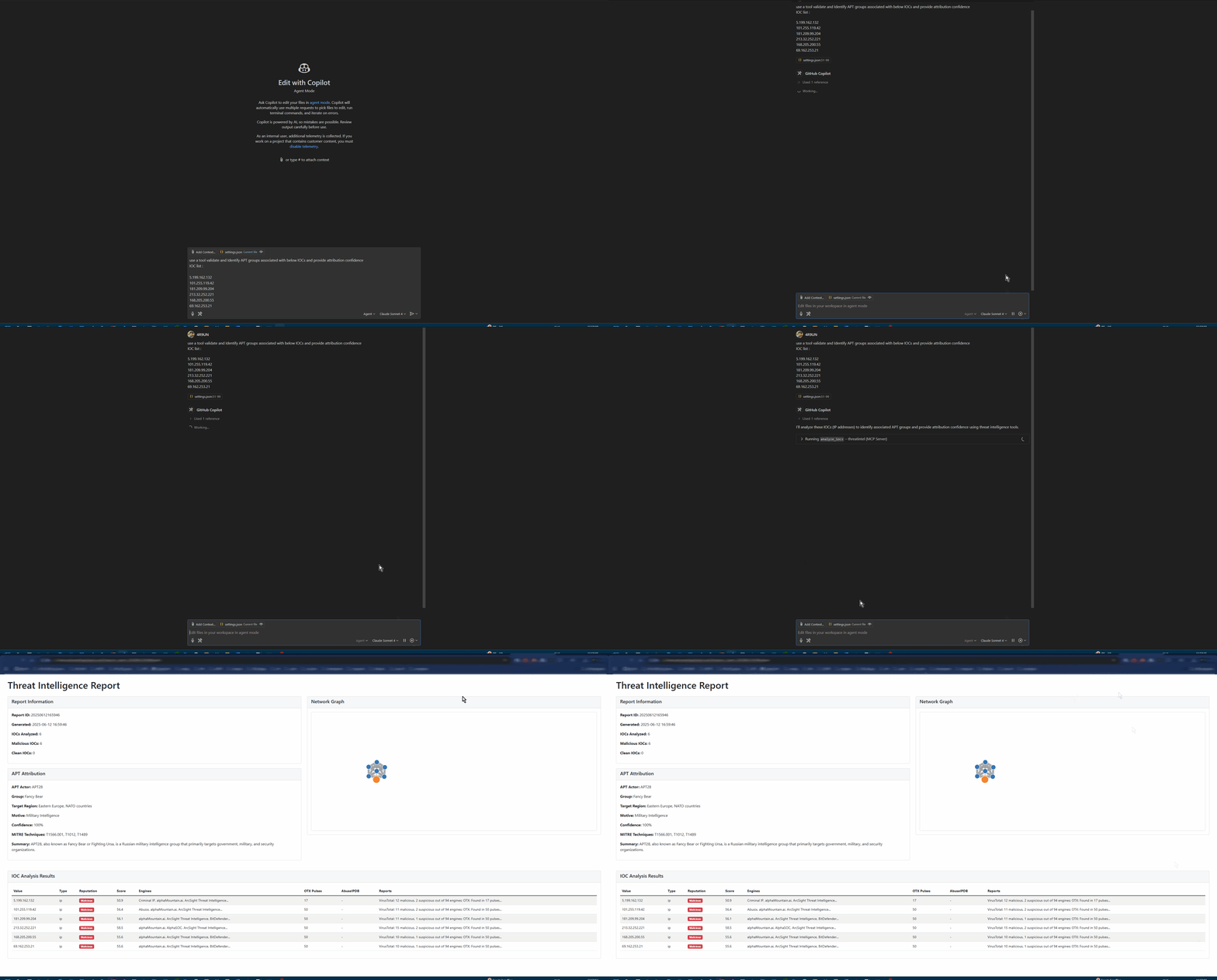
A comprehensive Model Context Protocol (MCP) server that provides enterprise-grade threat intelligence capabilities through natural language AI prompts. Analyze IPs, domains, URLs, and file hashes across multiple threat intelligence platforms with advanced APT attribution and interactive reporting.
✨ Why FastMCP ThreatIntel?
🎯 Purpose-Built for Modern Security Teams
🤖 AI-First Design: Natural language queries with intelligent IOC detection
🔗 MCP Integration: Seamless integration with Claude Desktop, VSCode (Roo-Cline), and other AI assistants
⚡ Lightning Fast: UV-powered development with optimized async processing
🏢 Enterprise Ready: Production-grade Docker containers and Kubernetes support
🔍 Multi-Source Intelligence
VirusTotal: File and URL reputation analysis with 70+ antivirus engines
AlienVault OTX: Community-driven threat intelligence and IOC feeds
AbuseIPDB: IP reputation and geolocation with abuse confidence scoring
IPinfo: Enhanced geolocation, ASN, and infrastructure data
🤖 AI-Powered Analysis
Natural Language Interface: Query threats using plain English
Advanced APT Attribution: Confidence-scored attribution with MITRE ATT&CK mapping
Intelligent IOC Detection: Auto-detects IP addresses, domains, URLs, and file hashes
Context-Aware Reporting: Generates comprehensive threat intelligence reports
📊 Rich Reporting & Visualization
Interactive HTML Reports: Modern, responsive design with dark/light modes
D3.js Network Graphs: Visual IOC relationship mapping
Multiple Output Formats: Markdown, JSON, HTML, and STIX-compliant outputs
Export Capabilities: PDF, CSV, and JSON export for integration
🚀 Flexible Deployment Options
🔌 MCP Server: Direct integration with AI assistants
💻 Standalone CLI: Interactive and batch processing modes
🐳 Docker Container: Production-ready containerization
📦 Python Package: Embed in your applications and workflows
Related MCP server: MCP Threat Intel Server
🏗️ Architecture
graph TB
    A[AI Assistant] --> B[MCP Protocol]
    C[CLI Interface] --> D[Core Engine]
    B --> D

    D --> E[IOC Processor]
    D --> F[Attribution Engine]
    D --> G[Report Generator]

    E --> H[VirusTotal API]
    E --> I[OTX API]
    E --> J[AbuseIPDB API]
    E --> K[IPinfo API]

    F --> L[APT Patterns]
    F --> M[MITRE ATT&CK]

    G --> N[HTML Reports]
    G --> O[JSON Export]
    G --> P[STIX Output]
🚀 Quick Start
Choose your preferred installation method and get started in minutes:
🐍 pip (Fastest)
# Install from PyPI
pip install fastmcp-threatintel

# Interactive setup wizard
threatintel setup

# Analyze your first IOC
threatintel analyze 8.8.8.8 --output-format table --verbose
🐳 Docker (Production Ready)
# Pull and run with your API keys
docker pull arjuntrivedi/fastmcp-threatintel:latest
docker run -e VIRUSTOTAL_API_KEY=your_key \
           -e OTX_API_KEY=your_key \
           arjuntrivedi/fastmcp-threatintel:latest \
           analyze 192.168.1.1
🔥 UV (Developer Recommended)
# Clone and install with UV
git clone https://github.com/4R9UN/fastmcp-threatintel.git
cd fastmcp-threatintel
uv sync

# Run interactive setup
uv run threatintel setup

# Start analyzing
uv run threatintel interactive
📦 Poetry (Traditional)
# Clone and install with Poetry
git clone https://github.com/4R9UN/fastmcp-threatintel.git
cd fastmcp-threatintel
poetry install

# Activate and run
poetry shell
threatintel analyze example.com --output-format html --open-browser
⚙️ Configuration
🔑 API Keys Setup
Get your free API keys and unlock the full potential:
Service | Status | Free Tier Limit | Get Your Key |
VirusTotal | Required | 1,000 requests/day | Sign Up → |
OTX | Required | Unlimited | Sign Up → |
AbuseIPDB | Optional | 1,000 requests/day | Sign Up → |
IPinfo | Optional | 50,000 requests/month | Sign Up → |
🛠️ Environment Configuration
Create a .env file in your project directory:
# Required API Keys
VIRUSTOTAL_API_KEY=your_virustotal_api_key
OTX_API_KEY=your_alienvault_otx_api_key

# Optional API Keys (for enhanced functionality)
ABUSEIPDB_API_KEY=your_abuseipdb_api_key
IPINFO_API_KEY=your_ipinfo_api_key

# Performance Tuning
CACHE_TTL=3600              # Cache duration (seconds)
MAX_RETRIES=3               # API retry attempts
REQUEST_TIMEOUT=30          # Request timeout (seconds)
💻 Usage Examples
CLI Analysis
# Quick single IOC analysis
threatintel analyze 192.168.1.1 --verbose

# Batch analysis from file
threatintel batch iocs.txt --output-file report.html --output-format html

# Interactive threat hunting session
threatintel interactive

# Start MCP server for AI integration
threatintel server --host 0.0.0.0 --port 8000
🔌 MCP Integration
Integrate with AI assistants for natural language threat intelligence:
VSCode with Roo-Cline
{
  "mcpServers": {
    "threatintel": {
      "command": "threatintel",
      "args": ["server", "--port", "8001"],
      "env": {
        "VIRUSTOTAL_API_KEY": "your_key",
        "OTX_API_KEY": "your_key"
      }
    }
  }
}
Claude Desktop
{
  "mcpServers": {
    "threatintel": {
      "command": "threatintel",
      "args": ["server"],
      "env": {
        "VIRUSTOTAL_API_KEY": "your_key",
        "OTX_API_KEY": "your_key"
      }
    }
  }
}
🔗 Complete MCP Integration Guide →
🎯 AI Prompt Examples
"Analyze IP 8.8.8.8 for security threats and provide geolocation data"
"Check if domain example.com has any malicious associations"
"Perform comprehensive threat analysis on 185.220.101.1 with APT attribution"
"Generate a security incident report for these IOCs: [list]"
📚 Documentation
📖 User Guides
🛠️ Developer Resources
🌟 What Makes It Special
**🔥 MCP Functionality **
MCP AI Powered: Cutting-edge threat intelligence automation
Revolutionizing Cybersecurity: Enterprise-grade AI-powered platform
Community-Focused: Open source with professional quality
🚀 Production-Ready Features
Multi-Architecture Docker: ARM64 and AMD64 support
Kubernetes Ready: Helm charts and deployment manifests
Comprehensive Testing: 80%+ code coverage with CI/CD pipeline
Security First: Secure by design with best practices
⚡ Performance Optimized
Async Everything: Non-blocking I/O for maximum throughput
Intelligent Caching: Redis-compatible caching layer
Rate Limiting: Built-in API rate limit management
Batch Processing: Efficient bulk IOC analysis
🤝 Contributing
We welcome contributions from the cybersecurity community!
Quick Start
# Fork and clone
git clone https://github.com/YOUR_USERNAME/fastmcp-threatintel.git
cd fastmcp-threatintel

# Setup development environment
uv sync --dev
uv run pre-commit install

# Make your changes and test
uv run pytest
uv run ruff format . && uv run ruff check .

# Submit your PR
git push origin feature/your-feature
📖 Complete Contributing Guide →
📜 License
This project is licensed under the Apache License 2.0 - see the LICENSE file for details.
🙏 Acknowledgments
Special thanks to the cybersecurity community and these amazing projects:
🔗 Links & Resources
🌟 Star this repo if you find it useful! 🌟


📚 Documentation • 🐛 Report Bug • 💡 Request Feature • 💬 Discussions
📦 PyPI Package • 🐳 Docker Hub
Built with ❤️ by Arjun Trivedi (4R9UN) for the cybersecurity community

