

A
licenseB
qualityC
maintenanceA Model Context Protocol server providing real-time stock data and options analysis through Yahoo Finance, enabling LLMs to access market data, analyze stocks, and evaluate options strategies.
3
27
MIT

Enables financial analysis of Amazon stock including price history, financial statements, and comparison with other companies.
Provides comprehensive financial data for Apple stock including historical prices, company information, institutional holders, and options analysis.
Offers tools to analyze Coca-Cola's financial data, compare dividend history and stock splits with competitors.
Allows retrieval of Google's financial data for comparison with other companies and analysis of quarterly income statements.
Provides access to latest news articles and financial information about Meta Platforms.
Enables analysis of NVIDIA's annual cash flow statements and other financial metrics.
Provides access to Tesla's key financial metrics, insider transactions, and institutional ownership changes.
Click on "Deploy Server".
Wait a few minutes for the server to deploy. Once ready, it will show a "Started" state.
In the chat, type @ followed by the MCP server name and your instructions, e.g., "@Yahoo Finance MCP Server get the latest stock price and news for Apple"
That's it! The server will respond to your query, and you can continue using it as needed.
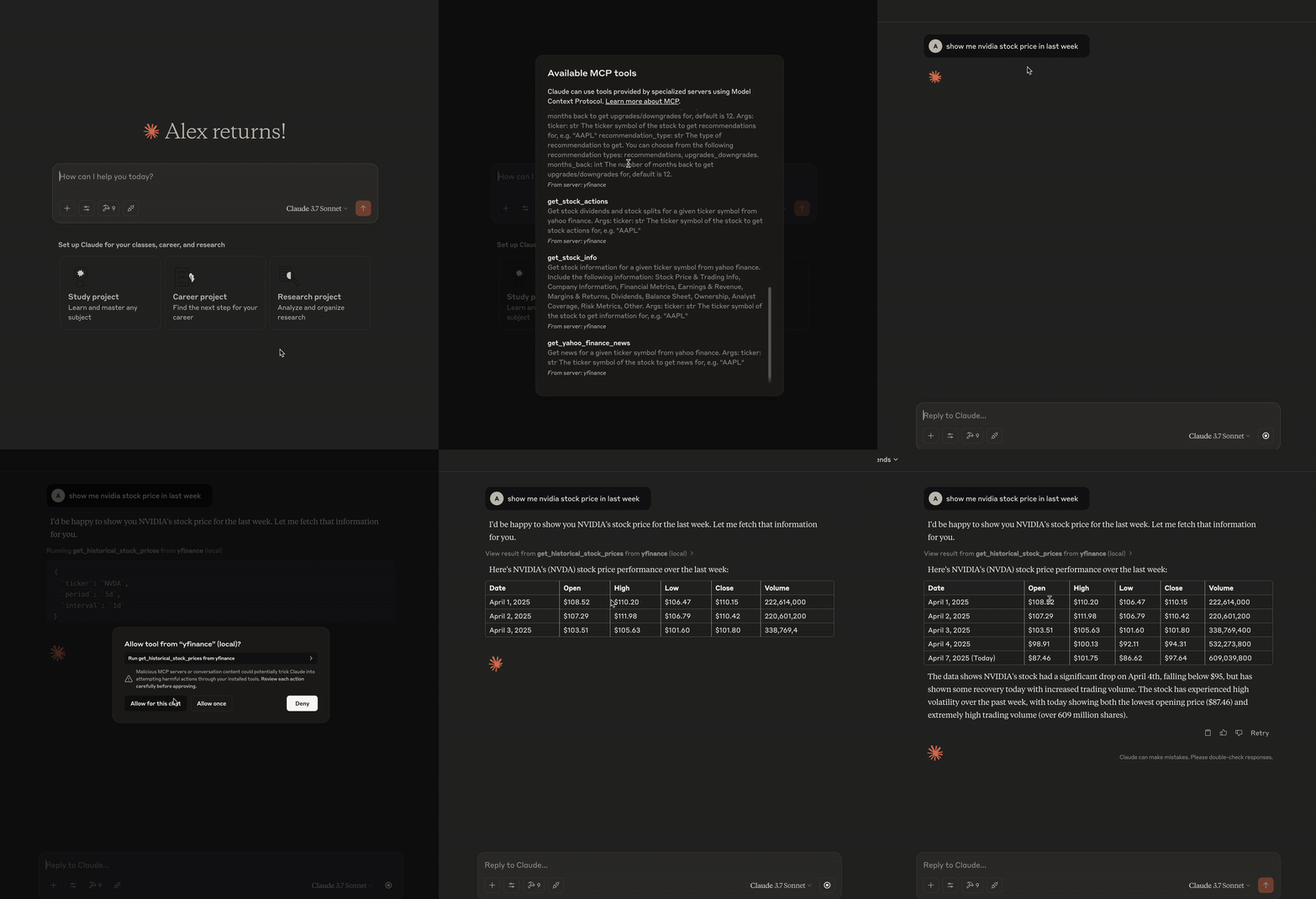
Here is a step-by-step guide with screenshots.
This is a Model Context Protocol (MCP) server that provides comprehensive financial data from Financial Modeling Prep. It allows you to retrieve detailed information about stocks, including historical prices, company information, financial statements, options data, and market news.
Related MCP server: MCP Yahoo Finance
The server exposes the following tools through the Model Context Protocol:
Tool | Description |
| Get historical OHLCV data for a stock with customizable period and interval |
| Get comprehensive stock data including price, metrics, and company details |
| Get latest news articles for a stock |
| Get stock dividends and splits history |
Tool | Description |
| Get income statement, balance sheet, or cash flow statement (annual/quarterly) using Financial Modeling Prep |
Tool | Description |
| Get available options expiration dates |
| Get options chain for a specific expiration date and type (calls/puts) |
Tool | Description |
| Get the latest analyst grades for a stock |
| Get historical analyst grades |
| Get a consensus summary of analyst grades |
| Get grade-related news for a stock |
| Get the most recent analyst grade news |
| Retrieve analyst financial estimates |
| Get ratings snapshot or history |
| Get price target summary, consensus or news |
Tool | Description |
| Search by symbol, name, CIK, CUSIP or ISIN |
| Retrieve exchange, sector and other lists |
Tool | Description |
| Get dividends, earnings, IPO and split calendars |
| Retrieve float data for one or all companies |
| Get latest or search M&A transactions |
| Fetch company executives or compensation info |
| Obtain DCF or levered DCF valuation |
| Retrieve treasury rates and other macro data |
Tool | Description |
| Retrieve the list of tradable cryptocurrencies |
| Get complete quote data for a cryptocurrency |
| Get quick quote data for a cryptocurrency |
| Get real-time quotes for all cryptocurrencies |
| Get historical cryptocurrency EOD prices in light or full mode |
| Get intraday cryptocurrency data by 1min, 5min or 1hour interval |
| Search cryptocurrency-related news |
| Retrieve the latest cryptocurrency news |
With this MCP server, you can use Claude to:
Price Analysis: "Show me the historical stock prices for AAPL over the last 6 months with daily intervals."
Financial Health: "Get the quarterly balance sheet for Microsoft."
Performance Metrics: "What are the key financial metrics for Tesla from the stock info?"
Trend Analysis: "Compare the quarterly income statements of Amazon and Google."
Cash Flow Analysis: "Show me the annual cash flow statement for NVIDIA."
News Analysis: "Get the latest news articles about Meta Platforms."
Market Movers: "List today's top gainers and losers."
Options Analysis: "Get the options chain for SPY with expiration date 2024-06-21 for calls."
"Create a comprehensive analysis of Microsoft's financial health using their latest quarterly financial statements."
"Compare the dividend history and stock splits of Coca-Cola and PepsiCo."
"Generate a report on the options market activity for Apple stock with expiration in 30 days."
Python 3.11 or higher
Dependencies as listed in pyproject.toml, including:
mcp
requests
pandas
pydantic
and other packages for data processing
Clone this repository:
git clone https://github.com/Alex2Yang97/financialmodelingprep-mcp.git
cd financialmodelingprep-mcp
Create and activate a virtual environment and install dependencies:
uv venv
source .venv/bin/activate  # On Windows: .venv\Scripts\activate
uv pip install -e .
Set your Financial Modeling Prep API key:
export FMP_API_KEY=YOUR_API_KEYYou can test the server with MCP Inspector by running:
uv run server.pyThis will start the server and allow you to test the available tools.
To integrate this server with Claude for Desktop:
Install Claude for Desktop to your local machine.
Install VS Code to your local machine. Then run the following command to open the claude_desktop_config.json file:
MacOS: code ~/Library/Application\ Support/Claude/claude_desktop_config.json
Windows: code $env:AppData\Claude\claude_desktop_config.json
Edit the Claude for Desktop config file, located at:
macOS:
{
  "mcpServers": {
    "financialmodelingprep": {
      "command": "uv",
      "args": [
        "--directory",
        "/ABSOLUTE/PATH/TO/PARENT/FOLDER/financialmodelingprep-mcp",
        "run",
        "server.py"
      ]
    }
  }
}
Windows:
{
  "mcpServers": {
    "financialmodelingprep": {
      "command": "uv",
      "args": [
        "--directory",
        "C:\\ABSOLUTE\\PATH\\TO\\PARENT\\FOLDER\\financialmodelingprep-mcp",
        "run",
        "server.py"
      ]
    }
  }
}Note: You may need to put the full path to the uv executable in the command field. You can get this by running which uv on MacOS/Linux or where uv on Windows.
Restart Claude for Desktop
MIT
获取全部加密货币的批量行情。
Inputs: no named parameters.
获取分析师的财务预估数据。
参数说明: symbol: str 股票代码,例如 "AAPL" period: str annual 或 quarter,默认 annual page: int 页码,默认 0 limit: int 返回数量,默认 10
Inputs: symbol (required), limit, page, period.
获取分红、收益、IPO、拆股等日历信息。
参数说明: event_type: str 可选值:dividends、dividends_calendar、earnings、earnings_calendar、 ipos_calendar、ipos_disclosure、ipos_prospectus、splits、splits_calendar symbol: str 部分类型需要股票代码 page: int 页码,默认 0 limit: int 返回数量,默认 100
Inputs: event_type (required), limit, page, symbol.
按时间间隔获取加密货币的分时价格,支持 1min、5min 和 1hour。
Inputs: symbol (required), interval.
获取加密货币最新新闻列表。
Inputs: limit, page.
获取交易所上市的加密货币列表。
Inputs: no named parameters.
搜索加密货币相关新闻。
Inputs: symbols (required).
获取加密货币的历史收盘价,可选简略或完整模式。
Inputs: symbol (required), mode.
获取指定加密货币的完整行情。
Inputs: symbol (required).
获取指定加密货币的简要行情。
Inputs: symbol (required).
获取 DCF 或杠杆 DCF 估值数据。
参数说明: valuation_type: str dcf 或 levered symbol: str 股票代码
Inputs: symbol (required), valuation_type (required).
获取市场或公司目录列表。
参数说明: list_type: str 可选值:stock、financial_statement_symbol、cik、symbol_change、etf、 actively_trading、earnings_transcript、available_exchanges、 available_sectors、available_industries、available_countries
Inputs: list_type (required).
获取宏观经济数据。
参数说明: data_type: str treasury_rates、economic_indicators、economic_calendar、market_risk_premium name: str 经济指标名称,data_type 为 economic_indicators 时必填 from_date: str 起始日期,格式 YYYY-MM-DD to_date: str 结束日期,格式 YYYY-MM-DD
Inputs: data_type (required), from_date, name, to_date.
获取公司高管信息或薪酬数据。
参数说明: info_type: str executives、compensation 或 benchmark symbol: str 当类型为 executives 或 compensation 时必填
Inputs: info_type (required), symbol.
获取公司财报,类型包括年度/季度的收入表、资产负债表和现金流量表。
参数说明: ticker: str 股票代码,例如 "AAPL" financial_type: str 财报类型:income_stmt_annual、income_stmt_quarterly、balance_sheet_annual、balance_sheet_quarterly、cashflow_annual、cashflow_quarterly
Inputs: financial_type (required), ticker (required).
获取指定股票的历史价格,返回日期、开盘价、最高价、最低价、收盘价和成交量。 参数说明: ticker: str 股票代码,例如 "AAPL" period : str 支持的周期:1d,5d,1mo,3mo,6mo,1y,2y,5y,10y,ytd,max; 也可以使用开始和结束日期;默认 "1mo" interval : str 支持的间隔:1m,2m,5m,15m,30m,60m,90m,1h,1d,5d,1wk,1mo,3mo; 分钟级数据最多可追溯60天;默认 "1d"
Inputs: ticker (required), interval, period.
获取并购相关数据。
参数说明: action_type: str latest 或 search name: str 搜索模式下的公司名称 page: int 页码,默认 0 limit: int 返回数量,默认 100
Inputs: action_type (required), limit, name, page.
获取指定股票的相关新闻列表。
参数说明: ticker: str 股票代码,例如 "AAPL"
Inputs: ticker (required).
根据股票代码、到期日和期权类型获取期权链数据。
参数说明: ticker: str 股票代码,例如 "AAPL" expiration_date: str 期权到期日,格式为 'YYYY-MM-DD' option_type: str 期权类型:'calls' 或 'puts'
Inputs: expiration_date (required), option_type (required), ticker (required).
获取指定股票可用的期权到期日。
参数说明: ticker: str 股票代码,例如 "AAPL"
Inputs: ticker (required).
获取分析师目标价相关信息,可选择汇总、共识或新闻。
参数说明: info_type: str summary、consensus、news、latest_news symbol: str 股票代码,news/summary/consensus 必填 page: int 页码,默认 0 limit: int 返回数量,默认 10
Inputs: info_type (required), limit, page, symbol.
获取股票评级数据,可选择快照或历史记录。
参数说明: symbol: str 股票代码,例如 "AAPL" rating_type: str snapshot 或 historical,默认 snapshot limit: int 返回数量,默认 1
Inputs: symbol (required), limit, rating_type.
获取股票的分红与拆股历史。
参数说明: ticker: str 股票代码,例如 "AAPL"
Inputs: ticker (required).
获取最新评级新闻。
参数说明: page: int 页码,默认 0 limit: int 每页数量,最大 1000,默认 10
Inputs: limit, page.
获取指定股票的评级新闻。
参数说明: ticker: str 股票代码,例如 "AAPL" page: int 页码,默认 0 limit: int 每页数量,最大 100,默认 1
Inputs: ticker (required), limit, page.
获取分析师最新评级。
参数说明: ticker: str 股票代码,例如 "AAPL
Inputs: ticker (required).
获取分析师评级历史记录。
参数说明: ticker: str 股票代码,例如 "AAPL" limit: int 返回记录数量,最大 1000,默认 100
Inputs: ticker (required), limit.
获取分析师评级汇总。
参数说明: ticker: str 股票代码,例如 "AAPL
Inputs: ticker (required).
获取公司概况及关键财务指标。
参数说明: ticker: str 股票代码,例如 "AAPL"
Inputs: ticker (required).
获取今日涨幅最大的股票列表。
Inputs: no named parameters.
获取今日跌幅最大的股票列表。
Inputs: no named parameters.
按标识类型查询股票代码、CIK、CUSIP 或 ISIN。
参数说明: identifier_type: str 可选值:symbol、name、cik、cusip、isin、exchange_variant query: str 对应的查询内容
Inputs: identifier_type (required), query (required).
根据关键字搜索公司信息。
参数说明: query: str 搜索关键字 limit: int 返回结果数量,默认 10 exchange: str 交易所代码,可选
Inputs: query (required), exchange, limit.
Recent tool additions, removals, and schema changes observed during successful MCP inspections.
Loading tool schema changelog…
Scored across 34 tools
The tool set has clear thematic grouping (crypto, stock, news, etc.), but there is significant overlap within categories. For example, get_crypto_quote and get_crypto_quote_short are nearly identical, and multiple tools for stock grades (get_stock_grades, get_stock_grades_historical, get_stock_grades_summary) could confuse an agent about which to use. Descriptions help differentiate, but the boundaries are not always sharp.
Most tools follow a consistent verb_noun pattern (e.g., get_crypto_quote, get_historical_stock_prices), with minor deviations like lookup_identifier and search_companies. The naming is generally predictable and readable, though not perfectly uniform across all tools.
With 34 tools, the count is excessive for a single server, making it heavy and potentially overwhelming. While Yahoo Finance is a broad domain, many tools could be consolidated (e.g., multiple crypto quote tools) or parameterized to reduce the surface area, indicating poor scoping.
The tool set comprehensively covers the Yahoo Finance domain, including stock data, crypto, news, analyst estimates, financial statements, options, and economic indicators. There are no obvious gaps; agents can perform a wide range of financial analysis tasks without dead ends.
A Model Context Protocol server exposing real-time and historical Colombo Stock Exchange (CSE) data to AI agents and LLM applications. Provides quotes and OHLCV price history, full financial statements (income, balance sheet, cash flow), pre-computed technicals (moving averages, RS ratings, volume signals), macroeconomic indicators, corporate actions, and rule-based screening across CSE stocks and sector indices, everything needed to build CSE-aware trading assistants, research tools, and market-analysis agents. This is the official MCP server of www.ceyloncharts.com
Financial data MCP server for Claude, ChatGPT, Cursor and Codex. Real-time stock quotes, financial statements, options flow, SEC filings, insider trades, 13F holdings, macro data and market news from gloom.sh, the open-source Bloomberg Terminal alternative.
Yahoo Finance for AI agents: quotes, price history, options with Greeks, financials, news, movers.
MCP server for Financial Modeling Prep API with 250+ financial data tools