
A
licenseNot graded
qualityD
maintenanceEnables AI assistants to manage business operations including invoicing, WooCommerce syncing, expense tracking, POS, inventory, and team management through natural language.
6 npm
2
MIT

Click on "Deploy Server".
Wait a few minutes for the server to deploy. Once ready, it will show a "Started" state.
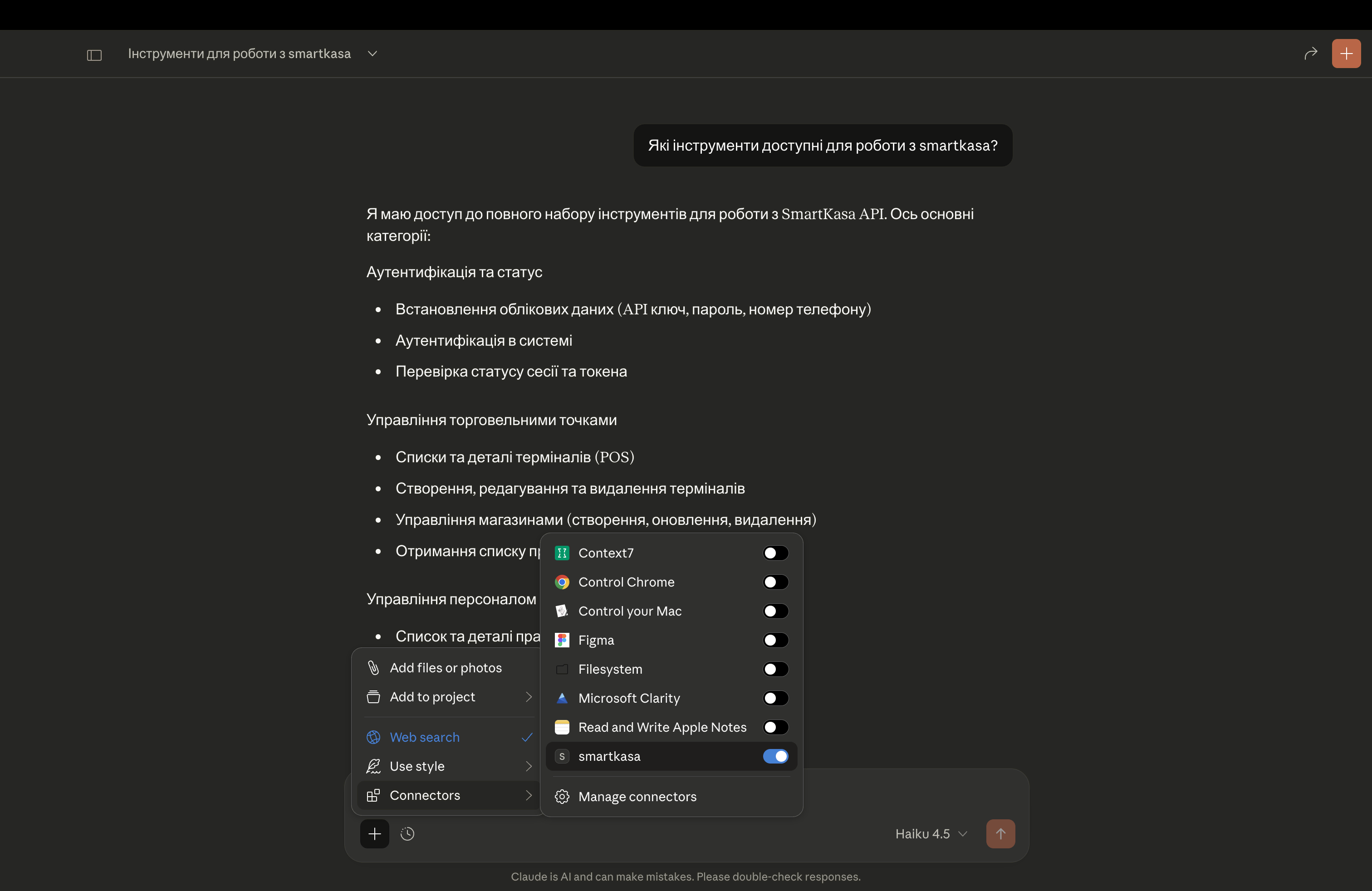
In the chat, type @ followed by the MCP server name and your instructions, e.g., "@SmartKasa MCP Server show me today's sales report for the Kyiv store"
That's it! The server will respond to your query, and you can continue using it as needed.
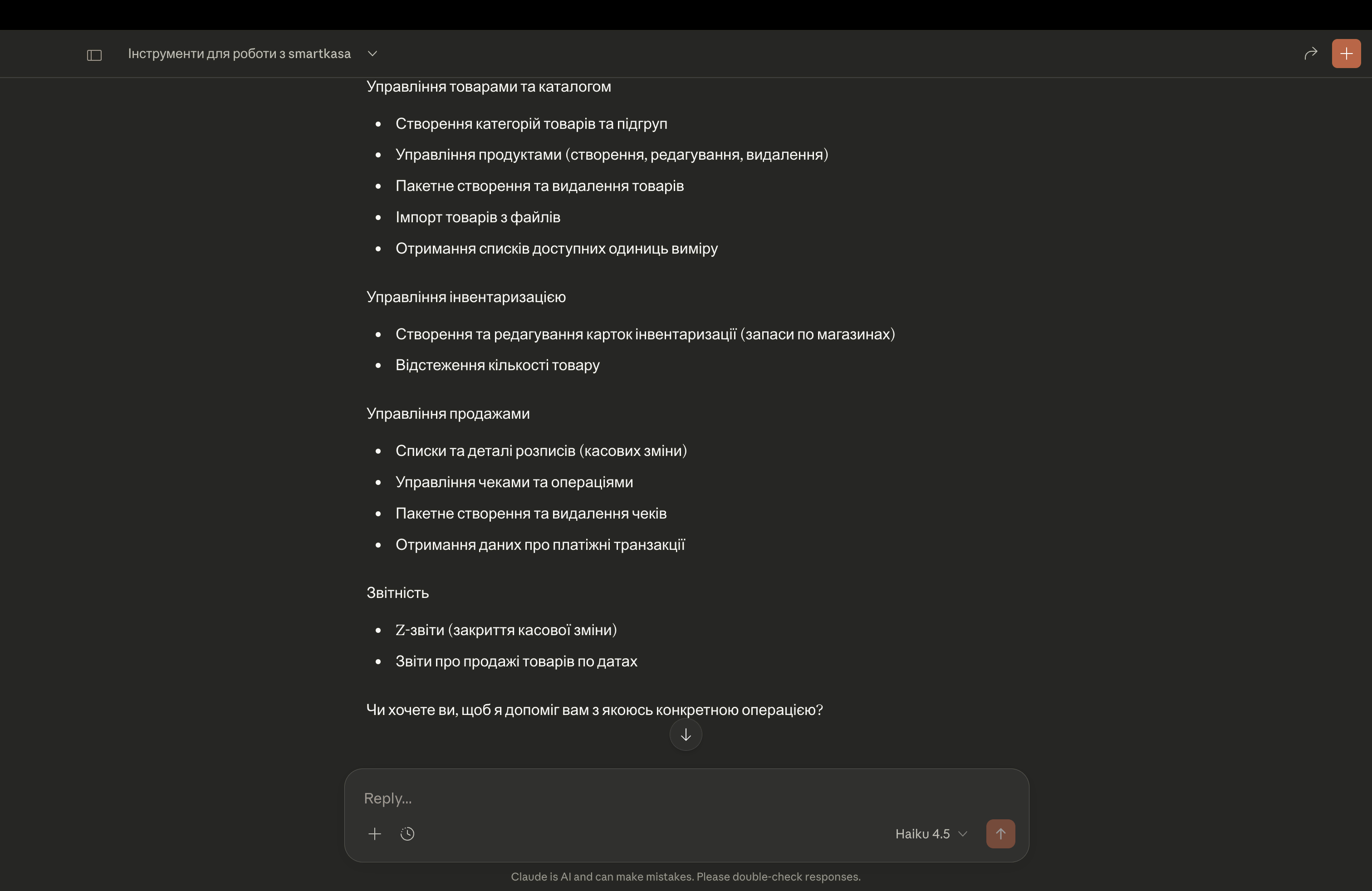
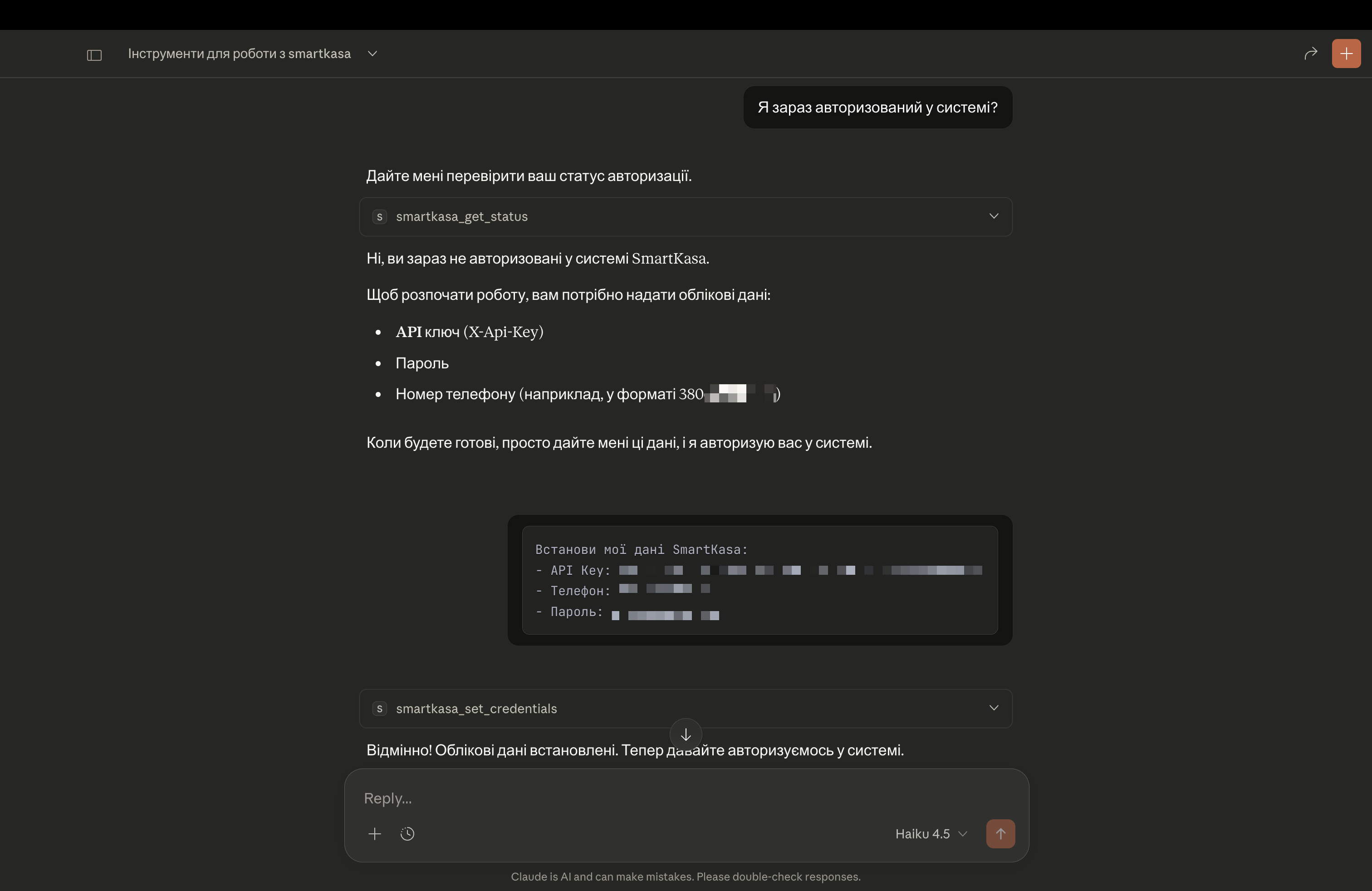
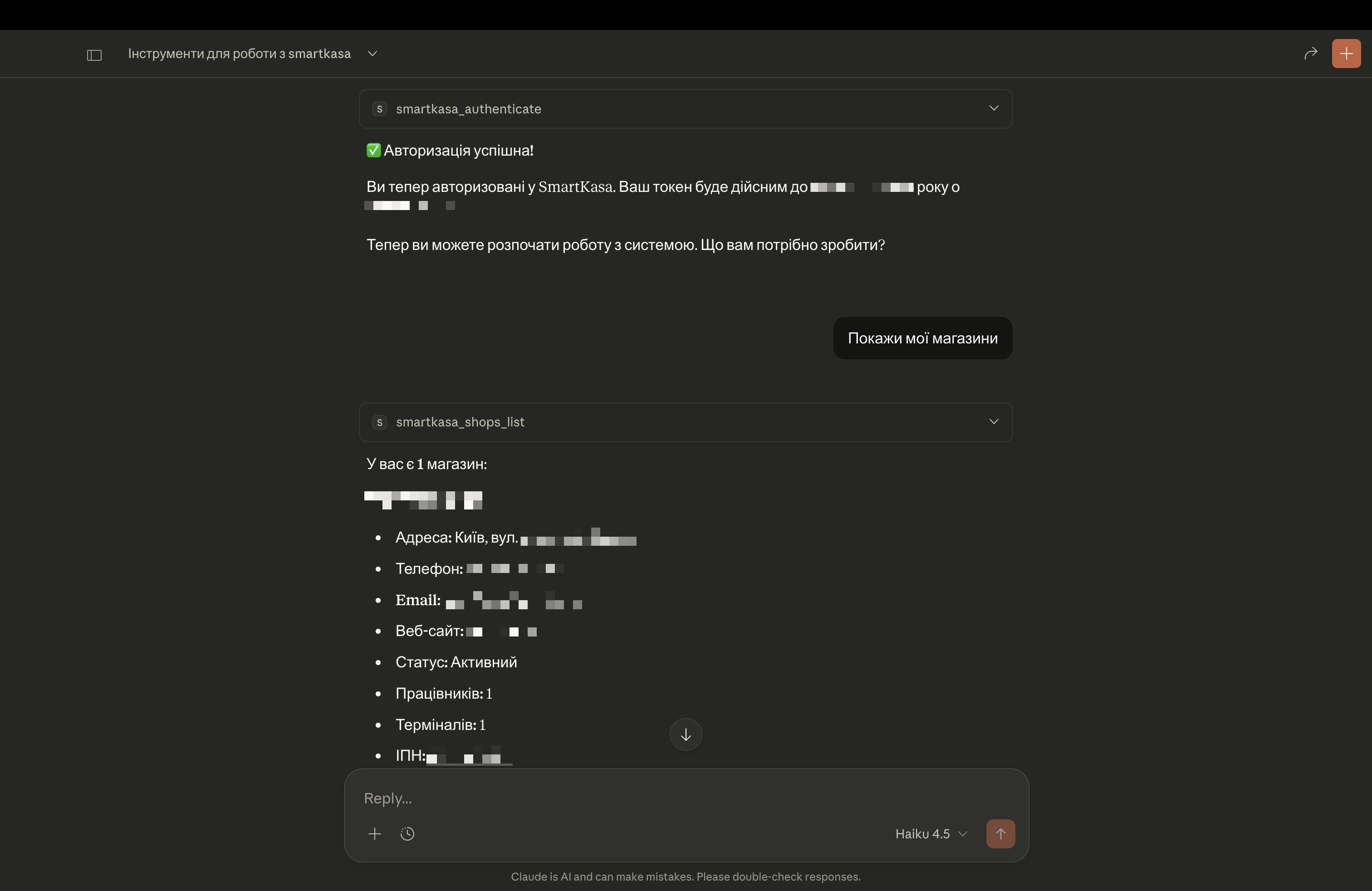
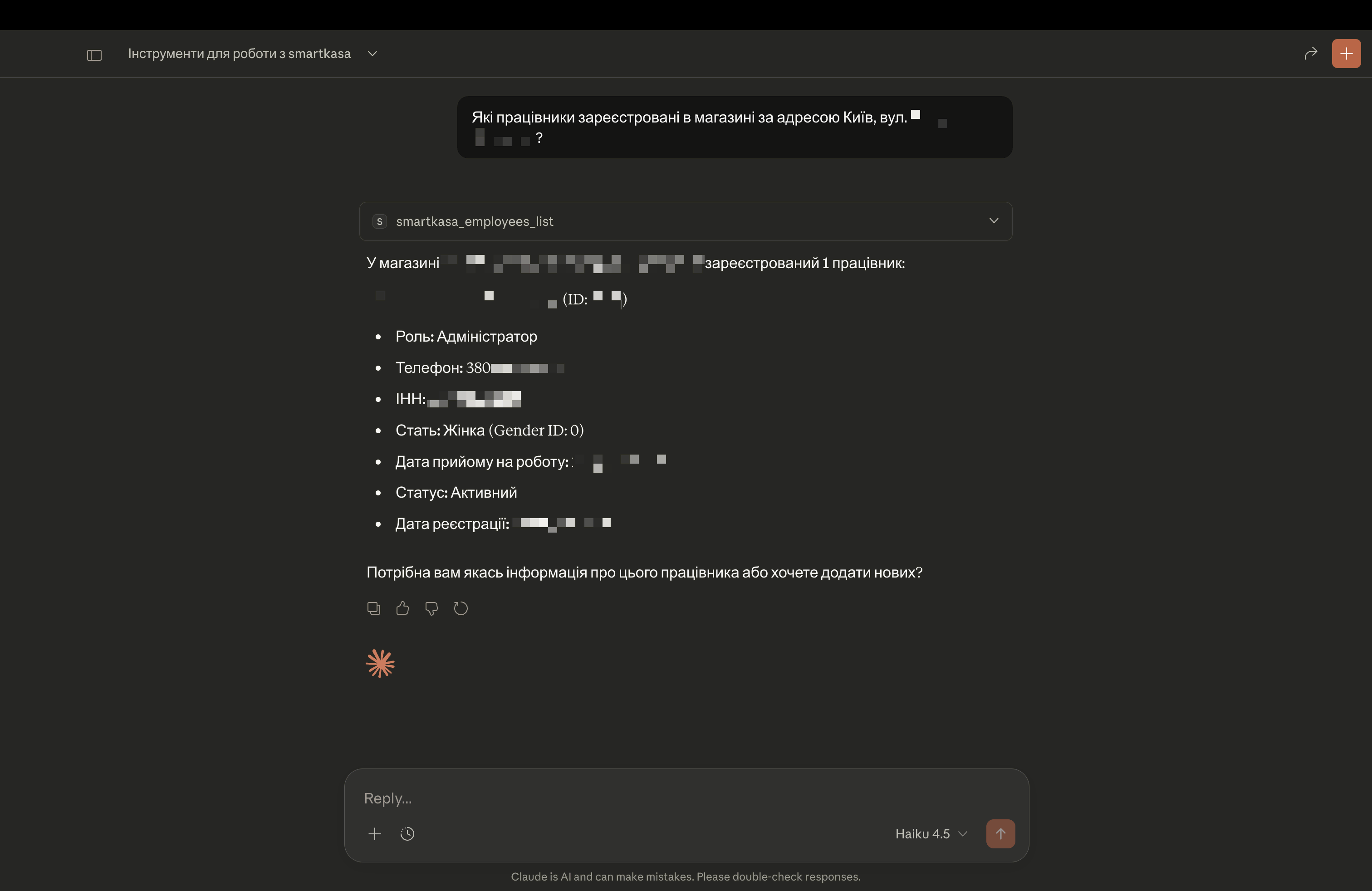
Here is a step-by-step guide with screenshots.
Production-ready Model Context Protocol (MCP) server for SmartKasa POS API


SmartKasa MCP Server enables AI assistants (Claude, GPT, etc.) to interact with SmartKasa - Ukrainian POS system with fiscal compliance. Through natural language, you can manage:
🏪 Shops - Create, update, manage retail locations
📦 Products - Full inventory management with categories
🧾 Receipts - Sales transactions and fiscal operations
👥 Employees - Staff management with roles
📊 Reports - Z-reports and sales statistics
💳 Terminals - POS terminal configuration
Related MCP server: SalesDrive MCP Server
✅ 58 API tools covering all SmartKasa endpoints
✅ HTTP/2 with connection pooling for high performance
✅ Automatic token refresh with exponential backoff
✅ Rate limiting protection with smart retries
✅ Secure credential handling - memory-only storage
✅ Multi-user support via process isolation
✅ Structured logging for debugging
✅ Two transport modes: stdio (local) and SSE (remote server)
✅ Docker support for easy deployment
⚠️ Important: You do NOT need to manually run this server!
MCP uses stdio transport by default - your LLM client (Claude Desktop, Cursor, etc.) automatically starts the server as a child process and communicates via stdin/stdout.
┌─────────────────────────────────────────────────────────┐
│  LLM Client (Claude Desktop / Cursor / VS Code)         │
│                                                         │
│  1. Reads your config file                              │
│  2. Spawns: python smartkasa-mcp-server.py              │
│  3. Communicates via stdin/stdout                       │
│  4. Server runs as long as client is open               │
└─────────────────────────────────────────────────────────┘
You only configure the path - the client handles everything else.
# Clone the repository
git clone https://github.com/1212bogdan/smartkasa-mcp-server.git
cd smartkasa-mcp-server

# Create virtual environment
python -m venv venv
source venv/bin/activate  # On Windows: venv\Scripts\activate

# Install dependencies
pip install -r requirements.txtYou need three things from SmartKasa:
API Key - Get from SmartKasa dashboard or support
Phone Number - Your registered phone (e.g., 380501234567)
Password - Your account password
See Client Configuration section below for your specific client.
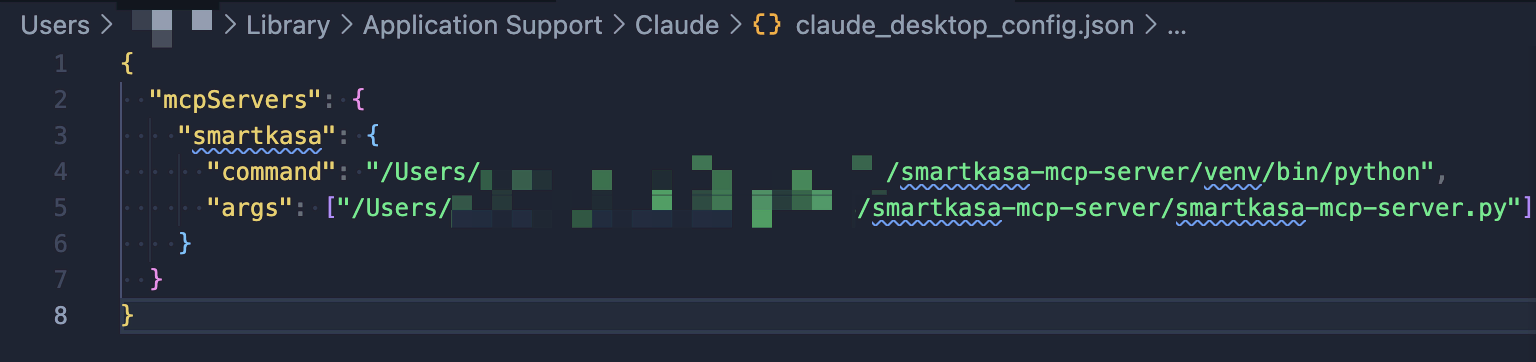
Edit ~/Library/Application Support/Claude/claude_desktop_config.json:
{
  "mcpServers": {
    "smartkasa": {
      "command": "/path/to/venv/bin/python",
      "args": ["/path/to/smartkasa-mcp-server/smartkasa-mcp-server.py"],
      "env": {
        "SMARTKASA_API_KEY": "your_api_key_here",
        "SMARTKASA_PHONE": "380501234567",
        "SMARTKASA_PASSWORD": "your_password"
      }
    }
  }
}Edit %APPDATA%\Claude\claude_desktop_config.json:
{
  "mcpServers": {
    "smartkasa": {
      "command": "C:\\path\\to\\venv\\Scripts\\python.exe",
      "args": ["C:\\path\\to\\smartkasa-mcp-server\\smartkasa-mcp-server.py"],
      "env": {
        "SMARTKASA_API_KEY": "your_api_key_here",
        "SMARTKASA_PHONE": "380501234567",
        "SMARTKASA_PASSWORD": "your_password"
      }
    }
  }
}Edit ~/.config/Claude/claude_desktop_config.json:
{
  "mcpServers": {
    "smartkasa": {
      "command": "/path/to/venv/bin/python",
      "args": ["/path/to/smartkasa-mcp-server/smartkasa-mcp-server.py"],
      "env": {
        "SMARTKASA_API_KEY": "your_api_key_here",
        "SMARTKASA_PHONE": "380501234567",
        "SMARTKASA_PASSWORD": "your_password"
      }
    }
  }
}Add to ~/.continue/config.json:
{
  "experimental": {
    "modelContextProtocolServers": [
      {
        "transport": {
          "type": "stdio",
          "command": "/path/to/venv/bin/python",
          "args": ["/path/to/smartkasa-mcp-server/smartkasa-mcp-server.py"]
        }
      }
    ]
  }
}Add to Cursor settings (Cmd/Ctrl + , → search "MCP"):
{
  "mcp.servers": {
    "smartkasa": {
      "command": "/path/to/venv/bin/python",
      "args": ["/path/to/smartkasa-mcp-server/smartkasa-mcp-server.py"]
    }
  }
}Configure in Cline settings panel:
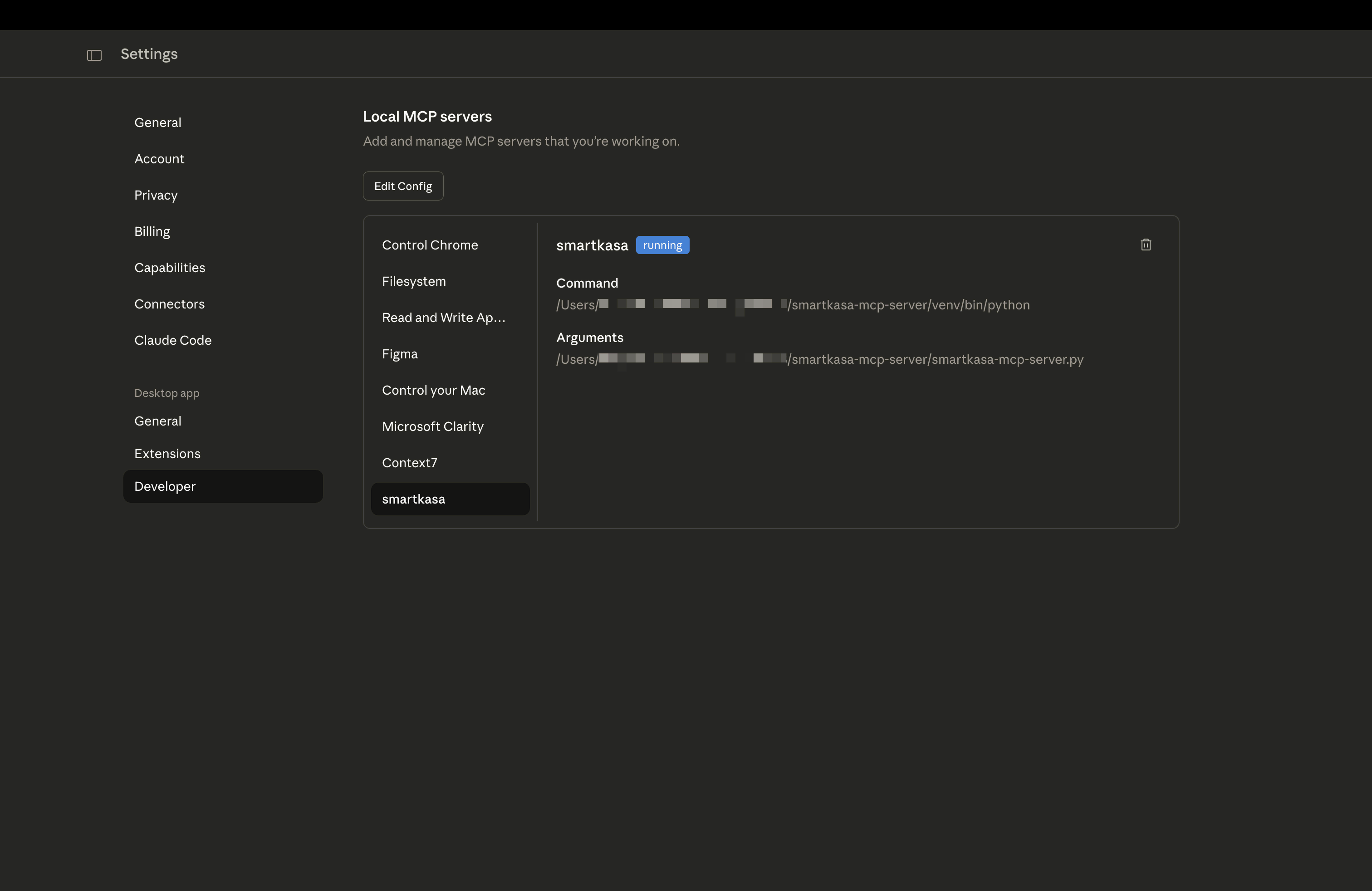
Server Name: smartkasa
Command: /path/to/venv/bin/python
Arguments: /path/to/smartkasa-mcp-server/smartkasa-mcp-server.py
If you didn't configure environment variables, set credentials via chat:
Please set my SmartKasa credentials:
- API Key: sk_live_xxxxx
- Phone: 380501234567
- Password: mypassword

Then authenticate and show my shops.List all products:
Show me all products in my SmartKasa accountCreate a new product:
Create a new product called "Espresso" with price 45 UAH,
tax group 1 (20% VAT), sold by units (not weight)
Get sales report:
Show me sales statistics for the last week for shop ID 123Check inventory:
What products have low stock in my main shop?Manage employees:
List all employees with their roles, then show me details for employee ID 5Tool | Description |
| Set API key, phone, password |
| Authenticate and get token |
| Check auth status and expiry |
| Logout and clear session |
Tool | Description |
| List all POS terminals |
| Get terminal by ID |
| Update terminal config |
| Delete terminal |
Tool | Description |
| List all shops |
| Get shop by ID |
| Create new shop |
| Update shop |
| Delete shop |
| List shop employees |
Tool | Description |
| List all employees |
| Get employee by ID |
| Create employee |
| Update employee |
| Delete employee |
Tool | Description |
| List categories |
| Create category |
| Update category |
| Delete category |
| Batch create |
| Batch delete |
Tool | Description |
| Search/list products |
| Get product by UUID |
| Create product |
| Update product |
| Delete product |
| Batch create |
| Batch delete |
Tool | Description |
| List inventory cards |
| Get card by ID |
| Create card |
| Update stock |
| Delete card |
Tool | Description |
| List receipts |
| Get receipt by UUID |
| Create receipt |
| Update receipt |
| Delete receipt |
| Batch create |
| Batch delete |
Tool | Description |
| Get Z-reports |
| Sales statistics |
smartkasa_unit_types_list - Unit types
smartkasa_subgroups_* - Product subgroups (4 tools)
smartkasa_import_* - Product import (3 tools)
smartkasa_shifts_* - Fiscal shifts (2 tools)
smartkasa_transactions_get - Payment transactions
🔐 Credentials are stored in memory only and are never written to disk by the server.
The security model:
Each MCP client spawns a separate process for this server
Process memory is isolated - credentials cannot leak between users
When the process ends, all credentials are cleared
Tokens auto-expire (typically 12 hours for access, 30 days for refresh)
Variable | Description |
| Your SmartKasa API key |
| Phone number (e.g., 380501234567) |
| Account password |
| Logging level (DEBUG/INFO/WARNING/ERROR) |
| API URL (default: https://core.smartkasa.ua) |
┌─────────────────┐     ┌─────────────────┐     ┌─────────────────┐
│   User Alice    │     │    User Bob     │     │   User Carol    │
│  (Claude App)   │     │   (VS Code)     │     │   (Cursor)      │
└────────┬────────┘     └────────┬────────┘     └────────┬────────┘
         │                       │                       │
         ▼                       ▼                       ▼
┌─────────────────┐     ┌─────────────────┐     ┌─────────────────┐
│  MCP Process 1  │     │  MCP Process 2  │     │  MCP Process 3  │
│  (Alice's creds)│     │  (Bob's creds)  │     │ (Carol's creds) │
└─────────────────┘     └─────────────────┘     └─────────────────┘
         │                       │                       │
         └───────────────────────┴───────────────────────┘
                                 │
                                 ▼
                    ┌───────────────────────┐
                    │   SmartKasa API       │
                    │ core.smartkasa.ua     │
                    └───────────────────────┘
Key points:
Each user's LLM client spawns its own MCP server process
Credentials are isolated in process memory
No session conflicts between users
Process termination = automatic cleanup
⚠️ Sessions do NOT persist across:
Application restarts
System reboots
Process crashes
To maintain access:
Configure credentials in environment variables
Server auto-authenticates on startup if env vars are set
Or re-set credentials via smartkasa_set_credentials tool
"Import mcp could not be resolved"
pip install mcp"Authentication failed: 401"
Verify API key is correct
Check phone number format (no + prefix, just 380...)
Verify password
"Connection timeout"
Check internet connection
Verify https://core.smartkasa.ua is accessible
Try increasing SMARTKASA_REQUEST_TIMEOUT
"Rate limited"
Server automatically handles this with retry
Reduce request frequency if persistent
Enable verbose logging:
export SMARTKASA_LOG_LEVEL=DEBUGOr in config:
{
  "env": {
    "SMARTKASA_LOG_LEVEL": "DEBUG"
  }
}pip install pytest pytest-asyncio
pytest tests/# Run server directly
python smartkasa-mcp-server.py
# With debug logging
SMARTKASA_LOG_LEVEL=DEBUG python smartkasa-mcp-server.pyFor hosting on a server, use SSE (Server-Sent Events) transport instead of stdio.
Platform | Suitability | Notes |
Docker + VPS | ✅ Best | Full control, persistent connections |
Coolify | ✅ Excellent | Easy Docker deployment |
Railway | ✅ Good | Supports long-running processes |
Fly.io | ✅ Good | Global edge deployment |
Render | ✅ Good | Free tier available |
AWS ECS/Fargate | ✅ Good | Enterprise-grade |
Vercel | ❌ No | Serverless, no persistent connections |
Cloudflare Workers | ❌ No | No long-running processes |
AWS Lambda | ❌ No | Timeout limits, no SSE |
# Build image
docker build -t smartkasa-mcp .

# Run with credentials
docker run -d \
  --name smartkasa-mcp \
  -p 8080:8080 \
  -e SMARTKASA_API_KEY="your_api_key" \
  -e SMARTKASA_PHONE="380501234567" \
  -e SMARTKASA_PASSWORD="your_password" \
  --restart unless-stopped \
smartkasa-mcpCreate .env file:
SMARTKASA_API_KEY=your_api_key
SMARTKASA_PHONE=380501234567
SMARTKASA_PASSWORD=your_password
Run:
docker-compose up -dCreate new service in Coolify
Select "Docker Compose" or "Dockerfile"
Point to your repository
Add environment variables in Coolify UI
Deploy
Create /etc/systemd/system/smartkasa-mcp.service:
[Unit]
Description=SmartKasa MCP Server
After=network.target

[Service]
Type=simple
User=www-data
WorkingDirectory=/opt/smartkasa-mcp-server
Environment=SMARTKASA_API_KEY=your_key
Environment=SMARTKASA_PHONE=380501234567
Environment=SMARTKASA_PASSWORD=your_password
Environment=SMARTKASA_TRANSPORT=sse
ExecStart=/opt/smartkasa-mcp-server/venv/bin/python smartkasa-mcp-server.py --transport sse
Restart=always
RestartSec=5

[Install]
WantedBy=multi-user.target
Enable and start:
sudo systemctl enable smartkasa-mcp
sudo systemctl start smartkasa-mcp# Install PM2
npm install -g pm2
# Start server
pm2 start smartkasa-mcp-server.py \
--name smartkasa-mcp \
--interpreter python \
-- --transport sse --port 8080
# Save and enable startup
pm2 save
pm2 startupFor production, put behind nginx/Caddy with HTTPS:
Caddy (automatic HTTPS):
mcp.yourdomain.com {
    reverse_proxy localhost:8080
}
Nginx:
server {
    listen 443 ssl http2;
    server_name mcp.yourdomain.com;

    ssl_certificate /path/to/cert.pem;
    ssl_certificate_key /path/to/key.pem;

    location / {
        proxy_pass http://localhost:8080;
        proxy_http_version 1.1;
        proxy_set_header Connection "";
        proxy_buffering off;
        proxy_cache off;
        # SSE specific
        proxy_set_header Cache-Control no-cache;
        proxy_read_timeout 86400s;
    }
}Edit config to use SSE transport:
{
  "mcpServers": {
    "smartkasa": {
      "transport": {
        "type": "sse",
        "url": "https://mcp.yourdomain.com/sse"
      }
    }
  }
}{
"experimental": {
"modelContextProtocolServers": [
{
"transport": {
"type": "sse",
"url": "https://mcp.yourdomain.com/sse"
}
}
]
}
}Your remote server exposes /health endpoint:
curl https://mcp.yourdomain.com/health
# {"status": "healthy", "server": "smartkasa-mcp", "transport": "sse", "authenticated": true}MIT License - see LICENSE file.
Production-ready MCP сервер для SmartKasa POS API
SmartKasa MCP Server дозволяє AI-асистентам (Claude, GPT тощо) працювати з SmartKasa - українською касовою системою з фіскалізацією. Через звичайну мову ви можете керувати:
🏪 Магазинами - створення, оновлення, керування точками продажу
📦 Товарами - повне управління складом з категоріями
🧾 Чеками - продажі та фіскальні операції
👥 Працівниками - управління персоналом з ролями
📊 Звітами - Z-звіти та статистика продажів
💳 Терміналами - конфігурація POS терміналів
# Клонуйте репозиторій
git clone https://github.com/1212bogdan/smartkasa-mcp-server.git
cd smartkasa-mcp-server

# Створіть віртуальне середовище
python -m venv venv
source venv/bin/activate  # Windows: venv\Scripts\activate

# Встановіть залежності
pip install -r requirements.txtВам потрібні:
API Key - отримайте в особистому кабінеті SmartKasa або через підтримку
Номер телефону - ваш зареєстрований номер (наприклад, 380501234567)
Пароль - пароль вашого облікового запису
Редагуйте ~/Library/Application Support/Claude/claude_desktop_config.json:
{
  "mcpServers": {
    "smartkasa": {
      "command": "/шлях/до/venv/bin/python",
      "args": ["/шлях/до/smartkasa-mcp-server/smartkasa-mcp-server.py"],
      "env": {
        "SMARTKASA_API_KEY": "ваш_api_ключ",
        "SMARTKASA_PHONE": "380501234567",
        "SMARTKASA_PASSWORD": "ваш_пароль"
      }
    }
  }
}Редагуйте %APPDATA%\Claude\claude_desktop_config.json:
{
  "mcpServers": {
    "smartkasa": {
      "command": "C:\\шлях\\до\\venv\\Scripts\\python.exe",
      "args": ["C:\\шлях\\до\\smartkasa-mcp-server\\smartkasa-mcp-server.py"],
      "env": {
        "SMARTKASA_API_KEY": "ваш_api_ключ",
        "SMARTKASA_PHONE": "380501234567",
        "SMARTKASA_PASSWORD": "ваш_пароль"
      }
    }
  }
}Перша авторизація (якщо не налаштовані env vars):
Встанови мої дані SmartKasa:
- API Key: sk_live_xxxxx
- Телефон: 380501234567
- Пароль: мій_пароль

Потім авторизуйся і покажи мої магазини.
Показати всі товари:
Покажи всі товари в моєму акаунті SmartKasaСтворити новий товар:
Створи новий товар "Еспресо" з ціною 45 грн,
група оподаткування 1 (ПДВ 20%), продається штуками
Звіт по продажах:
Покажи статистику продажів за останній тиждень для магазину ID 123Перевірити залишки:
Які товари мають низький запас в головному магазині?🔐 Дані зберігаються тільки в пам'яті і ніколи не записуються на диск сервером.
Модель безпеки:
Кожен LLM клієнт запускає окремий процес сервера
Пам'ять процесів ізольована - дані не можуть витікати між користувачами
Коли процес завершується, всі дані очищаються
Токени автоматично закінчуються (зазвичай 12 годин для access, 30 днів для refresh)
Кожен LLM клієнт користувача запускає власний процес MCP сервера
Дані авторизації ізольовані в пам'яті процесу
Немає конфліктів сесій між користувачами
Завершення процесу = автоматичне очищення
⚠️ Сесії НЕ зберігаються після:
Перезапуску додатка
Перезавантаження системи
Аварійного завершення процесу
Для збереження доступу:
Налаштуйте дані у змінних оточення
Сервер автоматично авторизується при запуску
Або повторно задайте дані через smartkasa_set_credentials
"Authentication failed: 401"
Перевірте правильність API ключа
Перевірте формат номера (без +, просто 380...)
Перевірте пароль
"Connection timeout"
Перевірте з'єднання з інтернетом
Перевірте доступність https://core.smartkasa.ua
export SMARTKASA_LOG_LEVEL=DEBUGДля хостингу на сервері використовуйте SSE (Server-Sent Events) transport.
При локальному використанні (stdio) - LLM клієнт сам запускає сервер.
При віддаленому (SSE) - сервер працює постійно, клієнти підключаються по HTTP.
Платформа | Придатність | Примітки |
Docker + VPS | ✅ Найкраще | Повний контроль |
Coolify | ✅ Відмінно | Легке Docker розгортання |
Railway | ✅ Добре | Підтримує long-running |
Fly.io | ✅ Добре | Global edge |
Vercel | ❌ Ні | Serverless, немає SSE |
Lambda | ❌ Ні | Timeout, немає SSE |
# Збірка
docker build -t smartkasa-mcp .

# Запуск
docker run -d \
  --name smartkasa-mcp \
  -p 8080:8080 \
  -e SMARTKASA_API_KEY="ваш_ключ" \
  -e SMARTKASA_PHONE="380501234567" \
  -e SMARTKASA_PASSWORD="ваш_пароль" \
  --restart unless-stopped \
smartkasa-mcp# Створіть .env файл з credentials
docker-compose up -dСтворіть /etc/systemd/system/smartkasa-mcp.service:
[Unit]
Description=SmartKasa MCP Server
After=network.target

[Service]
Type=simple
User=www-data
WorkingDirectory=/opt/smartkasa-mcp-server
Environment=SMARTKASA_API_KEY=ваш_ключ
Environment=SMARTKASA_TRANSPORT=sse
ExecStart=/opt/smartkasa-mcp-server/venv/bin/python smartkasa-mcp-server.py --transport sse
Restart=always

[Install]
WantedBy=multi-user.targetУ конфігу Claude Desktop:
{
  "mcpServers": {
    "smartkasa": {
      "transport": {
        "type": "sse",
        "url": "https://mcp.yourdomain.com/sse"
      }
    }
  }
}

MIT License - дивіться файл LICENSE.
Зроблено з ❤️ для української спільноти розробників
This server cannot be deployed
Run your Tecopos business from your AI: sales, inventory, cash, customers, purchases and reports.
Manage your NanoCart store from any AI agent: products, orders, coupons, subscribers, reports.
Run your restaurant from an AI client: orders, menu, reports, refunds, payouts and staff.
Connect AI to store orders, products and inventory with scoped access and human approvals.