
pentest-ai
by 0xSteph
README.md
[](https://pypi.org/project/ptai/) [](https://pypi.org/project/ptai/) [](https://github.com/0xSteph/pentest-ai/blob/main/LICENSE)
[Website](https://pentestai.xyz/) · [Quick start](#quick-start) · [Bug bounty](#bug-bounty-automation) · [Verification](#how-verification-works) · [Documentation](https://github.com/0xSteph/pentest-ai/tree/main/docs) · [Issues](https://github.com/0xSteph/pentest-ai/issues)
**Pentest-AI is an open-source AI penetration testing and bug-bounty tool that proves every finding.** It connects an AI client or model to a real pentest workflow — investigating web applications, discovering and reproducing vulnerabilities, and using **machine oracles to verify whether an exploit actually works**. No proof, no finding: verified results carry evidence you can replay yourself.
Use it through **MCP** (Claude Code, Codex, Cursor, VS Code), from the **CLI**, or in **CI/CD**. The model drives the investigation; an independent oracle decides whether a finding earns a verified verdict — so the output is signal, not AI slop.
**Built for authorized bug bounty:** import a program's scope (HackerOne, Bugcrowd, Intigriti, YesWeHack), run a scope-enforced engagement, and turn each verified finding into a platform-ready submission. [Jump to the bug-bounty workflow →](#bug-bounty-automation)
> Test only systems you own or have explicit authorization to assess. Read the [acceptable-use policy](https://pentestai.xyz/aup) and [terms](https://pentestai.xyz/terms) before running an engagement.
## Quick start
### Recommended: Codex or Claude Code
Use Python **3.10–3.14** and install [pipx](https://pipx.pypa.io/stable/installation/)
first. Run `pipx ensurepath` and reopen your terminal if needed. pipx isolates
Pentest-AI's dependencies and makes its commands available across folders.
```sh
pipx install ptai
ptai setup --mcp
```
Install your AI client's CLI first. Setup asks before connecting **all detected
supported clients**, including both Codex and Claude Code when installed. It
preserves existing registrations. Restart your client afterward.
The wizard uses **user-wide settings**. It does not install clients, sign you in,
download models or configure Ollama. Your AI client supplies the model; no separate
model API key is required by the MCP server. Use `ptai setup --mcp --dry-run` to
preview changes. See [single-client and per-repository setup](https://pentestai.xyz/docs/ai-clients/)
for Codex `.codex/config.toml` and Claude Code `.mcp.json` instructions.
For upgrades, use `pipx upgrade ptai`. In an existing activated virtual environment,
`python -m pip install --upgrade ptai` is also supported; keep that environment
available after registering it with your AI client.
### Alternative: Ollama and local models
Install Pentest-AI as above, but skip MCP setup for this route.
[Install and start Ollama](https://docs.ollama.com/quickstart), then pull a model
with tool-calling support. Use `ollama list` to find its exact installed name.
```bash
export PENTEST_AI_LLM_PROVIDER=ollama
export PENTEST_AI_MODEL="your-installed-model"
ptai start https://your-authorized-target.example --no-sync
```
In PowerShell:
```powershell
$env:PENTEST_AI_LLM_PROVIDER = "ollama"
$env:PENTEST_AI_MODEL = "your-installed-model"
ptai start https://your-authorized-target.example --no-sync
```
Replace the placeholders before running. A local model needs no cloud API key.
Model quality and available memory affect results. See the
[model guide](https://pentestai.xyz/docs/ai-clients/) for endpoint configuration.
### Try the bundled demo
No API key or external target required.
```bash
pipx install ptai
ptai demo
```
The demo tests a bundled vulnerable application, replays a finding from its proof capsule, and checks the hardened routes. Inspect the evidence workflow before configuring a real engagement.
### Other model providers
For standalone cloud models and optional scanner dependencies, see the [installation guide](https://pentestai.xyz/docs/getting-started/) and [provider guide](docs/llm-providers.md). Keep API keys out of source control.
## Bug-bounty automation
Pentest-AI is designed for authorized bug-bounty work, where staying in scope
and submitting only reproducible findings are what matter.
```sh
# 1. Import the program's scope (HackerOne / Bugcrowd / Intigriti / YesWeHack)
ptai bounty import --platform hackerone --file scope.json --out program.scope
# 2. Run a scope-enforced engagement (a preflight shows exactly what will be
# touched and asks you to confirm — nothing out of scope is ever hit)
ptai start acme.com --scope-file program.scope --intensity stealth
# 3. Turn verified findings into platform-ready submissions
ptai bounty report <engagement-id> --platform hackerone --out submissions/
```
- **Scope is enforced**, not advisory: wildcards, CIDRs and out-of-scope
exclusions, fail-closed, on every agent and tool.
- **Submissions are submittable**: each includes a reproducible `curl`, CVSS/CWE,
impact, remediation, and the machine verdict with a replayable proof capsule.
- Or run the built-in methodology playbook end-to-end:
`ptai playbook run bug-bounty-web -i target=acme.com --execute`.
[Full bug-bounty guide →](https://github.com/0xSteph/pentest-ai/blob/main/docs/bug-bounty.md)
## How verification works
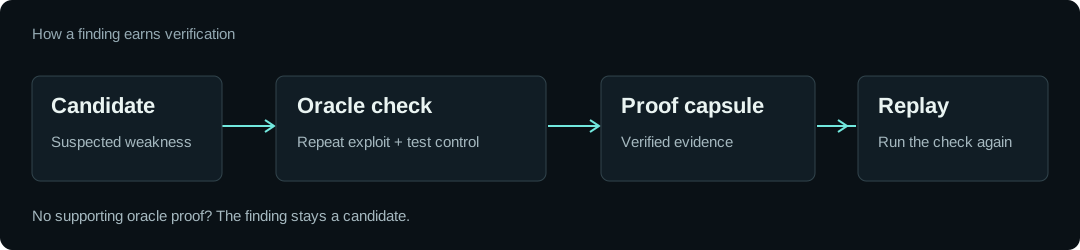
1. **Find a candidate.** A probe or scanner identifies behaviour worth investigating.
2. **Reproduce it and check a control.** A named oracle repeats the exploit and compares it with a control that should not demonstrate the weakness.
3. **Keep the evidence.** A verified finding records the oracle and its results in a portable proof capsule. Use `ptai replay` to check it again.
For example, a trusted-header bypass must return privileged content with the attack header and deny access without it. A server that answers every request with HTTP 200 is not sufficient evidence.
**The model cannot award a verified verdict.** Third-party scanner output remains unverified until an oracle independently proves it. Findings without a supported verification recipe remain candidates.
A verified verdict applies to the tested conditions. It does not mean the entire application is secure. Proof capsules are unsigned; rerunning the check is the trust mechanism.
[Read the verification design](https://github.com/0xSteph/pentest-ai/blob/main/docs/why-verification.md)
## What you can do
| Workflow | What Pentest-AI provides |
| --- | --- |
| Investigate web applications | Probes for injection, access control, request handling and other application weaknesses |
| Run a bug-bounty engagement | Import program scope, enforce it, and generate platform-ready submissions ([guide](https://github.com/0xSteph/pentest-ai/blob/main/docs/bug-bounty.md)) |
| Work through an AI client | MCP tools for engagements, investigation and verification |
| Reproduce a finding | Oracle results and replayable proof capsules |
| Check a fix | Rerun the recorded check against the updated target |
| Report to your team | Reports and SARIF output for existing engineering workflows |
| Keep engagement data local | Findings stored on your machine in SQLite |
Coverage varies by probe and oracle. Optional scanners need their own binaries, and some integrations provide raw output rather than structured findings. Consult the [documentation](https://github.com/0xSteph/pentest-ai/tree/main/docs) and [changelog](https://github.com/0xSteph/pentest-ai/blob/main/CHANGELOG.md) for your version; `main` may contain unreleased work.
[View the capability inventory checked by CI](https://github.com/0xSteph/pentest-ai/blob/main/docs/capability-inventory.md).
## Put verified findings into CI
Configure your model provider, an authorized target and first-run consent in your CI environment. Keep secrets in the CI provider's secret store.
```sh
ptai start https://your-authorized-target.example --ci --fail-on verified --no-sync
```
Export verified findings using the engagement ID from the run:
```sh
ptai export YOUR_ENGAGEMENT_ID --sarif pentest.sarif
```
`--sarif` is an export option, not a `ptai start` option. Retain the engagement ID and run the export even when the finding gate fails if you want evidence for failed builds. Upload the resulting file through your CI provider's SARIF integration.
[CI setup and templates](https://github.com/0xSteph/pentest-ai/blob/main/docs/ci-cd.md)
## Evidence, benchmarks and limits
Benchmark findings, challenge completion and oracle-verified findings are different measurements. These reports record the versions, targets and methodology behind their results:
- [Benchmark reports and artifacts](https://github.com/0xSteph/pentest-ai/tree/main/benchmarks)
- [Juice Shop methodology](https://github.com/0xSteph/pentest-ai/blob/main/docs/benchmarks/juice-shop.md)
- [Vulnerable test harness](https://github.com/0xSteph/pentest-ai/tree/main/tests/honeypot)
- [Clean-application checks](https://github.com/0xSteph/pentest-ai/tree/main/tests/cleanapp)
**Expect incomplete coverage.** A scan with no verified findings is not a security assessment of everything an application does. Authentication, application state, unsupported bug classes and environmental changes affect what can be found and reproduced. Review results and keep a human involved in the engagement.
## Data and network behaviour
Findings are stored locally. Anonymous usage counters are opt-in through `ptai telemetry enable`.
Local storage does not mean every operation stays on your machine: model-provider calls and installed scanners have their own network behaviour. Blind-vulnerability checks can use an external out-of-band collaborator; callback metadata is visible to that service.
Use your own collaborator where required, or disable callbacks:
```bash
ptai start https://your-authorized-target.example --oast-server https://your-collaborator.example
ptai start https://your-authorized-target.example --no-oast
```
## Get involved
Use [Issues](https://github.com/0xSteph/pentest-ai/issues) for reproducible bugs and [Discussions](https://github.com/0xSteph/pentest-ai/discussions) for questions and ideas. See the [agent and contributor guide](https://github.com/0xSteph/pentest-ai/blob/main/AGENTS.md) for build and test instructions.
The optional [pentest-ai-agents](https://github.com/0xSteph/pentest-ai-agents) repository contains Claude Code subagent files.
Pentest-AI is open source under the [MIT license](https://github.com/0xSteph/pentest-ai/blob/main/LICENSE).
This server cannot be deployed
Maintenance
ActivityMaintained
ResponsivenessSlow