
openfoam-mcp
# openfoam-mcp
**An MCP server that lets AI coding agents drive [OpenFOAM](https://openfoam.org) end to end** — clone a tutorial, edit dictionaries, mesh, run solvers in the background, watch convergence, and *look* at the flow — from Claude Code, Codex CLI, Gemini CLI, Cursor, VS Code, Windsurf, Claude Desktop or opencode.
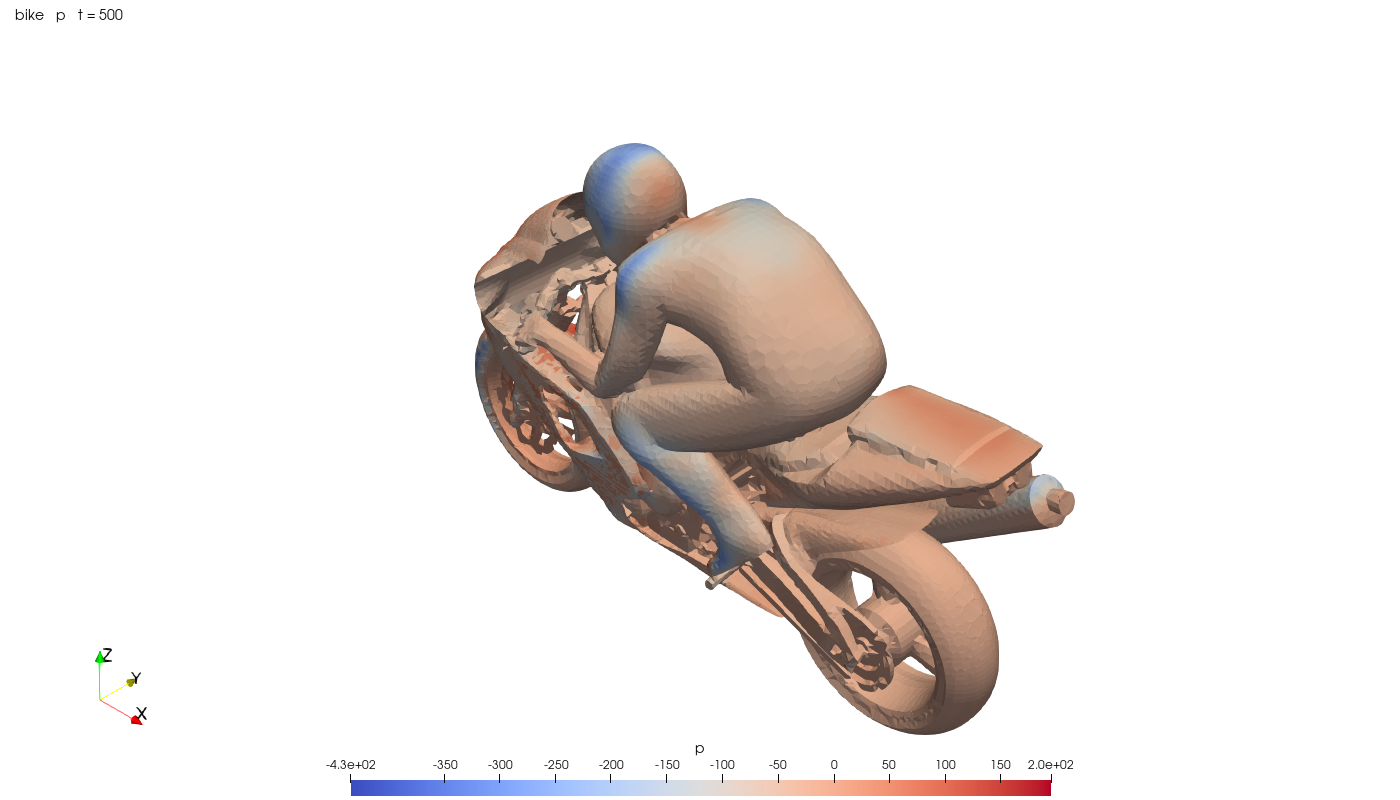
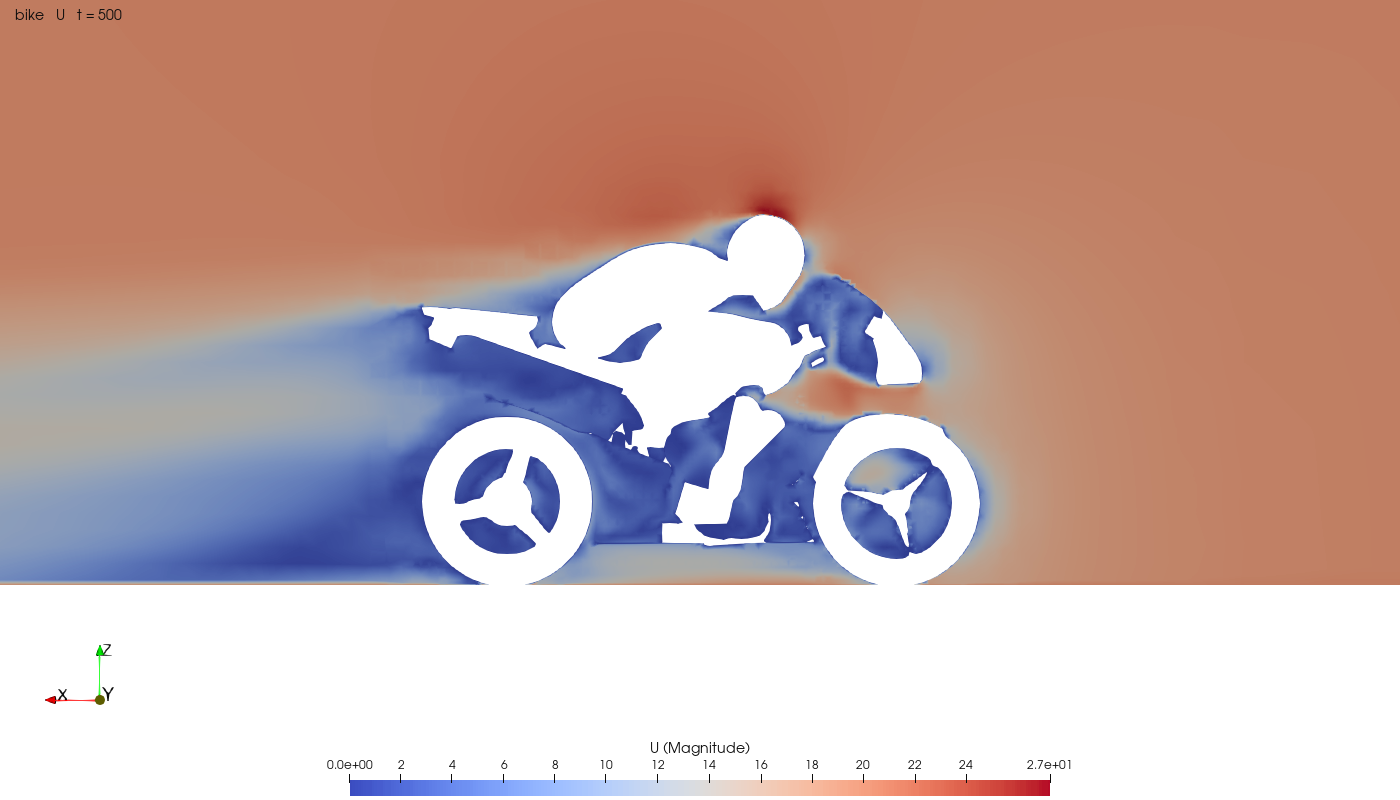
The motorBike tutorial, driven entirely through the server's tools: `create_case → import_file (geometry) → run surfaceFeatures / blockMesh → run snappyHexMesh np=6 → check_mesh → run foamRun np=6 → solver_progress → read_postprocessing (forceCoeffs) → render`.
| Surface pressure (`mode="patches"`) | Wake slice (`focus="motorBikeGroup"`) |
|---|---|
|  |  |
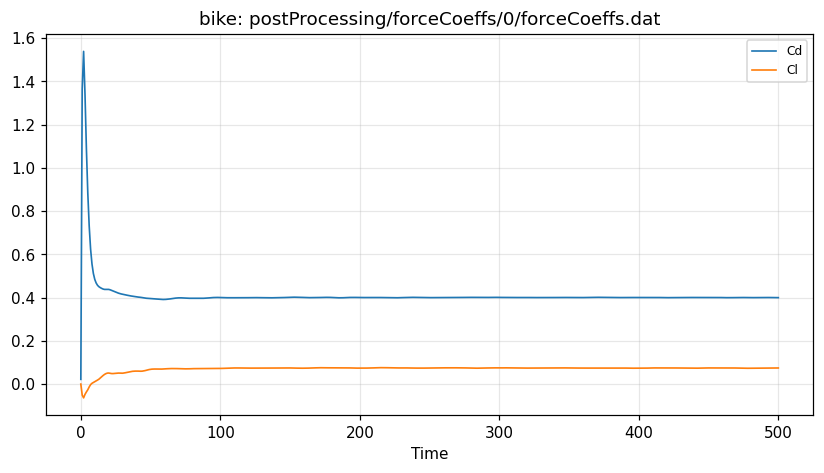
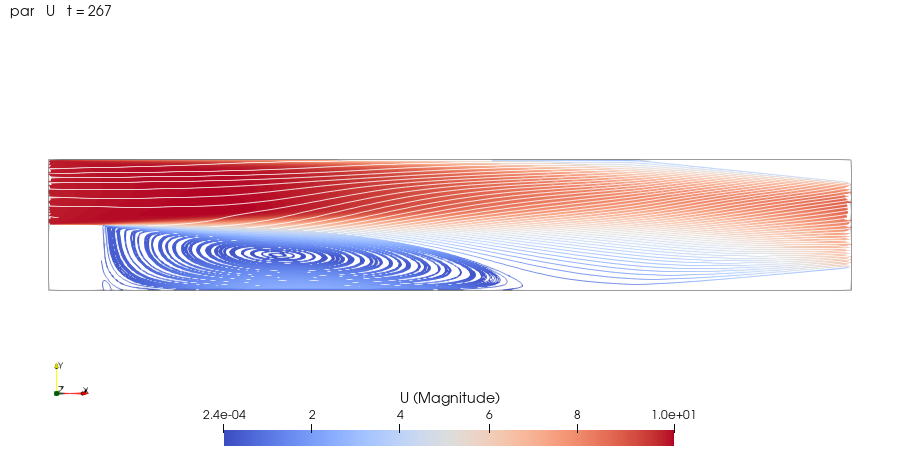
| **Drag/lift history** (`read_postprocessing(plot=True)`): Cd = 0.4007 ± 0.0003 over the last 10 % | **pitzDaily recirculation** (`mode="streamlines"`) |
|  |  |
## Why another OpenFOAM MCP?
Existing servers wrap a handful of hard-coded scenarios. This one exposes **general, composable primitives** and lets the model do the engineering, with guard-rails that make long-running CFD practical from a chat:
| | openfoam-mcp |
|---|---|
| Works with any case | Clone any of the ~260 tutorials (or your own case) and edit it; no canned geometries |
| OpenFOAM versions | openfoam.org 11+ (`foamRun`, modular solvers) **and** openfoam.com/ESI (`simpleFoam`…); on Linux, macOS, WSL or in Docker |
| Long runs | Detached jobs that **survive client/server restarts**; live progress, ETA, graceful *write-and-stop* |
| Convergence intelligence | Incremental log parsing: residual trends, Courant, continuity, *converged / diverging / failed / crashed* verdicts, plateau detection, ETA, extracted FOAM FATAL ERROR blocks |
| Sees the flow | Headless ParaView renders (slices, patches, streamlines, iso-surfaces such as Q-criterion, mesh) framed on any patch, plus residual/force plots — returned as **images** |
| Safe edits | Dictionary edits go through OpenFOAM's own `foamDictionary`; edits during a run are made visible to the solver (works around `fileModificationSkew`) |
| Parallel | `np=N` decomposes automatically (respecting the case's `decomposeParDict`), then meshing, solving, `checkMesh` and post-processing run under MPI |
| Results | Field statistics straight from ASCII **or binary** field files; postProcessing tables with text and vector columns |
| Discoverability | `foam_reference` lists valid BCs, models, function objects, solvers via `foamToC`; `list_tutorials(contains=…)` finds working examples of any keyword |
| Every client | `openfoam-mcp install` configures Claude Code, Codex, Gemini CLI, Cursor, VS Code, Windsurf, Claude Desktop and opencode — including **Windows clients talking to OpenFOAM in WSL** |
| Token-frugal | Compact JSON, elided field lists, sampled tables, grouped outputs; 25 tools |
## Install
Requirements: Python ≥ 3.10 and OpenFOAM reachable in one of the ways below. Optional: ParaView with Python for images, OpenMPI for parallel runs.
```bash
uv tool install git+https://github.com/0xFFD/openfoam-mcp # or: pipx install git+https://…
openfoam-mcp doctor # checks OpenFOAM, MPI, ParaView, workspace
openfoam-mcp install # registers the server with every MCP client it finds
```
### Platforms
The server runs on the machine (or VM) that can launch OpenFOAM, and finds it automatically:
| Platform | How OpenFOAM is reached | Notes |
|---|---|---|
| **Linux** (native) | `etc/bashrc` of distro packages (`/opt/openfoamNN`, `/usr/lib/openfoam/openfoamNNNN`) or source builds (`~/OpenFOAM/OpenFOAM-*`), or an already-sourced shell | ParaView: `sudo apt install paraview python3-paraview` or a Kitware tarball in `/opt`; add `xvfb` on headless servers |
| **macOS** (native) | [OpenFOAM.app](https://github.com/gerlero/openfoam-app) (`brew install gerlero/openfoam/openfoam`, openfoam.com builds) through its `openfoam` launcher, or source builds | ParaView: the official `ParaView-*.app` is picked up automatically |
| **macOS / any OS** (container) | `--container-image IMAGE` starts a Docker/Podman container with the workspace bind-mounted at the same path; `--container NAME` reuses one | The way to run openfoam.org releases on a Mac. Tutorials are mirrored to `~/.cache/openfoam-mcp` once; ParaView runs on the host |
| **Windows** | Install inside WSL2; `install` configures Windows-side clients to launch it through `wsl.exe` | Native Windows OpenFOAM builds are not supported |
```bash
# macOS with OpenFOAM.app
brew install gerlero/openfoam/openfoam && openfoam-mcp doctor
# any OS with Docker (example images: opencfd/openfoam-default for openfoam.com,
# or an openfoam.org image); bake the choice into every client config:
openfoam-mcp install --container-image opencfd/openfoam-default
```
`install` detects clients on the Linux side **and**, when run in WSL, on the Windows side (launching the server via `wsl.exe -d <distro> --exec …`). Restrict it with `--client codex,claude-code`, preview with `--dry-run`, undo with `openfoam-mcp uninstall`. Every modified config gets a one-time `.bak-openfoam-mcp` backup.
<details>
<summary>Manual configuration</summary>
`openfoam-mcp config` prints a snippet for each client (`--windows` for Windows clients using WSL). Examples:
**Codex CLI** — `~/.codex/config.toml`
```toml
[mcp_servers.openfoam]
command = "wsl.exe" # or the Linux python path when Codex runs inside Linux
args = ["-d", "Ubuntu-22.04", "--exec", "/home/me/.local/share/uv/tools/openfoam-mcp/bin/python", "-m", "openfoam_mcp", "serve"]
startup_timeout_sec = 30
tool_timeout_sec = 600
```
**Claude Code**
```bash
claude mcp add --scope user openfoam -- wsl.exe -d Ubuntu-22.04 --exec /home/me/.local/share/uv/tools/openfoam-mcp/bin/python -m openfoam_mcp serve
```
**Cursor / Gemini CLI / Windsurf / Claude Desktop** — `mcpServers` JSON
```json
{ "mcpServers": { "openfoam": { "command": "wsl.exe", "args": ["-d", "Ubuntu-22.04", "--exec", "/home/me/…/python", "-m", "openfoam_mcp", "serve"] } } }
```
</details>
## Tools
| Area | Tools |
|---|---|
| Environment | `foam_info`, `foam_reference` (BCs, models, function objects, solvers, app help) |
| Cases | `list_tutorials`, `create_case`, `list_cases`, `case_summary`, `clean_case`, `delete_case` |
| Files & dictionaries | `list_files`, `read_file`, `write_file`, `import_file` (geometry, resources), `get_dict`, `set_dict` |
| Running | `run` (any OpenFOAM app or `Allrun`, `np` for MPI), `job_status`, `stop_job`, `read_log`, `solver_progress` (+ residual plot) |
| Mesh | `check_mesh` (structured stats, failed checks, advice) |
| Results | `post_process`, `list_postprocessing`, `read_postprocessing` (+ plot), `field_stats`, `render` |
| Videos & GPU | `animate` (MP4/GIF from any transient run), `gpu_simulate` (GPU wind tunnel on any STL, see below) |
Typical loop the agent follows: `list_tutorials → create_case → case_summary → set_dict → run blockMesh/snappyHexMesh → check_mesh → run solver → solver_progress → render / post_process`.
### `render` modes
`auto` (whole 2-D domain, mid-plane slice in 3-D) · `slice` · `surface` · `patches` (e.g. pressure on a body) · `mesh` · `contour` (iso-surface, e.g. Q-criterion after `post_process("Q")`) · `streamlines` — with camera presets, `focus` on a patch or group, zoom, component, colour range and colormap.
### GPU wind tunnel (optional)
`gpu_simulate` runs a transient lattice Boltzmann simulation ([XLB](https://github.com/Autodesk/XLB), Apache-2.0) on an NVIDIA GPU around any STL/OBJ, renders every frame on the GPU (a glowing vorticity "smoke" view and a velocity slice) and encodes MP4 videos. It is built for what OpenFOAM on a CPU is slow at: watching unsteady wakes and vortex shedding, in minutes.
```bash
openfoam-mcp gpu-setup # one-time: dedicated env with XLB, JAX (CUDA 12) and NVIDIA Warp
```
Then ask your agent something like *"put drone.stl in a 15 m/s wind on the GPU and make a video"*. The grid is sized automatically to the free GPU memory (about 18 M cells on a 6 GB card), and `animate` turns frames into MP4 or GIF.
Honest limits:
- **Forces are indicative.** The force *calculation* is verified: on the same simulation it agrees within 2-3 % with an independent control-volume momentum balance. The simulated *flow* is the approximation: the tunnel walls are no-slip (XLB 0.3.1's far-field conditions were not stable), so blockage raises drag (every run reports its `blockage_ratio`), and thin parts such as rotor blades become blunter on the grid. For NASA's Ingenuity the GPU run gave about 21 N of drag where OpenFOAM gave 4.8 N.
- **The simulated Reynolds number is capped.** Stability needs a cell Reynolds number of about 100 or less, so a drone at Re 10^5-10^6 is simulated at Re of a few thousand to ten thousand (reported as `reynolds_simulated` next to `reynolds_physical`). Wakes look right qualitatively; use the OpenFOAM tools for engineering numbers.
- NVIDIA only (CUDA on Linux or WSL2). `gpu-setup` pins Warp 1.8.1 and JAX 0.10.2: newer Warp versions silently mis-voxelize STL bodies with XLB 0.3.1.
- The stability cap (`max_cell_reynolds`, default 100) comes from tests on spheres, boxes and Ingenuity; lower it if a run diverges.
- `mode="fast"` (D3Q19 + Smagorinsky) is about 2x faster; both modes, `ground=True` and arbitrary wind directions are covered by the GPU tests. Rendering a time-dependent OpenFOAM case with `animate` costs about 3-4 s per frame (one ParaView render each).
### Tested with
- OpenFOAM 14 (openfoam.org) on Ubuntu 22.04 / WSL2: pitzDaily (2-D, serial and parallel) and motorBike (3-D, `snappyHexMesh` and solver on 6 MPI ranks, 355 k cells).
- Clients: Claude Code (agent session through `wsl.exe`) and Codex CLI (configuration and health check).
- GPU engine: NVIDIA RTX 2060 (6 GB) under WSL2: sphere, floor-mounted bar with wind from -y, and Ingenuity (18.9 M cells, 18 min).
- Python 3.10 and 3.13.
- Not yet verified on real hardware: macOS (OpenFOAM.app), Docker/Podman, openfoam.com (ESI) builds — reports welcome.
## Configuration
| Flag | Env var | Default |
|---|---|---|
| `--workspace DIR` | `OPENFOAM_MCP_WORKSPACE` | `~/openfoam-mcp/cases` |
| `--root DIR` (repeatable) | `OPENFOAM_MCP_ROOTS` | — extra directories tools may access |
| `--bashrc FILE` | `OPENFOAM_MCP_BASHRC` | auto-detected (`/opt/openfoam*`, `/usr/lib/openfoam/*`, `~/OpenFOAM/*`) |
| `--launcher EXE` | `OPENFOAM_MCP_LAUNCHER` | auto-detected (`openfoam` from Homebrew / OpenFOAM.app, `/usr/bin/openfoamNNNN`) |
| `--container-image IMAGE` | `OPENFOAM_MCP_CONTAINER_IMAGE` | — run OpenFOAM in a container started from IMAGE |
| `--container NAME` | `OPENFOAM_MCP_CONTAINER` | — use an existing container (must mount the workspace at the same path) |
| `--container-cli EXE` | `OPENFOAM_MCP_CONTAINER_CLI` | `docker`, else `podman` |
| `--paraview-python EXE` | `OPENFOAM_MCP_PARAVIEW_PYTHON` | auto-detected (`pvpython`, system `python3`) |
| `--gpu-python EXE` | `OPENFOAM_MCP_GPU_PYTHON` | the `gpu-setup` environment, else the server's Python |
| `--no-scripts` | `OPENFOAM_MCP_NO_SCRIPTS` | scripts allowed |
| `--wait-seconds N` | `OPENFOAM_MCP_WAIT_SECONDS` | 45 — how long a tool waits before returning a job id |
| `serve --transport http --port 8765` | | stdio |
## Safety model
- File access is confined to the workspace (plus `--root` directories); `..` and absolute-path escapes are rejected.
- `run` only executes OpenFOAM applications from the installation's bin directories, or case-local `All*` scripts. There is no general shell tool.
- **This is not a sandbox.** Case scripts and OpenFOAM's `#codeStream`/coded boundary conditions can run arbitrary code by design. Use `--no-scripts` and review cases from untrusted sources; run the server under a dedicated user or container if you need isolation.
- Tools carry MCP annotations (`readOnlyHint`, `destructiveHint`) so clients can auto-approve reads and confirm deletions.
## Development
```bash
git clone https://github.com/0xFFD/openfoam-mcp && cd openfoam-mcp
uv sync
uv run pytest # unit tests run anywhere; integration tests run when OpenFOAM is found
uv run ruff check src tests
uv run openfoam-mcp serve --workspace /tmp/ws # or point an MCP inspector at it
```
CI runs the unit tests on Linux and macOS. Container mode is tested with a stand-in `docker` executable (see `tests/test_backends.py`) that runs the real pitzDaily case through the container code path; reports from real Docker/Podman and OpenFOAM.app setups are very welcome.
Project layout: `server.py` (tool definitions) · `foam.py` (installation discovery; native, launcher and container runners; app allow-list) · `jobs.py` (persistent background jobs) · `logs.py` (incremental solver-log parser and convergence verdicts) · `mesh.py` · `fields.py` · `postproc.py` · `dictparse.py` (fast read-only dictionary parser) · `render.py` + `_pv_render.py` (ParaView) · `gpu.py` + `_gpu_lbm.py` (GPU engine, video encoding) · `install.py` (client configuration).
[](https://m8ven.ai/mcp/0xffd/openfoam-mcp?s=readme)
## License
MIT. OpenFOAM is a registered trademark of OpenCFD Ltd; this project is not affiliated with or endorsed by OpenCFD or the OpenFOAM Foundation.
TDQS
Scored across 25 tools
Most tools target clearly distinct resources or actions (case creation, file I/O, dictionary editing, job control, post-processing). However, some overlap exists: read_file also reads dictionaries alongside get_dict, and job_status, solver_progress, and read_log all partially cover log/monitoring use cases. Descriptions help differentiate, but these boundaries are not perfectly crisp.
All names use snake_case, and the dominant pattern is verb_noun (e.g., create_case, list_files, read_log). Deviations are mostly conventional noun phrases for info/status tools (foam_info, job_status) and two bare verbs (run, render), which are readable but not perfectly uniform.
At 25 tools, the surface feels heavy for the domain, sitting at the upper end of the rubric's borderline range. While most tools are individually justified for a complex CFD workflow, some consolidation (e.g., monitoring/log tools, file/dict operations) could reduce the count without losing capability.
The surface covers the main OpenFOAM lifecycle: case setup, file/dictionary editing, running solvers, monitoring, mesh checking, post-processing, and rendering. Minor gaps exist, such as file-level delete/move/rename operations and dedicated mesh-generation tools (though run can invoke them), but these are workable for an agent.