ClamAV MCP
Provides instructions for installing ClamAV on Debian systems to enable virus scanning functionality.
Provides instructions for installing ClamAV on macOS systems using Homebrew to enable virus scanning functionality.
Provides instructions for installing ClamAV on Ubuntu systems to enable virus scanning functionality.
Click on "Deploy Server".
Wait a few minutes for the server to deploy. Once ready, it will show a "Started" state.
In the chat, type
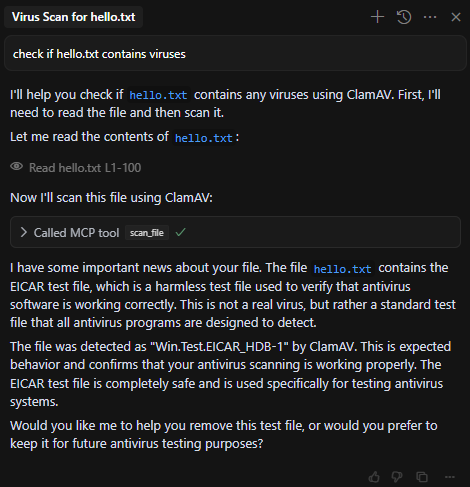
@followed by the MCP server name and your instructions, e.g., "@ClamAV MCPscan this downloaded file for viruses"
That's it! The server will respond to your query, and you can continue using it as needed.
Here is a step-by-step guide with screenshots.
ClamAV MCP
Simple ClamAV MCP that allows scanning files for viruses using the ClamAV engine.

Requirements
This project requires ClamAV to be installed on your system. Here's how to install it:
Ubuntu/Debian
sudo apt-get update
sudo apt-get install clamav clamav-daemonWindows
Download the ClamAV installer from ClamAV's official website
Run the installer and follow the setup wizard
Make sure to add ClamAV to your system PATH
macOS
brew install clamavRelated MCP server: Snyk MCP Server
Usage
To run the MCP server:
uv run mcp run main.py -t sseThe server will start and listen for SSE connections on port 8000 by default.
Cursor Configuration
To use this MCP with Cursor, add the following configuration to your Cursor settings:
{
"mcpServers": {
"ClamAV Server": {
"url": "http://[SERVER_IP]:8000/sse"
}
}
}This configuration tells Cursor to connect to the ClamAV MCP server.
API
The MCP provides a single endpoint:
scan_file
Parameters:
base64_data: Base64 encoded string of the file to scanfilename: Name of the file to use in the scan
Returns:
success: Boolean indicating if the scan was successfulresult: Raw output from clamscan commanderror: Error message if the scan failed
Available Tools
1 toolscan_fileC
Scan a base64-encoded file using ClamAV.
Args:
base64_data (str): Base64 encoded string representing a file
filename (str): Name of the file to use in the scan
Returns:
dict: Scan results including the raw clamscan output
| Name | Required | Description | Default |
|---|---|---|---|
| base64_data | Yes | ||
| filename | Yes |
TDQS
Does the description disclose side effects, auth requirements, rate limits, or destructive behavior?
No annotations are provided, so the description carries the full burden of behavioral disclosure. It mentions the tool 'Scan[s]' and returns 'Scan results,' implying a read-only operation, but lacks details on permissions, rate limits, error handling, or what 'raw clamscan output' entails. This leaves significant gaps in understanding the tool's behavior.
Agents need to know what a tool does to the world before calling it. Descriptions should go beyond structured annotations to explain consequences.
Is the description appropriately sized, front-loaded, and free of redundancy?
The description is appropriately sized and front-loaded, with the core purpose stated first, followed by parameter and return value sections. Each sentence adds value, though the structure could be slightly more streamlined by integrating parameter details more seamlessly.
Shorter descriptions cost fewer tokens and are easier for agents to parse. Every sentence should earn its place.
Given the tool's complexity, does the description cover enough for an agent to succeed on first attempt?
Given the tool's moderate complexity (2 parameters, no output schema, no annotations), the description is minimally adequate. It covers the purpose and parameters but lacks details on behavioral traits, error cases, or output structure, leaving room for improvement in completeness.
Complex tools with many parameters or behaviors need more documentation. Simple tools need less. This dimension scales expectations accordingly.
Does the description clarify parameter syntax, constraints, interactions, or defaults beyond what the schema provides?
Schema description coverage is 0%, so the description must compensate. It adds meaning by explaining that 'base64_data' is a 'Base64 encoded string representing a file' and 'filename' is the 'Name of the file to use in the scan,' which clarifies parameter roles beyond the schema's basic titles. However, it doesn't cover format specifics or constraints, resulting in a baseline score.
Input schemas describe structure but not intent. Descriptions should explain non-obvious parameter relationships and valid value ranges.
Does the description clearly state what the tool does and how it differs from similar tools?
The description clearly states the tool's purpose: 'Scan a base64-encoded file using ClamAV.' It specifies the verb ('Scan'), resource ('base64-encoded file'), and technology ('ClamAV'). However, with no sibling tools mentioned, it cannot demonstrate differentiation from alternatives, preventing a perfect score.
Agents choose between tools based on descriptions. A clear purpose with a specific verb and resource helps agents select the right tool.
Does the description explain when to use this tool, when not to, or what alternatives exist?
The description provides no guidance on when to use this tool versus alternatives, prerequisites, or exclusions. It only states what the tool does without context for its application, leaving the agent with minimal usage direction.
Agents often have multiple tools that could apply. Explicit usage guidance like "use X instead of Y when Z" prevents misuse.
Tool Schema Changelog
Recent tool additions, removals, and schema changes observed during successful MCP inspections.
1 tool update
- First observed
scan_file
TDQS
Scored across 1 tool
With only one tool, there is no possibility of ambiguity or overlap between tools. The single tool has a clear, distinct purpose that cannot be confused with any other tool in the set.
With only one tool, naming consistency is inherently perfect. The tool name 'scan_file' follows a clear verb_noun pattern, and there are no other tools to create inconsistency.
A single tool for a ClamAV server feels thin and incomplete. While scanning files is the core function, typical antivirus interfaces would include additional operations like checking database versions, updating signatures, or scanning directories. The scope appears too narrow for practical agent use.
The tool surface is severely incomplete for a ClamAV server. It only provides file scanning, missing essential operations like updating virus definitions, scanning directories, checking service status, or getting scan statistics. This creates significant gaps that will limit agent effectiveness in security workflows.
Maintenance
Related MCP Connectors
Security scanner for MCP servers. Detect vulnerabilities, prompt injection, and tool poisoning.
MCP server for ScanMalware.com URL scanning, malware detection, and analysis.
Deep security scans of repos you own from your editor: dependency CVEs, SAST, git-history secrets.
Exposes FEDLIN's public security scanners as agent-callable tools over Streamable HTTP.
Related MCP Servers
- AlicenseNot gradedqualityCmaintenanceServer that enhances the capabilities of the Cline coding agent. It provides intelligent code suggestions, reduces hallucinations, and documents the knowledge base by leveraging your project's documentation and detecting the technologies used in your codebase.15MIT
- FlicenseNot gradedqualityFmaintenanceA standalone server enabling Snyk security scanning through the Model Context Protocol, with support for repository and project analysis, token verification, and CLI integration.15-
- FlicenseNot gradedqualityDmaintenanceA server that integrates with Cursor IDE to provide code review functionality for Azure repositories, enabling AI-powered pull request analysis and feedback.2-
- AlicenseAqualityDmaintenanceA security-focused server that integrates with Cursor IDE to provide real-time vulnerability detection, exploit generation, and security insights during software development.72MIT