

F
licenseNot graded
qualityD
maintenanceEnables LLMs to interact with Hopsworks for platform management, feature store operations, model lifecycle, jobs, and integrations.
-

The LangSmith MCP Server enables language models to access and manage LangSmith observability platform data through a Model Context Protocol interface.
Conversation History: Retrieve paginated message history from conversation threads using character-based pagination
Prompt Management: List prompts with visibility filtering (public/private), get specific prompts by name, and get guidance on creating/pushing prompts
Traces & Runs: Fetch runs (LLM, chain, tool, retriever, etc.) from one or more projects with powerful Filter Query Language (FQL) support, filtering by run type, error status, root status, and trace ID; list projects with optional name filtering
Datasets & Examples: List datasets filtered by ID, type, name, or metadata; read individual datasets/examples; fetch examples with filtering, pagination, versioning, and splits; get guidance on creating datasets and updating examples
Experiments & Evaluations: List experiment projects for a given dataset with key metrics (latency p50/p99, cost, feedback stats) and get guidance on running experiments
Billing & Usage: Fetch organization billing usage (e.g., trace counts) for a specified date range with optional workspace filtering
Flexible Output & Deployment: Fetch runs in pretty, json, or raw formats; deploy via hosted HTTP endpoint, Docker container, or local PyPI installation
Character-Based Pagination: Stateless character-budget pagination (page_number, max_chars_per_page, preview_chars) keeps responses within LLM context limits
Provides seamless integration with the LangSmith observability platform, enabling language models to fetch conversation history, manage prompts, retrieve traces and runs, work with datasets and examples, and access experiment and evaluation data from LangSmith projects.
Click on "Deploy Server".
Wait a few minutes for the server to deploy. Once ready, it will show a "Started" state.
In the chat, type @ followed by the MCP server name and your instructions, e.g., "@LangSmith MCP Server fetch the history of my conversation from thread 'thread-123' in project 'my-chatbot'"
That's it! The server will respond to your query, and you can continue using it as needed.
Here is a step-by-step guide with screenshots.


A production-ready Model Context Protocol (MCP) server that provides seamless integration with the LangSmith observability platform. This server enables language models to fetch conversation history, prompts, runs and traces, datasets, experiments, and billing usage from LangSmith.
The server enables powerful capabilities including:
💬 Conversation History: "Fetch the history of my conversation from thread 'thread-123' in project 'my-chatbot'" (paginated by character budget)
📚 Prompt Management: "Get all public prompts in my workspace" / "Pull the template for the 'legal-case-summarizer' prompt"
🔍 Traces & Runs: "Fetch the latest 10 root runs from project 'alpha'" / "Get all runs for trace <uuid> (page 2 of 5)"
📊 Datasets: "List datasets of type chat" / "Read examples from dataset 'customer-support-qa'"
🧪 Experiments: "List experiments for dataset 'my-eval-set' with latency and cost metrics"
📈 Billing: "Get billing usage for September 2025"
Related MCP server: mcp-wandb
A hosted version of the LangSmith MCP Server is available over HTTP-streamable transport, so you can connect without running the server yourself:
URL: https://langsmith-mcp-server.onrender.com/mcp
Hosting: Render, built from this public repo using the project's Dockerfile.
Use it like any HTTP-streamable MCP server: point your client at the URL and send your LangSmith API key in the LANGSMITH-API-KEY header. No local install or Docker required.
Example (Cursor mcp.json):
{
  "mcpServers": {
    "LangSmith MCP (Hosted)": {
      "url": "https://langsmith-mcp-server.onrender.com/mcp",
      "headers": {
        "LANGSMITH-API-KEY": "lsv2_pt_your_api_key_here"
      }
    }
  }
}
Optional headers: LANGSMITH-WORKSPACE-ID, LANGSMITH-ENDPOINT (same as in the Docker Deployment section below).
Note: This deployed instance is intended for LangSmith Cloud. If you use a self-hosted LangSmith instance, run the server yourself and point it at your endpoint—see the Docker Deployment section below.
The LangSmith MCP Server provides the following tools for integration with LangSmith.
Tool Name | Description |
| Retrieve message history for a conversation thread. Uses char-based pagination: pass |
Tool Name | Description |
| Fetch prompts from LangSmith with optional filtering by visibility (public/private) and limit. |
| Get a specific prompt by its exact name, returning the prompt details and template. |
| Documentation-only: how to create and push prompts to LangSmith. |
Tool Name | Description |
| Fetch LangSmith runs (traces, tools, chains, etc.) from one or more projects. Supports filters (run_type, error, is_root), FQL ( |
| List LangSmith projects with optional filtering by name, dataset, and detail level (simplified vs full). |
Tool Name | Description |
| Fetch datasets with filtering by ID, type, name, name substring, or metadata. |
| Fetch examples from a dataset by dataset ID/name or example IDs, with filter, metadata, splits, and optional |
| Read a single dataset by ID or name. |
| Read a single example by ID, with optional |
| Documentation-only: how to create datasets in LangSmith. |
| Documentation-only: how to update dataset examples in LangSmith. |
Tool Name | Description |
| List experiment projects (reference projects) for a dataset. Requires |
| Documentation-only: how to run experiments and evaluations in LangSmith. |
Tool Name | Description |
| Fetch organization billing usage (e.g. trace counts) for a date range. Optional workspace filter; returns metrics with workspace names inline. |
Several tools use stateless, character-budget pagination so responses stay within a size limit and work well with LLM clients:
Where it’s used: get_thread_history and fetch_runs (when trace_id is set).
Parameters: You send page_number (1-based) on every request. Optional: max_chars_per_page (default 25000, cap 30000) and preview_chars (truncate long strings with "… (+N chars)").
Response: Each response includes page_number, total_pages, and the page payload (result for messages, runs for runs). To get more, call again with page_number = 2, then 3, up to total_pages.
Why it’s useful: Pages are built by JSON character count, not item count, so each page fits within a fixed size. No cursor or server-side state—just integer page numbers.
Install uv (a fast Python package installer and resolver):
curl -LsSf https://astral.sh/uv/install.sh | shClone this repository and navigate to the project directory:
git clone https://github.com/langchain-ai/langsmith-mcp-server.git
cd langsmith-mcp-serverOnce you have the LangSmith MCP Server, you can integrate it with various MCP-compatible clients. You have two installation options:
Install the package:
uv run pip install --upgrade langsmith-mcp-serverAdd to your client MCP config:
{
    "mcpServers": {
        "LangSmith API MCP Server": {
            "command": "/path/to/uvx",
            "args": [
                "langsmith-mcp-server"
            ],
            "env": {
                "LANGSMITH_API_KEY": "your_langsmith_api_key",
                "LANGSMITH_WORKSPACE_ID": "your_workspace_id",
                "LANGSMITH_ENDPOINT": "https://api.smith.langchain.com"
            }
        }
    }
}Add the following configuration to your MCP client settings (run from the project root so the package is found):
{
    "mcpServers": {
        "LangSmith API MCP Server": {
            "command": "/path/to/uv",
            "args": [
                "--directory",
                "/path/to/langsmith-mcp-server",
                "run",
                "langsmith_mcp_server/server.py"
            ],
            "env": {
                "LANGSMITH_API_KEY": "your_langsmith_api_key",
                "LANGSMITH_WORKSPACE_ID": "your_workspace_id",
                "LANGSMITH_ENDPOINT": "https://api.smith.langchain.com"
            }
        }
    }
}
Replace the following placeholders:
/path/to/uv: The absolute path to your uv installation (e.g., /Users/username/.local/bin/uv). You can find it with which uv.
/path/to/langsmith-mcp-server: The absolute path to the project root (the directory containing pyproject.toml and langsmith_mcp_server/).
your_langsmith_api_key: Your LangSmith API key (required).
your_workspace_id: Your LangSmith workspace ID (optional, for API keys scoped to multiple workspaces).
https://api.smith.langchain.com: The LangSmith API endpoint (optional, defaults to the standard endpoint).
Example configuration (PyPI/uvx):
{
    "mcpServers": {
        "LangSmith API MCP Server": {
            "command": "/path/to/uvx",
            "args": ["langsmith-mcp-server"],
            "env": {
                "LANGSMITH_API_KEY": "lsv2_pt_your_key_here",
                "LANGSMITH_WORKSPACE_ID": "your_workspace_id",
                "LANGSMITH_ENDPOINT": "https://api.smith.langchain.com"
            }
        }
    }
}
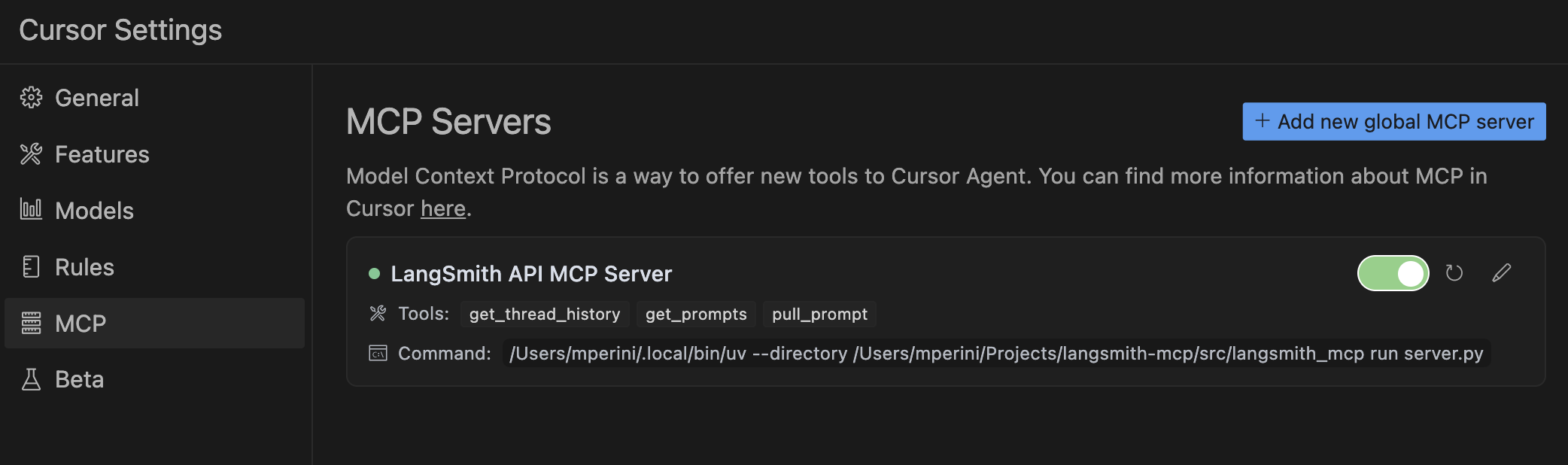
Copy this configuration into Cursor → MCP Settings (replace /path/to/uvx with the output of which uvx).
When connecting over HTTP (e.g. streamable HTTP or a hosted MCP endpoint), the server uses headers for authentication and configuration. Your MCP client must send these with each request; no environment variables are required for tool invocation.
Header | Required | Description |
| ✅ Yes | Your LangSmith API key for tool calls (list prompts, fetch runs, etc.) |
| ❌ No | Workspace ID for API keys scoped to multiple workspaces |
| ❌ No | Custom API endpoint URL (for self-hosted or EU region) |
Optional headers used only when server monitoring is enabled (for grouping traces by session):
Header | Description |
| Session or thread id; stored in trace metadata as |
| Fallback if |
| Fallback for request-scoped grouping |
Stdio transport: When running the server over stdio (e.g. uvx langsmith-mcp-server), there are no headers. The server falls back to the environment variables LANGSMITH_API_KEY, LANGSMITH_WORKSPACE_ID, and LANGSMITH_ENDPOINT in the process environment so that tool invocation still works.
Environment variables are not used for tool invocation when using HTTP (headers are). They are used for:
Stdio transport – fallback for credentials when no headers exist (see above).
Load tests – e.g. tests/load_test_sessions.py reads LANGSMITH_API_KEY from the environment (or a .env file at the project root).
Optional server monitoring – tracing tool calls to a second LangSmith instance (see below).
Variable | Used for | Description |
| Stdio fallback, load tests | LangSmith API key (when not provided via headers) |
| Stdio fallback | Workspace ID (optional) |
| Stdio fallback | Custom endpoint URL (optional) |
You can log every MCP tool call (with inputs and outputs) to a separate LangSmith project for monitoring and analytics. Set these in your environment (e.g. in a .env file at the project root; the server loads .env via python-dotenv):
Variable | Required | Description |
| Yes (to enable) | API key for the LangSmith instance used for monitoring |
| No | Endpoint URL (default: cloud) |
| No | Workspace ID for the monitoring instance |
| No | Project name for monitoring traces (default: |
| Yes (to send traces) | Set to |
Each tool run is traced with run_type="tool" and a session_id in metadata (from the mcp-session-id, x-session-id, or x-request-id header when using HTTP, or generated per request).
If you use the hosted LangSmith MCP Server, anonymous usage data is sent to a separate LangSmith project so we can iterate and improve the product.
The LangSmith MCP Server can be deployed as an HTTP server using Docker, enabling remote access via the HTTP-streamable protocol.
docker build -t langsmith-mcp-server .docker run -p 8000:8000 langsmith-mcp-serverThe API key is provided via the LANGSMITH-API-KEY header when connecting, so no environment variables are required for HTTP-streamable protocol.
Once the Docker container is running, you can connect to it using the HTTP-streamable transport. The server accepts authentication via headers:
Required header:
LANGSMITH-API-KEY: Your LangSmith API key
Optional headers:
LANGSMITH-WORKSPACE-ID: Workspace ID for API keys scoped to multiple workspaces
LANGSMITH-ENDPOINT: Custom endpoint URL (for self-hosted or EU region)
Example client configuration:
from mcp import ClientSession
from mcp.client.streamable_http import streamablehttp_client

headers = {
    "LANGSMITH-API-KEY": "lsv2_pt_your_api_key_here",
    # Optional:
    # "LANGSMITH-WORKSPACE-ID": "your_workspace_id",
    # "LANGSMITH-ENDPOINT": "https://api.smith.langchain.com",
}

async with streamablehttp_client("http://localhost:8000/mcp", headers=headers) as (read, write, _):
    async with ClientSession(read, write) as session:
        await session.initialize()
# Use the session to call tools, list prompts, etc.To add the LangSmith MCP Server to Cursor using HTTP-streamable protocol, add the following to your mcp.json configuration file:
{
  "mcpServers": {
    "HTTP-Streamable LangSmith MCP Server": {
      "url": "http://localhost:8000/mcp",
      "headers": {
        "LANGSMITH-API-KEY": "lsv2_pt_your_api_key_here"
      }
    }
  }
}
Optional headers:
{
  "mcpServers": {
    "HTTP-Streamable LangSmith MCP Server": {
      "url": "http://localhost:8000/mcp",
      "headers": {
        "LANGSMITH-API-KEY": "lsv2_pt_your_api_key_here",
        "LANGSMITH-WORKSPACE-ID": "your_workspace_id",
        "LANGSMITH-ENDPOINT": "https://api.smith.langchain.com"
      }
    }
  }
}
Make sure the server is running before connecting Cursor to it.
The server provides a health check endpoint:
curl http://localhost:8000/healthThis endpoint does not require authentication and returns "LangSmith MCP server is running" when the server is healthy.
Python 3.10+ (3.11+ recommended)
uv – install with curl -LsSf https://astral.sh/uv/install.sh | sh
LangSmith API key – from smith.langchain.com
Node.js (optional) – only if you want to use MCP Inspector to test the server (stdio or streamable-http)
git clone https://github.com/langchain-ai/langsmith-mcp-server.git
cd langsmith-mcp-server

uv sync                    # Install dependencies
uv sync --group test       # Include test dependencies (pytest, ruff, mypy)

uvx langsmith-mcp-server # Verify CLI runs (stdio)Edit code in langsmith_mcp_server/ or tests/.
Format and lint (required before committing):
make format
make lint
Run tests:
make test
# Or a single file:
make test TEST_FILE=tests/tools/test_dataset_tools.py
Type-check (optional): uv run mypy langsmith_mcp_server/
You can test the server with MCP Inspector using either stdio or streamable-http.
Start MCP Inspector:
npx @modelcontextprotocol/inspector@latestOpen http://localhost:6274 in your browser.
Connect in the Inspector:
Stdio: Choose stdio transport and configure the server command (e.g. uv run langsmith-mcp-server) and set LANGSMITH_API_KEY in the environment.
Streamable HTTP: Start the server first (uv run uvicorn langsmith_mcp_server.server:app --host 0.0.0.0 --port 8000 or Docker), then choose streamable-http, URL http://localhost:8000/mcp, and add header LANGSMITH-API-KEY = your API key.
A session-based load test opens many MCP sessions and calls the list_prompts tool in each, using langchain-mcp-adapters. Run from the CLI (no UI). The server must be running first.
uv sync --group load
# Terminal 1: start the server
uv run uvicorn langsmith_mcp_server.server:app --host 0.0.0.0 --port 8000
# Terminal 2: run the load test
uv run python tests/load_test_sessions.py --sessions 20 --calls-per-session 3
Options
Option | Default | Description |
|
| MCP endpoint URL |
| from |
|
| 10 | Number of concurrent sessions |
| 3 |
|
| off | Print step-by-step logs and first error traceback |
| — | Write a report after the run (see below) |
Report
Use --report PATH to write a JSON report after the test (e.g. --report load_test_report creates load_test_report.json with config, summary, per-session results, and first error).
uv run python tests/load_test_sessions.py --sessions 5 --report load_test_report
# Creates: load_test_report.json (in current directory)Before opening a PR:
make format and make lint pass
make test passes
New tools or behavior are documented (e.g. in CLAUDE.md if you change architecture or tools)
Error handling in tools returns {"error": "..."} rather than raising
For more detail (adding tools, code standards, troubleshooting), see CLAUDE.md.
This project is distributed under the MIT License. For detailed terms and conditions, please refer to the LICENSE file.
Made with ❤️ by the LangChain Team
Call this tool when you need to understand how to create datasets in LangSmith.
| Name | Required | Description | Default |
|---|---|---|---|
No parameters | |||
| Name | Required | Description |
|---|---|---|
| result | Yes |
Does the description disclose side effects, auth requirements, rate limits, or destructive behavior?
No annotations are provided, so the description carries full burden. It mentions 'understand how to create' which suggests this might be an informational/read-only tool rather than a mutating creation tool, but this is unclear. It doesn't disclose whether this actually creates datasets, what permissions are needed, what happens on invocation, or any behavioral traits like side effects or response format.
Agents need to know what a tool does to the world before calling it. Descriptions should go beyond structured annotations to explain consequences.
Is the description appropriately sized, front-loaded, and free of redundancy?
The description is a single sentence that's reasonably concise, but it's not front-loaded with clear purpose. The phrasing 'understand how to create' adds unnecessary ambiguity rather than directly stating what the tool does. It could be more efficiently structured to clarify intent.
Shorter descriptions cost fewer tokens and are easier for agents to parse. Every sentence should earn its place.
Given the tool's complexity, does the description cover enough for an agent to succeed on first attempt?
Given the tool has no parameters and an output schema exists, the description doesn't need to explain inputs or return values. However, for a tool named 'create_dataset' among siblings like 'list_datasets' and 'read_dataset', the description is incomplete—it fails to clarify whether this tool actually creates datasets or just provides instructions, leaving significant ambiguity about its function in context.
Complex tools with many parameters or behaviors need more documentation. Simple tools need less. This dimension scales expectations accordingly.
Does the description clarify parameter syntax, constraints, interactions, or defaults beyond what the schema provides?
The tool has 0 parameters with 100% schema description coverage, so no parameter documentation is needed. The description doesn't add parameter information, but that's appropriate here. Baseline is 4 for zero-parameter tools as the schema fully covers the absence of inputs.
Input schemas describe structure but not intent. Descriptions should explain non-obvious parameter relationships and valid value ranges.
Does the description clearly state what the tool does and how it differs from similar tools?
The description states 'create datasets in LangSmith' which provides a basic purpose, but it's vague about what 'create' entails and doesn't distinguish this tool from sibling tools like 'list_datasets' or 'read_dataset'. It essentially restates the tool name without adding specificity about what dataset creation involves.
Agents choose between tools based on descriptions. A clear purpose with a specific verb and resource helps agents select the right tool.
Does the description explain when to use this tool, when not to, or what alternatives exist?
The description says 'Call this tool when you need to understand how to create datasets' which implies usage for learning/understanding rather than actual creation, but this is ambiguous. It provides no guidance on when to use this vs alternatives like 'list_datasets' or 'read_dataset', nor does it mention prerequisites or exclusions.
Agents often have multiple tools that could apply. Explicit usage guidance like "use X instead of Y when Z" prevents misuse.
Fetch LangSmith runs (traces, tools, chains, etc.) from one or more projects using flexible filters, query language expressions, and trace-level constraints.
This is a general-purpose LangSmith run fetcher designed for analytics, trace export, and automated exploration.
It wraps client.list_runs() with complete support for:
Multiple project names or IDs
The Filter Query Language (FQL) for precise queries
Hierarchical filtering across trace trees
Sorting and result limiting
It returns raw dict objects suitable for further analysis or export.
project_name : str The project name to fetch runs from. For multiple projects, use JSON array string (e.g., '["project1", "project2"]').
trace_id : str, optional Return only runs that belong to a specific trace tree. It is a UUID string, e.g. "123e4567-e89b-12d3-a456-426614174000".
run_type : str, optional Filter runs by type (e.g. "llm", "chain", "tool", "retriever").
error : str, optional Filter by error status: "true" for errored runs, "false" for successful runs.
is_root : str, optional Filter root traces: "true" for only top-level traces, "false" to exclude roots. If not provided, returns all runs.
filter : str, optional A Filter Query Language (FQL) expression that filters runs by fields, metadata, tags, feedback, latency, or time.
─── Common field names ───
- `id`, `name`, `run_type`
- `start_time`, `end_time`
- `latency`
- `total_tokens`
- `error`
- `tags`
- `feedback_key`, `feedback_score`
- `metadata_key`, `metadata_value`
- `execution_order`

─── Supported comparators ───
- `eq`, `neq` → equal / not equal
- `gt`, `gte`, `lt`, `lte` → numeric or time comparisons
- `has` → tag or metadata contains value
- `search` → substring or full-text match
- `and`, `or`, `not` → logical operators

─── Examples ───
```python
'gt(latency, "5s")'                                # took longer than 5 seconds
'neq(error, null)'                                  # errored runs
'has(tags, "beta")'                                 # runs tagged "beta"
'and(eq(name,"ChatOpenAI"), eq(run_type,"llm"))'    # named & typed runs
'search("image classification")'                    # full-text search
```
trace_filter : str, optional Filter applied to the root run in each trace tree. Lets you select child runs based on root attributes or feedback.
Example:
```python
'and(eq(feedback_key,"user_score"), eq(feedback_score,1))'
```
→ return runs whose root trace has a user_score of 1.
tree_filter : str, optional
Filter applied to any run in the trace tree (including siblings or children).
Example:
python 'eq(name,"ExpandQuery")'
→ return runs if any run in their trace had that name.
order_by : str, default "-start_time" Sort field; prefix with "-" for descending order.
limit : int, default 50 Maximum number of runs to return.
reference_example_id : str, optional Filter runs by reference example ID. Returns only runs associated with the specified dataset example ID.
format_type : str, default "pretty"
Output format for extracted messages. Options:
- "pretty" (default): Human-readable formatted text focusing on human/AI/tool message exchanges
- "json": Pretty-printed JSON format
- "raw": Compact single-line JSON format
When format_type is set, the tool extracts messages from runs and formats them,
making it ideal for conversational AI agents that care about message exchanges
rather than full trace details. The response returns only the formatted output:
- `formatted`: Formatted string representation of messages (when format_type is provided)

When format_type is not set, the response returns:
- `runs`: Full run dataDict[str, Any]
Dictionary containing:
- If format_type is set: {"formatted": str} - formatted string representation of messages
- If format_type is not set: {"runs": List[Dict]} - list of LangSmith run dictionaries
1️⃣ Get latest 10 root runs
runs = fetch_runs("alpha-project", is_root="true", limit=10)2️⃣ Get all tool runs that errored
runs = fetch_runs("alpha-project", run_type="tool", error="true")3️⃣ Get all runs that took >5s and have tag "experimental"
runs = fetch_runs("alpha-project", filter='and(gt(latency,"5s"), has(tags,"experimental"))')4️⃣ Get all runs in a specific conversation thread
thread_id = "abc-123"
fql = f'and(in(metadata_key, ["session_id","conversation_id","thread_id"]), eq(metadata_value, "{thread_id}"))'
runs = fetch_runs("alpha-project", is_root="true", filter=fql)
5️⃣ List all runs called "extractor" whose root trace has feedback user_score=1
runs = fetch_runs(
    "alpha-project",
    filter='eq(name,"extractor")',
    trace_filter='and(eq(feedback_key,"user_score"), eq(feedback_score,1))'
)
6️⃣ List all runs that started after a timestamp and either errored or got low feedback
fql = 'and(gt(start_time,"2023-07-15T12:34:56Z"), or(neq(error,null), and(eq(feedback_key,"Correctness"), eq(feedback_score,0.0))))'
runs = fetch_runs("alpha-project", filter=fql)
7️⃣ Get formatted messages for conversational AI (default: pretty format)
# Returns formatted messages focusing on human/AI/tool exchanges
result = fetch_runs("alpha-project", limit=10, format_type="pretty")
# result["formatted"] contains human-readable formatted messages
# result["messages"] contains the raw message list
# result["runs"] contains full run data
8️⃣ Get messages in JSON format
result = fetch_runs("alpha-project", limit=10, format_type="json")
# result["messages"] contains messages as JSON array
# result["formatted"] contains pretty-printed JSON stringUse this to query LangSmith data sources dynamically.
Compose FQL strings programmatically based on your intent.
Combine filter, trace_filter, and tree_filter for hierarchical logic.
Always verify that project_name matches an existing LangSmith project.
Returned dict objects have fields like:
id, name, run_type, inputs, outputs, error, start_time, end_time, latency, metadata, feedback, etc.
If the trace is big, save it to a file (if you have this ability) and analyze it locally.
For conversational AI agents: Use format_type="pretty" (default) to get human-readable
message exchanges focusing on human/AI/tool messages rather than full trace details.
| Name | Required | Description | Default |
|---|---|---|---|
| project_name | Yes | ||
| trace_id | No | ||
| run_type | No | ||
| error | No | ||
| is_root | No | ||
| filter | No | ||
| trace_filter | No | ||
| tree_filter | No | ||
| order_by | No | -start_time | |
| limit | No | ||
| reference_example_id | No | ||
| format_type | No | pretty |
| Name | Required | Description |
|---|---|---|
No output parameters | ||
Does the description disclose side effects, auth requirements, rate limits, or destructive behavior?
With no annotations provided, the description carries full burden and does an excellent job disclosing behavioral traits. It explains the tool 'wraps client.list_runs()' with complete support for various filtering methods, describes return formats (raw dict objects), mentions output structure changes based on format_type parameter, and provides practical notes about verifying project_name and handling large traces. The only minor gap is lack of explicit rate limit or authentication requirements.
Agents need to know what a tool does to the world before calling it. Descriptions should go beyond structured annotations to explain consequences.
Is the description appropriately sized, front-loaded, and free of redundancy?
While well-structured with clear sections (PURPOSE, PARAMETERS, RETURNS, EXAMPLES, NOTES), the description is excessively long with redundant information. Some examples could be condensed, and the FQL syntax details might be overly verbose for a tool description. However, the front-loaded summary is effective, and the structure helps navigation despite the length.
Shorter descriptions cost fewer tokens and are easier for agents to parse. Every sentence should earn its place.
Given the tool's complexity, does the description cover enough for an agent to succeed on first attempt?
Given the complexity (12 parameters, no annotations, 0% schema coverage, but has output schema), the description is remarkably complete. It covers purpose, usage, all parameters with semantics, return formats, extensive examples, and agent-specific notes. The output schema existence means the description doesn't need to detail return structures, but it still explains the conditional returns based on format_type parameter.
Complex tools with many parameters or behaviors need more documentation. Simple tools need less. This dimension scales expectations accordingly.
Does the description clarify parameter syntax, constraints, interactions, or defaults beyond what the schema provides?
With 0% schema description coverage and 12 parameters, the description compensates fully by providing extensive parameter documentation. Each parameter gets clear explanations with examples, especially for complex ones like filter (with FQL syntax details), trace_filter, tree_filter, and format_type. The description adds significant value beyond the bare schema by explaining parameter interactions and practical usage.
Input schemas describe structure but not intent. Descriptions should explain non-obvious parameter relationships and valid value ranges.
Does the description clearly state what the tool does and how it differs from similar tools?
The description clearly states the tool 'fetches LangSmith runs' with specific resources (traces, tools, chains, etc.) and methods (flexible filters, query language). It explicitly distinguishes this as a 'general-purpose LangSmith run fetcher' for analytics and trace export, differentiating it from sibling tools like list_datasets or list_projects that handle different resource types.
Agents choose between tools based on descriptions. A clear purpose with a specific verb and resource helps agents select the right tool.
Does the description explain when to use this tool, when not to, or what alternatives exist?
The description provides explicit guidance on when to use this tool versus alternatives. It states it's for 'analytics, trace export, and automated exploration' and specifically advises 'For conversational AI agents: Use format_type="pretty" to get human-readable message exchanges.' It also distinguishes from sibling tools by focusing on runs rather than datasets, prompts, or experiments.
Agents often have multiple tools that could apply. Explicit usage guidance like "use X instead of Y when Z" prevents misuse.
Get a specific prompt by its exact name.
Args: prompt_name (str): The exact name of the prompt to retrieve ctx: FastMCP context (automatically provided)
Returns: Dict[str, Any]: Dictionary containing the prompt details and template, or an error message if the prompt cannot be found
| Name | Required | Description | Default |
|---|---|---|---|
| prompt_name | Yes |
| Name | Required | Description |
|---|---|---|
No output parameters | ||
Does the description disclose side effects, auth requirements, rate limits, or destructive behavior?
With no annotations provided, the description carries the full burden. It discloses that the tool retrieves prompt details and templates, and may return an error if the prompt is not found. However, it lacks details on authentication needs, rate limits, or whether the operation is idempotent.
Agents need to know what a tool does to the world before calling it. Descriptions should go beyond structured annotations to explain consequences.
Is the description appropriately sized, front-loaded, and free of redundancy?
The description is front-loaded with the core purpose, followed by structured sections for Args and Returns. Every sentence adds value: the first states the action, the Args clarify the parameter, and the Returns explain the output and error handling.
Shorter descriptions cost fewer tokens and are easier for agents to parse. Every sentence should earn its place.
Given the tool's complexity, does the description cover enough for an agent to succeed on first attempt?
Given the tool's simplicity (1 parameter, no annotations, but has an output schema), the description is mostly complete. It explains the purpose, parameter, and return behavior. However, it could improve by addressing authentication or error specifics, though the output schema may cover return values.
Complex tools with many parameters or behaviors need more documentation. Simple tools need less. This dimension scales expectations accordingly.
Does the description clarify parameter syntax, constraints, interactions, or defaults beyond what the schema provides?
The input schema has 0% description coverage, but the description compensates by explaining that 'prompt_name' must be the exact name of the prompt to retrieve. It adds meaningful context beyond the bare schema, though it does not specify format constraints (e.g., case sensitivity).
Input schemas describe structure but not intent. Descriptions should explain non-obvious parameter relationships and valid value ranges.
Does the description clearly state what the tool does and how it differs from similar tools?
The description clearly states the specific action ('Get a specific prompt') and resource ('by its exact name'), distinguishing it from sibling tools like 'list_prompts' (which lists all prompts) and 'push_prompt' (which creates/updates prompts). The verb 'retrieve' reinforces the read-only nature.
Agents choose between tools based on descriptions. A clear purpose with a specific verb and resource helps agents select the right tool.
Does the description explain when to use this tool, when not to, or what alternatives exist?
The description implies when to use this tool (to retrieve a specific prompt by exact name) versus alternatives like 'list_prompts' (for browsing all prompts). However, it does not explicitly state when NOT to use it or mention other potential alternatives like 'push_prompt' for creating prompts.
Agents often have multiple tools that could apply. Explicit usage guidance like "use X instead of Y when Z" prevents misuse.
Fetch LangSmith datasets.
Note: If no arguments are provided, all datasets will be returned.
Args: dataset_ids (Optional[str]): Dataset IDs to filter by as JSON array string (e.g., '["id1", "id2"]') or single ID data_type (Optional[str]): Filter by dataset data type (e.g., 'chat', 'kv') dataset_name (Optional[str]): Filter by exact dataset name dataset_name_contains (Optional[str]): Filter by substring in dataset name metadata (Optional[str]): Filter by metadata as JSON object string (e.g., '{"key": "value"}') limit (int): Max number of datasets to return (default: 20) ctx: FastMCP context (automatically provided)
Returns: Dict[str, Any]: Dictionary containing the datasets and metadata, or an error message if the datasets cannot be retrieved
| Name | Required | Description | Default |
|---|---|---|---|
| dataset_ids | No | ||
| data_type | No | ||
| dataset_name | No | ||
| dataset_name_contains | No | ||
| metadata | No | ||
| limit | No |
| Name | Required | Description |
|---|---|---|
No output parameters | ||
Does the description disclose side effects, auth requirements, rate limits, or destructive behavior?
With no annotations provided, the description carries full burden. It discloses that it's a read operation ('Fetch'), mentions default behavior, and describes the return format. However, it doesn't address important behavioral aspects like pagination (beyond the limit parameter), rate limits, authentication requirements, or error conditions beyond the generic 'error message' mention.
Agents need to know what a tool does to the world before calling it. Descriptions should go beyond structured annotations to explain consequences.
Is the description appropriately sized, front-loaded, and free of redundancy?
The description is well-structured with clear sections (purpose statement, note, args, returns) and uses bullet-like formatting for parameters. While comprehensive, it could be slightly more concise by integrating the note about default behavior into the main purpose statement rather than as a separate line.
Shorter descriptions cost fewer tokens and are easier for agents to parse. Every sentence should earn its place.
Given the tool's complexity, does the description cover enough for an agent to succeed on first attempt?
Given the tool's moderate complexity (6 parameters, no annotations, but has output schema), the description is reasonably complete. It covers purpose, usage note, all parameters with semantics, and return format. The output schema existence means the description doesn't need to detail return values, but it still provides a high-level overview ('Dictionary containing the datasets and metadata'), making it adequately comprehensive.
Complex tools with many parameters or behaviors need more documentation. Simple tools need less. This dimension scales expectations accordingly.
Does the description clarify parameter syntax, constraints, interactions, or defaults beyond what the schema provides?
With 0% schema description coverage, the description fully compensates by providing detailed semantic explanations for all 6 parameters. Each parameter is clearly explained with examples (e.g., 'JSON array string', 'e.g., "chat", "kv"', 'Filter by exact dataset name'), format requirements, and the limit's default value, adding substantial value beyond the bare schema.
Input schemas describe structure but not intent. Descriptions should explain non-obvious parameter relationships and valid value ranges.
Does the description clearly state what the tool does and how it differs from similar tools?
The description clearly states the tool's purpose as 'Fetch LangSmith datasets' with a specific verb ('Fetch') and resource ('LangSmith datasets'), making it immediately understandable. However, it doesn't explicitly differentiate from sibling tools like 'list_experiments' or 'list_projects' that likely have similar list/fetch patterns for different resource types.
Agents choose between tools based on descriptions. A clear purpose with a specific verb and resource helps agents select the right tool.
Does the description explain when to use this tool, when not to, or what alternatives exist?
The description provides clear context about default behavior ('If no arguments are provided, all datasets will be returned'), which helps guide usage. However, it doesn't explicitly mention when to use this tool versus alternatives like 'read_dataset' (which likely fetches a single dataset) or 'create_dataset', leaving some sibling differentiation incomplete.
Agents often have multiple tools that could apply. Explicit usage guidance like "use X instead of Y when Z" prevents misuse.
Fetch examples from a LangSmith dataset with advanced filtering options.
Note: Either dataset_id, dataset_name, or example_ids must be provided. If multiple are provided, they are used in order of precedence: example_ids, dataset_id, dataset_name.
Args: dataset_id (Optional[str]): Dataset ID to retrieve examples from dataset_name (Optional[str]): Dataset name to retrieve examples from example_ids (Optional[str]): Specific example IDs as JSON array string (e.g., '["id1", "id2"]') or single ID limit (int): Maximum number of examples to return (default: 10) offset (int): Number of examples to skip (default: 0) filter (Optional[str]): Filter string using LangSmith query syntax (e.g., 'has(metadata, {"key": "value"})') metadata (Optional[str]): Metadata to filter by as JSON object string (e.g., '{"key": "value"}') splits (Optional[str]): Dataset splits as JSON array string (e.g., '["train", "test"]') or single split inline_s3_urls (Optional[str]): Whether to inline S3 URLs: "true" or "false" (default: SDK default if not specified) include_attachments (Optional[str]): Whether to include attachments: "true" or "false" (default: SDK default if not specified) as_of (Optional[str]): Dataset version tag OR ISO timestamp to retrieve examples as of that version/time ctx: FastMCP context (automatically provided)
Returns: Dict[str, Any]: Dictionary containing the examples and metadata, or an error message if the examples cannot be retrieved
| Name | Required | Description | Default |
|---|---|---|---|
| dataset_id | No | ||
| dataset_name | No | ||
| example_ids | No | ||
| filter | No | ||
| metadata | No | ||
| splits | No | ||
| inline_s3_urls | No | ||
| include_attachments | No | ||
| as_of | No | ||
| limit | No | ||
| offset | No |
| Name | Required | Description |
|---|---|---|
No output parameters | ||
Does the description disclose side effects, auth requirements, rate limits, or destructive behavior?
No annotations are provided, so the description carries the full burden. It mentions the tool fetches with filtering and returns a dictionary or error, but lacks details on permissions, rate limits, side effects, or pagination behavior. The description adds some context (e.g., precedence rules, default behaviors) but doesn't fully disclose behavioral traits for a complex tool with 11 parameters.
Agents need to know what a tool does to the world before calling it. Descriptions should go beyond structured annotations to explain consequences.
Is the description appropriately sized, front-loaded, and free of redundancy?
The description is well-structured with a purpose statement, usage note, parameter details, and return info. It's appropriately sized for a complex tool, but the parameter list is lengthy (though necessary). Every sentence adds value, and it's front-loaded with key information.
Shorter descriptions cost fewer tokens and are easier for agents to parse. Every sentence should earn its place.
Given the tool's complexity, does the description cover enough for an agent to succeed on first attempt?
Given the tool's complexity (11 parameters, no annotations, 0% schema coverage), the description is quite complete. It covers purpose, usage rules, parameter semantics, and return values. An output schema exists, so return details aren't needed. The main gap is lack of behavioral context like permissions or side effects, preventing a perfect score.
Complex tools with many parameters or behaviors need more documentation. Simple tools need less. This dimension scales expectations accordingly.
Does the description clarify parameter syntax, constraints, interactions, or defaults beyond what the schema provides?
Schema description coverage is 0%, so the description must compensate. It provides detailed semantics for all 11 parameters, including data types, defaults, formats (e.g., JSON strings), and examples. This goes well beyond what the bare schema offers, making parameter usage clear.
Input schemas describe structure but not intent. Descriptions should explain non-obvious parameter relationships and valid value ranges.
Does the description clearly state what the tool does and how it differs from similar tools?
The description clearly states the tool's purpose: 'Fetch examples from a LangSmith dataset with advanced filtering options.' It specifies the verb ('fetch'), resource ('examples'), and scope ('LangSmith dataset'), and distinguishes it from siblings like 'read_example' (singular) and 'list_datasets' (different resource).
Agents choose between tools based on descriptions. A clear purpose with a specific verb and resource helps agents select the right tool.
Does the description explain when to use this tool, when not to, or what alternatives exist?
The description provides explicit guidance on when to use this tool: 'Note: Either dataset_id, dataset_name, or example_ids must be provided.' It also clarifies precedence rules for multiple inputs. However, it doesn't explicitly contrast with alternatives like 'read_example' or 'update_examples', which would be needed for a perfect score.
Agents often have multiple tools that could apply. Explicit usage guidance like "use X instead of Y when Z" prevents misuse.
List LangSmith experiment projects (reference projects) with mandatory dataset filtering.
Fetches experiment projects from LangSmith that are associated with a specific dataset. These are projects used for model evaluation and comparison. Requires either a dataset ID or dataset name to filter experiments.
This function provides a convenient way to list and explore LangSmith experiment projects. It supports:
Filtering experiments by reference dataset (mandatory)
Filtering projects by name (partial match)
Limiting the number of results
Automatically extracting deployment IDs from nested project data
Returns simplified project information with key metrics (latency, cost, feedback stats)
reference_dataset_id : str, optional
The ID of the reference dataset to filter experiments by.
Either this OR reference_dataset_name must be provided (but not both).
reference_dataset_name : str, optional
The name of the reference dataset to filter experiments by.
Either this OR reference_dataset_id must be provided (but not both).
limit : int, default 5 Maximum number of experiments to return. This can be adjusted by agents or users based on their needs.
project_name : str, optional
Filter projects by name using partial matching. If provided, only projects
whose names contain this string will be returned.
Example: project_name="Chat" will match "Chat-LangChain", "ChatBot", etc.
Dict[str, Any] A dictionary containing an "experiments" key with a list of simplified experiment project dictionaries:
```python
{
    "experiments": [
        {
            "name": "Experiment-Chat-LangChain",
            "experiment_id": "787d5165-f110-43ff-a3fb-66ea1a70c971",
            "feedback_stats": {...},  # Feedback statistics if available
            "latency_p50_seconds": 1.626,  # 50th percentile latency in seconds
            "latency_p99_seconds": 2.390,   # 99th percentile latency in seconds
            "total_cost": 0.00013005,       # Total cost in dollars
            "prompt_cost": 0.00002085,      # Prompt cost in dollars
            "completion_cost": 0.0001092,   # Completion cost in dollars
            "agent_deployment_id": "deployment-123"  # Only if available
        },
        ...
    ]
}
```1️⃣ List experiments for a dataset by ID
experiments = list_experiments(reference_dataset_id="f5ca13c6-96ad-48ba-a432-ebb6bf94528f")2️⃣ List experiments for a dataset by name
experiments = list_experiments(reference_dataset_name="my-dataset", limit=10)3️⃣ Find experiments with specific name pattern
experiments = list_experiments(
    reference_dataset_id="f5ca13c6-96ad-48ba-a432-ebb6bf94528f",
    project_name="Chat",
    limit=1
)Returns simplified experiment information with key metrics (latency, cost, feedback stats)
The agent_deployment_id field is automatically extracted from nested
project data when available, making it easy to identify agent deployments
Experiments are filtered to include only reference projects (associated with datasets)
The function uses name_contains for filtering, so partial matches work
You must provide either reference_dataset_id OR reference_dataset_name, but not both
Experiment projects are used for model evaluation and comparison across different runs
| Name | Required | Description | Default |
|---|---|---|---|
| reference_dataset_id | No | ||
| reference_dataset_name | No | ||
| limit | No | ||
| project_name | No |
| Name | Required | Description |
|---|---|---|
No output parameters | ||
Does the description disclose side effects, auth requirements, rate limits, or destructive behavior?
With no annotations provided, the description carries full burden and delivers comprehensive behavioral disclosure. It explains what the tool does (filters experiments by dataset, supports partial name matching, extracts deployment IDs), what it returns (simplified project information with key metrics), and operational constraints (mandatory dataset filtering, either/or parameter logic, default limit of 5). No contradictions exist since annotations are absent.
Agents need to know what a tool does to the world before calling it. Descriptions should go beyond structured annotations to explain consequences.
Is the description appropriately sized, front-loaded, and free of redundancy?
The description is well-structured with clear sections (PURPOSE, PARAMETERS, RETURNS, EXAMPLES, NOTES) but could be more concise. Some information is repeated across sections (e.g., mandatory dataset filtering appears multiple times). However, every sentence adds value, and the structure helps agents quickly find relevant information.
Shorter descriptions cost fewer tokens and are easier for agents to parse. Every sentence should earn its place.
Given the tool's complexity, does the description cover enough for an agent to succeed on first attempt?
Given the tool's complexity (4 parameters, no annotations, 0% schema coverage) and presence of an output schema, the description provides complete context. It explains the tool's purpose, usage guidelines, parameter semantics, return format (with detailed example), and behavioral characteristics. The output schema existence means the description doesn't need to exhaustively document return values, but it still provides helpful context about what metrics are included.
Complex tools with many parameters or behaviors need more documentation. Simple tools need less. This dimension scales expectations accordingly.
Does the description clarify parameter syntax, constraints, interactions, or defaults beyond what the schema provides?
With 0% schema description coverage, the description fully compensates by providing detailed parameter documentation. Each parameter gets clear explanations of purpose, constraints (e.g., 'either this OR reference_dataset_name must be provided'), defaults ('limit: int, default 5'), and examples. The description adds significant value beyond the bare schema, explaining the either/or relationship between dataset parameters and partial matching behavior for project_name.
Input schemas describe structure but not intent. Descriptions should explain non-obvious parameter relationships and valid value ranges.
Does the description clearly state what the tool does and how it differs from similar tools?
The description clearly states the tool's purpose: 'List LangSmith experiment projects (reference projects) with mandatory dataset filtering.' It specifies the verb ('List'), resource ('LangSmith experiment projects'), and scope ('with mandatory dataset filtering'). It distinguishes from siblings like 'list_projects' by focusing specifically on experiment projects used for model evaluation.
Agents choose between tools based on descriptions. A clear purpose with a specific verb and resource helps agents select the right tool.
Does the description explain when to use this tool, when not to, or what alternatives exist?
The description provides explicit guidance on when to use this tool: 'Requires either a dataset ID or dataset name to filter experiments.' It distinguishes from alternatives by noting experiments are 'reference projects associated with datasets' and 'used for model evaluation and comparison.' The 'NOTES FOR AGENTS' section reinforces usage rules like mandatory dataset filtering.
Agents often have multiple tools that could apply. Explicit usage guidance like "use X instead of Y when Z" prevents misuse.
List LangSmith projects with optional filtering and detail level control.
Fetches projects from LangSmith, optionally filtering by name and controlling the level of detail returned. Can return either simplified project information or full project details. In case a dataset id or name is provided, you don't need to provide a project name.
This function provides a convenient way to list and explore LangSmith projects. It supports:
Filtering projects by name (partial match)
Limiting the number of results
Choosing between simplified or full project information
Automatically extracting deployment IDs from nested project data
limit : int, default 5 Maximum number of projects to return (as string, e.g., "5"). This can be adjusted by agents or users based on their needs.
project_name : str, optional
Filter projects by name using partial matching. If provided, only projects
whose names contain this string will be returned.
Example: project_name="Chat" will match "Chat-LangChain", "ChatBot", etc.
more_info : str, default "false"
Controls the level of detail returned:
- "false" (default): Returns simplified project information with only
essential fields: name, project_id, and agent_deployment_id (if available)
- "true": Returns full project details as returned by the LangSmith API
reference_dataset_id : str, optional
The ID of the reference dataset to filter projects by.
Either this OR reference_dataset_name must be provided (but not both).
reference_dataset_name : str, optional
The name of the reference dataset to filter projects by.
Either this OR reference_dataset_id must be provided (but not both).
List[dict]
A list of project dictionaries. The structure depends on more_info:
**When `more_info=False` (simplified):**
```python
[
    {
        "name": "Chat-LangChain",
        "project_id": "787d5165-f110-43ff-a3fb-66ea1a70c971",
        "agent_deployment_id": "deployment-123"  # Only if available
    },
    ...
]
```

**When `more_info=True` (full details):**
Returns complete project objects with all fields from the LangSmith API,
including metadata, settings, statistics, and nested structures.1️⃣ List first 5 projects (simplified)
projects = list_projects(limit="5")2️⃣ Search for projects with "Chat" in the name
projects = list_projects(project_name="Chat", limit="10")3️⃣ Get full project details
projects = list_projects(limit="3", more_info="true")4️⃣ Find a specific project with full details
projects = list_projects(project_name="MyProject", more_info="true", limit="1")Use more_info="false" for quick project discovery and listing
Use more_info="true" when you need detailed project information
The agent_deployment_id field is automatically extracted from nested
project data when available, making it easy to identify agent deployments
Projects are filtered to exclude reference projects by default
The function uses name_contains for filtering, so partial matches work
| Name | Required | Description | Default |
|---|---|---|---|
| limit | No | ||
| project_name | No | ||
| more_info | No | false | |
| reference_dataset_id | No | ||
| reference_dataset_name | No |
| Name | Required | Description |
|---|---|---|
No output parameters | ||
Does the description disclose side effects, auth requirements, rate limits, or destructive behavior?
Since no annotations are provided, the description carries the full burden of behavioral disclosure. It does this excellently by explaining: default filtering behavior ('Projects are filtered to exclude reference projects by default'), how filtering works ('uses `name_contains` for filtering, so partial matches work'), and what happens with nested data ('The `agent_deployment_id` field is automatically extracted from nested project data when available').
Agents need to know what a tool does to the world before calling it. Descriptions should go beyond structured annotations to explain consequences.
Is the description appropriately sized, front-loaded, and free of redundancy?
The description is well-structured with clear sections (PURPOSE, PARAMETERS, RETURNS, EXAMPLES, NOTES) but is quite lengthy. While every section adds value, some redundancy exists (e.g., the initial summary repeats what's in the PURPOSE section). It could be more concise while maintaining clarity.
Shorter descriptions cost fewer tokens and are easier for agents to parse. Every sentence should earn its place.
Given the tool's complexity, does the description cover enough for an agent to succeed on first attempt?
Given the tool's complexity (5 parameters, filtering logic, detail levels) and the presence of an output schema, the description is exceptionally complete. It explains the tool's behavior thoroughly, documents all parameters, provides return format examples for both detail levels, includes practical examples, and offers agent guidance. The output schema existence means the description doesn't need to exhaustively document return structures.
Complex tools with many parameters or behaviors need more documentation. Simple tools need less. This dimension scales expectations accordingly.
Does the description clarify parameter syntax, constraints, interactions, or defaults beyond what the schema provides?
With 0% schema description coverage, the description fully compensates by providing comprehensive parameter documentation. Each of the 5 parameters is clearly explained with purpose, default values, examples, and usage constraints (e.g., 'Either this OR `reference_dataset_name` must be provided but not both'). The description adds significant value beyond what the bare schema provides.
Input schemas describe structure but not intent. Descriptions should explain non-obvious parameter relationships and valid value ranges.
Does the description clearly state what the tool does and how it differs from similar tools?
The description clearly states the tool's purpose: 'List LangSmith projects with optional filtering and detail level control.' It specifies the exact resource (LangSmith projects) and actions (list, filter, control detail). It distinguishes itself from siblings like list_datasets or list_experiments by focusing specifically on projects.
Agents choose between tools based on descriptions. A clear purpose with a specific verb and resource helps agents select the right tool.
Does the description explain when to use this tool, when not to, or what alternatives exist?
The description provides explicit guidance on when to use this tool vs alternatives. The 'NOTES FOR AGENTS' section advises 'Use `more_info="false"` for quick project discovery and listing' and 'Use `more_info="true"` when you need detailed project information.' It also mentions sibling tools implicitly by specifying this is for projects, not datasets or other resources.
Agents often have multiple tools that could apply. Explicit usage guidance like "use X instead of Y when Z" prevents misuse.
Fetch prompts from LangSmith with optional filtering.
Args: is_public (str): Filter by prompt visibility - "true" for public prompts, "false" for private prompts (default: "false") limit (int): Maximum number of prompts to return (default: 20)
Returns: Dict[str, Any]: Dictionary containing the prompts and metadata
| Name | Required | Description | Default |
|---|---|---|---|
| is_public | No | false | |
| limit | No |
| Name | Required | Description |
|---|---|---|
No output parameters | ||
Does the description disclose side effects, auth requirements, rate limits, or destructive behavior?
With no annotations provided, the description carries full burden but only states it 'fetches' with filtering. It lacks critical behavioral details such as authentication requirements, rate limits, pagination behavior (beyond the 'limit' parameter), error handling, or whether it's read-only (implied but not explicit). This is inadequate for a tool with potential complexity.
Agents need to know what a tool does to the world before calling it. Descriptions should go beyond structured annotations to explain consequences.
Is the description appropriately sized, front-loaded, and free of redundancy?
The description is efficiently structured with a clear opening sentence followed by well-organized 'Args' and 'Returns' sections. Every sentence adds value without redundancy, making it easy to parse and understand quickly.
Shorter descriptions cost fewer tokens and are easier for agents to parse. Every sentence should earn its place.
Given the tool's complexity, does the description cover enough for an agent to succeed on first attempt?
Given the tool has an output schema (returns a dictionary with prompts and metadata), the description doesn't need to detail return values. However, with no annotations and only basic parameter info, it misses behavioral context like auth or pagination. For a simple fetch tool, it's minimally adequate but leaves gaps in operational guidance.
Complex tools with many parameters or behaviors need more documentation. Simple tools need less. This dimension scales expectations accordingly.
Does the description clarify parameter syntax, constraints, interactions, or defaults beyond what the schema provides?
The description adds significant value beyond the input schema, which has 0% description coverage. It explains that 'is_public' filters by prompt visibility with specific string values ('true'/'false') and default, and 'limit' sets the maximum number of prompts with its default. This compensates well for the schema's lack of descriptions.
Input schemas describe structure but not intent. Descriptions should explain non-obvious parameter relationships and valid value ranges.
Does the description clearly state what the tool does and how it differs from similar tools?
The description clearly states the verb ('Fetch') and resource ('prompts from LangSmith') with optional filtering, making the purpose understandable. However, it doesn't explicitly differentiate from sibling tools like 'get_prompt_by_name' or 'push_prompt', which would require more specific scope definition.
Agents choose between tools based on descriptions. A clear purpose with a specific verb and resource helps agents select the right tool.
Does the description explain when to use this tool, when not to, or what alternatives exist?
No guidance is provided on when to use this tool versus alternatives like 'get_prompt_by_name' for specific prompts or 'push_prompt' for creating prompts. The description mentions filtering but doesn't clarify use cases or prerequisites, leaving the agent without contextual direction.
Agents often have multiple tools that could apply. Explicit usage guidance like "use X instead of Y when Z" prevents misuse.
Call this tool when you need to understand how to create and push prompts to LangSmith.
| Name | Required | Description | Default |
|---|---|---|---|
No parameters | |||
| Name | Required | Description |
|---|---|---|
| result | Yes |
Does the description disclose side effects, auth requirements, rate limits, or destructive behavior?
No annotations are provided, so the description carries the full burden of behavioral disclosure. It vaguely suggests the tool helps 'understand' something, which doesn't clarify if it's a read-only operation, performs mutations, requires authentication, or has side effects. This leaves significant gaps in transparency for a tool that might involve creating or pushing prompts.
Agents need to know what a tool does to the world before calling it. Descriptions should go beyond structured annotations to explain consequences.
Is the description appropriately sized, front-loaded, and free of redundancy?
The description is a single sentence that is somewhat front-loaded but inefficiently worded; it could be more direct (e.g., 'Provides guidance on creating and pushing prompts to LangSmith'). While not overly verbose, it doesn't maximize clarity or structure for quick comprehension.
Shorter descriptions cost fewer tokens and are easier for agents to parse. Every sentence should earn its place.
Given the tool's complexity, does the description cover enough for an agent to succeed on first attempt?
Given the tool's potential complexity (involving prompt creation/pushing) and the presence of an output schema, the description is incomplete. It fails to explain what the tool actually returns or does operationally, relying too much on the output schema without providing enough context for an agent to understand its role among siblings or its behavioral impact.
Complex tools with many parameters or behaviors need more documentation. Simple tools need less. This dimension scales expectations accordingly.
Does the description clarify parameter syntax, constraints, interactions, or defaults beyond what the schema provides?
The input schema has 0 parameters with 100% coverage, so no parameter documentation is needed. The description doesn't add parameter details, which is appropriate here. A baseline of 4 is applied as it adequately handles the lack of parameters without introducing confusion.
Input schemas describe structure but not intent. Descriptions should explain non-obvious parameter relationships and valid value ranges.
Does the description clearly state what the tool does and how it differs from similar tools?
The description states the tool's purpose as helping 'understand how to create and push prompts to LangSmith,' which is vague and instructional rather than specifying what the tool itself does. It doesn't clearly state a specific action the tool performs (e.g., 'creates and pushes a prompt'), making it tautological to the name 'push_prompt' without concrete differentiation from siblings like 'list_prompts' or 'get_prompt_by_name'.
Agents choose between tools based on descriptions. A clear purpose with a specific verb and resource helps agents select the right tool.
Does the description explain when to use this tool, when not to, or what alternatives exist?
The description provides minimal guidance by saying 'Call this tool when you need to understand how to create and push prompts to LangSmith,' which implies usage for learning purposes but doesn't specify when to use it versus alternatives like 'list_prompts' for viewing prompts or 'create_dataset' for related tasks. There's no explicit when/when-not advice or clear context for selection among siblings.
Agents often have multiple tools that could apply. Explicit usage guidance like "use X instead of Y when Z" prevents misuse.
Read a specific dataset from LangSmith.
Note: Either dataset_id or dataset_name must be provided to identify the dataset. If both are provided, dataset_id takes precedence.
Args: dataset_id (Optional[str]): Dataset ID to retrieve dataset_name (Optional[str]): Dataset name to retrieve ctx: FastMCP context (automatically provided)
Returns: Dict[str, Any]: Dictionary containing the dataset details, or an error message if the dataset cannot be retrieved
Example in case you need to create a separate python script to read a dataset: ```python from langsmith import Client
client = Client()
dataset = client.read_dataset(dataset_name="My Dataset")
# Or by ID:
# dataset = client.read_dataset(dataset_id="dataset-id-here")
```| Name | Required | Description | Default |
|---|---|---|---|
| dataset_id | No | ||
| dataset_name | No |
| Name | Required | Description |
|---|---|---|
No output parameters | ||
Does the description disclose side effects, auth requirements, rate limits, or destructive behavior?
No annotations are provided, so the description carries the full burden. It discloses that the tool reads a dataset and returns details or an error, but lacks behavioral traits like authentication needs, rate limits, or whether it's idempotent. The example adds some context but doesn't fully compensate for missing annotations.
Agents need to know what a tool does to the world before calling it. Descriptions should go beyond structured annotations to explain consequences.
Is the description appropriately sized, front-loaded, and free of redundancy?
The description is front-loaded with the core purpose, but includes an extensive example that may be redundant for an AI agent. The structure is somewhat cluttered with notes and code, reducing efficiency. Every sentence doesn't fully earn its place, as the example could be trimmed or omitted.
Shorter descriptions cost fewer tokens and are easier for agents to parse. Every sentence should earn its place.
Given the tool's complexity, does the description cover enough for an agent to succeed on first attempt?
Given the tool's moderate complexity (2 parameters, no annotations, but has an output schema), the description is fairly complete. It covers the purpose, parameter usage, and return behavior. The output schema exists, so explaining return values isn't needed, but it could benefit from more behavioral context (e.g., error handling details).
Complex tools with many parameters or behaviors need more documentation. Simple tools need less. This dimension scales expectations accordingly.
Does the description clarify parameter syntax, constraints, interactions, or defaults beyond what the schema provides?
Schema description coverage is 0%, so the description must compensate. It clearly explains the semantics of both parameters: 'dataset_id' and 'dataset_name' are for identifying the dataset, with precedence rules. This adds significant value beyond the bare schema, though it doesn't detail format constraints (e.g., string patterns).
Input schemas describe structure but not intent. Descriptions should explain non-obvious parameter relationships and valid value ranges.
Does the description clearly state what the tool does and how it differs from similar tools?
The description clearly states the tool's purpose: 'Read a specific dataset from LangSmith.' It uses a specific verb ('Read') and resource ('dataset'), making the action clear. However, it doesn't explicitly differentiate from sibling tools like 'list_datasets' or 'read_example', which would require a 5.
Agents choose between tools based on descriptions. A clear purpose with a specific verb and resource helps agents select the right tool.
Does the description explain when to use this tool, when not to, or what alternatives exist?
The description provides implied usage guidance by noting that either 'dataset_id' or 'dataset_name' must be provided, with 'dataset_id' taking precedence if both are given. However, it lacks explicit when-to-use vs. alternatives (e.g., compared to 'list_datasets' for browsing datasets), and no exclusions or prerequisites are mentioned.
Agents often have multiple tools that could apply. Explicit usage guidance like "use X instead of Y when Z" prevents misuse.
Read a specific example from LangSmith.
Args: example_id (str): Example ID to retrieve as_of (Optional[str]): Dataset version tag OR ISO timestamp to retrieve the example as of that version/time ctx: FastMCP context (automatically provided)
Returns: Dict[str, Any]: Dictionary containing the example details, or an error message if the example cannot be retrieved
Example in case you need to create a separate python script to read an example: ```python from langsmith import Client
client = Client()
example = client.read_example(example_id="example-id-here")
# Or with version:
# example = client.read_example(example_id="example-id-here", as_of="v1.0")
```| Name | Required | Description | Default |
|---|---|---|---|
| example_id | Yes | ||
| as_of | No |
| Name | Required | Description |
|---|---|---|
No output parameters | ||
Does the description disclose side effects, auth requirements, rate limits, or destructive behavior?
With no annotations provided, the description carries full burden for behavioral disclosure. It mentions the tool returns a dictionary or error message, which adds some context beyond the input schema. However, it lacks details on permissions, rate limits, error types, or what 'example details' include. For a read operation with zero annotation coverage, this leaves significant behavioral gaps.
Agents need to know what a tool does to the world before calling it. Descriptions should go beyond structured annotations to explain consequences.
Is the description appropriately sized, front-loaded, and free of redundancy?
The description is front-loaded with the core purpose, but includes extensive example code that may be redundant for an AI agent. The 'Args' and 'Returns' sections are structured but verbose. Some sentences (like the script example) don't earn their place for tool selection, reducing efficiency.
Shorter descriptions cost fewer tokens and are easier for agents to parse. Every sentence should earn its place.
Given the tool's complexity, does the description cover enough for an agent to succeed on first attempt?
Given the tool has an output schema (true), the description doesn't need to detail return values. It covers input parameters well despite 0% schema coverage. With no annotations, it could improve by adding behavioral context like error handling or permissions, but it's largely complete for a read operation with structured output.
Complex tools with many parameters or behaviors need more documentation. Simple tools need less. This dimension scales expectations accordingly.
Does the description clarify parameter syntax, constraints, interactions, or defaults beyond what the schema provides?
Schema description coverage is 0%, so the description must compensate fully. It explicitly documents both parameters: 'example_id' as 'Example ID to retrieve' and 'as_of' as 'Dataset version tag OR ISO timestamp to retrieve the example as of that version/time'. This adds crucial meaning beyond the bare schema, clarifying data types and purposes effectively.
Input schemas describe structure but not intent. Descriptions should explain non-obvious parameter relationships and valid value ranges.
Does the description clearly state what the tool does and how it differs from similar tools?
The description clearly states the verb 'Read' and resource 'a specific example from LangSmith', making the purpose unambiguous. It distinguishes from siblings like 'list_examples' (which lists multiple) and 'read_dataset' (which reads datasets rather than examples). However, it doesn't explicitly contrast with 'update_examples' or other siblings beyond the inherent 'read' vs 'write' distinction.
Agents choose between tools based on descriptions. A clear purpose with a specific verb and resource helps agents select the right tool.
Does the description explain when to use this tool, when not to, or what alternatives exist?
The description implies usage when you need to retrieve a specific example by ID, possibly with versioning via 'as_of'. It doesn't provide explicit when-not-to-use guidance or name alternatives like 'list_examples' for browsing. The example code suggests typical use cases but doesn't articulate contextual boundaries.
Agents often have multiple tools that could apply. Explicit usage guidance like "use X instead of Y when Z" prevents misuse.
Call this tool when you need to understand how to run experiments and evaluations in LangSmith.
| Name | Required | Description | Default |
|---|---|---|---|
No parameters | |||
| Name | Required | Description |
|---|---|---|
| result | Yes |
Does the description disclose side effects, auth requirements, rate limits, or destructive behavior?
With no annotations provided, the description carries full burden for behavioral disclosure. It only mentions understanding how to run experiments, but doesn't reveal whether this tool actually executes experiments, provides documentation, returns configuration templates, or has any side effects. Critical behavioral traits like mutability, authentication needs, or rate limits are completely unspecified.
Agents need to know what a tool does to the world before calling it. Descriptions should go beyond structured annotations to explain consequences.
Is the description appropriately sized, front-loaded, and free of redundancy?
The description is a single sentence that's reasonably concise, but it's not optimally structured. It could be more front-loaded with the tool's actual function rather than framing it as 'understanding how to run experiments'. The sentence earns its place but could be more direct.
Shorter descriptions cost fewer tokens and are easier for agents to parse. Every sentence should earn its place.
Given the tool's complexity, does the description cover enough for an agent to succeed on first attempt?
Given the tool has 0 parameters, 100% schema coverage, and an output schema exists, the description doesn't need to explain return values. However, for a tool in a complex ecosystem with many sibling tools, the description is insufficiently complete - it doesn't clarify what the tool actually produces or how it differs from related tools despite the structured data being adequate.
Complex tools with many parameters or behaviors need more documentation. Simple tools need less. This dimension scales expectations accordingly.
Does the description clarify parameter syntax, constraints, interactions, or defaults beyond what the schema provides?
The tool has 0 parameters with 100% schema description coverage, so the schema fully documents the absence of inputs. The description doesn't need to compensate for any parameter gaps. While it doesn't add parameter-specific information (since there are none), this is appropriate for a parameterless tool.
Input schemas describe structure but not intent. Descriptions should explain non-obvious parameter relationships and valid value ranges.
Does the description clearly state what the tool does and how it differs from similar tools?
The description states 'run experiments and evaluations in LangSmith' which gives a general domain but lacks a specific verb+resource combination. It doesn't clearly distinguish what this tool actually does versus siblings like 'list_experiments' or 'fetch_runs'. The purpose is vague rather than tautological, but insufficiently specific for tool selection.
Agents choose between tools based on descriptions. A clear purpose with a specific verb and resource helps agents select the right tool.
Does the description explain when to use this tool, when not to, or what alternatives exist?
The description says 'Call this tool when you need to understand how to run experiments...' which provides minimal context about when to use it, but offers no guidance on when NOT to use it or what alternatives exist among the sibling tools. There's no comparison to similar tools or exclusion criteria.
Agents often have multiple tools that could apply. Explicit usage guidance like "use X instead of Y when Z" prevents misuse.
Call this tool when you need to understand how to update dataset examples in LangSmith.
| Name | Required | Description | Default |
|---|---|---|---|
No parameters | |||
| Name | Required | Description |
|---|---|---|
| result | Yes |
Does the description disclose side effects, auth requirements, rate limits, or destructive behavior?
No annotations are provided, so the description must fully disclose behavior. It implies an informational or tutorial role ('understand how to update'), but doesn't clarify if this is a read-only operation, requires permissions, or has side effects. The ambiguity fails to compensate for the lack of annotations, leaving key behavioral traits undisclosed.
Agents need to know what a tool does to the world before calling it. Descriptions should go beyond structured annotations to explain consequences.
Is the description appropriately sized, front-loaded, and free of redundancy?
The description is a single sentence that is concise but under-specified, as it fails to clearly state the tool's function. While efficient, it lacks front-loaded clarity, making it less helpful for quick comprehension. It could be more structured to directly convey purpose without ambiguity.
Shorter descriptions cost fewer tokens and are easier for agents to parse. Every sentence should earn its place.
Given the tool's complexity, does the description cover enough for an agent to succeed on first attempt?
Given the tool's complexity (implied by its vague purpose) and the presence of an output schema, the description is incomplete. It doesn't explain what the tool returns or how it aids in 'understanding,' leaving gaps despite the output schema. For a tool with no annotations and unclear behavior, more context is needed to guide the agent effectively.
Complex tools with many parameters or behaviors need more documentation. Simple tools need less. This dimension scales expectations accordingly.
Does the description clarify parameter syntax, constraints, interactions, or defaults beyond what the schema provides?
The input schema has 0 parameters with 100% coverage, so no parameter documentation is needed. The description appropriately avoids discussing parameters, aligning with the schema's completeness. A baseline of 4 is applied since no parameters exist, and the description doesn't add unnecessary details.
Input schemas describe structure but not intent. Descriptions should explain non-obvious parameter relationships and valid value ranges.
Does the description clearly state what the tool does and how it differs from similar tools?
The description states the tool is for 'understanding how to update dataset examples in LangSmith,' which is vague about the actual action performed. It suggests a meta-purpose (learning how to update) rather than executing an update operation, creating ambiguity. This differs from clear sibling tools like 'create_dataset' or 'read_example' that specify direct actions.
Agents choose between tools based on descriptions. A clear purpose with a specific verb and resource helps agents select the right tool.
Does the description explain when to use this tool, when not to, or what alternatives exist?
The description provides minimal guidance by stating 'Call this tool when you need to understand how to update dataset examples,' but it lacks explicit when-to-use vs. alternatives, prerequisites, or comparisons to siblings like 'list_examples' or 'read_example.' This leaves the agent with insufficient context for optimal tool selection.
Agents often have multiple tools that could apply. Explicit usage guidance like "use X instead of Y when Z" prevents misuse.
Recent tool additions, removals, and schema changes observed during successful MCP inspections.
v0.0.10create_datasetfetch_runsget_prompt_by_namelist_datasetslist_exampleslist_experimentslist_projectslist_promptspush_promptread_datasetread_examplerun_experimentupdate_examplesScored across 13 tools
Most tools have distinct purposes targeting different LangSmith resources like datasets, examples, prompts, runs, projects, and experiments, with clear boundaries. However, 'create_dataset' and 'push_prompt' are described as informational tools ('call this tool when you need to understand how to...'), which could confuse agents about their actual functionality versus other tools that perform operations directly.
Tool names follow a highly consistent verb_noun pattern throughout, such as 'create_dataset', 'fetch_runs', 'list_datasets', 'read_example', and 'update_examples'. All tools use snake_case with clear, descriptive names, making the set predictable and easy to navigate.
With 13 tools, the server is well-scoped for managing LangSmith resources, covering datasets, examples, prompts, runs, projects, and experiments. Each tool serves a specific function without redundancy, and the count aligns with the complexity of the domain, providing comprehensive coverage without being overwhelming.
The tool set offers strong coverage for core LangSmith operations, including CRUD-like actions for datasets, examples, prompts, runs, projects, and experiments. Minor gaps exist, such as no explicit 'delete' tools for resources like datasets or prompts, but agents can likely work around this given the overall robust surface for analytics and management tasks.
Access Pollinations models and API capabilities through agent tools.
Gateway between LLM agents and world data through eight tools and a bundled endpoint catalog.
Connect LLM tools to your Algolia account with user-scoped access for internal workflows.
LLM Observability & Orchestration Agent (LangChain Community)