brainstorm-mcp




Ask one model a design question and you get one confident answer, with no
signal about which parts it is unsure of. Ask three and the disagreement is
the signal.
brainstorm-mcp runs multi-round debates between GPT, Gemini, DeepSeek, Claude
and local Ollama models from inside your editor: they see and critique each
other's answers across rounds, then you get a 3-bullet synthesis —
recommendation, key tradeoffs, strongest disagreement. Also does instant
quick mode, multi-model code review with verdicts, and red-team/Socratic
styles. Hosted mode needs zero API keys.
Don't trust one AI. Make them argue.
Quick start (60 seconds)
claude mcp add brainstorm -- npx -y brainstorm-mcp
Then ask Claude: "Brainstorm using opus, sonnet, and haiku about whether we should use GraphQL or REST."
That runs in hosted mode: no API keys, no provider accounts. The debate uses the models already
available in your environment, and you get the 3-bullet synthesis at the end.
Demo
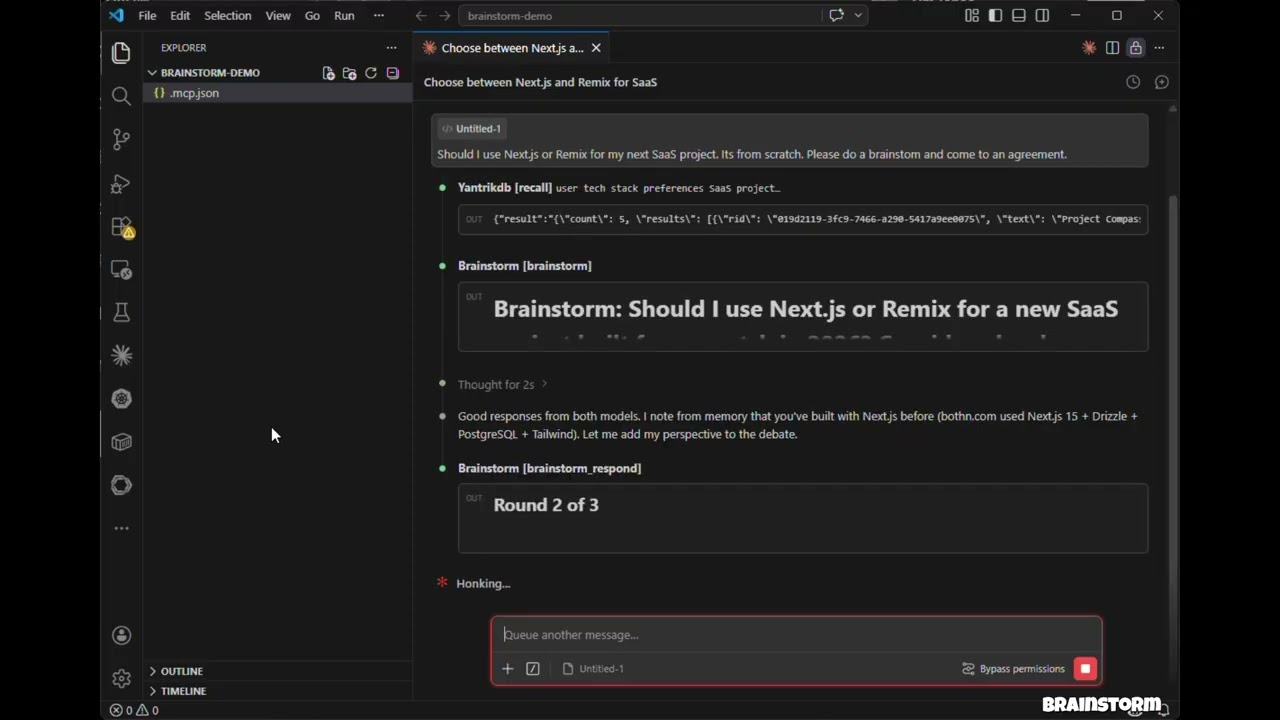
Click to watch: 3 models debate, cross-examine, and produce a structured verdict — all inside Claude Code.
Related MCP server: roundtable-mcp
Features
Hosted mode — No API keys needed. Uses models in your environment (Claude Opus/Sonnet/Haiku) via sub-agents
API mode — Direct model API calls with parallel execution across OpenAI, Gemini, DeepSeek, Groq, Ollama
CLI mode — Debate through agent CLIs you already have (claude, codex, and more) so debates run on your subscription instead of API credits
brainstorm_quick — Instant multi-model perspectives in under 10 seconds
brainstorm_review — Multi-model code review with structured findings, severity ratings, and verdicts
Debate styles — Freeform, red-team (adversarial), and Socratic (probing questions)
Context injection — Ground debates in actual code, diffs, or architecture docs
3-bullet synthesis verdicts — Recommendation, Key Tradeoffs, Strongest Disagreement
Claude as participant — Claude debates alongside external models with full conversation context
Multi-round debates — Models see and critique each other's responses across rounds
Parallel execution — All models respond concurrently within each round
Resilient — One model failing doesn't abort the debate
Cross-platform — Works on macOS, Windows, and Linux
Install
The one-line command under Quick start is enough for hosted mode. Add provider keys to
bring GPT, Gemini, DeepSeek, Groq or Ollama into the debate; per-client setup follows.
Claude Code
Add to your project's .mcp.json:
{
  "mcpServers": {
    "brainstorm": {
      "command": "npx",
      "args": ["-y", "brainstorm-mcp"],
      "env": {
        "OPENAI_API_KEY": "sk-...",
        "GEMINI_API_KEY": "AIza...",
        "DEEPSEEK_API_KEY": "sk-..."
      }
    }
  }
}
Claude Desktop
Add to claude_desktop_config.json:
{
  "mcpServers": {
    "brainstorm": {
      "command": "npx",
      "args": ["-y", "brainstorm-mcp"],
      "env": {
        "OPENAI_API_KEY": "sk-...",
        "DEEPSEEK_API_KEY": "sk-..."
      }
    }
  }
}
Manual Install
npm install -g brainstorm-mcp
brainstorm-mcp
Hosted mode requires no API keys — just install and go. The host (Claude Code) executes prompts using its own model access.
Configuration
Option 1: Environment Variables (simplest)
OPENAI_API_KEY=sk-...
GEMINI_API_KEY=AIza...
DEEPSEEK_API_KEY=sk-...
Option 2: Config File (full control)
Set BRAINSTORM_CONFIG to point to a JSON config:
{
  "providers": {
    "openai": { "model": "gpt-6.1-sol", "apiKeyEnv": "OPENAI_API_KEY" },
    "gemini": { "model": "gemini-3.8-flash", "apiKeyEnv": "GEMINI_API_KEY" },
    "deepseek": { "model": "deepseek-flash", "apiKeyEnv": "DEEPSEEK_API_KEY" },
    "ollama": { "model": "llama3.1", "baseURL": "http://localhost:11434/v1" }
  }
}
Known providers (openai, gemini, deepseek, groq, mistral, together, moonshot,
minimax, glm, qwen, xai) don't need a baseURL, and the ones with a built-in default model
(openai, gemini, deepseek, moonshot, minimax, glm, qwen, xai) don't need a model either.
Use provider:default (e.g. openai:default) to mean a provider's default model.
Env-var detection: OPENAI_API_KEY, GEMINI_API_KEY, DEEPSEEK_API_KEY, MOONSHOT_API_KEY,
MINIMAX_API_KEY, ZAI_API_KEY, DASHSCOPE_API_KEY (Qwen), XAI_API_KEY (Grok; GROK_API_KEY also works). Each also accepts
<PREFIX>_BASE_URL and <PREFIX>_DEFAULT_MODEL.
Provider | Default model |
openai
| gpt-6.1-sol (also gpt-6-astra, gpt-6-sol, gpt-6-luna, gpt-5.5)
|
gemini
| gemini-3.8-flash (gemini-3.1-pro-preview for Pro)
|
deepseek
| deepseek-flash (deepseek-v4-pro)
|
xai
| grok-4.7
|
moonshot
| kimi-k3
|
minimax
| MiniMax-M3
|
glm
| glm-5.3
|
qwen
| qwen3.8-max
|
Reasoning models (GPT-5/6, o-series, Kimi K3, Gemini 3, DeepSeek V4, Grok 4+, GLM-5, MiniMax M3,
Qwen 3.5+) are sent the token budget they need and no temperature; inline <think>…</think> blocks
are stripped from replies.
Any model id the provider serves works, including OpenAI's GPT-6 (openai:gpt-6-astra) and the
gpt-5.x reasoning models: brainstorm picks the request shape each model expects and retries with
the other shape if the API rejects it.
Option 3: CLI Providers (use a subscription, not API credits)
If you already pay for Claude Code, Codex, Gemini CLI, and friends, brainstorm can shell out to
those CLIs instead of buying API credits. Any agent CLI found on your PATH is registered
automatically at startup — no configuration needed:
[brainstorm] Detected CLI provider(s) on PATH: claude, codex (subscription-based, no API cost)
Use them like any other provider:
{ "topic": "GraphQL vs REST", "models": ["claude:sonnet", "codex:default", "openai:gpt-6.1-sol"] }
Built-in adapters:
Provider | Command | Default model | Status |
claude
| claude -p
| sonnet
| verified |
codex
| codex exec
| default
| verified |
gemini
| gemini -p
| default
| best-effort, verify locally |
cursor-agent
| cursor-agent -p
| default
| best-effort |
opencode
| opencode run
| default
| best-effort |
qwen
| qwen -p
| default
| best-effort |
kimi
| kimi --print
| default
| best-effort |
droid
| droid exec
| default
| best-effort |
<provider>:default means "let the CLI use whatever model it's configured with". CLI calls run
with tools disabled and a read-only sandbox where the CLI supports it — they generate text, they
don't touch your repo. Provider-specific API key env vars (ANTHROPIC_API_KEY, OPENAI_API_KEY)
are stripped from the child process so the CLI falls back to your subscription login.
Env knobs:
Variable | Effect |
BRAINSTORM_CLI_PROVIDERS
| auto (default), off, or a comma-separated list of adapters to detect
|
BRAINSTORM_PREFER_CLI
| 1 — debates with no explicit models use only CLI providers, skipping metered APIs
|
BRAINSTORM_CLI_TIMEOUT_MS
| Per-call timeout for CLI providers (default 300000) |
To pin a model or add a CLI that isn't built in, use the config file:
{
  "providers": {
    "claude": { "type": "cli", "model": "opus" },
    "my-cli": {
      "type": "cli",
      "adapter": "custom",
      "command": "some-agent-cli",
      "args": ["run", "--model", "{{model}}", "--quiet", "{{prompt}}"],
      "promptVia": "arg",
      "model": "some-model"
    }
  }
}
Template placeholders: {{model}}, {{system}}, {{prompt}}, {{outfile}}. A lone placeholder
that resolves to nothing drops out of the command line along with the flag introducing it, so
["--model", "{{model}}"] works even for provider:default. Set "promptVia": "stdin" to pipe
the prompt instead of passing it as an argument.
Coding-plan backends through the Claude CLI
Moonshot (Kimi), MiniMax, and Z.ai (GLM) sell coding-plan subscriptions that speak the Anthropic
API. Point the claude binary at one of them and that vendor joins the debate on the plan you
already pay for:
{
  "providers": {
    "moonshot": { "type": "cli", "backend": "moonshot", "model": "kimi-k3" },
    "minimax":  { "type": "cli", "backend": "minimax",  "model": "MiniMax-M3" },
    "glm":      { "type": "cli", "backend": "glm",      "model": "glm-5.3" }
  }
}
Backend | Endpoint | Token env var |
moonshot
| https://api.moonshot.ai/anthropic
| MOONSHOT_API_KEY
|
minimax
| https://api.minimax.io/anthropic
| MINIMAX_API_KEY
|
glm
| https://api.z.ai/api/anthropic
| ZAI_API_KEY
|
The token is read from your environment at call time — the config file holds the variable name,
never the secret. ANTHROPIC_API_KEY is stripped from the child so your Anthropic account is
never billed for these. Any CLI provider also accepts an "env" block to override the backend
manually; a value of "$NAME" indirects through the server's environment.
These vendors are reachable as plain metered APIs too — moonshot, minimax, glm and qwen
have known base URLs, so MOONSHOT_API_KEY alone is enough to register moonshot as an API
provider.
Tools
Tool | Description | Annotation |
brainstorm
| Multi-round debate between AI models (API or hosted mode) | readOnly |
brainstorm_quick
| Instant multi-model perspectives — parallel, no rounds | readOnly |
brainstorm_review
| Multi-model code review with findings, severity, verdict | readOnly |
brainstorm_respond
| Submit Claude's response in an interactive session | readOnly |
brainstorm_collect
| Submit model responses in a hosted session | readOnly |
list_providers
| Show configured providers, API key status, and detected CLIs | readOnly |
add_provider
| Add a new API or CLI provider at runtime | non-destructive |
Usage Examples
Example 1: Quick Multi-Model Perspectives
Prompt: "Use brainstorm_quick to compare Redis vs PostgreSQL for session storage"
Tool called: brainstorm_quick
{ "topic": "Redis vs PostgreSQL for session storage in a Node.js app" }
Output: Each configured model responds independently in parallel. You get a side-by-side comparison in under 10 seconds with model names, responses, timing, and cost.
Error handling: If a model fails (rate limit, timeout), the tool continues with remaining models and shows which ones failed.
Example 2: Multi-Model Code Review
Prompt: "Review this diff for security issues" (with a git diff pasted)
Tool called: brainstorm_review
{
  "diff": "diff --git a/src/auth.ts ...",
  "title": "Add JWT authentication middleware",
  "focus": ["security", "correctness"]
}
Output: A structured verdict (approve / approve with warnings / needs changes) with a findings table showing severity, category, file, line numbers, and suggestions. Includes model agreement analysis — issues flagged by multiple models have higher confidence.
Error handling: If synthesis fails, raw model reviews are still returned.
Example 3: Hosted Mode Brainstorm (No API Keys)
Prompt: "Brainstorm using opus, sonnet, and haiku about whether we should use GraphQL or REST"
Tool called: brainstorm
{
  "topic": "GraphQL vs REST for our public API",
  "models": ["opus", "sonnet", "haiku"],
  "mode": "hosted",
  "rounds": 2,
  "style": "redteam"
}
Output: The tool returns prompts for each model. The host (Claude Code) spawns sub-agents with different models, collects responses, and feeds them back via brainstorm_collect. After all rounds, a synthesis model produces a 3-bullet verdict: Recommendation, Key Tradeoffs, Strongest Disagreement.
Error handling: Sessions expire after 10 minutes. If a session is not found, a clear error message is returned with instructions to start a new one.
How It Works
API / CLI Mode
You ask Claude to brainstorm a topic
The tool sends the topic to all configured providers in parallel — HTTP for API providers, a spawned subprocess for CLI providers
Claude reads their responses and contributes its own perspective
Models see each other's responses and refine across rounds
A synthesizer produces the final verdict
Hosted Mode
You ask Claude to brainstorm with specific models (e.g., opus, sonnet, haiku)
The tool returns prompts — no API calls are made
Claude spawns sub-agents with different models to execute prompts
Responses are collected and fed back for the next round
Repeat until synthesis
Privacy Policy
brainstorm-mcp runs entirely on your machine and does not collect, store, or transmit any personal data, telemetry, or analytics.
In API mode, prompts are sent directly from your machine to the model providers you configure (OpenAI, Gemini, DeepSeek, etc.) using your own API keys. In CLI mode, prompts are passed to agent CLIs installed on your machine, which talk to their own vendors under your existing subscription. In hosted mode, no external API calls are made.
Debate sessions are stored in-memory only with a 10-minute TTL. No data is written to disk unless you explicitly save results.
Full privacy policy: PRIVACY.md
Support
Development
git clone https://github.com/spranab/brainstorm-mcp.git
cd brainstorm-mcp
npm install
npm run build
npm start
Related projects
Other agent infrastructure by the same author, built to be used together:
saga-mcp — SQLite-backed project
tracker: once the debate settles, the decision goes somewhere durable.
yantrikdb-mcp — persistent
cognitive memory so the agent remembers what you decided and why.
swarmcode — real-time channel
between Claude Code instances on different machines.
truenas-mcp — 278 TrueNAS SCALE
actions behind one hierarchical tool.
mcpier — self-hosted MCP control plane
that keeps API keys off your clients.
License
MIT


