Image-Edit-RMCP
Provides an image editing service that benchmarks and emulates the features of OpenAI's web interface, offering tools for AI-powered image generation, editing, content recognition, and OCR.
Image Edit RMCP - 图像编辑 MCP 服务
一、项目介绍
对标 OpenAI Web 的图像编辑功能:提供一个类似于 OpenAI 图像编辑功能的 MCP(Model Context Protocol)服务,支持多种图像处理操作
让纯文本模型也能"看见图片":通过图像识别和描述功能,使传统语言模型能够理解和处理图像内容
Related MCP server: jgkme/kilo-image-gen-mcp
二、功能介绍
图像处理功能:
图像内容识别:使用 Qwen3-VL 模型分析图像内容并生成描述
图像裁剪:按百分比坐标裁剪图像
图像旋转:支持 90°左旋、90°右旋和 180°翻转
图像基础信息获取:获取图像尺寸、格式、大小等信息
图像 OCR:从图像中提取文字内容
AI 图像生成:基于文本描述生成图像
AI 图像编辑:基于文本指令编辑现有图像
简单图床:内置图像上传和存储功能,支持通过 URL 访问处理后的图像
秘钥生成:提供 API 密钥生成和管理界面
三、体验地址
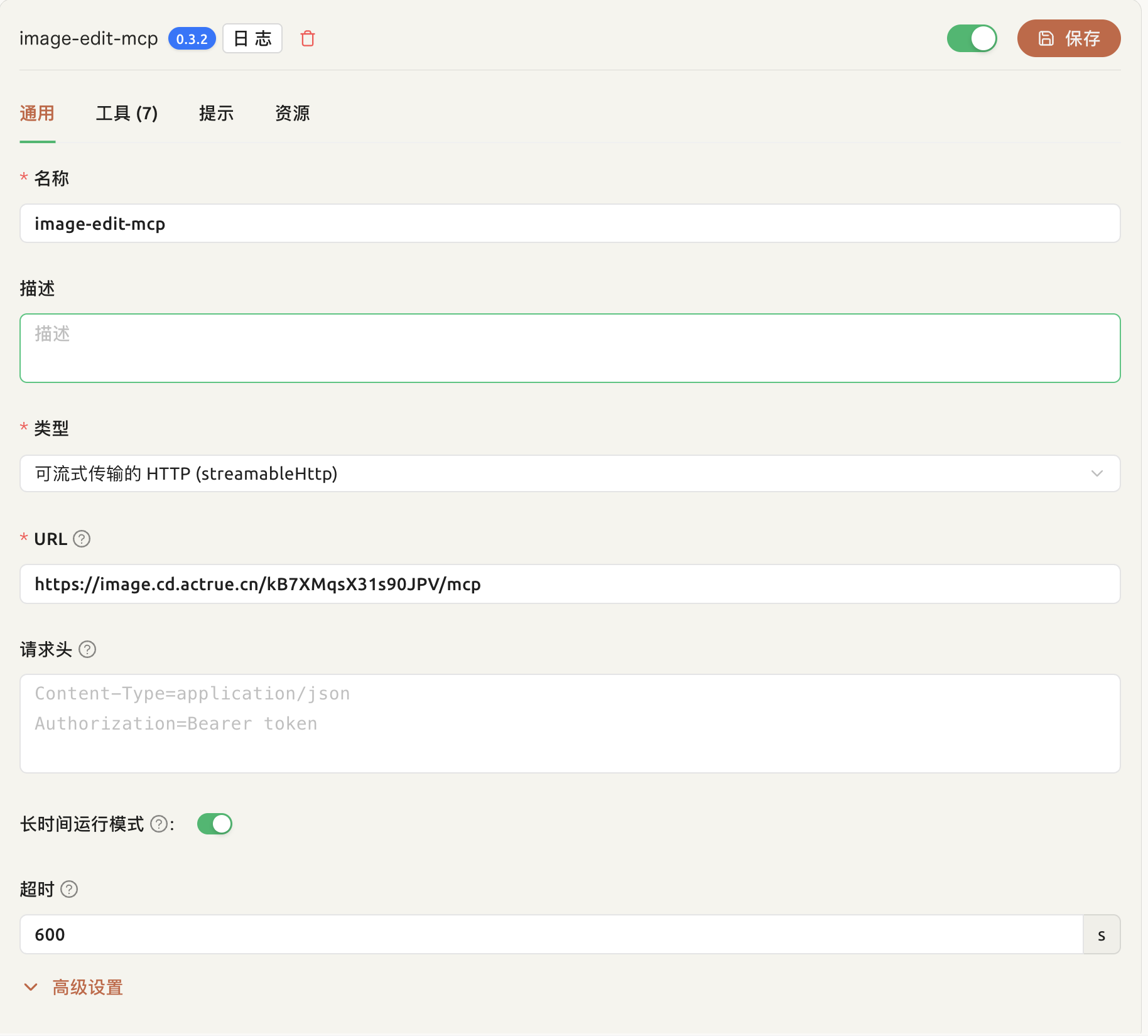
MCP 连接地址:
https://image.cd.actrue.cn/kB7XMqsX31s90JPV/mcp(httpstream)图床地址:
https://image.cd.actrue.cn/kB7XMqsX31s90JPV/upload秘钥生成地址:
https://image.cd.actrue.cn/secret
四、使用教程
CherryStudio 集成

特别注意:需要开启长时间运行模式。AI 生成图像功能耗时较长,建议在使用时保持耐心。
最佳实践
将待处理的图片通过图床上传并且获得url
将待处理的图片url通过prompt传递给模型
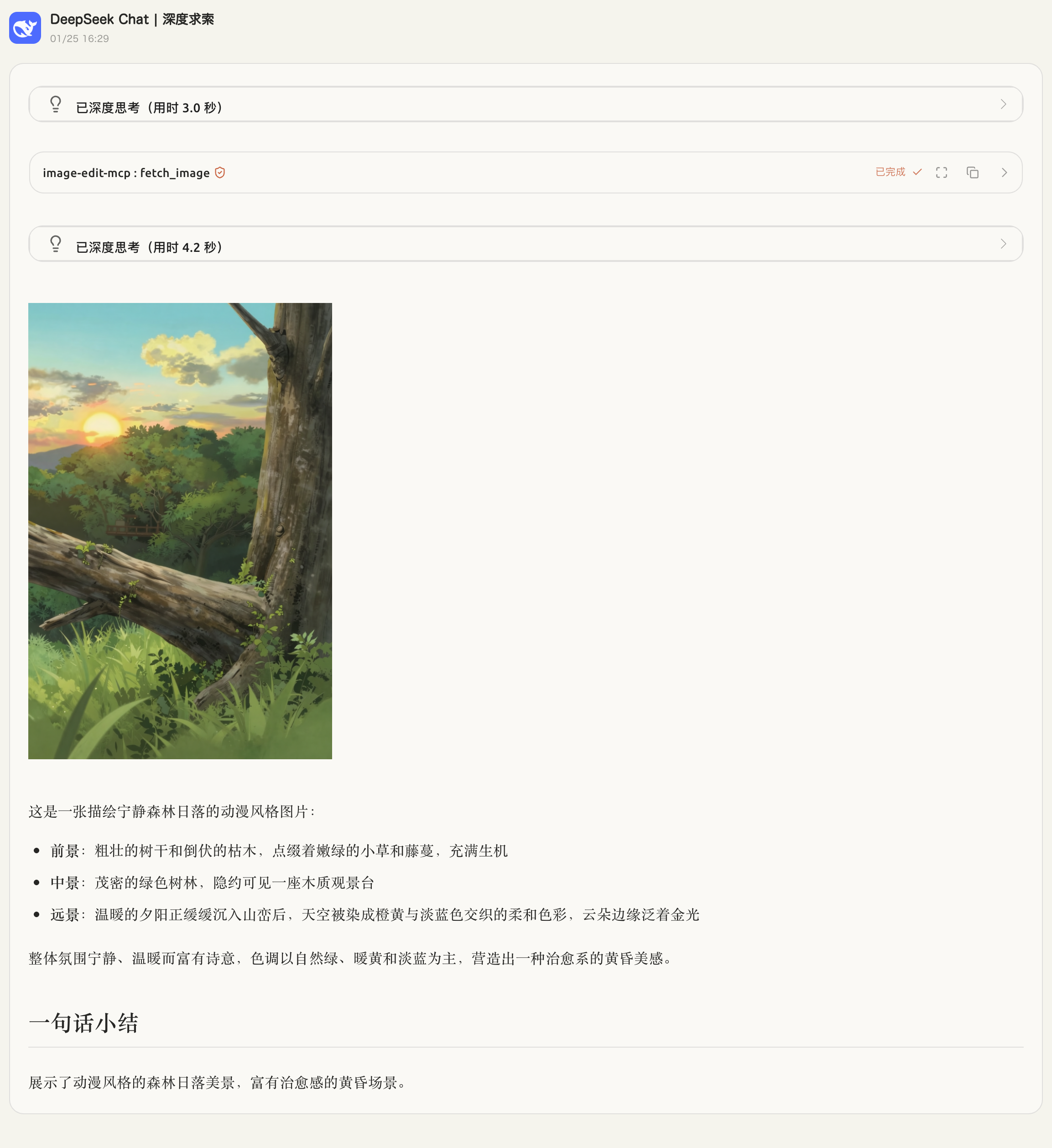
图像内容识别
提示词:
https://muse-ai.oss-cn-hangzhou.aliyuncs.com/img/fd7409815bb94bddba84191e21a803a2.png
查看这张图片
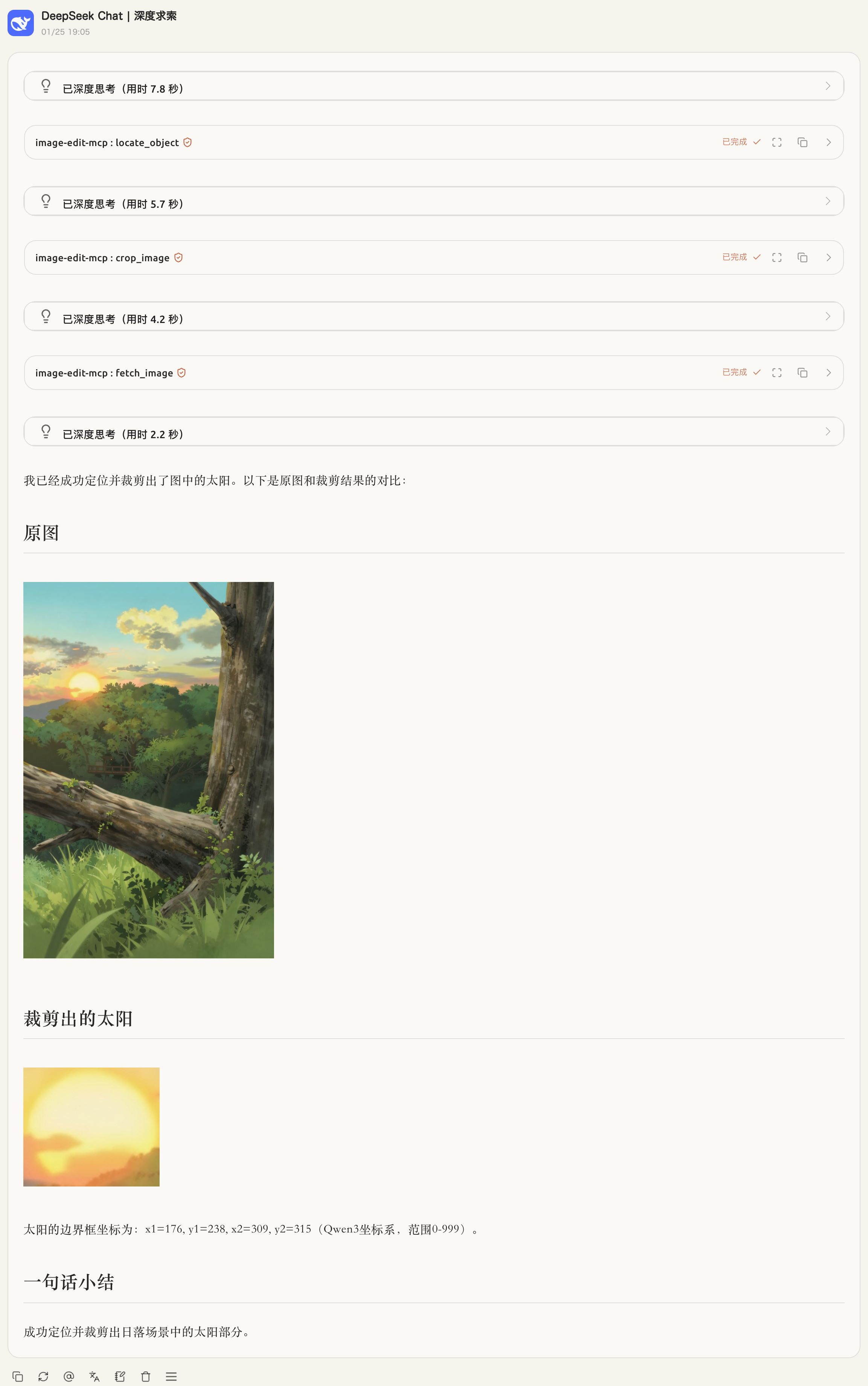
图像内容裁剪
提示词:
https://muse-ai.oss-cn-hangzhou.aliyuncs.com/img/fd7409815bb94bddba84191e21a803a2.png
裁剪出图中的太阳
裁剪完成后展示出原图和裁剪结果
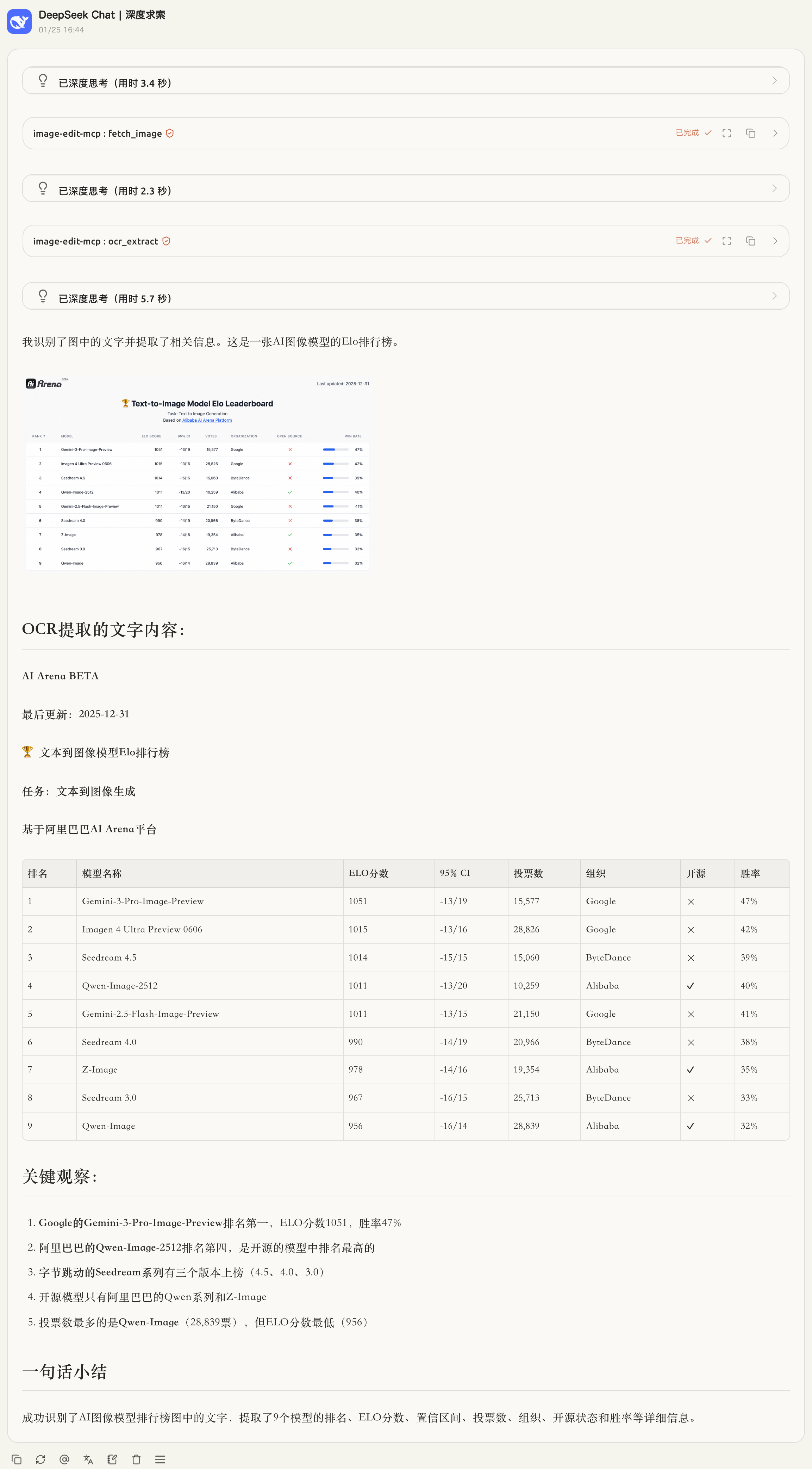
图像文字提取
提示词:
https://qianwen-res.oss-cn-beijing.aliyuncs.com/Qwen-Image/image2512/arena.png#center
识别图中文字
并且展示图片
五、部署方式
环境要求
Rust 1.76 或更高版本
Docker(可选,用于容器化部署)
ModelScope API 密钥(用于 AI 功能)
Cargo 部署(推荐)
1. Rust 安装
# 使用 rustup 安装 Rust
curl --proto '=https' --tlsv1.2 -sSf https://sh.rustup.rs | sh
# 或从系统包管理器安装
# macOS: brew install rust
# Ubuntu/Debian: sudo apt install rustc cargo2. 配置环境变量
复制环境变量模板并配置您的 API 密钥:
cp .env.example .env编辑 .env 文件:
# ModelScope API 密钥(必填)
MODELSCOPE_API_KEY=your_api_key_here
# 服务器端口
MCP_PORT=3000
# 安全密钥(用于图床上传)
SECRET_KEY=your_secret_key_here
# 缓存目录
CACHE_DIR=~/.cache/image-edit-rmcp
# 缓存 URL(用于生成公开访问链接)
CACHE_URL=http://localhost:30003. 项目启动
# 克隆项目(如果尚未克隆)
# git clone <repository-url>
# cd image-edit-rmcp
# 安装依赖并构建
cargo build --release
# 运行服务
cargo run --release服务将在 http://localhost:3000 启动。
使用http://localhost:3000/{SECRET_KEY}/mcp 访问mcp服务
六、技术细节
工具介绍
1. fetch_image - 从 URL 获取图像
功能:从指定 URL 下载图像,分析图像内容,并生成描述。
输入参数:
url(string): 图像 URL(必需)focus(string, 可选): 需要特别关注的内容
输出:
图像 URL
图像名称
MIME 类型
图像描述文本
2. rotate_image - 旋转图像
功能:按指定方向旋转图像。
输入参数:
url(string): 图像 URL(必需)direction(enum): 旋转方向,可选值:Right90: 顺时针旋转 90°Left90: 逆时针旋转 90°Flip180: 旋转 180°
输出:
旋转后的图像 URL(PNG 格式)
3. crop_image - 裁剪图像
功能:按百分比坐标裁剪图像。
输入参数:
url(string): 图像 URL(必需)left(float, 可选): 左侧百分比(0-100),默认 0top(float, 可选): 顶部百分比(0-100),默认 0right(float, 可选): 右侧百分比(0-100),默认 100bottom(float, 可选): 底部百分比(0-100),默认 100
输出:
裁剪后的图像 URL(PNG 格式)
4. get_image_info - 获取图像信息
功能:获取图像的基本信息。
输入参数:
url(string): 图像 URL(必需)
输出:
width: 图像宽度(像素)height: 图像高度(像素)total_pixels: 总像素数mime_type: MIME 类型size: 文件大小(字节)aspect_ratio: 宽高比(可选)
5. ocr_extract - OCR 文字提取
功能:从图像中提取文字内容。
输入参数:
image_url(string): 图像 URL(必需)
输出:
提取的文本内容
6. generate_image - AI 生成图像
功能:基于文本描述生成图像。
输入参数:
prompt(string): 图像描述(必需)negative_prompt(string, 可选): 不希望出现的内容aspect_ratio(string, 可选): 宽高比,可选值:1:1、16:9、9:16、4:3、3:4、3:2、2:3,默认1:1resolution(string, 可选): 分辨率,可选值:1k、2k、4k,默认1ksteps(u32, 可选): 采样步数
输出:
生成的图像 URL
7. edit_image - AI 编辑图像
功能:基于文本指令编辑现有图像。
输入参数:
image_url(string): 待编辑图像 URL(必需)prompt(string): 编辑指令(必需)size(string, 可选): 输出图像尺寸steps(u32, 可选): 采样步数
输出:
编辑后的图像 URL
工具的实现方式
技术栈
后端框架:Rust + Axum + RMCP
图像处理:
image库(支持 PNG、JPEG、GIF、BMP、WebP)AI 集成:ModelScope API(Qwen3-VL、Z-Image-Turbo、Qwen-Image-Edit)
缓存系统:本地文件缓存,支持 HTTP 访问
Web 界面:Axum 静态文件服务 + HTML 模板
核心实现原理
图像处理流程:
接收 HTTP URL 输入
下载图像到内存
使用
image库进行解码和处理(旋转、裁剪)编码为 PNG 格式输出
缓存处理结果到本地文件系统
AI 功能集成:
图像识别:调用 ModelScope Qwen3-VL 模型分析图像内容
OCR 提取:使用 Qwen3-VL 模型提取图像中的文字
图像生成:使用 Z-Image-Turbo 模型基于文本生成图像
图像编辑:使用 Qwen-Image-Edit 模型基于指令编辑图像
缓存机制:
基于 URL 和参数计算哈希值
将处理结果存储到本地缓存目录
通过 HTTP 服务提供缓存文件的公开访问
支持元数据(图像信息、描述等)存储
MCP 协议集成:
实现 RMCP 协议的 ServerHandler
提供标准的工具调用接口
支持 httpstream 传输协议
依赖库
主要依赖(见 Cargo.toml):
rmcp: MCP 协议实现axum: Web 框架image: 图像处理reqwest: HTTP 客户端serde: JSON 序列化tokio: 异步运行时
This server cannot be installed
Maintenance
Resources
Unclaimed servers have limited discoverability.
Looking for Admin?
If you are the server author, to access and configure the admin panel.
Related MCP Servers
- AlicenseAqualityDmaintenanceAn MCP server that provides AI image generation and editing capabilities using Google's Gemini 2.5 Flash Image API. It allows users to create new images from text, modify existing files, and perform iterative edits through natural language prompts.Last updated6971MIT
- Alicense-qualityAmaintenanceMCP server for generating, editing, and processing images via multiple providers including Kilo, OpenRouter, OpenAI, and Gemini, with local tools for background removal, resizing, and cropping.Last updated542MIT
- Flicense-qualityDmaintenanceAI-powered image editing and generation server using Model Context Protocol, enabling intelligent image manipulation, cleanup, and generation via Google's Gemini AI models.Last updated
- Flicense-qualityDmaintenanceA powerful Model Context Protocol (MCP) server for image processing, designed to empower AI models with advanced image manipulation capabilities.Last updated
Related MCP Connectors
MCP server for Midjourney AI image generation and editing
Generate on-brand images from your AI agent: design, edit, and render templates over MCP.
MCP server for NanoBanana AI image generation and editing
Latest Blog Posts
- Who's Calling? MCP Hosts Are an Identity Blind Spot (And the Spec Knows It)By Om-Shree-0709 on .mcpAgent IdentityOAuth 2.1
- Your AI Chatbot Just Exposed Your CEO's Salary to an InternBy Om-Shree-0709 on .Agent IdentityMCP SecurityOAuth Delegation
- Why MCP Servers Need Execution Sandboxing (And Why Your Current Stack Isn't Enough)By Om-Shree-0709 on .Agentic AiPrompt InjectionWebAssembly
MCP directory API
We provide all the information about MCP servers via our MCP API.
curl -X GET 'https://glama.ai/api/mcp/v1/servers/FactrueSolin/Image-Edit-RMCP'
If you have feedback or need assistance with the MCP directory API, please join our Discord server