Iconsult MCP
Architecture consulting for multi-agent systems, grounded in the textbook.
Iconsult is an MCP server that reviews your multi-agent architecture against a knowledge graph of 141 concepts and 462 relationships extracted from Agentic Architectural Patterns for Building Multi-Agent Systems (Arsanjani & Bustos, Packt 2026). Every recommendation comes with chapter numbers, page references, and concrete code-level changes — not abstract advice.
This project was influenced by Piaget's theories of cognitive development in which learning occurs through the adaptation of schemas.
See It In Action
We pointed Iconsult at OpenAI's Financial Research Agent — a 5-stage multi-agent pipeline from their Agents SDK — and asked it to assess architectural maturity.
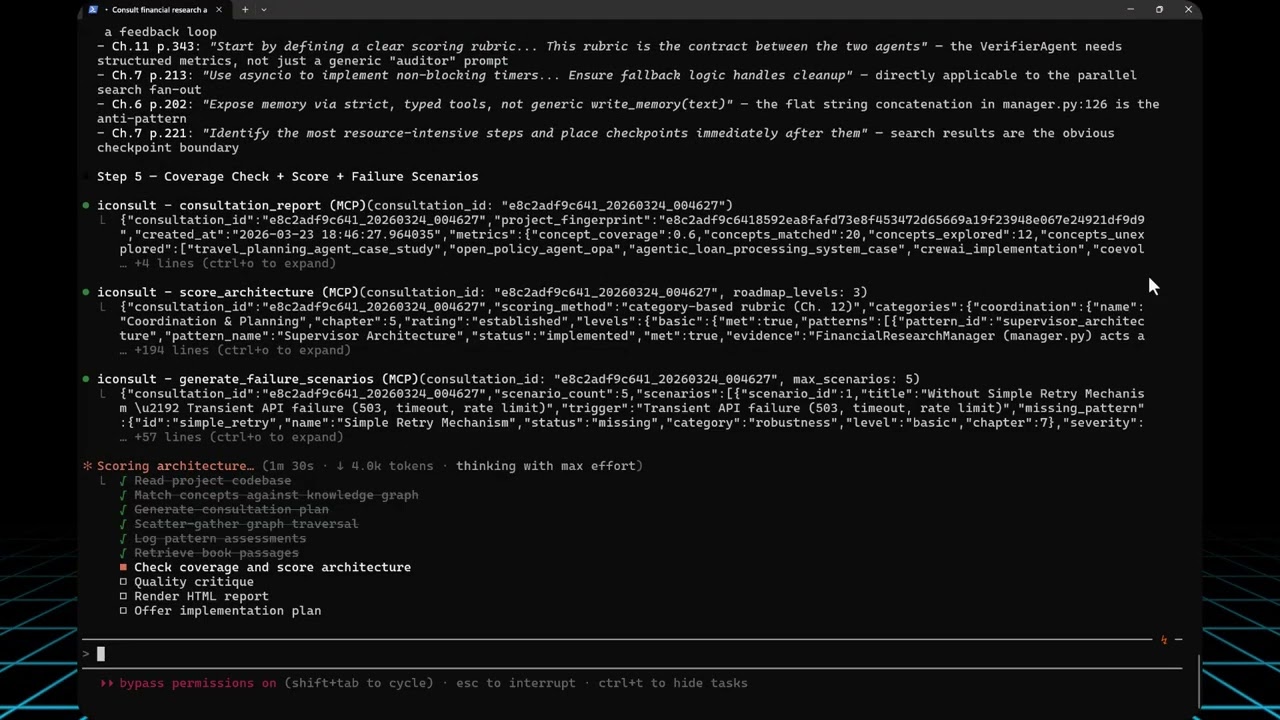
View the full interactive architecture review →
The agent's current architecture
The Financial Research Agent uses a 5-stage sequential pipeline orchestrated by FinancialResearchManager. Search is the only concurrent stage — everything else runs in sequence, and the verifier is a terminal dead end:
flowchart TD
    User(["User Query"]) --> Manager["FinancialResearchManager"]
    Manager --> Planner["PlannerAgent\no3-mini"]
    Planner -->|"FinancialSearchPlan"| FanOut{"Parallel Fan-Out"}
    FanOut --> S1["SearchAgent 1"]
    FanOut --> S2["SearchAgent 2"]
    FanOut --> SN["SearchAgent N"]
    S1 --> Collect["Collect Results"]
    S2 --> Collect
    SN --> Collect
    Collect --> Writer["WriterAgent\ngpt-5.4"]
    Writer -.->|"as_tool"| Fundamentals["FundamentalsAnalystAgent"]
    Writer -.->|"as_tool"| Risk["RiskAnalystAgent"]
    Fundamentals -.-> Writer
    Risk -.-> Writer
    Writer -->|"FinancialReportData"| Verifier["VerifierAgent\ngpt-5.4"]
    Verifier --> Output(["Print Report"])
What Iconsult found
Solid foundation — and Iconsult's knowledge graph traversal identified key opportunities across 7 categories:
Category | Rating | Key Finding |
Coordination & Planning | Established | Solid supervisor + agent-as-tool delegation |
Human-Agent Interaction | Emerging | Agent delegation works; no HITL checkpoints |
Agent Capabilities | Emerging | WebSearchTool + structured outputs in place |
Robustness | Not Started | 0% failure chain coverage; no retry, no timeout |
Explainability | Not Started | No instruction anchoring or fidelity auditing |
Infrastructure | Not Started | No event system, no auth, no registry |
Continuous Improvement | Not Started | Verification is informational only |
Recommended architecture
The natural next evolution — adding retry logic, checkpointing, shared memory, and a verification feedback loop:
flowchart TD
    User(["User Query"]) --> Manager["FinancialResearchManager"]
    Manager --> Planner["PlannerAgent\no3-mini"]
    Planner -->|"FinancialSearchPlan"| FanOut{"Parallel Fan-Out"}
    FanOut --> S1["SearchAgent 1"]
    FanOut --> S2["SearchAgent 2"]
    FanOut --> SN["SearchAgent N"]
    S1 --> Collect["Collect Results"]
    S2 --> Collect
    SN --> Collect

    FanOut -.-> WD["Watchdog Timeout\nSupervisor"]:::opportunity
    S1 -.-> RT["Adaptive Retry\n+ Prompt Mutation"]:::opportunity
    S2 -.-> RT
    SN -.-> RT

    Collect --> CP1["Checkpoint\nSearch Results"]:::opportunity
    CP1 --> SharedMem[("Shared Epistemic\nMemory")]:::newpattern
    SharedMem --> Writer["WriterAgent\ngpt-5.4"]
    Writer -.->|"as_tool"| Fundamentals["FundamentalsAnalystAgent"]
    Writer -.->|"as_tool"| Risk["RiskAnalystAgent"]
    Fundamentals -.-> Writer
    Risk -.-> Writer

    Writer -->|"FinancialReportData"| Verifier["VerifierAgent\ngpt-5.4\n+ Scoring Rubric"]:::newpattern
    Verifier -->|"Pass"| Output(["Print Report"])
    Verifier -->|"Fail + Feedback"| Writer
    Verifier -.-> Metrics["Custom Evaluation\nMetrics"]:::opportunity

    classDef opportunity fill:none,stroke:#E74C3C,stroke-dasharray:5 5,color:#E74C3C
    classDef newpattern fill:#27AE60,stroke:#333,color:white
How it got there
The consultation followed Iconsult's 7-step guided workflow — view the visual workflow →
Step | Tool(s) | What happened |
1. Read codebase | — | Fetched manager.py, agents/*.py. Identified the orchestrator pattern, .as_tool() delegation, silent except Exception: return None, and terminal verifier. |
2. Match concepts | match_concepts
| Embedded the project description (OpenAI text-embedding-3-small) and ranked all 141 concepts by cosine similarity against their pre-computed embeddings in the knowledge graph. Same input → same embedding → same ranking — no LLM judgment. Top hits: Multi-Agent Planning, Supervisor Architecture, Agent Delegates to Agent, AgentTool, Hybrid Planner+Scorer. |
2b. Plan | plan_consultation
| Assessed complexity as complex (score 86/100 — 20 concepts, high relationship density). Generated 11-step adaptive plan. Complexity controls traversal depth: simple (3 concepts, 1 hop, 8 steps) → moderate (5 concepts, 2 hops, adds follow-up questions + optional critique, 10 steps) → complex (8 concepts, 2 hops, parallel subagents, second traversal round, mandatory critique, 11 steps). |
3. Traverse graph | get_subgraph, log_pattern_assessment, emit_event
| 4 parallel subagents explored concept clusters across two traversal rounds (39 nodes, 45 edges). Logged 20 pattern assessments (7 implemented, 3 partial, 7 missing, 3 N/A). Emitted gap_found events for key opportunities. |
4. Retrieve passages | ask_book
| Book passages scoped to discovered concepts — returned chapter numbers, page ranges, and quotes grounding each recommendation. |
5. Coverage + Score + Stress test | consultation_report, score_architecture, generate_failure_scenarios
| consultation_report verifies 4 coverage dimensions from logged steps: concept coverage (matched concepts traversed or assessed / total matched), relationship type coverage (edge types seen / 10 possible), passage diversity (chapters + sections retrieved), and critical edge checks (requires/conflicts_with examined). Then score_architecture computed the 7-category maturity scorecard and generate_failure_scenarios produced 5 failure walkthroughs for missing patterns.
|
5b. Critique | critique_consultation
| No LLM — 7 rule-based checks against fixed thresholds (workflow completeness, traversal depth >= 3, assessments >= 5, coverage >= 50%, critical edges examined, etc.). Flagged 2 issues; backfilled 6 unexplored concepts. |
6. Render report | render_report
| Generated the interactive HTML report server-side — scores, scenarios, and coverage pulled from DB, merged with narrative content. |
7. Implementation plan | generate_implementation_plan
| Offered step-by-step phased checklist (mechanical code changes vs. design decisions). |
Related MCP server: MCP Architect
What It Does
Point it at a codebase (or describe your architecture), and it runs a structured consultation: matching concepts, traversing the knowledge graph for prerequisites and conflicts, scoring maturity against a category-based rubric (7 categories × 3 levels from Ch. 12), and generating an interactive HTML review with before/after architecture diagrams.
Tools (25)
Consultation workflow:
Tool | Role | What it does |
match_concepts
| Entry point | Embeds a project description → deterministic concept ranking + consultation_id for session tracking |
plan_consultation
| Planning | Assesses complexity (simple/moderate/complex) and generates an adaptive step-by-step plan |
get_subgraph
| Graph traversal | Priority-queue BFS from seed concepts — discovers alternatives, prerequisites, conflicts, complements |
log_pattern_assessment
| Assessment | Records whether each pattern is implemented, partial, missing, or not applicable |
ask_book
| Deep context | RAG search against the book — returns passages with chapter, page numbers, and full text |
consultation_report
| Coverage | Computes concept/relationship coverage, identifies opportunities, optionally diffs two sessions |
score_architecture
| Scoring | Category-based maturity scorecard (7 categories × 3 levels) from logged pattern assessments; pattern ID aliases bridge KG ↔ rubric IDs |
generate_failure_scenarios
| Resilience analysis | Resilience scenarios for each opportunity — code-grounded or book-grounded, with Ch. 7 recovery chain mapping |
critique_consultation
| Quality | Structural critique with actionable fix suggestions; multi-iteration mode (1-3 passes) with convergence detection |
render_report
| Report rendering | Server-side HTML rendering — pulls scores/scenarios/coverage from DB, merges with narrative content, writes complete HTML with CSS/JS/zoom/tooltips |
supervise_consultation
| Supervision | Tracks workflow progress across 9 phases, suggests next action with tool + params |
generate_implementation_plan
| Implementation | Phased markdown checklist from consultation results; classifies steps as mechanical or design decision |
get_implementation_plan
| Implementation | Retrieve a previously generated plan with progress summary |
update_plan_step
| Implementation | Update step status (pending/in_progress/completed/skipped); recomputes summary |
Coordination:
Tool | What it does |
write_state / read_state
| Shared key-value state for subagent coordination during traversal |
assert_fact / query_facts
| Blackboard Knowledge Hub — typed, versioned facts with conflict detection, confidence scores, and TTL |
emit_event / get_events
| Event-driven reactivity — emit events like gap_found, poll with filters, get reactive suggestions |
Quality & utility:
Tool | What it does |
rate_consultation
| Record user quality score (1-5) and/or feedback with metadata snapshot |
consultation_analytics
| Surface quality trends across consultations (avg rating, coverage, distribution) |
list_concepts
| Browse/filter the full 138-concept catalogue |
validate_subagent
| Schema validation for subagent responses; optional semantic validation against the knowledge graph |
health_check
| Server health + graph stats |
Prompt
Prompt | What it does |
consult
| Kick off a full architecture consultation — provide your project context and get the guided workflow |
The Knowledge Graph
141 concepts · 786 sections · 462 relationships · 1,248 concept-section mappings
Relationship types span uses, extends, alternative_to, component_of, requires, enables, complements, specializes, precedes, and conflicts_with.
How it was built
The graph was extracted from the book in 4 phases using Claude and OpenAI embeddings:
Phase | What it does | Output |
1a — Parse Index | Extract concept entries from the book's index (OCR-corrected) | 138 concepts with page references |
1b — Parse Book | Segment the book into sections by heading structure | 786 sections across 16 chapters |
2 — Tag Concepts | Claude maps each concept to relevant sections using index page numbers + semantic context | 1,248 concept-section mappings |
3a — Explicit Relationships | Claude identifies relationships between concepts within each chapter | Typed edges (uses, requires, extends, etc.) |
3b — Semantic Pairs | OpenAI embeddings find similar concepts across chapters; Claude validates and types the relationship | Cross-chapter semantic edges |
3c–3e — Cross-Chapter | Three additional passes: knowledge-based, cross-chapter semantic, and summary-based structural relationships | 462 total relationships at avg 0.695 confidence |
4 — Build Graph | Deduplicate edges, validate confidence thresholds, compute final embeddings from section content | Production-ready graph on MotherDuck |
See docs/development.md for pipeline commands and technical details.
Explore the interactive knowledge graph →
Setup
Prerequisites
Python 3.10+
A MotherDuck account (free tier works)
OpenAI API key (for embeddings used by ask_book)
Claude Code (optionally with the visual-explainer skill for ad-hoc diagrams outside consultations)
Database Access
The knowledge graph is hosted on MotherDuck and shared publicly. The server automatically detects whether you own the database or need to attach the public share — no extra configuration needed. Just provide your MotherDuck token and it works.
Install visual-explainer (optional)
The visual-explainer skill is no longer required for consultations — render_report now handles HTML rendering server-side. However, it remains useful for ad-hoc diagrams outside consultations:
git clone https://github.com/nicobailon/visual-explainer.git ~/.claude/skills/visual-explainer
mkdir -p ~/.claude/commands
cp ~/.claude/skills/visual-explainer/prompts/*.md ~/.claude/commands/
Install
pip install git+https://github.com/marcus-waldman/Iconsult_mcp.git
For development:
git clone https://github.com/marcus-waldman/Iconsult_mcp.git
cd Iconsult_mcp
pip install -e .
Environment Variables
export MOTHERDUCK_TOKEN="your-token"    # Required — database
export OPENAI_API_KEY="sk-..."          # Required — embeddings for ask_book
MCP Configuration
Add to your Claude Desktop config (claude_desktop_config.json) or Claude Code settings:
{
  "mcpServers": {
    "iconsult": {
      "command": "iconsult-mcp",
      "env": {
        "MOTHERDUCK_TOKEN": "your-token",
        "OPENAI_API_KEY": "sk-..."
      }
    }
  }
}
Verify
License
AGPL-3.0 — see LICENSE for details.


