


A
licenseC
qualityD
maintenanceEnables LLMs to compose and play multi-track MIDI music through natural language prompts. Supports outputting to software or hardware synthesizers for enhanced audio quality.
2
9 npm
25
MIT

Generates and exports musical clips as standard MIDI files (.mid), supporting riffs, chord progressions, and arpeggios with configurable patterns, scales, and articulation for import into digital audio workstations.
Click on "Deploy Server".
Wait a few minutes for the server to deploy. Once ready, it will show a "Started" state.
In the chat, type @ followed by the MCP server name and your instructions, e.g., "@Scribbletune MCP Server create a 2-bar deep tech bassline in G# minor, 131 BPM"
That's it! The server will respond to your query, and you can continue using it as needed.
Here is a step-by-step guide with screenshots.
Work in progress. The server is functional but actively evolving. Feedback, ideas, bug reports, and contributions are warmly welcome — please open an issue or a PR.
An MCP (Model Context Protocol) server that brings MIDI generation into AI agent workflows. It wraps Scribbletune — a wonderful open-source library by Walmik Deshpande — and exposes it as a set of tools and resources that an LLM can call to compose and export MIDI clips.
Modern AI assistants can talk about music — genres, moods, harmony, rhythm — but they can't produce it in a form you can load into your DAW. This project bridges that gap.
The intended workflow is an AI agent acting as a creative co-producer:
You describe a musical idea in natural language —
"2-bar Deep Tech bassline in G# minor, 131 BPM, plucky, 16th-note groove"
The agent reads the Scribbletune concept docs exposed as MCP resources to understand scales, patterns, and articulation parameters
It translates your idea into a structured tool call, discussing options with you if needed
The server generates a MIDI file and stores it in a key-value store
The agent hands you a download link — drag the .mid file straight into Ableton, Logic, FL Studio, or any DAW
No coding required on your end. The agent handles the translation from musical intent to MIDI.
Related MCP server: Filopastry
Streamable HTTP transport — stateless MCP over HTTP, compatible with any MCP client (Claude Desktop, custom agents, etc.)
generate-clip tool — generate a MIDI clip from a musical description (riff, chord progression, or arpeggio)
get-progression tool — resolve scale degrees to chord names before generating a clip
7 MCP resources — Scribbletune concept documentation as Markdown so the agent understands notes, patterns, scales, chords, progressions, and genre-specific guidance out of the box
MIDI store service — dedicated NestJS service backed by Valkey for storing and serving MIDI files with Swagger UI
Built with NestJS, @rekog/mcp-nest, and Nx
Your AI Agent (Claude, GPT, etc.)
        │
        │  MCP  (Streamable HTTP, stateless)
        ▼
scribbletune-mcp-server   :3000
        │
        │  POST /clips
        ▼
scribbletune-midi-store   :3001
        │
        ▼
   Redis / Valkey

        ↓
User downloads .mid → imports into DAWNode.js 20+
npm
git clone https://github.com/claboran/scribbletune-mcp-ws.git
cd scribbletune-mcp-ws
npm installnpm run valkey:up # start Valkey in Docker
npm run dev # start both apps in parallelMCP server: http://localhost:3000/mcp
MIDI store: http://localhost:3001
MIDI store Swagger UI: http://localhost:3001/api
To run apps individually:
npm run mcp:dev     # MCP server only
npm run store:dev # MIDI store onlyWith the dev server running, open a second terminal:
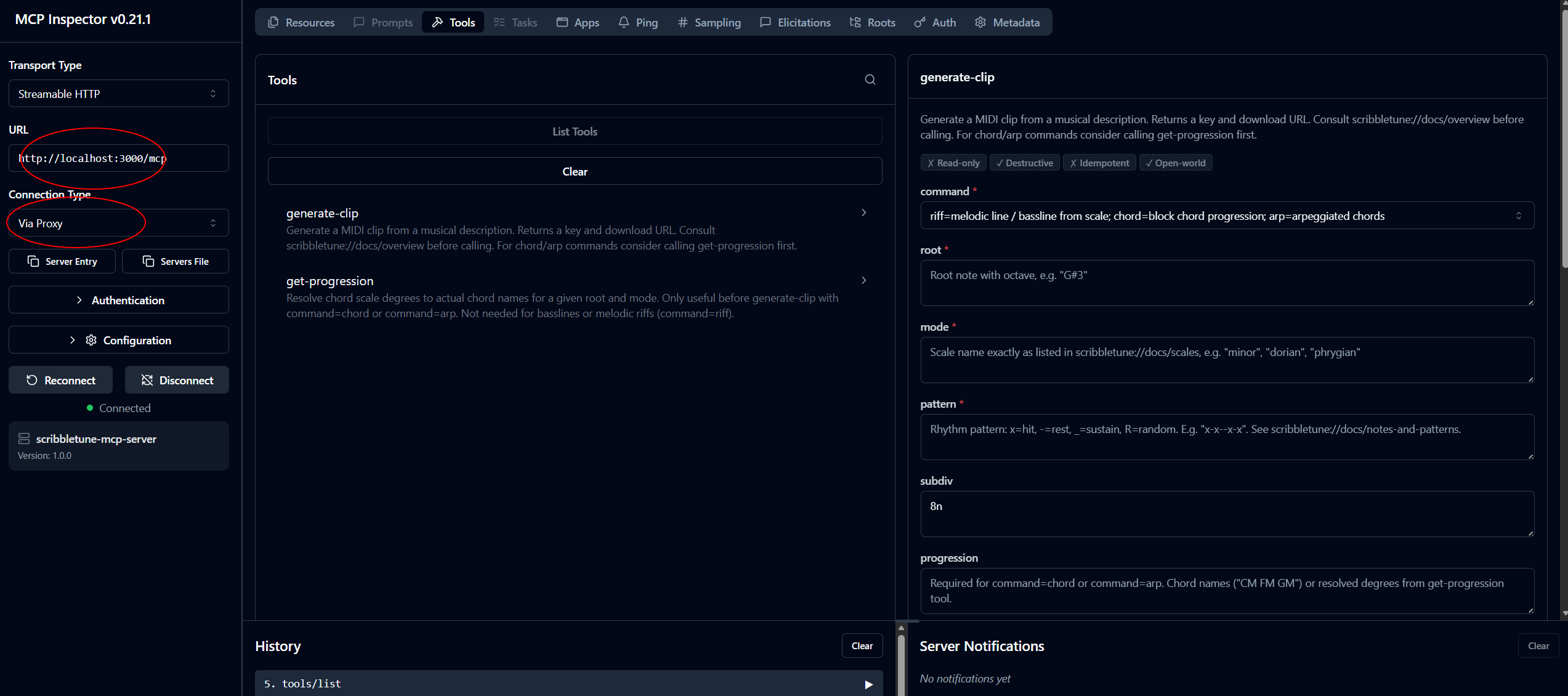
npm run mcp:inspectThis launches the @modelcontextprotocol/inspector UI in your browser. Follow these steps to connect:
Set Transport Type to Streamable HTTP
Set URL to http://localhost:3000/mcp
Click Connect
Use the Resources tab to read the Scribbletune concept docs
Use the Tools tab to call generate-clip or get-progression interactively
npm run mcp:buildThe real value of the MCP server is the back-and-forth between you and the agent. Here's what a real session looks like, including the notes override for precise melodic control.
You: I want a Deep Tech top bassline, 2 bars, 1/16 notes, D#2, a bit of movement in the second bar going up a perfect fifth.
Agent:
Perfect fifth from D#2 is A#2 (+7 semitones). I'll keep bar 1 sparse and anchored, then climb in bar 2. Using phrygian feel — the minor 2nd (E2/F2) adds that hypnotic tension typical of deep tech.
(calls
generate-clip)
{
  "command": "riff",
  "notes": "D#2 D#2 F2 D#2 F2 D#2 D#2 F2 G2 G#2 A#2 A#2 A#2 A#2 G#2 A#2",
  "pattern": "x--x-x--x---x--xx-x-xx-x-xx-x-xx",
  "subdiv": "16n",
  "bpm": 131,
  "amp": 90
}
Download your clip:
http://localhost:3001/clips/8c7d8d4e-…A rendered example of this exact clip is available at midi/clip.mid.
You: Nice. The second bar feels a bit crowded — space it out and make the climb slower.
Agent:
I'll thin out bar 2 — fewer hits, longer gaps between the ascending notes, so the climb breathes more.
(calls
generate-clipagain with revised notes and pattern)
You: Can you add a sub bass underneath? Same key, just D#1, whole notes.
Agent:
That's a separate clip — one whole note per bar, sitting underneath.
(calls
generate-clipwithroot=D#1,mode=phrygian,pattern=x_,subdiv=1m) Download your sub:http://localhost:3001/clips/…
Import both .mid files into separate DAW tracks, layer them — done.
Note on the
notesoverride: Whenever you describe a melody with specific pitches ("go up a fifth", "land on the major 7th"), the agent uses thenotesparameter directly rather than deriving from a scale. This gives it precise per-step melodic control that scale-based generation can't provide.
generate-clipGenerates a MIDI clip and returns a download key and URL.
Parameter | Type | Description |
|
| Type of clip: melodic line, chord block, or arpeggio |
| string | Root note with octave, e.g. |
| string | Scale name, e.g. |
| string | Rhythm pattern: |
| string | Step duration: |
| string | Roman numeral scale degrees, e.g. |
| number | Tempo in BPM |
| string | Velocity envelope: |
| number | Max velocity 0–127 |
| string | Accent pattern, e.g. |
| number | Notes per chord for |
| string | Arp note order, e.g. |
Returns { key, downloadUrl, ttlSeconds, meta }.
Pattern vs chord count: each
xin the pattern plays the next chord in sequence. With 4 chords andpattern: "x---"only the first chord sounds. Use"xxxx"(or a pattern with as manyxsteps as chords) to hit every chord.
get-progressionResolves scale degrees to chord names for human reference. Call this before generate-clip when working with chord or arp commands — then pass the returned degrees (not the chord names) as the progression parameter. Not needed for basslines or melodic riffs.
Parameter | Type | Description |
| string | Root note with octave |
| enum | Scale/mode name |
| string | Space-separated degrees, e.g. |
| number | Number of chords when generating randomly (2–8) |
Returns { degrees, chordNames, hint }.
The agent reads these before making tool calls to avoid hallucinating invalid parameter values.
URI | Description |
| What Scribbletune is, the clip model, riff/chord/arp commands |
| Full |
| Note naming, octaves, pattern syntax |
| All 80+ valid scale names |
| Chord types and notation |
| Progression API and scale degree tables by mode |
| Genre → scale, BPM, and pattern recommendations |
The scribbletune-midi-store exposes a full OpenAPI 3 spec via its Swagger UI (served at /api). The scribbletune-mcp-server consumes this spec through a generated TypeScript client rather than a hand-written HTTP wrapper.
The MIDI store serves its spec as JSON and YAML:
GET http://localhost:3001/api-json
GET http://localhost:3001/api-yaml
The spec is committed to apps/scribbletune-mcp-server/open-api/scribbletune-open-api.yml
The OpenAPI Generator CLI produces a typescript-fetch client into apps/scribbletune-mcp-server/src/midi-store-client/
The MidiStoreClient in the MCP server imports the generated ClipsApi class instead of making raw axios / form-data calls
Java 11+ (required by openapi-generator)
The generator JAR at open-api-generator-cli/openapi-generator-cli.jar — download from the OpenAPI Generator releases:
mkdir -p open-api-generator-cli
curl -L https://repo1.maven.org/maven2/org/openapitools/openapi-generator-cli/7.19.0/openapi-generator-cli-7.19.0.jar \
-o open-api-generator-cli/openapi-generator-cli.jarWith the MIDI store running (npm run store:dev), export the current spec, then regenerate:
# 1. Export the live spec
curl http://localhost:3001/api-yaml -o apps/scribbletune-mcp-server/open-api/scribbletune-open-api.yml

# 2. Regenerate the TypeScript fetch client
npm run store:generate:client
The generated files land in apps/scribbletune-mcp-server/src/midi-store-client/ and are committed alongside the spec. Re-run these two steps whenever the MIDI store API changes.
apps/scribbletune-mcp-server/
├── open-api/
│   └── scribbletune-open-api.yml     # committed spec snapshot
└── src/
    └── midi-store-client/            # generated — do not edit by hand
        ├── apis/
        │   └── ClipsApi.ts
        ├── models/
        │   └── SaveClipResponseDto.ts
└── ...This is an Nx monorepo.
apps/
  scribbletune-mcp-server/   # MCP server — tools, resources, Scribbletune integration
  scribbletune-midi-store/   # MIDI store REST service — Valkey-backed, Swagger UI at /api
docker-compose.yml # Valkey 8 for local developmentThe test suite is split by concern: unit-style tests for the MIDI generation logic, and container-backed integration tests for the storage layer.
npm run mcp:test    # ScribbletunService — MIDI generation (Jest, no Docker needed)
npm run store:test # ClipsService + ClipsController — Valkey integration (requires Docker)mcp:test)Tests live in apps/scribbletune-mcp-server/src/scribbletune/scribbletune.service.spec.ts.
ScribbletunService is instantiated directly — no NestJS bootstrap needed — and the
generated MIDI buffers are parsed with midi-file
to make structural assertions on the binary output.
Musical scenarios covered:
Scenario | What is verified |
README Deep Tech bassline ( | Pitches match the note string, correct BPM, velocities within |
G minor riff (scale-based | All pitch classes belong to G natural minor, BPM encoding, hit count |
C major chord progression | Multi-voice noteOn events (> chord count), pitch class C present, BPM |
Descending arpeggio | Buffer parseable, noteOn events produced, BPM |
Sub bass D#1 whole note | MIDI note number 27, sub-bass register confirmed (< 30) |
BPM → µs/beat encoding at 60 / 120 / 130 / 174 BPM |
|
Error paths | Throws when |
Why these tests matter: Writing the tests surfaced three real bugs in the original documentation and tool schema:
getChordsByProgressiononly accepts Roman numeral degrees ("I IV V ii"), not raw chord names ("CM FM GM"); the pattern'sx-count determines how many chords are hit, not the length of the progression array; and theget-progressiontool returns chord names for human reference — the degrees are what flows intogenerate-clip. All three are now corrected in the schema, MCP resources, and this README.
store:test)Tests live in apps/scribbletune-midi-store/src/clips/clips.integration.spec.ts.
A real Valkey instance is started via
Testcontainers (valkey/valkey:8-alpine) before the suite
runs and torn down afterwards. Docker must be available on the host.
The suite is split into two describe blocks that share the same container:
ClipsService (6 tests) — storage logic:
ioredis is injected directly into the service, bypassing the NestJS module system for speed.
Test | What is verified |
| Returns a v4 UUID id and a |
| Retrieved bytes are byte-for-byte identical to the original |
| Throws |
| Throws |
Custom TTL | Key TTL in Valkey is within 2 s of the requested value |
Two independent clips | Both are retrievable without cross-contamination |
ClipsController HTTP (5 tests) — full HTTP stack:
NestJS testing module with the real ClipsModule, REDIS_CLIENT overridden with the
shared test connection, supertest for HTTP assertions.
Test | What is verified |
| 201 response, |
| 200, |
| 404 |
| 204 on delete, then 404 on subsequent fetch |
|
|
Each test runs against a clean store — redis.flushdb() is called in afterEach.
scribbletune-midi-store — Valkey-backed MIDI storage with HTTP download endpoint and Swagger UI
Docker Compose setup for full local stack
Wire generated OpenAPI client into scribbletune-mcp-server (replace handcrafted MidiStoreClient)
Multi-clip session tool — generate bass, chords, and melody in a single call
Example agent system prompts and Claude Desktop configuration
Ghost note support — allow intentionally low amp values (< 20) for ghost notes and subtle velocity layers, with an explicit ghostNotes: true flag to distinguish musical intent from accidental misconfiguration
This project would not exist without the work of others.
Scribbletune by Walmik Deshpande is the MIDI generation engine at the heart of this server. Scribbletune is a beautifully designed library that makes programmatic music composition expressive and accessible. Please visit the project, star the repo, and consider contributing.
@rekog/mcp-nest by the rekog-labs team provides first-class NestJS integration for the Model Context Protocol and made building this server a pleasure.
Model Context Protocol by Anthropic is the open standard that makes tool-augmented AI agents possible.
This project is in active early development and there is plenty of room to grow — in tooling, musical concepts, documentation quality, and agent integration examples.
Open an issue to suggest features, report bugs, or discuss the direction
PRs are welcome — please open an issue first for larger changes so we can align before you invest time
MIT — © 2026 the scribbletune-mcp-server contributors
This server cannot be deployed
Autonomous music production for AI agents with MIDI generation, QC and provenance.
Music & audio for AI agents: 50+ AI instruments play your MIDI, stems, audio to MIDI, Logic/Ableton
Generate full songs with vocals, instrumentals and sound effects from text. One server for Suno, Google Lyria, Mureka, MiniMax, ACE-Step, YuE and ElevenLabs. Your agent can quote the credit cost before generating, start a song, wait for it to finish and return download links. Sign in with OAuth; optional daily credit caps; retries never charge twice.
Generate images, video, music and voice from your CLI or AI agent. On-brand AI media toolkit.