
A
licenseB
qualityB
maintenanceAn MCP server implementation that integrates with Odoo ERP systems, enabling AI assistants to interact with Odoo data and functionality through the Model Context Protocol.
41
1,352 PyPI
421
MIT

Provides tools for interacting with Odoo ERP instances, allowing LLMs to search and manage business records including partners, quotations, sales orders, and customer invoices.
Click on "Deploy Server".
Wait a few minutes for the server to deploy. Once ready, it will show a "Started" state.
In the chat, type @ followed by the MCP server name and your instructions, e.g., "@mcp-server-odoo Find all recent sales orders for Azure Interior"
That's it! The server will respond to your query, and you can continue using it as needed.
Here is a step-by-step guide with screenshots.
An extensible Model Context Protocol server that provides integration between Odoo and LLMs.
Beware: the project is in very early development. Expect rough edges. We welcome any feedback!
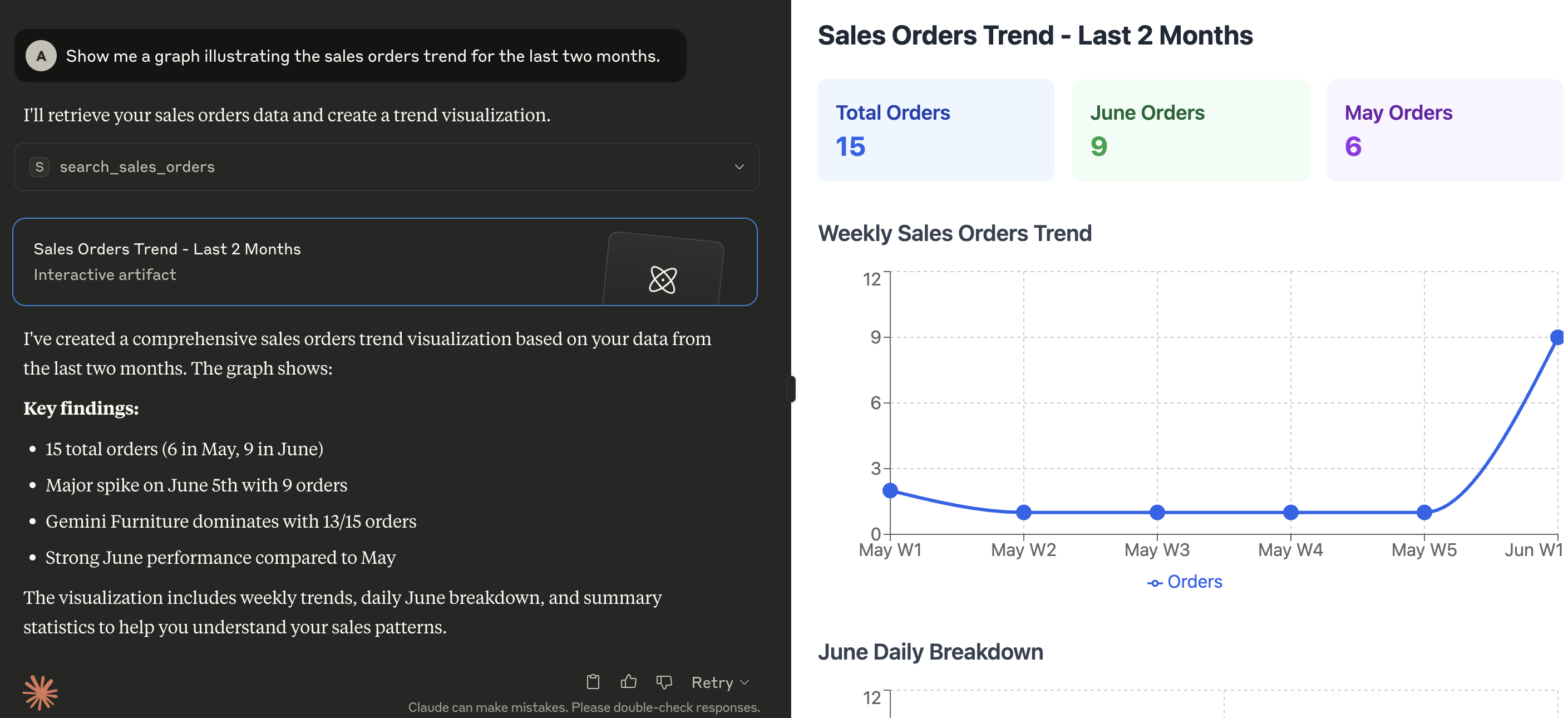
Here's a demonstration of what kind of capabilities the MCP enables in Claude for Desktop:
Related MCP server: Odoo MCP Server
The server looks for the following variables in the execution environment:
Variable | Required | Description | Example |
| Yes | The URL of the Odoo instance |
|
| Yes | The database name to connect to |
|
| Yes | Username for authentication |
|
| Yes | Password or API Key for authentication |
|
| Yes | Major version of your Odoo server |
|
| No | Desided logging level (see Python logging levels), default is INFO |
|
| Yes | The MCP transport protocol to use. Valid values are |
|
| No | The IP address(es) on which the server is to listen for connections from clients |
|
| Yes | Comma-separated list of tools to expose to the MCP client. Tools can be chosen from those included within this project (see directory |
|
| No | Comma-separated list of paths to search for additional tools that can be loaded at runtime |
|
Install the tool with uv tool:
uv tool install --from git+https://github.com/alberto-re/mcp-server-odoo mcp-server-odooExecute it directly with uvx:
uvx mcp-server-odooA Dockerfile is included if you wish to run the MCP server inside a Docker container.
To build the container execute this command from the root directory of the repository:
docker build -t mcp-server-odoo .Now you can execute the container from the built image with:
docker run --rm --env-file /path/to/env/file -p 8000:8000 mcp-server-odooWhen running inside a container remember to use an HTTP based transport protocol (i.e. set TRANSPORT_PROTOCOL to sse or streamable-http)
and to make the server listen to all interfaces (i.e. set HOST to 0.0.0.0).
Edit the Claude for Desktop configuration file.
In MacOS the configuration is located at ~/Library/Application Support/Claude/claude_desktop_config.json.
In Windows the configuration is located at %APPDATA%\Claude\claude_desktop_config.json
Add the server configuration under the mcpServers section.
{
  "mcpServers": {
    "mcp-server-odoo": {
      "command": "uvx",
      "args": [
        "mcp-server-odoo"
      ],
      "env": {
        "ODOO_BASE_URL": "http://localhost:8069",
        "ODOO_DATABASE": "mydatabase",
        "ODOO_USERNAME": "admin",
        "ODOO_PASSWORD": "admin",
        "ODOO_VERSION": "18",
        "TRANSPORT_PROTOCOL": "stdio",
        "TOOLS_TO_REGISTER": "search_partners,search_quotations,search_sales_orders,search_customer_invoices"
      }
    }
  }
}
Restart Claude for Desktop.
Edit the mcphost configuration file. See the documentation for where it looks for configuration files.
Add the server configuration under the mcpServers section.
{
  "mcpServers": {
    "mcp-server-odoo": {
      "command": "uvx",
      "args": [
        "mcp-server-odoo"
      ],
      "env": {
        "ODOO_BASE_URL": "http://localhost:8069",
        "ODOO_DATABASE": "mydatabase",
        "ODOO_USERNAME": "admin",
        "ODOO_PASSWORD": "admin",
        "ODOO_VERSION": "18",
        "TRANSPORT_PROTOCOL": "stdio",
        "TOOLS_TO_REGISTER": "search_partners,search_quotations,search_sales_orders,search_customer_invoices"
      }
    }
  }
}
Execute the mcphost command.
This server cannot be deployed
MCP server unifying ERPs, CRMs, APIs and knowledge base for Claude, ChatGPT and Gemini.
The Remote MCP server acts as a standardized bridge between LLM applications (like Claude, ChatGPT, and Cursor) and external services, enabling AI agents to access external tools and resources. Its primary capability is providing a centralized search tool to discover other MCP servers and their respective tools. Unlike local implementations, it runs remotely with OAuth authentication and permission controls for security.
MCP server for your apps' tools and custom tools, plus hosted AI agents and approval-gated workflows
API-first CRM for LLMs - contacts, companies, deals and activities over a native MCP server.