💹 MCP YFinance Stock Server



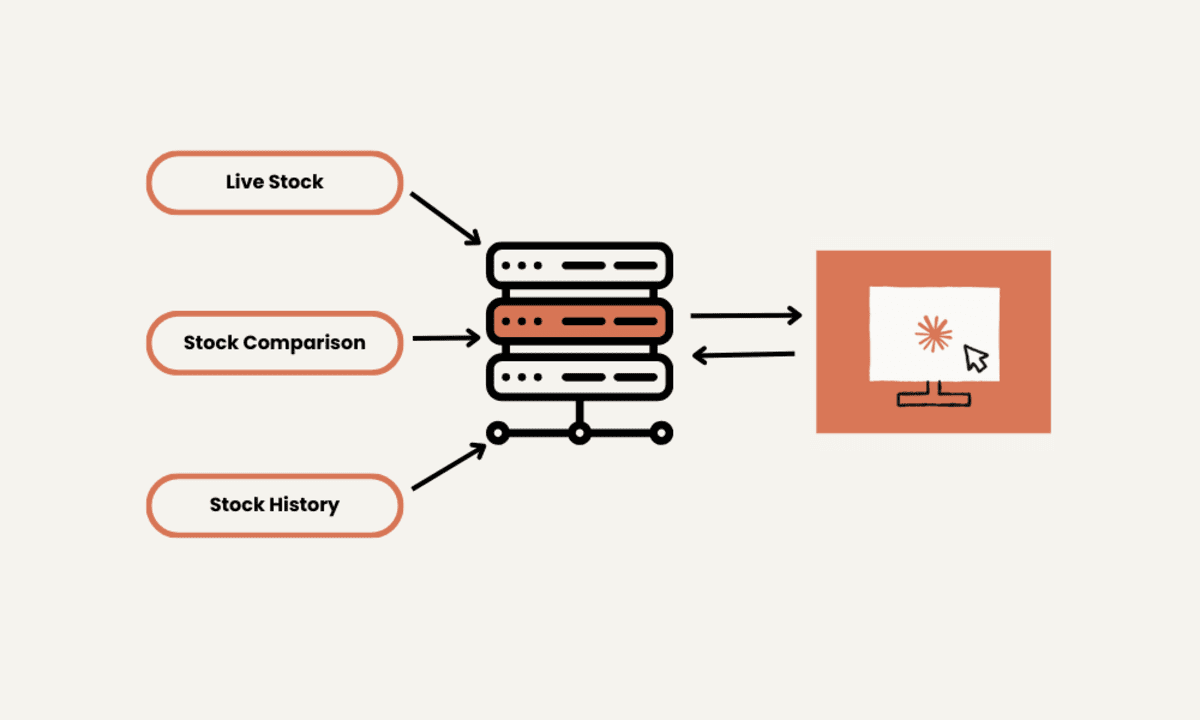
This project sets up a stock Price server powered by the Yahoo Finance (YFinance) API and built for seamless integration with MCP (Model Control Protocol).
It allows AI agents or clients to:
Retrieve real-time stock data
Manage a watchlist
Perform full stock analysis
Run full technical indicators
And much more
🪙 Start Simple: Build a Crypto Price Tracker First
Before diving into the full-blown stock server, I recommend starting with this simple crypto tracker built with Python + MCP 👇
🔗 GitHub Repo:
https://github.com/sauniket/mcp-yfinance-server
You'll learn how to:
Use MCP to expose crypto tools like get_price("BTC")
Build an API with FastAPI
Fetch real-time prices using the Alpaca API
Related MCP server: YFinance MCP Server
📈 Then Level Up: Build the yFinance Stock Server
Once you're familiar with the flow, move on to this more advanced stock tracker 💹
🔗 GitHub Repo:
https://github.com/sauniket/mcp-yfinance-server
📝 Detailed Blog:
👉 How I Built My Own Stock Server with Python, yFinance, and a Touch of Nerdy Ambition
Includes:
Watchlists
Real-time(ish) price updates
Technical summaries
A full-featured dashboard
Trend + momentum indicators
Watchlist management
📦 Step 1: Set Up the Environment (with uv)
We use uv — a modern, ultra-fast Python package manager — to manage our project environment.
🛠️ Installation & Setup
Run the following commands in your terminal:
# Install uv
curl -LsSf https://astral.sh/uv/install.sh | sh

# Create and navigate to your project directory
mkdir mcp-yfinance-server
cd mcp-yfinance-server

# Initialize a new project
uv init

# Create and activate the virtual environment
uv venv
source .venv/bin/activate  # On Windows: .venv\Scripts\activate
📥 Install the project
Once your pyproject.toml is set up with dependencies, run:
#  Run
uv pip install -e .
🚀 Step 2: Running the MCP Server
Once your environment is ready, start the stock server:
🧪 Want a quick test first?
Try checking the tools first:
python run test_server_fun.py
📄 Curious how the full server works?
Explore the source code here:
🔗 yf_server.py › GitHub
🛠️ MCP Tool Reference
The server exposes many tools for AI agents and CLI users.
Here are some important tools, check out the complete tools list here:
📦 Tool List
Tool Name | Description |
add_to_watchlist
| Add a stock ticker to your personal watchlist. |
analyze_stock
| Perform a 1-month technical trend analysis (RSI, MACD, MAs).. |
get_technical_summary
| Generate a comprehensive technical summary including indicators & signals.. |
get_watchlist_prices
| Fetch the most recent prices for all watchlisted tickers. |
get_trend_analysiss
| Analyze recent trend shifts, patterns, and divergences.. |
get_stock_price
| Retrieve the current price for a given ticker symbol. |
get_volatility_analysis
| Calculate historical volatility and ATR metrics.. |
compare_stocks
| Compare two stock prices (useful for relative performance analysis). |
✅ Total: 18 powerful tools to analyze and monitor stocks with precision.
🧠 Use Cases
These tools are ideal for:
📊 Dynamic watchlist management
🔁 Trend and momentum detection
📈 Deep-dive technical analysis for investment decisions
⚠️ Volatility-based risk assessment
🤖 Powering stock-focused autonomous agents or dashboards
⚙️ Keep this reference handy for building intelligent financial applications with the MCP server.
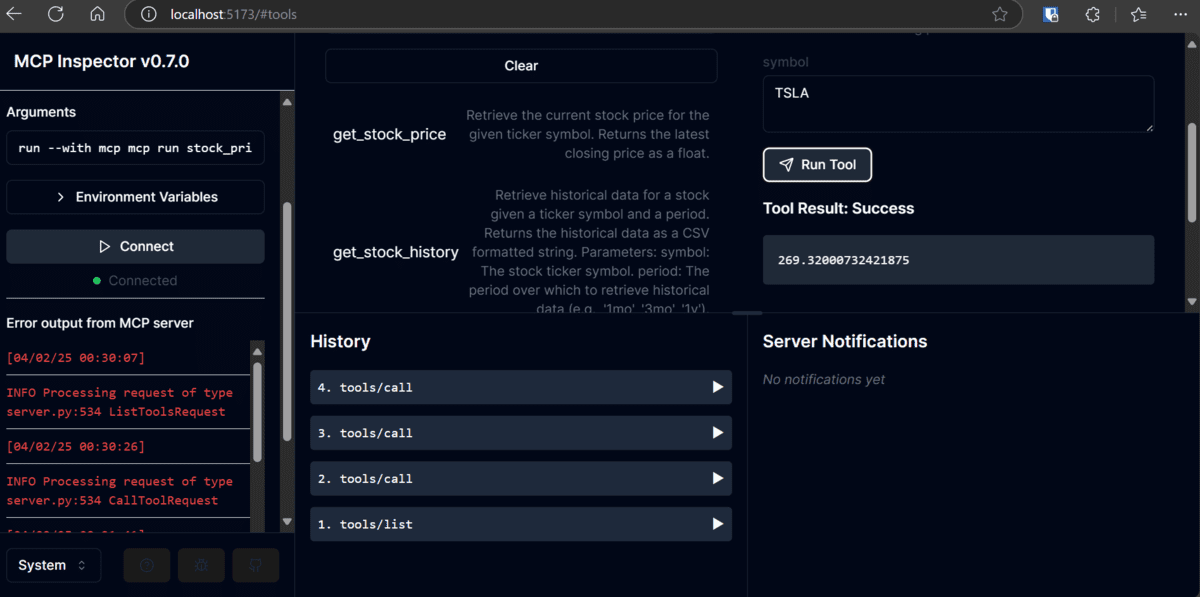
🔍 Step 3: Inspecting the MCP Server
Easily explore and test your MCP tools using the MCP Server Inspector.
Run the following command in your terminal:
$ mcp dev source/yf_server.py
This launches an interactive UI to:
🧰 View all available tools and resources
📥 Test input/output for each tool
📡 Monitor real-time responses from your server
⚙️ Step 4: Configure Your MCP Server
To integrate your YFinance MCP server, add the following entry to your mcp.config.json file:
{
  "mcpServers": {
    "yfinance-price-tracker": {
      "command": "uv",
      "args": [
        "--directory",
        "/ABSOLUTE/PATH/TO/YOUR/mcp-yfinance-server",
        "run",
        "main.py"
      ]
    }
  }
}
⚠️ Replace /ABSOLUTE/PATH/TO/... with actual file paths.
💡 Tip: Rename your server from crypto-price-tracker to yfinance-price-tracker for clarity.
🔁 Step 5: Restart Claude Desktop
Restart Claude Desktop (or any interface that uses MCP) to reload and activate your new YFinance tools.
This ensures the updated MCP configuration is recognized and all stock tracking tools are
ready to use.
✅ Step 6: Testing the MCP Server with Claude Desktop
Use these example queries to test your MCP YFinance Server in action:
"Compare the stock prices of Tesla and Apple."
→ 🔧 Uses compare_stocks
"Get the historical data for Tesla over the past month."
→ 📊 Uses get_stock_history
"Add Apple, Tesla, and Reliance to my watchlist."
→ 📋 Uses add_to_watchlist
"Show me a chart of Apple’s stock over the last 30 days."
→ 🖼️ Claude can fetch + visualize data using your server
📷 Sample Chart:
🖼 view Screenshot
🌐 Live Claude Site:
Open Demo on Claude.site
🧪 These tests ensure your MCP integration is working end-to-end—from data retrieval to real-time analysis and visualization.
📊 Results
⚙️ Outcomes You Can Expect
Feature | Outcome |
✅ Stock Analysis | Analyse stock giving price, OHLC, returns, volume, insights and data. |
📈 Technical Analysis | Access indicators like RSI, MACD, MA, and a complete technical summary. |
📉 Volatility Reports | Analyze stock risk with ATR and volatility metrics. |
🔍 Trend Analysis | Detect trend shifts and divergence using price movement analysis. |
🧠 Visualisations | 18+ tools ready to power AI agents or dashboards to visualise stock. |
📋 Technical Charts | Analyse and monitor technical indicators for stocks in real-time. |
🖼️ Visual Insights | Generate charts and visual summaries with Claude Desktop. |
🎉 Ready to build your stock-tracking bot or intelligent financial dashboard? This project has all the core pieces.
📫 Feedback & Contributions
Contributions are welcome! Whether you're fixing bugs, adding features, or improving documentation, your help makes this project better.
🐛 Reporting Issues
If you encounter bugs or have suggestions, please open an issue in the Issues section. Be sure to include:
✅ Steps to reproduce (if applicable)
🔍 Expected vs. actual behavior
📷 Screenshots or error logs (if relevant)
📬 Submit a Pull Request
Have a fix or improvement? Head over to the Pull Requests section and submit your PR. We’ll review and merge it ASAP!
💬 Spread the Word
If this project saved you from API rate limits or overpriced SaaS tools...
If you’d like a tweet thread, carousel, or launch post for this — I’ve got your back 😎


