
AI-Notion Integration MCP Server
Integrates with Notion databases to store AI-generated question and answer pairs, providing tools to create, set up, and query database entries for tracking conversations.
Click on "Deploy Server".
Wait a few minutes for the server to deploy. Once ready, it will show a "Started" state.
In the chat, type
@followed by the MCP server name and your instructions, e.g., "@AI-Notion Integration MCP ServerSave our discussion about quantum physics to my Notion database"
That's it! The server will respond to your query, and you can continue using it as needed.
Here is a step-by-step guide with screenshots.
Notion MCP Server


AI-powered knowledge management with Notion integration and spaced repetition learning system.
✨ Features
📝 Auto-save conversations - Save AI Q&A to Notion with intelligent categorization
🔍 Advanced search - Query by date, category, tags, and full-text search
🧠 Spaced repetition - Science-based review scheduling (1/2/4/7/15 days)
📊 Progress tracking - Track mastery levels (⭐-⭐⭐⭐⭐⭐) and review counts
📦 Installation
Option 1: NPM (Recommended)
npm install -g @itsyuimorii/notion-mcp-serverOption 2: From Source
git clone https://github.com/itsyuimorii/notion-mcp-server.git
cd notion-mcp-server
npm install
npm run build
🚀 Quick Start
1. Create Notion Integration
Go to Notion Integrations and create a new integration
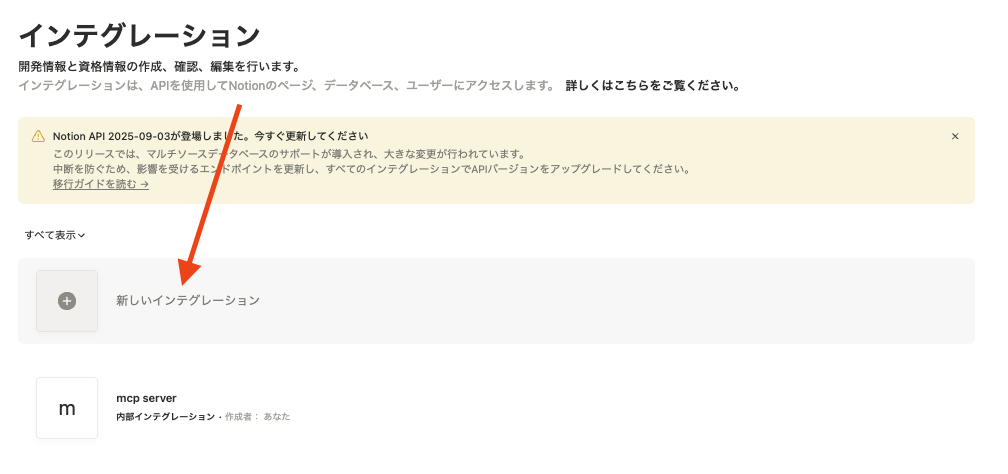
Give your integration a name (e.g., "AI Learning Tracker") and select the appropriate capabilities (read & write)
Copy the "Internal Integration Token" and paste it into your
.envfile

Share your Notion page with the integration
2. Configure Environment
Create a .env file:
NOTION_API_TOKEN=ntn_your_token_here
NOTION_PARENT_PAGE_ID=your_page_id_here
NOTION_DATABASE_ID=your_database_id_here  # Optional
3. Configure Claude Desktop
Edit ~/Library/Application Support/Claude/claude_desktop_config.json:
{
  "mcpServers": {
    "notion-mcp-server": {
      "command": "node",
      "args": ["/path/to/notion-mcp-server/dist/index.js"],
      "env": {
        "NOTION_API_TOKEN": "ntn_your_token",
        "NOTION_PARENT_PAGE_ID": "your_page_id",
        "NOTION_DATABASE_ID": "your_database_id"
      }
    }
  }
}
4. Restart Claude Desktop
You're ready to use it!
🛠️ Available Tools
Tool | Description |
| Create pre-configured database with spaced repetition fields |
| Save Q&A with auto-categorization and tags |
| Search with filters (date/category/tags) |
| Check overdue and upcoming reviews |
| Update mastery level and schedule next review |
📁 Project Structure
notion-mcp-server/
├── src/
│   ├── index.ts       # Main MCP server
│   ├── config.ts      # Configuration
│   └── types.ts       # TypeScript types
├── docs/
│   └── images/        # Documentation images
├── QUICKSTART.md      # Detailed setup guide
├── DEMO_SCENARIOS.md  # Usage examples
├── LICENSE            # MIT License
└── package.json       # Dependencies
📚 Documentation
QUICKSTART.md - Complete setup guide
DEMO_SCENARIOS.md - Real-world usage examples
🔧 Requirements
Node.js 18+
npm 9+
Notion account with workspace
Claude Desktop (latest version)
🐛 Troubleshooting
Connection failed?
Check
.envfile has correct tokenRun
npm run buildto generatedist/index.jsVerify path in Claude config
Restart Claude Desktop
Database permission denied?
Go to your Notion page
Click "..." → "Add connections"
Select your integration
Restart Claude Desktop
📄 License
MIT - see LICENSE
🔗 Links
New to this project? Start with QUICKSTART.md 🚀
This server cannot be deployed
Maintenance
Related MCP Connectors
- Knowledge BaseOAuthai.b77
A searchable knowledge base your assistant reads and writes.
Persistent memory for AI assistants: store, search, and connect knowledge across conversations.
Durable, revision-pinned memory storage and retrieval for AI conversations.
Persistent memory for AI agents. Search and store durable facts, preferences and decisions.
