F
licenseNot graded
qualityD
maintenanceA basic educational MCP server that provides simple tools for mathematical calculations, text manipulation, and time retrieval. Designed for learning MCP implementation patterns and development purposes.
-

Click on "Deploy Server".
Wait a few minutes for the server to deploy. Once ready, it will show a "Started" state.
In the chat, type @ followed by the MCP server name and your instructions, e.g., "@My First MCP calculate 15 * 3 + 7"
That's it! The server will respond to your query, and you can continue using it as needed.
Here is a step-by-step guide with screenshots.
MCP(Model Context Protocol) 서버 개발 튜토리얼 - 첫 번째 MCP 서버


이 프로젝트는 MCP(Model Context Protocol) 서버 개발을 배우기 위한 튜토리얼입니다. Claude Code와 같은 AI 도구에서 사용할 수 있는 간단한 MCP 서버를 구현합니다.
Tool | 설명 | 사용 예시 |
| 현재 시간 조회 | "지금 몇 시야?" |
| 사칙연산 계산기 | "123 + 456 계산해줘" |
| 랜덤 숫자 생성 | "로또 번호 뽑아줘" |
| 문자열 뒤집기 | "hello 뒤집어줘" |
| 서버 정보 조회 | "MCP 서버 정보" |
| 프로젝트 구조 분석 | "프로젝트 구조 보여줘" |
| 의존성 분석 | "package.json 분석해줘" |
| 코드 라인 수 통계 | "코드 라인 수 알려줘" |
| 서버 상태 조회 | "서버 상태 확인해줘" |
Related MCP server: My First MCP
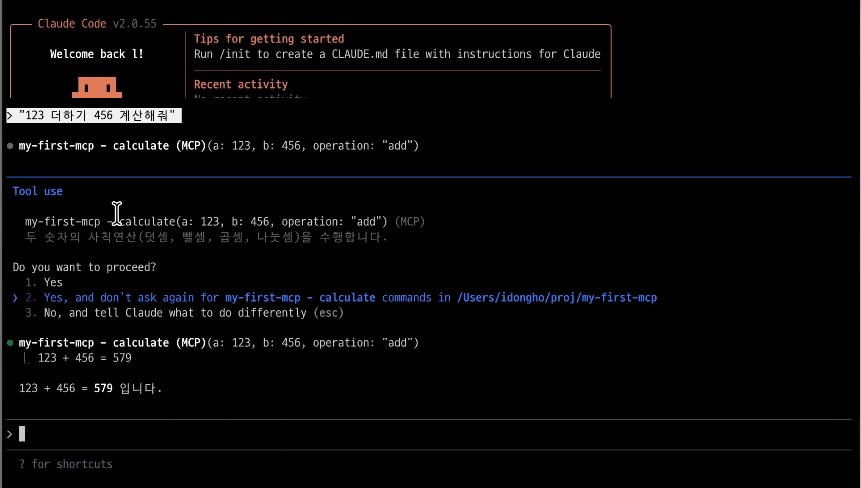
"123 더하기 456 계산해줘" → calculate Tool 실행 → "123 + 456 = 579 입니다"
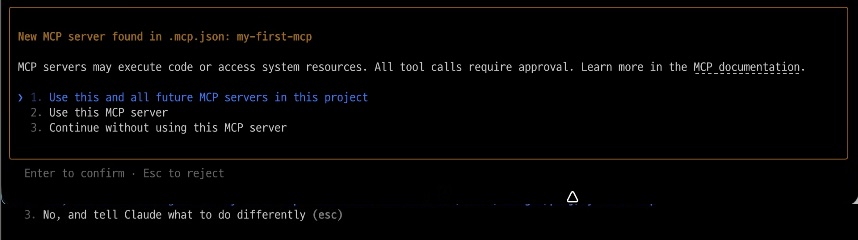
.mcp.json파일로 프로젝트 진입 시 자동 감지
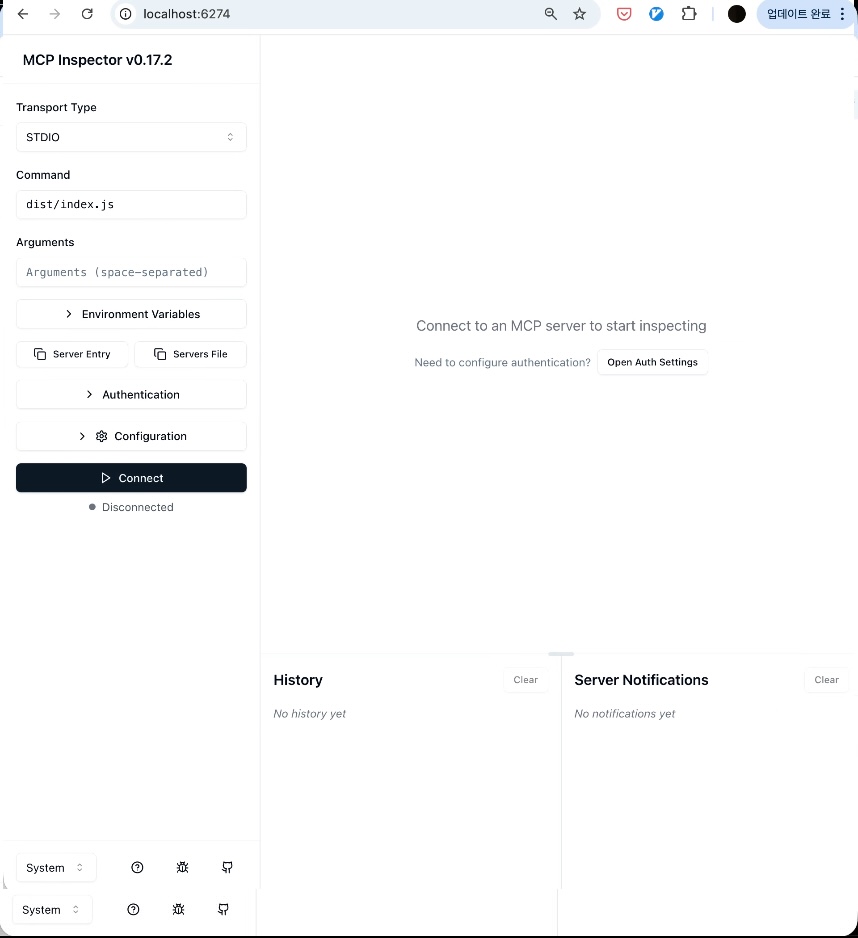
MCP Inspector로 서버 테스트 및 디버깅
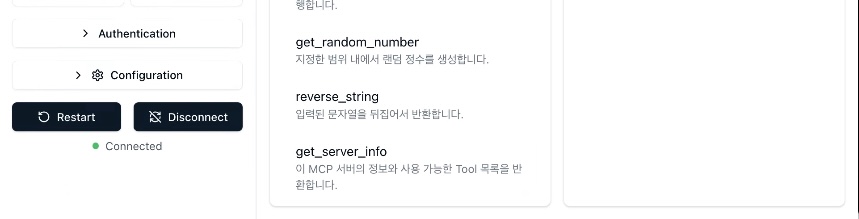
5개 Tool (get_current_time, calculate, get_random_number, reverse_string, get_server_info)
Node.js 20+
npm 또는 pnpm
# 저장소 클론
git clone https://github.com/dh1789/my-first-mcp.git
cd my-first-mcp

# 의존성 설치
npm install

# 빌드
npm run build# MCP 서버 등록
claude mcp add my-first-mcp -- node /path/to/my-first-mcp/dist/index.js
# 연결 확인
claude mcp listnpm run inspect
# 브라우저에서 http://localhost:6274 접속npm startmy-first-mcp/
├── src/
│ ├── index.ts # MCP 서버 진입점
│ ├── tools.ts # Day 1: 기본 Tool 로직
│ ├── resources.ts # Day 2: Resource 로직
│ ├── prompts.ts # Day 2: Prompt 로직
│ ├── project-analyzer.ts # Day 3: 프로젝트 분석기
│ ├── advanced.ts # Day 5: 고급 패턴 (캐싱, 보안, 로깅)
│ └── *.test.ts # 유닛 테스트
├── dist/ # 빌드 결과물
├── package.json
├── tsconfig.json
└── vitest.config.tsnpm run build # TypeScript 빌드
npm test # 유닛 테스트 실행 (31 tests)
npm run test:watch # 테스트 watch 모드
npm run inspect # MCP Inspector 실행
npm start # 서버 실행TDD 방식으로 120개 유닛 테스트가 포함되어 있습니다:
npm test

# 결과
# ✓ src/tools.test.ts (31 tests)
# ✓ src/resources.test.ts (11 tests)
# ✓ src/prompts.test.ts (13 tests)
# ✓ src/project-analyzer.test.ts (18 tests)
# ✓ src/advanced.test.ts (30 tests)
# ✓ src/package-config.test.ts (14 tests)
# ✓ src/shebang.test.ts (3 tests)
# Test Files  7 passed (7)
# Tests 120 passed (120)Runtime: Node.js 20+
Language: TypeScript 5.7
MCP SDK: @modelcontextprotocol/sdk
Validation: zod
Testing: vitest
MIT License - 자유롭게 사용, 수정, 배포할 수 있습니다.
이슈와 PR을 환영합니다!
Fork
Feature branch 생성 (git checkout -b feature/amazing-feature)
Commit (git commit -m 'Add amazing feature')
Push (git push origin feature/amazing-feature)
Pull Request 생성
idongho - GitHub
프로젝트의 package.json을 분석하여 의존성 정보를 제공합니다.
| Name | Required | Description | Default |
|---|---|---|---|
| path | Yes | 분석할 프로젝트 경로 (package.json이 있는 디렉토리) | |
| includeDevDeps | No | 개발 의존성 포함 여부. 기본값: true |
Does the description disclose side effects, auth requirements, rate limits, or destructive behavior?
No annotations are provided, so the description carries the full burden of behavioral disclosure. While it mentions analyzing package.json and providing dependency information, it doesn't describe what format the output takes, whether it's read-only or has side effects, error conditions, or performance characteristics. This leaves significant behavioral gaps for a tool with no annotation coverage.
Agents need to know what a tool does to the world before calling it. Descriptions should go beyond structured annotations to explain consequences.
Is the description appropriately sized, front-loaded, and free of redundancy?
The description is a single, efficient sentence that gets straight to the point. There's no wasted language or unnecessary elaboration. It's appropriately sized for a tool with two parameters and clear basic functionality.
Shorter descriptions cost fewer tokens and are easier for agents to parse. Every sentence should earn its place.
Given the tool's complexity, does the description cover enough for an agent to succeed on first attempt?
For a tool with no annotations and no output schema, the description is insufficient. It doesn't explain what the output looks like (dependency list format, structure, etc.), doesn't mention error handling for missing or invalid package.json files, and provides minimal behavioral context. Given the lack of structured metadata, the description should do more to compensate.
Complex tools with many parameters or behaviors need more documentation. Simple tools need less. This dimension scales expectations accordingly.
Does the description clarify parameter syntax, constraints, interactions, or defaults beyond what the schema provides?
The schema description coverage is 100%, so the schema already documents both parameters thoroughly. The description doesn't add any parameter-specific information beyond what's in the schema. It mentions analyzing package.json which implies the path parameter, but doesn't provide additional context about parameter usage or constraints.
Input schemas describe structure but not intent. Descriptions should explain non-obvious parameter relationships and valid value ranges.
Does the description clearly state what the tool does and how it differs from similar tools?
The description clearly states the tool's purpose: analyzing package.json to provide dependency information. It specifies the resource (package.json) and the action (analyzing to provide information). However, it doesn't differentiate from sibling tools like analyze_structure, which might also analyze project files.
Agents choose between tools based on descriptions. A clear purpose with a specific verb and resource helps agents select the right tool.
Does the description explain when to use this tool, when not to, or what alternatives exist?
No guidance is provided on when to use this tool versus alternatives. The description doesn't mention any prerequisites, limitations, or when other tools like analyze_structure might be more appropriate. It simply states what the tool does without contextual usage information.
Agents often have multiple tools that could apply. Explicit usage guidance like "use X instead of Y when Z" prevents misuse.
프로젝트 디렉토리 구조를 분석하여 트리 형태로 보여줍니다.
| Name | Required | Description | Default |
|---|---|---|---|
| path | Yes | 분석할 디렉토리 경로 | |
| maxDepth | No | 최대 깊이 (1-10). 기본값: 전체 | |
| showHidden | No | 숨김 파일/폴더 표시 여부. 기본값: false |
Does the description disclose side effects, auth requirements, rate limits, or destructive behavior?
With no annotations provided, the description carries the full burden of behavioral disclosure. It mentions the tool displays structure in tree form, which implies a read-only operation, but doesn't cover other important traits like whether it requires specific permissions, handles errors (e.g., invalid paths), or has performance considerations (e.g., large directories). For a tool with 3 parameters and no annotations, this is a significant gap.
Agents need to know what a tool does to the world before calling it. Descriptions should go beyond structured annotations to explain consequences.
Is the description appropriately sized, front-loaded, and free of redundancy?
The description is a single, efficient sentence in Korean that directly states the tool's function without unnecessary details. It's appropriately sized and front-loaded, with every word contributing to understanding the core purpose. There's no waste or redundancy, making it easy for an agent to parse quickly.
Shorter descriptions cost fewer tokens and are easier for agents to parse. Every sentence should earn its place.
Given the tool's complexity, does the description cover enough for an agent to succeed on first attempt?
Given the tool's complexity (3 parameters, no output schema, no annotations), the description is incomplete. It lacks information on behavioral traits (e.g., error handling, permissions), usage context relative to siblings, and output details (since there's no output schema, the description should hint at return values like tree structure format). For a directory analysis tool, this leaves gaps that could hinder agent effectiveness.
Complex tools with many parameters or behaviors need more documentation. Simple tools need less. This dimension scales expectations accordingly.
Does the description clarify parameter syntax, constraints, interactions, or defaults beyond what the schema provides?
The description adds no parameter semantics beyond what the input schema provides. Since schema description coverage is 100%, the schema already documents all parameters ('path', 'maxDepth', 'showHidden') with descriptions and constraints. The description doesn't explain how these parameters interact (e.g., how 'maxDepth' affects the tree output) or provide additional context, so it meets the baseline of 3 for high schema coverage.
Input schemas describe structure but not intent. Descriptions should explain non-obvious parameter relationships and valid value ranges.
Does the description clearly state what the tool does and how it differs from similar tools?
The description clearly states the tool's purpose: '프로젝트 디렉토리 구조를 분석하여 트리 형태로 보여줍니다' (Analyzes project directory structure and displays it in tree form). It specifies the verb ('analyzes'), resource ('project directory structure'), and output format ('tree form'), which is clear and specific. However, it doesn't explicitly differentiate from siblings like 'analyze_dependencies' or 'count_lines', which could help an agent choose correctly.
Agents choose between tools based on descriptions. A clear purpose with a specific verb and resource helps agents select the right tool.
Does the description explain when to use this tool, when not to, or what alternatives exist?
The description provides no guidance on when to use this tool versus alternatives. It doesn't mention scenarios where this tool is preferred over siblings (e.g., 'analyze_dependencies' for dependency analysis or 'count_lines' for file content analysis), nor does it specify prerequisites or exclusions. This lack of context makes it harder for an agent to select the right tool.
Agents often have multiple tools that could apply. Explicit usage guidance like "use X instead of Y when Z" prevents misuse.
두 숫자의 사칙연산(덧셈, 뺄셈, 곱셈, 나눗셈)을 수행합니다.
| Name | Required | Description | Default |
|---|---|---|---|
| a | Yes | 첫 번째 숫자 | |
| b | Yes | 두 번째 숫자 | |
| operation | Yes | 연산 종류: add(덧셈), subtract(뺄셈), multiply(곱셈), divide(나눗셈) |
Does the description disclose side effects, auth requirements, rate limits, or destructive behavior?
No annotations are provided, so the description carries the full burden of behavioral disclosure. While it states what the tool does, it doesn't mention error handling (e.g., division by zero), output format, precision limits, or any side effects. For a tool with mathematical operations, this lack of behavioral context is a significant gap.
Agents need to know what a tool does to the world before calling it. Descriptions should go beyond structured annotations to explain consequences.
Is the description appropriately sized, front-loaded, and free of redundancy?
The description is a single, efficient sentence in Korean that directly states the tool's function without any fluff or redundant information. It's appropriately sized and front-loaded, making it easy for an agent to parse quickly.
Shorter descriptions cost fewer tokens and are easier for agents to parse. Every sentence should earn its place.
Given the tool's complexity, does the description cover enough for an agent to succeed on first attempt?
Given the lack of annotations and output schema, the description is incomplete for a tool performing mathematical operations. It doesn't address potential errors (like division by zero), return value format, or numerical precision, which are critical for an AI agent to use the tool correctly and handle edge cases.
Complex tools with many parameters or behaviors need more documentation. Simple tools need less. This dimension scales expectations accordingly.
Does the description clarify parameter syntax, constraints, interactions, or defaults beyond what the schema provides?
Schema description coverage is 100%, with clear descriptions for all three parameters in the input schema. The description adds no additional parameter semantics beyond what's already documented in the schema (e.g., it doesn't explain parameter constraints or usage examples). This meets the baseline for high schema coverage.
Input schemas describe structure but not intent. Descriptions should explain non-obvious parameter relationships and valid value ranges.
Does the description clearly state what the tool does and how it differs from similar tools?
The description clearly states the tool performs basic arithmetic operations (addition, subtraction, multiplication, division) on two numbers. It specifies both the action ('performs') and the resource ('two numbers'), making the purpose unambiguous. However, it doesn't explicitly differentiate from sibling tools like 'get_random_number' or 'count_lines', which prevents a perfect score.
Agents choose between tools based on descriptions. A clear purpose with a specific verb and resource helps agents select the right tool.
Does the description explain when to use this tool, when not to, or what alternatives exist?
The description provides no guidance on when to use this tool versus alternatives. It doesn't mention any prerequisites, limitations, or specific contexts where this tool is preferred over other calculation methods or sibling tools. The agent must infer usage purely from the tool's name and description.
Agents often have multiple tools that could apply. Explicit usage guidance like "use X instead of Y when Z" prevents misuse.
프로젝트의 코드 라인 수를 분석합니다 (코드/주석/빈줄 분류).
| Name | Required | Description | Default |
|---|---|---|---|
| path | Yes | 분석할 디렉토리 경로 | |
| extensions | No | 분석할 확장자 목록 (예: ["ts", "js"]). 기본값: 모든 지원 확장자 |
Does the description disclose side effects, auth requirements, rate limits, or destructive behavior?
No annotations are provided, so the description carries the full burden of behavioral disclosure. It mentions analyzing and classifying lines (code/comments/blank), which implies a read-only operation, but doesn't specify output format, performance considerations, or any side effects. For a tool with no annotation coverage, this leaves key behavioral traits undocumented, such as whether it's resource-intensive or how results are returned.
Agents need to know what a tool does to the world before calling it. Descriptions should go beyond structured annotations to explain consequences.
Is the description appropriately sized, front-loaded, and free of redundancy?
The description is a single, efficient sentence that directly states the tool's purpose without any fluff. It's front-loaded with the core functionality and includes helpful parenthetical detail. Every word earns its place, making it highly concise and well-structured for quick understanding.
Shorter descriptions cost fewer tokens and are easier for agents to parse. Every sentence should earn its place.
Given the tool's complexity, does the description cover enough for an agent to succeed on first attempt?
Given the complexity of analyzing code lines with classification, the lack of annotations and output schema means the description is incomplete. It doesn't explain what the return values look like (e.g., a breakdown of counts), potential errors, or usage constraints. For a tool with no structured output information, the description should provide more context to be fully helpful.
Complex tools with many parameters or behaviors need more documentation. Simple tools need less. This dimension scales expectations accordingly.
Does the description clarify parameter syntax, constraints, interactions, or defaults beyond what the schema provides?
The schema description coverage is 100%, with clear descriptions for both parameters ('path' and 'extensions'). The description adds no additional parameter semantics beyond what the schema provides, such as examples of supported extensions or path format details. Since the schema does the heavy lifting, the baseline score of 3 is appropriate, as the description doesn't compensate but also doesn't detract.
Input schemas describe structure but not intent. Descriptions should explain non-obvious parameter relationships and valid value ranges.
Does the description clearly state what the tool does and how it differs from similar tools?
The description clearly states the tool's purpose: '프로젝트의 코드 라인 수를 분석합니다 (코드/주석/빈줄 분류)' translates to 'Analyzes the number of lines of code in a project (classifying code/comments/blank lines).' This specifies the verb (analyzes), resource (project code lines), and scope (with classification). However, it doesn't explicitly distinguish this tool from potential siblings like 'analyze_structure' or 'calculate,' which might have overlapping functionality, preventing a perfect score.
Agents choose between tools based on descriptions. A clear purpose with a specific verb and resource helps agents select the right tool.
Does the description explain when to use this tool, when not to, or what alternatives exist?
The description provides no guidance on when to use this tool versus alternatives. It doesn't mention any prerequisites, exclusions, or specific contexts for usage. Given the sibling tools include 'analyze_structure' and 'calculate,' which could potentially handle similar analyses, the lack of differentiation is a significant gap in usage guidance.
Agents often have multiple tools that could apply. Explicit usage guidance like "use X instead of Y when Z" prevents misuse.
현재 날짜와 시간을 반환합니다. 시간대를 지정할 수 있습니다.
| Name | Required | Description | Default |
|---|---|---|---|
| timezone | No | 시간대 (예: Asia/Seoul, America/New_York). 기본값: Asia/Seoul | |
| format | No | 출력 형식: full(전체), date(날짜만), time(시간만). 기본값: full |
Does the description disclose side effects, auth requirements, rate limits, or destructive behavior?
With no annotations provided, the description carries the full burden of behavioral disclosure. It adds some context by mentioning timezone specification and output format options, but lacks details on rate limits, authentication needs, or error handling. It doesn't contradict annotations (none exist), but it's minimally adequate for a simple read operation.
Agents need to know what a tool does to the world before calling it. Descriptions should go beyond structured annotations to explain consequences.
Is the description appropriately sized, front-loaded, and free of redundancy?
The description is extremely concise and front-loaded: two sentences that directly state the tool's function and key capability. Every word earns its place with no wasted text, making it easy for an AI agent to parse quickly.
Shorter descriptions cost fewer tokens and are easier for agents to parse. Every sentence should earn its place.
Given the tool's complexity, does the description cover enough for an agent to succeed on first attempt?
Given the tool's low complexity (simple read operation with 2 optional parameters) and 100% schema coverage, the description is somewhat complete but lacks output details (no output schema exists). It covers the basic purpose and parameters but doesn't explain return values or potential behavioral aspects, leaving room for improvement.
Complex tools with many parameters or behaviors need more documentation. Simple tools need less. This dimension scales expectations accordingly.
Does the description clarify parameter syntax, constraints, interactions, or defaults beyond what the schema provides?
Schema description coverage is 100%, so the schema already fully documents both parameters (timezone and format). The description adds minimal value by mentioning timezone specification but doesn't provide additional syntax or format details beyond what the schema offers. This meets the baseline for high schema coverage.
Input schemas describe structure but not intent. Descriptions should explain non-obvious parameter relationships and valid value ranges.
Does the description clearly state what the tool does and how it differs from similar tools?
The description clearly states the tool's purpose: '현재 날짜와 시간을 반환합니다' (returns current date and time). It specifies the verb (returns) and resource (current date and time), making the function unambiguous. However, it doesn't differentiate from siblings like 'get_server_info' or 'server_status' that might also provide time-related data, preventing a perfect score.
Agents choose between tools based on descriptions. A clear purpose with a specific verb and resource helps agents select the right tool.
Does the description explain when to use this tool, when not to, or what alternatives exist?
The description provides no guidance on when to use this tool versus alternatives. It mentions timezone specification but doesn't clarify scenarios where this is necessary or compare it to sibling tools that might offer similar functionality. There's no explicit when/when-not usage or alternative recommendations.
Agents often have multiple tools that could apply. Explicit usage guidance like "use X instead of Y when Z" prevents misuse.
지정한 범위 내에서 랜덤 정수를 생성합니다.
| Name | Required | Description | Default |
|---|---|---|---|
| min | Yes | 최소값 (정수) | |
| max | Yes | 최대값 (정수) | |
| count | No | 생성할 숫자 개수 (1-10). 기본값: 1 |
Does the description disclose side effects, auth requirements, rate limits, or destructive behavior?
No annotations are provided, so the description carries the full burden of behavioral disclosure. It states the tool generates random integers but does not explain key behaviors like whether the generation is deterministic, the distribution of randomness, error handling for invalid ranges, or output format. This leaves significant gaps for an agent to understand how to use it effectively.
Agents need to know what a tool does to the world before calling it. Descriptions should go beyond structured annotations to explain consequences.
Is the description appropriately sized, front-loaded, and free of redundancy?
The description is a single, efficient sentence in Korean that directly states the tool's function without any unnecessary words. It is appropriately sized and front-loaded, making it easy to understand at a glance.
Shorter descriptions cost fewer tokens and are easier for agents to parse. Every sentence should earn its place.
Given the tool's complexity, does the description cover enough for an agent to succeed on first attempt?
Given the lack of annotations and output schema, the description is incomplete. It does not cover behavioral aspects like randomness properties, error cases, or return values, which are crucial for a tool with parameters and no structured output documentation. This makes it inadequate for full contextual understanding.
Complex tools with many parameters or behaviors need more documentation. Simple tools need less. This dimension scales expectations accordingly.
Does the description clarify parameter syntax, constraints, interactions, or defaults beyond what the schema provides?
Schema description coverage is 100%, with clear descriptions for 'min', 'max', and 'count' parameters. The description adds no additional semantic information beyond what the schema provides, such as explaining range inclusivity or the effect of 'count'. Baseline 3 is appropriate as the schema does the heavy lifting.
Input schemas describe structure but not intent. Descriptions should explain non-obvious parameter relationships and valid value ranges.
Does the description clearly state what the tool does and how it differs from similar tools?
The description clearly states the tool's purpose: '지정한 범위 내에서 랜덤 정수를 생성합니다' (generates random integers within a specified range). It specifies the verb '생성합니다' (generates) and resource '랜덤 정수' (random integers), but does not distinguish it from sibling tools like 'calculate' or 'get_current_time', which serve different purposes.
Agents choose between tools based on descriptions. A clear purpose with a specific verb and resource helps agents select the right tool.
Does the description explain when to use this tool, when not to, or what alternatives exist?
The description provides no guidance on when to use this tool versus alternatives. It does not mention any context, prerequisites, or exclusions, such as when to choose this over other mathematical or data generation tools in the sibling list.
Agents often have multiple tools that could apply. Explicit usage guidance like "use X instead of Y when Z" prevents misuse.
이 MCP 서버의 정보와 사용 가능한 Tool 목록을 반환합니다.
| Name | Required | Description | Default |
|---|---|---|---|
No parameters | |||
Does the description disclose side effects, auth requirements, rate limits, or destructive behavior?
With no annotations provided, the description carries the full burden of behavioral disclosure. While it states the tool returns information (implying read-only), it doesn't clarify whether this requires authentication, has rate limits, what format the information comes in, or any other behavioral characteristics. For a tool with zero annotation coverage, this is insufficient disclosure.
Agents need to know what a tool does to the world before calling it. Descriptions should go beyond structured annotations to explain consequences.
Is the description appropriately sized, front-loaded, and free of redundancy?
The description is extremely concise - a single Korean sentence that directly states the tool's purpose without any unnecessary words. It's front-loaded with the core functionality and wastes no space on redundant information. Every word earns its place.
Shorter descriptions cost fewer tokens and are easier for agents to parse. Every sentence should earn its place.
Given the tool's complexity, does the description cover enough for an agent to succeed on first attempt?
Given that this is a simple read-only tool with no parameters and no output schema, the description provides the basic purpose but lacks important context. Without annotations or output schema, the description should ideally specify what 'server information' includes and what format the 'available tool list' takes. The current description is minimally adequate but leaves gaps about the return format.
Complex tools with many parameters or behaviors need more documentation. Simple tools need less. This dimension scales expectations accordingly.
Does the description clarify parameter syntax, constraints, interactions, or defaults beyond what the schema provides?
The tool has zero parameters (schema description coverage is 100%), so the baseline for a parameterless tool is 4. The description appropriately doesn't discuss parameters since none exist, and it focuses on what the tool returns rather than what it accepts as input.
Input schemas describe structure but not intent. Descriptions should explain non-obvious parameter relationships and valid value ranges.
Does the description clearly state what the tool does and how it differs from similar tools?
The description clearly states the tool's purpose: '이 MCP 서버의 정보와 사용 가능한 Tool 목록을 반환합니다' (returns this MCP server's information and available tool list). It specifies both the verb ('반환합니다' - returns) and the resources (server info and tool list). However, it doesn't explicitly differentiate from siblings like 'server_status' which might have overlapping functionality.
Agents choose between tools based on descriptions. A clear purpose with a specific verb and resource helps agents select the right tool.
Does the description explain when to use this tool, when not to, or what alternatives exist?
The description provides no guidance on when to use this tool versus alternatives. With siblings like 'server_status' that might provide similar server information, there's no indication of when this tool is appropriate versus other tools. The description simply states what it does without contextual usage information.
Agents often have multiple tools that could apply. Explicit usage guidance like "use X instead of Y when Z" prevents misuse.
입력된 문자열을 뒤집어서 반환합니다.
| Name | Required | Description | Default |
|---|---|---|---|
| text | Yes | 뒤집을 문자열 |
Does the description disclose side effects, auth requirements, rate limits, or destructive behavior?
With no annotations provided, the description carries the full burden of behavioral disclosure. It states what the tool does (reverses strings) but doesn't mention any behavioral traits like error handling for empty strings (though minLength=1 prevents this), performance characteristics, encoding considerations, or what happens with special characters. The description is minimal and lacks operational context.
Agents need to know what a tool does to the world before calling it. Descriptions should go beyond structured annotations to explain consequences.
Is the description appropriately sized, front-loaded, and free of redundancy?
The description is a single, efficient sentence that directly states the tool's function. It's front-loaded with the core action and contains zero wasted words. Every element of the description earns its place by communicating the essential purpose without unnecessary elaboration.
Shorter descriptions cost fewer tokens and are easier for agents to parse. Every sentence should earn its place.
Given the tool's complexity, does the description cover enough for an agent to succeed on first attempt?
For a simple string transformation tool with one well-documented parameter and no output schema, the description is adequate but minimal. It covers the basic purpose but lacks context about the return value format (though implied), error conditions, or performance considerations. Given the tool's simplicity, the description meets minimum viability but doesn't provide rich contextual information.
Complex tools with many parameters or behaviors need more documentation. Simple tools need less. This dimension scales expectations accordingly.
Does the description clarify parameter syntax, constraints, interactions, or defaults beyond what the schema provides?
The schema description coverage is 100%, with the parameter 'text' clearly documented as '뒤집을 문자열' (string to reverse). The description doesn't add any parameter semantics beyond what the schema already provides, but since the schema coverage is complete, the baseline score of 3 is appropriate. No additional parameter context is needed or provided.
Input schemas describe structure but not intent. Descriptions should explain non-obvious parameter relationships and valid value ranges.
Does the description clearly state what the tool does and how it differs from similar tools?
The description clearly states the tool's purpose with a specific verb ('뒤집어서' - reverse) and resource ('문자열' - string), and it distinguishes from all sibling tools which perform different operations like analysis, calculation, counting, or information retrieval. The description precisely communicates the transformation being performed.
Agents choose between tools based on descriptions. A clear purpose with a specific verb and resource helps agents select the right tool.
Does the description explain when to use this tool, when not to, or what alternatives exist?
The description provides no guidance on when to use this tool versus alternatives. While the purpose is clear, there's no mention of use cases, prerequisites, or comparison with sibling tools that might handle text manipulation differently. The agent must infer usage from the tool name and description alone.
Agents often have multiple tools that could apply. Explicit usage guidance like "use X instead of Y when Z" prevents misuse.
MCP 서버 상태를 확인합니다 (uptime, 메모리 사용량 등).
| Name | Required | Description | Default |
|---|---|---|---|
No parameters | |||
Does the description disclose side effects, auth requirements, rate limits, or destructive behavior?
With no annotations provided, the description carries the full burden of behavioral disclosure. It states the tool checks server status and mentions specific metrics (uptime, memory usage), but doesn't describe what the response looks like, whether authentication is required, if there are rate limits, or what format the data returns. For a monitoring tool with zero annotation coverage, this leaves significant behavioral questions unanswered.
Agents need to know what a tool does to the world before calling it. Descriptions should go beyond structured annotations to explain consequences.
Is the description appropriately sized, front-loaded, and free of redundancy?
The description is a single, efficient sentence that gets straight to the point. It states the action ('확인합니다' - checks) and the target ('MCP 서버 상태' - MCP server status) with specific examples of what's included. There's no wasted verbiage or unnecessary elaboration. However, it could be slightly more structured by explicitly mentioning it's a monitoring/health check tool.
Shorter descriptions cost fewer tokens and are easier for agents to parse. Every sentence should earn its place.
Given the tool's complexity, does the description cover enough for an agent to succeed on first attempt?
Given the tool has no annotations, no output schema, and the description doesn't explain what the return values look like, this leaves significant gaps. For a server status monitoring tool, the agent needs to know what format the status information returns (structured data? plain text? specific metrics?) and whether there are any behavioral constraints. The description mentions specific metrics but doesn't provide enough context for the agent to understand the complete interaction.
Complex tools with many parameters or behaviors need more documentation. Simple tools need less. This dimension scales expectations accordingly.
Does the description clarify parameter syntax, constraints, interactions, or defaults beyond what the schema provides?
The tool has 0 parameters with 100% schema description coverage, so the schema already fully documents the parameter situation. The description appropriately doesn't discuss parameters since none exist. It focuses instead on what the tool returns (server status metrics), which is correct for a parameterless tool. Baseline would be 4 for 0 parameters.
Input schemas describe structure but not intent. Descriptions should explain non-obvious parameter relationships and valid value ranges.
Does the description clearly state what the tool does and how it differs from similar tools?
The description clearly states the tool's purpose: 'MCP 서버 상태를 확인합니다' (checks MCP server status) with specific metrics mentioned (uptime, memory usage). It distinguishes from most siblings by focusing on server status rather than code analysis, calculations, or string manipulation. However, it doesn't explicitly differentiate from 'get_server_info' which might be a similar sibling tool.
Agents choose between tools based on descriptions. A clear purpose with a specific verb and resource helps agents select the right tool.
Does the description explain when to use this tool, when not to, or what alternatives exist?
The description provides no guidance on when to use this tool versus alternatives. It doesn't mention when this tool is appropriate, when other tools should be used instead, or what distinguishes it from 'get_server_info' which appears to be a potential sibling with similar functionality. There's only a basic statement of what the tool does without usage context.
Agents often have multiple tools that could apply. Explicit usage guidance like "use X instead of Y when Z" prevents misuse.
Recent tool additions, removals, and schema changes observed during successful MCP inspections.
analyze_dependenciesanalyze_structurecalculatecount_linesget_current_timeget_random_numberget_server_inforeverse_stringserver_statusScored across 9 tools
Most tools have distinct purposes (e.g., analyze_dependencies vs. count_lines), but some overlap exists: get_server_info and server_status both relate to server monitoring, which could cause confusion. The descriptions help differentiate them, but the boundaries are not entirely clear.
The naming follows a consistent verb_noun pattern throughout (e.g., analyze_dependencies, calculate, get_current_time), with only minor deviations like 'server_status' using a noun_verb style. This consistency makes the tools readable and predictable.
With 9 tools, the count is reasonable, but the scope is broad and unfocused, mixing project analysis, basic utilities, and server monitoring. This makes it borderline as the tools don't form a cohesive set for a specific domain, feeling somewhat heavy for a general-purpose server.
The server lacks a clear domain, making completeness hard to assess. For project analysis, there are gaps (e.g., no update or delete operations for dependencies or structure). As a utility toolkit, it's incomplete with random tools like calculate and reverse_string that don't integrate well, leading to potential agent failures.
MCP server for skill documentation, generated by doc2mcp.
This MCP server enables users to perform scientific computations regarding linear algebra and vect…