
A
licenseB
qualityD
maintenanceProvides Windows system diagnostic capabilities to AI agents, allowing them to access event logs, crash information, system uptime, and perform stability analysis.
11
3
MIT

Click on "Deploy Server".
Wait a few minutes for the server to deploy. Once ready, it will show a "Started" state.
In the chat, type @ followed by the MCP server name and your instructions, e.g., "@Windows MCP Server show me the top 5 processes using the most CPU"
That's it! The server will respond to your query, and you can continue using it as needed.
Here is a step-by-step guide with screenshots.
This project provides a Windows MCP (Model Context Protocol) server exposing useful system information and control tools for Windows environments on your AI applications.
More robust drive and uptime implementations (no brittle PowerShell parsing).
Structured results for top processes (list of objects with pid, name, cpu_percent, memoryMB).
Structured results for memory and network information.
Safer PowerShell usage with JSON parsing for GPU info.
Related MCP server: System Info MCP Server
System info (OS, release, version, architecture, hostname)
Uptime and last boot time
Drives listing and per-drive space usage
Memory, CPU, GPU, and Network information
Top processes by memory and CPU (accurate sampling)
Tool Name | Description | Parameters | Returns |
Windows-system-info | Get OS, release, version, architecture, and hostname | None | object: name, system, release, version, architecture, hostname |
Windows-last-boot-time | Get the last boot time of the system | None | string (timestamp) |
Windows-uptime | Get system uptime since last boot | None | string: "Uptime: seconds" |
Windows-drives | Get list of all available drives | None | string[] (e.g., ["C", "D"]) |
Windows-drive-status | Get used and free space for a specific drive | drive: string | DriveInfo { name, used_spaceGB: number, free_spaceGB: number } |
Windows-drives-status-simple | Get status using comma-separated drive letters | drives_string: string | DriveInfo[] |
Windows-memory-info | Get RAM usage information | None | object: total_memory, available_memory, used_memory (strings with GB) |
Windows-network-info | Get network IPv4 addresses per interface | None | object: interface -> IPv4 (or { error }) |
Windows-cpu-info | Get CPU model, logical count and frequency | None | string |
Windows-gpu-info | Get GPU name(s) and driver versions | None | string (one line per GPU) |
Windows-top-processes-by-memory | Get the top X processes by memory usage | amount: int = 5 | ProcessInfo[] { pid, name, memoryMB, cpu_percent? } |
Windows-top-processes-by-cpu | Get the top X processes by CPU usage (sampled for accuracy) | amount: int = 5 | ProcessInfo[] { pid, name, cpu_percent, memoryMB } |
Note: Previously documented tools Windows-name-version, Windows-drives-status, and Windows-all-drives-status are not currently implemented to avoid duplication. If needed, they can be added easily.
Python 3.13+
uv (for fast startup and dependency management)
# On Windows
powershell -c "irm https://astral.sh/uv/install.ps1 | iex"Clone this repository:
git clone https://github.com/carlosedp/windows-mcp-server.git
cd windows-mcp-serveruv run mcp dev main.pyuv handles the installation of dependencies and runs the server with the MCP protocol enabled.
Then in the MCP Inspector browser window:
Click "Connect" to connect the MCP client.
Go to the "Tools" tab to see available tools.
Click "List Tools" to see the available tools.
Select a tool and click "Run tool" to execute it.
{
  "name": "MY-PC",
  "system": "Windows",
  "release": "10",
  "version": "10.0.19045",
  "architecture": "64bit",
  "hostname": "MY-PC"
}{
"name": "C",
"used_spaceGB": 120.53,
"free_spaceGB": 380.12
}{
"total_memory": "32.00 GB",
"available_memory": "18.25 GB",
"used_memory": "13.75 GB"
}{
"Ethernet": "192.168.1.50",
"Wi-Fi": "10.0.0.15"
}[
{ "pid": 1234, "name": "chrome.exe", "cpu_percent": 24.7, "memoryMB": 512.3 },
{ "pid": 4321, "name": "code.exe", "cpu_percent": 12.1, "memoryMB": 650.8 },
{ "pid": 9876, "name": "System", "cpu_percent": 8.4, "memoryMB": 45.0 }
]LM Studio using Llama 3.2 3B getting system information using the MCP server:
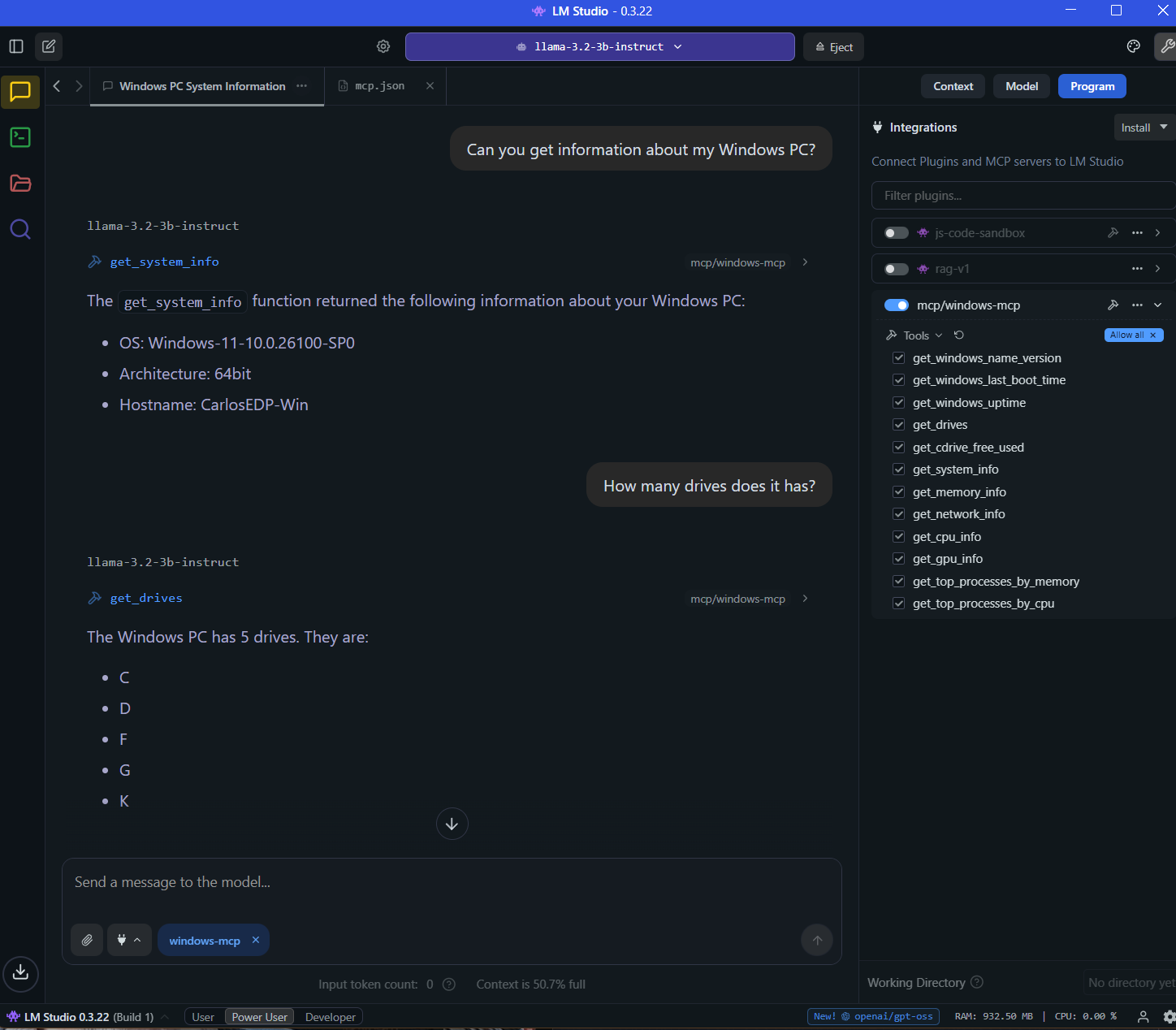
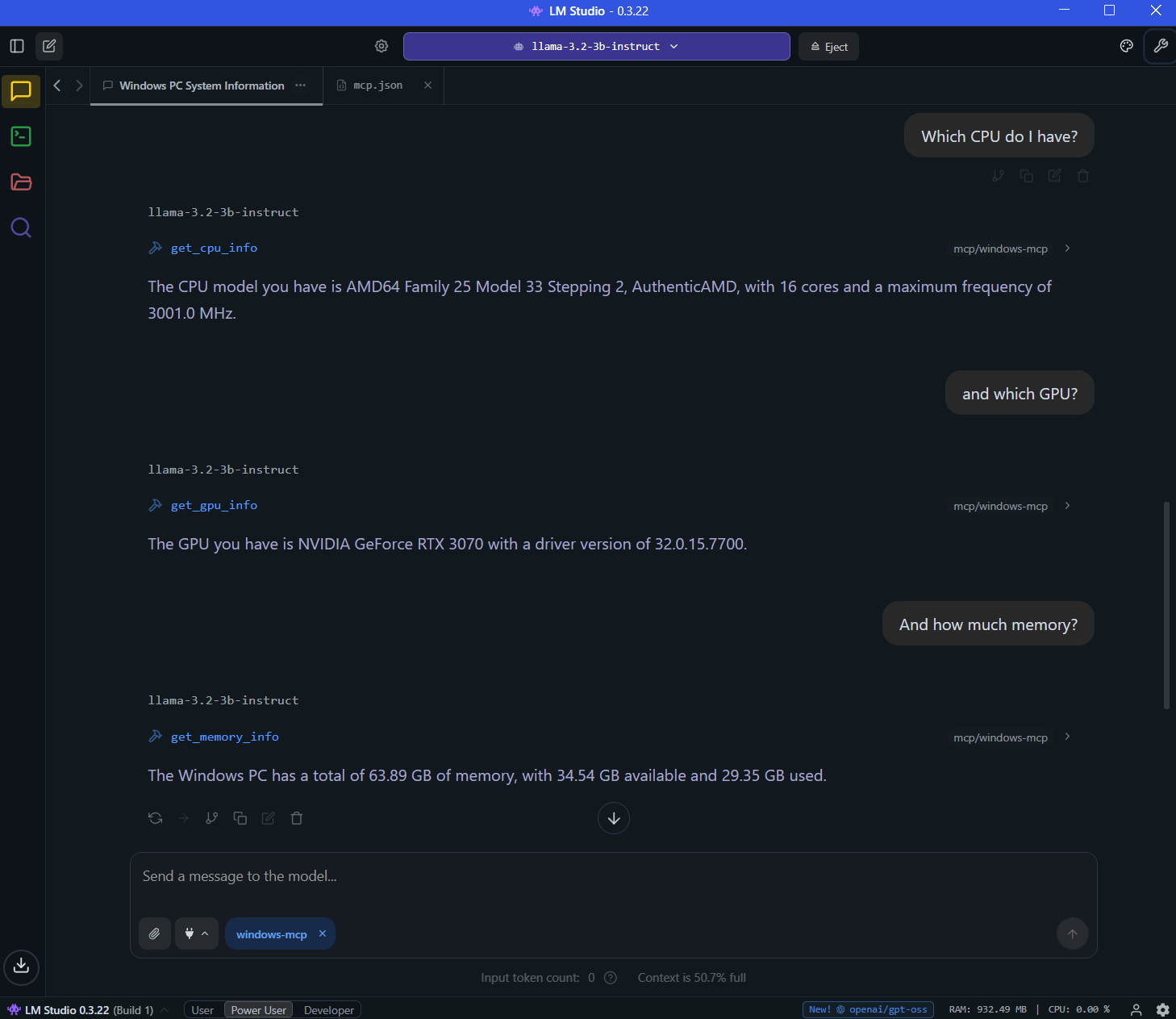
Some more examples of tools you can run:
To connect your MCP client to this server (like Claude Desktop, VSCode, LM Studio, etc), add the following to your client configuration:
{
  "mcpServers": {
    "windows-mcp": {
      "command": "uv",
      "args": [
        "--directory",
        "C:\\Users\\Carlos Eduardo\\repos\\windows-mcp-server",
        "run",
        "mcp",
        "run",
        "main.py"
      ]
    }
  }
}
Adjust the paths above to where the project file is located.
To publish as a Python package:
Edit pyproject.toml with your metadata.
Build and upload to PyPI:
python -m build
python -m twine upload dist/*MIT
Get CPU information of the Windows system.
Inputs: no named parameters. Returns: result
Get a list of all drives in the Windows system
Inputs: no named parameters. Returns: result
Get status for specific drives using a comma-separated drive letters as string (e.g., 'C,D,F')
Inputs: drives_string (required). Returns: result
Get status information about the used and free space in a Windows drive
Inputs: drive (required). Returns: Model for drive information.
Get GPU information of the Windows system.
Inputs: no named parameters. Returns: result
Get the last boot time of the Windows system
Inputs: no named parameters. Returns: result
Get memory information of the Windows system.
Inputs: no named parameters. Returns: object
Get network information of the Windows system.
Inputs: no named parameters. Returns: object
Get Windows system information including OS version, release, architecture, and hostname
Inputs: no named parameters. Returns: object
Get the top X processes by CPU usage.
Inputs: amount. Returns: result
Get the top X processes by memory usage.
Inputs: amount. Returns: result
Get the uptime of the Windows system
Inputs: no named parameters. Returns: result
Recent tool additions, removals, and schema changes observed during successful MCP inspections.
Loading tool schema changelog…
Scored across 12 tools
Most tools are clearly distinct, but 'Windows-drives-status-simple' and 'Windows-drive-status' could cause confusion as both relate to drive status; descriptions help differentiate.
Consistent 'Windows-' prefix, but mix of 'info' and 'status' suffixes and singular vs plural ('drives' vs 'drive') creates minor inconsistency.
12 tools for system information retrieval is well-scoped, covering key areas like CPU, memory, drives, and network without being excessive.
Covers major system info components, but lacks common queries like process listing, disk I/O, or services; overall good for basic monitoring.
Connect ChatGPT, Claude, Cursor or VS Code to your Windows PC: files, terminal, browser, apps.
Control your authorized Windows computers via OAuth: files, shell, apps, and task status.
Remote Desktop Commander: use files, terminal and processes on your own computers from any AI app.
Connect AI assistants to authorized Windows and macOS devices for files, commands, and management.