
F
licenseB
qualityD
maintenanceA learning project demonstrating how to build MCP servers with Python, featuring weather query tools that showcase custom tool creation, configuration, and integration with AI assistants.
1
-

Click on "Deploy Server".
Wait a few minutes for the server to deploy. Once ready, it will show a "Started" state.
In the chat, type @ followed by the MCP server name and your instructions, e.g., "@Swiss Meteo MCP what's the temperature in Zurich?"
That's it! The server will respond to your query, and you can continue using it as needed.
Here is a step-by-step guide with screenshots.
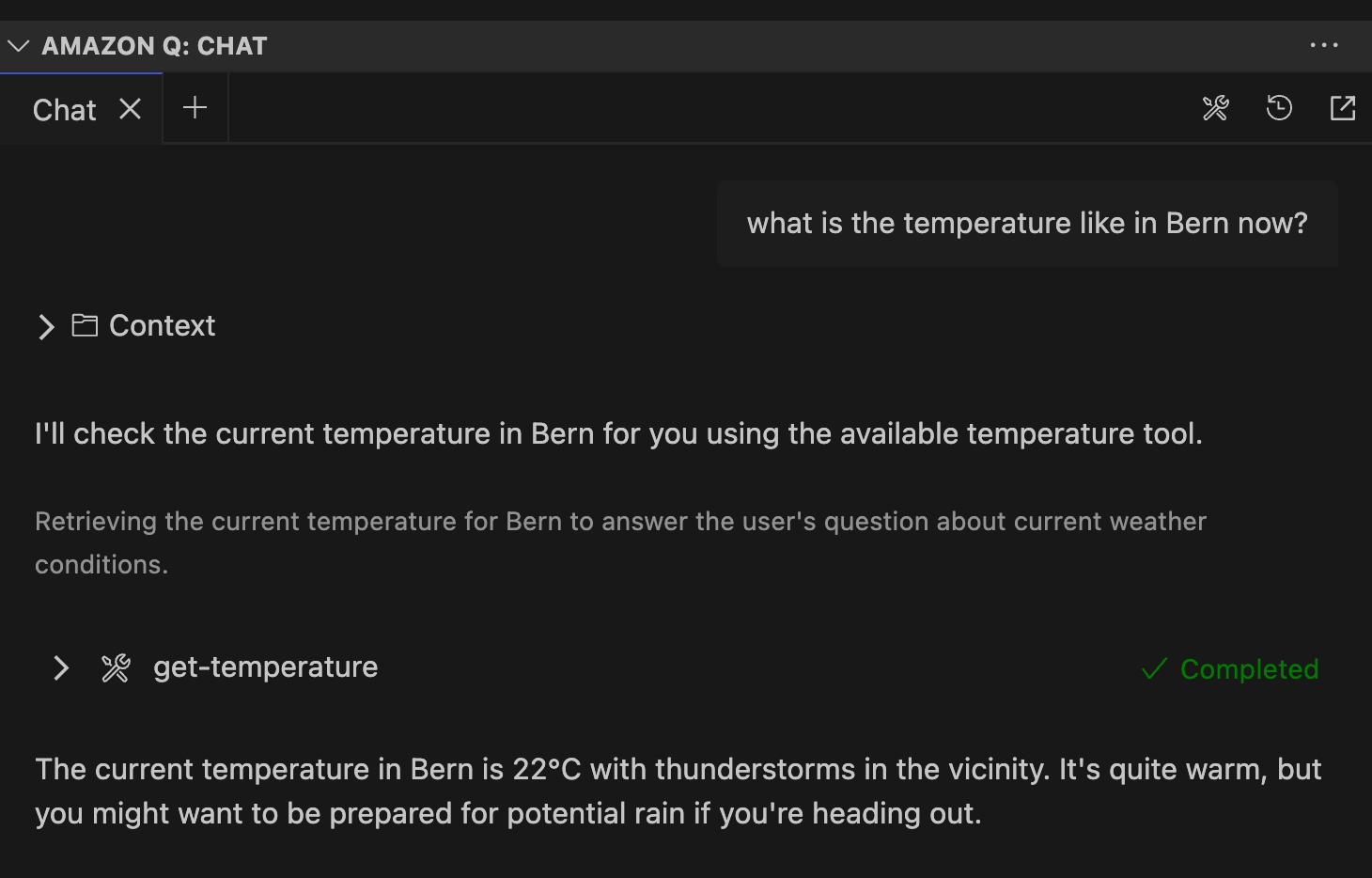
This is an experimental project to learn about MCP + GitHub Copilot, using the latter to create the MCP server code and then access it through the Chat funciton of copilot. I also managed to use the MCP server through Amazon Q chat (see further below).
I prompted the goal as stated above for an initial pass.
After uvicorn was used wrongly in the .vscode/mcp.json config, which is for http endpoints, not for stdio ones, debugging back and forth with copilot fixed the issue and I had a running MCP server scaffolded (that were unrelated to swiss meteo):
Availabilities:
prompt to summarise text, which could either be detailed or brief (/mcp.swiss-meteo-mcp.summarize-notes ).
tool to add a note (#add-note).
resource to list notes, not accessible explicitly (just implicitly) through copilot chat.
One can see below that it works as expected, with autocompletion, after the server was started:
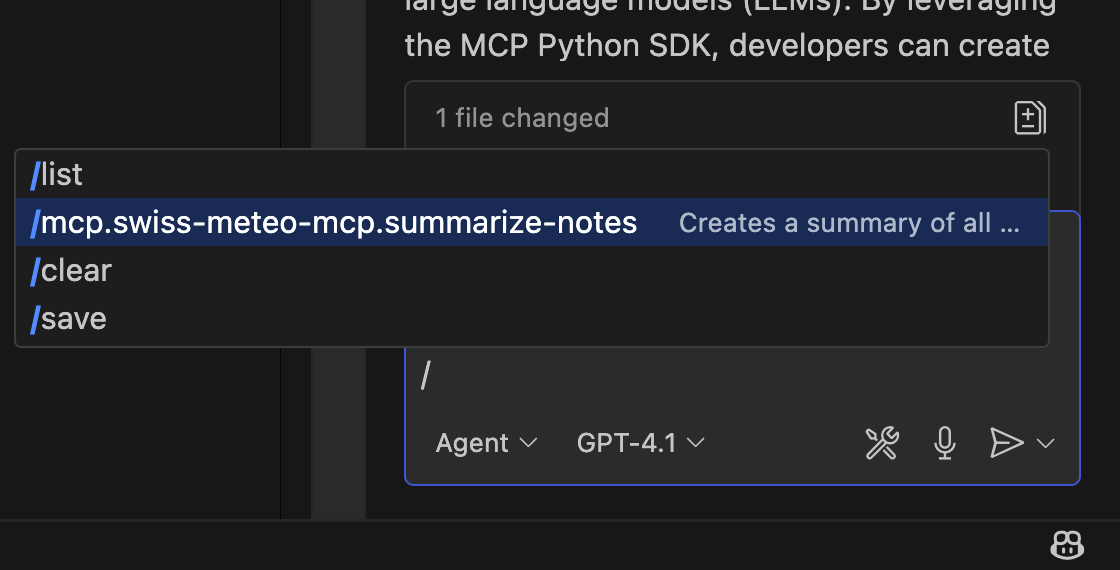
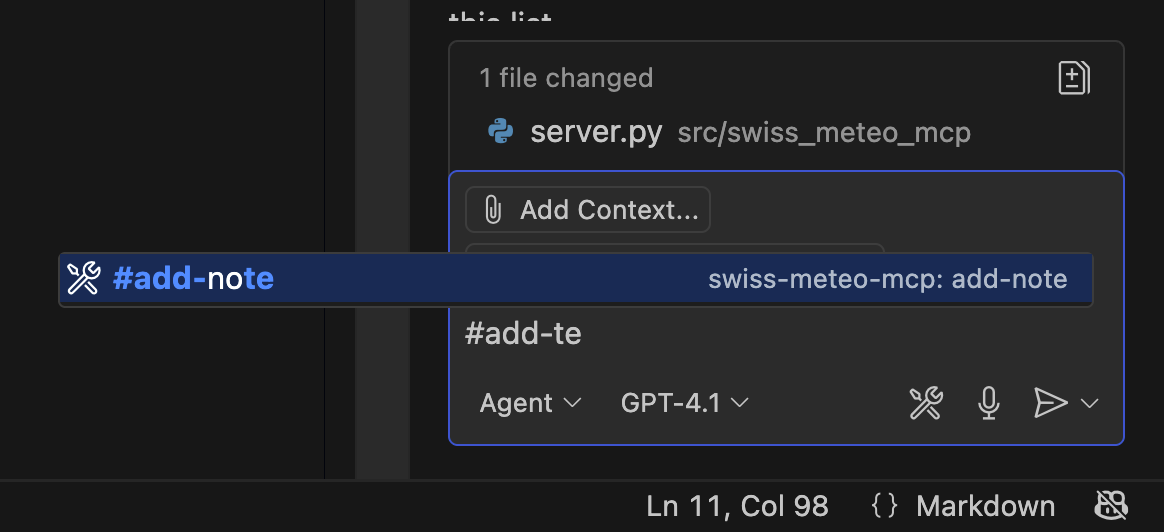
I wanted to add a tool to get the current weather from swiss meteo (hence the name of the package), but there is no official API I found out with copilot chat.
I then asked for a few alternatives and decided to go with wttr.io and let copilot implement it.
I also factored out some functionality so I could let copilot write a simple unit test that worked.
So my own new tool is #get-temperature
Related MCP server: MCP Travel Weather Server
Building an MPC server seems a standard task. GitHub Copilot managed kind of well, but not flawless.
Integration of mcp servers is working well with copilot it seems.
Invocation of tools and resources is possible implicitly or explicitly. When used, it is communicated transparently in the copilot chat.
MCP servers can run locally (with like uv run or container isolation) or remotely.
MCP prompts are really just parametrised snippets.
resources are read-only info.
tools are supposed to have side effects.
can also write git commit messages (not so impressive)
used 20% of free code suggestions in one day (and might be used for retraining).
Can discover MCP server in .vscode/mcp.json in own project, start it when a relevant question is asked in the Q chat and use the tool to answer the question, but using Python source package not MCP tool over stdio.
to use the mcp server outside the source repo, we had to put the mcp.json file into the amazon q global directory at ~/.aws/amazonq/mcp/mcp.json and rename the servers: key to mcpServers: for Q to recognise it:
{
  "mcpServers": {
    "swiss-meteo-mcp3": {
      "type": "stdio",
      # not portable, most mcp servers use uvx run [pypiname.module@latest] to install on fly and run
      "command": "/Users/lorenz/git/swiss_meteo_mcp/.venv/bin/python",
      "args": [
        "-m",
        "swiss_meteo_mcp.server"
      ]
    }
  }
}
drag and drop screenshot into VS Code editor works well
Add a new note
Inputs: name (required), content (required).
Delete all notes from the server.
Inputs: no named parameters.
Get the current temperature for a location using SwissMeteo APIs.
Inputs: location (required).
Recent tool additions, removals, and schema changes observed during successful MCP inspections.
Loading tool schema changelog…
Scored across 3 tools
The tools have unclear boundaries and overlapping purposes. 'add-note' and 'delete-all-notes' are related to note management, while 'get-temperature' is a weather API tool, creating a split domain. Within the note tools, there is a gap between adding and deleting all notes, but they are distinct from the weather tool, though the server name suggests a weather focus, making the note tools ambiguous in context.
The naming shows mixed conventions. 'add-note' and 'delete-all-notes' use kebab-case with verb-object patterns, while 'get-temperature' also uses kebab-case but is more descriptive. There is no consistent pattern across all tools, as the note tools imply a different domain than the weather tool, leading to readability issues.
With only 3 tools, the count is too few for the apparent scope. The server name 'Swiss Meteo MCP' suggests a weather-related service, but only one tool ('get-temperature') directly supports this, while the other two are for note management, creating an incomplete and mismatched set for the domain.
The tool surface is severely incomplete for the stated purpose. Based on the server name, weather-related operations are expected, but only 'get-temperature' is provided, missing other essential weather data (e.g., forecasts, humidity). The note tools are unrelated and lack full CRUD coverage (e.g., no update or individual delete), leading to significant gaps that will cause agent failures.
An MCP server for weather information by @kulybaba
An MCP server for weather information by @kulybaba
MCP server for weather with reasoning — umbrella advice, outdoor checks, city comparisons.