

F
licenseNot graded
qualityD
maintenanceEnables AI assistants to query Salesforce data including retrieving accounts by ID, searching accounts by name, and fetching recent opportunities through authenticated API access.
-

Provides secure access to Salesforce data and operations through OAuth 2.0, enabling SOQL query execution, CRUD operations on records (Accounts, Contacts, Opportunities, etc.), and object metadata retrieval with built-in security and rate limiting.
Click on "Deploy Server".
Wait a few minutes for the server to deploy. Once ready, it will show a "Started" state.
In the chat, type @ followed by the MCP server name and your instructions, e.g., "@MCP Salesforce Lite show me the last 10 opportunities created this month"
That's it! The server will respond to your query, and you can continue using it as needed.
Here is a step-by-step guide with screenshots.
Simple and lightweight Salesforce MCP server for connecting AI assistants to Salesforce data. Ideal for prototyping and small projects.


📦 Install from PyPI: pip install mcp-salesforce-lite
🔗 PyPI Package: https://pypi.org/project/mcp-salesforce-lite/
📚 GitHub Repository: https://github.com/luvl/mcp-salesforce-lite
See the MCP Salesforce Lite server in action with Claude Desktop:
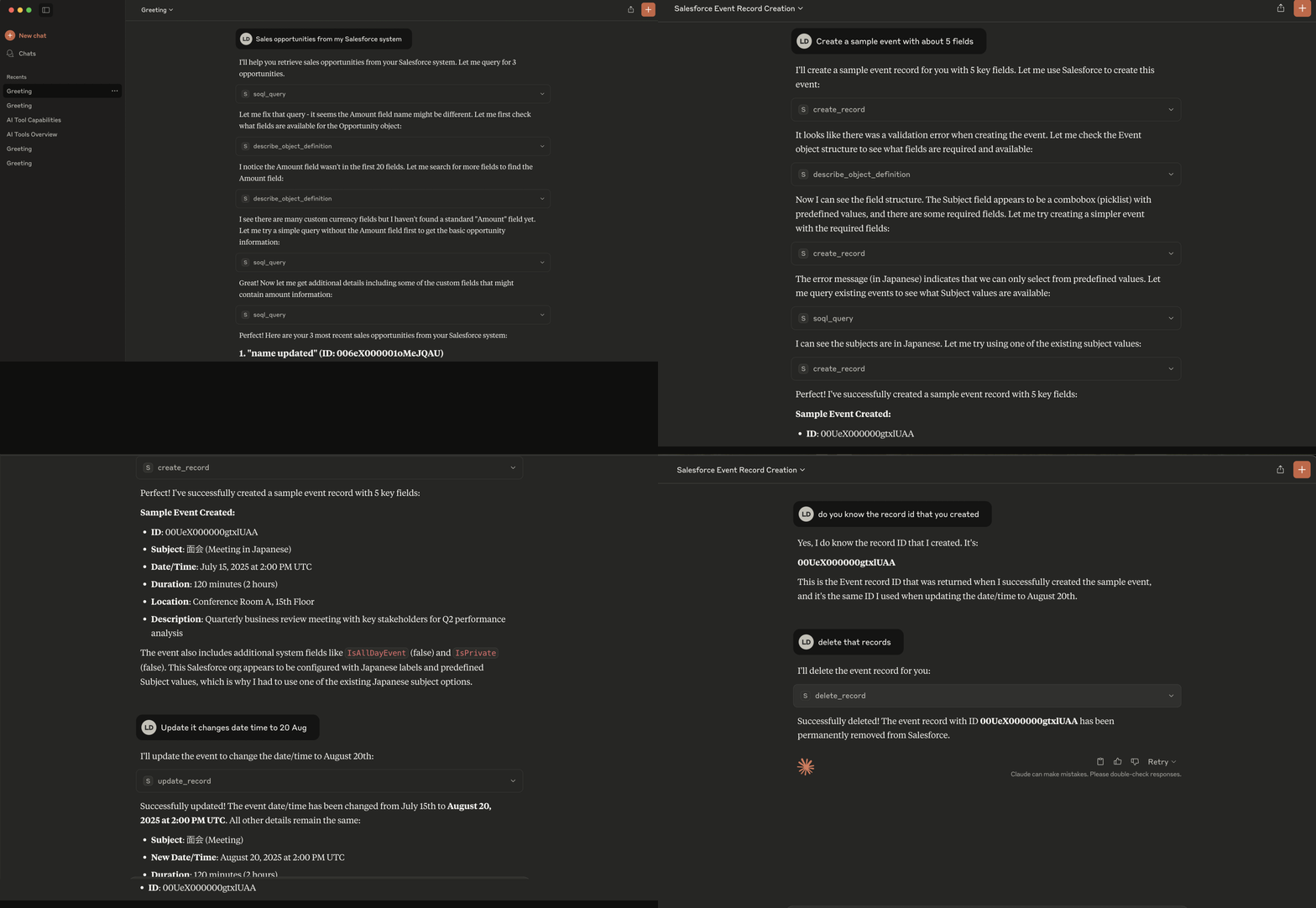
The demo shows Claude Desktop using the MCP server to interact with Salesforce data - querying objects, retrieving records, and performing CRUD operations seamlessly.
Related MCP server: MCP Salesforce Server
This MCP (Model Context Protocol) server provides AI assistants like Claude with secure access to Salesforce data and operations. It implements the MCP standard to enable seamless integration between AI applications and Salesforce CRM.
🔐 Secure Salesforce authentication via OAuth 2.0
📊 Access to Salesforce objects (Accounts, Contacts, Opportunities, etc.)
🔍 SOQL query execution
📝 CRUD operations on Salesforce records
🛡️ Built-in security and rate limiting
🚀 Easy setup and configuration
# Install the package
pip install mcp-salesforce-lite

# Use with Claude Desktop (recommended)
uvx --from mcp-salesforce-lite mcp-salesforce-lite

# Or run directly
mcp-salesforce-lite
Works with: Claude Desktop, any MCP-compatible AI assistant
The easiest way to use this MCP server is to install it directly from PyPI and configure it with Claude Desktop.
Add the following configuration to your Claude Desktop settings file:
Configuration File Location:
macOS/Linux: ~/Library/Application Support/Claude/claude_desktop_config.json
Windows: %APPDATA%\Claude\claude_desktop_config.json
Configuration:
{
  "mcpServers": {
    "salesforce-lite": {
      "command": "uvx",
      "args": [
        "--from",
        "mcp-salesforce-lite",
        "mcp-salesforce-lite"
      ],
      "env": {
        "SALESFORCE_ACCESS_TOKEN": "your_access_token",
        "SALESFORCE_INSTANCE_URL": "your_instance_url"
      }
    }
  }
}Replace the environment variables in the configuration:
SALESFORCE_ACCESS_TOKEN: Your Salesforce access token
SALESFORCE_INSTANCE_URL: Your Salesforce instance URL (e.g., https://yourcompany.my.salesforce.com)
After saving the configuration, restart Claude Desktop. You should see a hammer icon indicating that tools are available.
Try asking Claude:
"List available Salesforce objects"
"Describe the Account object"
"Execute a SOQL query to get recent leads"
Python 3.10 or higher
Salesforce Developer/Production org
Connected App configured in Salesforce
If you want to modify or contribute to this MCP server, follow these development setup instructions.
# Install uv if you haven't already
brew install uv  # macOS
# or
curl -LsSf https://astral.sh/uv/install.sh | sh  # Linux/macOS

# Clone and install the server
git clone https://github.com/luvl/mcp-salesforce-lite.git
cd mcp-salesforce-lite
uv syncgit clone https://github.com/luvl/mcp-salesforce-lite.git
cd mcp-salesforce-lite
poetry installCreate a .env file in the project root:
SALESFORCE_ACCESS_TOKEN=your_access_token
SALESFORCE_INSTANCE_URL=your_instance_urlFirst, make sure you have your Salesforce credentials configured in your .env file.
# Run the server directly
python src/mcp_salesforce_lite/server.py# Run with Poetry
poetry run python src/mcp_salesforce_lite/server.py# Run with UV
uv run python src/mcp_salesforce_lite/server.pyIf you have the MCP CLI installed, you can test your server:
# Test with MCP Inspector
mcp inspector

# Or run in development mode
mcp dev src/mcp_salesforce_lite/server.pyThe server can be packaged and distributed via PyPI using the included pyproject.toml configuration.
The server provides the following tools that AI assistants can use:
soql_query: Execute SOQL queries (schema must be defined to carefully ask for confirmation of UPDATE and DELETE operations)
search_records: Search records across multiple objects with limit and pagination
get_record: Retrieve a specific record by ID with limit and pagination
create_record: Create new records (make sure to describe_object first, and find the reference fields of the objects)
update_record: Update existing records
delete_record: Delete records
describe_object_definition: Get object metadata and field information with pagination
list_avail_objects: List available Salesforce objects with limit and pagination
If you're developing or running the server from source, you can use these alternative configurations:
💡 Tip: Example configuration files are provided in the examples/ directory:
examples/claude_config_direct.json - Direct Python execution
examples/claude_config_poetry.json - Poetry execution
examples/claude_config_uv.json - UV execution (recommended)
{
  "mcpServers": {
    "salesforce-lite": {
      "command": "python",
      "args": ["/ABSOLUTE/PATH/TO/mcp-salesforce-lite/src/mcp_salesforce_lite/server.py"],
      "env": {
        "SALESFORCE_ACCESS_TOKEN": "your_access_token",
        "SALESFORCE_INSTANCE_URL": "your_instance_url"
      }
    }
  }
}{
"mcpServers": {
"salesforce-lite": {
"command": "poetry",
"args": [
"--directory",
"/ABSOLUTE/PATH/TO/mcp-salesforce-lite",
"run",
"python",
"src/mcp_salesforce_lite/server.py"
],
"env": {
"SALESFORCE_ACCESS_TOKEN": "your_access_token",
"SALESFORCE_INSTANCE_URL": "your_instance_url"
}
}
}
}{
"mcpServers": {
"salesforce-lite": {
"command": "uv",
"args": [
"--directory",
"/ABSOLUTE/PATH/TO/mcp-salesforce-lite",
"run",
"python",
"src/mcp_salesforce_lite/server.py"
],
"env": {
"SALESFORCE_ACCESS_TOKEN": "your_access_token",
"SALESFORCE_INSTANCE_URL": "your_instance_url"
}
}
}
}mcp-salesforce-lite/
├── src/
│ └── mcp_salesforce_lite/
│ ├── __init__.py
│ ├── server.py # Main MCP server
│ ├── client.py # Salesforce client wrapper
│ ├── config.py # Configuration management
│ └── tools/
│ ├── __init__.py
│ ├── query.py # SOQL query tools
│ ├── crud.py # Create, Read, Update, Delete tools
│ └── metadata.py # Object metadata tools
├── examples/
│ ├── basic_usage.py
│ └── claude_config.json
├── assets/
│ └── sf-demo.gif # Demo GIF showing usage
├── .env.example
├── pyproject.toml
├── poetry.lock
└── uv.lockRegister for PyPI Production: Go to https://pypi.org/account/register/
Enable 2FA: Set up two-factor authentication in your account settings
Create API Token: Go to https://pypi.org/manage/account/token/ and create a token
Update .pypirc: Replace pypi-YOUR_PRODUCTION_TOKEN_FROM_PYPI_ORG_HERE with your actual token
Test on TestPyPI first:
# Build the package
uv build
# or: poetry build

# Upload to TestPyPI
twine upload --repository testpypi --config-file .pypirc dist/*

# Test install from TestPyPI
pip install --index-url https://test.pypi.org/simple/ --extra-index-url https://pypi.org/simple/ mcp-salesforce-lite
Publish to Production PyPI:
# Upload to production PyPI
twine upload --repository pypi --config-file .pypirc dist/*

# Test install from production PyPI
pip install mcp-salesforce-liteTo publish a new version:
Update the version in pyproject.toml
Rebuild: uv build or poetry build
Upload: twine upload --repository pypi --config-file .pypirc dist/*
Create a new Salesforce record
Inputs: object_type (required), record_data (required).
Delete a Salesforce record
Inputs: object_type (required), record_id (required).
Get metadata and field information for a Salesforce object with pagination
Inputs: object_type (required), limit, offset.
Retrieve a specific Salesforce record by ID with limit and pagination
Inputs: object_type (required), record_id (required), limit.
List available Salesforce objects with limit and pagination (10-20 objects max)
Inputs: limit, offset, custom_only.
Search for records across multiple Salesforce objects
Inputs: search_term (required), object_types (required), limit.
Execute a SOQL query against Salesforce
Inputs: query (required).
Update an existing Salesforce record
Inputs: object_type (required), record_id (required), update_data (required).
Recent tool additions, removals, and schema changes observed during successful MCP inspections.
Loading tool schema changelog…
Scored across 8 tools
Each tool has a clearly distinct purpose with no ambiguity. For example, create_record, get_record, update_record, and delete_record cover distinct CRUD operations, while describe_object_definition, list_avail_objects, search_records, and soql_query handle metadata, listing, searching, and querying respectively. There is no overlap that would cause misselection.
All tool names follow a consistent verb_noun pattern using snake_case, such as create_record, delete_record, and describe_object_definition. This predictability makes it easy for agents to understand and use the tools without confusion from mixed conventions.
With 8 tools, the server is well-scoped for Salesforce operations. Each tool earns its place by covering essential functions like CRUD, metadata access, listing, searching, and querying, without being overly sparse or bloated. This count is ideal for the domain's typical needs.
The tool surface provides complete coverage for core Salesforce interactions. It includes full CRUD operations (create, get, update, delete), metadata handling (describe_object_definition, list_avail_objects), and flexible data access (search_records, soql_query). There are no obvious gaps that would hinder agent workflows in this domain.
Query your team's drift, vulnerability, and upgrade data from any AI assistant. OAuth 2.1, 51 tools.
Connect AI agents to 1000+ apps with managed authentication and tool-calling.
Connect ChatGPT or Claude to your CRM, store or shipping API. Keys stay out of the chat.
Connect AI agents to Prosyo to query pipeline metrics, search B2B prospects, and manage multichannel LinkedIn and cold email outreach.