F
licenseNot graded
qualityNot graded
maintenanceEnables discovery, querying, and exporting of Tableau Cloud dashboards and data sources. Supports searching workbooks, filtering data, and exporting views as PDF, PNG, PowerPoint, CSV, or JSON.
-

Click on "Deploy Server".
Wait a few minutes for the server to deploy. Once ready, it will show a "Started" state.
In the chat, type @ followed by the MCP server name and your instructions, e.g., "@Tableau MCP Server show me the top 10 products by sales from the Superstore datasource"
That's it! The server will respond to your query, and you can continue using it as needed.
Here is a step-by-step guide with screenshots.


Tableau MCP is a suite of developer primitives, including tools, resources and prompts, that will make it easier for developers to build AI applications that integrate with Tableau.
Related MCP server: Tableau MCP Server
https://tableau.github.io/tableau-mcp/
Node.js 22.7.5 or newer
An MCP client e.g. Claude Desktop, Cursor, VS Code, MCP Inspector, etc.
Standard config works in most MCP clients:
{
  "mcpServers": {
    "tableau": {
      "command": "npx",
      "args": ["-y", "@tableau/mcp-server@latest"],
      "env": {
        "SERVER": "https://my-tableau-server.com",
        "SITE_NAME": "my_site",
        "PAT_NAME": "my_pat",
        "PAT_VALUE": "pat_value"
      }
    }
  }
}
For the Superstore Datasource, what are the top 5 states with the most sales in 2025?Based on the Superstore Datasource, here are the top 5 states with the most sales in 2025:
1. California - $146,388.34
2. New York - $93,922.99
3. Washington - $65,539.90
4. Texas - $43,421.76
5. Pennsylvania - $42,688.31
California leads by a significant margin with over $146,000 in sales, followed by New York with nearly $94,000. These two states alone account for a substantial portion of the total sales across the top 5 states.Find me the most viewed workbook within the last year.The most viewed workbook within the last year is:
Global Connections
- Owner: John Doe
- Project: Marketing
- Views in last year: 523
- Last Modified: September 2, 2025
- Workbook ID: 111fb672-9401-4913-a167-17b3d89a3e4fShow me an image of the "Economy" view in the "Finances" project.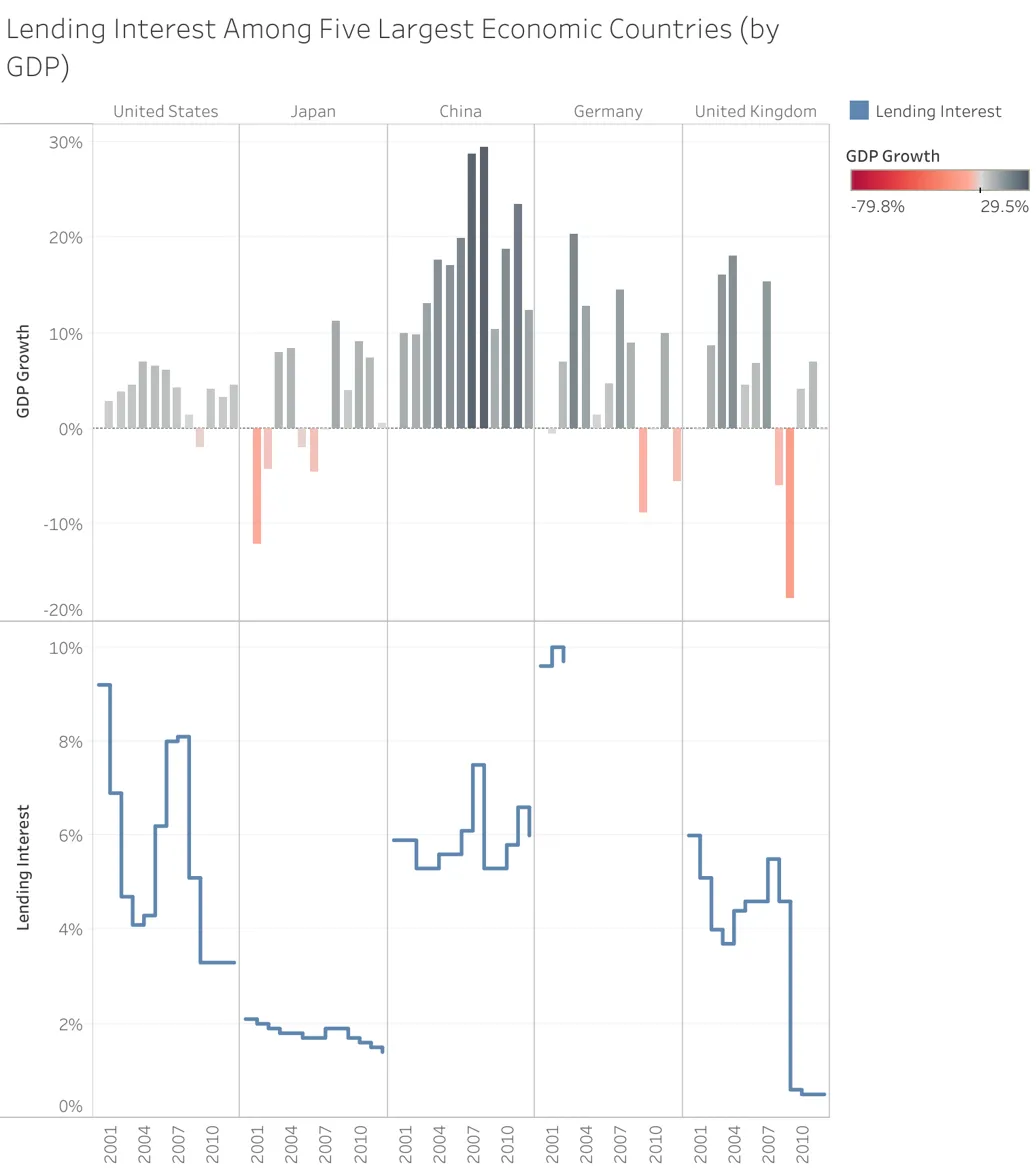
This server cannot be deployed
Query and update Teable records, manage tables, and access the Teable API with AI agents.
List datasets, schemas, run APL queries, and use prompts for exploration, anomalies, and monitoring.
Explore, clean, transform and export your Mammoth Analytics data from an AI client.
Teable is an AI spreadsheet for business that combines a familiar spreadsheet interface with a structured database. Its remote MCP server lets AI agents inspect project and table structure, read and update records, and access the Teable API through OAuth with existing project permissions. Website: [teable.ai](https://teable.ai)