F
licenseNot graded
qualityD
maintenanceEnables interaction with PostgreSQL databases through MCP, allowing users to explore database structures, inspect table schemas, and execute read-only SQL queries.
-

Enables querying PostgreSQL databases with read-only access, allowing execution of SELECT statements, table inspection, and database connection testing with built-in security validation.
Click on "Deploy Server".
Wait a few minutes for the server to deploy. Once ready, it will show a "Started" state.
In the chat, type @ followed by the MCP server name and your instructions, e.g., "@PostgreSQL MCP Server show me the last 5 orders from the orders table"
That's it! The server will respond to your query, and you can continue using it as needed.
Here is a step-by-step guide with screenshots.
An MCP (Model Context Protocol) server for querying a PostgreSQL database. Execute SQL queries, view table details, and manage database connections through MCP-compatible clients.
Database Connection: Connect to PostgreSQL databases with authentication
SQL Execution: Execute SELECT queries with security validation
Connection Testing: Test database connection status
Related MCP server: PostgreSQL MCP Server
Follow these steps for installation:
Download the postgres-connector.mcpb file from this repository (located in the root directory).
Open Claude Desktop
Navigate to Settings > Features
Click "Install Extension" and select the postgres-connector.mcpb file
 Screenshot placeholder: Installing the .mcpb file
After installation, the PostgreSQL Connector will appear in your Claude Desktop with default environment variables that you can configure with your database details.
 Screenshot placeholder: Database configuration interface showing environment variables
Send a query "test the database connection"
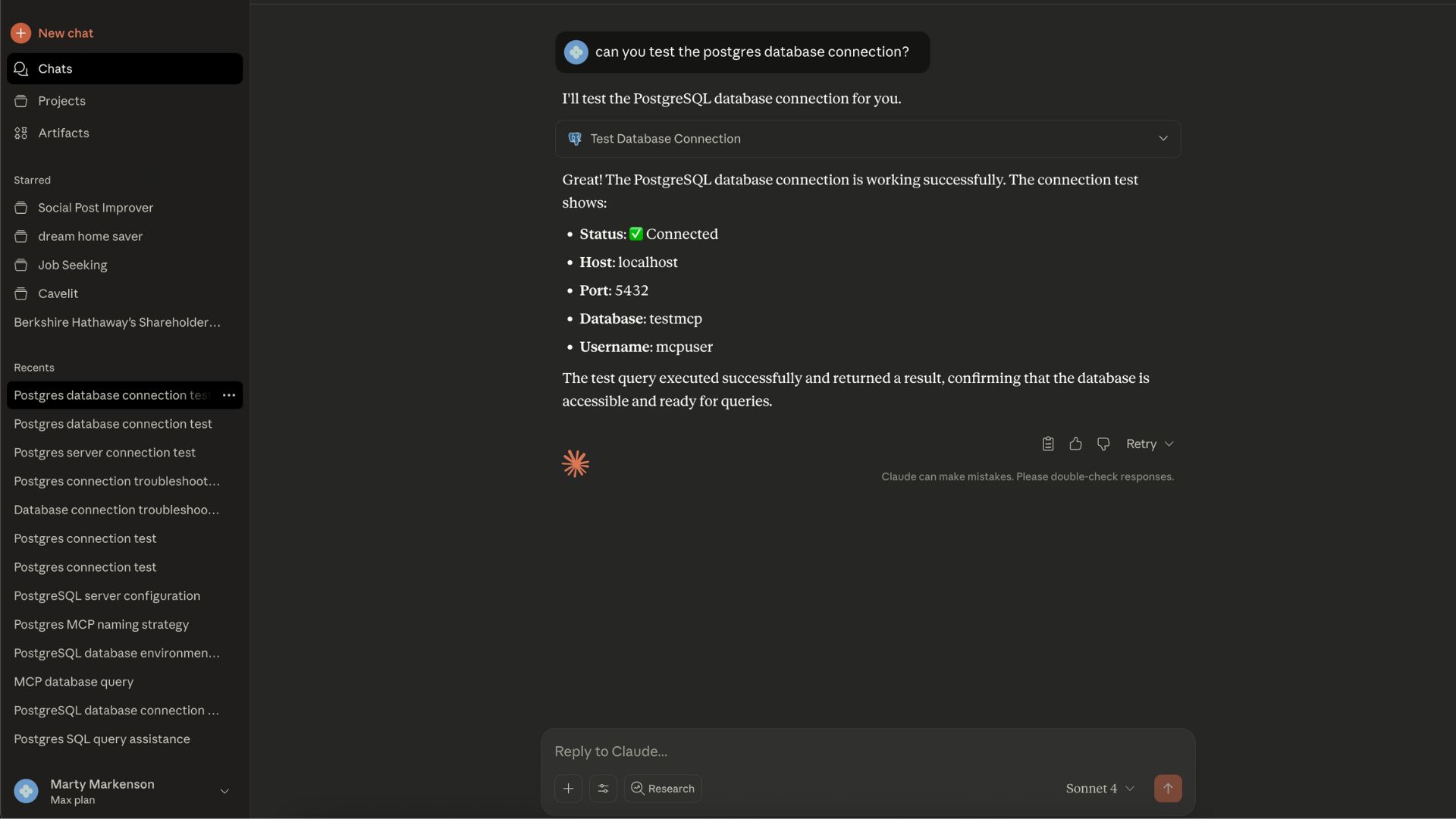
You'll need to provide the following information for your PostgreSQL database:
Environment Variable | Description | Required | Default |
POSTGRES_HOST | The hostname or IP address of your PostgreSQL server | ✅ Yes | - |
POSTGRES_PORT | The port number for your PostgreSQL server | ❌ No | 5432 |
POSTGRES_DB | The name of the specific database to connect to | ✅ Yes | - |
POSTGRES_USER | Your PostgreSQL username | ✅ Yes | - |
POSTGRES_PASSWORD | Your PostgreSQL password | ✅ Yes | - |
These environment variables will be automatically available for configuration in the extension settings panel after installing the extension in Claude Desktop.
Tool: test-postgres-connection
Tests your database connection and displays the current configuration (password hidden for security).
Example Output:
✅ Database connection successful!

Configuration:
{
  "host": "localhost",
  "port": "5432",
  "database": "myapp_production",
  "username": "postgres",
  "password": "***hidden***"
}

Connection test result: [
  {
    "test": 1
  }
]Tool: get-all-tables
Retrieves a list of all tables in the public schema of your database.
Example Output:
[
  {
    "table_name": "users"
  },
  {
    "table_name": "orders"
  },
  {
    "table_name": "products"
  },
  {
    "table_name": "categories"
  }
]Tool: execute-sql-query
Executes SELECT queries on your database with security validation.
Input:
sql: The SQL query to execute (SELECT statements only)
Example Usage:
SELECT id, name, email FROM users LIMIT 5;Example Output:
[
  {
    "id": 1,
    "name": "John Doe",
    "email": "john@example.com"
  },
  {
    "id": 2,
    "name": "Jane Smith",
    "email": "jane@example.com"
  }
]The PostgreSQL MCP server includes security measures:
READ-ONLY Operations: Only SELECT statements are permitted
Dangerous Keywords Blocked: DROP, DELETE, TRUNCATE, ALTER, CREATE, INSERT, UPDATE operations are automatically blocked
Statement-Level Validation: Each SQL statement is validated individually
Safe Error Handling: Database errors are caught and displayed safely
Best practice is to create a read-only database user for the postgres connector to use.
The following SQL operations are NOT ALLOWED for security:
DROP (deleting tables/databases)
DELETE (removing data)
TRUNCATE (clearing tables)
ALTER (modifying structure)
CREATE (creating new objects)
INSERT (adding data)
UPDATE (modifying data)
Use the get-all-tables tool to retrieve all tables in your database schema.
Use the execute-sql-query tool with SELECT statements:
SELECT * FROM users LIMIT 10;Problem: "Database connection failed"
Check: Verify your host, port, database name, username, and password
Check: Ensure your PostgreSQL server is running and accessible
Check: Verify that your database user has the necessary permissions
Problem: "Connection timeout"
Check: Your database server might be behind a firewall
Check: The host address and port number are correct
Check: Network connectivity to the database server
Problem: "Dangerous operation detected"
Cause: You're trying to execute a non-SELECT statement
Solution: Only SELECT queries are allowed for security reasons
Problem: "Query execution failed"
Check: Your SQL syntax is correct
Check: The tables and columns you're referencing exist
Check: Your database user has SELECT permissions on the tables
Problem: MCP server not appearing in Claude Desktop client
Solution: Restart Claude Desktop
Check: Verify the .mcpb file was installed correctly
Check: Look for any error messages in Claude Desktop's console
Problem: Environment variables not showing up
Solution: Restart Claude Desktop after installation
Check: Ensure the extension is enabled in Settings > Features
Problem: Cannot configure database settings
Solution: Make sure all required environment variables are filled out
Check: Verify your database credentials are correct
PostgreSQL database (version 9.0 or higher)
Network access to your PostgreSQL server
Node.js runtime
PostgreSQL client libraries
MCP (Model Context Protocol) framework
postgres-connector/
├── src/
│   └── server.ts          # Main MCP server implementation
├── package.json           # Node.js dependencies
├── manifest.json          # MCP extension manifest
├── icon.png              # Extension icon
└── postgres-connector.mcpb # Compiled extension bundleMIT License - see the LICENSE file for details.
Marty Markenson
Email: martyamark@gmail.com
LinkedIn: Marty Markenson
Need help? Open an issue in this repository or reach out to martymarkenson
Execute a SQL query on the database. Only SELECT statements are allowed for security.
Inputs: sql (required).
Execute SQL queries to get all tables in the database
Inputs: no named parameters.
Test the Postgres connection and return connection status
Inputs: no named parameters.
Recent tool additions, removals, and schema changes observed during successful MCP inspections.
Loading tool schema changelog…
Scored across 3 tools
Each tool has a clearly distinct purpose: executing SELECT queries, listing all tables, and testing connection. There is no overlap.
All tool names follow a consistent verb_noun pattern with snake_case: execute-sql-query, get-all-tables, test-postgres-connection.
Only 3 tools for a PostgreSQL server is extremely limited. Typical servers require many more operations (CRUD, schema management, etc.), making this count too low for the domain.
The server only supports SELECT queries, listing tables, and connection testing. Missing essential operations like INSERT, UPDATE, DELETE, schema inspection, and index management, severely limiting usefulness.
Managed Postgres MCP: projects, SQL, docs search, and storage buckets via OAuth.
Hosted MCP server for PostgreSQL diagnostics: slow queries, missing indexes, connection pressure.
Hosted PostgreSQL MCP server for Claude, ChatGPT and Cursor, with each action switched per account.
Query PostgreSQL databases in plain English — LLM-generated, safety-validated SQL.