

A
licenseNot graded
qualityD
maintenanceHigh-performance MCP server that enables AI assistants to control TouchDesigner live via WebSocket, providing 37 tools for nodes, parameters, scripting, and more.
5
MIT

This is an MCP server for managing TouchDesigner/Envoy sessions and Convoy LAN nodes from an AI assistant.
Check TouchDesigner/Envoy health, crash/frozen state, launch or restart TD, switch TD instances, and list/dismiss blocking modal dialogs.
Inspect Convoy host status, list nodes/controllers, select or pin this session to a remote node, and ping nodes.
Start, restart, or forget Convoy nodes, and route ordinary Envoy tool calls to explicit remote nodes.
Relay one operation or ordered batches to Convoy targets, then track jobs, acknowledge results, cancel jobs, and fetch or save artifacts.
Send project files to Convoy nodes, including inbox, worktree, or live-project destinations.
Use Owlette for read-only site/machine inventory and command status, with opt-in command submission.
Fleet-update Embody on Convoy nodes via durable self-update jobs.
create at the speed of thought.
embody.tools · Documentation · Manifesto · Changelog
Embot — he hops through your network while Envoy builds
Embody puts your ideas on screen as fast as you can describe them. Operators, connections, parameters, the works. Want to try a different direction? Spin up a new approach in seconds. Compare attempts side by side. Branch off the one that works. The tool keeps up with you, instead of the other way around.
Envoy — forward velocity. An embedded MCP server lets Claude Code, Codex, OpenCode, Gemini, Cursor, Windsurf, and GitHub Copilot (via VS Code) talk directly to your live TouchDesigner session. Create operators, wire them up, set parameters, write extensions, debug errors — by saying what you want. No copy-pasting code. No describing your network in chat. Idea → operators in seconds.
Embody — lateral velocity. Tag any operator and Embody externalizes it to files on disk that mirror your network hierarchy. Try a new direction, branch off a good one, restore the state from yesterday — all in seconds. Your externalized files are the source of truth, so every project opens already in flow.
Convoy — outward velocity. Convoy-enabled Embody nodes on a trusted LAN discover, inspect, and control each other — one AI session relaying builds, test runs, saves, screenshots, files, and restarts to every machine in the room. A small per-user background app keeps each computer reachable even while TouchDesigner is closed, so a closed project can be started remotely. Convoy guide
TDXN — the substrate that makes it all possible. TouchDesigner networks exported as human-readable YAML. The format is what lets your AI agent understand what's on the screen, what lets you diff one attempt against another, and what lets a network reconstruct itself from text on the next project open. TDXN is what makes the rest of this possible.
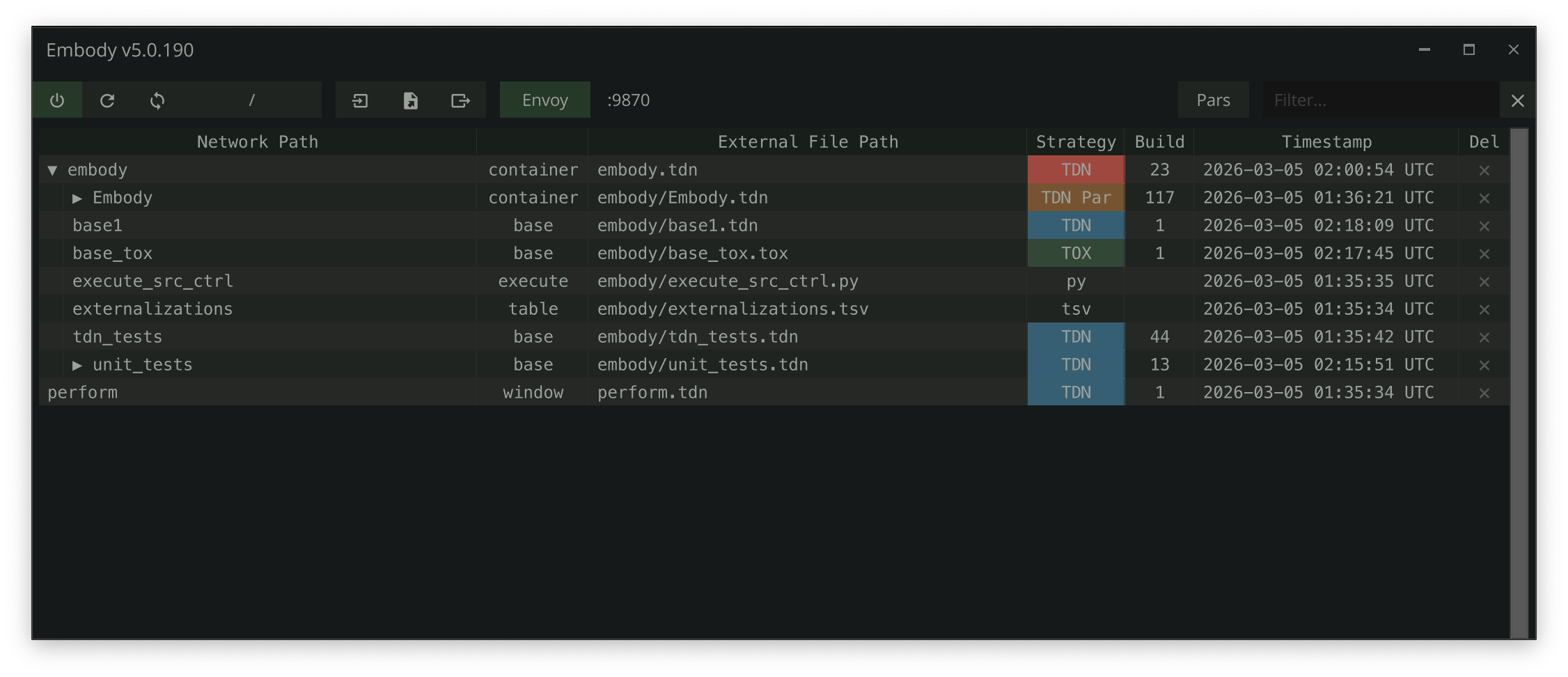
What | Why it matters | |
🤖 | Envoy MCP Server | 70 tools let your AI assistant build, wire, parameterize, and debug live networks. The first time you watch it happen, you stop typing operator names by hand for good. |
📄 | TDXN Network Format | Networks become text. Diff two versions, revisit any version, hand an LLM a complete picture of what's on screen — all from a single |
📦 | Automatic Restoration | Externalized files are written on save, so any COMP can be recovered from disk. By default (Export-on-Save) the |
📤 | Portable Tox Export | Pull any COMP out as a self-contained |
🐍 | Project Python Environment | One |
🛰️ | Convoy LAN Relay | Convoy-enabled Embody nodes on a trusted LAN discover, inspect, and control each other through Envoy — relay test runs, saves, screenshots, and restarts to other machines from one AI session. Convoy guide |
Related MCP server: td-mcp
Requirements: TouchDesigner 2025.33230 or later (Windows / macOS). No Python setup needed — Embody builds a per-project Python environment (.venv) matched to TouchDesigner's own interpreter, and your own packages can live in it too. No special folder structure either: Embody works in any project folder, and if you happen to use git, every change is also a clean diff for free.
Download the Embody .tox from /release and drag it into your TouchDesigner project. The Setup Wizard opens and walks you through the choices that matter — how much autonomy Embody gets, what to externalize, whether to enable the AI assistant (Envoy) and for which tool, permissions, whether to join a trusted-LAN Convoy, and where config files live. Nothing changes until the final click, and you can re-run it anytime via the Setup Wizard pulse on the Embody COMP.
Updating Embody: Embody updates itself — pulse Check for Update on the About page (or set Auto-Update to check at startup), and a verified release is downloaded, backed up against, and swapped in place. Your settings and tracked externalizations live on disk and survive the update untouched. See the auto-update guide. Manual alternative: delete the old Embody COMP and drag the new
.toxin its place — the new version picks up your on-disk state automatically, no re-scan, no files rewritten.
Provisioning a machine with no one at it (a render node, a media server)? The bootstrap installs Embody into a .toe offline with TouchDesigner's own tools, in one line.
Tag operators — hover any COMP or DAT and press lctrl twice to open the tagger (pick a strategy for a COMP, a file format for a DAT)
Work normally — press ctrl + shift + u to update all externalizations, or ctrl + alt + u to update only the current COMP. Externalized files are written on save; on open, the .toe stays authoritative by default (Export-on-Save), while Roundtrip mode also reconstructs TDXN-strategy COMPs from disk
Tip: Externalization is opt-in — nothing is written to disk until you tag it. To capture your AI assistant's work automatically, set Auto-Externalize New Ops (Envoy parameter page) and everything it creates through Envoy is tagged and externalized as it's built.
For supported formats, folder configuration, duplicate handling, Manager UI, and more — see the Embody docs.
Embody includes Envoy, an embedded MCP server that gives AI coding assistants direct access to your live TouchDesigner session.
Pick an AI assistant in the Setup Wizard — it opens on first install, or re-run it anytime (the Setup Wizard pulse on the Embody COMP). Prefer parameters? Toggling Envoy Enable (Envoyenable) does the same thing with your current settings
Server starts on 127.0.0.1:9870 (configurable via Envoyport; if the port is taken by another instance, Envoy scans forward automatically)
Auto-configuration — Envoy writes a .mcp.json (STDIO bridge, so tools are available even before TD is running) at your AI project root. By default that's the git repo root; the wizard's config-location step — or the Aiprojectroot parameter — can point it at the .toe folder or a custom path instead. Projects without a git repo still get config generated in the .toe folder
Connect — open a Claude Code session (or restart your IDE) at that root — it picks up .mcp.json automatically
The generated config runs Envoy's bridged STDIO transport (recommended — it can launch and restart TD for you). If you'd rather wire a client by hand, the direct HTTP transport works whenever TD is running:
{
  "mcpServers": {
    "envoy": {
      "type": "http",
      "url": "http://127.0.0.1:9870/mcp"
    }
  }
}Tool | What It Does |
| Create any operator type in any network |
| Set values, expressions, or bind modes on any parameter |
| Wire operators together |
| Run arbitrary Python in TD's main thread |
| Export networks to diffable |
| Scaffold a full extension (COMP + DAT + wiring) |
| Inspect errors on any operator and its children |
...and 56 more. See the full tools reference.
When Envoy starts, it always generates an AGENTS.md file in your project root with TD development patterns and project-specific guidance. It also writes a client-specific config for whichever assistant you select in the Aiclient parameter (CLAUDE.md + .claude/ for Claude Code, opencode.json + .claude/ for OpenCode, Cursor/Windsurf rules, Copilot instructions, GEMINI.md for Gemini; Codex and OpenCode read AGENTS.md directly). For OpenCode and local-model setups, see the Local Models & Open Clients guide.
TDXN (TouchDesigner eXternal Network) is the file format that makes the rest of Embody possible. It exports an entire operator network — operators, connections, parameters, layout, annotations, DAT content — as a single human-readable YAML file. Your AI agent can read it. You can read it. Any text tool can diff it. The network can rebuild itself from it.
This is the substrate. Every other capability — AI-driven building, version control, automatic restoration — builds on top of it.
Entire project: ctrl + shift + e
Current COMP: ctrl + alt + e
Via Envoy: export_network / import_network MCP tools
See the full TDXN specification for format details, import process, and round-trip guarantees.
Shortcut | Action |
| Tag or manage the operator under the cursor |
| Update all externalizations |
| Update only the current COMP |
| Refresh tracking state |
| Open the Manager UI |
| Copy the selected COMP to the clipboard as a portable TDXN envelope |
| Export entire project to |
| Export current COMP to |
These are the defaults — every shortcut is editable on the Embody COMP's Shortcuts parameter page (type a combo, or pulse Record and press the keys; empty disables it). See Keyboard Shortcuts.
Embody writes externalized files relative to your .toe location, mirroring your network hierarchy — no special folder structure required:
my-project/              ← project folder (optionally a git repo)
├── my-project.toe       ← your TouchDesigner project
├── base1/               ← externalized operators
│   ├── base2.tox        ← COMP (TOX strategy)
│   ├── base3.tdxn        ← COMP (TDXN strategy — diffable YAML)
│   └── text1.py         ← DAT
└── ...
Embody provides a multi-destination logging system:
File logging (default): dev/logs/<project_name>_YYMMDD.log, auto-rotates at 10 MB
FIFO DAT: Recent entries visible in the TD network editor
Textport: Enable the Print parameter to echo logs
Ring buffer: Last 200 entries via the Envoy get_logs MCP tool
op.Embody.Log('Something happened', 'INFO')
op.Embody.Warn('Check this out')
op.Embody.Error('Something broke')
Embody includes 166 test suites (5,720 tests) covering core externalization, MCP tools, TDXN format, the Envoy server/bridge, launch/config generation, install/uninstall paths, self-update, release hooks, the status readout, and palette catalogs. Tests run inside TouchDesigner using a custom test runner with sandbox isolation. Destructive whole-project suites are segregated and run only via the save-gated RunDestructiveTests.
op.unit_tests.RunTests()                              # All tests (non-blocking)
op.unit_tests.RunTests(suite_name='test_path_utils')   # Single suite
op.unit_tests.RunTestsSync()                           # All in one frame (blocks TD)
Via Envoy MCP: use the run_tests tool. See the full testing docs for coverage details and how to write new tests.
Timeline Paused: Embody requires the timeline to be running. An error appears if paused.
Clone/Replicant Operators: Cannot be externalized. Embody warns if you try to tag them.
Engine COMPs: Engine, time, and annotate COMPs are not supported for externalization.
For more, see Troubleshooting.
Every release is documented in the full changelog. Highlights:
6.3.3 — Convoy is set up once per computer: machines stay on with no project open, a version-up keeps a node's address and approvals, and the page lists one row per machine
6.2.77 — the update-complete dialog offers Save Now, so the saved .toe keeps the new Embody
6.2.76 — Externalize Full Project keeps Embody and TouchDesigner's own COMPs out of your files, older over-tagged projects clean up after the update, and a project saved before its first externalization reopens with its tracking (issue #176)
6.2.73 — a .mcp.json Embody cannot parse is left untouched instead of replaced, so your other MCP servers survive (issue #159)
6.2.72 — Convoy switches branches, uses optional sibling worktrees and sends files to a node (convoy_send_file), and a pull no longer moves a different branch; TDXN format 2.2 and self-contained clipboard copies
6.2.71 — parent .tdxn files stop repeating the custom parameters of children that have their own .tdxn (a 15-COMP lab's child entries shrink from 2,368 lines to 72); importing a COMP from its own .tdxn creates its custom parameters before its contents
6.2.69 — a session whose TouchDesigner closes stops with envoy.instance.unavailable instead of drifting into another open project; saves that rename the .toe are followed, and launch_td / restart_td act on the session's own instance (issue #147)
6.2.68 — a manual Check for Update offers Install Anyway when a release was built for a newer TouchDesigner than yours; unattended updates still stop at the floor (issue #145)
6.2.65 — four new skills (glsl-shaders, operator-gotchas, testing, /collab) and skill reference files, with thanks to Derivative's TDMCPSkills; describe_op_type and run_soak_test; a user project's always-loaded guidance cut by 40%
6.2.64 — Forget Offline Nodes clears rows fleet-wide, each by its owner; silent nodes retire after a week instead of a month; update jobs no longer report a false failure
6.2.63 — the Windows supervisor stays armed after an install; node rows carry the TD build and the fleet update its runtime id; a live-but-silent node reads stalled; a mid-scan readout clears on reopen
6.2.62 — a re-minted host's ghost record goes dormant on its peers instead of being dialed forever; the pin stays, contact wakes it, and Status names the ghost on both sides
6.2.61 — Convoy names its Envoy dependency and the host's advisories (rejected certificates, re-minted identities, realm splits, VPN binds), re-pins changed peers, avoids VPNs and public networks on auto-bind, and rejoins admitted peers' realm instead of founding one
6.2.59 — a fresh clone keeps the Envoy it adopts; a rollback no longer claims the version it discarded; the release gate's identity check stopped failing healthy builds and passing on runtime tables
6.2.57 — TDXN exports operator references as authored and rebases in-project absolute paths (fixes #132); a fresh clone adopts the committed Envoy declaration; one-command fresh-install release smoke, with the macOS leg in CI
6.2.56 — a venv whose Python stops running is repaired in place instead of deleted, on a background thread, keeping installed packages; enabling Envoy no longer freezes TD; devalue security bump
6.2.55 — new specimen Serenity and Beauty with a cover video; enabled clones of a sibling COMP export as their values (the mandala .tdxn 9,599 → 2,834 lines); embody.tools source viewer renders in the browser; Embot allowed in TDXN COMPs; new shipped rule tdxn-economy
6.2.52 — tuplet custom parameters (RGB, XYZ, multi-component Float/Int) at a non-zero default import with that value instead of 0
6.2.51 — seven agent-rule gotchas from issue #94 verified live before shipping; embody.tools covers come from the specimen row, never a baked list; new specimen Prismatic Strata
6.2.50 — Export Release Toe: one pulse prompts, asks where, then ships the project as a locked .toe; Embody can write the pre_release_toe hook for you
6.2.49 — saves say what a .tdxn cannot hold, headers stay visible in VS Code, and Envoy can no longer freeze TouchDesigner by deleting its own host (issues #106, #108–#110)
6.2.42 — ExportReleaseToe: ship the whole project as one locked .toe with Embody removed, preview first
6.2.41 — the MCP SDK moves to 2.2.0; existing venvs upgrade themselves on the next start
6.2.40 — the TDXN tag, the strategy column, the files on disk and the git diff driver all say TDXN; nine strategy reads that had silently stopped matching are fixed
6.2.13 — vector custom parameter defaults survive the round trip (issue #96); six definition fields, three authored flags, and TDXN format 2.1
6.2.8 — the TDXN rename completes across docs, skills, and embody.tools (/tdn/ → /tdxn/ with permanent redirects)
6.2.5 — TDXN review fixes: snapshot exports never touch tracked files, and dirty detection covers everything an export writes
6.2.0 — three namespace tiers; the promoted surface drops from 214 members to 43 (issue #94 — breaking for undocumented names)
6.1.5 — every AI client gets the MCP config it actually reads, from one registry; edit protection rides inside generated files
6.1.2 — the format becomes TDXN (TouchDesigner eXternal Network); existing .tdn files work unchanged, with an opt-in migration pulse
6.0.201–6.0.280 — the Convoy hardening arc: macOS enablement, a self-updating daemon, fleet-wide Embody updates, and a self-updater that can no longer be latched by a stuck download
6.0.171 — Convoy ships end to end: nodes on a trusted LAN discover, relay work to, and control each other
6.0.162 — MCP SDK 2.0 port with self-upgrading venvs
6.0.145 — self-update ships: manifest-gated, verified, backup + rollback
Originally derived from External Tox Saver by Tim Franklin. Refactored entirely by Dylan Roscover, with inspiration and guidance from Elburz Sorkhabi, Matthew Ragan and Wieland Hilker.
Want to help? Start with CONTRIBUTING.md — this repo works differently from a typical Python project (TouchDesigner writes many of the files), and that page explains what is safe to change and how to run the tests.
Embody stands on other people's work, and this section names it. Ideas move between the TouchDesigner MCP projects in both directions; where Embody took one, it is credited here and in the code where it landed.
External Tox Saver by Tim Franklin -- Embody began in 2020 as a refactor of it.
TDMCP by Derivative (their MCP server, used with permission while it was private, public since September 2026) -- undoable MCP mutations (one undo step per batch), the get_docs design (version-exact offline help first, the wiki API second), sequence-block growth on parameter writes, the transport-security hardening prompt, and treating a code-review rule as a query. Landed from v6.0.87 (2026-07-04) on.
TDMCPSkills by Derivative (used with permission) -- the pop-networks skill is adapted from td-pop-family; glsl-shaders and operator-gotchas were written against their td-glsl-shaders and family skills as a topic checklist, with every claim re-verified live on TD 2025.33230 (2026-09-25).
touchdesigner-mcp by 8beeeaaat -- the first widely used TouchDesigner MCP server (2025). Envoy's earliest tool vocabulary (get_td_classes, get_td_class_details, get_td_info, get_module_help, exec_node_method, execute_python) follows the names that project established.
td-mcp-rs by asyade -- a Rust-daemon take on the same problem (2026). Its OS-dialog dismissal, per-call instance addressing, stable error codes with fix hints, any-family capture through an OP Viewer TOP, shader lint on DAT writes, and offline installation into a project file are ideas Embody adopted and built (see the roadmap).
If Embody carries an idea of yours and this list misses it, open an issue and it will be added.
Embody is an independent open-source project. It is not affiliated with, endorsed by, or sponsored by Derivative. TouchDesigner is a trademark of Derivative.
Acknowledge that this controller has safely observed one terminal Convoy delivery. This idempotent call lets the target release protected result artifacts and eventually reap the job. Verified artifact downloads and successful artifact saves acknowledge automatically; use this tool for other terminal results or to retry an indeterminate acknowledgement.
| Name | Required | Description | Default |
|---|---|---|---|
| convoy_id | Yes | ||
| delivery_id | Yes | ||
| target_host_id | Yes |
Does the description disclose side effects, auth requirements, rate limits, or destructive behavior?
With no annotations, the description carries the full behavioral burden, and it delivers real value: it declares the call idempotent, states the side effects (release protected result artifacts, eventually reap the job), and explains the automatic-acknowledgement path. It stops short of covering authorization requirements, failure/indeterminate-result semantics beyond the retry hint, or concurrency concerns.
Agents need to know what a tool does to the world before calling it. Descriptions should go beyond structured annotations to explain consequences.
Is the description appropriately sized, front-loaded, and free of redundancy?
Three dense sentences, front-loaded with the core action and immediately followed by the side effects and the usage routing. No filler, though the middle sentence packs two distinct consequences (artifact release and job reaping) that could be slightly clearer.
Shorter descriptions cost fewer tokens and are easier for agents to parse. Every sentence should earn its place.
Given the tool's complexity, does the description cover enough for an agent to succeed on first attempt?
For a required-args-only mutation with no annotations and no output schema, the description covers behavior and usage well but omits parameter identification and any notion of what a failed or already-acknowledged call returns. It is adequate but has a real gap on the inputs the agent must supply.
Complex tools with many parameters or behaviors need more documentation. Simple tools need less. This dimension scales expectations accordingly.
Does the description clarify parameter syntax, constraints, interactions, or defaults beyond what the schema provides?
Schema description coverage is 0% across three required parameters (convoy_id, delivery_id, target_host_id), so the schema provides no meaning at all. The description refers obliquely to 'this controller' and 'the target' and 'one terminal Convoy delivery' but never maps those concepts to the parameter names, so an agent must guess which identifier is which.
Input schemas describe structure but not intent. Descriptions should explain non-obvious parameter relationships and valid value ranges.
Does the description clearly state what the tool does and how it differs from similar tools?
The description names a specific verb (acknowledge) and a specific resource (a terminal Convoy delivery observed by this controller), and it distinguishes the operation from siblings by noting that convoy_get_artifact/convoy_save_artifact success paths auto-acknowledge. An agent can tell what this tool does and roughly where it sits relative to the artifact tools without opening any schema.
Agents choose between tools based on descriptions. A clear purpose with a specific verb and resource helps agents select the right tool.
Does the description explain when to use this tool, when not to, or what alternatives exist?
It states both when the tool is NOT needed ('Verified artifact downloads and successful artifact saves acknowledge automatically') and when it IS needed ('for other terminal results or to retry an indeterminate acknowledgement'). This is explicit when/when-not guidance with an implied alternative path, which is exactly the routing information an agent needs.
Agents often have multiple tools that could apply. Explicit usage guidance like "use X instead of Y when Z" prevents misuse.
Run one ordered Envoy batch on each explicit Convoy target. Targets execute independently and may run concurrently; the result preserves input order and reports partial success. This does not promise distributed atomicity or rollback.
| Name | Required | Description | Default |
|---|---|---|---|
| wait | No | ||
| targets | Yes | ||
| override | No | ||
| timeout_s | No | ||
| operations | Yes | ||
| idempotency_key | No | Stable caller key for this fanout. Reuse it to reconcile or retry the exact batch. Reusing it with different work is refused by each target. |
Does the description disclose side effects, auth requirements, rate limits, or destructive behavior?
With no annotations, the description carries the full burden and does well on the core contract: targets run independently, may run concurrently, results preserve input order, partial success is possible, and there is explicitly no distributed atomicity or rollback. It omits auth requirements, per-target error behavior, and what the default-true 'wait' flag changes, so it is not a 5.
Agents need to know what a tool does to the world before calling it. Descriptions should go beyond structured annotations to explain consequences.
Is the description appropriately sized, front-loaded, and free of redundancy?
Three tight sentences, front-loaded with the operation and fan-out scope, then the concurrency/ordering guarantee, then the explicit limitation. Every sentence earns its place with no filler.
Shorter descriptions cost fewer tokens and are easier for agents to parse. Every sentence should earn its place.
Given the tool's complexity, does the description cover enough for an agent to succeed on first attempt?
For a 6-parameter batch tool with no annotations and no output schema, the description supplies the concurrency contract and some return-shape information (order preservation, partial success). It is still incomplete on parameter behavior (wait, override, timeout_s) and on how partial failures surface, which the agent needs to call it correctly.
Complex tools with many parameters or behaviors need more documentation. Simple tools need less. This dimension scales expectations accordingly.
Does the description clarify parameter syntax, constraints, interactions, or defaults beyond what the schema provides?
Schema description coverage is only 17% (effectively just idempotency_key), so the description must compensate for six parameters and does not. It never explains wait, override, timeout_s, or expected_runtime_id, leaving the majority of the schema's meaning unstated.
Input schemas describe structure but not intent. Descriptions should explain non-obvious parameter relationships and valid value ranges.
Does the description clearly state what the tool does and how it differs from similar tools?
The description states a specific verb and resource ('Run one ordered Envoy batch on each explicit Convoy target'), and the fan-out framing distinguishes it from single-target siblings like convoy_call. It does not name a sibling or state explicitly what it is not, so it falls short of a 5.
Agents choose between tools based on descriptions. A clear purpose with a specific verb and resource helps agents select the right tool.
Does the description explain when to use this tool, when not to, or what alternatives exist?
Usage is implied: the fan-out phrasing ('on each explicit Convoy target') signals this is for multi-target work versus a single-target call. However, there is no explicit when-to-use guidance, no stated prerequisites, and no named alternative among the many convoy_* siblings.
Agents often have multiple tools that could apply. Explicit usage guidance like "use X instead of Y when Z" prevents misuse.
Relay one Envoy operation to an explicit Embody node. The target is always identified by host_id and node_id; Convoy never silently falls back to a local TouchDesigner instance.
| Name | Required | Description | Default |
|---|---|---|---|
| wait | No | Wait for a terminal result. False returns the durable remote delivery immediately. | |
| arguments | No | ||
| convoy_id | Yes | ||
| operation | Yes | ||
| timeout_s | No | ||
| target_host_id | Yes | ||
| target_node_id | Yes | ||
| idempotency_key | No | Stable retry key. Omit to generate a fresh key; reuse the returned key when reconciling. | |
| expected_runtime_id | No |
Does the description disclose side effects, auth requirements, rate limits, or destructive behavior?
No annotations are provided, so the description carries the full burden. It usefully discloses that the target is always explicit and that there is no silent local TouchDesigner fallback, which is real behavioral context, but it omits failure semantics, auth/connectivity requirements, and what the remote relay actually returns.
Agents need to know what a tool does to the world before calling it. Descriptions should go beyond structured annotations to explain consequences.
Is the description appropriately sized, front-loaded, and free of redundancy?
Two tight sentences, front-loaded with the core action and free of filler. It is efficient, though arguably too sparse given the tool's complexity.
Shorter descriptions cost fewer tokens and are easier for agents to parse. Every sentence should earn its place.
Given the tool's complexity, does the description cover enough for an agent to succeed on first attempt?
For a tool with 9 parameters, nested arguments, no output schema, and no annotations, the description is too thin. It never explains operation semantics, the arguments payload, timeout/retry behavior, or what a call returns, leaving the agent under-equipped to invoke it correctly.
Complex tools with many parameters or behaviors need more documentation. Simple tools need less. This dimension scales expectations accordingly.
Does the description clarify parameter syntax, constraints, interactions, or defaults beyond what the schema provides?
Schema coverage is only 22% (9 params, only wait and idempotency_key documented), so the description should compensate but largely does not. It references the target concept by 'host_id and node_id', which hints at target_host_id/target_node_id, yet leaves operation, convoy_id, arguments, timeout_s, and expected_runtime_id unexplained.
Input schemas describe structure but not intent. Descriptions should explain non-obvious parameter relationships and valid value ranges.
Does the description clearly state what the tool does and how it differs from similar tools?
The description states a specific verb and resource ('Relay one Envoy operation to an explicit Embody node'), which an agent can distinguish from convoy_batch ('one' operation vs. batch) and from node-management siblings. It does not explicitly name the alternative it contrasts with, but the action is unambiguous.
Agents choose between tools based on descriptions. A clear purpose with a specific verb and resource helps agents select the right tool.
Does the description explain when to use this tool, when not to, or what alternatives exist?
There is no explicit when-to-use / when-not guidance and no sibling is named as an alternative, so routing decisions among convoy_call, convoy_batch, and convoy_start_node must be inferred. The 'never silently falls back' line clarifies routing behavior rather than selection criteria.
Agents often have multiple tools that could apply. Explicit usage guidance like "use X instead of Y when Z" prevents misuse.
Request cancellation from the exact host that owns a durable delivery. Queued work cancels definitively; an active host subprocess receives best-effort process-tree cancellation. TouchDesigner work already past its host boundary is reported as non-cancellable, never simulated. Cancellation never wakes TouchDesigner.
| Name | Required | Description | Default |
|---|---|---|---|
| convoy_id | Yes | ||
| delivery_id | Yes | ||
| target_host_id | Yes |
Does the description disclose side effects, auth requirements, rate limits, or destructive behavior?
With no annotations, the description carries the full burden and does so well: it discloses that cancellation is a routed request, that queued work cancels definitively while active work gets best-effort process-tree termination, that past-boundary TouchDesigner work is reported non-cancellable rather than simulated, and that cancellation never wakes TouchDesigner. These are non-obvious side-effect and guarantee disclosures an agent needs.
Agents need to know what a tool does to the world before calling it. Descriptions should go beyond structured annotations to explain consequences.
Is the description appropriately sized, front-loaded, and free of redundancy?
Four sentences, front-loaded with the core action, and each sentence adds a distinct behavioral fact. It is dense with domain jargon ('host boundary', 'durable delivery') but there is no filler.
Shorter descriptions cost fewer tokens and are easier for agents to parse. Every sentence should earn its place.
Given the tool's complexity, does the description cover enough for an agent to succeed on first attempt?
Behavioral coverage is strong, but for a 3-required-param mutation tool with no annotations and no output schema, the description omits parameter meaning entirely and says nothing about what is returned when cancellation succeeds or fails. Adequate but with clear gaps.
Complex tools with many parameters or behaviors need more documentation. Simple tools need less. This dimension scales expectations accordingly.
Does the description clarify parameter syntax, constraints, interactions, or defaults beyond what the schema provides?
Schema coverage is 0% and all three parameters (target_host_id, convoy_id, delivery_id) are required, yet the description never explains what any of them identify or their format. Phrases like 'the exact host' and 'durable delivery' gesture at target_host_id and delivery_id but do not map clearly enough to compensate for the total schema gap.
Input schemas describe structure but not intent. Descriptions should explain non-obvious parameter relationships and valid value ranges.
Does the description clearly state what the tool does and how it differs from similar tools?
States a specific verb (cancel) and resource (job / durable delivery), and scopes it to the owning host. It is distinguishable from siblings like convoy_get_job and convoy_ack_job, though it never names an alternative tool explicitly.
Agents choose between tools based on descriptions. A clear purpose with a specific verb and resource helps agents select the right tool.
Does the description explain when to use this tool, when not to, or what alternatives exist?
The description implies usage by describing the three delivery states (queued, active, past-host-boundary), which tells the agent what outcomes to expect. However, it gives no explicit when-to-use versus convoy_ack_job or other convoy tools, leaving routing to inference.
Agents often have multiple tools that could apply. Explicit usage guidance like "use X instead of Y when Z" prevents misuse.
Delete a stale node row (the row a renamed, moved, or deleted project left behind). Without host_id it acts on THIS machine's Convoy host app; with host_id (the owning host from convoy_list_nodes) the request is relayed to that host over its live session and its rules decide. Refuses while the node still has a delivery that has not FINISHED, and names the blocking delivery ids so they can be cancelled; a finished result never holds a row, because results are fetched by delivery id and outlive it; an online row is never forgotten. A row clears itself once its .toe is deleted; this is the immediate manual path, and it resets the node's TD Python approval. The Convoy page's Forget Offline... button is the in-TD bulk equivalent, fleet-wide, with an enumerating confirmation.
| Name | Required | Description | Default |
|---|---|---|---|
| host_id | No | The host that owns the row (from convoy_list_nodes). Omit for a local row. | |
| node_id | Yes |
Does the description disclose side effects, auth requirements, rate limits, or destructive behavior?
With no annotations at all, the description carries the full burden and does most of it: it discloses the destructive nature, the refusal condition (an unfinished delivery), that blocking delivery ids are returned so they can be cancelled, and the non-obvious side effect that it resets the node's TD Python approval. The one gap is the success response shape, which is never described despite there being no output schema.
Agents need to know what a tool does to the world before calling it. Descriptions should go beyond structured annotations to explain consequences.
Is the description appropriately sized, front-loaded, and free of redundancy?
The scoping rule (host_id or not) is front-loaded ahead of every caveat, and each clause carries distinct information about refusals, alternatives, or side effects. The dense semicolon-and-em-dash chain makes it heavier to parse than necessary, but no sentence is filler.
Shorter descriptions cost fewer tokens and are easier for agents to parse. Every sentence should earn its place.
Given the tool's complexity, does the description cover enough for an agent to succeed on first attempt?
For a two-parameter mutation tool with no annotations and no output schema, this covers the operation, both invocation modes, refusal semantics, side effects, and alternatives. The only thing an agent still lacks is what a successful call returns or confirms.
Complex tools with many parameters or behaviors need more documentation. Simple tools need less. This dimension scales expectations accordingly.
Does the description clarify parameter syntax, constraints, interactions, or defaults beyond what the schema provides?
Schema coverage is only 50% (node_id has no schema description at all), so the description must compensate, and it does: host_id is explained as the owning host sourced from convoy_list_nodes whose rules govern the relay, and node_id is grounded via the definition of a stale row. It stops short of explaining id format or what identifies a row versus a live node, which is the only remaining ambiguity.
Input schemas describe structure but not intent. Descriptions should explain non-obvious parameter relationships and valid value ranges.
Does the description clearly state what the tool does and how it differs from similar tools?
"Delete a stale node row" gives a specific verb and resource, then immediately defines what a stale row is ("the row a renamed, moved, or deleted project left behind"). It distinguishes the two invocation modes (local vs. relayed via host_id) and names the in-TD bulk equivalent, so an agent can tell it apart from siblings like convoy_list_nodes or convoy_restart_node without opening a schema.
Agents choose between tools based on descriptions. A clear purpose with a specific verb and resource helps agents select the right tool.
Does the description explain when to use this tool, when not to, or what alternatives exist?
Explicitly states when to omit host_id (THIS machine's host app) versus when to supply it (the owning host from convoy_list_nodes), and what happens in each case. It also names real alternatives with their tradeoffs: waiting for the row to clear itself once the .toe is deleted, or using the Convoy page's Forget Offline... button for fleet-wide bulk work.
Agents often have multiple tools that could apply. Explicit usage guidance like "use X instead of Y when Z" prevents misuse.
Materialize one private Convoy artifact from its owning host onto this client machine. Images are returned as MCP image content; other files are verified and returned as a local temporary path. Use the artifact reference returned by a Convoy job rather than copying a remote filesystem path.
| Name | Required | Description | Default |
|---|---|---|---|
| artifact | Yes | ||
| convoy_id | Yes | ||
| timeout_s | No | ||
| target_host_id | Yes | ||
| target_node_id | Yes |
Does the description disclose side effects, auth requirements, rate limits, or destructive behavior?
With no annotations, the description carries the burden and does disclose meaningful behavior: images come back as MCP image content, other files are verified and returned as a local temporary path, and the artifact is private. It omits the side effect of writing a temp file to the client machine, permission requirements, and what happens on timeout.
Agents need to know what a tool does to the world before calling it. Descriptions should go beyond structured annotations to explain consequences.
Is the description appropriately sized, front-loaded, and free of redundancy?
Three tight sentences with the core action front-loaded, followed by output behavior and then the input guidance. No filler or restated name/title.
Shorter descriptions cost fewer tokens and are easier for agents to parse. Every sentence should earn its place.
Given the tool's complexity, does the description cover enough for an agent to succeed on first attempt?
Return-values are well explained, which matters since there is no output schema. However, with no annotations and four required parameters at zero description coverage, the definition leaves the host/node/convoy identifier relationships and failure modes undocumented.
Complex tools with many parameters or behaviors need more documentation. Simple tools need less. This dimension scales expectations accordingly.
Does the description clarify parameter syntax, constraints, interactions, or defaults beyond what the schema provides?
Schema coverage is 0% across 5 parameters, including a nested 'artifact' object, so the description must compensate and largely does not. It clarifies the 'artifact' parameter (a reference returned by a Convoy job) but says nothing about target_host_id, target_node_id, convoy_id, or the timeout_s bound.
Input schemas describe structure but not intent. Descriptions should explain non-obvious parameter relationships and valid value ranges.
Does the description clearly state what the tool does and how it differs from similar tools?
States a specific verb and resource ('Materialize one private Convoy artifact from its owning host onto this client machine') and immediately distinguishes itself from convoy_save_artifact by direction of data flow. The return-format sentence makes the operation's nature unambiguous.
Agents choose between tools based on descriptions. A clear purpose with a specific verb and resource helps agents select the right tool.
Does the description explain when to use this tool, when not to, or what alternatives exist?
Gives a concrete usage directive: use the artifact reference returned by a Convoy job rather than a remote filesystem path. This tells the agent what input to supply, but it never contrasts this tool with sibling convoy_save_artifact or explains when retrieval is appropriate versus leaving the artifact on the host.
Agents often have multiple tools that could apply. Explicit usage guidance like "use X instead of Y when Z" prevents misuse.
Read a previously relayed Convoy delivery from its owning peer. Use the target_host_id, convoy_id, and delivery_id returned by convoy_call.
| Name | Required | Description | Default |
|---|---|---|---|
| since | No | ||
| convoy_id | Yes | ||
| delivery_id | Yes | ||
| target_host_id | Yes |
Does the description disclose side effects, auth requirements, rate limits, or destructive behavior?
With no annotations, the description carries the full burden; it does state this is a read ('Read'), which implies non-mutating, and discloses the meaningful trait that the record lives on the owning peer (so that peer may need to be reachable). It says nothing about blocking vs. non-blocking behavior, error state when the delivery isn't ready, or permissions, which are real gaps for a zero-annotation tool.
Agents need to know what a tool does to the world before calling it. Descriptions should go beyond structured annotations to explain consequences.
Is the description appropriately sized, front-loaded, and free of redundancy?
Two sentences, front-loaded with the action before the parameter provenance hint, and every clause conveys information the agent needs. No filler or restatement of the tool name.
Shorter descriptions cost fewer tokens and are easier for agents to parse. Every sentence should earn its place.
Given the tool's complexity, does the description cover enough for an agent to succeed on first attempt?
With no output schema, no annotations, and 0% schema coverage across four parameters, the description should do far more: it never describes what is returned, whether the call waits for the delivery, what 'since' does, or how a missing/expired job fails. The provenance hint is useful but insufficient for the complexity of this tool.
Complex tools with many parameters or behaviors need more documentation. Simple tools need less. This dimension scales expectations accordingly.
Does the description clarify parameter syntax, constraints, interactions, or defaults beyond what the schema provides?
Schema description coverage is 0%, so the description must compensate, and it partially does by telling the agent where the three required IDs (target_host_id, convoy_id, delivery_id) originate. It adds no format or value semantics for those IDs and completely ignores the optional 'since' parameter, leaving one of four parameters unexplained anywhere.
Input schemas describe structure but not intent. Descriptions should explain non-obvious parameter relationships and valid value ranges.
Does the description clearly state what the tool does and how it differs from similar tools?
Names a specific verb and resource ('Read a previously relayed Convoy delivery') and adds scope ('from its owning peer'), which is more precise than a generic fetch. It doesn't explicitly contrast itself with near neighbors like convoy_get_artifact or convoy_ack_job, so an agent must infer the boundary from the convoy_call reference.
Agents choose between tools based on descriptions. A clear purpose with a specific verb and resource helps agents select the right tool.
Does the description explain when to use this tool, when not to, or what alternatives exist?
Gives one concrete prerequisite: the three IDs must come from convoy_call, which tells the agent this is a follow-up read rather than an initiating call. It offers no when-not-to-use guidance or comparison against convoy_get_artifact, convoy_ack_job, or convoy_cancel_job, so the usage context is only implied.
Agents often have multiple tools that could apply. Explicit usage guidance like "use X instead of Y when Z" prevents misuse.
List live controller sessions, selected targets, leases, and active work across reachable Convoy hosts. Read-only and never wakes TouchDesigner.
| Name | Required | Description | Default |
|---|---|---|---|
| host_id | No | Optional target-host filter. | |
| node_id | No | Optional local node filter. | |
| convoy_id | No | Optional Convoy namespace filter. |
Does the description disclose side effects, auth requirements, rate limits, or destructive behavior?
With no annotations, the description carries the full burden, and it does disclose two meaningful traits: read-only and non-waking (no side effects on TouchDesigner), plus the implicit skip of unreachable hosts. It says nothing about permissions, result shape, pagination, or failure behavior, so coverage remains partial.
Agents need to know what a tool does to the world before calling it. Descriptions should go beyond structured annotations to explain consequences.
Is the description appropriately sized, front-loaded, and free of redundancy?
Two tightly written sentences with the resource scope front-loaded and the behavioral guarantee second. No filler, no repetition of the name or schema.
Shorter descriptions cost fewer tokens and are easier for agents to parse. Every sentence should earn its place.
Given the tool's complexity, does the description cover enough for an agent to succeed on first attempt?
For a low-complexity, zero-required-parameter list tool with no output schema, the description covers purpose, scope, and safety behavior, and even notes that only reachable hosts are queried. The remaining gap is the absence of any return-format or empty-result expectation.
Complex tools with many parameters or behaviors need more documentation. Simple tools need less. This dimension scales expectations accordingly.
Does the description clarify parameter syntax, constraints, interactions, or defaults beyond what the schema provides?
Schema coverage is 100% and all three filters are self-documented as optional host/node/namespace selectors, so the baseline of 3 applies. The description adds no semantics beyond the schema, such as whether filters combine as AND or how multiple filters interact.
Input schemas describe structure but not intent. Descriptions should explain non-obvious parameter relationships and valid value ranges.
Does the description clearly state what the tool does and how it differs from similar tools?
The description states a specific verb ("List") and enumerates the exact resources returned: controller sessions, selected targets, leases, and active work. The scope ("across reachable Convoy hosts") is precise, though it never names a sibling such as convoy_list_nodes to distinguish itself explicitly.
Agents choose between tools based on descriptions. A clear purpose with a specific verb and resource helps agents select the right tool.
Does the description explain when to use this tool, when not to, or what alternatives exist?
Usage is only implied: it reads as a discovery/monitoring call, and "never wakes TouchDesigner" hints that it is the safe choice when you don't want side effects. There is no explicit when-to-use vs. when-not guidance or pointer to an alternative sibling.
Agents often have multiple tools that could apply. Explicit usage guidance like "use X instead of Y when Z" prevents misuse.
List the machines in this Convoy and the Embody nodes known to this machine's Convoy host. machines has one row per computer, online with or without a project open, with the .toe files active on it. nodes has one row per project (every save of one .toe is one node), including closed projects, with stable host/node/runtime identities, connection state, address, and version metadata. Local nodes carry a capabilities field (td_python, full_shell); remote nodes deliberately do not -- absent means unknown, never allowed.
| Name | Required | Description | Default |
|---|---|---|---|
| convoy_id | No | Optional Convoy namespace filter. |
Does the description disclose side effects, auth requirements, rate limits, or destructive behavior?
With no annotations supplied, the description carries the full burden and does substantial work: it says machines include online hosts with or without a project open, that nodes include closed projects, and that capabilities are present only on local nodes with absent meaning unknown rather than allowed. That last note is a genuine behavioral caveat an agent would otherwise get wrong. It never explicitly states the call is read-only and says nothing about pagination or refresh behavior, so it stops short of a 5.
Agents need to know what a tool does to the world before calling it. Descriptions should go beyond structured annotations to explain consequences.
Is the description appropriately sized, front-loaded, and free of redundancy?
Front-loaded with the action, then two tight sentences that each define one returned collection, plus a deliberate caveat about the capabilities field. Dense but every clause carries information; it is slightly back-loaded with the remote-node caveat that matters only after the agent knows it wants node data.
Shorter descriptions cost fewer tokens and are easier for agents to parse. Every sentence should earn its place.
Given the tool's complexity, does the description cover enough for an agent to succeed on first attempt?
No output schema exists, so the description has to describe the return shape and it does so concretely for both collections, including identity, connection state, address, and version metadata. A mention of ordering, volume, or whether calling it hits the network would close the remaining gap.
Complex tools with many parameters or behaviors need more documentation. Simple tools need less. This dimension scales expectations accordingly.
Does the description clarify parameter syntax, constraints, interactions, or defaults beyond what the schema provides?
Schema coverage is 100% including a description on convoy_id, and the tool has a single optional parameter, so the schema already fully documents it. The description adds scoping context ('this Convoy', 'this machine's Convoy host') that reinforces what the filter does without contradicting the schema.
Input schemas describe structure but not intent. Descriptions should explain non-obvious parameter relationships and valid value ranges.
Does the description clearly state what the tool does and how it differs from similar tools?
States a specific verb (list) and two precisely delimited resources: machines in the Convoy and Embody nodes known to the host. The two-collection structure is spelled out, so an agent knows exactly what shape of data comes back. It does not name or contrast with the closest sibling, convoy_list_controllers, which keeps it from a 5.
Agents choose between tools based on descriptions. A clear purpose with a specific verb and resource helps agents select the right tool.
Does the description explain when to use this tool, when not to, or what alternatives exist?
There is no explicit when-to-use or when-not statement and no alternative tool is named, even though convoy_list_controllers and get_convoy_status are plausible overlaps. Usage is only implied by the detailed row semantics, which let an agent infer this is a discovery/inventory call.
Agents often have multiple tools that could apply. Explicit usage guidance like "use X instead of Y when Z" prevents misuse.
Use Convoy's optional, host-private consumer of Owlette's published API for site/machine inventory, online detail, and command status. Command submission requires a separate local host opt-in and an idempotency key. Owlette is not the Convoy LAN transport and mcp_tool_call is always refused here.
| Name | Required | Description | Default |
|---|---|---|---|
| action | No | capabilities | |
| params | No | ||
| site_id | No | ||
| command_id | No | ||
| machine_id | No | ||
| command_type | No | ||
| idempotency_key | No | ||
| timeout_seconds | No |
Does the description disclose side effects, auth requirements, rate limits, or destructive behavior?
With no annotations, the description carries the full burden, and it does add real behavioral context: host-private scope, the opt-in gate and idempotency requirement for command submission, and the refusal of mcp_tool_call. It stops short of disclosing return format, timeout behavior, pagination, or error semantics for a tool with seven actions.
Agents need to know what a tool does to the world before calling it. Descriptions should go beyond structured annotations to explain consequences.
Is the description appropriately sized, front-loaded, and free of redundancy?
Three sentences, front-loaded with the tool's identity and scope before the preconditions and the exclusion. Dense but every sentence carries distinct information; no filler.
Shorter descriptions cost fewer tokens and are easier for agents to parse. Every sentence should earn its place.
Given the tool's complexity, does the description cover enough for an agent to succeed on first attempt?
For a 7-action, 8-parameter tool with no annotations, no output schema, and 0% schema coverage, the description omits the action vocabulary, the nested params contract, and timeout semantics. What it covers is valuable but far from sufficient to call the tool correctly across all actions.
Complex tools with many parameters or behaviors need more documentation. Simple tools need less. This dimension scales expectations accordingly.
Does the description clarify parameter syntax, constraints, interactions, or defaults beyond what the schema provides?
Schema description coverage is 0% across 8 parameters, including a nested 'params' object that is entirely opaque. The description rescues idempotency_key and implies the id-bearing params via 'site/machine inventory... command status,' but timeout_seconds, command_type, and the action enum values themselves are never explained.
Input schemas describe structure but not intent. Descriptions should explain non-obvious parameter relationships and valid value ranges.
Does the description clearly state what the tool does and how it differs from similar tools?
The description names a specific resource ('consumer of Owlette's published API') and enumerates its scope ('site/machine inventory, online detail, and command status'), which maps onto the action enum. It also distinguishes itself from siblings by stating 'Owlette is not the Convoy LAN transport,' so an agent can separate it from convoy_call/convoy_batch without opening the schema.
Agents choose between tools based on descriptions. A clear purpose with a specific verb and resource helps agents select the right tool.
Does the description explain when to use this tool, when not to, or what alternatives exist?
It gives a precondition for the submit_command path (separate local host opt-in plus idempotency key) and a hard exclusion (mcp_tool_call is always refused here). However, it never states when to choose this tool over the numerous convoy_* siblings for inventory or status reads, leaving the read paths' routing implied.
Agents often have multiple tools that could apply. Explicit usage guidance like "use X instead of Y when Z" prevents misuse.
Measure Convoy reachability to one explicit node through the host-native ping operation. It reports the node's known online state without starting or waking TouchDesigner.
| Name | Required | Description | Default |
|---|---|---|---|
| convoy_id | Yes | ||
| timeout_s | No | ||
| target_host_id | Yes | ||
| target_node_id | Yes | ||
| idempotency_key | No |
Does the description disclose side effects, auth requirements, rate limits, or destructive behavior?
No annotations are provided, so the description carries the full burden. It usefully discloses a side-effect constraint ('without starting or waking TouchDesigner') and that it reports 'known online state,' which is meaningful behavioral context. However, it omits timeout behavior, failure modes, idempotency handling, and whether the call is read-only or has side effects on Convoy state.
Agents need to know what a tool does to the world before calling it. Descriptions should go beyond structured annotations to explain consequences.
Is the description appropriately sized, front-loaded, and free of redundancy?
Two tight sentences, no filler, front-loaded with the action (measure reachability) and immediately scoped. Every clause earns its place.
Shorter descriptions cost fewer tokens and are easier for agents to parse. Every sentence should earn its place.
Given the tool's complexity, does the description cover enough for an agent to succeed on first attempt?
For a tool with 5 params at 0% coverage, no annotations, no output schema, and a large sibling set, the description is too thin. An agent cannot tell what target_host_id vs target_node_id mean, what happens on timeout, or how results are surfaced. The non-waking guarantee is the only substantive context provided.
Complex tools with many parameters or behaviors need more documentation. Simple tools need less. This dimension scales expectations accordingly.
Does the description clarify parameter syntax, constraints, interactions, or defaults beyond what the schema provides?
Schema description coverage is 0%, so all five parameters are undocumented in both schema and description. The description mentions 'one explicit node' which loosely maps to target_node_id, but target_host_id, convoy_id, timeout_s, and idempotency_key get no semantic explanation. The description fails to compensate for the severe coverage gap.
Input schemas describe structure but not intent. Descriptions should explain non-obvious parameter relationships and valid value ranges.
Does the description clearly state what the tool does and how it differs from similar tools?
States a specific verb (Measure) and resource (Convoy reachability to one explicit node) via host-native ping. Distinguishes itself reasonably from siblings like convoy_get_job or convoy_owlette, but doesn't explicitly name an alternative like get_convoy_status which could confuse an agent choosing between them.
Agents choose between tools based on descriptions. A clear purpose with a specific verb and resource helps agents select the right tool.
Does the description explain when to use this tool, when not to, or what alternatives exist?
No explicit when-to-use guidance or alternatives named. The phrase 'one explicit node' hints at scope, and 'without starting or waking TouchDesigner' implies a non-invasive check, but the agent is left to infer when convoy_ping is preferable to get_convoy_status or get_td_status.
Agents often have multiple tools that could apply. Explicit usage guidance like "use X instead of Y when Z" prevents misuse.
Restart one exact running TouchDesigner node. The default require_clean policy refuses dirty, unsaved, or unverifiable state, and TouchDesigner 2025 always reports project changes, so use save_then_restart: it saves a new version, proves it reached disk and reopens it. Destructive restart policies are not exposed by this build.
| Name | Required | Description | Default |
|---|---|---|---|
| wait | No | ||
| policy | No | require_clean | |
| convoy_id | Yes | ||
| timeout_s | No | ||
| target_host_id | Yes | ||
| target_node_id | Yes | ||
| idempotency_key | No | ||
| expected_runtime_id | Yes |
Does the description disclose side effects, auth requirements, rate limits, or destructive behavior?
With no annotations at all, the description carries the full load and does real work: it discloses that destructive restart policies are not exposed, explains what require_clean refuses, and describes save_then_restart as saving a new version, proving it reached disk, and reopening it. It still omits observable consequences such as session interruption, whether in-flight jobs are affected, and how idempotency or retries behave.
Agents need to know what a tool does to the world before calling it. Descriptions should go beyond structured annotations to explain consequences.
Is the description appropriately sized, front-loaded, and free of redundancy?
Three sentences, front-loaded with the action, then the policy rationale and the recommendation. Density is high and nothing is pure filler, though the middle sentence is long and packs the policy comparison and recommendation into one run-on clause.
Shorter descriptions cost fewer tokens and are easier for agents to parse. Every sentence should earn its place.
Given the tool's complexity, does the description cover enough for an agent to succeed on first attempt?
For an 8-parameter mutation with no annotations and no output schema, the description covers only the policy dimension. It never explains the concurrency guard (expected_runtime_id), idempotency_key behavior, wait vs timeout_s semantics, or what a successful restart returns, leaving an agent unable to call it safely without guessing.
Complex tools with many parameters or behaviors need more documentation. Simple tools need less. This dimension scales expectations accordingly.
Does the description clarify parameter syntax, constraints, interactions, or defaults beyond what the schema provides?
Schema description coverage is 0% across 8 parameters, so the description must compensate, and it only explains one of them ('policy' and its two enum values). The four required parameters, especially expected_runtime_id and the id strings, plus idempotency_key, wait, and timeout_s get no meaning from the description; their purpose and format must be guessed from names alone.
Input schemas describe structure but not intent. Descriptions should explain non-obvious parameter relationships and valid value ranges.
Does the description clearly state what the tool does and how it differs from similar tools?
The opening clause gives a specific verb+resource plus a scoping qualifier: 'Restart one exact running TouchDesigner node.' The word 'node' implicitly separates it from the instance-level sibling restart_td, but no sibling is named outright, so the differentiation is inferred rather than stated.
Agents choose between tools based on descriptions. A clear purpose with a specific verb and resource helps agents select the right tool.
Does the description explain when to use this tool, when not to, or what alternatives exist?
Strong guidance on the policy choice: it explains that require_clean refuses dirty/unverifiable state, that TouchDesigner 2025 always reports project changes, and therefore directs the caller to save_then_restart. It gives no guidance on when to use this tool instead of restart_td, convoy_start_node, or convoy_select_node, so sibling-level routing is left to inference.
Agents often have multiple tools that could apply. Explicit usage guidance like "use X instead of Y when Z" prevents misuse.
Verify one Convoy artifact and explicitly save it in this bridge project's .embody/convoy/artifacts directory. The project is derived from this Envoy bridge's own configuration; remote paths and caller-selected project roots are never used. Existing files are preserved unless overwrite is true.
| Name | Required | Description | Default |
|---|---|---|---|
| artifact | Yes | ||
| filename | No | Optional plain filename (no directories). | |
| convoy_id | Yes | ||
| overwrite | No | ||
| timeout_s | No | ||
| target_host_id | Yes | ||
| target_node_id | Yes |
Does the description disclose side effects, auth requirements, rate limits, or destructive behavior?
No annotations are provided, so the description carries the full burden. It usefully discloses that existing files are preserved unless overwrite is true, and that project root is derived rather than caller-selected. However, it says nothing about authorization/permission requirements, timeout behavior, what verification entails, or failure modes for a 7-param mutating tool.
Agents need to know what a tool does to the world before calling it. Descriptions should go beyond structured annotations to explain consequences.
Is the description appropriately sized, front-loaded, and free of redundancy?
Three focused sentences, front-loaded with the action. The middle sentence about project derivation is a bit awkward but earns its place by clarifying scope. No filler.
Shorter descriptions cost fewer tokens and are easier for agents to parse. Every sentence should earn its place.
Given the tool's complexity, does the description cover enough for an agent to succeed on first attempt?
A mutating, multi-parameter tool with nested object input, no annotations, no output schema, and 14% schema coverage demands substantially more behavioral context than provided. Verification semantics, timeout behavior, permission/auth needs, and the artifact object's structure are absent.
Complex tools with many parameters or behaviors need more documentation. Simple tools need less. This dimension scales expectations accordingly.
Does the description clarify parameter syntax, constraints, interactions, or defaults beyond what the schema provides?
Schema description coverage is only 14%, so only the filename field and overwrite semantics are covered between description and schema. The description explains overwrite and the derived project root, but target_host_id, convoy_id, target_node_id, artifact (nested), and timeout_s are semantically undocumented in both places.
Input schemas describe structure but not intent. Descriptions should explain non-obvious parameter relationships and valid value ranges.
Does the description clearly state what the tool does and how it differs from similar tools?
States a specific action (verify and save) and a specific resource (a Convoy artifact into the bridge project's .embody/convoy/artifacts directory). Differentiates from the sibling convoy_get_artifact, which presumably retrieves rather than persists. Not a tautology, though scope phrasing is slightly convoluted.
Agents choose between tools based on descriptions. A clear purpose with a specific verb and resource helps agents select the right tool.
Does the description explain when to use this tool, when not to, or what alternatives exist?
Implies when the tool is used (verifying and persisting an artifact locally) but never names an alternative such as convoy_get_artifact or states explicit when-not conditions. Adequate but leaves the agent to infer the distinction from the sibling list.
Agents often have multiple tools that could apply. Explicit usage guidance like "use X instead of Y when Z" prevents misuse.
Pin this MCP session's ordinary Envoy tool calls to one exact Convoy node. The selection survives peer dropouts and never falls back to local TouchDesigner. Call with no arguments to inspect the selection, or clear=true to restore direct local routing.
| Name | Required | Description | Default |
|---|---|---|---|
| clear | No | ||
| convoy_id | No | ||
| target_host_id | No | ||
| target_node_id | No | ||
| expected_runtime_id | No |
Does the description disclose side effects, auth requirements, rate limits, or destructive behavior?
With no annotations, the description carries the full burden and does well: it discloses that the selection survives peer dropouts, never falls back to local TouchDesigner, and that clear restores direct routing. It omits auth/permission requirements and error or conflict behavior when a selection already exists.
Agents need to know what a tool does to the world before calling it. Descriptions should go beyond structured annotations to explain consequences.
Is the description appropriately sized, front-loaded, and free of redundancy?
Three tight sentences: the core action is front-loaded, followed by critical behavioral guarantees, then the argument shortcuts. Every sentence earns its place with no redundancy.
Shorter descriptions cost fewer tokens and are easier for agents to parse. Every sentence should earn its place.
Given the tool's complexity, does the description cover enough for an agent to succeed on first attempt?
No output schema or annotations exist, and 4 of 5 parameters are undocumented. The description conceptually completes the tool's role and behavior but leaves the parameter model (which IDs select the node) unexplained, which is a meaningful gap for a 5-param tool.
Complex tools with many parameters or behaviors need more documentation. Simple tools need less. This dimension scales expectations accordingly.
Does the description clarify parameter syntax, constraints, interactions, or defaults beyond what the schema provides?
Schema description coverage is 0% across 5 parameters. The description only explains clear (and the no-arg case); convoy_id, target_host_id, target_node_id, and expected_runtime_id are entirely undocumented, so it fails to compensate for the coverage gap.
Input schemas describe structure but not intent. Descriptions should explain non-obvious parameter relationships and valid value ranges.
Does the description clearly state what the tool does and how it differs from similar tools?
States a specific verb and resource: pinning this session's ordinary Envoy tool calls to one exact Convoy node. The purpose is clear and scoped to this MCP session. It does not explicitly distinguish itself from siblings like convoy_list_nodes or convoy_call, but the operation is unambiguous.
Agents choose between tools based on descriptions. A clear purpose with a specific verb and resource helps agents select the right tool.
Does the description explain when to use this tool, when not to, or what alternatives exist?
Gives two concrete usage modes: call with no arguments to inspect the selection, or clear=true to restore direct local routing. However, it does not say when to select a node versus leaving routing local, nor differentiate from related siblings such as convoy_list_nodes or convoy_get_status.
Agents often have multiple tools that could apply. Explicit usage guidance like "use X instead of Y when Z" prevents misuse.
Send one file from this bridge's project to a Convoy node. The source must resolve inside this project. By default it lands in the target project's .embody/convoy/inbox/; with worktree= at dest inside the target's sibling -wt- worktree (create one with convoy_call convoy_git worktree_add); with live=true at dest inside the live project, which needs Allow Execute TD Python on the target because a synced .py reloads into TouchDesigner. dest defaults to the file name for the inbox and to the file's own project-relative path otherwise. Existing files are kept unless overwrite is true.
| Name | Required | Description | Default |
|---|---|---|---|
| dest | No | Relative '/'-separated destination; a plain file name for the inbox. | |
| live | No | Write into the target's live project. | |
| path | Yes | Local file inside this project: relative to its root, or absolute. | |
| worktree | No | Write into the target's <project>-wt-<name> worktree. | |
| convoy_id | Yes | ||
| overwrite | No | ||
| timeout_s | No | ||
| target_host_id | Yes | ||
| target_node_id | Yes | ||
| idempotency_key | No |
Does the description disclose side effects, auth requirements, rate limits, or destructive behavior?
With no annotations, the description carries the full behavioral burden and does so well: it discloses the default destination, the worktree/live path resolution, that live mode requires 'Allow Execute TD Python' on the target and why (.py reloads into TouchDesigner), and that existing files are kept unless overwrite is true. This covers both destructive-action semantics and auth requirements beyond structured fields.
Agents need to know what a tool does to the world before calling it. Descriptions should go beyond structured annotations to explain consequences.
Is the description appropriately sized, front-loaded, and free of redundancy?
Front-loaded with the core purpose, then dense but earned clauses for each destination mode. It is a long paragraph, but nearly every clause conveys a distinct, non-redundant behavior; minor compression is possible in the nested worktree/live clauses.
Shorter descriptions cost fewer tokens and are easier for agents to parse. Every sentence should earn its place.
Given the tool's complexity, does the description cover enough for an agent to succeed on first attempt?
For a 10-parameter mutation tool with no annotations and no output schema, the description is largely sufficient on destination modes and permissions. It omits any explanation of timeout_s/idempotency_key semantics and the meaning of the convoy/host/node identifiers, leaving small but real gaps.
Complex tools with many parameters or behaviors need more documentation. Simple tools need less. This dimension scales expectations accordingly.
Does the description clarify parameter syntax, constraints, interactions, or defaults beyond what the schema provides?
Schema coverage is only 40%, so the description must compensate, and it adds real meaning: dest defaults to the file name for the inbox and the project-relative path otherwise, overwrite governs clobbering, and worktree/live/live-permission behavior is explained. It leaves convoy_id, target_host_id, target_node_id, timeout_s, and idempotency_key undocumented, but the parameters that determine destination semantics are well covered.
Input schemas describe structure but not intent. Descriptions should explain non-obvious parameter relationships and valid value ranges.
Does the description clearly state what the tool does and how it differs from similar tools?
States a specific verb+resource+scope: 'Send one file from this bridge's project to a Convoy node.' An agent immediately knows this is a single-file transfer to a remote node. It does not explicitly distinguish itself from siblings like convoy_save_artifact or convoy_get_artifact, which also move file-like payloads, so it stops short of a 5.
Agents choose between tools based on descriptions. A clear purpose with a specific verb and resource helps agents select the right tool.
Does the description explain when to use this tool, when not to, or what alternatives exist?
Provides clear context for each destination mode (default inbox, worktree, live) and even routes the agent to convoy_call convoy_git worktree_add to create a worktree. However, it never states when to use this tool versus convoy_save_artifact or convoy_get_artifact, and offers no explicit exclusions.
Agents often have multiple tools that could apply. Explicit usage guidance like "use X instead of Y when Z" prevents misuse.
Start one exact, previously registered offline TouchDesigner node from its host-pinned launch profile. No executable, path, argv, or environment is accepted from the caller.
| Name | Required | Description | Default |
|---|---|---|---|
| wait | No | ||
| convoy_id | Yes | ||
| timeout_s | No | ||
| target_host_id | Yes | ||
| target_node_id | Yes | ||
| idempotency_key | No |
Does the description disclose side effects, auth requirements, rate limits, or destructive behavior?
With no annotations, the description carries the full burden and does disclose a meaningful behavioral trait: no executable, path, argv, or environment is accepted, so the launch profile is host-pinned and not caller-controlled. It still omits failure behavior, whether 'wait' blocks, timeout/idempotency semantics, and auth requirements, so the disclosure is partial rather than rich.
Agents need to know what a tool does to the world before calling it. Descriptions should go beyond structured annotations to explain consequences.
Is the description appropriately sized, front-loaded, and free of redundancy?
Two tightly written sentences, front-loaded with the action and scope, followed by the security constraint. No filler or repetition.
Shorter descriptions cost fewer tokens and are easier for agents to parse. Every sentence should earn its place.
Given the tool's complexity, does the description cover enough for an agent to succeed on first attempt?
A mutation-style start operation with no annotations, no output schema, and six fully undocumented parameters leaves significant gaps: nothing about return values, success/failure signals, timeout defaults, or idempotency behavior. The security note is valuable but does not cover the operational surface an agent needs.
Complex tools with many parameters or behaviors need more documentation. Simple tools need less. This dimension scales expectations accordingly.
Does the description clarify parameter syntax, constraints, interactions, or defaults beyond what the schema provides?
Schema description coverage is 0% across six parameters, and the description explains none of them. target_host_id, convoy_id, and target_node_id are at least implied by 'host-pinned launch profile' and 'previously registered node', but wait, timeout_s, and idempotency_key receive no explanation anywhere.
Input schemas describe structure but not intent. Descriptions should explain non-obvious parameter relationships and valid value ranges.
Does the description clearly state what the tool does and how it differs from similar tools?
Names a specific verb (start) and resource (a previously registered offline TouchDesigner node from its host-pinned launch profile), which is more precise than a generic launch tool. The 'offline, previously registered' qualifier implicitly distinguishes it from restart-style siblings, but no sibling is named explicitly, so it stops short of a 5.
Agents choose between tools based on descriptions. A clear purpose with a specific verb and resource helps agents select the right tool.
Does the description explain when to use this tool, when not to, or what alternatives exist?
The phrase 'previously registered offline' implies a precondition (the node must already exist and be stopped), which gives usable context. However, it never states when to prefer this over convoy_restart_node, restart_td, or launch_td, leaving the selection to inference.
Agents often have multiple tools that could apply. Explicit usage guidance like "use X instead of Y when Z" prevents misuse.
Self-update Embody on Convoy nodes to the latest GitHub release -- one node or the whole fleet -- without the TD Python grant. Dispatches the bounded update_embody operation (sha256-pinned manifest, downgrade-refusing) as a durable job per node and returns the handles; poll convoy_get_job. Nodes must run Embody >= 6.0.257 to serve the operation.
| Name | Required | Description | Default |
|---|---|---|---|
| all | No | Dispatch to every online, enabled, awake node. | |
| node | No | Target one node by node_id, node_name, or hostname. Mutually exclusive with all. | |
| convoy_id | No | ||
| timeout_s | No |
Does the description disclose side effects, auth requirements, rate limits, or destructive behavior?
With no annotations, the description carries the full behavioral burden and does well: it discloses the sha256-pinned manifest, downgrade-refusing behavior, durable per-node job dispatch, returned handles, and the auth note ('without the TD Python grant'). It omits failure modes, reversibility, and what the handles actually contain, so not a full 5.
Agents need to know what a tool does to the world before calling it. Descriptions should go beyond structured annotations to explain consequences.
Is the description appropriately sized, front-loaded, and free of redundancy?
Front-loaded with purpose and scope, then behavior, then the prerequisite. Dense but every clause earns its place; slightly run-on but no filler.
Shorter descriptions cost fewer tokens and are easier for agents to parse. Every sentence should earn its place.
Given the tool's complexity, does the description cover enough for an agent to succeed on first attempt?
For a mutation tool with no output schema and no annotations, it explains the dispatch model, return handles, follow-up (poll convoy_get_job), and version prerequisite. The main gap is the unexplained convoy_id and timeout_s parameters and no error/failure behavior.
Complex tools with many parameters or behaviors need more documentation. Simple tools need less. This dimension scales expectations accordingly.
Does the description clarify parameter syntax, constraints, interactions, or defaults beyond what the schema provides?
Schema coverage is 50%, so the description must compensate and only partially does: 'one node or the whole fleet' maps to the node/all parameters and the mutual exclusivity is confirmed in the schema. convoy_id and timeout_s receive no explanation in either place, leaving a gap.
Input schemas describe structure but not intent. Descriptions should explain non-obvious parameter relationships and valid value ranges.
Does the description clearly state what the tool does and how it differs from similar tools?
States a specific verb (self-update) and resource (Embody on Convoy nodes) with clear scope ('one node or the whole fleet'). An agent can distinguish it from siblings like convoy_restart_node or convoy_start_node without opening any schema.
Agents choose between tools based on descriptions. A clear purpose with a specific verb and resource helps agents select the right tool.
Does the description explain when to use this tool, when not to, or what alternatives exist?
Clear context for when to use it: updating Embody to the latest release, scoped to one node or fleet, and it routes the agent to convoy_get_job for polling. It also names a prerequisite (Embody >= 6.0.257). However it doesn't state when-not to use it or contrast explicitly against alternative update paths.
Agents often have multiple tools that could apply. Explicit usage guidance like "use X instead of Y when Z" prevents misuse.
Dismiss a modal dialog that is blocking a TouchDesigner instance, then verify it is gone. Default action=auto runs the ladder close (WM_CLOSE) -> escape -> enter until the window disappears; the main TouchDesigner window is never a target. Use list_dialogs (with screenshot=true) first so you know what you are dismissing: close/escape decline a question, enter accepts its default.
| Name | Required | Description | Default |
|---|---|---|---|
| action | No | auto = close, then escape, then enter, stopping when the dialog is gone. A single rung tries only that. | auto |
| dialog | No | Which dialog: a title substring or the window id from list_dialogs. Omit to take the first listed dialog. | |
| instance | No | Registered instance name (toe basename). Omit for this session's pinned instance. |
Does the description disclose side effects, auth requirements, rate limits, or destructive behavior?
With no annotations, the description carries the full burden and does well: it discloses the auto ladder sequence (WM_CLOSE -> escape -> enter), that it stops when the window disappears, and the consequence that enter accepts a dialog's default (potentially committing something). It omits failure behavior (what happens if the dialog never closes) and any permission/instance-targeting caveats.
Agents need to know what a tool does to the world before calling it. Descriptions should go beyond structured annotations to explain consequences.
Is the description appropriately sized, front-loaded, and free of redundancy?
Two dense sentences, front-loaded with the action and the ladder behavior, then the sequencing guidance. No filler; every clause adds decision-relevant information.
Shorter descriptions cost fewer tokens and are easier for agents to parse. Every sentence should earn its place.
Given the tool's complexity, does the description cover enough for an agent to succeed on first attempt?
For a no-annotation, no-output-schema tool the description is nearly complete: it covers the default behavior, the fallback ladder, the safety boundary, and the recommended pre-step. A minor gap is the absence of failure/timeout behavior when the dialog persists.
Complex tools with many parameters or behaviors need more documentation. Simple tools need less. This dimension scales expectations accordingly.
Does the description clarify parameter syntax, constraints, interactions, or defaults beyond what the schema provides?
Schema coverage is 100%, so the baseline is 3, but the description adds real meaning beyond the schema by explaining the semantic effect of each action (close/escape decline vs enter accepts the default) rather than just restating the enum values.
Input schemas describe structure but not intent. Descriptions should explain non-obvious parameter relationships and valid value ranges.
Does the description clearly state what the tool does and how it differs from similar tools?
States a specific verb+resource (dismiss a modal dialog) plus the scope (blocking a TouchDesigner instance) and the post-condition (verify it is gone). It also carves out a boundary the siblings don't cover, noting the main TouchDesigner window is never a target.
Agents choose between tools based on descriptions. A clear purpose with a specific verb and resource helps agents select the right tool.
Does the description explain when to use this tool, when not to, or what alternatives exist?
Explicitly routes the agent to run list_dialogs (with screenshot=true) first, and gives decision guidance for the rungs: close/escape decline a question, enter accepts its default. This tells the agent not just when to call it but which action to choose.
Agents often have multiple tools that could apply. Explicit usage guidance like "use X instead of Y when Z" prevents misuse.
Report this machine's Convoy host presence and, when it is running, its realm, peer, queue, and identity status. This is a host-only read and never wakes TouchDesigner. Explicit convoy_* tools use this host for remote routing; ordinary Envoy tools remain local until convoy_select_node explicitly pins this session to a Convoy node.
| Name | Required | Description | Default |
|---|---|---|---|
No parameters | |||
Does the description disclose side effects, auth requirements, rate limits, or destructive behavior?
With no annotations, the description carries the full burden and does disclose key behavioral traits: it is a read-only, host-only operation that never wakes TouchDesigner, and it clarifies routing implications for other tools. It does not detail return format or side effects, but the safety and scope context is valuable and goes beyond what the schema provides.
Agents need to know what a tool does to the world before calling it. Descriptions should go beyond structured annotations to explain consequences.
Is the description appropriately sized, front-loaded, and free of redundancy?
Two dense sentences with no filler. It front-loads the primary purpose and then adds routing context. Every clause earns its place.
Shorter descriptions cost fewer tokens and are easier for agents to parse. Every sentence should earn its place.
Given the tool's complexity, does the description cover enough for an agent to succeed on first attempt?
For a zero-parameter status tool with no output schema and no annotations, the description covers what it reports, that it's safe and passive, and how it relates to other tools' routing. It doesn't enumerate the exact fields returned, but given the absence of an output schema, the description is sufficiently complete for correct invocation.
Complex tools with many parameters or behaviors need more documentation. Simple tools need less. This dimension scales expectations accordingly.
Does the description clarify parameter syntax, constraints, interactions, or defaults beyond what the schema provides?
The tool takes zero parameters, so per the rubric the baseline is 4. There are no parameters to describe, and the description appropriately focuses on output instead. No additional parameter semantics are needed.
Input schemas describe structure but not intent. Descriptions should explain non-obvious parameter relationships and valid value ranges.
Does the description clearly state what the tool does and how it differs from similar tools?
The description clearly states a specific verb and resource — 'Report this machine's Convoy host presence and ... realm, peer, queue, and identity status.' The scope is distinct from siblings like convoy_list_nodes or get_td_status. However, it doesn't explicitly contrast with other status tools (e.g., get_td_status) to help the agent pick correctly.
Agents choose between tools based on descriptions. A clear purpose with a specific verb and resource helps agents select the right tool.
Does the description explain when to use this tool, when not to, or what alternatives exist?
The description explains when to use it: to check this machine's Convoy host presence, noting it's a host-only read that never wakes TouchDesigner, and that explicit convoy_* tools use this host for remote routing. It implies usage but doesn't state exclusions or name an alternative status tool for comparison.
Agents often have multiple tools that could apply. Explicit usage guidance like "use X instead of Y when Z" prevents misuse.
Check if TouchDesigner is running and Envoy is reachable. Returns connection state, crash detection, process liveness, and project config. Works even when TD is down. envoy_unresponsive / main_thread_stalled flag a TouchDesigner that is alive but frozen.
| Name | Required | Description | Default |
|---|---|---|---|
No parameters | |||
Does the description disclose side effects, auth requirements, rate limits, or destructive behavior?
With no annotations, the description carries the full burden and does well: it discloses the returned fields, that it remains callable when TouchDesigner is down, and that envoy_unresponsive / main_thread_stalled signal a live-but-frozen TD. It does not mention timeouts, latency, or whether the call is strictly read-only, which keeps it short of a 5.
Agents need to know what a tool does to the world before calling it. Descriptions should go beyond structured annotations to explain consequences.
Is the description appropriately sized, front-loaded, and free of redundancy?
Three short sentences, front-loaded with the core purpose and followed by return contents and the key edge-case flags. Every sentence adds information; no filler.
Shorter descriptions cost fewer tokens and are easier for agents to parse. Every sentence should earn its place.
Given the tool's complexity, does the description cover enough for an agent to succeed on first attempt?
No output schema exists, so the description must explain returns — and it does, listing connection state, crash detection, liveness, and config, plus the frozen-TD flag semantics. For a zero-parameter health-check tool this is fully adequate.
Complex tools with many parameters or behaviors need more documentation. Simple tools need less. This dimension scales expectations accordingly.
Does the description clarify parameter syntax, constraints, interactions, or defaults beyond what the schema provides?
The tool takes zero parameters, so the schema carries nothing to interpret and the baseline is 4. The description correctly adds no parameter chatter.
Input schemas describe structure but not intent. Descriptions should explain non-obvious parameter relationships and valid value ranges.
Does the description clearly state what the tool does and how it differs from similar tools?
States a specific verb and resource (check whether TouchDesigner is running and Envoy reachable) and enumerates the exact signals returned (connection state, crash detection, process liveness, project config). This is clearly distinguishable from sibling job/node tools like convoy_get_job or convoy_ping, which target Convoy rather than TD/Envoy health.
Agents choose between tools based on descriptions. A clear purpose with a specific verb and resource helps agents select the right tool.
Does the description explain when to use this tool, when not to, or what alternatives exist?
"Works even when TD is down" implies a diagnostic/health-check use case and hints that this is the tool to reach for during outages, but no alternatives are named and no when-not condition is given (e.g., versus get_convoy_status or convoy_ping). Usage is implied rather than explicit.
Agents often have multiple tools that could apply. Explicit usage guidance like "use X instead of Y when Z" prevents misuse.
Launch TouchDesigner with this session's pinned instance's .toe (unpinned: the registry default's). Use to start TD for the first time or restart after a crash. Waits for Envoy to become reachable before returning.
| Name | Required | Description | Default |
|---|---|---|---|
| timeout | No | Max seconds to wait for Envoy to become reachable after launch (default: 120) | |
| project_path | No | Override the .toe file to open. Absolute path or relative to git root. If omitted, uses this session's pinned instance's .toe. |
Does the description disclose side effects, auth requirements, rate limits, or destructive behavior?
With no annotations, the description carries the full behavioral burden, and it usefully discloses that the call blocks until Envoy is reachable before returning. It does not cover other relevant traits such as behavior when an instance is already running, failure modes, or permissions.
Agents need to know what a tool does to the world before calling it. Descriptions should go beyond structured annotations to explain consequences.
Is the description appropriately sized, front-loaded, and free of redundancy?
Three tight sentences with the core action and scope front-loaded, and the blocking behavior positioned last as a useful caveat. The parenthetical '(unpinned: the registry default's)' is dense but still efficient overall.
Shorter descriptions cost fewer tokens and are easier for agents to parse. Every sentence should earn its place.
Given the tool's complexity, does the description cover enough for an agent to succeed on first attempt?
For a zero-required-parameter launch tool with no output schema and no annotations, the description covers the essential scope logic and the readiness behavior. Absent is any note on return values or what happens on timeout failure, but the core is sufficient to call it correctly.
Complex tools with many parameters or behaviors need more documentation. Simple tools need less. This dimension scales expectations accordingly.
Does the description clarify parameter syntax, constraints, interactions, or defaults beyond what the schema provides?
Schema description coverage is 100%, so both parameters (timeout, project_path) are already fully documented. The description reinforces the project_path default (pinned instance) but adds no syntax or format beyond what the schema provides; baseline 3 is appropriate.
Input schemas describe structure but not intent. Descriptions should explain non-obvious parameter relationships and valid value ranges.
Does the description clearly state what the tool does and how it differs from similar tools?
The description gives a specific verb+resource (launch TouchDesigner) and precisely scopes which .toe it opens (this session's pinned instance, or registry default when unpinned). It partially differentiates from the sibling restart_td via 'start TD for the first time,' but never names restart_td, leaving the launch-vs-restart boundary slightly fuzzy.
Agents choose between tools based on descriptions. A clear purpose with a specific verb and resource helps agents select the right tool.
Does the description explain when to use this tool, when not to, or what alternatives exist?
It supplies a clear when-to-use condition: 'start TD for the first time or restart after a crash.' However, it doesn't explicitly name or rule out the restart_td sibling, so the agent must infer which tool applies to a plain restart versus a crash recovery.
Agents often have multiple tools that could apply. Explicit usage guidance like "use X instead of Y when Z" prevents misuse.
List the modal dialogs a TouchDesigner instance currently shows (ui.messageBox, missing-file and save-changes prompts, the license box, file pickers). Runs on the bridge, so it works while TD's main thread is blocked by the dialog and every Envoy tool is timing out. TD draws its own dialogs, so their text is not readable through the OS: pass screenshot=true to save a PNG of each one and Read it. Returns blocked=true when a dialog is up.
| Name | Required | Description | Default |
|---|---|---|---|
| instance | No | Registered instance name (toe basename) to inspect. Omit for this session's pinned instance. | |
| screenshot | No | Save a PNG of each dialog window to the temp dir and return its path (Windows). Default false. |
Does the description disclose side effects, auth requirements, rate limits, or destructive behavior?
No annotations are provided, so the description carries the full burden and does so well: it discloses that it runs on the bridge and therefore works during a blocked main thread, that TD's dialogs are not OS-readable, and that a blocked=true signal is returned when a dialog is up. It omits permission/auth requirements and how the returned list is structured, but covers the non-obvious behavioral traits.
Agents need to know what a tool does to the world before calling it. Descriptions should go beyond structured annotations to explain consequences.
Is the description appropriately sized, front-loaded, and free of redundancy?
Four sentences, each carrying distinct information (purpose, execution context, text-reading workaround, return signal), with the core purpose front-loaded. Dense and mostly waste-free, though the parenthetical dialog enumeration could be tightened.
Shorter descriptions cost fewer tokens and are easier for agents to parse. Every sentence should earn its place.
Given the tool's complexity, does the description cover enough for an agent to succeed on first attempt?
Given an unusual execution scenario (working during a blocked main thread) with no annotations and no output schema, the description supplies the needed context: what it lists, when it works, how to read dialog text, and the blocked flag. It leaves the return structure of the dialog list undescribed, which is a minor gap without an output schema.
Complex tools with many parameters or behaviors need more documentation. Simple tools need less. This dimension scales expectations accordingly.
Does the description clarify parameter syntax, constraints, interactions, or defaults beyond what the schema provides?
Schema coverage is 100%, so the baseline would be 3. The description adds real value beyond the schema by specifying the screenshot workflow — 'pass screenshot=true to save a PNG of each one and Read it' — which tells the agent what to do with the parameter's output, something the schema alone does not convey.
Input schemas describe structure but not intent. Descriptions should explain non-obvious parameter relationships and valid value ranges.
Does the description clearly state what the tool does and how it differs from similar tools?
States a specific verb and resource ('List the modal dialogs a TouchDesigner instance currently shows') and enumerates concrete dialog types. However, it never names or differentiates from the obvious sibling dismiss_dialog, so an agent must infer that this is the read-only counterpart rather than being routed explicitly.
Agents choose between tools based on descriptions. A clear purpose with a specific verb and resource helps agents select the right tool.
Does the description explain when to use this tool, when not to, or what alternatives exist?
Gives clear context for when this is the tool to reach for: while TD's main thread is blocked and every other Envoy tool is timing out. It also tells the agent to pass screenshot=true and Read the PNG when text is needed. It stops short of naming the alternative action (dismiss_dialog) after a dialog is found.
Agents often have multiple tools that could apply. Explicit usage guidance like "use X instead of Y when Z" prevents misuse.
Quit this session's pinned TouchDesigner gracefully and relaunch its .toe (unpinned: the registry default's). Other TD instances are never touched. Waits for the process to exit before relaunching. Use when TD is running but needs a fresh start.
| Name | Required | Description | Default |
|---|---|---|---|
| timeout | No | Max seconds to wait for Envoy to become reachable after relaunch (default: 120) | |
| project_path | No | Override the .toe file to open. Absolute path or relative to git root. If omitted, uses this session's pinned instance's .toe. |
Does the description disclose side effects, auth requirements, rate limits, or destructive behavior?
With no annotations, the description carries the full burden and does disclose real behavior: graceful quit, blocking wait for process exit before relaunch, and that other instances are never affected. It omits what happens to unsaved work in the project being killed, which is a meaningful gap for a restart/terminate tool, and says nothing about failure or partial-restart behavior.
Agents need to know what a tool does to the world before calling it. Descriptions should go beyond structured annotations to explain consequences.
Is the description appropriately sized, front-loaded, and free of redundancy?
Four short sentences, front-loaded with the core action and scope before the sequencing detail and the when-to-use trigger. The parenthetical about unpinned behavior is slightly dense but every sentence earns its place; no filler.
Shorter descriptions cost fewer tokens and are easier for agents to parse. Every sentence should earn its place.
Given the tool's complexity, does the description cover enough for an agent to succeed on first attempt?
For a two-param, zero-required tool with no output schema and no annotations, the description covers action, scope, sequencing and trigger condition adequately. The remaining hole is the fate of unsaved project state and behavior when TD is not actually running, which an agent would want before invoking.
Complex tools with many parameters or behaviors need more documentation. Simple tools need less. This dimension scales expectations accordingly.
Does the description clarify parameter syntax, constraints, interactions, or defaults beyond what the schema provides?
Schema description coverage is 100%, so the schema already documents both parameters and the baseline is 3. The parenthetical '(unpinned: the registry default's)' adds modest resolution on project_path's default, but the description adds no formatting details (e.g. path syntax) beyond the schema.
Input schemas describe structure but not intent. Descriptions should explain non-obvious parameter relationships and valid value ranges.
Does the description clearly state what the tool does and how it differs from similar tools?
States a precise verb+resource ('Quit this session's pinned TouchDesigner gracefully and relaunch its .toe') and scopes it tightly to one instance, so an agent can distinguish it from a plain launch. It stops short of naming the obvious sibling (launch_td) that an agent could confuse it with, so it is clear but not maximally differentiating.
Agents choose between tools based on descriptions. A clear purpose with a specific verb and resource helps agents select the right tool.
Does the description explain when to use this tool, when not to, or what alternatives exist?
'Use when TD is running but needs a fresh start' gives explicit triggering context, and the scoping clauses ('unpinned: the registry default's', 'Other TD instances are never touched') tell the agent what state to be in. It never states the negative case (e.g. use launch_td when TD is not running) or names alternatives, so it is clear but lacks exclusions.
Agents often have multiple tools that could apply. Explicit usage guidance like "use X instead of Y when Z" prevents misuse.
Switch THIS session's TouchDesigner instance or list all registered instances. Omit the instance parameter to list available instances with their status. Provide an instance name (toe basename) to re-pin this session's bridge to that instance -- other sessions' routing is untouched unless all_sessions=true.
| Name | Required | Description | Default |
|---|---|---|---|
| instance | No | Instance name to switch to (toe basename without .toe extension). Omit to list all instances. | |
| all_sessions | No | Also move every OTHER session's bridge to this instance (writes the registry default and bumps active_epoch). Default false: only this session switches. |
Does the description disclose side effects, auth requirements, rate limits, or destructive behavior?
With no annotations, the description carries the full burden and does well: it discloses that only this session's bridge is re-pinned, that other sessions are untouched unless all_sessions=true, and that all_sessions writes the registry default and bumps active_epoch. It omits error behavior (e.g. unknown instance name) and any permission prerequisites.
Agents need to know what a tool does to the world before calling it. Descriptions should go beyond structured annotations to explain consequences.
Is the description appropriately sized, front-loaded, and free of redundancy?
Three tight sentences, front-loaded with the dual behavior and the listing mode before the switching mode. Minimal waste, though the instance/all_sessions wording partly duplicates the schema descriptions.
Shorter descriptions cost fewer tokens and are easier for agents to parse. Every sentence should earn its place.
Given the tool's complexity, does the description cover enough for an agent to succeed on first attempt?
No output schema exists, and the description does state that listing returns instances with their status, which covers the main return expectation. Combined with the mutation-scope disclosure, it is nearly complete for a 2-param tool, missing only failure modes.
Complex tools with many parameters or behaviors need more documentation. Simple tools need less. This dimension scales expectations accordingly.
Does the description clarify parameter syntax, constraints, interactions, or defaults beyond what the schema provides?
Schema description coverage is 100%, so the schema already documents both parameters including the toe-basename format and the all_sessions default. The description restates the same semantics without adding format, validation, or edge-case detail, so the baseline 3 applies.
Input schemas describe structure but not intent. Descriptions should explain non-obvious parameter relationships and valid value ranges.
Does the description clearly state what the tool does and how it differs from similar tools?
The description names a specific verb (switch) and resource (this session's TouchDesigner instance) and explicitly covers the dual mode (switch vs list). An agent can distinguish it from siblings like get_td_status, launch_td, and restart_td without opening any schema.
Agents choose between tools based on descriptions. A clear purpose with a specific verb and resource helps agents select the right tool.
Does the description explain when to use this tool, when not to, or what alternatives exist?
It gives clear conditional usage: omit 'instance' to list, supply a name to re-pin. That covers the when-to-use decision for both modes, but it does not name an alternative tool or state when a different sibling (e.g. get_td_status) would be preferable.
Agents often have multiple tools that could apply. Explicit usage guidance like "use X instead of Y when Z" prevents misuse.
Recent tool additions, removals, and schema changes observed during successful MCP inspections.
v6.2.73convoy_send_filev6.2.69launch_td1 field changedInput schema / properties / project_path / descriptionPrevious value: -"Override the .toe file to open. Absolute path or relative to git root. If omitted, uses the default toe_path from envoy.json."New value: +"Override the .toe file to open. Absolute path or relative to git root. If omitted, uses this session's pinned instance's .toe."restart_td1 field changedInput schema / properties / project_path / descriptionPrevious value: -"Override the .toe file to open. Absolute path or relative to git root. If omitted, uses the default toe_path from envoy.json."New value: +"Override the .toe file to open. Absolute path or relative to git root. If omitted, uses this session's pinned instance's .toe."v6.2.67convoy_ack_jobconvoy_batchconvoy_callconvoy_cancel_jobconvoy_forget_nodeconvoy_get_artifactconvoy_get_jobconvoy_list_controllersconvoy_list_nodesconvoy_owletteconvoy_pingconvoy_restart_nodeconvoy_save_artifactconvoy_select_nodeconvoy_start_nodeconvoy_update_embodydismiss_dialogget_convoy_statusget_td_statuslaunch_tdlist_dialogsrestart_tdswitch_instanceScored across 24 tools
Most tools have clearly distinct purposes, and the descriptions carefully distinguish local versus Convoy-remote operations. The main potential confusion is between local/remote pairs like launch_td vs convoy_start_node and restart_td vs convoy_restart_node, plus switch_instance vs convoy_select_node, but these are explicitly clarified in the text.
Nearly all names follow a snake_case verb_noun pattern (convoy_list_nodes, convoy_restart_node, launch_td, dismiss_dialog), with the convoy_ prefix used consistently for fleet operations. Minor deviations like convoy_owlette and convoy_batch lack a clear verb, and the prefix is only applied to some tools, but overall the convention is readable and predictable.
24 tools sits at the heavy end of the scale for a single server, spanning fleet orchestration, job/artifact relay, dialog handling, and local instance control. Each tool is defensible, but the surface is broad enough that it feels borderline heavy for the stated purpose.
The surface covers node discovery, start/restart/forget lifecycle, controllers, job get/ack/cancel, artifact get/save, file transfer, dialog handling, and instance switching. Notable gaps include a way to stop a node or quit TouchDesigner without a restart, but agents can work around these via the restart tools.
214 tools for AI agents over one MCP endpoint: image, video, audio, 3D, data, storage, mail, GPUs.
Build your own tools from chat: design, test and host them on a shareable MCP server URL.
AI image, video, voice and music generation over MCP, routed to Veo 3.1, Seedance 2.5 and more.