
A
licenseD
qualityD
maintenanceAn MCP server that allows users to search for movies, get detailed information, receive genre-based recommendations, and discover popular/trending films using OMDb and TMDb APIs.
5
8 npm
MIT

Integrates with a local Ollama instance to facilitate multi-agent workflows and provide tools for comparing prompt responses across different large language models.
Click on "Deploy Server".
Wait a few minutes for the server to deploy. Once ready, it will show a "Started" state.
In the chat, type @ followed by the MCP server name and your instructions, e.g., "@greenroom Recommend some highly-rated Spanish language horror films from the 2010s."
That's it! The server will respond to your query, and you can continue using it as needed.
Here is a step-by-step guide with screenshots.
A python package containing an MCP server that coordinates outreach to multiple LLMs, integrates with external content providers, and provides custom tooling to agents with the goal of producing high-value, hybrid human-AI curation of entertainment recommendations.
As of 2026, greenroom provides recommendations on film and television content. I plan to integrate with additional data providers and LLM services to broaden the offering.
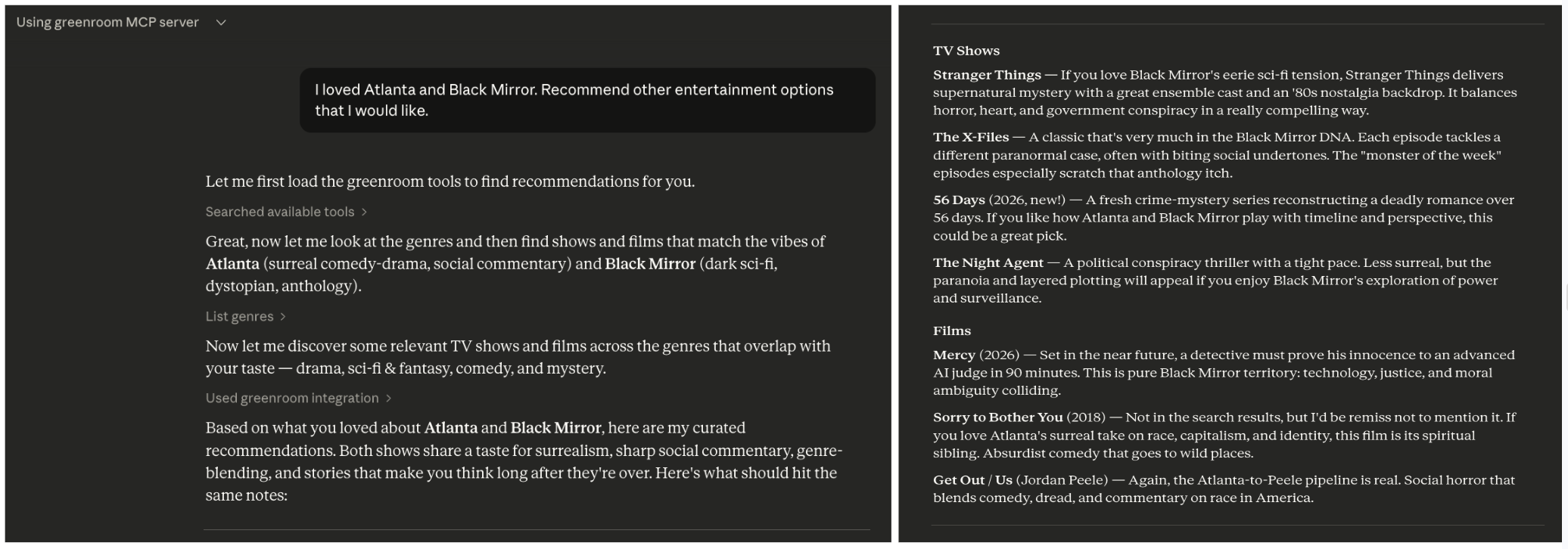
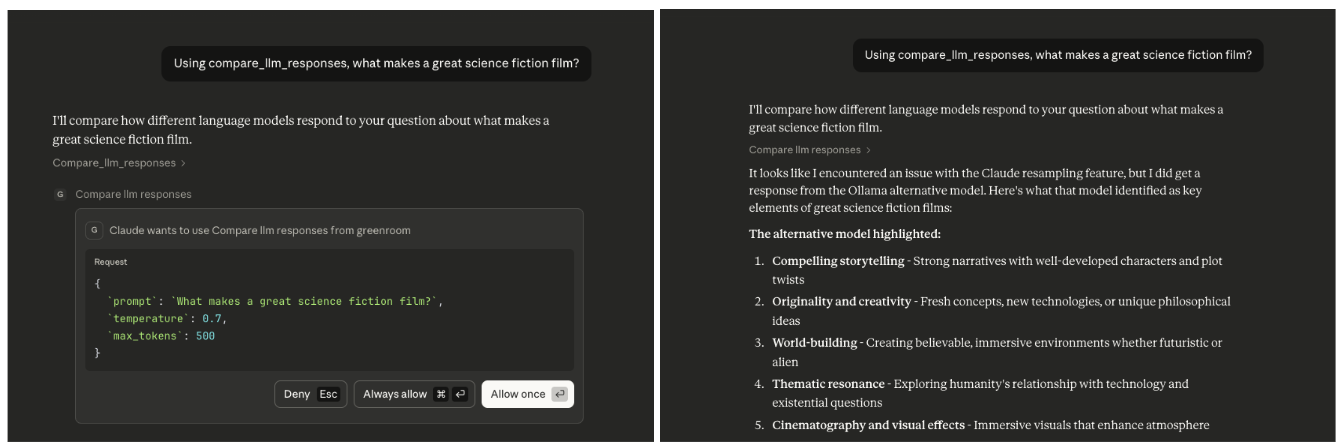
The greenroom MCP server can be used to answer a wide range of questions related to entertainment. Below are some example prompts that will trigger the use of multiple MCP tools, but these are just examples.
What kinds of entertainment can you recommend?
I'm in the mood for something serious. Recommend some entertainment content.
Recommend spanish language documentary films from the 2010s.
I loved Atlanta and Black Mirror. Recommend other entertainment options that I would like.
I'm hosting a French film night. Recommend highly-rated French films across genres.
Plan a binge-watching weekend including recent dramas and comedies.
Let's host a sci-fi movie marathon. Recommend 5 sci-fi films from different decades.
Analyze which genres have the highest average ratings in film vs television.
Compare action films made in the 1980s to those made in the 2020s.
What are the top-rated spanish language television shows in each genre?
Using compare_llm_responses, what makes a great science fiction film?
Using the compare_llm_responses tool, how is machine learning used in modern filmmaking?
Related MCP server: moviefinder-mcp
Category | Tool | Description |
Genres | list_genres | Fetches all entertainment genres, returning a unified map showing which media types support each genre |
Genres | categorize_genres | Maps human moods to media genres to improve hit rate from human prompts |
Films | discover_films | Retrieves list of films based on selected criteria. Returns metadata for informed responses and optimized categorization. |
Films | search_films | Looks up films by title. Search can be optionally narrowed by release year. Returns the same metadata shape as discover_films. |
Television | discover_television | Retrieves list of television shows based on selected criteria. Returns metadata for informed responses and optimized categorization. |
Television | search_television | Looks up television shows by title. Search can be optionally narrowed by release year (year of first airing). Returns the same metadata shape as discover_television. |
MCP tools are callable actions, analogous to POST requests, that an agent executes. They are annotated with @mcp.tool() in the FastMCP framework.
This server supports the coordination of multiple agents to work on a single task.
compare_llm_responses - Receives a prompt and fields it out to two agents. It constrains the responses by temperature and token limit.
To trigger this tool, ask the agent: Using the compare_llm_responses tool, why is the ocean blue?
You should see: Both a resampled response and an ollama response Response lengths comparison Structured JSON output showing both LLM outputs side-by-side
As of 2026, this defaults to comparing the response from a resampling of the current client to a response from a new ollama client. If you use the server with Claude, the resampled response will be null because Anthropic forbids resampling.
Context-aware tools use FastMCP's Context parameter to access advanced MCP features like LLM sampling.
Example:
list_genres_simplified - Returns a simplified list of genre names by using ctx.sample() to leverage the agent's LLM capabilities for data transformation.
These resources provide read-only data, analogous to GET requests. An agent reads the information but does not perform actions.
Resources are annotated with @mcp.resource() in the FastMCP framework.
config://version - Get server version
All errors raised by the greenroom server use a custom exception hierarchy rooted in GreenroomError.
This means MCP callers can catch GreenroomError to handle any server-side failure, or catch a specific subclass for finer control:
APIResponseError - HTTP errors, invalid JSON, unexpected response bodies from external APIs
APIConnectionError - Network or connectivity failures when reaching external APIs
APITypeError - Response had an unexpected python type after deserialization
SamplingError - Errors during LLM sampling
Built-in exceptions like ValueError are still raised for input validation (e.g., invalid parameters).
Tools Layer (MCP Interface)
    ↓
Services Layer (Business Logic)
    ↓
Client Layer (Provider-specific HTTP Communication)
    ↓
Models Layer (Provider-agnostic Data Structures)This project follows the python package src/ layout to support convenient packaging and testing. Below is a simplified diagram of the project.
greenroom/
├── src/
│   └── greenroom/                       # python package
│       │
│       ├── server.py                    # primary entry point to server
│       ├── config.py                    # centralized configuration
│       ├── utils.py                     # shared utilities
│       │
│       │
│       ├── models/                      # data models
│       │
│       ├── services/                    # business logic
│       │   ├── llm/                     # LLM agent services and clients
│       │   ├── tmdb/                    # TMDB provider services and clients
│       │   └── protocols.py             # standardizes methods across media providers
│       │
│       └── tools/                       # MCP tools (exposed via FastMCP)
│            ├── agent_tools.py          # coordinate multiple agents and LLMs
│            ├── genre_tools.py          # optimize genre discovery and presentation to user
│            └── media/                  # tools for retrieving entertainment content
│                 ├── discover_tools.py  # browse the catalog by filter criteria
│                 └── search_tools.py    # look up a specific title by name
│
├── tests/greenroom/                     # test suite
│
├── pyproject.toml                       # configuration and dependencies
└── uv.lock # dependency lock file (auto-generated)python >=3.10
FastMCP >=2.13.0; MCP server framework; requires python 3.10+
uv: package manager
Hatchling: build system
httpx: network calls to external data sources
python-dotenv: API key management
ollama (optional): local LLM runtime for multi-agent tools like compare_llm_responses
I chose FastMCP framework for this project, because it requires minimal boilerplate. In previous projects, I used alternative frameworks like MCP Python SDK to understand more fundamental mechanics.
Create local development environment
# Clone the repository
git clone <repository-url>
cd greenroom

# Install dependencies (uv will create a virtual environment automatically)
uv sync
Add TMDB api key as environment variable
Get a free API key at TMDB by creating an account, going to account settings, and navigating to the API section.
Create a file called .env at the top level of the project. (This file is gitignored to prevent committing secrets.)
Copy the content of .env.example to your new file.
Replace your_tmdb_api_key_here in .env with the actual TMDB API key.
To use ollama as a second agent (in addition to Claude). An example of usage is the compare_llm_responses tool.
Install ollama Download from https://ollama.com/download.
Start ollama service Open ollama desktop application or start from terminal:
ollama servePull the default model
The compare_llm_responses tool defaults to llama3.2:latest as of 2026.
ollama pull llama3.2Verify the model is available.
ollama listTest ollama is working
curl http://localhost:11434/api/generate -d '{"model": "llama3.2", "prompt": "Why is the sky blue?", "stream": false}'Expected response will look something like the below.
 {
   "model":"llama3.2",
   "created_at":"2025-11-30T12:01:32.314915Z",
   "response":"The sky appears blue because of a phenomenon called Rayleigh scattering...
   ...
}Regardless of your preferred platform, exercising the server is fairly standardized.
/mcp will display the server with access to the list of tools and their descriptions.
Tools will automatically be used during conversations.
To explicitly test a tool, ask that agent to call the tool. e.g. Call the <name-of-tool> tool from the greenroom MCP server to answer the following:...
If you update any tools, you must /reload a session for the updates to become available.
Add the server configuration to a local toml file
Create .vibe/ directory at the top-level of the project. Create config.toml file within that directory.
Add the below to config.toml.
[[mcp_servers]]
name = "greenroom"
transport = "stdio"
command = "uv"
args = [
  "--directory",
  "/ABSOLUTE/PATH/TO/PROJECT",
  "run",
  "python",
  "src/greenroom/server.py"
]
startup_timeout_sec = 15.0
Exercise in vibe CLI
vibe to open a fresh session
Type /mcp to view available MCP servers.
Confirm that greenroom is one of them with status: connected.
Update local claude settings and start the server
claude mcp add greenroom --scope project -- uv --directory /ABSOLUTE/PATH/TO/PROJECT run python src/greenroom/server.pyExercise in claude CLI
claude to open a fresh session
Type /mcp to view available MCP servers.
Confirm that greenroom is one of them with status: connected.
Open the claude desktop app.
Confirm the desktop app is connected to the greenroom server:
Navigate to Settings.
Click on "Developer". Local MCP Servers should appear.
The greenroom server should be listed there and it should have status: running.
If it is not running, click on 'Edit Config'. Then follow the instructions in the Troubleshooting section below.
Run the MCP server locally
The server will start and communicate via stdin/stdout. It uses stdio by default, which is the standard transport for local MCP servers.
uv run greenroom                        # recommended: uses the MCP entry point

uv run python src/greenroom/server.py   # alternative
NB: You should not run the server directly (e.g. uv run <path to server.py>) because the server is part of a python package.
Running it directly would break the module resolution.
Inspect using MCP Inspector (web ui)
npx @modelcontextprotocol/inspector uv --directory /ABSOLUTE/PATH/TO/PROJECT run python src/greenroom/server.pyRun tests
The test suite includes a kickoff of the mypy type checker.
uv run pytest               # fast unit and integration tests; excludes external tests that make real network calls

uv run pytest -m external   # tests that make real network calls to confirm contracts
Design Note: The @mcp.tool() decorator wraps functions into a FunctionTool objects, which prevents the decorated function from being callable as a plain function.
To ease testability and provide modular interfaces, I delegated the logic within each tool to high-level public orchestration methods, which can be tested without spinning up a server and which use shared utility modules.
The remaining top-level registration layer of each tool is covered separately by registration tests, which build an in-memory FastMCP server to verify the tool names, parameter schemas, and the arguments each tool forwards to its delegate.
Confirm correctness of the local claude configuration.
When you run the setup command (claude mcp add ... --scope project), a configuration for that MCP server is added to a .mcp.json file at the project root.
This is a different than the configuration file that the claude desktop app uses.
Align your local .mcp.json with the below.
Replace /ABSOLUTE/PATH/TO/PROJECT with the actual path to the project directory (not the package directory) on your local machine.
Replace /ABSOLUTE/PATH/TO/UV/LIBRARY with the actual path to uv on your local machine. On mac, which uv should print out this directory.
{
  "mcpServers": {
    "greenroom": {
      "command": "/ABSOLUTE/PATH/TO/UV/LIBRARY",
      "args": [
        "--directory",
        "/ABSOLUTE/PATH/TO/PROJECT",
        "run",
        "python",
        "src/greenroom/server.py"
      ]
    }
  }
}
When experiencing configuration issues, sometimes it helps to remove the mcp server from your local machine and add it back again.
Remove the local configuration.
claude mcp remove greenroomUpdate the local configuration and run the MCP server.
claude mcp add greenroom --scope project -- uv --directory /ABSOLUTE/PATH/TO/PROJECT run python src/greenroom/server.pyConfirm correctness of local claude desktop configuration
Clicking "Edit Config" in the Developer settings (see the Usage section above) opens claude_desktop_config.json in your default text editor.
This is a different configuration file than the CLI uses and it applies globally across every project opened in the desktop app rather than to a single project.
On Mac, this file generally lives at ~/Library/Application Support/Claude/claude_desktop_config.json.
Replace /ABSOLUTE/PATH/TO/PROJECT with the actual path to the project directory (not the package directory) on your local machine.
Replace /ABSOLUTE/PATH/TO/UV/LIBRARY with the actual path to uv on your local machine. On mac, which uv should print out this directory.
{
  "mcpServers": {
    "greenroom": {
      "command": "/ABSOLUTE/PATH/TO/UV/LIBRARY",
      "args": [
        "--directory",
        "/ABSOLUTE/PATH/TO/PROJECT",
        "run",
        "python",
        "src/greenroom/server.py"
      ]
    }
  }
}
When experiencing configuration issues, sometimes it helps to remove the mcp server entry and add it back again.
Remove the greenroom entry from claude_desktop_config.json and save the file.
Re-add the greenroom entry (matching the JSON above) and save the file.
Fully quit and reopen the claude desktop app for the change to take effect.
The pyproject.toml file declares the fastmcp dependency managed by uv
When an agent starts, it launches this MCP server as a subprocess using the configured command
uv automatically manages the virtual environment and dependencies
The server advertises its available resources and tools (e.g. the tools/list JSON-RPC method)
During conversations, the agent can automatically call these tools when relevant
The server executes the requested tool and returns results to the agent
The agent incorporates the results into its response to you
Add more media types (e.g., podcasts, books)
Add providers to augment data sources
Add an entertainment concierge experience (e.g., manager agent flow)
Categorize all available genres by mood/tone.
Groups entertainment genres into mood categories (Dark, Light, Serious, Fun) using a hybrid approach: hardcoded mappings for common genres with LLM-based categorization for edge cases and unknown genres.
Returns: Dictionary mapping mood categories to lists of genre names: { "Dark": ["Horror", "Thriller", "Crime", "Mystery"], "Light": ["Comedy", "Family", "Kids", "Animation", "Romance"], "Serious": ["Documentary", "History", "War", "Drama"], "Fun": ["Action", "Adventure", "Fantasy", "Science Fiction"], "Other": ["Western", "Film Noir"] }
| Name | Required | Description | Default |
|---|---|---|---|
No parameters | |||
| Name | Required | Description |
|---|---|---|
No output parameters | ||
Does the description disclose side effects, auth requirements, rate limits, or destructive behavior?
With no annotations provided, the description carries full burden and discloses key behavioral traits: it uses a 'hybrid approach' combining hardcoded mappings and LLM-based categorization, and specifies the return format. However, it lacks details on performance, rate limits, or error handling.
Agents need to know what a tool does to the world before calling it. Descriptions should go beyond structured annotations to explain consequences.
Is the description appropriately sized, front-loaded, and free of redundancy?
The description is front-loaded with the core purpose, followed by implementation details and return format. It is appropriately sized with no wasted sentences, though the return example is detailed but necessary for clarity.
Shorter descriptions cost fewer tokens and are easier for agents to parse. Every sentence should earn its place.
Given the tool's complexity, does the description cover enough for an agent to succeed on first attempt?
Given the tool's complexity (hybrid approach), no annotations, and an output schema (implied by the detailed return example), the description is largely complete. It explains the categorization method and output, though could benefit from more context on limitations or edge cases.
Complex tools with many parameters or behaviors need more documentation. Simple tools need less. This dimension scales expectations accordingly.
Does the description clarify parameter syntax, constraints, interactions, or defaults beyond what the schema provides?
The input schema has 0 parameters with 100% coverage, so no parameter details are needed. The description appropriately focuses on the tool's function and output, adding value beyond the empty schema without redundancy.
Input schemas describe structure but not intent. Descriptions should explain non-obvious parameter relationships and valid value ranges.
Does the description clearly state what the tool does and how it differs from similar tools?
The description clearly states the tool's purpose with specific verbs ('Categorize', 'Groups') and resources ('all available genres', 'entertainment genres'), and distinguishes it from siblings like 'list_genres' and 'list_genres_simplified' by focusing on mood-based categorization rather than listing.
Agents choose between tools based on descriptions. A clear purpose with a specific verb and resource helps agents select the right tool.
Does the description explain when to use this tool, when not to, or what alternatives exist?
The description implies usage by mentioning 'edge cases and unknown genres', but does not explicitly state when to use this tool versus alternatives like 'list_genres' or 'discover_films'. No exclusions or prerequisites are provided.
Agents often have multiple tools that could apply. Explicit usage guidance like "use X instead of Y when Z" prevents misuse.
Compare how Claude and a second agent (defaults to Ollama) respond to the same prompt.
Sends the same prompt to both Claude (via ctx.sample) and the second agent in parallel, returning a structured comparison of their responses.
Args: prompt: The prompt to send to both LLMs llm_model: Which second model to use (default: llama3.2:latest) temperature: Temperature for both LLMs (default: 0.7) max_tokens: Maximum tokens for responses (default: 500)
Returns: Dictionary containing: { "prompt": "original prompt text", "claude_response": { "text": "Claude's response...", "model": "claude-sonnet-4-5", "error": None }, "alternative_response": { "text": "Ollama's response...", "model": "llama3.2:latest", "error": None }, "comparison": { "claude_length": 150, "alternative_length": 142, "both_succeeded": true } }
Raises: ValueError: If prompt is empty or invalid parameters provided
| Name | Required | Description | Default |
|---|---|---|---|
| prompt | Yes | ||
| llm_model | No | ||
| temperature | No | ||
| max_tokens | No |
| Name | Required | Description |
|---|---|---|
No output parameters | ||
Does the description disclose side effects, auth requirements, rate limits, or destructive behavior?
With no annotations provided, the description carries the full burden and does well by disclosing key behaviors: parallel execution ('sends...in parallel'), default values (Ollama as second agent, specific defaults), error handling (error fields in response), and exception conditions (raises ValueError). It doesn't mention rate limits or authentication needs.
Agents need to know what a tool does to the world before calling it. Descriptions should go beyond structured annotations to explain consequences.
Is the description appropriately sized, front-loaded, and free of redundancy?
The description is appropriately sized and well-structured: purpose statement first, then execution details, followed by parameter explanations, return format, and error conditions. Every sentence adds value with zero wasted text.
Shorter descriptions cost fewer tokens and are easier for agents to parse. Every sentence should earn its place.
Given the tool's complexity, does the description cover enough for an agent to succeed on first attempt?
Given the tool's complexity (parallel LLM calls with comparison), no annotations, and 0% schema coverage, the description provides complete context. It explains purpose, behavior, all parameters, return format (detailed dictionary structure), and error conditions. The output schema exists but the description still adds useful semantic context.
Complex tools with many parameters or behaviors need more documentation. Simple tools need less. This dimension scales expectations accordingly.
Does the description clarify parameter syntax, constraints, interactions, or defaults beyond what the schema provides?
With 0% schema description coverage, the description fully compensates by explaining all 4 parameters in detail: 'prompt' (what to send), 'llm_model' (which second model with default), 'temperature' (for both LLMs with default), and 'max_tokens' (maximum tokens with default). It adds meaning beyond the bare schema.
Input schemas describe structure but not intent. Descriptions should explain non-obvious parameter relationships and valid value ranges.
Does the description clearly state what the tool does and how it differs from similar tools?
The description clearly states the tool's purpose with specific verbs ('compare', 'sends') and resources ('Claude and a second agent', 'structured comparison of their responses'). It distinguishes itself from sibling tools by focusing on LLM response comparison rather than media categorization or discovery.
Agents choose between tools based on descriptions. A clear purpose with a specific verb and resource helps agents select the right tool.
Does the description explain when to use this tool, when not to, or what alternatives exist?
The description provides clear context for when to use this tool ('compare how Claude and a second agent respond to the same prompt'), but doesn't explicitly state when not to use it or mention alternatives. The sibling tools are unrelated (media categorization/discovery), so no direct alternatives are needed.
Agents often have multiple tools that could apply. Explicit usage guidance like "use X instead of Y when Z" prevents misuse.
Discovers films from based on optional filters like genre, release year, language, and sorting preferences. For now, defaults to TMDB service.
Args: genre_id: Optional TMDB genre ID to filter by (use list_genres to find IDs) year: Optional release year to filter by (e.g., 2024) language: Optional ISO 639-1 language code (e.g., "en", "es", "fr") sort_by: Sort order - options: "popularity.desc", "popularity.asc", "vote_average.desc", "vote_average.asc", "date.desc", "date.asc" (None defaults to "popularity.desc") page: Page number for pagination, 1-indexed (default: 1) max_results: Maximum number of results to return (default: 20, max: 100)
Returns: Dictionary containing: { "results": [ { "id": str, "media_type": str, "title": str, "date": str (YYYY-MM-DD format, may be None), "rating": float (0-10 scale, may be None), "description": str (may be None), "genre_ids": List[int] } ], "total_results": int, "page": int, "total_pages": int, "provider": str }
Raises: ValueError: If invalid parameters provided RuntimeError: If service returns an error ConnectionError: If unable to connect to service
| Name | Required | Description | Default |
|---|---|---|---|
| genre_id | No | ||
| year | No | ||
| language | No | ||
| sort_by | No | ||
| page | No | ||
| max_results | No |
| Name | Required | Description |
|---|---|---|
No output parameters | ||
Does the description disclose side effects, auth requirements, rate limits, or destructive behavior?
With no annotations provided, the description carries the full burden of behavioral disclosure. It adds useful context such as defaults (TMDB service, pagination defaults), constraints (max_results: 100), and error conditions (raises ValueError, RuntimeError, ConnectionError). However, it doesn't cover aspects like rate limits, authentication needs, or data freshness, leaving some gaps for a mutation-free tool.
Agents need to know what a tool does to the world before calling it. Descriptions should go beyond structured annotations to explain consequences.
Is the description appropriately sized, front-loaded, and free of redundancy?
The description is well-structured with sections for Args, Returns, and Raises, making it easy to parse. It's appropriately sized for the tool's complexity, though the initial sentence could be more front-loaded with key information, and some details in the Returns section might be redundant if an output schema exists.
Shorter descriptions cost fewer tokens and are easier for agents to parse. Every sentence should earn its place.
Given the tool's complexity, does the description cover enough for an agent to succeed on first attempt?
Given the tool's moderate complexity (6 optional parameters, no annotations, but has output schema), the description is largely complete. It covers parameters thoroughly, includes return format details (though output schema may handle this), and mentions error conditions. Minor gaps include lack of sibling tool differentiation and some behavioral aspects like rate limits.
Complex tools with many parameters or behaviors need more documentation. Simple tools need less. This dimension scales expectations accordingly.
Does the description clarify parameter syntax, constraints, interactions, or defaults beyond what the schema provides?
The schema description coverage is 0%, so the description must fully compensate. It comprehensively documents all 6 parameters with clear explanations, examples (e.g., '2024', 'en'), enumerated options for sort_by, defaults, and constraints (max: 100). This adds significant meaning beyond the bare input schema.
Input schemas describe structure but not intent. Descriptions should explain non-obvious parameter relationships and valid value ranges.
Does the description clearly state what the tool does and how it differs from similar tools?
The description clearly states the tool 'discovers films' with optional filters like genre, release year, language, and sorting preferences, which is a specific verb+resource combination. However, it doesn't explicitly differentiate from sibling tools like 'discover_television' or 'list_genres', which would be needed for a score of 5.
Agents choose between tools based on descriptions. A clear purpose with a specific verb and resource helps agents select the right tool.
Does the description explain when to use this tool, when not to, or what alternatives exist?
The description implies usage through the mention of 'optional filters' and references 'list_genres' to find genre IDs, providing some context. However, it lacks explicit guidance on when to use this tool versus alternatives like 'discover_television' or 'categorize_genres', and doesn't specify prerequisites or exclusions.
Agents often have multiple tools that could apply. Explicit usage guidance like "use X instead of Y when Z" prevents misuse.
Discovers television shows based on optional filters like genre, first air year, language, and sorting preferences. For now, defaults to TMDB service.
Args: genre_id: Optional TMDB genre ID to filter by (use list_genres to find IDs) year: Optional first air year to filter by (e.g., 2024) language: Optional ISO 639-1 language code (e.g., "en", "es", "fr") sort_by: Sort order - options: "popularity.desc", "popularity.asc", "vote_average.desc", "vote_average.asc", "date.desc", "date.asc" (None defaults to "popularity.desc") page: Page number for pagination, 1-indexed (default: 1) max_results: Maximum number of results to return (default: 20, max: 100)
Returns: Dictionary containing: { "results": [ { "id": str, "media_type": str, "title": str, "date": str (YYYY-MM-DD format, may be None), "rating": float (0-10 scale, may be None), "description": str (may be None), "genre_ids": List[int] } ], "total_results": int, "page": int, "total_pages": int, "provider": str }
Raises: ValueError: If invalid parameters provided RuntimeError: If service returns an error ConnectionError: If unable to connect to service
| Name | Required | Description | Default |
|---|---|---|---|
| genre_id | No | ||
| year | No | ||
| language | No | ||
| sort_by | No | ||
| page | No | ||
| max_results | No |
| Name | Required | Description |
|---|---|---|
No output parameters | ||
Does the description disclose side effects, auth requirements, rate limits, or destructive behavior?
With no annotations provided, the description carries the full burden of behavioral disclosure. It effectively describes the tool's behavior: defaults to TMDB service, pagination with page numbers, result limits (max 100), error conditions (ValueError, RuntimeError, ConnectionError), and the complete return structure. The only minor gap is not explicitly stating this is a read-only operation, though 'discovers' implies it.
Agents need to know what a tool does to the world before calling it. Descriptions should go beyond structured annotations to explain consequences.
Is the description appropriately sized, front-loaded, and free of redundancy?
The description is well-structured with clear sections (Args, Returns, Raises) and front-loads the core purpose. While comprehensive, it could be slightly more concise by integrating some parameter details into the opening sentence rather than separate sections, but every sentence adds necessary value.
Shorter descriptions cost fewer tokens and are easier for agents to parse. Every sentence should earn its place.
Given the tool's complexity, does the description cover enough for an agent to succeed on first attempt?
Given the tool's complexity (6 parameters, no annotations, but has output schema), the description is complete. It covers purpose, all parameters with semantics, return values (though output schema exists, the description provides helpful context), error conditions, and service defaults. No significant gaps remain for agent understanding.
Complex tools with many parameters or behaviors need more documentation. Simple tools need less. This dimension scales expectations accordingly.
Does the description clarify parameter syntax, constraints, interactions, or defaults beyond what the schema provides?
With 0% schema description coverage, the description fully compensates by providing comprehensive parameter documentation. Each of the 6 parameters is clearly explained with examples, default values, constraints (e.g., 'max: 100'), and usage guidance (e.g., 'use list_genres to find IDs'). The description adds significant value beyond the bare schema.
Input schemas describe structure but not intent. Descriptions should explain non-obvious parameter relationships and valid value ranges.
Does the description clearly state what the tool does and how it differs from similar tools?
The description clearly states the tool's purpose: 'Discovers television shows based on optional filters' with specific resources (television shows) and actions (discover with filtering). It distinguishes from sibling tools like 'discover_films' by specifying television shows and from 'list_genres' by focusing on discovery rather than listing.
Agents choose between tools based on descriptions. A clear purpose with a specific verb and resource helps agents select the right tool.
Does the description explain when to use this tool, when not to, or what alternatives exist?
The description provides clear context for when to use this tool (discovering TV shows with filtering) and mentions using 'list_genres' to find genre IDs, which implies an alternative tool for that purpose. However, it doesn't explicitly state when NOT to use this tool or compare it directly with 'discover_films' for media type selection.
Agents often have multiple tools that could apply. Explicit usage guidance like "use X instead of Y when Z" prevents misuse.
List all available entertainment genres across media types and providers.
Returns: Dictionary mapping genre names to their properties: { "Documentary": { "id": 99, "has_films": true, "has_tv_shows": true }, "Action": { "id": 28, "has_films": true, "has_tv_shows": false }, ... }
| Name | Required | Description | Default |
|---|---|---|---|
No parameters | |||
| Name | Required | Description |
|---|---|---|
No output parameters | ||
Does the description disclose side effects, auth requirements, rate limits, or destructive behavior?
With no annotations provided, the description carries full burden and does well by specifying the return format as a dictionary mapping genre names to properties. It discloses behavioral traits like the structure of returned data (genre names with id, has_films, has_tv_shows), which is valuable beyond basic listing. It doesn't mention potential limitations like rate limits or auth needs, but for a read-only list tool, this is acceptable.
Agents need to know what a tool does to the world before calling it. Descriptions should go beyond structured annotations to explain consequences.
Is the description appropriately sized, front-loaded, and free of redundancy?
The description is appropriately sized and front-loaded: the first sentence states the purpose clearly, followed by a concise specification of the return format. Every sentence earns its place by providing essential information without redundancy.
Shorter descriptions cost fewer tokens and are easier for agents to parse. Every sentence should earn its place.
Given the tool's complexity, does the description cover enough for an agent to succeed on first attempt?
Given the tool's low complexity (0 parameters, read-only operation), the description is complete. It explains what the tool does and the return format in detail. Since an output schema exists, the description doesn't need to explain return values further, and it adequately covers the tool's purpose and behavior.
Complex tools with many parameters or behaviors need more documentation. Simple tools need less. This dimension scales expectations accordingly.
Does the description clarify parameter syntax, constraints, interactions, or defaults beyond what the schema provides?
The input schema has 0 parameters with 100% coverage, so the baseline is 4. The description adds no parameter information, which is fine since there are no parameters to document. It doesn't detract from the schema, maintaining the baseline score.
Input schemas describe structure but not intent. Descriptions should explain non-obvious parameter relationships and valid value ranges.
Does the description clearly state what the tool does and how it differs from similar tools?
The description clearly states the specific verb 'List' and resource 'all available entertainment genres across media types and providers.' It distinguishes from siblings like 'list_genres_simplified' by specifying comprehensive coverage across media types and providers, and from 'categorize_genres' by focusing on listing rather than categorization.
Agents choose between tools based on descriptions. A clear purpose with a specific verb and resource helps agents select the right tool.
Does the description explain when to use this tool, when not to, or what alternatives exist?
The description implies usage context by mentioning 'across media types and providers,' suggesting this tool is for broad genre discovery. However, it lacks explicit guidance on when to use this vs. 'list_genres_simplified' or alternatives like 'discover_films' for specific media types, which would be needed for a perfect score.
Agents often have multiple tools that could apply. Explicit usage guidance like "use X instead of Y when Z" prevents misuse.
Get a simplified list of available genre names.
Uses LLM sampling to extract genre names from the full genre data, returning a clean, formatted list without IDs or media type flags. Falls back to direct extraction if sampling is not supported.
Returns: A formatted string containing the sorted list of genre names.
Raises: Sampling errors are logged and result in fallback to direct key extraction.
| Name | Required | Description | Default |
|---|---|---|---|
No parameters | |||
| Name | Required | Description |
|---|---|---|
| result | Yes |
Does the description disclose side effects, auth requirements, rate limits, or destructive behavior?
With no annotations provided, the description carries the full burden of behavioral disclosure. It effectively describes key traits: it uses 'LLM sampling' with a fallback to 'direct extraction,' returns a 'formatted string,' sorts the list, and handles errors by logging and falling back. This covers method, output format, and error handling, though it could mention performance or rate limits for a higher score.
Agents need to know what a tool does to the world before calling it. Descriptions should go beyond structured annotations to explain consequences.
Is the description appropriately sized, front-loaded, and free of redundancy?
The description is well-structured and front-loaded with the core purpose. Each sentence adds value: method details, output format, and error handling. It's appropriately sized for the tool's complexity, but minor verbosity in explaining fallback and errors slightly reduces conciseness, preventing a perfect score.
Shorter descriptions cost fewer tokens and are easier for agents to parse. Every sentence should earn its place.
Given the tool's complexity, does the description cover enough for an agent to succeed on first attempt?
Given the tool's moderate complexity (0 params, no annotations, but with output schema), the description is largely complete. It explains the method, output, and error handling. Since an output schema exists, it doesn't need to detail return values further. However, it could briefly mention the sibling tool 'list_genres' for better context, leaving a small gap.
Complex tools with many parameters or behaviors need more documentation. Simple tools need less. This dimension scales expectations accordingly.
Does the description clarify parameter syntax, constraints, interactions, or defaults beyond what the schema provides?
The input schema has 0 parameters with 100% coverage, so no parameter information is needed. The description appropriately focuses on behavior and output without redundant param details. It earns a baseline 4 for compensating with clear operational context, though it doesn't add param-specific semantics since none exist.
Input schemas describe structure but not intent. Descriptions should explain non-obvious parameter relationships and valid value ranges.
Does the description clearly state what the tool does and how it differs from similar tools?
The description clearly states the tool's purpose: 'Get a simplified list of available genre names.' It specifies the verb ('Get') and resource ('genre names'), and distinguishes it from the sibling 'list_genres' by emphasizing 'simplified' and 'without IDs or media type flags.' However, it doesn't explicitly contrast with other siblings like 'categorize_genres' or 'discover_films,' keeping it from a perfect score.
Agents choose between tools based on descriptions. A clear purpose with a specific verb and resource helps agents select the right tool.
Does the description explain when to use this tool, when not to, or what alternatives exist?
The description implies usage by mentioning 'simplified list' and fallback behavior, suggesting it's for when a clean, formatted output is needed. However, it lacks explicit guidance on when to use this tool versus alternatives like 'list_genres' or other siblings, and no exclusions or prerequisites are stated, making the guidance incomplete.
Agents often have multiple tools that could apply. Explicit usage guidance like "use X instead of Y when Z" prevents misuse.
Recent tool additions, removals, and schema changes observed during successful MCP inspections.
v0.1.0categorize_genrescompare_llm_responsesdiscover_filmsdiscover_televisionlist_genreslist_genres_simplifiedScored across 6 tools
Most tools have distinct purposes (categorizing genres, comparing LLMs, discovering films/TV, listing genres), but there is notable overlap between 'list_genres' and 'list_genres_simplified'—both list genres with only output format differences. This could confuse agents about which to use for basic genre listing. The other tools are clearly differentiated.
Tools follow a consistent verb_noun naming pattern (e.g., 'categorize_genres', 'compare_llm_responses', 'discover_films'), which is predictable and readable. However, 'list_genres' and 'list_genres_simplified' deviate slightly by adding a modifier, breaking the pure verb_noun convention but maintaining clarity.
With 6 tools, the count is reasonable for a media/entertainment-focused server, covering genre management, content discovery, and LLM comparison. It's slightly thin for full media lifecycle coverage (e.g., no update/delete tools for genres or content), but each tool serves a clear purpose without obvious bloat.
The server covers genre listing and content discovery for films and TV, but there are notable gaps. It lacks CRUD operations for genres (only listing/categorizing) and media (no create/update/delete tools for films/TV). The LLM comparison tool feels out of scope, and there's no integration between discovery and genre tools (e.g., filtering by mood from categorize_genres).
MCP server for building and testing AI agents with multi-model experimentation and insights.
Nifty's MCP server — exposes tasks, projects, messages, and files as tools for AI agents.
MCP server unifying ERPs, CRMs, APIs and knowledge base for Claude, ChatGPT and Gemini.
MCP server for agentverse documentation, generated by doc2mcp.