
Supports the Windsurf IDE by Codeium, enabling AI coding agents to maintain continuity through persistent memory, auto-capture of lessons, and semantic search of past sessions.
OMEGA
Persistent memory for AI coding agents. Your agent remembers decisions, learns from mistakes, and picks up where it left off.
🇨🇳 中文 | 🇯🇵 日本語 | 🇰🇷 한국어 | 🇧🇷 Português | 🇪🇸 Español | 🇫🇷 Français | 🇩🇪 Deutsch | 🇷🇺 Русский






The open source, local-first alternative to No API keys. No cloud. Your data stays on your machine.
Listed on: Official MCP Registry · awesome-mcp-servers (80K+ stars) · awesome-nostr · awesome-L402 · mcp.so · mcpservers.org
pip3 install omega-memory[server]
omega setup
Works with Claude Code | Cursor | Windsurf | Zed | any MCP client
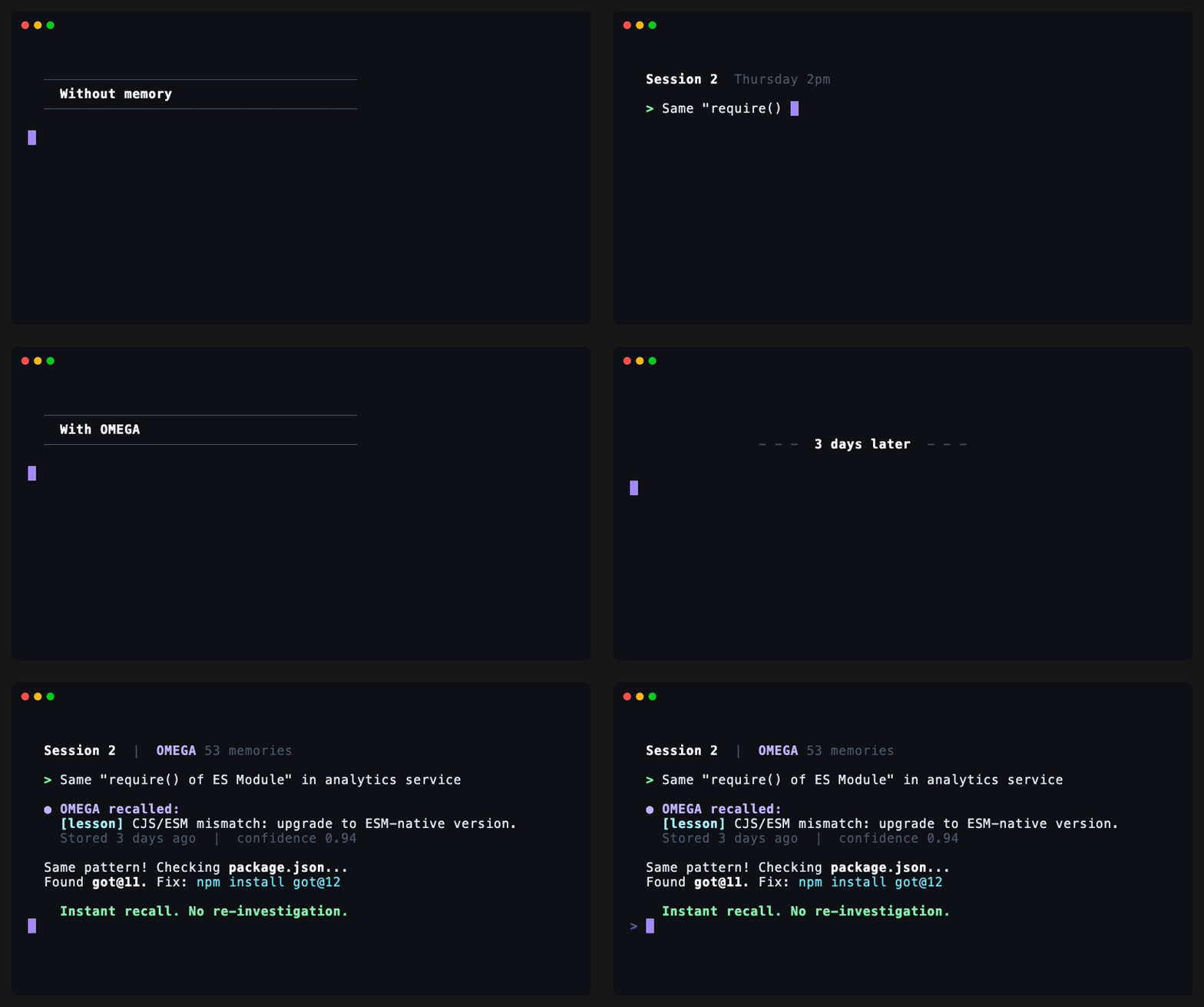
Why Not Just Use CLAUDE.md?
Claude Code's built-in CLAUDE.md is a flat markdown file. It works for a few notes. It breaks down when:
You can't search it. 200 lines in, you're grepping for context that may or may not be there. OMEGA uses semantic search (bge-small-en-v1.5 embeddings + sqlite-vec) to find relevant memories even when the wording is different.
It doesn't auto-capture. Every lesson has to be manually written. OMEGA detects decisions and debugging outcomes automatically.
It grows forever. No dedup, no decay, no contradiction detection. OMEGA auto-resolves conflicts, deduplicates semantically similar entries, and decays stale memories over time.
It's one file per project. No cross-project learning. OMEGA's memory graph spans your entire development history.
It can't checkpoint. Stop mid-refactor and there's no way to resume. OMEGA saves task state and picks up exactly where you left off.
CLAUDE.md is fine for "always use tabs." OMEGA is for when your agent needs to actually learn.
Quick Start
pip3 install omega-memory[server]   # install from PyPI (includes MCP server)
omega setup                         # auto-configures Claude Code + hooks
omega doctor                        # verify everything works
Important:
omega setupdownloads the embedding model and configures your editor. Don't skip it.
That's it. Start a new Claude Code session and say "Remember that we always use early returns and never nest more than 2 levels." Close the session. Open a new one and ask "What are my code style preferences?" OMEGA recalls it instantly.
Using another editor? Install with pip3 install omega-memory[server], then:
omega setup --client cursor          # writes ~/.cursor/mcp.json
omega setup --client windsurf        # writes ~/.codeium/windsurf/mcp_config.json
omega setup --client zed             # writes ~/.config/zed/settings.json
Add to your editor's MCP config file:
{
  "mcpServers": {
    "omega-memory": {
      "command": "python3",
      "args": ["-m", "omega.server.mcp_server"]
    }
  }
}
Config file locations by editor:
Editor | Config File |
Claude Code |
|
Cursor |
|
Windsurf |
|
Zed |
|
Cline | VS Code settings → Cline MCP Servers |
VS Code (Copilot) |
|
Augment |
|
OpenAI Codex CLI |
|
Gemini CLI |
|
pipx install omega-memory[server]              # recommended for global install (no venv needed)
pip3 install omega-memory[server]              # standard (may need a venv)
python3 -m pip install omega-memory[server]    # if pip3 is not available
If you only need OMEGA as a Python library for scripts, CI/CD, or automation, you can skip the MCP server entirely:
pip3 install omega-memory # core only, no MCP server processfrom omega import store, query, remember
store("Always use TypeScript strict mode", "user_preference")
results = query("TypeScript preferences")This gives you the full storage and retrieval API without running an MCP server (~50 MB lighter, no background process). You won't get MCP tools in your editor, but hooks still work:
omega setup --hooks-only # auto-capture + memory surfacing, no MCP server (~600MB RAM saved)What It Does
After omega setup, OMEGA works in the background. No commands to learn.
Auto-capture -- When you make a decision or debug an issue, OMEGA detects it and stores it automatically.
Auto-surface -- When you edit a file or start a session, OMEGA surfaces relevant memories from past sessions.
Checkpoint & resume -- Stop mid-task, pick up in a new session exactly where you left off.
You can also explicitly tell Claude to remember things:
"Remember that we use JWT tokens, not session cookies"
But the real value is what OMEGA does without being asked.
Examples
Architectural decisions carry forward:
"Remember: we chose PostgreSQL over MongoDB for the orders service because we need ACID transactions for payment processing."
Three weeks later, in a new session:
"I'm adding a caching layer to the orders service -- what should I know?"
OMEGA surfaces the PostgreSQL decision automatically, so Claude doesn't suggest a MongoDB-style approach.
Mistakes become lessons:
You spend 30 minutes debugging a Docker build failure. Claude figures it out:
"The node_modules volume mount was shadowing the container's node_modules. Fixed by adding an anonymous volume."
OMEGA auto-captures this as a lesson. Next time anyone hits the same Docker issue, Claude already knows the fix.
Preferences persist:
"Remember: always use early returns. Never nest conditionals more than 2 levels deep. Prefer
constoverlet."
Every future session follows these rules without being told again.
Tasks survive session boundaries:
You're mid-refactor when you need to stop:
"Checkpoint this -- I'm halfway through migrating the auth middleware to the new pattern."
Next session:
"Resume the auth middleware task."
Claude picks up exactly where you left off.
More examples (CLI, Python API, scripting): docs/examples
How It Compares
Feature | OMEGA | CLAUDE.md | Mem0 | Basic MCP Memory |
Persistent across sessions | Yes | Yes | Yes | Yes |
Semantic search | Yes | No | Yes | Varies |
Auto-capture | Yes | No | Yes (cloud) | No |
Contradiction detection | Yes | No | No | No |
Checkpoint & resume | Yes | No | No | No |
Graph relationships | Yes | No | No | No |
Cross-session learning | Yes | Limited | Yes | No |
Intelligent forgetting | Yes | No | No | No |
Local-only (no API keys) | Yes | Yes | No | Yes |
Setup |
| Built-in | API key + cloud | Manual JSON config |
Full comparison at omegamax.co/compare.
Free vs Pro
OMEGA follows an open-core model. The free Core tier is Apache-2.0 licensed and will never be relicensed.
Feature | Core (Free) | Pro ($19/mo) |
Memory tools (store, query, search, lessons, profile) | 12 tools | 12 tools |
Semantic search (bge-small-en-v1.5 + sqlite-vec) | Yes | Yes |
Auto-capture & surfacing (hooks) | Yes | Yes |
Checkpoint / resume | Yes | Yes |
Contradiction detection & dedup | Yes | Yes |
Graph relationships (related, supersedes, contradicts) | Yes | Yes |
Forgetting intelligence (decay, conflict resolution) | Yes | Yes |
Encryption at rest (AES-256-GCM) | Yes | Yes |
CLI (query, store, status, timeline, doctor, etc.) | Yes | Yes |
Multi-agent coordination (file claims, branch guards, task queues, messaging) | -- | 37 tools |
Multi-LLM routing (intent classification, provider switching) | -- | 10 tools |
Entity management (corporate registry, relationship graphs) | -- | 8 tools |
Secure encrypted profiles (AES-256, category-scoped) | -- | 3 tools |
Cloud sync (Supabase) | -- | Yes |
Priority support | -- | Yes |
License | Apache-2.0 | Commercial |
Core is complete. Most individual developers will never need Pro. Pro unlocks multi-agent coordination and enterprise capabilities for teams running multiple concurrent agents.
Benchmark
#1 on (ICLR 2025) -- the academic benchmark for long-term memory systems. 500 questions testing extraction, reasoning, temporal understanding, and preference tracking.
System | Score | Notes |
OMEGA | 95.4% | #1 |
Mastra | 94.87% | #2 |
Emergence | 86.0% | -- |
Zep/Graphiti | 71.2% | Published in their paper |
Details and methodology at omegamax.co/benchmarks.
Key Features
12 MCP Tools -- Store, query, traverse, checkpoint, resume, compact, consolidate, and more. Full tool reference at omegamax.co/docs.
Semantic Search -- bge-small-en-v1.5 embeddings + sqlite-vec for fast, accurate retrieval.
Auto-Capture & Surfacing -- Hooks automatically detect decisions and lessons, and surface relevant memories during work.
Graph Relationships -- Memories linked with typed edges (related, supersedes, contradicts).
Forgetting Intelligence -- Time decay, conflict resolution, deduplication. Preferences and errors are exempt from decay.
Encryption at Rest (optional) -- AES-256-GCM with macOS Keychain integration.
pip install omega-memory[encrypt]Plugin Architecture -- Extensible via entry points.
Compatibility
Supported Editors
Client | 12 MCP Tools | Auto-Capture Hooks | Setup Command |
Claude Code | Yes | Yes |
|
Cursor | Yes | No |
|
Windsurf | Yes | No |
|
Zed | Yes | No |
|
Any MCP Client | Yes | No | Manual config (docs) |
Auto-capture hooks are currently only supported by Claude Code's hook system. All MCP-compatible clients get the full 12-tool memory API.
Python & OS
Python | Status | OS | Status | |
3.11 | Supported | macOS (Apple Silicon + Intel) | Fully supported | |
3.12 | Supported | Linux (x86_64, aarch64) | Fully supported | |
3.13 | Supported | Windows (WSL 2) | Supported |
System Requirements
Resource | Requirement |
Disk | ~90 MB for the ONNX embedding model |
RAM | ~31 MB at startup, ~337 MB after first query (ONNX CPU inference) |
GPU | Not required (CPU-only inference) |
Network | Required once for setup (model download), then fully offline |
Who Uses OMEGA
OMEGA is used by developers running Claude Code, Cursor, and Windsurf who need persistent memory across sessions. From solo developers to teams running multi-agent workflows.
"I installed OMEGA and forgot about it. Two weeks later I realized my Claude sessions just... knew things from previous sessions."
If you're using OMEGA, open a PR to add yourself here.
Remote / SSH Setup
Run your agent on a remote server, SSH in from any device. OMEGA's memory graph is on the server waiting for you.
# On your remote server (any Linux VPS -- no GPU needed)
pip3 install omega-memory[server]
omega setup
omega doctor
Every SSH session has full memory of every previous session on that server. Survives disconnects. ~337 MB RAM after first query. Zero external services.
OMEGA runs on Windows through WSL 2 (Windows Subsystem for Linux). WSL 1 works but WSL 2 is recommended for better SQLite performance.
1. Install WSL 2 (if you don't have it)
# In PowerShell (admin)
wsl --install
This installs Ubuntu by default. Restart when prompted.
2. Install Python 3.11+ inside WSL
# In your WSL terminal
sudo apt update && sudo apt install -y python3 python3-pip python3-venv
python3 --version   # should be 3.11+
If your distro ships an older Python, use the deadsnakes PPA:
sudo add-apt-repository ppa:deadsnakes/ppa
sudo apt update && sudo apt install -y python3.12 python3.12-venv
3. Install and set up OMEGA
pip3 install omega-memory[server]
omega setup
omega doctor
WSL-specific notes:
Use the Linux filesystem, not OMEGA stores data in
~/.omega/inside WSL. Keep your projects on the Linux side (~/Projects/) for best performance.Keyring may not work out of the box. If you use
omega-memory[encrypt], installkeyrings.altfor a file-based backend:pip3 install keyrings.alt.Claude Code runs inside WSL. Install Claude Code in your WSL terminal, not in Windows PowerShell.
Multiple WSL distros. Each distro has its own
~/.omega/directory. Copy~/.omega/omega.dbto transfer memories.
Architecture
               +---------------------+
               |    Claude Code       |
               |  (or any MCP host)   |
               +----------+----------+
                          | stdio/MCP
               +----------v----------+
               |   OMEGA MCP Server   |
               |   12 memory tools    |
               +----------+----------+
                          |
               +----------v----------+
               |    omega.db (SQLite) |
               | memories | edges |   |
               |     embeddings       |
               +----------------------+
MCP Tools Reference
Tool | What it does |
| Store typed memory (decision, lesson, error, preference, summary) |
| Semantic or phrase search with tag filters and contextual re-ranking |
| Cross-session lessons ranked by access count |
| Session briefing with recent memories and profile |
| Retrieve operating rules and behavioral guidelines |
| Read or update the user profile |
| Save task state for cross-session continuity |
| Resume a previously checkpointed task |
| Manage a specific memory (edit, delete, feedback, similar, traverse) |
| Set, list, or dismiss time-based reminders |
| System housekeeping (health, consolidate, compact, backup, restore) |
| Analytics: type breakdown, session stats, weekly digest, access rates |
CLI
Command | Description |
| Create dirs, download model, register MCP, install hooks |
| Verify installation health |
| Memory count, store size, model status |
| Search memories by semantic similarity |
| Store a memory with a specified type |
| Show memory timeline grouped by day |
| Show recent session activity overview |
| Memory type distribution and health summary |
| Deduplicate, prune, and optimize memory |
| Cluster and summarize related memories |
| Back up omega.db (keeps last 5) |
| Validate database integrity |
| Show recent hook errors |
| Migrate legacy JSON to SQLite |
Hooks
All hooks dispatch via fast_hook.py with fail-open semantics.
Hook | Handlers | Purpose |
SessionStart |
| Welcome briefing with recent memories |
Stop |
| Session summary |
UserPromptSubmit |
| Auto-capture lessons/decisions |
PostToolUse |
| Surface relevant memories during work |
Search Pipeline
Vector similarity via sqlite-vec (cosine distance, 384-dim bge-small-en-v1.5)
Full-text search via FTS5 (fast keyword matching)
Type-weighted scoring (decisions/lessons weighted 2x)
Contextual re-ranking (boosts by tag, project, and content match)
Deduplication at query time
Time-decay weighting (old unaccessed memories rank lower)
Memory Lifecycle
Dedup: SHA256 hash (exact) + embedding similarity 0.85+ (semantic) + Jaccard per-type
Evolution: Similar content (55-95%) appends new insights to existing memories
TTL: Session summaries expire after 1 day, lessons/preferences are permanent
Auto-relate: Creates
relatededges (similarity >= 0.45) to top-3 similar memoriesCompaction: Clusters and summarizes related memories
Decay: Unaccessed memories lose ranking weight over time (floor 0.35); preferences and errors exempt
Conflict detection: Contradicting memories auto-detected on store; decisions auto-resolve, lessons flagged
Memory Footprint
Startup: ~31 MB RSS
After first query (ONNX model loaded): ~337 MB RSS
Database: ~10.5 MB for ~242 memories
Install from Source
git clone https://github.com/omega-memory/omega-memory.git
cd omega-memory
pip3 install -e ".[server,dev]"
omega setup
omega setup will:
Create
~/.omega/directoryDownload the ONNX embedding model (~90 MB) to
~/.cache/omega/models/Register
omega-memoryas an MCP server in~/.claude.jsonInstall session hooks in
~/.claude/settings.jsonAdd a managed
<!-- OMEGA:BEGIN -->block to~/.claude/CLAUDE.md
All changes are idempotent.
Troubleshooting
omega doctor
Ensure
pip3 install -e ".[server]"from the repo rootCheck
python3 -c "import omega"works
MCP server fails to start:
Run
pip3 install omega-memory[server](the[server]extra includes the MCP package)
MCP server not registered:
claude mcp add -s user omega-memory -- python3 -m omega.server.mcp_serverHooks not firing:
Check
~/.claude/settings.jsonhas OMEGA hook entriesCheck
~/.omega/hooks.logfor errors
Development
pip3 install -e ".[server,dev]"
pytest tests/
ruff check src/
Uninstall
claude mcp remove omega-memory
rm -rf ~/.omega ~/.cache/omega
pip3 uninstall omega-memory
Manually remove OMEGA entries from ~/.claude/settings.json and the <!-- OMEGA:BEGIN --> block from ~/.claude/CLAUDE.md.
Links
Website & Docs -- full documentation, benchmarks, and comparison pages
Star History
License
Apache-2.0. See LICENSE for details. The free Core tier is Apache-2.0 licensed and will never be relicensed.