Meta-MCP-Proxy
Ein flexibler Model Context Protocol (MCP)-Proxy, der die Erkennung und Ausführung von Tools über mehrere MCP-Server und JavaScript-Funktionen hinweg ermöglicht. Er ermöglicht ein reduziertes Kontextereignis, wenn Sie Hunderte von Tools haben. Dieser MCP fungiert als Wrapper für andere MCPs (oder Bibliotheken) und führt eine Art lokales RAG (Retrieval Augmented Generation) aus, um die Kontextgröße zu reduzieren. Er stellt dem LLM zwei Methoden (Erkennen und Ausführen) zur Verfügung und fordert den LLM auf, bei der Erkennung präzise zu sein. Die Ausführungsmethode ist ein einfacher Proxy.
Wir empfehlen dringend, die Konfiguration discoverDescriptionExtras zu „Extenses“ hinzuzufügen, um Details zum Zweck der Tools und zu den Themen anzugeben, für die der LLM sie verwenden soll.
Merkmale
🌉 Einheitliche Tool-Erkennung : Suche nach Tools auf mehreren MCP-Servern
🔌 Proxy-Ausführung : Leiten Sie Tool-Aufrufe an den entsprechenden Server weiter
🔍 Intelligente Suche : Finden Sie mit Fuzzy Matching das beste Werkzeug für die jeweilige Aufgabe
🧩 JavaScript-Integration : Stellen Sie benutzerdefinierte JavaScript-Funktionen als MCP-Tools bereit
📝 Konfigurierbar : Konfiguration aus Dateien oder Befehlszeilenargumenten laden
Related MCP server: mcptool
Verwendung
🧱 Installation
Bearbeiten Sie Ihre Datei ~/Library/Application Support/Claude/claude_desktop_config.json
und fügen Sie Folgendes hinzu
{
  "mcpServers": {
    "mcp-openapi-proxy": {
      "command": "npx",
      "args": ["@nullplatform/meta-mcp-proxy","-f","config.json"]
    }
  }
}
Konfigurationsdateiformat
Ihre config.json sollte dieser Struktur folgen:
{
  "discoverDescriptionExtras": "Additional description for discovery",
  "discoverLimit": 10,
  "mcpServers": {
    "server-name": {
      "command": "command-to-execute",
      "args": ["arg1", "arg2"],
      "env": {
        "ENV_VAR1": "value1",
        "ENV_VAR2": "value2"
      },
      "transport": "stdio"
    }
  }
}
als Beispiel
{
  "discoverDescriptionExtras": "Api used to manage a pet store with access to pets, pet types, users, orders and store",
  "mcpServers": {
    "mcp-petstore": {
        "command": "uvx",
        "args": ["mcp-openapi-proxy"],
        "env": {
            "OPENAPI_SPEC_URL": "https://petstore.swagger.io/v2/swagger.json",
            "API_KEY": "xxxxx"
       }
    }
  }
}
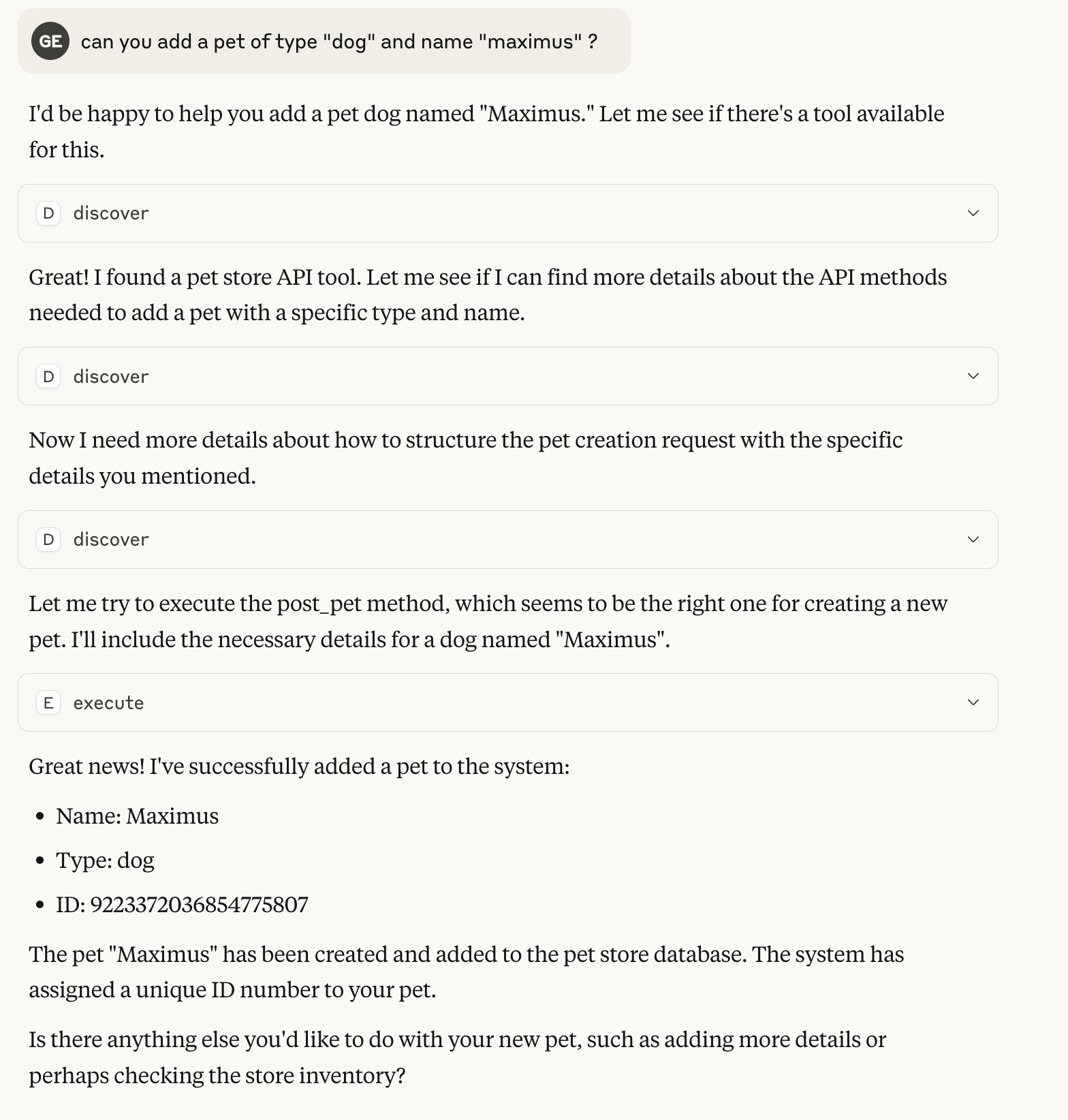
Beispiel 0-Shot-Gespräch mit Claude
Das Beispiel verwendet die Demo-Konfiguration mit dem Zoogeschäft, fast ohne Beschreibung der API
Als Bibliothek
Sie können Meta MCP Proxy auch als Bibliothek in Ihren eigenen JavaScript-Anwendungen verwenden:
import { MCPProxy } from '@nullplatform/meta-mcp-proxy';

// Create a new proxy instance
const mcpProxy = new MCPProxy({
  mcpServers: {
    "my-server": {
      "command": "path/to/server",
      "args": [],
      "env": {}
    }
  },
  discoverLimit: 10
});

// Register a custom JavaScript function
mcpProxy.registerJsFunction(
  "myFunction",
  "Description of my function",
  {
    properties: {
      param1: {
        type: "string",
        description: "First parameter"
      },
      param2: {
        type: "number",
        description: "Second parameter"
      }
    },
    required: ["param1"]
  },
  async ({ param1, param2 }) => {
    // Implementation goes here
    return {
      content: [
        {
          type: "text",
          text: JSON.stringify({ result: `Processed ${param1}` })
        }
      ]
    };
  }
);

// Start the MCP server
await mcpProxy.startMCP();
Beispiel zum Erstellen eines MCP mit Meta-MCP-Proxy als Bibliothek
Lizenz
MIT