

F
licenseNot graded
qualityD
maintenanceEnables interaction with e-commerce storefronts through a standardized API. Provides access to product catalogs, inventory management, and customer operations for online retail platforms.
-

Provides tools for interacting with SAP Commerce OCC APIs, enabling management of e-commerce operations including product catalog browsing, cart management, store lookups, customer search through ASM (Assisted Service Module), and various discovery flows for base sites, catalogs, and categories.
Click on "Deploy Server".
Wait a few minutes for the server to deploy. Once ready, it will show a "Started" state.
In the chat, type @ followed by the MCP server name and your instructions, e.g., "@SAP Commerce MCP Server show me the stock for product code ABC123"
That's it! The server will respond to your query, and you can continue using it as needed.
Here is a step-by-step guide with screenshots.

This project exposes an MCP server for SAP Commerce Cloud focused on ASM employee workflows: search a customer, impersonate them, bind or manage a cart, and complete OCC-backed commerce actions through task-oriented MCP tools.
The repo is now treated as local-first: the expected default target is https://localhost:9002, with SAP_BASE_URL controlling the actual host. Remote tenants can still be used, but the docs, tests, and validation flow should make the local SAP Commerce runtime truth-first.
ASM-first customer actions: search a customer, impersonate a customer, and continue acting on their behalf
Session-aware cart management: create, inspect, update, remove, and clear carts without manual cart juggling
Checkout flow: delivery address, delivery mode, guest email, and order placement
Product and discovery tools: search products, fetch details, inspect stock, browse base sites/stores/catalogs/categories
Two tool layers: high-level agent-friendly tools plus low-level OCC/ASM wrappers
Session orientation: get_session_status helps agents understand the current cart/user/base-site context
FastMCP transport: stdio and SSE transports for local or remote MCP clients
Related MCP server: Agentic Shopping MCP

Source: docs/diagrams/architecture.mmd
This is the typical “agent impersonates a customer, then keeps shopping on their behalf” path.
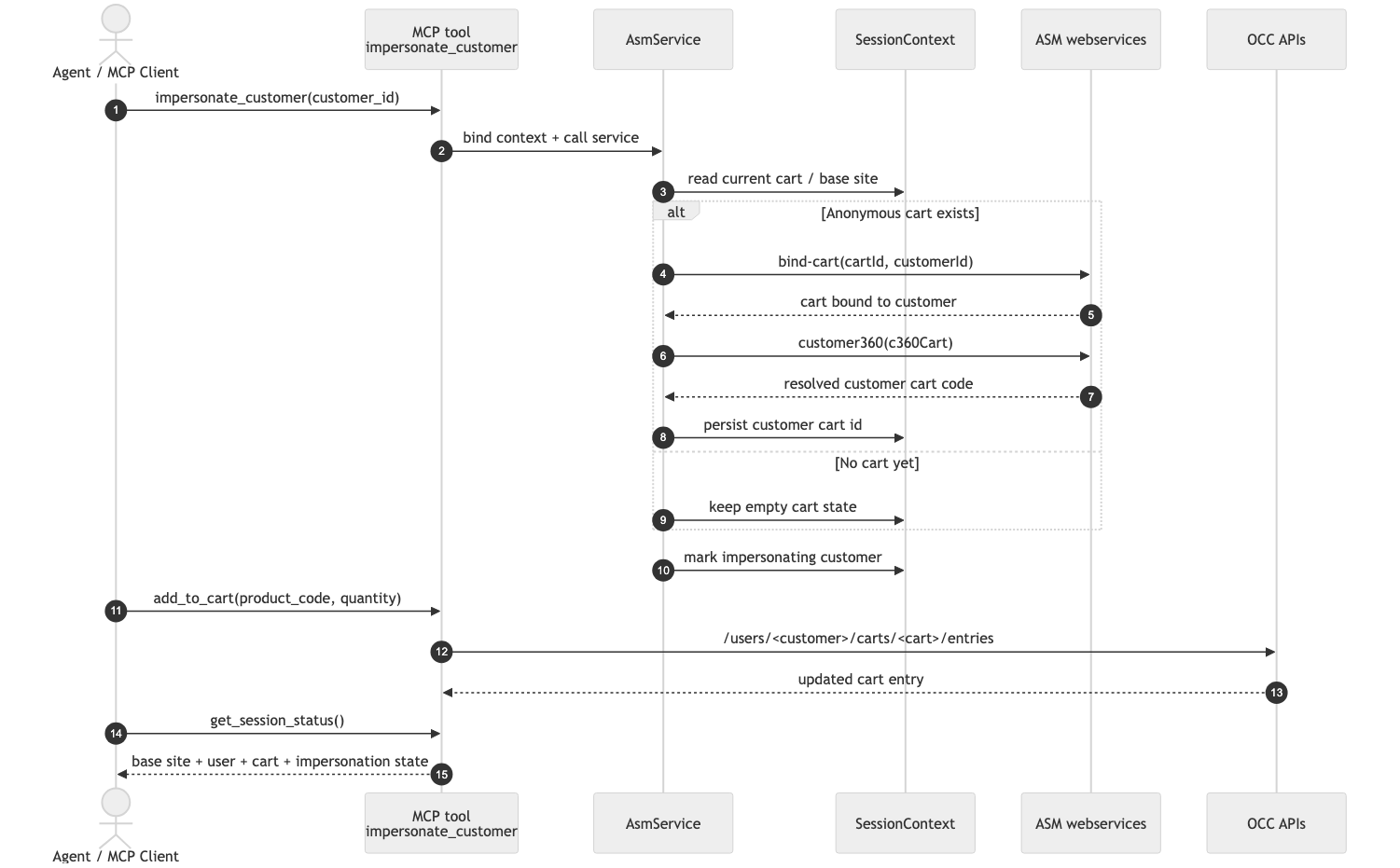
Source: docs/diagrams/example-request.mmd
These are the main contract for ASM employee workflows.
Discovery and products
search_products — keyword product discovery
get_product — fetch one product detail
get_session_status — inspect current session state
Customer / ASM
search_customer — find a customer quickly
impersonate_customer — start acting as customer
end_impersonation — return to anonymous mode
Cart and checkout
add_to_cart — add one product
get_cart — read current cart
update_cart_entry — change entry quantity
remove_from_cart — delete one entry
clear_cart — empty the cart
set_delivery_address — attach shipping address
set_delivery_mode — choose shipping method
get_delivery_modes — list shipping options
set_guest_email — set guest checkout email
place_order — submit the order
These expose narrower OCC / ASM primitives for exact control.
basesites.list — list available base sites
catalogs.list — list catalogs for a site
catalogs.get — fetch one catalog
catalogVersions.get — fetch one catalog version
categories.products — browse products by category
stores.list — list stores for a site
stores.get — fetch one base store
products.get — fetch one OCC product
products.stock — inspect stock data
products.stockCount — count stock locations
asm.customer360 — fetch customer 360 fragments
asm.customers.create — create a customer
asm.customers.search — run ASM customer search
asm.customers.suggest — get customer suggestions
carts.list — list carts
carts.create — create or restore cart
carts.get — fetch one cart
carts.delete — delete one cart
cartEntries.list — list cart entries
cartEntries.add — add one entry
cartEntries.get — fetch one entry
cartEntries.update — replace entry payload
cartEntries.patch — partially update entry
cartEntries.delete — delete one entry
Install dependencies:
uv syncCopy the environment template:
cp .env.example .envFor the local SAP Commerce instance, set:
SAP_BASE_URL=https://localhost:9002Keep or adjust these path fragments if your SAP deployment differs:
OCC_API_PATH=/occ/v2
OAUTH_PATH=/authorizationserver/oauth/token
ASM_PATH=/assistedservicewebservices
Configure OAuth credentials for the local tenant or remote tenant you are validating against. For the stock local sample-data setup, these are the expected defaults:
OAUTH_CLIENT_ID=mobile_android
OAUTH_CLIENT_SECRET=secret
OAUTH_USERNAME=asmagent
OAUTH_PASSWORD=nimda
OAUTH_SCOPE=basicStdio:
python -m app.serverSSE:
fastmcp serve app/server.py --sse :8080Full verification suite:
uv run ruff check app tests
uv run mypy app
uv run pytest -q
Smoke checks:
uv run pytest tests/integration/test_smoke.py -qLive discovery flow:
uv run pytest tests/integration/test_integration_live.py -sNote Live tests are intended to validate the current contract against a real SAP Commerce runtime. When
SAP_BASE_URL=https://localhost:9002, the local OCC/ASM instance should be the primary proof target. If OAuth or ASM data is misconfigured, diagnose it locally before broadening scope.
Local SAP caveat Some SAP 2211 local stacks include
messagecentercsocc, whose lateOauth2UserFiltercan overwrite the/users/{customerId}on-behalf context with the authenticated agent again. Ifasmagentcart calls regress toEmployeeModel -> CustomerModelcast errors, patch that filter so it preserves the already-matched customer when the current OCC user differs from the OAuth principal.
Ruff for linting and import hygiene
Mypy for a practical static type gate across app/
Pytest + coverage.xml so SonarQube can consume the same local evidence used in CI
Local SonarQube analysis can be published with:
uv run pytest -q
sonar-scanner
sonar-project.properties is checked in so local and CI scans use the same project key/source layout.
Workflows — practical tool-call sequences
Architecture Mermaid — source for the system diagram
Request Mermaid — source for the swimlane diagram
MCP manifest and tool registration: app/server.py
Contribution guide: AGENTS.md
add an optional external backing store only if the project later needs multi-process or horizontally scaled session persistence
The current server covers the endpoints needed for the flows above, including base sites, catalogs, stores, products, carts, cart entries, checkout address/delivery operations, order placement, and ASM customer search / customer 360 / bind-cart style operations.
This server cannot be deployed
Agentic commerce gateway: discovery, search, checkout across Shopify/Woo/Odoo/PrestaShop.
AI-powered commerce API for luxury skincare shopping. Enables AI agents to search products, browse collections, manage shopping carts, and generate checkout URLs for the Regenique Elegance Shopify store.
Hosted MCP for e-commerce: live product catalog, stock, and pricing for AI agents.
Agentic commerce with 58 MCP tools for product search, checkout, A2A negotiation, C-Suite analytics.
