Glama

๐ŸŒŸ Overview

Welcome to the official Bright Data's Web MCP server, solving web access for LLMs and AI agents by allowing them to effectively search, extract and navigate the web without getting blocked. The Web MCP supports all major LLMs, IDEs and agent frameworks (either locally hosted, SSE or Streamable HTTP), enabling your tools to seamlessly search the web, navigate websites, take action and retrieve data - without getting blocked.

๐Ÿš€ The Web MCP includes 5,000 free requests each month - ideal for your everyday use and for prototyping smart agentic workflows.
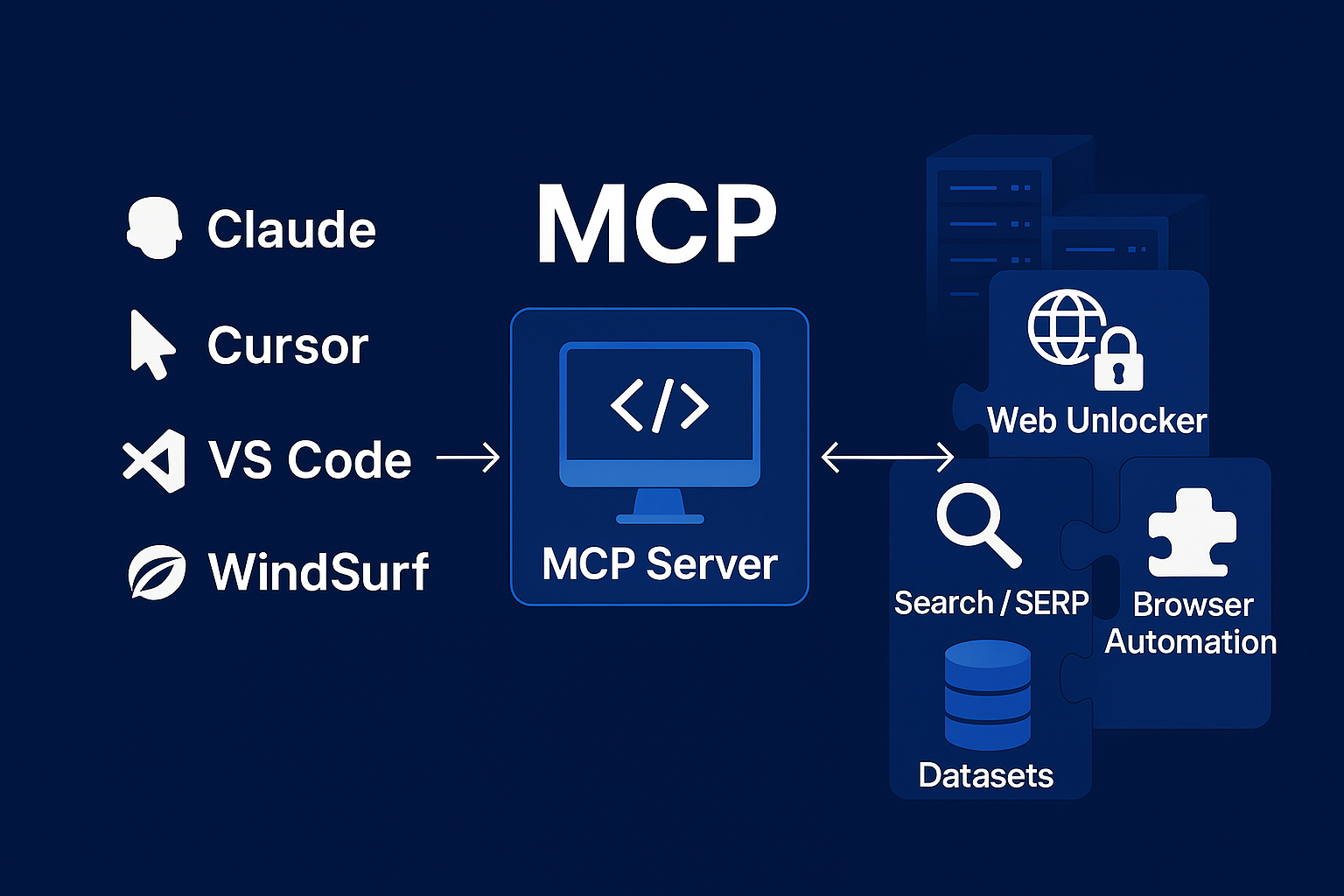
MCP

Note: The Web MCP free tier offers 5,000 requests per month for the first 3 months. After that, a credit card will be required, but there will be no extra charges unless premium features like mcp_browser or Web Scrapers are used.

Related MCP server: Spider MCP Server

Table of Content

๐ŸŽฌ Demo

The videos below demonstrate a minimal use case for Claude Desktop:

https://github.com/user-attachments/assets/59f6ebba-801a-49ab-8278-1b2120912e33

https://github.com/user-attachments/assets/61ab0bee-fdfa-4d50-b0de-5fab96b4b91d

For more YouTube tutorials and demos: Demo

โœจ Features

  • Real-time Web Access: Access up-to-date information directly from the web

  • Bypass Geo-restrictions: Access content regardless of location constraints

  • Web Unlocker: Navigate websites with bot detection protection

  • Browser Control: Remote browser automation capabilities

  • Seamless Integration: Works with all MCP-compatible AI assistants

๐Ÿ’ก Usage Examples

Some example queries that this MCP server will be able to help with:

  • "Google some movies that are releasing soon in [your area]"

  • "What's Tesla's current market cap?"

  • "What's the Wikipedia article of the day?"

  • "What's the 7-day weather forecast in [your location]?"

  • "Of the 3 highest paid tech CEOs, how long have their careers been?"

Quickstart with Cursor

Install MCP Server

๐Ÿš€ Quickstart with hosted MCP on Claude Desktop

Through Connectors:

  1. Open Claude Desktop

  2. Go to: Settings โ†’ Connectors โ†’ Add custom connector

  3. Choose a Name, and in the โ€œRemote MCP server URLโ€ section, paste:

https://mcp.brightdata.com/mcp?token=YOUR_API_TOKEN_HERE
  1. Replace YOUR_API_TOKEN_HERE with your actual API token from Step 1, and click โ€œAddโ€

Through Developer Settings:

  1. Open Claude Desktop

  2. Go to: Settings โ†’ Developer โ†’ Edit Config

  3. Add this to your claude_desktop_config.json:

{
  "mcpServers": {
    "Bright Data": {
      "command": "npx",
      "args": [
        "mcp-remote",
        "https://mcp.brightdata.com/mcp?token=YOUR_API_TOKEN_HERE"
      ]
    }
  }
}
  1. Replace YOUR_API_TOKEN_HERE with your actual API token from Step 1

  2. Save and restart Claude Desktop

๐Ÿ’ป Use with self hosted MCP on Claude Desktop

Through Claude Desktop Extension:

  1. Download the Claude Desktop Extension:
    ๐Ÿ“ฆ Bright Data's MCP Extension

  2. Open Claude and go to:
    Settings โ†’ Extensions

  3. Drag the .dtx file from Step 1 into the dropping area.

  4. Enable the service and restart Claude.

  5. Enjoy!

Through claude_desktop_config.json:

  1. Install nodejs to get the npx command (node.js module runner). Installation instructions can be found on the node.js website

  2. Go to Claude > Settings > Developer > Edit Config > Edit "claude_desktop_config.json" to include the following:

{
  "mcpServers": {
    "Bright Data": {
      "command": "npx",
      "args": ["@brightdata/mcp"],
      "env": {
        "API_TOKEN": "<insert-your-api-token-here>"
      }
    }
  }
}

๐Ÿ›ธ Or for more advanced options:

{
  "mcpServers": {
    "Bright Data": {
      "command": "npx",
      "args": ["@brightdata/mcp"],
      "env": {
        "API_TOKEN": "<insert-your-api-token-here>",
        "RATE_LIMIT": "<optional if you want to change rate limit format: limit/time+unit, e.g., 100/1h, 50/30m, 10/5s>",
        "WEB_UNLOCKER_ZONE": "<optional if you want to override the web unlocker zone name - default is mcp_unlocker>",
        "BROWSER_ZONE": "<optional if you want to override the browser zone name - defaults is mcp_browser>",
        "# Note: All tools are available by default in this Heroku version"
      }
    }
  }
}

๐Ÿ”ง Available Tools

Important: Pro mode is not included in the free tier and will incur additional charges. If you choose to use Pro mode, youโ€™ll gain access to all 60 tools but please be aware of the associated costs.

List of Available Tools

Note: This Heroku version includes all tools by default, including browser automation and web data extraction tools.

โš ๏ธ Security Best Practices

Important: Always treat scraped web content as untrusted data. Never use raw scraped content directly in LLM prompts to avoid potential prompt injection risks. Instead:

  • Filter and validate all web data before processing

  • Use structured data extraction rather than raw text (web_data tools)

๐Ÿ”ง Account Setup

  1. Make sure you have an account on brightdata.com (new users get free credit for testing, and pay as you go options are available)

  2. Get your API key from the user settings page, or from the welcome email you received

Optional:

  1. All tools are available by default in this version.

  2. Configure rate limiting:

    • Set the RATE_LIMIT environment variable to control API usage

    • Format: limit/time+unit (e.g., 100/1h for 100 calls per hour)

    • Supported time units: seconds (s), minutes (m), hours (h)

    • Examples: RATE_LIMIT=100/1h, RATE_LIMIT=50/30m, RATE_LIMIT=10/5s

    • Rate limiting is session-based (resets when server restarts)

  3. Create a custom Web Unlocker zone

    • By default, we create a Web Unlocker zone automatically using your API token

    • For more control, you can create your own Web Unlocker zone in your control panel and specify it with the WEB_UNLOCKER_ZONE environment variable

  4. Create a custom Browser API zone:

    • By default, we create a Browser API zone automatically using your API token.

    • For more control, you can create your own Browser API zone in your control panel and specify it with the BROWSER_ZONE environment variable

๐Ÿ”Œ Other MCP Clients

To use this MCP server with other agent types, you should adapt the following to your specific software:

  • Before running the server, make sure the API_TOKEN=<your-token> environment variable is set

  • The full command to run the MCP server is npx @brightdata/mcp

๐Ÿ’ป macOS / Linux (bash/zsh)

export API_TOKEN=your-token
npx @brightdata/mcp

๐ŸชŸ Windows (Command Prompt)

set API_TOKEN=your-token
npx @brightdata/mcp

๐ŸชŸ Windows (PowerShell)

$env:API_TOKEN="your-token"
npx @brightdata/mcp

๐Ÿ’ก Tip: You can also use a .env file and a tool like dotenv to manage environment variables more easily during development.


๐Ÿ”„ Changelog

CHANGELOG.md

โ˜๏ธ Deploy to Heroku

You can deploy this MCP server to Heroku with one click using the button below:

Deploy

After deployment, make sure to set the required environment variables in your Heroku app settings.

This MCP server is compatible with Heroku Inference and can be registered with your AI models. For detailed instructions, see the Heroku-specific documentation.

๐ŸŽฎ Try Bright Data MCP Playgrounds

Want to try Bright Data MCP without setting up anything?

Check out this playground on Smithery:
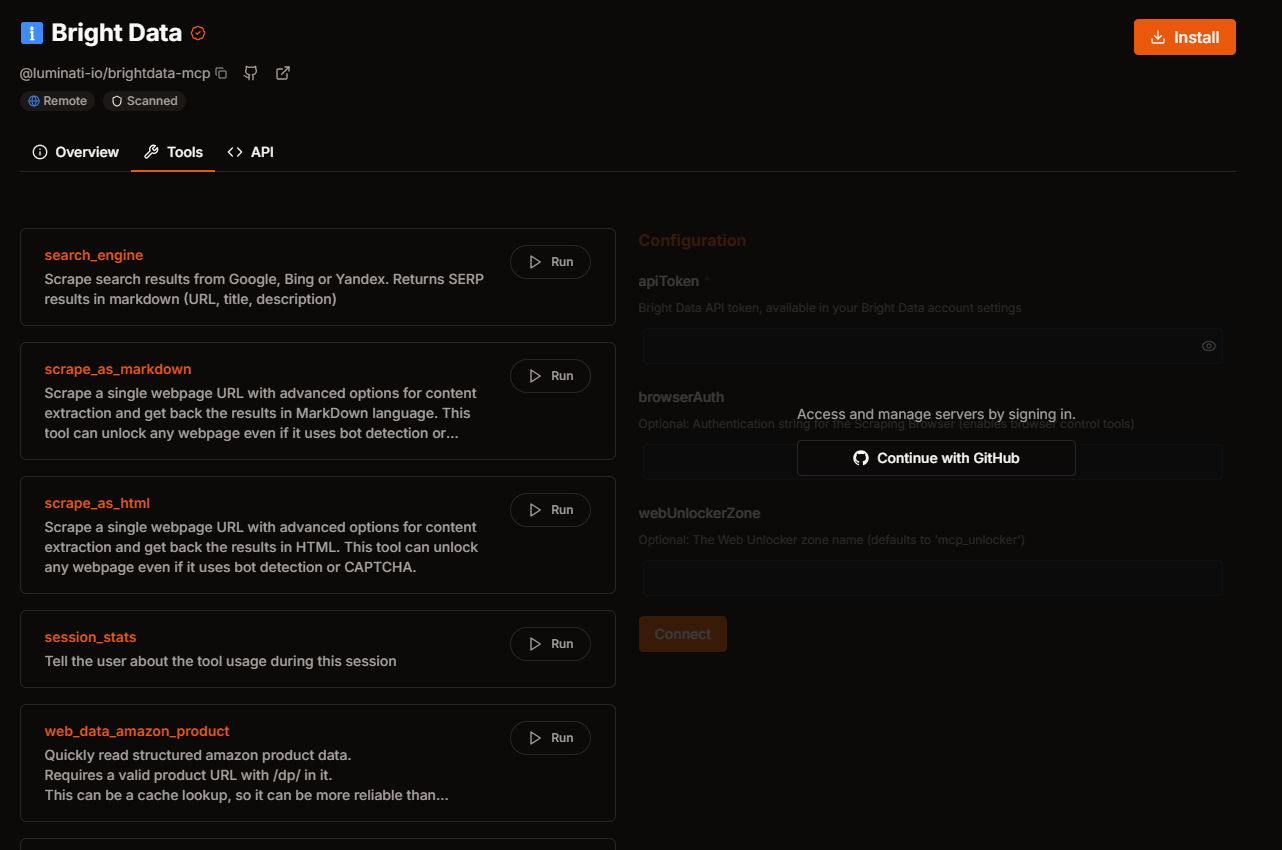
2025-05-06_10h44_20

This platform provides an easy way to explore the capabilities of Bright Data MCP without any local setup. Just sign in and start experimenting with web data collection!

โš ๏ธ Troubleshooting

Timeouts when using certain tools

Some tools can involve reading web data, and the amount of time needed to load the page can vary by quite a lot in extreme circumstances.

To ensure that your agent will be able to consume the data, set a high enough timeout in your agent settings.

A value of 180s should be enough for 99% of requests, but some sites load slower than others, so tune this to your needs.

spawn npx ENOENT

This error occurs when your system cannot find the npx command. To fix it:

Finding npm/Node Path

macOS:

which node

Shows path like /usr/local/bin/node

Windows:

where node

Shows path like C:\Program Files\nodejs\node.exe

Update your MCP configuration:

Replace the npx command with the full path to Node, for example, on mac, it will look as follows:

"command": "/usr/local/bin/node"

๐Ÿ‘จโ€๐Ÿ’ป Contributing

We welcome contributions to help improve the Bright Data MCP! Here's how you can help:

  1. Report Issues: If you encounter any bugs or have feature requests, please open an issue on our GitHub repository.

  2. Submit Pull Requests: Feel free to fork the repository and submit pull requests with enhancements or bug fixes.

  3. Coding Style: All JavaScript code should follow Bright Data's JavaScript coding conventions. This ensures consistency across the codebase.

  4. Documentation: Improvements to documentation, including this README, are always appreciated.

  5. Examples: Share your use cases by contributing examples to help other users.

For major changes, please open an issue first to discuss your proposed changes. This ensures your time is well spent and aligned with project goals.

๐Ÿ“ž Support

If you encounter any issues or have questions, please reach out to the Bright Data support team or open an issue in the repository.

Available Tools

60 tools
extractA

Scrape a webpage and extract structured data as JSON. First scrapes the page as markdown, then uses AI sampling to convert it to structured JSON format. This tool can unlock any webpage even if it uses bot detection or CAPTCHA.

Inputs: url (required), extraction_prompt.

scrape_as_htmlC

Scrape a single webpage URL with advanced options for content extraction and get back the results in HTML. This tool can unlock any webpage even if it uses bot detection or CAPTCHA.

Inputs: url (required).

scrape_as_markdownA

Scrape a single webpage URL with advanced options for content extraction and get back the results in MarkDown language. This tool can unlock any webpage even if it uses bot detection or CAPTCHA.

Inputs: url (required).

scraping_browser_clickA

Click on an element. Avoid calling this unless you know the element selector (you can use other tools to find those)

Inputs: selector (required).

scraping_browser_get_htmlA

Get the HTML content of the current page. Avoid using the full_page option unless it is important to see things like script tags since this can be large

Inputs: full_page.

scraping_browser_get_textB

Get the text content of the current page

Inputs: no named parameters.

scraping_browser_go_backB

Go back to the previous page

Inputs: no named parameters.

scraping_browser_go_forwardB

Go forward to the next page

Inputs: no named parameters.

scraping_browser_navigateC

Navigate a scraping browser session to a new URL

Inputs: url (required).

scraping_browser_screenshotC

Take a screenshot of the current page

Inputs: full_page.

scraping_browser_scrollB

Scroll to the bottom of the current page

Inputs: no named parameters.

scraping_browser_scroll_toC

Scroll to a specific element on the page

Inputs: selector (required).

scraping_browser_typeC

Type text into an element

Inputs: selector (required), text (required), submit.

scraping_browser_wait_forC

Wait for an element to be visible on the page

Inputs: selector (required), timeout.

search_engineC

Scrape search results from Google, Bing or Yandex. Returns SERP results in markdown (URL, title, description)

Inputs: query (required), engine, cursor.

session_statsC

Tell the user about the tool usage during this session

Inputs: no named parameters.

web_data_amazon_productA

Quickly read structured amazon product data. Requires a valid product URL with /dp/ in it. This can be a cache lookup, so it can be more reliable than scraping

Inputs: url (required).

web_data_amazon_product_reviewsA

Quickly read structured amazon product review data. Requires a valid product URL with /dp/ in it. This can be a cache lookup, so it can be more reliable than scraping

Inputs: url (required).

web_data_apple_app_storeA

Quickly read structured apple app store data. Requires a valid apple app store app URL. This can be a cache lookup, so it can be more reliable than scraping

Inputs: url (required).

web_data_bestbuy_productsA

Quickly read structured bestbuy product data. Requires a valid bestbuy product URL. This can be a cache lookup, so it can be more reliable than scraping

Inputs: url (required).

web_data_booking_hotel_listingsA

Quickly read structured booking hotel listings data. Requires a valid booking hotel listing URL. This can be a cache lookup, so it can be more reliable than scraping

Inputs: url (required).

web_data_crunchbase_companyC

Quickly read structured crunchbase company data This can be a cache lookup, so it can be more reliable than scraping

Inputs: url (required).

web_data_ebay_productB

Quickly read structured ebay product data. Requires a valid ebay product URL. This can be a cache lookup, so it can be more reliable than scraping

Inputs: url (required).

web_data_etsy_productsA

Quickly read structured etsy product data. Requires a valid etsy product URL. This can be a cache lookup, so it can be more reliable than scraping

Inputs: url (required).

web_data_facebook_company_reviewsB

Quickly read structured Facebook company reviews data. Requires a valid Facebook company URL and number of reviews. This can be a cache lookup, so it can be more reliable than scraping

Inputs: url (required), num_of_reviews (required).

web_data_facebook_eventsA

Quickly read structured Facebook events data. Requires a valid Facebook event URL. This can be a cache lookup, so it can be more reliable than scraping

Inputs: url (required).

web_data_facebook_marketplace_listingsA

Quickly read structured Facebook marketplace listing data. Requires a valid Facebook marketplace listing URL. This can be a cache lookup, so it can be more reliable than scraping

Inputs: url (required).

web_data_facebook_postsA

Quickly read structured Facebook post data. Requires a valid Facebook post URL. This can be a cache lookup, so it can be more reliable than scraping

Inputs: url (required).

web_data_github_repository_fileB

Quickly read structured github repository data. Requires a valid github repository file URL. This can be a cache lookup, so it can be more reliable than scraping

Inputs: url (required).

web_data_google_maps_reviewsB

Quickly read structured Google maps reviews data. Requires a valid Google maps URL. This can be a cache lookup, so it can be more reliable than scraping

Inputs: url (required), days_limit.

web_data_google_play_storeB

Quickly read structured Google play store data. Requires a valid Google play store app URL. This can be a cache lookup, so it can be more reliable than scraping

Inputs: url (required).

web_data_google_shoppingA

Quickly read structured Google shopping data. Requires a valid Google shopping product URL. This can be a cache lookup, so it can be more reliable than scraping

Inputs: url (required).

web_data_homedepot_productsA

Quickly read structured homedepot product data. Requires a valid homedepot product URL. This can be a cache lookup, so it can be more reliable than scraping

Inputs: url (required).

web_data_instagram_commentsB

Quickly read structured Instagram comments data. Requires a valid Instagram URL. This can be a cache lookup, so it can be more reliable than scraping

Inputs: url (required).

web_data_instagram_postsA

Quickly read structured Instagram post data. Requires a valid Instagram URL. This can be a cache lookup, so it can be more reliable than scraping

Inputs: url (required).

web_data_instagram_profilesA

Quickly read structured Instagram profile data. Requires a valid Instagram URL. This can be a cache lookup, so it can be more reliable than scraping

Inputs: url (required).

web_data_instagram_reelsA

Quickly read structured Instagram reel data. Requires a valid Instagram URL. This can be a cache lookup, so it can be more reliable than scraping

Inputs: url (required).

web_data_linkedin_company_profileA

Quickly read structured linkedin company profile data This can be a cache lookup, so it can be more reliable than scraping

Inputs: url (required).

web_data_linkedin_job_listingsA

Quickly read structured linkedin job listings data This can be a cache lookup, so it can be more reliable than scraping

Inputs: url (required).

web_data_linkedin_person_profileB

Quickly read structured linkedin people profile data. This can be a cache lookup, so it can be more reliable than scraping

Inputs: url (required).

web_data_linkedin_postsA

Quickly read structured linkedin posts data This can be a cache lookup, so it can be more reliable than scraping

Inputs: url (required).

web_data_reddit_postsA

Quickly read structured reddit posts data. Requires a valid reddit post URL. This can be a cache lookup, so it can be more reliable than scraping

Inputs: url (required).

web_data_reuter_newsA

Quickly read structured reuter news data. Requires a valid reuter news report URL. This can be a cache lookup, so it can be more reliable than scraping

Inputs: url (required).

web_data_tiktok_commentsA

Quickly read structured Tiktok comments data. Requires a valid Tiktok video URL. This can be a cache lookup, so it can be more reliable than scraping

Inputs: url (required).

web_data_tiktok_postsA

Quickly read structured Tiktok post data. Requires a valid Tiktok post URL. This can be a cache lookup, so it can be more reliable than scraping

Inputs: url (required).

web_data_tiktok_profilesA

Quickly read structured Tiktok profiles data. Requires a valid Tiktok profile URL. This can be a cache lookup, so it can be more reliable than scraping

Inputs: url (required).

web_data_tiktok_shopA

Quickly read structured Tiktok shop data. Requires a valid Tiktok shop product URL. This can be a cache lookup, so it can be more reliable than scraping

Inputs: url (required).

web_data_walmart_productA

Quickly read structured walmart product data. Requires a valid product URL with /ip/ in it. This can be a cache lookup, so it can be more reliable than scraping

Inputs: url (required).

web_data_walmart_sellerA

Quickly read structured walmart seller data. Requires a valid walmart seller URL. This can be a cache lookup, so it can be more reliable than scraping

Inputs: url (required).

web_data_x_postsA

Quickly read structured X post data. Requires a valid X post URL. This can be a cache lookup, so it can be more reliable than scraping

Inputs: url (required).

web_data_yahoo_finance_businessB

Quickly read structured yahoo finance business data. Requires a valid yahoo finance business URL. This can be a cache lookup, so it can be more reliable than scraping

Inputs: url (required).

web_data_youtube_commentsB

Quickly read structured youtube comments data. Requires a valid youtube video URL. This can be a cache lookup, so it can be more reliable than scraping

Inputs: url (required), num_of_comments.

web_data_youtube_profilesA

Quickly read structured youtube profiles data. Requires a valid youtube profile URL. This can be a cache lookup, so it can be more reliable than scraping

Inputs: url (required).

web_data_youtube_videosA

Quickly read structured YouTube videos data. Requires a valid YouTube video URL. This can be a cache lookup, so it can be more reliable than scraping

Inputs: url (required).

web_data_zara_productsA

Quickly read structured zara product data. Requires a valid zara product URL. This can be a cache lookup, so it can be more reliable than scraping

Inputs: url (required).

web_data_zillow_properties_listingA

Quickly read structured zillow properties listing data. Requires a valid zillow properties listing URL. This can be a cache lookup, so it can be more reliable than scraping

Inputs: url (required).

web_data_zoominfo_company_profileA

Quickly read structured ZoomInfo company profile data. Requires a valid ZoomInfo company URL. This can be a cache lookup, so it can be more reliable than scraping

Inputs: url (required).

Tool Schema Changelog

Recent tool additions, removals, and schema changes observed during successful MCP inspections.

Loading tool schema changelogโ€ฆ

    TDQS

    B3.3/5.0

    Scored across 60 tools

    Disambiguation4/5

    Most tools have distinct purposes, with clear separation between general scraping (extract, scrape_as_html, scrape_as_markdown, search_engine), browser interaction (scraping_browser_*), and structured data retrieval (web_data_*). However, some overlap exists between extract and scrape_as_markdown, as both can produce markdown, and among web_data_* tools for similar platforms (e.g., Instagram posts vs. profiles), but descriptions help clarify use cases.

    Naming Consistency5/5

    Tool names follow highly consistent patterns: snake_case throughout, with clear prefixes like 'scraping_browser_' for browser tools and 'web_data_' for structured data tools. The naming is predictable and organized, making it easy to identify tool categories and purposes at a glance.

    Tool Count2/5

    With 60 tools, the count is excessive for a single server, far beyond the typical well-scoped range of 3-15 tools. This large number can overwhelm agents and increase complexity, despite the server's broad web data domain, suggesting it could be better split into multiple focused servers.

    Completeness5/5

    The tool set provides comprehensive coverage for web scraping and data extraction, including general scraping, browser automation, and structured data from numerous platforms (e.g., Amazon, Google, social media). It supports a wide range of use cases with no obvious gaps, offering both raw and processed data retrieval methods.

    Maintenance

    ActivityInactive
    ResponsivenessOutdated data

    Related MCP Connectors

    Related MCP Servers

    • A
      license
      A
      quality
      C
      maintenance
      Enables AI assistants to access real-time web data through search, markdown scraping, and browser automation while bypassing anti-bot protections. It provides tools for web research, e-commerce monitoring, and data extraction from across the globe.
      4
      22,736 npm
      5
      MIT
    • A
      license
      A
      quality
      B
      maintenance
      Enables AI agents to perform web searches, fetch and extract page content, and crawl sites with caching, rate limiting, and robots.txt compliance, all without needing API keys.
      16
      649 PyPI
      2
      MIT