
A
licenseNot graded
qualityD
maintenanceAn MCP server that allows Claude and other AI assistants to interact with the YouTube API, providing tools to search videos/channels and retrieve detailed information about them.
30 npm
1
MIT

Provides comprehensive access to YouTube content, including video metadata, transcripts with search and timestamp filtering, playlist listings, comments, frame screenshots, and audio clip extraction.
Click on "Deploy Server".
Wait a few minutes for the server to deploy. Once ready, it will show a "Started" state.
In the chat, type @ followed by the MCP server name and your instructions, e.g., "@YouTube Ultimate Toolkit MCP Summarize this video and show the top comments: https://youtu.be/dQw4w9WgXcQ"
That's it! The server will respond to your query, and you can continue using it as needed.
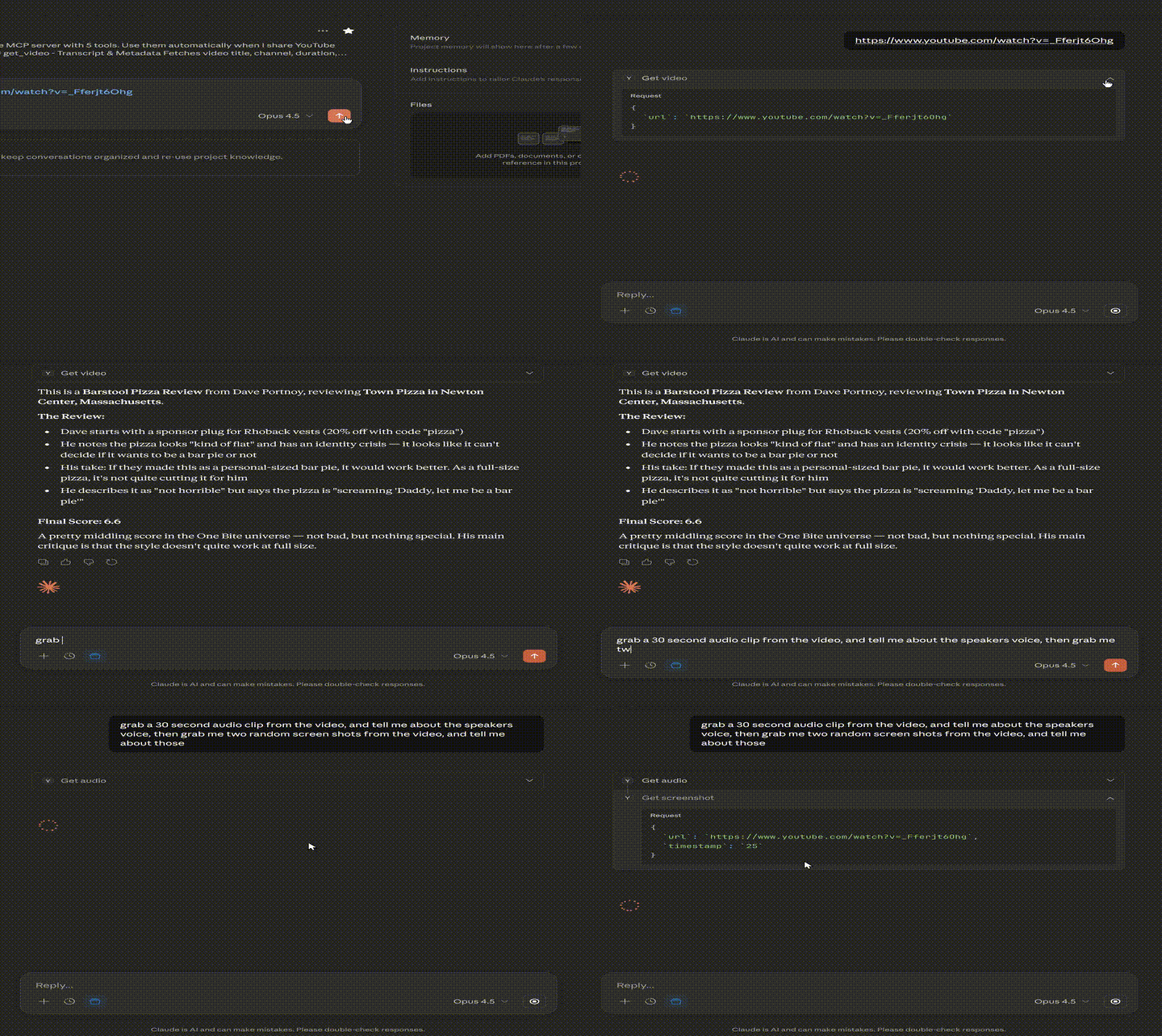
Here is a step-by-step guide with screenshots.
A powerful Model Context Protocol (MCP) server that gives Claude AI full access to YouTube content - transcripts, metadata, comments, screenshots, and audio clips.
Works with both Claude Desktop (local) and Claude Web UI (remote with OAuth).
Related MCP server: YouTube Insights MCP Server
Feature | This MCP | Most Others |
Transcripts | ✅ | ✅ |
Timestamps | ✅ | Some |
Time range filtering | ✅ | Rare |
Transcript search | ✅ | Rare |
Key segments (hook/outro) | ✅ | ❌ |
Metadata | ✅ | ✅ |
Playlists | ✅ | Some |
Comments | ✅ | Very rare |
Screenshots | ✅ | 1-2 others |
Audio clips | ✅ | ❌ |
All URL formats | ✅ | Partial |
OAuth 2.1 + PKCE | ✅ | ❌ |
Password protection | ✅ | ❌ |
Rate limiting | ✅ | ❌ |
Claude Web UI support | ✅ | Few |
Tool | Description |
| Fetch video metadata and transcript with search, timestamps, and time ranges |
| List all videos in a playlist |
| Get top comments with likes and reply counts |
| Capture video frames at any timestamp |
| Extract audio clips (max 120s) for speech/music analysis |
# Install
git clone https://github.com/Comzee/Youtube-Ultimate-Toolkit-MCP.git
cd Youtube-Ultimate-Toolkit-MCP
npm install
npm run build

# Run
node dist/index.js
Add to Claude Desktop config (~/.config/claude/claude_desktop_config.json on Linux, ~/Library/Application Support/Claude/claude_desktop_config.json on macOS):
{
  "mcpServers": {
    "youtube": {
      "command": "node",
      "args": ["/path/to/Youtube-Ultimate-Toolkit-MCP/dist/index.js"]
    }
  }
}Remote mode requires OAuth setup and a public URL. See Remote Mode Setup below.
Node.js 18+
yt-dlp - YouTube content fetcher (must be kept updated)
ffmpeg - For screenshots and audio extraction (optional)
YouTube API Key - For comments feature only (optional)
Ubuntu/Debian:
# Node.js 18+
curl -fsSL https://deb.nodesource.com/setup_18.x | sudo -E bash -
sudo apt install -y nodejs

# yt-dlp (keep updated - YouTube breaks old versions frequently)
pip3 install --upgrade yt-dlp

# ffmpeg (for screenshots and audio)
sudo apt install ffmpeg
macOS:
brew install node yt-dlp ffmpegWindows:
# Install Node.js from https://nodejs.org
# Install yt-dlp: pip install yt-dlp
# Install ffmpeg from https://ffmpeg.org/download.htmlYouTube frequently changes their API. If transcripts stop working, update yt-dlp:
pip3 install --upgrade yt-dlp
# or on systems that complain about externally-managed packages:
pip3 install --upgrade --break-system-packages yt-dlpgit clone https://github.com/Comzee/Youtube-Ultimate-Toolkit-MCP.git
cd Youtube-Ultimate-Toolkit-MCP
npm install
npm run buildRemote mode allows you to use this MCP with Claude Web UI (claude.ai) by exposing it over HTTPS with OAuth authentication.
cp .env.example .envEdit .env:
# OAuth credentials
OAUTH_CLIENT_ID=youtube-mcp-client
OAUTH_CLIENT_SECRET=your-secret-here  # Generate: openssl rand -hex 32

# Password for the consent page (bcrypt hash)
# Generate: node -e "require('bcrypt').hash('your-password', 12).then(console.log)"
AUTH_PASSWORD_HASH=$2b$12$...your-hash-here...

# Optional: YouTube API key for get_comments tool
YOUTUBE_API_KEY=your-api-key-here# Development
npm run start:remote
# Production (with systemd)
sudo cp youtube-mcp.service /etc/systemd/system/
# Edit the service file to set your username and paths
sudo nano /etc/systemd/system/youtube-mcp.service
sudo systemctl daemon-reload
sudo systemctl enable youtube-mcp
sudo systemctl start youtube-mcpClaude Web UI requires HTTPS. Use nginx as a reverse proxy:
server {
    listen 443 ssl;
    server_name your-domain.com;

    ssl_certificate /path/to/fullchain.pem;
    ssl_certificate_key /path/to/privkey.pem;

    location / {
        proxy_pass http://localhost:3010;
        proxy_set_header Host $host;
        proxy_set_header X-Real-IP $remote_addr;
        proxy_set_header X-Forwarded-For $proxy_add_x_forwarded_for;
        proxy_set_header X-Forwarded-Proto $scheme;

        # WebSocket support
        proxy_http_version 1.1;
        proxy_set_header Upgrade $http_upgrade;
        proxy_set_header Connection "upgrade";

        # Important for long-running requests
        proxy_buffering off;
        proxy_cache off;
        proxy_read_timeout 86400s;
        proxy_send_timeout 86400s;
        proxy_set_header X-Accel-Buffering no;
    }
}Go to Settings → Connectors → Add Custom Connector
Enter URL: https://your-domain.com/mcp
Start a new chat and enable the MCP
Ask Claude to fetch a YouTube video - the authorization popup will appear
Enter your password on the consent page and click "Authorize"
Fetches video metadata and English transcript.
Parameters:
Parameter | Required | Description |
| Yes | YouTube URL (any format) or video ID |
| No | Add |
| No | Start time for transcript range (e.g., "60", "1:00") |
| No | End time for transcript range |
| No | Search transcript and highlight matches |
| No | Return only hook (first 40s) and outro (last 30s) |
Supported URL formats:
youtube.com/watch?v=VIDEO_ID
youtu.be/VIDEO_ID
youtube.com/shorts/VIDEO_ID
youtube.com/live/VIDEO_ID
youtube.com/embed/VIDEO_ID
m.youtube.com/watch?v=VIDEO_ID
music.youtube.com/watch?v=VIDEO_ID
Direct video ID: dQw4w9WgXcQ
Lists videos in a YouTube playlist.
Parameters:
Parameter | Required | Description |
| Yes | YouTube playlist URL |
| No | Max videos to return (default: 50, max: 200) |
Fetches top comments from a video. Requires YOUTUBE_API_KEY in .env.
Parameters:
Parameter | Required | Description |
| Yes | YouTube video URL or ID |
| No | Number of comments (default: 25, max: 100) |
| No | Sort: "relevance" (default) or "time" |
Captures a frame from a video. Requires ffmpeg.
Parameters:
Parameter | Required | Description |
| Yes | YouTube video URL |
| No | Time to capture (default: "0"). Formats: "30", "1:30", "1:30:00" |
Returns: Base64-encoded JPEG image
Extracts audio clips for analysis. Requires ffmpeg.
Parameters:
Parameter | Required | Description |
| Yes | YouTube video URL |
| No | Start time (default: "0") |
| No | End time (optional) |
| No | Max seconds (default: 60, max: 120) |
Returns: Base64-encoded MP3 audio (128kbps)
The remote mode implements OAuth 2.1 with PKCE for secure authentication.
Claude connects to /mcp - discovery/handshake methods work without auth
When you use a tool, Claude receives a 401 with OAuth discovery info
Claude performs dynamic client registration
Browser opens the consent page - you enter your password
Claude exchanges the auth code for an access token
Subsequent requests use the Bearer token
Feature | Protection |
Password-protected consent | Only you can authorize access |
Bcrypt password hashing | Password stored securely |
Rate limiting | 5 attempts per IP, then 10-minute lockout |
XSS protection | All OAuth parameters HTML-escaped |
Command injection protection | yt-dlp spawned with |
PKCE (S256) | Prevents authorization code interception |
Update yt-dlp - YouTube changes frequently:
pip3 install --upgrade yt-dlpEnsure HTTPS is configured correctly
Check service status: sudo systemctl status youtube-mcp
Check logs: sudo journalctl -u youtube-mcp -f
Verify .well-known/ endpoints return 200 (not 401)
Check browser console for CORS errors
Ensure /register returns valid credentials
OAuth triggers on first tool use, not on connection
Start a chat, enable the MCP, then ask Claude to fetch a YouTube video
Disconnect and reconnect the MCP in Claude settings to refresh the tool list.
Use this prompt in a Claude Project to automatically leverage the MCP:
You have access to the YouTube MCP server. When I share a YouTube URL:
1. Automatically fetch the transcript with get_video
2. Provide a summary, key takeaways, and notable quotes
3. For long videos (10+ min), consider using keySegmentsOnly=true first

Available tools:
- get_video: Transcript and metadata (supports timestamps, time ranges, search)
- get_playlist: List videos in a playlist
- get_comments: Top comments (requires API key)
- get_screenshot: Capture frames at any timestamp
- get_audio: Extract audio clips for analysis (max 120s)Transport: Streamable HTTP (MCP spec 2025-03-26)
Sessions: Stateful with UUID identifiers (in-memory)
OAuth: Authorization Code + PKCE, Dynamic Client Registration
Tokens: In-memory storage (lost on restart)
MIT - See LICENSE for details.
Contributions are welcome! Please open an issue or PR on GitHub.
Extract an audio clip from a YouTube video. Returns base64-encoded MP3. Use time range parameters to limit duration (max 120 seconds). Useful for analyzing speech, music, or audio when transcript isn't available.
Inputs: url (required), startTime, endTime, maxDuration.
Get top comments from a YouTube video. Returns comment author, text, like count, and reply count. Requires YOUTUBE_API_KEY environment variable. Useful for understanding audience reactions and discussion topics.
Inputs: url (required), maxResults, order.
Get information about a YouTube playlist including all video titles, durations, and URLs. Useful for understanding playlist contents before selecting specific videos to transcribe.
Inputs: url (required), limit.
Capture a screenshot from a YouTube video at a specific timestamp. Returns the image as base64. Requires ffmpeg to be installed. Useful for getting visual context from specific moments in a video.
Inputs: url (required), timestamp.
Get a YouTube video's metadata and English transcript with advanced options. Supports timestamps, time range filtering, search within transcript, and key segments extraction. Use this to summarize YouTube videos, find specific moments, or extract key takeaways.
Inputs: url (required), includeTimestamps, startTime, endTime, +2 more.
Recent tool additions, removals, and schema changes observed during successful MCP inspections.
Loading tool schema changelog…
Scored across 5 tools
Each tool has a clearly distinct purpose targeting different aspects of YouTube content: audio extraction, comment retrieval, playlist information, screenshot capture, and video metadata/transcript. No overlap exists in functionality, making tool selection straightforward for an agent.
All tools follow a consistent verb_noun naming pattern (get_audio, get_comments, get_playlist, get_screenshot, get_video) with no deviations in style or convention. This predictability enhances usability and clarity.
Five tools is a reasonable number for a YouTube-focused server, covering key functionalities like content extraction and analysis. However, it feels slightly thin for an 'Ultimate Toolkit' as it lacks tools for actions like uploading, managing playlists, or interacting with channels, which might be expected in a comprehensive set.
The tools provide good read-only coverage for extracting and analyzing YouTube content, but there are notable gaps in write operations (e.g., no create, update, or delete tools for playlists, comments, or videos). This limits the server to consumption-only workflows, which may cause agent failures in scenarios requiring interaction or content management.
YouTube transcripts, search, channel browsing, and playlists for AI agents via MCP.
An MCP server that gives any LLM or agent clean YouTube transcripts on demand: a single video, a whole channel, or a playlist, plus AI cleanup of auto-generated captions. API-key auth, credit-based, same backend as the public v1 API. Get a free API key with 25 free credits at youtubetranscriptdownload.com/account.
Hosted YouTube MCP server for Claude, ChatGPT and Cursor, with each action switched per account.
Your YouTube library, in the AI tools you already use: Claude, ChatGPT, Cursor, any MCP client.