🧠 Eternity MCP
Your Eternal Second Brain, Running Locally.
Eternity MCP is a lightweight, privacy-focused memory server designed to provide long-term memory for LLMs and AI agents using the Model Context Protocol (MCP).
It combines structured storage (SQLite) with semantic vector search (ChromaDB), enabling agents to persist and retrieve text, PDF documents, and chat histories across sessions using natural language queries.
Built to run fully locally, Eternity integrates seamlessly with MCP-compatible clients, LangChain, LangGraph, and custom LLM pipelines, giving agents a durable and private memory layer.
🚀 Why Eternity?
Building agents that "remember" is hard. Most solutions rely on expensive cloud vector databases or complex setups. Eternity solves this by being:
🔒 Private & Local: Runs entirely on your machine. No data leaves your network.
⚡ fast & Lightweight: Built on FastAPI and ChromaDB.
🔌 Agent-Ready: Perfect for LangGraph, LangChain, or direct LLM integration.
📄 Multi-Modal: Ingests raw text and PDF documents automatically.
🔎 Semantic Search: Finds matches by meaning, not just keywords.
Related MCP server: Local Memory MCP Server
📦 Installation
You can install Eternity directly from PyPI (coming soon) or from source:
# From source
git clone https://github.com/danttis/eternity-mcp.git
cd eternity
🛠️ Usage
1. Start the Server
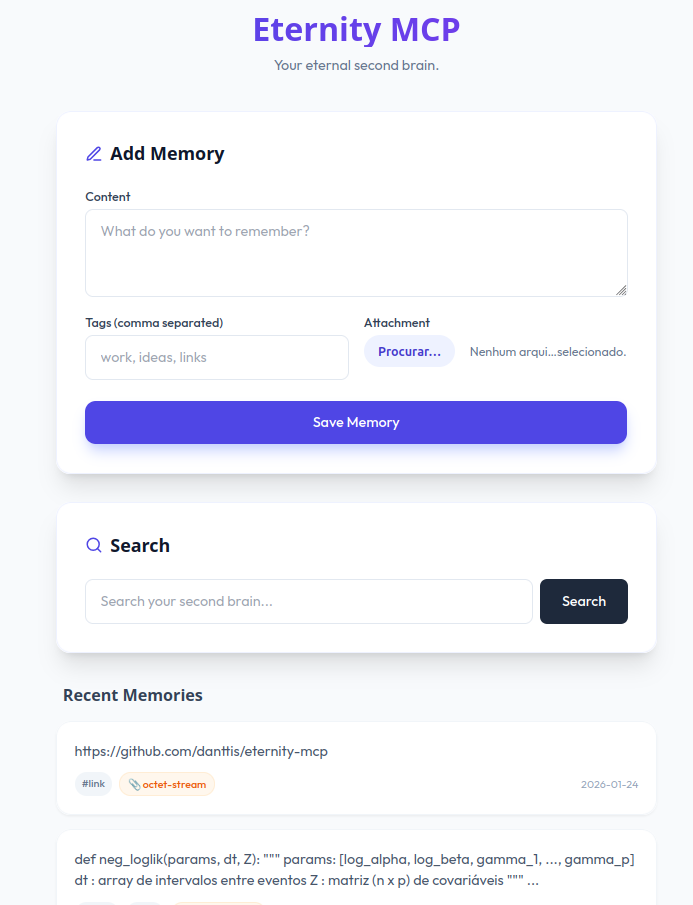
Run the server in a terminal. It will host the API and the Memory UI.
Server runs at http://localhost:8000
2. Client Usage (Python)
You can interact with Eternity using simple HTTP requests.
import requests

ETERNITY_URL = "http://localhost:8000"

# 💾 Store a memory
requests.post("{ETERNITY_URL}/add", data={
    "content": "The project deadline is next Friday.",
    "tags": "work,deadline"
})

# 🔍 Search memory
response = requests.get("{ETERNITY_URL}/search", params={"q": "When is the deadline?"})
print(response.json())
3. Integration with LangGraph/AI Agents
Eternity shines when connected to an LLM. Here is a simple pattern for an agent with long-term memory:
Recall: Before answering, search Eternity for context.
Generate: Feed the retrieved context to the LLM.
Memorize: Save the useful parts of the interaction back to Eternity.
(See langgraph_agent.py in the repo for a full, working example using Ollama/Groq).
🔌 API Endpoints
Method | Endpoint | Description |
GET
| /
| Web UI to view recent memories. |
POST
| /add
| Add text or file (PDF). Params: content, tags, file. |
GET
| /search
| Semantic search. Params: q (query text). |
🤝 Contributing
Contributions are welcome! Please feel free to submit a Pull Request.
📜 License
This project is licensed under the MIT License - see the LICENSE file for details.
🌟 Inspiration
This project was inspired by Supermemory. We admire their vision for a second brain and their open-source spirit.
Created by Junior Dantas with a little help from AI :)

