


A
licenseNot graded
qualityD
maintenanceA server that integrates with Cursor IDE to provide code review functionality for Azure repositories, enabling AI-powered pull request analysis and feedback.
2
ISC

Provides Node.js-specific code snippets and integration guidance for implementing Chargebee's subscription management services in Node.js applications.
Enables distribution and installation of the Chargebee MCP server via npm, allowing developers to easily integrate Chargebee services into their projects.
Click on "Deploy Server".
Wait a few minutes for the server to deploy. Once ready, it will show a "Started" state.
In the chat, type @ followed by the MCP server name and your instructions, e.g., "@Chargebee MCP Server show me how to create a subscription with a trial period"
That's it! The server will respond to your query, and you can continue using it as needed.
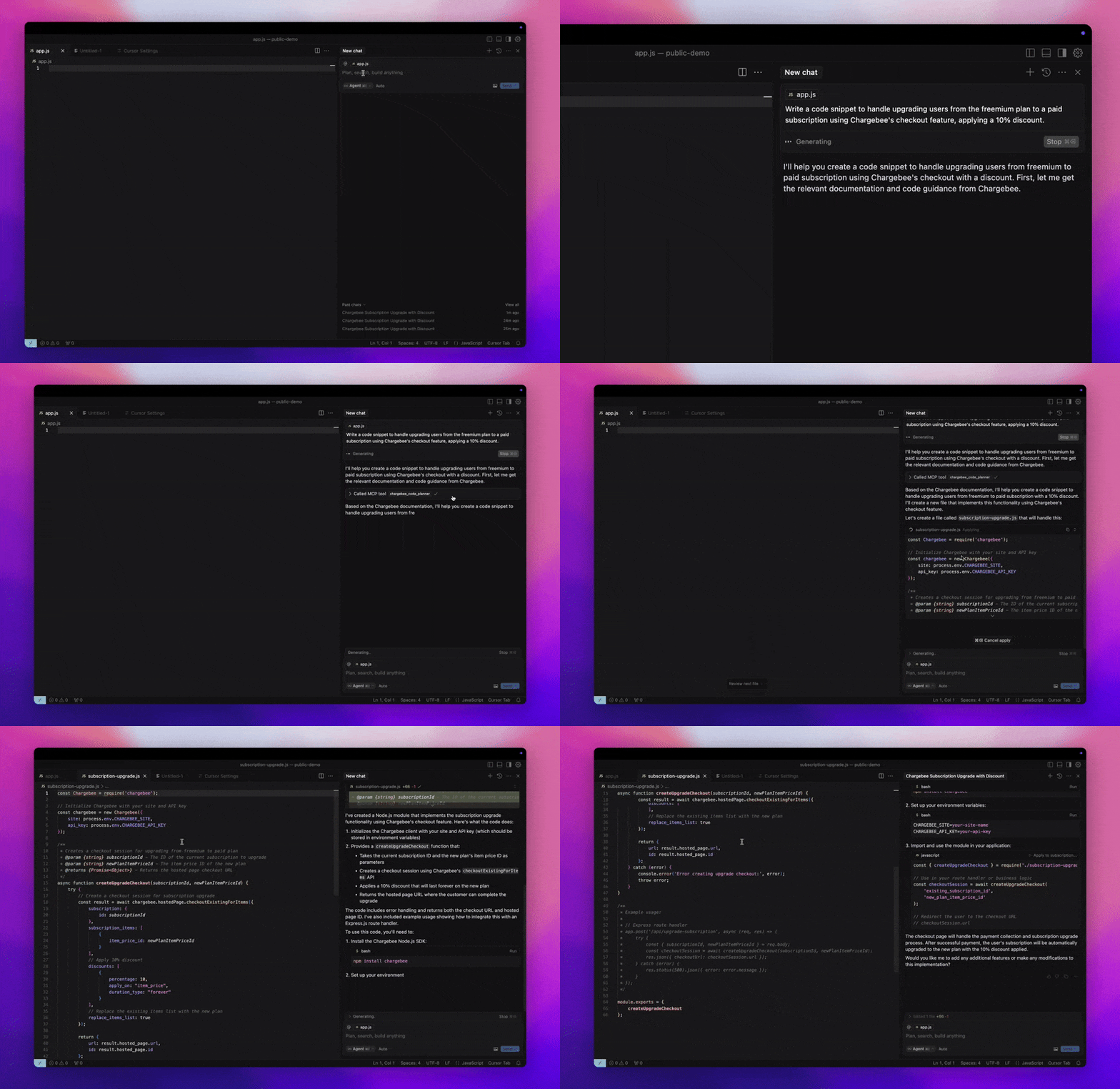
Here is a step-by-step guide with screenshots.

Model Context Protocol (MCP) is a standardized protocol designed to manage context between large language models (LLMs) and external systems.
The Chargebee MCP Server offers a robust set of tools to improve developer efficiency. It integrates with AI-powered code editors like Cursor, Windsurf, and Cline, as well as general-purpose tools such as Claude Desktop. It is compatible with any MCP Client.
With this MCP Server, you can:
Get immediate answers about the Chargebee products and API services.
Receive context-aware code snippets tailored to your integration needs.
Access Chargebee's knowledge base, including:
Documentation
FAQs
Release notes
And much more
Node.js LTS - The Chargebee MCP server requires the Node.js LTS version to function correctly.
Related MCP server: AgentMode
To run the Chargebee MCP server using Node.js npx, execute the following command:
npx -y @chargebee/mcp@latestTool | Description |
| Search Chargebee's documentation to retrieve detailed information and usage guides. |
| Generate structured code outlines and sample code for integrating Chargebee's APIs and features. |
To add this server to Cursor IDE:
Navigate to Cursor Settings > MCP.
Click + Add new Global MCP Server.
Add the following configuration to your global .cursor/mcp.json file:
{
  "mcpServers": {
    "chargebee": {
      "command": "npx",
      "args": [
          "-y",
          "@chargebee/mcp"
      ]
    }
  }
}
Refer to the Cursor documentation for additional details. Note: You can also add this to your project-specific Cursor configuration (supported in Cursor 0.46+).
To set up MCP with Cascade:
Open Windsurf and navigate to Settings > Advanced Settings or use the Command Palette > Open Windsurf Settings Page.
Scroll to the Cascade section to add a new server, view existing servers, or access the raw JSON config file at mcp_config.json.
Click “Add custom server +” to include the Chargebee MCP server directly in mcp_config.json:
{
  "mcpServers": {
    "chargebee": {
      "command": "npx",
      "args": [
          "-y",
          "@chargebee/mcp"
      ]
    }
  }
}
Refer to the Windsurf documentation for more information.
Install the Chargebee MCP server in VS Code using one of these buttons:
Alternatively, you can install the Chargebee MCP server using the VS Code CLI:
# For VS Code
code --add-mcp '{"name":"chargebee","command":"npx","args":["-y","@chargebee/mcp"]}'
# For VS Code Insiders
code-insiders --add-mcp '{"name":"chargebee","command":"npx","args":["-y","@chargebee/mcp"]}'After installation, the Chargebee MCP server will be available for use with your GitHub Copilot agent in VS Code.
Add the following configuration to your claude_desktop_config.json file. Refer to the Claude Desktop documentation for more details:
{
  "mcpServers": {
    "chargebee": {
      "command": "npx",
      "args": [
          "-y",
          "@chargebee/mcp"
      ]
    }
  }
}Manually add the following JSON to your cline_mcp_settings.json file via the Cline MCP Server settings:
{
  "mcpServers": {
    "chargebee": {
      "command": "npx",
      "args": [
          "-y",
          "@chargebee/mcp"
      ]
    }
  }
}Access the MCP settings by selecting Edit MCP Settings in Roo Code settings or using the Roo Code: Open MCP Config command in the VS Code command palette:
{
  "mcpServers": {
    "chargebee": {
      "command": "npx",
      "args": [
          "-y",
          "@chargebee/mcp"
      ]
    }
  }
}To contribute to this project, refer to the contribution guide.
Use this tool for any Chargebee integration questions or implementation needs.
Always use this tool to get the accurate integration code guide for Chargebee. This is the main tool developers need when asking about implementing Chargebee functionality (like "how to update billing address", "how to create subscription", "how to handle webhooks", etc.).
This tool will take in parameters about integrating with Chargebee in their application and generates an integration workflow along with the code snippets.
It takes the following arguments:
goal (string): What is the user's goal?
language (enum): Programming language the code to be generated in. Check the user's application language.
| Name | Required | Description | Default |
|---|---|---|---|
| goal | Yes | What is the user's goal? | |
| language | No | Programming language the code to be generated in. Check the user's application language. |
Does the description disclose side effects, auth requirements, rate limits, or destructive behavior?
No annotations are provided, so the description must disclose behavioral traits. It only describes the tool as generating code but does not clarify that it is a read-only operation with no side effects or data mutations. Such information is essential for safe invocation.
Agents need to know what a tool does to the world before calling it. Descriptions should go beyond structured annotations to explain consequences.
Is the description appropriately sized, front-loaded, and free of redundancy?
The description contains redundant phrasing (e.g., 'Use this tool' and 'Always use this tool') and could be more streamlined. However, it is not excessively long and includes necessary details.
Shorter descriptions cost fewer tokens and are easier for agents to parse. Every sentence should earn its place.
Given the tool's complexity, does the description cover enough for an agent to succeed on first attempt?
The description covers the tool's inputs and high-level output (workflow and code snippets) but lacks details on the output structure, error handling, or limitations. With no output schema, more specifics would improve completeness.
Complex tools with many parameters or behaviors need more documentation. Simple tools need less. This dimension scales expectations accordingly.
Does the description clarify parameter syntax, constraints, interactions, or defaults beyond what the schema provides?
Schema coverage is 100%, and the descriptions in the schema are adequate. The tool description reiterates the parameter meanings without adding new context or examples, meeting the baseline for high coverage.
Input schemas describe structure but not intent. Descriptions should explain non-obvious parameter relationships and valid value ranges.
Does the description clearly state what the tool does and how it differs from similar tools?
The description clearly states the tool's purpose: generating integration workflows and code snippets for Chargebee. It explicitly differentiates from the sibling tool 'chargebee_documentation_search' by positioning itself as the main tool for implementation questions.
Agents choose between tools based on descriptions. A clear purpose with a specific verb and resource helps agents select the right tool.
Does the description explain when to use this tool, when not to, or what alternatives exist?
The description advises to use this tool for Chargebee integration needs and to check the user's language. It implies a context for use but does not explicitly exclude scenarios or mention alternatives beyond the sibling.
Agents often have multiple tools that could apply. Explicit usage guidance like "use X instead of Y when Z" prevents misuse.
Only use this tool for general product documentation queries, NOT for implementation questions.
Do not use this tool for code generation or implementation questions. For any developer questions about implementing Chargebee functionality (like "how to update billing address", "how to create subscription", etc.), use "chargebee_code_planner" tool instead.
This tool should only be used for:
General product documentation queries about Chargebee's features and concepts
Understanding billing, payments, receivables, revenue recognition concepts
Learning about subscription management processes
Finding product feature explanations and overviews
Non-implementation related documentation queries
It takes the following arguments:
query (string): The user query to search an answer for in the Chargebee documentation.
language (enum): The programming language for the documentation. Check the user's application language.
userRequest (string): User's original request to you.
| Name | Required | Description | Default |
|---|---|---|---|
| query | Yes | The user query to search an answer for in the Chargebee documentation. | |
| userRequest | No | User's original request to you. | |
| language | No | The programming language for the documentation. Check the user's application language. |
Does the description disclose side effects, auth requirements, rate limits, or destructive behavior?
No annotations are provided, so the description carries the full burden. It clearly indicates this is a search tool for documentation, implying a read-only, non-destructive operation. It does not mention side effects, rate limits, or return format, but the core behavior is transparent enough for an agent.
Agents need to know what a tool does to the world before calling it. Descriptions should go beyond structured annotations to explain consequences.
Is the description appropriately sized, front-loaded, and free of redundancy?
The description is well-structured, starting with critical usage boundaries, then listing use cases, then parameters. It is front-loaded with the most important information. It could be slightly more concise, but every sentence serves a clear purpose.
Shorter descriptions cost fewer tokens and are easier for agents to parse. Every sentence should earn its place.
Given the tool's complexity, does the description cover enough for an agent to succeed on first attempt?
Given no annotations and no output schema, the description does not specify what the tool returns (e.g., format, if results are snippets or full documents) or error handling. However, it covers usage boundaries and parameter semantics adequately for a search tool with a sibling distinction.
Complex tools with many parameters or behaviors need more documentation. Simple tools need less. This dimension scales expectations accordingly.
Does the description clarify parameter syntax, constraints, interactions, or defaults beyond what the schema provides?
Schema coverage is 100%, so baseline is 3. The description adds value by providing usage context for each parameter (e.g., 'Check the user's application language' for language, and 'User's original request to you' for userRequest), which helps the agent set values correctly.
Input schemas describe structure but not intent. Descriptions should explain non-obvious parameter relationships and valid value ranges.
Does the description clearly state what the tool does and how it differs from similar tools?
The description clearly states the tool is for 'general product documentation queries' and explicitly distinguishes it from the sibling tool, naming the sibling and specifying when to use that alternative. It lists specific use cases, making the purpose highly distinct and actionable.
Agents choose between tools based on descriptions. A clear purpose with a specific verb and resource helps agents select the right tool.
Does the description explain when to use this tool, when not to, or what alternatives exist?
The description provides explicit when-to-use and when-not-to-use guidance, including naming the alternative tool 'chargebee_code_planner' for implementation questions. It also enumerates specific allowed query types, leaving no ambiguity.
Agents often have multiple tools that could apply. Explicit usage guidance like "use X instead of Y when Z" prevents misuse.
Recent tool additions, removals, and schema changes observed during successful MCP inspections.
chargebee_code_plannerchargebee_documentation_searchScored across 2 tools
The two tools have clearly distinct purposes: chargebee_code_planner is for implementation/code generation questions, while chargebee_documentation_search is for general documentation queries. The descriptions explicitly differentiate them with clear boundaries and usage instructions, leaving no room for confusion.
Both tools follow a consistent naming pattern: 'chargebee_' prefix followed by a descriptive compound noun (code_planner, documentation_search). The naming is uniform, predictable, and clearly indicates the tool's function without mixing conventions.
With only 2 tools, the server feels severely under-scoped for a comprehensive Chargebee integration domain. While the tools cover documentation and code planning, there are no direct operational tools for CRUD actions on subscriptions, customers, or invoices, which are core to billing systems.
The toolset is incomplete for a Chargebee integration server. It lacks essential CRUD operations (e.g., create_subscription, update_customer, list_invoices) and lifecycle management tools, forcing agents to rely solely on generated code rather than direct API interactions. This creates significant gaps for automated workflows.
The Fireflies MCP Server enables AI tools to connect directly to meeting data from Fireflies.ai, providing access to meeting transcripts, summaries, action items, and insights without switching platforms. It includes capabilities for querying cross-meeting data for analysis (such as sales insights or product feedback), and a separate Documentation MCP Server that allows searching the Fireflies knowledge base for API references, guides, and code examples.
The Cortex MCP server provides read-only access to real-time engineering context from the Cortex developer portal, allowing AI coding assistants to answer natural language questions about your organization's catalog (microservices, libraries, domains, teams, infrastructure), scorecards (engineering standards and best practices), initiatives (goals and deadlines), and Engineering Intelligence metrics. It includes tools for querying documentation, tracking personal entities, and accessing AI-assisted insights across the entire Cortex ecosystem.
The HubSpot MCP Server acts as a bridge that enables AI assistants and Large Language Models to securely interact with HubSpot CRM data through natural conversation, without requiring users to understand complex API structures. It provides read-only access to standard CRM objects (contacts, companies, deals, tickets, products, invoices, and more) and their associations, secured via OAuth 2.0, allowing AI agents to perform tasks like summarizing deals, fetching company updates, and looking up record changes.
The CustomGPT.ai MCP server is a fully managed, RAG-powered endpoint that connects large language models with private knowledge bases and external data sources. It provides tools for retrieval-augmented generation queries (send_message), data ingestion (upload_file), and source listing, enabling AI agents to query private documents like PDFs with high accuracy and real-time citations.
