


A
licenseNot graded
qualityD
maintenanceProvides a standardized MCP interface for interacting with HTTP tools and services, enabling unified API access and management.
MIT

The ACOMO MCP Server provides comprehensive tools for interacting with the ACOMO API through a Model Context Protocol (MCP) server, enabling both API exploration and execution.
Core Capabilities:
API Documentation & Exploration: List available APIs (list_apis), describe specific operations (describe_api), view schemas and components (api_schemas, list_components, describe_component), and generate request templates (generate_request_template)
API Execution: Execute direct API calls (call_api) with support for path parameters, query parameters, and request bodies (requires ACOMO_TENANT_ID and ACOMO_ACCESS_TOKEN authentication)
Health Monitoring: Perform server health checks (health tool)
Guidance & Support: Access contextual guidance through the acomo://guide resource and guide prompt to enhance AI interaction quality
Flexible Deployment: Run via Docker or locally with Node.js
The server supports complete API workflows from documentation discovery to schema exploration to actual API call execution, making it ideal for both development and integration scenarios.
Provides tools for interacting with acomo's API, enabling OpenAPI specification browsing, schema reference, request template generation, and direct API calls to manage acomo workflows and models
Click on "Deploy Server".
Wait a few minutes for the server to deploy. Once ready, it will show a "Started" state.
In the chat, type @ followed by the MCP server name and your instructions, e.g., "@ACOMO MCP Server list all available APIs and show me their summaries"
That's it! The server will respond to your query, and you can continue using it as needed.
Here is a step-by-step guide with screenshots.
acomo API をツールから扱えるようにする MCP (Model Context Protocol) サーバです。stdio トランスポートで動作します。acomo の OpenAPI に基づく API 一覧やスキーマ参照、リクエスト雛形生成、API 呼び出し(問い合わせ)も行えます。
以下は MCP 導入前と導入後のイメージ図です。

Related MCP server: yellow-pages
acomo MCP は、用途に応じて次の2種類のツールを提供します。
OpenAPI仕様に基づくAPIドキュメント応答ツール(仕様の検索・要約・雛形生成・Q&A/APIコールは行わない)
list_apis, describe_api, api_schemas, generate_request_template, list_components, describe_component
認証や追加設定は不要です。
OpenAPI仕様に基づくAPIコールツール(API を実行)
call_api
認証のため環境変数 ACOMO_TENANT_ID と ACOMO_ACCESS_TOKEN の設定が必要です。
以下は mcpServers 設定です(API仕様ドキュメント応答用途の例)。
{
  "mcpServers": {
    "acomo": {
      "command": "docker",
      "args": [
        "run", "-i", "--rm",
        "ghcr.io/progress-all/acomo-mcp-server:latest"
      ]
    }
  }
}
latest タグのイメージを使っている場合、更新は次のコマンドで行えます。
docker pull ghcr.io/progress-all/acomo-mcp-server:latest注: 既に起動中のコンテナは自動では更新されません。pull 後は旧コンテナを停止・削除して、改めて起動してください。
callApi)APIコールツールを使う場合は、次の環境変数が必要です。
ACOMO_TENANT_ID
ACOMO_ACCESS_TOKEN
Docker の設定例(上の応答用途の例に追記する形):
{
  "mcpServers": {
    "acomo": {
      "command": "docker",
      "args": [
        "run", "-i", "--rm",
        "-e", "ACOMO_TENANT_ID=<tenant-id>",
        "-e", "ACOMO_ACCESS_TOKEN=<access-token>",
        "ghcr.io/progress-all/acomo-mcp-server:latest"
      ]
    }
  }
}Node.js 18+(推奨: 20+)
リポジトリを取得してビルドします。
git clone https://github.com/progress-all/acomo-mcp-server.git
cd acomo-mcp-server
npm ci
npm run build
mcpServers 設定(Node 実行・OpenAPI仕様に基づくAPIコールの例)
{
  "mcpServers": {
    "acomo": {
      "command": "node",
      "args": ["/absolute/path/to/repo/dist/server.js"],
        "env": {
          "ACOMO_OPENAPI_PATH": "/absolute/path/to/repo/openapi.json",
          "ACOMO_TENANT_ID": "<tenant-id>",
          "ACOMO_ACCESS_TOKEN": "<access-token>"
        }
    }
  }
}health: ヘルスチェック
list_apis: OpenAPI の API 一覧
describe_api: 指定 operationId の詳細(method/path/summary/raw に加え、baseUrlExample と completeUrl を含みます)
api_schemas: parameters / requestBody / responses の抜粋
generate_request_template: パラメータ・ボディの雛形生成(pathParams/query/body のスケルトン)
list_components: components.schemas の一覧
describe_component: 指定スキーマの JSON Schema
call_api: 指定 operationId で API 呼び出し(必要に応じて pathParams/query/body を受け付けます)
guide: acomo の前提と MCP の使い方をまとめたガイドを、acomo://guide リソースとともに返します(クライアントが MCP Prompts に対応している場合に利用可能)。
acomo://guide: acomo MCP ガイド: 開発の前提・認証・MCPの使い方の要点(text/markdown)
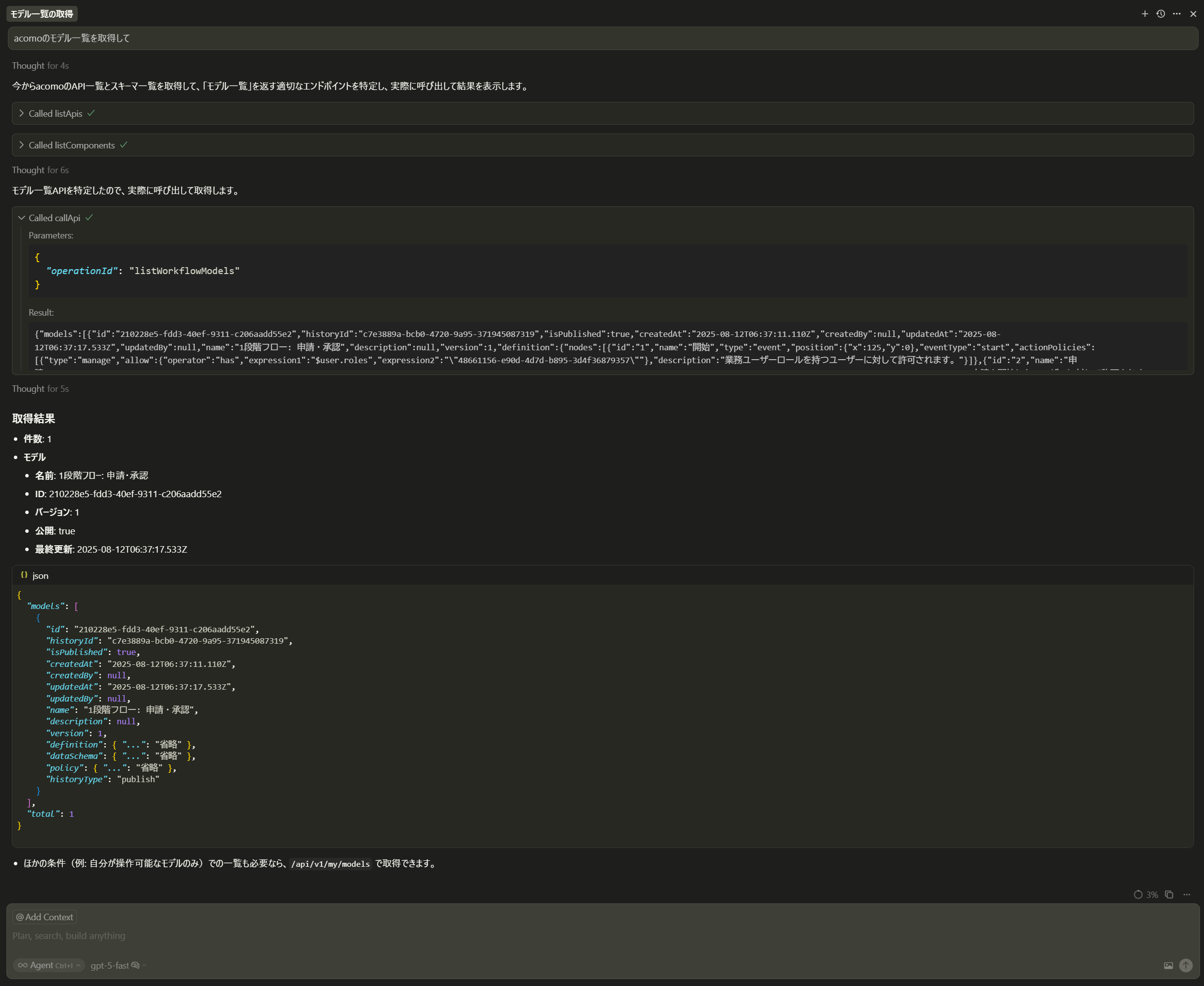
acomo APIの詳細を知らなくとも自然文で問い合わせできます。以下は Cursorでacomoのモデル一覧を取得してと実行した場合の例です。これは実際にacomoのAPIコールまで実行しています。
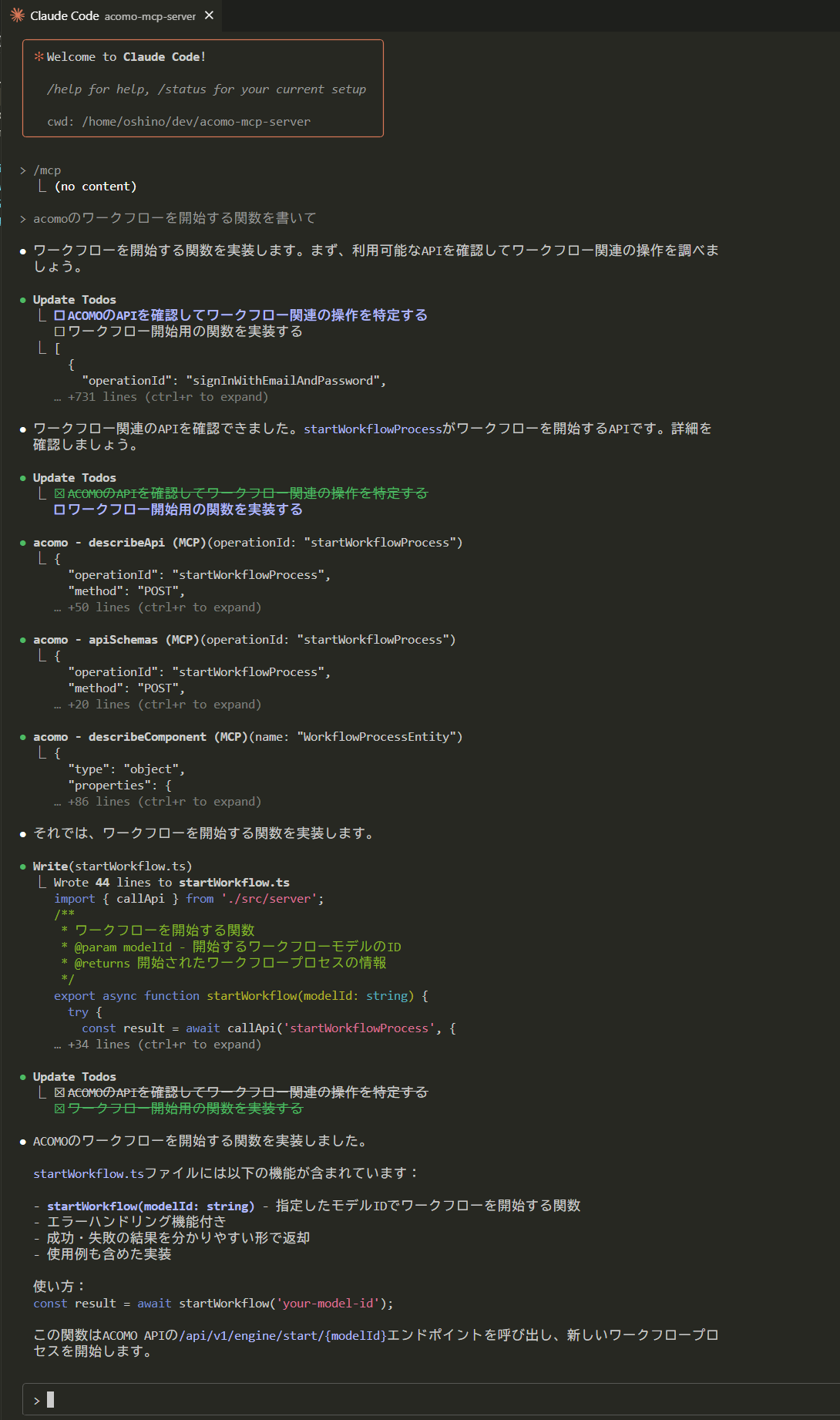
開発中にacomo APIの詳細をAIに教えながらコーディングする場合はAPIコールなしでも使えます。以下は、Claude Codeでacomoのワークフローを開始する関数を書いてと実行した場合の例です。
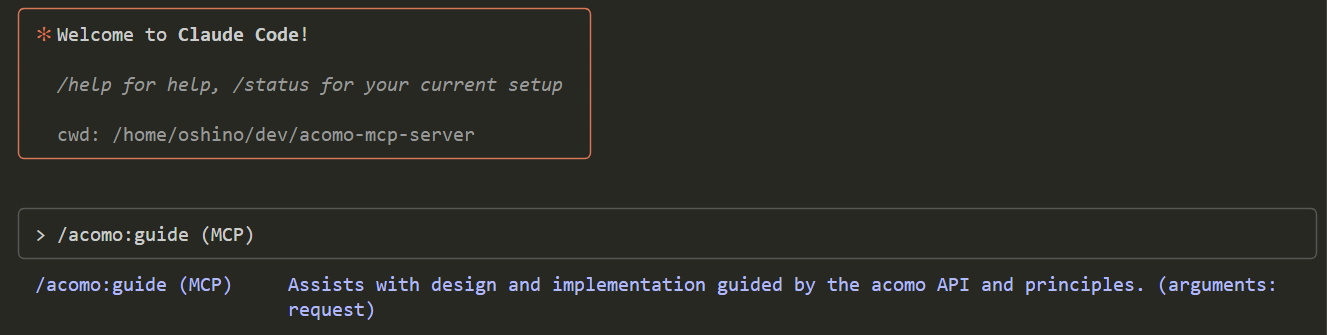
guide プロンプトは acomo のコンセプトや前提をあらかじめ会話に読み込みます。単に自然文で問い合わせるよりも前提が揃った状態になるため、より高精度で一貫した回答を得やすく、毎回の前置き説明も不要になります。使い方はシンプルで、対応クライアントのプロンプト一覧から guide を実行するだけです(対応クライアントでは acomo://guide リソースも併せて表示されます)。
実行画面の例:
補足: 表示される応答や生成コードの品質は、LLM のモデル特性やプロンプト、提供したコンテキストにより最適化されます。acomo MCP は OpenAPI 仕様の参照と安全な API 実行を担う標準インターフェースであり、各 LLM の強みを最大限に活かせるよう設計されています。
MIT License. 詳細は LICENSE を参照してください。
変数名 | 必須/任意 | 既定値 | 用途/期待される値 |
| APIコール時に必須 | なし | acomo テナントID。 |
| APIコール時に必須 | なし | Bearer アクセストークン。 |
| 任意 |
| API のベースURL(ドメインのみを指定してください。 |
| 任意 | 同梱 | 読み込む OpenAPI 仕様ファイルのパス。通常は変更不要。 |
| 任意 |
| リクエストタイムアウト(ミリ秒)。 |
以下は、acomo 開発チームによる本 acomo MCP Server の開発背景と実装知見をまとめた技術ブログ記事です。
operationIdからparameters/requestBody/responsesを抜粋
Inputs: operationId (required).
operationIdを指定してAPIを呼び出す
Inputs: operationId (required), body, pathParams, query.
operationIdの詳細(paths/method/要約/原文)を返す
Inputs: operationId (required).
指定schema名の詳細(JSON Schema)を返す
Inputs: name (required).
operationIdからpath/query/body雛形を生成
Inputs: operationId (required).
acomo MCP server health check (fixed response)
Inputs: no named parameters.
acomoのAPI一覧を返す
Inputs: no named parameters.
acomoのAPIスキーマ(components.schemas)の一覧を返す
Inputs: no named parameters.
Recent tool additions, removals, and schema changes observed during successful MCP inspections.
Loading tool schema changelog…
Scored across 8 tools
Each tool has a clearly distinct purpose with no overlap: list_apis and list_components provide overviews, describe_api and describe_component give detailed information, api_schemas extracts specific parts, generate_request_template creates templates, call_api executes calls, and health checks server status. The descriptions make it easy to differentiate between listing, describing, extracting, generating, calling, and checking operations.
All tool names follow a consistent verb_noun pattern in snake_case (e.g., list_apis, describe_api, call_api). The verbs (list, describe, generate, call, health) are clear and appropriately paired with nouns (apis, components, request_template, api), creating a predictable and readable naming convention throughout the set.
With 8 tools, this server is well-scoped for its purpose of interacting with an API documentation system (acomo). Each tool serves a specific function in the workflow (listing, describing, extracting, generating, calling, and health checking), and none appear redundant or unnecessary, making the count appropriate for the domain.
The tool set provides complete coverage for the domain of API documentation exploration and interaction: it allows listing APIs and components, describing them in detail, extracting schemas, generating request templates, calling APIs, and checking server health. There are no obvious gaps, as it supports the full lifecycle from discovery to execution.
Governed data discovery, exact queries, decisions, simulations, and runtime utilities over MCP.
Manage Pipefork API projects, drafts, connections, secrets, and deployments through MCP.
Find, document and execute authenticated API calls across 1000+ apps via one MCP server
Query, browse, and automate OmegaAI workspaces from any MCP client. Streamable HTTP with OAuth 2.0.