Health Microservice API
A comprehensive FastAPI microservice for health-related operations with JWT authentication, PostgreSQL database, and Alembic migrations.It is backed by MCP server using FastApiMCP
Working Demo
health-api-mcp-server-with-fastapi-demo.webm
Related MCP server: @flexpa/mcp-fhir
Features
JWT-based authentication
PostgreSQL database with async SQLAlchemy
Alembic database migrations
Comprehensive health domain models (Patient, Doctor, Appointment, Medical Record)
RESTful API endpoints
Interactive API documentation (Swagger UI)
Modular project structure
CORS middleware
Async/await support
UV package manager for fast dependency resolution
Comprehensive test suite
Prerequisites
Python 3.13.3+
PostgreSQL
UV package manager
Project Structure
The project follows a modular structure suitable for large applications with clear separation of concerns between models, schemas, routes, and business logic.
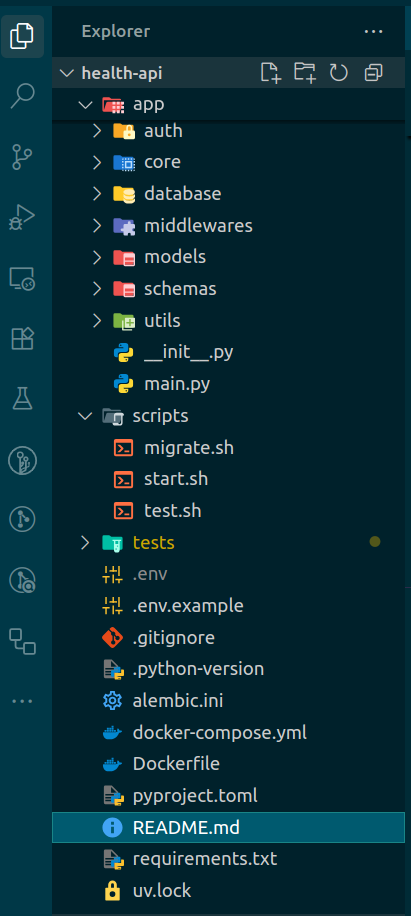
Installation
Install UV
# On macOS and Linux
curl -LsSf https://astral.sh/uv/install.sh | sh

# On Windows
powershell -c "irm https://astral.sh/uv/install.ps1 | iex"

# Or with pip
pip install uv
Setup Project
Clone the repository:
git clone <repository-url>
cd health-api
Install dependencies:
Set up environment variables:
cp .env.example .env
# Edit .env with your database credentials and secret key
Database Migrations with Alembic (using UV)
Alembic is used for handling database migrations. All commands below assume you are in the project root directory.
But first off all create up a PostgreSQL database:
CREATE DATABASE health_db;
Generate a New Migration (Autogenerate)
uv run alembic revision --autogenerate -m "Your migration message"
Apply Migrations (Upgrade Database)
uv run alembic upgrade head
Start the application (choose one):
uv run uvicorn app.main:app --host 0.0.0.0 --port 5000 --reload
# Or use the convenience script
chmod +x scripts/start.sh
./scripts/start.sh
Some more required alembic migration commands
These commands are not required during setup but are useful for managing migrations in the future
during development.
Downgrade Database (Revert Last Migration)
uv run alembic downgrade -1
View Current Migration Status
Show Migration History
For more Alembic commands and usage, see the Alembic documentation.
Development
Install development dependencies:
Run tests:
uv run pytest
# Or use the test script
chmod +x scripts/test.sh
./scripts/test.sh
Code formatting:
uv run black app/ tests/
uv run isort app/ tests/
Type checking:
Docker
Build and run with Docker Compose:
docker-compose up --build
This will start both the PostgreSQL database and the FastAPI application.
API Documentation
Once the application is running, visit:
curl -H "Authorization: Bearer <your_bearer_token>"
-H "Accept: text/event-stream" http://localhost:5000/mcp
Database Migrations
Create a new migration:
uv run alembic revision --autogenerate -m "Description of changes"
# Or use the migration script
chmod +x scripts/migrate.sh
./scripts/migrate.sh "Description of changes"
Apply migrations:
uv run alembic upgrade head
Authentication
Register a new user: POST /auth/register
Login to get access token: POST /auth/login
Use the token in Authorization header: Bearer <token>
Main API Endpoints (after authentication)
After obtaining a JWT access token, you can access the following endpoints:
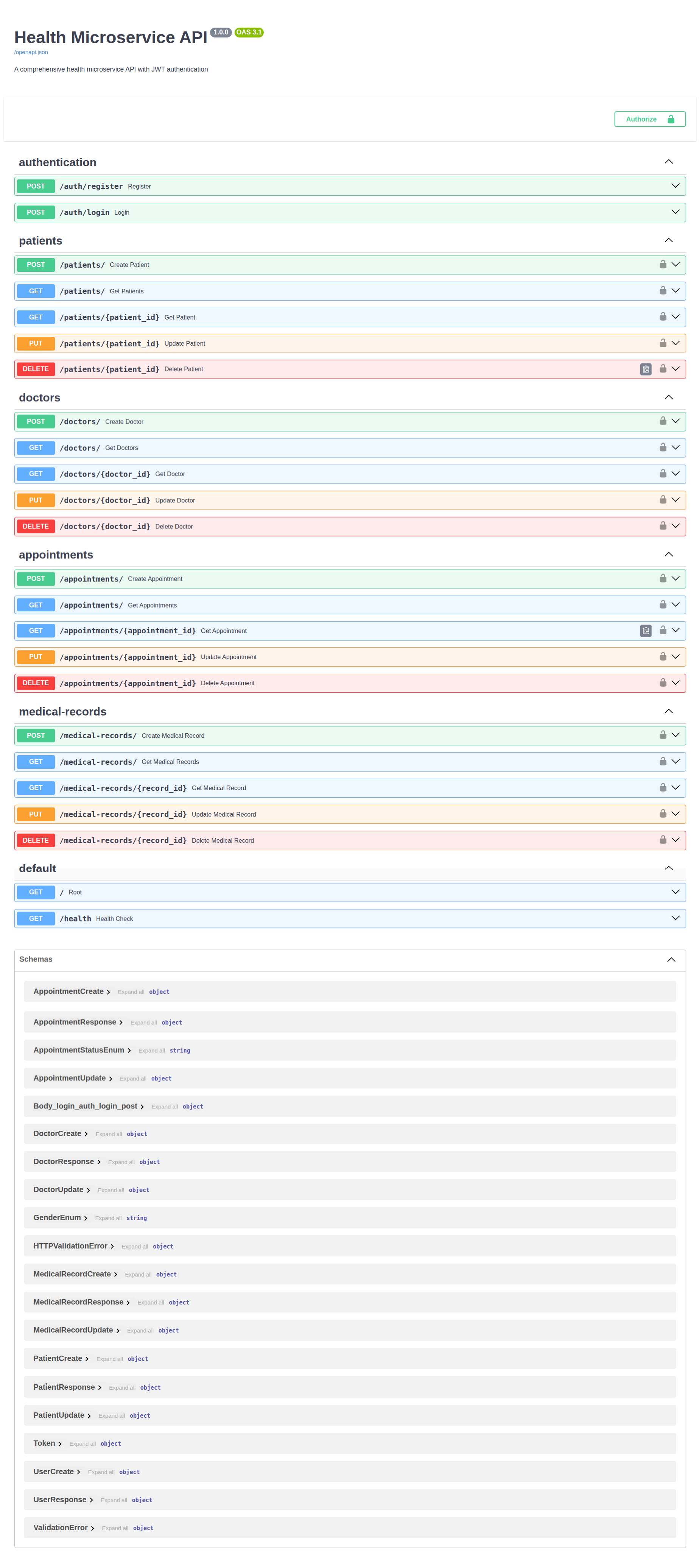
Doctors
GET /doctors — List all doctors
GET /doctors/{doctor_id} — Get a specific doctor by ID
POST /doctors — Create a new doctor
PUT /doctors/{doctor_id} — Update a doctor's information
DELETE /doctors/{doctor_id} — Delete a doctor
Patients
GET /patients — List all patients
GET /patients/{patient_id} — Get a specific patient by ID
POST /patients — Create a new patient
PUT /patients/{patient_id} — Update a patient's information
DELETE /patients/{patient_id} — Delete a patient
Medical Records
GET /medical-records — List all medical records (optionally filter by patient)
GET /medical-records/{record_id} — Get a specific medical record by ID
POST /medical-records — Create a new medical record
PUT /medical-records/{record_id} — Update a medical record
DELETE /medical-records/{record_id} — Delete a medical record
Appointments
GET /appointments — List all appointments
GET /appointments/{appointment_id} — Get a specific appointment by ID
POST /appointments — Create a new appointment
PUT /appointments/{appointment_id} — Update an appointment
DELETE /appointments/{appointment_id} — Delete an appointment
Telemedicine
POST /telemedicine/visits/ — Create a new virtual visit
GET /telemedicine/visits/ — List all virtual visits
GET /telemedicine/visits/{visit_id} — Get a specific virtual visit by ID
POST /telemedicine/chats/ — Create a new chat log
GET /telemedicine/chats/ — List all chat logs
GET /telemedicine/chats/{chat_id} — Get a specific chat log by ID
POST /telemedicine/videos/ — Create a new video session
GET /telemedicine/videos/ — List all video sessions
GET /telemedicine/videos/{video_id} — Get a specific video session by ID
Lab
POST /lab/orders/ — Create a new lab order
GET /lab/orders/ — List all lab orders
GET /lab/orders/{order_id} — Get a specific lab order by ID
POST /lab/results/ — Create a new lab result
GET /lab/results/ — List all lab results
GET /lab/results/{result_id} — Get a specific lab result by ID
POST /lab/images/ — Create a new diagnostic image
GET /lab/images/ — List all diagnostic images
GET /lab/images/{image_id} — Get a specific diagnostic image by ID
Referral
POST /referral/requests/ — Create a new referral request
GET /referral/requests/ — List all referral requests
GET /referral/requests/{request_id} — Get a specific referral request by ID
POST /referral/statuses/ — Create a new referral status
GET /referral/statuses/ — List all referral statuses
GET /referral/statuses/{status_id} — Get a specific referral status by ID
POST /referral/notes/ — Create a new specialist note
GET /referral/notes/ — List all specialist notes
GET /referral/notes/{note_id} — Get a specific specialist note by ID
Pharmacy
POST /pharmacy/medications/ — Create a new medication
GET /pharmacy/medications/ — List all medications
GET /pharmacy/medications/{med_id} — Get a specific medication by ID
POST /pharmacy/prescriptions/ — Create a new prescription
GET /pharmacy/prescriptions/ — List all prescriptions
GET /pharmacy/prescriptions/{pres_id} — Get a specific prescription by ID
POST /pharmacy/orders/ — Create a new pharmacy order
GET /pharmacy/orders/ — List all pharmacy orders
GET /pharmacy/orders/{order_id} — Get a specific pharmacy order by ID
Insurance
POST /insurance/plans/ — Create a new insurance plan
GET /insurance/plans/ — List all insurance plans
GET /insurance/plans/{plan_id} — Get a specific insurance plan by ID
POST /insurance/claims/ — Create a new insurance claim
GET /insurance/claims/ — List all insurance claims
GET /insurance/claims/{claim_id} — Get a specific insurance claim by ID
POST /insurance/payments/ — Create a new payment
GET /insurance/payments/ — List all payments
GET /insurance/payments/{payment_id} — Get a specific payment by ID
POST /insurance/invoices/ — Create a new invoice
GET /insurance/invoices/ — List all invoices
GET /insurance/invoices/{invoice_id} — Get a specific invoice by ID
All these endpoints require the Authorization: Bearer header. Refer to the interactive API docs at /docs for detailed request/response schemas and try out the endpoints interactively.
Package Management with UV
UV provides fast dependency resolution and installation. Useful commands:
uv sync - Install dependencies from lock file
uv add <package> - Add a new dependency
uv remove <package> - Remove a dependency
uv run <command> - Run command in virtual environment
uv lock - Update the lock file
MCP Integration
Integration with MCP is done by using the
FastApiMCP class from the fastapi_mcp package.
The MCP server is mounted to the FastAPI
application using the mount method.
windsurf settings,
{
  "mcpServers": {
    "health-api": {
      "serverUrl": "http://localhost:5000/mcp",
      "headers": {
        "Authorization": "Bearer
        <put_your_bearer_token_here>"
      }
    }
  }
}
vscode or cursor settings,
{
  "servers": {
    "health-api": {
      "url": "http://localhost:5000/mcp",
      "headers": {
        "Authorization": "Bearer
        <put_your_bearer_token_here>"
      }
    }
  }
}
Note: I haven't tested on vscode or cursor yet.
License
MIT License
TODOs
Contributing
Install development dependencies: uv sync --group dev
Make your changes
Run tests: uv run pytest
Format code: uv run black app/ tests/
Submit a pull request
See more at [Contributing](https://github.com/
AlwaysSany/health-api/blob/main/CONTRIBUTING.md).
Contact
References

