
A
licenseA
qualityB
maintenanceAllows Claude desktop app to execute terminal commands and edit files on your computer through MCP, with features including command execution, process management, and diff-based file editing.
25
10,387
MIT

Provides a way for users to support the project financially through the Buy Me A Coffee platform.
Allows users to join a Discord server for getting help, sharing feedback, and connecting with other users of the Desktop Commander MCP.
Facilitates project contribution, issue reporting, and discussions through GitHub's platform.
Supports running commands and managing files on Linux systems with specific enhancements for various Linux distributions.
Offers detailed articles exploring how Claude with MCPs is changing developer workflows.
Enables installation and distribution of the Desktop Commander through the npm package registry.
Provides video tutorials and demonstrations showcasing how to set up and use the Desktop Commander effectively.
Click on "Deploy Server".
Wait a few minutes for the server to deploy. Once ready, it will show a "Started" state.
In the chat, type @ followed by the MCP server name and your instructions, e.g., "@Desktop Commander MCP list all Python files in my current directory"
That's it! The server will respond to your query, and you can continue using it as needed.
Here is a step-by-step guide with screenshots.



Short version. Two key things. Terminal commands and diff based file editing.
This is server that allows Claude desktop app to execute long-running terminal commands on your computer and manage processes through Model Context Protocol (MCP) + Built on top of MCP Filesystem Server to provide additional search and replace file editing capabilities .
Related MCP server: MCP Tools
Execute terminal commands with output streaming
Command timeout and background execution support
Process management (list and kill processes)
Session management for long-running commands
Full filesystem operations:
Read/write files
Create/list directories
Move files/directories
Search files
Get file metadata
Code editing capabilities:
Surgical text replacements for small changes
Full file rewrites for major changes
Multiple file support
Pattern-based replacements
First, ensure you've downloaded and installed the Claude Desktop app and you have npm installed.
To install Desktop Commander for Claude Desktop automatically via Smithery:
npx -y @smithery/cli install @wonderwhy-er/desktop-commander --client claudeJust run this in terminal
npx @wonderwhy-er/desktop-commander setupRestart Claude if running
Add this entry to your claude_desktop_config.json (on Mac, found at ~/Library/Application\ Support/Claude/claude_desktop_config.json):
{
  "mcpServers": {
    "desktop-commander": {
      "command": "npx",
      "args": [
        "-y",
        "@wonderwhy-er/desktop-commander"
      ]
    }
  }
}
Restart Claude if running
Clone and build:
git clone https://github.com/wonderwhy-er/ClaudeComputerCommander.git
cd ClaudeComputerCommander
npm run setup
Restart Claude if running
The setup command will:
Install dependencies
Build the server
Configure Claude's desktop app
Add MCP servers to Claude's config if needed
The server provides these tool categories:
execute_command: Run commands with configurable timeout
read_output: Get output from long-running commands
force_terminate: Stop running command sessions
list_sessions: View active command sessions
list_processes: View system processes
kill_process: Terminate processes by PID
block_command/unblock_command: Manage command blacklist
read_file/write_file: File operations
create_directory/list_directory: Directory management
move_file: Move/rename files
search_files: Pattern-based file search
get_file_info: File metadata
edit_block: Apply surgical text replacements (best for changes <20% of file size)
write_file: Complete file rewrites (best for large changes >20% or when edit_block fails)
Search/Replace Block Format:
filepath.ext
<<<<<<< SEARCH
existing code to replace
=======
new code to insert
>>>>>>> REPLACE
Example:
src/main.js
<<<<<<< SEARCH
console.log("old message");
=======
console.log("new message");
>>>>>>> REPLACEFor commands that may take a while:
execute_command returns after timeout with initial output
Command continues in background
Use read_output with PID to get new output
Use force_terminate to stop if needed
This project extends the MCP Filesystem Server to enable:
Local server support in Claude Desktop
Full system command execution
Process management
File operations
Code editing with search/replace blocks
Created as part of exploring Claude MCPs: https://youtube.com/live/TlbjFDbl5Us
The following features are currently being developed or planned:
Better code search (in progress) - Enhanced code exploration with context-aware results
Better configurations (in progress) - Improved settings for allowed paths, commands and shell environment
Windows environment fixes (in progress) - Resolving issues specific to Windows platforms
Linux improvements (in progress) - Enhancing compatibility with various Linux distributions
Support for WSL - Windows Subsystem for Linux integration
Support for SSH - Remote server command execution
Installation troubleshooting guide - Comprehensive help for setup issues
Learn more about this project through these resources:
Claude with MCPs replaced Cursor & Windsurf. How did that happen? - A detailed exploration of how Claude with Model Context Protocol capabilities is changing developer workflows.
Claude Desktop Commander Video Tutorial - Watch how to set up and use the Commander effectively.
Join our Discord server to get help, share feedback, and connect with other users.
 https://www.youtube.com/watch?v=ly3bed99Dy8&lc=UgyyBt6_ShdDX_rIOad4AaABAg
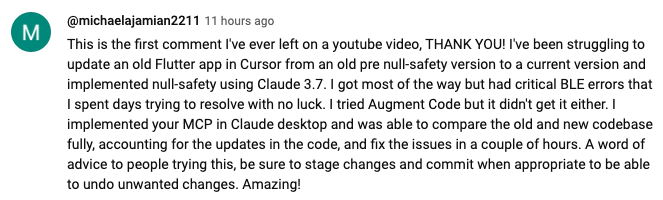 https://www.youtube.com/watch?v=ly3bed99Dy8&lc=UgztdHvDMqTb9jiqnf54AaABAg
 https://www.youtube.com/watch?v=ly3bed99Dy8&lc=UgyQFTmYLJ4VBwIlmql4AaABAg
 https://www.youtube.com/watch?v=ly3bed99Dy8&lc=Ugy4-exy166_Ma7TH-h4AaABAg
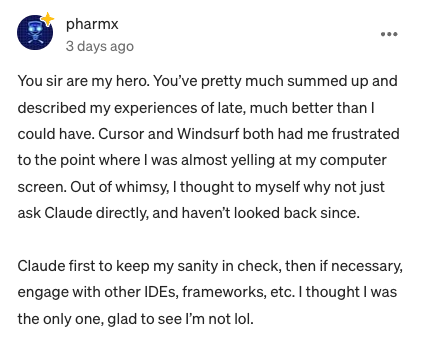 https://medium.com/@pharmx/you-sir-are-my-hero-62cff5836a3e
If you find this project useful, please consider giving it a ⭐ star on GitHub! This helps others discover the project and encourages further development.
We welcome contributions from the community! Whether you've found a bug, have a feature request, or want to contribute code, here's how you can help:
Found a bug? Open an issue at github.com/wonderwhy-er/ClaudeComputerCommander/issues
Have a feature idea? Submit a feature request in the issues section
Want to contribute code? Fork the repository, create a branch, and submit a pull request
Questions or discussions? Start a discussion in the GitHub Discussions tab
All contributions, big or small, are greatly appreciated!
If you find this tool valuable for your workflow, please consider supporting the project.
MIT
Add a command to the blacklist. Once blocked, the command cannot be executed until unblocked.
Inputs: command (required).
Create a new directory or ensure a directory exists. Can create multiple nested directories in one operation. Only works within allowed directories.
Inputs: path (required).
Apply surgical text replacements to files. Best for small changes (<20% of file size). Multiple blocks can be used for separate changes. Will verify changes after application. Format: filepath, then <<<<<<< SEARCH, content to find, =======, new content, >>>>>>> REPLACE.
Inputs: blockContent (required).
Execute a terminal command with timeout. Command will continue running in background if it doesn't complete within timeout.
Inputs: command (required), timeout_ms.
Force terminate a running terminal session.
Inputs: pid (required).
Retrieve detailed metadata about a file or directory including size, creation time, last modified time, permissions, and type. Only works within allowed directories.
Inputs: path (required).
Terminate a running process by PID. Use with caution as this will forcefully terminate the specified process.
Inputs: pid (required).
Returns the list of directories that this server is allowed to access.
Inputs: no named parameters.
List all currently blocked commands.
Inputs: no named parameters.
Get a detailed listing of all files and directories in a specified path. Results distinguish between files and directories with [FILE] and [DIR] prefixes. Only works within allowed directories.
Inputs: path (required).
List all running processes. Returns process information including PID, command name, CPU usage, and memory usage.
Inputs: no named parameters.
List all active terminal sessions.
Inputs: no named parameters.
Move or rename files and directories. Can move files between directories and rename them in a single operation. Both source and destination must be within allowed directories.
Inputs: source (required), destination (required).
Read the complete contents of a file from the file system. Handles various text encodings and provides detailed error messages if the file cannot be read. Only works within allowed directories.
Inputs: path (required).
Read the contents of multiple files simultaneously. Each file's content is returned with its path as a reference. Failed reads for individual files won't stop the entire operation. Only works within allowed directories.
Inputs: paths (required).
Read new output from a running terminal session.
Inputs: pid (required).
Recursively search for files and directories matching a pattern. Searches through all subdirectories from the starting path. Only searches within allowed directories.
Inputs: path (required), pattern (required).
Remove a command from the blacklist. Once unblocked, the command can be executed normally.
Inputs: command (required).
Completely replace file contents. Best for large changes (>20% of file) or when edit_block fails. Use with caution as it will overwrite existing files. Only works within allowed directories.
Inputs: path (required), content (required).
Recent tool additions, removals, and schema changes observed during successful MCP inspections.
Loading tool schema changelog…
Scored across 19 tools
Most tools have distinct purposes, but some overlap exists between 'execute_command' and 'force_terminate'/'kill_process' in managing processes, and 'edit_block' and 'write_file' in file modification. However, descriptions clarify their specific use cases (e.g., 'edit_block' for small changes, 'write_file' for large replacements), reducing confusion.
Tool names follow a consistent verb_noun pattern throughout, such as 'create_directory', 'list_directory', 'read_file', and 'move_file'. This uniformity makes the toolset predictable and easy for agents to navigate without naming conflicts.
With 19 tools, the count is slightly high but reasonable for a desktop management server covering file operations, process control, and command execution. It provides comprehensive functionality without being overwhelmingly large, though it could be streamlined by merging some related tools.
The toolset offers complete coverage for desktop management, including CRUD operations for files and directories, process lifecycle management, command execution with safety features (blocking/unblocking), and session handling. No obvious gaps are present, supporting a wide range of agent workflows.
A comprehensive Model Context Protocol (MCP) server that enables AI assistants to interact with yo…
Shared memory MCP server for Claude Code, Codex, Gemini CLI and Cursor. Cited, editable.
Use your Mac, Windows or Linux computer from ChatGPT, Claude or Codex: files, commands, documents.
Remote MCP server exposing your Node Command fleet (files, shell, processes, browser) to AI hosts.