iTerm MCP
Allows models to interact with an active iTerm terminal session, including writing commands, reading terminal output, and sending control characters. Enables the model to execute commands, work with REPLs, and view specific portions of terminal output.
Provides integration with macOS through the iTerm2 terminal, allowing interaction with the macOS system via terminal commands.
Click on "Deploy Server".
Wait a few minutes for the server to deploy. Once ready, it will show a "Started" state.
In the chat, type
@followed by the MCP server name and your instructions, e.g., "@iTerm MCP list files in the current directory"
That's it! The server will respond to your query, and you can continue using it as needed.
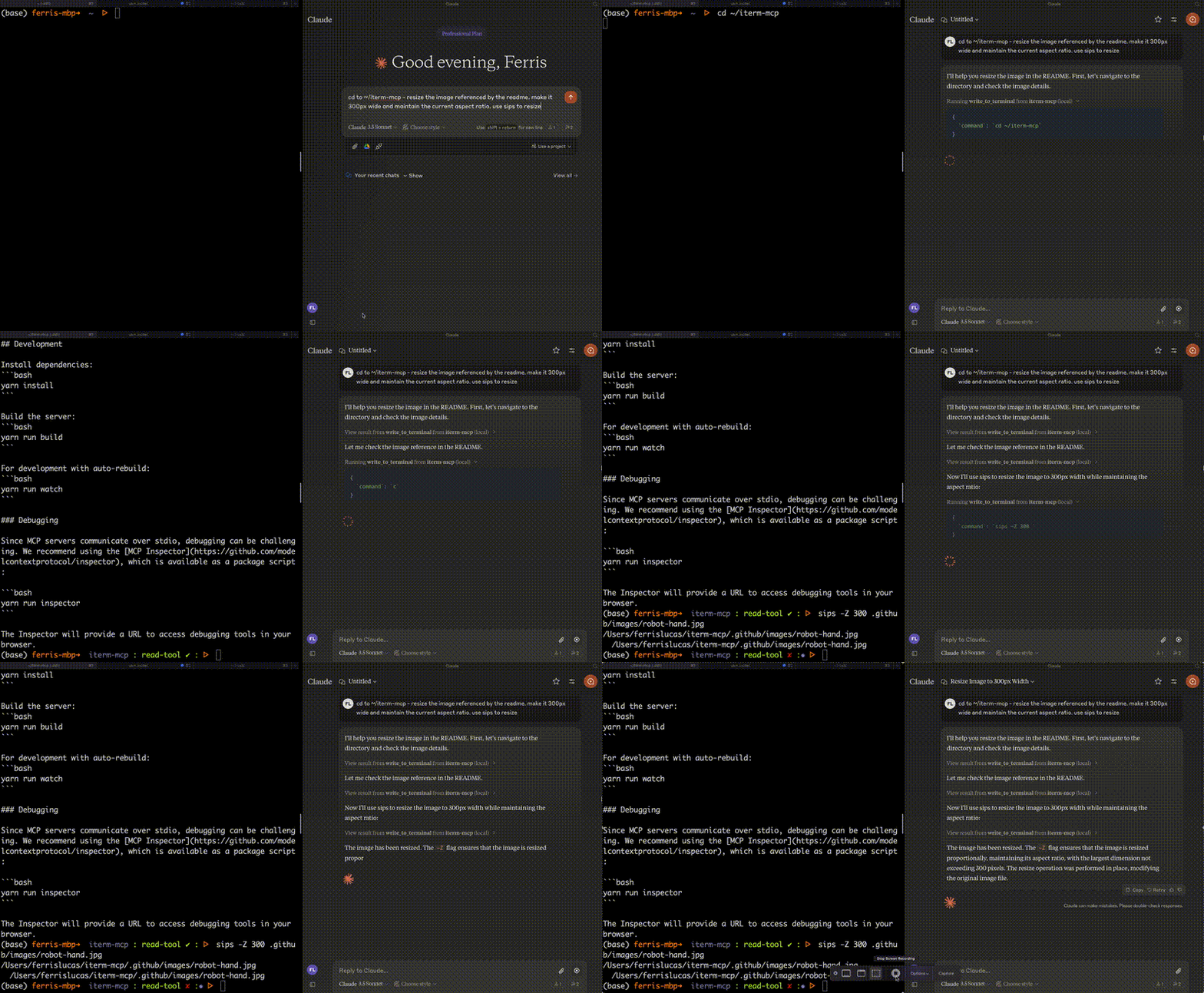
Here is a step-by-step guide with screenshots.
iterm-mcp
A Model Context Protocol server that provides access to your iTerm session.
Features
Efficient Token Use: iterm-mcp gives the model the ability to inspect only the output that the model is interested in. The model typically only wants to see the last few lines of output even for long running commands.
Natural Integration: You share iTerm with the model. You can ask questions about what's on the screen, or delegate a task to the model and watch as it performs each step.
Full Terminal Control and REPL support: The model can start and interact with REPL's as well as send control characters like ctrl-c, ctrl-z, etc.
Easy on the Dependencies: iterm-mcp is built with minimal dependencies and is runnable via npx. It's designed to be easy to add to Claude Desktop and other MCP clients. It should just work.
Safety Considerations
The user is responsible for using the tool safely.
No built-in restrictions: iterm-mcp makes no attempt to evaluate the safety of commands that are executed.
Models can behave in unexpected ways. The user is expected to monitor activity and abort when appropriate.
For multi-step tasks, you may need to interrupt the model if it goes off track. Start with smaller, focused tasks until you're familiar with how the model behaves.
Tools
write_to_terminal- Writes to the active iTerm terminal, often used to run a command. Returns the number of lines of output produced by the command.read_terminal_output- Reads the requested number of lines from the active iTerm terminal.send_control_character- Sends a control character to the active iTerm terminal.
Requirements
iTerm2 must be running
Node version 18 or greater
Related MCP server: MCP Terminal
Installation
To use with Claude Desktop, add the server config:
On macOS: ~/Library/Application Support/Claude/claude_desktop_config.json
On Windows: %APPDATA%/Claude/claude_desktop_config.json
{
"mcpServers": {
"iterm-mcp": {
"command": "npx",
"args": [
"-y",
"iterm-mcp"
]
}
}
}Installing via Smithery
To install iTerm for Claude Desktop automatically via Smithery:
npx -y @smithery/cli install iterm-mcp --client claudeDevelopment
Install dependencies:
yarn installBuild the server:
yarn run buildFor development with auto-rebuild:
yarn run watchDebugging
Since MCP servers communicate over stdio, debugging can be challenging. We recommend using the MCP Inspector, which is available as a package script:
yarn run inspector
yarn debug <command>The Inspector will provide a URL to access debugging tools in your browser.
Available Tools
3 toolsread_terminal_outputC
Reads the output from the active iTerm terminal
Inputs: linesOfOutput (required).
send_control_characterC
Sends a control character to the active iTerm terminal (e.g., Control-C)
Inputs: letter (required).
write_to_terminalA
Writes text to the active iTerm terminal - often used to run a command in the terminal
Inputs: command (required).
Tool Schema Changelog
Recent tool additions, removals, and schema changes observed during successful MCP inspections.
Loading tool schema changelog…
TDQS
Scored across 3 tools
Each tool has a clearly distinct purpose: reading output, sending control characters, and writing text/commands. There is no overlap in functionality, making it easy for an agent to select the right tool for each operation.
All tool names follow a consistent verb_noun pattern (read_terminal_output, send_control_character, write_to_terminal). The naming is uniform and predictable, using snake_case throughout with clear action-object pairs.
With only 3 tools, the set feels minimal but covers core terminal interactions. For a terminal control server, this is borderline thin, as additional operations like listing sessions or managing tabs might be expected, but it's not severely lacking.
The tools cover essential terminal operations: reading, writing, and sending control signals. Minor gaps exist, such as no tools for managing multiple terminals or sessions, but the core workflow for interacting with an active terminal is well-supported without dead ends.
Maintenance
Related MCP Connectors
A comprehensive Model Context Protocol (MCP) server that enables AI assistants to interact with yo…
A Model Context Protocol server for Wix AI tools
Remote MCP server exposing your Node Command fleet (files, shell, processes, browser) to AI hosts.
Connect ChatGPT and Claude to your Mac, Windows or Linux with secure MCP remote access.
Related MCP Servers
- AlicenseBqualityDmaintenanceA Model Context Protocol server that provides programmatic access to the Windows terminal, enabling AI models to interact with the Windows command line through standardized tools for writing commands, reading output, and sending control signals.3MIT
- AlicenseCqualityDmaintenanceA server that enables AI assistants to execute terminal commands and retrieve outputs via the Model Context Protocol (MCP).326MIT
- AlicenseAqualityDmaintenanceA Model Context Protocol server that enables AI assistants to interact with iTerm2 terminals, allowing creation and management of terminal sessions, command execution, and reading terminal output.589 npm14ISC
- AlicenseNot gradedqualityDmaintenanceMCP server enabling AI agents to interact with terminal applications through structured Terminal State Tree representation. Works with any AI assistant that supports the Model Context Protocol.103 npm21MIT