

A
licenseNot graded
qualityC
maintenanceCaptures browser network traffic, analyzes API patterns, and exposes analysis tools through an MCP server for AI-assisted workflows.
1
MIT

The Charles MCP Server integrates Charles Proxy with MCP clients, enabling AI agents to capture, analyze, and inspect HTTP/HTTPS traffic in real-time and from historical recordings.
Live Traffic Capture
Start/stop sessions (start_live_capture, stop_live_capture) — begin or adopt an ongoing Charles session
Read incremental traffic (read_live_capture) — consume new entries as they arrive, advancing an internal cursor
Preview without consuming (peek_live_capture) — inspect new entries without advancing the cursor
Query/filter live traffic (query_live_capture_entries) — structured filtering by host, path, method, status, content type, body content, headers, or JSON queries without advancing the cursor
Historical Recording Analysis
List saved recordings (list_recordings) — enumerate available recording files with metadata
Analyze recorded traffic (analyze_recorded_traffic) — structured summary analysis with matched fields and match reasons
Query recorded traffic (query_recorded_traffic) — lightweight filtering of the latest recording by host, method, or regex
Load recording snapshots (get_recording_snapshot) — read the raw snapshot of a specific recording
Traffic Inspection & Aggregation
Drill into entries (get_traffic_entry_detail) — full request/response headers, bodies, timings, and parsed JSON/form data with configurable truncation
Group and aggregate (group_capture_analysis) — group traffic by host, path, status, resource class, or method to identify hotspots
Traffic class statistics (get_capture_analysis_stats) — coarse counts by resource class (API, static assets, documents, errors, etc.)
Charles Control & Configuration
Check status (charles_status) — verify Charles connectivity and active capture state
Set throttling (throttling) — simulate network conditions (3G, 4G, 5G, 56k, fibre, etc.)
Reset environment (reset_environment) — restore Charles to a clean configuration state
Legacy/Compatibility Tools
proxy_by_time, filter_func, and list_sessions available via explicit compatibility switches
Works with Claude Code, Claude Desktop, Cursor, Windsurf, and other MCP clients. Designed with a summary-first, token-budget-optimized approach for efficient AI agent workflows.
Allows for the monitoring and analysis of network traffic through Charles Proxy, enabling agents to capture real-time traffic, inspect historical recordings, filter requests by host or status, and view detailed request/response data.
Click on "Deploy Server".
Wait a few minutes for the server to deploy. Once ready, it will show a "Started" state.
In the chat, type @ followed by the MCP server name and your instructions, e.g., "@Charles MCP Server show me a summary of the latest live network traffic"
That's it! The server will respond to your query, and you can continue using it as needed.
Here is a step-by-step guide with screenshots.



Docs | Tool Contract | AGENTS | Agent Workflow Guide | English README
仓库维护公告(2026-04-21)
本仓库的公开 Git 历史已于 2026-04-21 重新整理。如果你在该日期之前克隆过本仓库,请在继续贡献前重新克隆。不要从旧的本地克隆直接合并或推送,否则可能会把过期历史重新引入仓库。
Charles MCP Server 用于把 Charles Proxy 接入 MCP 客户端,让 agent 可以稳定地读取实时流量、分析历史录包,并在需要时再展开单条请求细节。
它解决的核心问题只有三个:
录制还在进行时,agent 也能持续读取当前 session 的增量流量
live 与 history 统一走结构化分析,不再让 agent 直接消费原始抓包字典
默认使用 summary-first 输出,先看热点与摘要,再 drill-down 到单条 detail
v3.0 的更新方向是:charles-mcp 的能力开始从“流量查看/筛选”向“逆向工程工作流”延伸。
在保留原有 live/history 分析能力的基础上,新增 reverse-analysis 工具链(导入、查询、解码、回放、签名候选分析、live 逆向会话)。
目标是让 agent 不只看到流量,还能围绕认证、签名、参数变异与可重放性,形成更完整的逆向分析闭环。
Related MCP server: Charles MCP Server
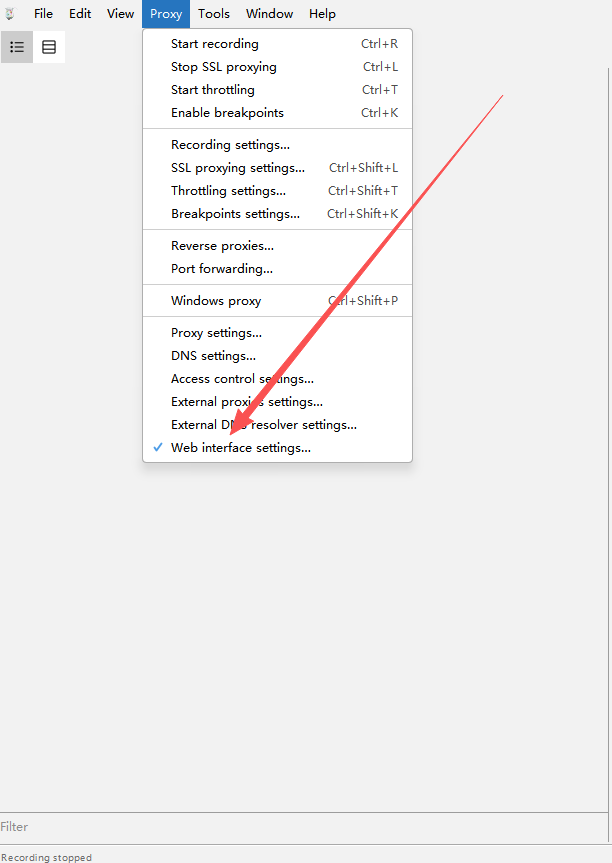
在 Charles 中依次进入:Proxy -> Web Interface Settings
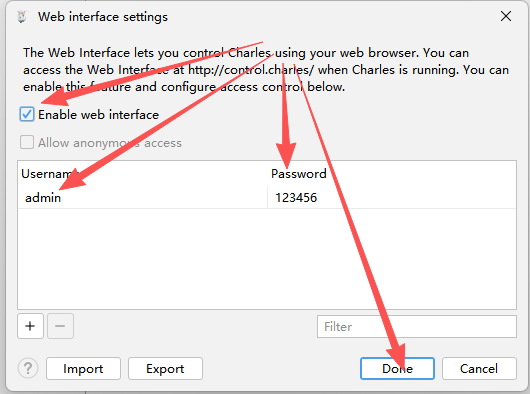
请确认:
勾选 Enable web interface
用户名为 admin
密码为 123456
菜单位置示意:
设置窗口示意:
无需 clone 仓库,无需手动创建虚拟环境。需要先安装 uv。
claude mcp add-json charles '{
  "type": "stdio",
  "command": "uvx",
  "args": ["charles-mcp"],
  "env": {
    "CHARLES_USER": "admin",
    "CHARLES_PASS": "123456",
    "CHARLES_MANAGE_LIFECYCLE": "false"
  }
}'{
"mcpServers": {
"charles": {
"command": "uvx",
"args": ["charles-mcp"],
"env": {
"CHARLES_USER": "admin",
"CHARLES_PASS": "123456",
"CHARLES_MANAGE_LIFECYCLE": "false"
}
}
}
}[mcp_servers.charles]
command = "uvx"
args = ["charles-mcp"]
[mcp_servers.charles.env]
CHARLES_USER = "admin"
CHARLES_PASS = "123456"
CHARLES_MANAGE_LIFECYCLE = "false"将以下提示词复制粘贴给任意 AI agent(Claude Code、ChatGPT、Gemini CLI、Cursor Agent 等),agent 会自动完成安装和配置:
Install the "charles-mcp" MCP server and configure it for my MCP client. Follow these steps exactly:

Step 1 — Detect OS:
  Determine if this machine runs Windows, macOS, or Linux.

Step 2 — Ensure uv is installed:
  Run: uv --version
  If the command fails (uv not found):
    - macOS/Linux: run: curl -LsSf https://astral.sh/uv/install.sh | sh
    - Windows: run: powershell -ExecutionPolicy ByPass -c "irm https://astral.sh/uv/install.ps1 | iex"
  After installing, verify uv works: uv --version

Step 3 — Detect which MCP client is installed:
  Check in this order and use the FIRST match:

  a) Claude Code — run: claude --version
     If it succeeds, run this command and skip to Step 5:
       claude mcp add-json charles '{"type":"stdio","command":"uvx","args":["charles-mcp"],"env":{"CHARLES_USER":"admin","CHARLES_PASS":"123456","CHARLES_MANAGE_LIFECYCLE":"false"}}'

  b) Claude Desktop — check if config file exists:
     - macOS:   ~/Library/Application Support/Claude/claude_desktop_config.json
     - Windows: %APPDATA%\Claude\claude_desktop_config.json
     - Linux:   ~/.config/Claude/claude_desktop_config.json

  c) Cursor — check if any of these exist:
     - ~/.cursor/mcp.json
     - .cursor/mcp.json (in current project)

  d) Windsurf — check if exists:
     - ~/.codeium/windsurf/mcp_config.json

  If none detected, ask the user which client they use.

Step 4 — Write config (for clients b/c/d):
  The config entry to add is:
    "charles": {
      "command": "uvx",
      "args": ["charles-mcp"],
      "env": {
        "CHARLES_USER": "admin",
        "CHARLES_PASS": "123456",
        "CHARLES_MANAGE_LIFECYCLE": "false"
      }
    }

  IMPORTANT: If the config file already exists, read it first, parse the JSON,
  add the "charles" key inside "mcpServers" (create "mcpServers" if absent),
  and write back. Do NOT overwrite other existing MCP server entries.
  If the file does not exist, create it with:
    { "mcpServers": { "charles": { ... } } }

Step 5 — Verify:
  Run: uvx charles-mcp
  Wait 3 seconds then terminate the process.
  If it starts without import errors, the installation is successful.

Step 6 — Report:
  Print: "charles-mcp installed successfully. Please restart your MCP client to load the new server."
Also mention that Charles Proxy must be running with Web Interface enabled (Proxy → Web Interface Settings, username: admin, password: 123456).Python 3.10+
本机已启动 Charles Proxy
Charles Web Interface 已启用
Charles 代理默认监听 127.0.0.1:8888
推荐默认保持 CHARLES_MANAGE_LIFECYCLE=false。除非你明确希望 MCP server 接管 Charles 生命周期,否则不要让它在退出时关闭你的 Charles 进程。
变量 | 默认值 | 说明 |
|
| Charles Web Interface 用户名 |
|
| Charles Web Interface 密码 |
|
| Charles 代理主机 |
|
| Charles 代理端口 |
| 自动探测 | Charles 配置文件路径 |
|
| 控制面 HTTP 超时秒数 |
|
| 有界录制最大时长 |
|
| 是否由 MCP server 管理 Charles 启停 |
|
| reverse-analysis 的 SQLite 与工件状态目录 |
| 旧变量 | 旧版 reverse-analysis 状态目录。主 |
start_live_capture
group_capture_analysis
query_live_capture_entries
get_traffic_entry_detail
stop_live_capture
这条路径的目标是先用最少 token 找到热点,再按需展开单条请求。
list_recordings
analyze_recorded_traffic
group_capture_analysis(source="history")
get_traffic_entry_detail
这条路径适合先浏览录包,再对结构化 summary 做筛选和 drill-down。
默认公开工具面已收紧为 canonical 31 个工具;legacy aliases(filter_func、proxy_by_time、list_sessions)不再默认暴露。
新增显式兼容开关:create_server(expose_legacy_tools=True) 或环境变量 CHARLES_EXPOSE_LEGACY_TOOLS=true 可启用 legacy 兼容层。
文档入口收口到 docs/README.md,并新增 docs/migrations/legacy-tools.md 作为 legacy 迁移权威说明。
新增 Agent 执行规范文档:仓库根目录增加 AGENTS.md,并新增 docs/agent-workflows.md 作为任务化调用手册。
README 与 docs/contracts/tools.md 增加 Agent 文档入口,统一使用仓库相对路径,便于跨环境查看。
高频入口工具描述已补齐最小必要语义(identity 保留、summary-first、peek/read 差异),并新增契约测试避免文档与工具描述漂移。
功能方向开始向逆向工程发展:引入 reverse-analysis 工具面,覆盖导入、解码、回放、签名候选发现与 live 逆向分析工作流。
read_live_capture 与 peek_live_capture 现在只返回路由级摘要字段,例如 host、method、path、status,不再直接抛出完整原始 Charles entry,避免在实时轮询时快速打满上下文。
query_live_capture_entries 改为只读分析入口,不会推进 live cursor。你可以基于同一个 capture_id 反复换过滤条件查询,而不会把历史增量“消费掉”。
analyze_recorded_traffic 和 query_live_capture_entries 的 summary 项会显式返回 matched_fields 与 match_reasons,便于 agent 解释“为什么这条流量被选中”。
get_traffic_entry_detail 默认 include_full_body=false、max_body_chars=2048。如果 detail 估算输出超过约 12,000 字符,会在 warnings 中提示缩小范围或关闭 full body。
detail / summary 输出会自动剥离 null 值,并隐藏 header_map、parsed_json、parsed_form、lower_name 等内部字段;需要查看头信息时请使用 headers 列表。
README 只覆盖推荐使用的主流程工具。兼容保留入口不在本文档中展开。
工具 | 作用 | 何时使用 |
| 启动或接管当前 live capture,并返回 | 开始实时观察前 |
| 按 cursor 增量读取 live capture,并只返回紧凑路由摘要 | 连续消费新增流量、只想先看 host/path/status 时 |
| 预览新增流量但不推进 cursor,并只返回紧凑路由摘要 | 想先看一眼而不改变读取进度时 |
| 结束 capture,并在需要时持久化快照 | 收尾或导出本次实时抓包时 |
| 对 live capture 输出结构化 summary,且不推进 cursor | 想从实时流量里反复筛关键请求时 |
工具 | 作用 | 何时使用 |
| 对 live 或 history 结果聚合分组 | 先看热点 host、path、status 时 |
| 返回分类统计结果 | 想快速知道 API、静态资源、错误流量占比时 |
| 读取单条 entry 的 detail,并在响应过大时给出 warnings | 已经拿到目标 |
| 对指定录包或最新录包输出结构化 summary,并附带匹配原因 | 想分析历史 |
工具 | 作用 | 何时使用 |
| 列出当前已保存的录包文件 | 想先知道有哪些历史录包时 |
| 读取某个录包的原始快照 | 需要完整查看某个保存快照时 |
| 直接对最新录包做轻量过滤 | 需要快速查找 host、method、regex 命中时 |
工具 | 作用 | 何时使用 |
| 查看 Charles 连接状态与当前 live capture 状态 | 怀疑连接异常或想确认 capture 是否仍在活动时 |
| 设置 Charles 弱网预设 | 需要模拟 3G / 4G / 5G / off 等网络条件时 |
| 恢复 Charles 配置并清理当前环境 | 需要回到干净环境时 |
工具 | 作用 | 何时使用 |
| 将官方 Charles XML / native session 导入 canonical reverse store | 想从已导出的 Charles 会话开始回放、解码或签名分析时 |
| 列出已导入的 reverse-analysis capture | 想选择已落库的 reverse 数据集时 |
| 通过路由字段过滤已导入的 reverse entry | 想先缩小候选请求范围再看 detail / replay 时 |
| 返回单条已导入 reverse entry 的 canonical detail | 想深挖某一条基线请求时 |
| 解码已存储的 request / response body,支持 descriptor 驱动的 protobuf | 想拿到结构化 payload 视图时 |
| 对单条已导入请求做 replay,可附带变异参数 | 想验证请求可重放性或参数敏感性时 |
| 对多条已导入请求做对比并给出疑似签名字段排名 | 想定位动态 auth / sign 参数时 |
| 查看已持久化的 replay / signature finding | 想回看已有逆向证据时 |
| 返回 Charles 当前录制状态和 reverse live session 状态 | 想确认 reverse live 分析是否已就绪时 |
| 启动 reverse live session,并通过官方导出页面抓取当前 Charles session | 想持续追踪新产生的逆向目标流量时 |
| 读取新的 reverse live entry,但不推进 reverse cursor | 想预览新增流量而不消费状态时 |
| 读取并消费新的 reverse live entry | 想推进 reverse live 分析进度时 |
| 停止 reverse live session,并按需恢复 Charles 录制状态 | 想干净收尾 reverse live 分析时 |
| 对新增 live 流量做登录 / 鉴权相关打分并给出后续动作建议 | 想分析登录、拿 token、建立 session 的流程时 |
| 对新增 live 流量做 API 工作流打分并给出后续动作建议 | 想分析业务 API 请求链路时 |
| 聚焦签名敏感请求,并生成更偏向变异实验的建议 | 想分析 sign、nonce、timestamp 等保护机制时 |
所有工具默认返回完整原始内容,不做脱敏处理。如果上层需要 masking,应由 MCP 客户端或 agent 自行处理。
推荐先用 group_capture_analysis、query_live_capture_entries 或 analyze_recorded_traffic 确认目标,再调用 get_traffic_entry_detail。
默认不要一开始就请求 include_full_body=true。
所有 summary 和 detail 输出都经过了序列化瘦身:
header_map、parsed_json、parsed_form、lower_name 等内部字段不再出现在输出中
值为 null 的字段在序列化时自动剥离
detail 视图中 full_text 存在时,冗余的 preview_text 会被移除
默认参数已调低以保护上下文窗口:
参数 | 旧默认 | 新默认 |
| 20 | 10 |
| 256 | 128 |
| 8 | 6 |
| 4096 | 2048 |
如需更大范围查看,仍可手动传入更高的值。
history summary 会返回 recording_path,live summary 会返回 capture_id。
对 get_traffic_entry_detail:
history 场景优先传 recording_path
live 场景优先传 capture_id
stop_live_capture 的失败是可恢复的stop_live_capture 有两个稳定结束态:
status="stopped":真正关闭完成
status="stop_failed":短重试后仍失败,但 capture 仍保留
当返回 stop_failed 时,应同时关注:
recoverable
active_capture_preserved
如果结果是:
{
  "status": "stop_failed",
  "recoverable": true,
  "active_capture_preserved": true
}
说明当前 capture 仍然可继续读取、诊断、再次 stop,而不是已经被关闭。
运行测试:
python -m pytest -q常用本地检查:
python charles-mcp-server.py
python -c "from charles_mcp.main import main; main()"完成公开仓库历史整理,为整改后的公开历史发布做准备。
默认公开工具面收紧为 canonical 31 个工具,legacy aliases 改为显式兼容层(默认不公开)。
新增兼容开关:expose_legacy_tools 参数与 CHARLES_EXPOSE_LEGACY_TOOLS 环境变量(参数优先级高于环境变量)。
新增 docs hub(docs/README.md)与 legacy 迁移文档(docs/migrations/legacy-tools.md),并统一入口导航。
docs/contracts/tools.md 明确 canonical public surface,并新增稳定可解析的 JSON 区域用于测试对齐。
接入并发布 Agent 执行规范文档:新增仓库根目录 AGENTS.md 与 docs/agent-workflows.md。
在 README 与 docs/contracts/tools.md 增加 Agent 文档入口链接,统一使用仓库相对路径。
同步高频入口工具最小提示语,并新增文档/工具语义契约测试,确保规则持续与 MCP 描述保持一致。
引入 reverse-analysis 主工具面,覆盖导入、查询、解码、回放、签名候选发现与 live 逆向分析流程,能力边界从“流量查看”扩展到“逆向工作流”。
升级 live/history 的结构化分析路径:query_live_capture_entries 保持只读、summary 增加匹配原因、detail 输出默认更轻量并在大响应时给出预警。
对外文档更新为 v3.0 语义:README 新版特性区块显式标注版本号,并同步中英文说明。
新增基于 Trusted Publisher(OIDC)的 GitHub Actions 自动发版流程,可在正式 GitHub Release 发布后自动同步到 PyPI。
增加发版保护:校验 Release tag 与项目版本一致,并执行 twine check --strict。
补齐仓库可见性与发版元数据,确保 GitHub Release 与 PyPI 发布链路保持一致。
限制历史录包路径读取:历史快照相关入口现在只允许访问受管目录中的 .chlsj 文件,避免通过工具接口读取任意本地 JSON 文件
修复 live 扫描窗口:query_live_capture_entries 与相关 live 分析路径现在真正遵循 scan_limit,不再静默只扫描一个很小的固定窗口
修复 body 过滤漏报:request_body_contains 与 response_body_contains 不再只匹配截断后的 preview 文本,能正确覆盖更完整的请求与响应体
调整运行时数据目录:安装环境默认改用用户状态目录保存快照与备份,避免把运行时数据写进包安装目录
发布 2.0.1:同步了以上修复,并已更新 GitHub 与 PyPI 版本
修复 lower_name 校验崩溃:HeaderKV.lower_name 添加默认值与自动计算 validator,解决 get_traffic_entry_detail 输出校验报错 'lower_name' is a required property 导致工具完全不可用的问题
修复游标逻辑陷阱:query_live_capture_entries 改为只读分析(不再推进内部 cursor),避免 agent 反复调用后历史数据被"消费"、始终返回空列表的问题
防止 Context 爆炸:read_live_capture 和 peek_live_capture 返回前自动将原始 entry 压缩为路由摘要(host/method/path/status),不再把完整 HTTP 请求/响应原文直接抛给大模型
打破 Agent 死循环:以上三个修复共同消除了 agent 在实时分析时因 detail 崩溃 → 回退查询 → 游标已过无数据 → 不断重试的死循环模式
改善工具描述:所有 live/history 工具补充了使用指引、副作用说明和推荐调用路径
Token 预算优化:序列化输出瘦身约 50%,解决多次 get_traffic_entry_detail 后触发 Context limit reached 的问题
header_map、parsed_json、parsed_form、lower_name 标记为内部字段,不再出现在工具输出中
TrafficQueryResult 和 TrafficDetailResult 自动剥离 null 值
detail 视图中 full_text 存在时自动去除冗余的 preview_text
降低默认参数:max_items 20→10、max_preview_chars 256→128、max_headers_per_side 8→6、max_body_chars 4096→2048
大响应预警:get_traffic_entry_detail 输出超过 12,000 字符时,在 warnings 中提示 agent 缩小请求范围
移除已废弃的 redaction 体系:删除 include_sensitive 参数和全部 redactions_applied / redacted / sensitive_included 字段,减少工具签名噪音
修复 errors_only 预设语义:该预设现在会自动注入 has_error=True,只返回真正出错的流量
HTTP 连接复用:LiveCaptureService 在 start → read → stop 全生命周期复用同一 HTTP 连接,减少高频轮询时的 TCP 开销
entry_id 计算轻量化:从 JSON 全序列化改为管道拼接关键字段后 SHA1,避免对大 body 做不必要的序列化
本项目最初受到 tianhetonghua/Charles-mcp-server 的启发,由于该项目使用体验较差,此后代码库已进行了大幅重写与重组,面向不同的架构和使用场景,并由当前维护者独立持续维护。
前作核心能力是围绕缓存展开;而本项目的目标是让通用 AI agent 在 Claude Code、Codex、Cursor 等 MCP 客户端里,稳定、低 token、可重复地分析实时流量和历史录包。
后续实现主要围绕这些差异化目标展开:
统一 live capture 与 history analysis 的工具语义,而不是让 agent 在“收割”“过滤”“录包”之间切换不同心智模型
默认走 summary-first、detail-on-demand,避免 agent 一上来就消费大块原始抓包,导致上下文快速爆掉
提供稳定的 capture_id、cursor、recording_path 语义,让 agent 可以反复查询而不会把实时数据“读没了”
提供更严格的工具契约、错误边界和可恢复行为,适配 AI Agent 生态对协议一致性和自动化稳定性的要求
前作提供了起点,而这个仓库则是在不同目标下逐步演进出的独立实现。
Analyze a saved recording snapshot with compact summaries. Returns structured TrafficSummary items with matched_fields and match_reasons. Use get_traffic_entry_detail to drill down into a specific entry_id afterwards.
| Name | Required | Description | Default |
|---|---|---|---|
| recording_path | No | ||
| preset | No | api_focus | |
| host_contains | No | ||
| path_contains | No | ||
| method_in | No | ||
| status_in | No | ||
| resource_class_in | No | ||
| min_priority_score | No | ||
| request_header_name | No | ||
| request_header_value_contains | No | ||
| response_header_name | No | ||
| response_header_value_contains | No | ||
| request_content_type | No | ||
| response_content_type | No | ||
| request_body_contains | No | ||
| response_body_contains | No | ||
| request_json_query | No | ||
| response_json_query | No | ||
| include_body_preview | No | ||
| max_items | No | ||
| max_preview_chars | No | ||
| max_headers_per_side | No | ||
| scan_limit | No |
| Name | Required | Description |
|---|---|---|
| items | No | |
| source | Yes | |
| warnings | No | |
| truncated | No | |
| next_cursor | No | |
| total_items | No | |
| matched_count | No | |
| scanned_count | No | |
| filtered_out_count | No | |
| filtered_out_by_class | No |
Does the description disclose side effects, auth requirements, rate limits, or destructive behavior?
With no annotations provided, the description carries the full burden. It successfully discloses the return structure ('matched_fields and match_reasons') and the compact nature of summaries. However, it fails to mention operational characteristics like the scan_limit behavior, read-only safety, or filtering capabilities implied by the extensive parameter set.
Agents need to know what a tool does to the world before calling it. Descriptions should go beyond structured annotations to explain consequences.
Is the description appropriately sized, front-loaded, and free of redundancy?
The description consists of three well-structured sentences with zero waste: purpose declaration, return value specification, and workflow guidance. Information is front-loaded appropriately given the complexity of the tool.
Shorter descriptions cost fewer tokens and are easier for agents to parse. Every sentence should earn its place.
Given the tool's complexity, does the description cover enough for an agent to succeed on first attempt?
Given the high complexity (23 filter parameters, output schema, no annotations), the description is inadequate. While it mentions the output structure, it omits any explanation of the filtering capabilities (host/path/header/body filters), which constitute the primary interaction model for this tool. The 0% schema coverage makes this omission critical.
Complex tools with many parameters or behaviors need more documentation. Simple tools need less. This dimension scales expectations accordingly.
Does the description clarify parameter syntax, constraints, interactions, or defaults beyond what the schema provides?
The input schema has 23 parameters with 0% description coverage (titles only). The description completely fails to compensate for this gap, not mentioning any parameters, the filtering paradigm, or even the 'preset' enum which defines the analysis mode. Users have no guidance on how to construct valid queries from the description alone.
Input schemas describe structure but not intent. Descriptions should explain non-obvious parameter relationships and valid value ranges.
Does the description clearly state what the tool does and how it differs from similar tools?
The description clearly identifies the action ('Analyze'), resource ('saved recording snapshot'), and output format ('compact summaries'/'TrafficSummary items'). It distinguishes this tool from the sibling 'get_traffic_entry_detail' by positioning this as the summary/overview tool versus the drill-down tool.
Agents choose between tools based on descriptions. A clear purpose with a specific verb and resource helps agents select the right tool.
Does the description explain when to use this tool, when not to, or what alternatives exist?
The description provides explicit workflow guidance: 'Use get_traffic_entry_detail to drill down into a specific entry_id afterwards.' This clearly indicates the sequence of operations. However, it does not distinguish when to use this versus the similarly-named 'query_recorded_traffic' sibling.
Agents often have multiple tools that could apply. Explicit usage guidance like "use X instead of Y when Z" prevents misuse.
Check Charles connectivity and active live-capture state.
| Name | Required | Description | Default |
|---|---|---|---|
No parameters | |||
| Name | Required | Description |
|---|---|---|
| error | No | |
| config | Yes | |
| connected | Yes | |
| charles_info | No | |
| live_capture | Yes |
Does the description disclose side effects, auth requirements, rate limits, or destructive behavior?
With no annotations provided, the description carries the full burden of behavioral disclosure. It states what it checks but omits whether this is a read-only operation (though implied), whether it affects performance, rate limits, or what specific status indicators are returned. For a tool with no annotations, this lacks necessary behavioral context.
Agents need to know what a tool does to the world before calling it. Descriptions should go beyond structured annotations to explain consequences.
Is the description appropriately sized, front-loaded, and free of redundancy?
The description is a single, efficient sentence of seven words with zero waste. It is front-loaded with the action verb and immediately specifies the scope, making it appropriately sized for a zero-parameter status tool.
Shorter descriptions cost fewer tokens and are easier for agents to parse. Every sentence should earn its place.
Given the tool's complexity, does the description cover enough for an agent to succeed on first attempt?
Given the tool has zero parameters and an output schema exists (covering return values), the description adequately covers the conceptual purpose. It establishes the domain (connectivity and capture state) sufficiently for an agent to select it correctly, though it could be improved by mentioning it's a safe diagnostic operation.
Complex tools with many parameters or behaviors need more documentation. Simple tools need less. This dimension scales expectations accordingly.
Does the description clarify parameter syntax, constraints, interactions, or defaults beyond what the schema provides?
With zero parameters, the baseline score is 4 per the evaluation rules. The description appropriately requires no additional parameter context since the input schema is empty.
Input schemas describe structure but not intent. Descriptions should explain non-obvious parameter relationships and valid value ranges.
Does the description clearly state what the tool does and how it differs from similar tools?
The description uses specific verbs ('Check') and resources ('Charles connectivity', 'active live-capture state') that clearly distinguish it from action-oriented siblings like start_live_capture or analysis tools like analyze_recorded_traffic. However, 'Check' is slightly less precise than 'Retrieve' or 'Get', and 'Charles' assumes context from the server rather than being self-evident.
Agents choose between tools based on descriptions. A clear purpose with a specific verb and resource helps agents select the right tool.
Does the description explain when to use this tool, when not to, or what alternatives exist?
The description provides no explicit guidance on when to use this tool versus alternatives, nor does it mention prerequisites (e.g., checking connectivity before starting a capture). While the purpose implies diagnostic usage, there are no explicit when/when-not statements or comparisons to siblings like peek_live_capture.
Agents often have multiple tools that could apply. Explicit usage guidance like "use X instead of Y when Z" prevents misuse.
Filter traffic from a fixed capture window or the latest saved history package.
| Name | Required | Description | Default |
|---|---|---|---|
| capture_seconds | Yes | 录制持续时长,单位为秒。绝对不是 Unix 时间戳(如 1700000000)也不是毫秒时间戳(如 1700000000000)。0 表示读取最新历史流量包。 | |
| host_contains | No | 按 host 子串过滤(包含匹配)。例如:api.example.com | |
| http_method | No | HTTP 方法过滤。仅允许标准 HTTP 方法。必须是方法名,不是正则表达式,不是路径。 | |
| keyword_regex | No | 用于搜索请求/响应内容的 Python 正则表达式。建议使用短表达式,避免灾难性回溯。 | |
| keep_request | No | ||
| keep_response | No |
| Name | Required | Description |
|---|---|---|
| result | Yes |
Does the description disclose side effects, auth requirements, rate limits, or destructive behavior?
With no annotations provided, the description carries the full burden of behavioral disclosure but fails to clarify whether 'filter' implies a destructive operation or simple querying, what the return format contains, or performance characteristics (e.g., regex execution limits). It does not disclose whether filtered results are removed from source or merely returned.
Agents need to know what a tool does to the world before calling it. Descriptions should go beyond structured annotations to explain consequences.
Is the description appropriately sized, front-loaded, and free of redundancy?
The description is a single 11-word sentence that is efficiently structured with the verb front-loaded. However, it is arguably underspecified for a 6-parameter tool with complex filtering capabilities, leaving insufficient semantic weight to guide proper invocation without heavy reliance on the schema.
Shorter descriptions cost fewer tokens and are easier for agents to parse. Every sentence should earn its place.
Given the tool's complexity, does the description cover enough for an agent to succeed on first attempt?
Given the tool's complexity (6 parameters including regex filtering, boolean retention flags, and historical/live data modes) and the presence of an output schema, the description remains incomplete. It fails to explain the filtering logic, prerequisites (e.g., existing capture requirements), or behavioral implications of the keep_request/keep_response parameters.
Complex tools with many parameters or behaviors need more documentation. Simple tools need less. This dimension scales expectations accordingly.
Does the description clarify parameter syntax, constraints, interactions, or defaults beyond what the schema provides?
Schema description coverage is 67% (4/6 parameters). While capture_seconds, host_contains, http_method, and keyword_regex are well-documented in the schema, 'keep_request' and 'keep_response' lack descriptions. The tool description provides no compensation for these gaps, nor does it explain the interaction between filtering criteria (AND/OR logic) or the impact of the boolean flags.
Input schemas describe structure but not intent. Descriptions should explain non-obvious parameter relationships and valid value ranges.
Does the description clearly state what the tool does and how it differs from similar tools?
The description clearly states the tool filters traffic from either a 'fixed capture window' or 'latest saved history package', providing specific verb (filter) and resource (traffic). However, it does not explicitly differentiate this from sibling tools like 'query_recorded_traffic' or 'analyze_recorded_traffic' which may perform similar operations.
Agents choose between tools based on descriptions. A clear purpose with a specific verb and resource helps agents select the right tool.
Does the description explain when to use this tool, when not to, or what alternatives exist?
The description implies usage context by specifying data sources (capture window vs history package), suggesting when to use it based on data availability. However, it lacks explicit 'when not to use' guidance or named alternatives, leaving ambiguity regarding when to choose this over 'query_recorded_traffic' or other analysis tools.
Agents often have multiple tools that could apply. Explicit usage guidance like "use X instead of Y when Z" prevents misuse.
Return coarse traffic class counts for a live capture or saved recording.
| Name | Required | Description | Default |
|---|---|---|---|
| source | Yes | ||
| capture_id | No | ||
| recording_path | No | ||
| preset | No | api_focus | |
| scan_limit | No |
| Name | Required | Description |
|---|---|---|
| preset | Yes | |
| source | Yes | |
| warnings | No | |
| total_items | No | |
| scanned_count | No | |
| classified_counts | No |
Does the description disclose side effects, auth requirements, rate limits, or destructive behavior?
With no annotations provided, the description carries the full burden of behavioral disclosure. While 'coarse' hints at granularity limitations, the description omits critical behavioral details: what the 'scan_limit' parameter controls, the computational cost of analysis, whether presets filter input or output, and any side effects on the capture state.
Agents need to know what a tool does to the world before calling it. Descriptions should go beyond structured annotations to explain consequences.
Is the description appropriately sized, front-loaded, and free of redundancy?
Single sentence of 10 words that efficiently conveys the core function. Front-loaded with the action verb 'Return'. However, given the tool complexity (5 parameters with 0% schema coverage), this brevity constitutes under-documentation rather than effective conciseness.
Shorter descriptions cost fewer tokens and are easier for agents to parse. Every sentence should earn its place.
Given the tool's complexity, does the description cover enough for an agent to succeed on first attempt?
Despite having an output schema (reducing the need to describe return values), the description is inadequate for a tool with 5 parameters and complex input logic. Missing: clarification of parameter relationships (capture_id vs recording_path), enumeration semantics for 'preset', and behavioral constraints. Requires significant inference from parameter names alone.
Complex tools with many parameters or behaviors need more documentation. Simple tools need less. This dimension scales expectations accordingly.
Does the description clarify parameter syntax, constraints, interactions, or defaults beyond what the schema provides?
Schema coverage is 0%, requiring the description to compensate for 5 undocumented parameters. While 'live capture or saved recording' hints at the domain for 'capture_id' and 'recording_path', it fails to explain the required 'source' parameter, the enum values for 'preset' (api_focus, errors_only, etc.), or the purpose of 'scan_limit'. Insufficient compensation for zero schema documentation.
Input schemas describe structure but not intent. Descriptions should explain non-obvious parameter relationships and valid value ranges.
Does the description clearly state what the tool does and how it differs from similar tools?
The description states a specific action ('Return') and resource ('traffic class counts') with clear scope ('live capture or saved recording'). The qualifier 'coarse' provides useful granularity context. However, it doesn't explicitly distinguish when to use this versus sibling tools like 'analyze_recorded_traffic' or 'group_capture_analysis'.
Agents choose between tools based on descriptions. A clear purpose with a specific verb and resource helps agents select the right tool.
Does the description explain when to use this tool, when not to, or what alternatives exist?
No guidance provided on when to use this tool versus alternatives like 'query_recorded_traffic' or 'get_recording_snapshot'. Critically missing: explanation of the relationship between 'capture_id' and 'recording_path' parameters (mutually exclusive? complementary?) and when each should be used.
Agents often have multiple tools that could apply. Explicit usage guidance like "use X instead of Y when Z" prevents misuse.
Load a saved recording snapshot. This tool never reads the live Charles session.
| Name | Required | Description | Default |
|---|---|---|---|
| path | No |
| Name | Required | Description |
|---|---|---|
| path | No | |
| items | Yes | |
| source | Yes | |
| warnings | No | |
| total_items | Yes |
Does the description disclose side effects, auth requirements, rate limits, or destructive behavior?
With no annotations provided, the description carries the full burden of behavioral disclosure. It successfully clarifies the data source (saved snapshots vs. live), but fails to explicitly state safety properties (read-only status), side effects, or whether loading affects current session state.
Agents need to know what a tool does to the world before calling it. Descriptions should go beyond structured annotations to explain consequences.
Is the description appropriately sized, front-loaded, and free of redundancy?
The description consists of two efficient sentences with zero waste. The primary purpose is front-loaded in the first sentence, while the second sentence provides essential behavioral context.
Shorter descriptions cost fewer tokens and are easier for agents to parse. Every sentence should earn its place.
Given the tool's complexity, does the description cover enough for an agent to succeed on first attempt?
While the tool has an output schema (covering return values) and a simple single-parameter structure, the complete lack of parameter documentation in both schema and description, combined with absent annotations, leaves critical usage information gaps.
Complex tools with many parameters or behaviors need more documentation. Simple tools need less. This dimension scales expectations accordingly.
Does the description clarify parameter syntax, constraints, interactions, or defaults beyond what the schema provides?
The input schema has 0% description coverage, and the description fails to compensate by providing any semantics for the 'path' parameter. It does not explain what the path represents, acceptable formats, or the behavior when null (the default).
Input schemas describe structure but not intent. Descriptions should explain non-obvious parameter relationships and valid value ranges.
Does the description clearly state what the tool does and how it differs from similar tools?
The description provides a specific verb ('Load') and resource ('saved recording snapshot'), clearly defining the tool's function. It explicitly distinguishes the tool from live-capture siblings by stating it 'never reads the live Charles session.'
Agents choose between tools based on descriptions. A clear purpose with a specific verb and resource helps agents select the right tool.
Does the description explain when to use this tool, when not to, or what alternatives exist?
The description provides clear contextual guidance via the negative constraint 'never reads the live Charles session,' implicitly defining when not to use this tool (vs. live capture tools). However, it does not explicitly name alternative tools like 'read_live_capture' for that use case.
Agents often have multiple tools that could apply. Explicit usage guidance like "use X instead of Y when Z" prevents misuse.
Load one traffic entry detail view for drill-down inspection. Requires entry_id from a prior summary/query call. For history entries, pass recording_path from the summary. For live entries, pass capture_id from the summary. Keep include_full_body=false unless you specifically need the raw body text.
| Name | Required | Description | Default |
|---|---|---|---|
| source | Yes | ||
| entry_id | Yes | ||
| capture_id | No | ||
| recording_path | No | ||
| include_full_body | No | ||
| max_body_chars | No |
| Name | Required | Description |
|---|---|---|
| detail | Yes | |
| source | Yes | |
| entry_id | Yes | |
| warnings | No |
Does the description disclose side effects, auth requirements, rate limits, or destructive behavior?
With no annotations provided, the description carries the full burden of behavioral disclosure. It provides useful workflow context (dependency on prior calls) and a performance warning about include_full_body implying large payloads. However, it lacks disclosure on safety profile (read-only vs. destructive), rate limits, or what occurs if both capture_id and recording_path are provided.
Agents need to know what a tool does to the world before calling it. Descriptions should go beyond structured annotations to explain consequences.
Is the description appropriately sized, front-loaded, and free of redundancy?
The description is efficiently structured with five sentences: purpose first, prerequisites second, conditional parameter logic next, and performance warning last. Every sentence earns its place with zero redundancy or filler text. Information is appropriately front-loaded.
Shorter descriptions cost fewer tokens and are easier for agents to parse. Every sentence should earn its place.
Given the tool's complexity, does the description cover enough for an agent to succeed on first attempt?
Given the tool has 6 parameters with conditional logic and an output schema (which excuses return value explanation), the description is incomplete. The gaps in 'source' and 'max_body_chars' documentation with 0% schema coverage, combined with no safety annotations, leave the agent without sufficient context to fully understand required inputs and side effects.
Complex tools with many parameters or behaviors need more documentation. Simple tools need less. This dimension scales expectations accordingly.
Does the description clarify parameter syntax, constraints, interactions, or defaults beyond what the schema provides?
Schema description coverage is 0%, so the description must compensate. It successfully adds semantic context for entry_id, recording_path, capture_id, and include_full_body (explaining relationships and when to use them). However, it completely omits explanation for the required 'source' parameter and 'max_body_chars', leaving 2 of 6 parameters undocumented.
Input schemas describe structure but not intent. Descriptions should explain non-obvious parameter relationships and valid value ranges.
Does the description clearly state what the tool does and how it differs from similar tools?
The description clearly states the tool 'Load[s] one traffic entry detail view for drill-down inspection,' specifying the singular resource and action. However, it does not explicitly differentiate from similar siblings like read_live_capture or get_recording_snapshot, requiring the agent to infer the distinction from 'detail view' versus other operations.
Agents choose between tools based on descriptions. A clear purpose with a specific verb and resource helps agents select the right tool.
Does the description explain when to use this tool, when not to, or what alternatives exist?
Excellent explicit guidance: it states the prerequisite ('Requires entry_id from a prior summary/query call'), provides conditional logic for mutually exclusive parameters ('For history entries... For live entries...'), and gives a clear when-not recommendation ('Keep include_full_body=false unless...'). This directly addresses the workflow sequence and parameter selection.
Agents often have multiple tools that could apply. Explicit usage guidance like "use X instead of Y when Z" prevents misuse.
Group analyzed traffic so the agent can inspect hot spots with lower token cost.
| Name | Required | Description | Default |
|---|---|---|---|
| source | Yes | ||
| group_by | Yes | ||
| capture_id | No | ||
| recording_path | No | ||
| preset | No | api_focus | |
| host_contains | No | ||
| path_contains | No | ||
| method_in | No | ||
| status_in | No | ||
| resource_class_in | No | ||
| min_priority_score | No | ||
| request_header_name | No | ||
| request_header_value_contains | No | ||
| response_header_name | No | ||
| response_header_value_contains | No | ||
| request_content_type | No | ||
| response_content_type | No | ||
| request_body_contains | No | ||
| response_body_contains | No | ||
| request_json_query | No | ||
| response_json_query | No | ||
| max_groups | No | ||
| max_preview_chars | No | ||
| max_headers_per_side | No | ||
| scan_limit | No |
| Name | Required | Description |
|---|---|---|
| groups | No | |
| source | Yes | |
| group_by | Yes | |
| warnings | No | |
| truncated | No | |
| total_items | No | |
| matched_count | No | |
| scanned_count | No | |
| filtered_out_count | No | |
| filtered_out_by_class | No |
Does the description disclose side effects, auth requirements, rate limits, or destructive behavior?
With no annotations provided, the description carries the full burden of behavioral disclosure and successfully communicates the token efficiency trait ('lower token cost'). However, it fails to disclose safety characteristics (e.g., whether read-only), performance limits, or what constitutes a 'hot spot' in this context.
Agents need to know what a tool does to the world before calling it. Descriptions should go beyond structured annotations to explain consequences.
Is the description appropriately sized, front-loaded, and free of redundancy?
The description consists of a single 12-word sentence that is efficiently worded without redundancy. However, for a tool with 25 parameters and complex filtering capabilities, this length is inappropriately brief and fails to front-load critical parameter guidance.
Shorter descriptions cost fewer tokens and are easier for agents to parse. Every sentence should earn its place.
Given the tool's complexity, does the description cover enough for an agent to succeed on first attempt?
Given the high complexity (25 parameters, 0% schema coverage) and presence of an output schema, the description remains inadequate as it omits all parameter semantics and operational constraints. The mention of 'hot spots' and token cost provides minimal context for the extensive filtering capabilities available.
Complex tools with many parameters or behaviors need more documentation. Simple tools need less. This dimension scales expectations accordingly.
Does the description clarify parameter syntax, constraints, interactions, or defaults beyond what the schema provides?
The input schema contains 25 parameters with 0% description coverage, yet the description mentions none of them, not even the required `source` or `group_by` fields. The single sentence provides no syntax guidance, filtering examples, or explanations for complex parameters like `request_json_query` or `resource_class_in`.
Input schemas describe structure but not intent. Descriptions should explain non-obvious parameter relationships and valid value ranges.
Does the description clearly state what the tool does and how it differs from similar tools?
The description clearly states the tool 'Group[s] analyzed traffic' and specifies the benefit of 'lower token cost' for inspecting 'hot spots.' While it effectively conveys the aggregation purpose, it does not explicitly differentiate from sibling tools like `analyze_recorded_traffic` or `get_traffic_entry_detail` beyond the efficiency hint.
Agents choose between tools based on descriptions. A clear purpose with a specific verb and resource helps agents select the right tool.
Does the description explain when to use this tool, when not to, or what alternatives exist?
The description implies usage context by mentioning 'inspect hot spots' and emphasizes the 'lower token cost' benefit, suggesting when to choose this over detailed analysis tools. However, it lacks explicit when-not-to-use guidance or named alternatives among the 17 sibling tools.
Agents often have multiple tools that could apply. Explicit usage guidance like "use X instead of Y when Z" prevents misuse.
List saved recording files using an explicit history-oriented tool name.
| Name | Required | Description | Default |
|---|---|---|---|
No parameters | |||
| Name | Required | Description |
|---|---|---|
| items | Yes | |
| warnings | No | |
| total_items | Yes |
Does the description disclose side effects, auth requirements, rate limits, or destructive behavior?
No annotations are provided, so the description carries the full disclosure burden. It fails to mention whether this is read-only, idempotent, performant, or what scope of recordings are returned (all vs. filtered). The agent gets no behavioral hints beyond the basic action.
Agents need to know what a tool does to the world before calling it. Descriptions should go beyond structured annotations to explain consequences.
Is the description appropriately sized, front-loaded, and free of redundancy?
While brief, the second clause ('using an explicit history-oriented tool name') is meta-commentary about the tool's naming convention that provides zero value to an AI agent trying to select or invoke the tool. This constitutes wasted space in a short description.
Shorter descriptions cost fewer tokens and are easier for agents to parse. Every sentence should earn its place.
Given the tool's complexity, does the description cover enough for an agent to succeed on first attempt?
Given zero input parameters and the existence of an output schema, the description adequately covers the minimal input requirements. However, it lacks domain context about what constitutes a 'recording' in this system (e.g., Charles Proxy recordings vs. sessions) and omits any mention of the output structure despite the presence of an output schema reducing the burden.
Complex tools with many parameters or behaviors need more documentation. Simple tools need less. This dimension scales expectations accordingly.
Does the description clarify parameter syntax, constraints, interactions, or defaults beyond what the schema provides?
The tool has zero parameters with 100% schema description coverage. Per the scoring rules, zero-parameter tools receive a baseline score of 4 since there are no parameter semantics to describe beyond what the empty schema already conveys.
Input schemas describe structure but not intent. Descriptions should explain non-obvious parameter relationships and valid value ranges.
Does the description clearly state what the tool does and how it differs from similar tools?
The description clearly states the core action ('List saved recording files') with a specific verb and resource. However, it does not differentiate from siblings like 'list_sessions' or 'query_recorded_traffic', leaving ambiguity about when to choose this over similar tools.
Agents choose between tools based on descriptions. A clear purpose with a specific verb and resource helps agents select the right tool.
Does the description explain when to use this tool, when not to, or what alternatives exist?
No explicit guidance on when to use this tool versus alternatives like 'list_sessions' or 'query_recorded_traffic'. The phrase 'history-oriented' weakly implies use for historical data but lacks concrete when-to-use or when-not-to-use criteria.
Agents often have multiple tools that could apply. Explicit usage guidance like "use X instead of Y when Z" prevents misuse.
List historical session files via the legacy tool name.
| Name | Required | Description | Default |
|---|---|---|---|
No parameters | |||
| Name | Required | Description |
|---|---|---|
| result | Yes |
Does the description disclose side effects, auth requirements, rate limits, or destructive behavior?
No annotations are provided, so the description carries full disclosure burden. It indicates a read operation (List) but provides no details about output format, pagination, filtering behavior, or what distinguishes a 'session file' from a 'recording' (relevant given the sibling tool).
Agents need to know what a tool does to the world before calling it. Descriptions should go beyond structured annotations to explain consequences.
Is the description appropriately sized, front-loaded, and free of redundancy?
Single sentence that efficiently conveys the core function. The phrase 'via the legacy tool name' is somewhat cryptic and could be clearer, but the description avoids unnecessary verbosity and places the action verb at the beginning.
Shorter descriptions cost fewer tokens and are easier for agents to parse. Every sentence should earn its place.
Given the tool's complexity, does the description cover enough for an agent to succeed on first attempt?
Adequate for a zero-parameter tool with an output schema (which handles return value documentation). However, it lacks explanation of the 'legacy' designation's practical implications—whether this tool is deprecated, returns different data than `list_recordings`, or requires specific compatibility considerations.
Complex tools with many parameters or behaviors need more documentation. Simple tools need less. This dimension scales expectations accordingly.
Does the description clarify parameter syntax, constraints, interactions, or defaults beyond what the schema provides?
Input schema has zero parameters, which establishes a baseline score of 4 per the evaluation rules. With no parameters to describe, the description is not penalized for missing parameter details.
Input schemas describe structure but not intent. Descriptions should explain non-obvious parameter relationships and valid value ranges.
Does the description clearly state what the tool does and how it differs from similar tools?
Uses specific verb 'List' and resource 'historical session files'. The phrase 'via the legacy tool name' distinguishes it from sibling `list_recordings` by implying this is the older/deprecated interface, though the phrasing is slightly ambiguous about whether the tool itself is legacy or accesses legacy data.
Agents choose between tools based on descriptions. A clear purpose with a specific verb and resource helps agents select the right tool.
Does the description explain when to use this tool, when not to, or what alternatives exist?
The 'legacy tool name' mention implies this may not be the preferred modern approach compared to `list_recordings`, suggesting implied usage context. However, it fails to explicitly state when to use this versus the alternative or what 'legacy' means for the caller.
Agents often have multiple tools that could apply. Explicit usage guidance like "use X instead of Y when Z" prevents misuse.
Preview incremental traffic without advancing the cursor. Returns compact entry summaries (host/method/path/status only). Safe to call repeatedly — does not consume items. Use query_live_capture_entries for structured filtering and analysis.
| Name | Required | Description | Default |
|---|---|---|---|
| capture_id | Yes | ||
| cursor | No | ||
| limit | No |
| Name | Required | Description |
|---|---|---|
| items | Yes | |
| status | Yes | |
| warnings | No | |
| truncated | No | |
| capture_id | Yes | |
| next_cursor | Yes | |
| total_new_items | Yes |
Does the description disclose side effects, auth requirements, rate limits, or destructive behavior?
With no annotations provided, the description carries full responsibility for behavioral disclosure. It successfully communicates that the operation is non-destructive ('does not consume items'), safe for polling, and returns compact summaries. It does not mention error conditions or authentication requirements, hence not a perfect 5.
Agents need to know what a tool does to the world before calling it. Descriptions should go beyond structured annotations to explain consequences.
Is the description appropriately sized, front-loaded, and free of redundancy?
Four sentences with zero waste: opens with the core action, details the return format, explains the safety/behavioral contract, and concludes with sibling differentiation. Every sentence earns its place and is front-loaded with critical information.
Shorter descriptions cost fewer tokens and are easier for agents to parse. Every sentence should earn its place.
Given the tool's complexity, does the description cover enough for an agent to succeed on first attempt?
Given the tool's moderate complexity (3 params, simple concept) and the existence of an output schema, the description is appropriately complete. It summarizes the return value sufficiently without duplicating the output schema, though it could have briefly mentioned the limit parameter's role in pagination.
Complex tools with many parameters or behaviors need more documentation. Simple tools need less. This dimension scales expectations accordingly.
Does the description clarify parameter syntax, constraints, interactions, or defaults beyond what the schema provides?
Schema description coverage is 0%, requiring the description to compensate. It successfully explains the 'cursor' semantics ('without advancing the cursor'), which is the most complex parameter (anyOf int/null). However, it omits explicit description of 'limit' and 'capture_id', though these are relatively self-explanatory from their titles and context.
Input schemas describe structure but not intent. Descriptions should explain non-obvious parameter relationships and valid value ranges.
Does the description clearly state what the tool does and how it differs from similar tools?
The description clearly states the action (preview incremental traffic), the resource (live capture), and the key mechanism (without advancing the cursor). It effectively distinguishes from siblings by contrasting with query_live_capture_entries and implying the difference from read_live_capture through the 'does not consume items' clarification.
Agents choose between tools based on descriptions. A clear purpose with a specific verb and resource helps agents select the right tool.
Does the description explain when to use this tool, when not to, or what alternatives exist?
Excellent guidance provided: explicitly states 'Safe to call repeatedly' indicating polling scenarios, clarifies the non-consuming nature (idempotent peek semantics), and directly names the alternative tool 'query_live_capture_entries' for when structured filtering is needed instead of simple preview.
Agents often have multiple tools that could apply. Explicit usage guidance like "use X instead of Y when Z" prevents misuse.
Capture traffic for a fixed duration or read the latest saved history package.
| Name | Required | Description | Default |
|---|---|---|---|
| record_seconds | Yes | 录制持续时长,单位为秒。绝对不是 Unix 时间戳(如 1700000000)也不是毫秒时间戳(如 1700000000000)。0 表示读取最新历史流量包。 |
| Name | Required | Description |
|---|---|---|
| result | Yes |
Does the description disclose side effects, auth requirements, rate limits, or destructive behavior?
With no annotations provided, the description carries full burden. It discloses the dual-mode behavior (capture vs read) but omits critical operational details: where captures are persisted, whether they overwrite previous data, what the 'history package' format is, or any side effects.
Agents need to know what a tool does to the world before calling it. Descriptions should go beyond structured annotations to explain consequences.
Is the description appropriately sized, front-loaded, and free of redundancy?
Single sentence efficiently conveys dual functionality without verbosity. Front-loaded with the primary action. Minor awkwardness in 'saved history package' phrasing prevents a 5.
Shorter descriptions cost fewer tokens and are easier for agents to parse. Every sentence should earn its place.
Given the tool's complexity, does the description cover enough for an agent to succeed on first attempt?
Given the tool has only one parameter (well-documented in schema) and an output schema exists (per context signals), the description adequately covers the functional scope. The dual-mode behavior is mentioned, though could be elaborated.
Complex tools with many parameters or behaviors need more documentation. Simple tools need less. This dimension scales expectations accordingly.
Does the description clarify parameter syntax, constraints, interactions, or defaults beyond what the schema provides?
Schema coverage is 100% with detailed parameter descriptions (including Chinese documentation explaining the 0-value behavior and timestamp warnings). The description adds no parameter context, but the schema handles this adequately, warranting the baseline score.
Input schemas describe structure but not intent. Descriptions should explain non-obvious parameter relationships and valid value ranges.
Does the description clearly state what the tool does and how it differs from similar tools?
States two distinct operations clearly: 'Capture traffic for a fixed duration' (time-boxed recording) and 'read the latest saved history package' (retrieval). The 'fixed duration' phrasing implicitly distinguishes it from sibling start_live_capture which likely runs indefinitely.
Agents choose between tools based on descriptions. A clear purpose with a specific verb and resource helps agents select the right tool.
Does the description explain when to use this tool, when not to, or what alternatives exist?
No guidance on when to choose capture mode vs read mode (record_seconds=0), nor when to use this versus siblings like start_live_capture, read_live_capture, or get_recording_snapshot. The dual-purpose nature creates ambiguity without selection criteria.
Agents often have multiple tools that could apply. Explicit usage guidance like "use X instead of Y when Z" prevents misuse.
Analyze the active live capture with structured summary-first filtering. This is the RECOMMENDED tool for inspecting live traffic. Does NOT advance the cursor — safe to call repeatedly with different filters. Default cursor=0 scans all captured data from the beginning. Use get_traffic_entry_detail to drill down into a specific entry_id.
| Name | Required | Description | Default |
|---|---|---|---|
| capture_id | Yes | ||
| cursor | No | ||
| preset | No | api_focus | |
| host_contains | No | ||
| path_contains | No | ||
| method_in | No | ||
| status_in | No | ||
| resource_class_in | No | ||
| min_priority_score | No | ||
| request_header_name | No | ||
| request_header_value_contains | No | ||
| response_header_name | No | ||
| response_header_value_contains | No | ||
| request_content_type | No | ||
| response_content_type | No | ||
| request_body_contains | No | ||
| response_body_contains | No | ||
| request_json_query | No | ||
| response_json_query | No | ||
| include_body_preview | No | ||
| max_items | No | ||
| max_preview_chars | No | ||
| max_headers_per_side | No | ||
| scan_limit | No |
| Name | Required | Description |
|---|---|---|
| items | No | |
| source | Yes | |
| warnings | No | |
| truncated | No | |
| next_cursor | No | |
| total_items | No | |
| matched_count | No | |
| scanned_count | No | |
| filtered_out_count | No | |
| filtered_out_by_class | No |
Does the description disclose side effects, auth requirements, rate limits, or destructive behavior?
No annotations provided, so description carries full burden. It successfully discloses critical cursor behavior ('Does NOT advance the cursor — safe to call repeatedly') and default scanning behavior ('Default cursor=0 scans all captured data'). Missing details on rate limits, auth requirements, or exact return structure, though output schema exists.
Agents need to know what a tool does to the world before calling it. Descriptions should go beyond structured annotations to explain consequences.
Is the description appropriately sized, front-loaded, and free of redundancy?
Five sentences, zero waste. Front-loaded with purpose, followed by recommendation, behavioral warning, parameter default, and sibling reference. Every sentence earns its place with high information density.
Shorter descriptions cost fewer tokens and are easier for agents to parse. Every sentence should earn its place.
Given the tool's complexity, does the description cover enough for an agent to succeed on first attempt?
For a 24-parameter complex filtering tool, the description covers the unique behavioral aspects (cursor immobility) and sibling relationships adequately. However, given zero schema descriptions, it lacks explanation of the filtering paradigm, preset meanings, or parameter interactions. Output schema exists, mitigating need for return value description.
Complex tools with many parameters or behaviors need more documentation. Simple tools need less. This dimension scales expectations accordingly.
Does the description clarify parameter syntax, constraints, interactions, or defaults beyond what the schema provides?
With 0% schema description coverage across 24 parameters, the description fails to compensate adequately. It explains cursor behavior specifically but leaves 23 other parameters (host_contains, request_json_query, preset enums, etc.) completely undocumented. No explanation of filtering syntax or preset options provided.
Input schemas describe structure but not intent. Descriptions should explain non-obvious parameter relationships and valid value ranges.
Does the description clearly state what the tool does and how it differs from similar tools?
Description opens with specific verb 'Analyze' and resource 'active live capture' plus methodology 'structured summary-first filtering.' It clearly distinguishes from sibling get_traffic_entry_detail by specifying this is for summary analysis versus drilling down.
Agents choose between tools based on descriptions. A clear purpose with a specific verb and resource helps agents select the right tool.
Does the description explain when to use this tool, when not to, or what alternatives exist?
Explicitly states 'This is the RECOMMENDED tool for inspecting live traffic' and provides clear alternative guidance: 'Use get_traffic_entry_detail to drill down into a specific entry_id.' Also implies when-not by emphasizing cursor safety for repeated calls.
Agents often have multiple tools that could apply. Explicit usage guidance like "use X instead of Y when Z" prevents misuse.
Query the latest saved recording. This tool never reads the live Charles session.
| Name | Required | Description | Default |
|---|---|---|---|
| host_contains | No | 按 host 子串过滤(包含匹配)。例如:api.example.com | |
| http_method | No | HTTP 方法过滤。仅允许标准 HTTP 方法。必须是方法名,不是正则表达式,不是路径。 | |
| keyword_regex | No | 用于搜索请求/响应内容的 Python 正则表达式。建议使用短表达式,避免灾难性回溯。 | |
| keep_request | No | ||
| keep_response | No |
| Name | Required | Description |
|---|---|---|
| path | No | |
| items | Yes | |
| source | Yes | |
| warnings | No | |
| truncated | No | |
| total_items | Yes |
Does the description disclose side effects, auth requirements, rate limits, or destructive behavior?
With no annotations provided, the description carries the full burden. It discloses the critical behavioral trait of auto-selecting the 'latest' recording (explaining the absence of a recording_id parameter) and the boundary constraint against reading live sessions. However, it omits details about return format, read-only safety, or performance limits.
Agents need to know what a tool does to the world before calling it. Descriptions should go beyond structured annotations to explain consequences.
Is the description appropriately sized, front-loaded, and free of redundancy?
Two sentences, zero waste. The first sentence establishes the core function, while the second sentence immediately addresses the critical distinction from live capture tools. Every word earns its place.
Shorter descriptions cost fewer tokens and are easier for agents to parse. Every sentence should earn its place.
Given the tool's complexity, does the description cover enough for an agent to succeed on first attempt?
Given the presence of an output schema, the description appropriately omits return value details. It covers the essential scope (saved vs live) and the implicit recording selection behavior. However, gaps remain regarding the filtering capabilities and the undocumented boolean parameters.
Complex tools with many parameters or behaviors need more documentation. Simple tools need less. This dimension scales expectations accordingly.
Does the description clarify parameter syntax, constraints, interactions, or defaults beyond what the schema provides?
Schema coverage is 60%, with keep_request and keep_response lacking descriptions. The description adds no information about the filtering parameters (host_contains, http_method, keyword_regex) or the boolean flags, failing to compensate for the schema gaps. The word 'Query' vaguely implies filtering but provides no specific semantics.
Input schemas describe structure but not intent. Descriptions should explain non-obvious parameter relationships and valid value ranges.
Does the description clearly state what the tool does and how it differs from similar tools?
The description provides a specific verb (Query) and resource (latest saved recording), clearly distinguishing it from live capture tools. The explicit statement 'never reads the live Charles session' effectively differentiates this tool from siblings like read_live_capture and query_live_capture_entries.
Agents choose between tools based on descriptions. A clear purpose with a specific verb and resource helps agents select the right tool.
Does the description explain when to use this tool, when not to, or what alternatives exist?
The phrase 'never reads the live Charles session' provides clear contextual guidance for when to use this tool (saved recordings) versus live capture alternatives. However, it stops short of explicitly naming the sibling tools or stating positive conditions like 'Use this when analyzing historical traffic.'
Agents often have multiple tools that could apply. Explicit usage guidance like "use X instead of Y when Z" prevents misuse.
Read incremental traffic and advance the cursor. Returns compact entry summaries (host/method/path/status only). Use query_live_capture_entries for structured filtering instead of this tool. This tool advances the internal cursor — repeated calls only return new items.
| Name | Required | Description | Default |
|---|---|---|---|
| capture_id | Yes | ||
| cursor | No | ||
| limit | No |
| Name | Required | Description |
|---|---|---|
| items | Yes | |
| status | Yes | |
| warnings | No | |
| truncated | No | |
| capture_id | Yes | |
| next_cursor | Yes | |
| total_new_items | Yes |
Does the description disclose side effects, auth requirements, rate limits, or destructive behavior?
With no annotations provided, description carries full burden and succeeds well: discloses cursor advancement (state mutation), return format ('compact entry summaries: host/method/path/status only'), and incremental nature. Minor gap: doesn't explain initial cursor state (null) behavior or error conditions.
Agents need to know what a tool does to the world before calling it. Descriptions should go beyond structured annotations to explain consequences.
Is the description appropriately sized, front-loaded, and free of redundancy?
Four sentences, zero waste: (1) purpose, (2) return format, (3) sibling alternative, (4) cursor behavior. Front-loaded with action and resource. Every sentence provides unique value not found in structured fields.
Shorter descriptions cost fewer tokens and are easier for agents to parse. Every sentence should earn its place.
Given the tool's complexity, does the description cover enough for an agent to succeed on first attempt?
Given the tool has an output schema, the description appropriately summarizes return values without redundancy. Covers the critical 'live capture' cursor mechanics thoroughly. Slight deduction for not clarifying the initial cursor=null state, but overall comprehensive for a streaming/polling tool.
Complex tools with many parameters or behaviors need more documentation. Simple tools need less. This dimension scales expectations accordingly.
Does the description clarify parameter syntax, constraints, interactions, or defaults beyond what the schema provides?
Schema has 0% description coverage. Description mentions 'cursor' explicitly and its advancement behavior, but doesn't explain 'capture_id' (what it identifies) or 'limit' beyond implied pagination. Mentions cursor semantics but doesn't fully compensate for the schema's lack of parameter descriptions.
Input schemas describe structure but not intent. Descriptions should explain non-obvious parameter relationships and valid value ranges.
Does the description clearly state what the tool does and how it differs from similar tools?
Description opens with specific verb 'Read' + resource 'incremental traffic' and immediately clarifies the core mechanism 'advance the cursor'. It distinguishes from sibling 'query_live_capture_entries' by directing users to that tool for 'structured filtering instead of this tool', and implies distinction from 'peek_live_capture' via the cursor advancement warning.
Agents choose between tools based on descriptions. A clear purpose with a specific verb and resource helps agents select the right tool.
Does the description explain when to use this tool, when not to, or what alternatives exist?
Provides explicit alternative: 'Use query_live_capture_entries for structured filtering instead of this tool'. Explains critical usage pattern: 'repeated calls only return new items' due to cursor advancement, which tells the agent when to poll vs when to seek historical data.
Agents often have multiple tools that could apply. Explicit usage guidance like "use X instead of Y when Z" prevents misuse.
Reset the Charles environment and restore the saved configuration.
| Name | Required | Description | Default |
|---|---|---|---|
No parameters | |||
| Name | Required | Description |
|---|---|---|
| result | Yes |
Does the description disclose side effects, auth requirements, rate limits, or destructive behavior?
With no annotations provided, the description carries the full burden of behavioral disclosure. It indicates a destructive-then-restorative pattern ('Reset... and restore'), implying state reversion rather than clearing to factory defaults. However, it fails to specify what exactly gets reset (active captures? settings? sessions?) or whether unsaved work is permanently destroyed.
Agents need to know what a tool does to the world before calling it. Descriptions should go beyond structured annotations to explain consequences.
Is the description appropriately sized, front-loaded, and free of redundancy?
The description consists of a single, efficient sentence that frontloads the action verb 'Reset' and immediately qualifies the scope with 'restore the saved configuration.' Every word contributes to understanding the tool's dual-phase behavior without redundancy.
Shorter descriptions cost fewer tokens and are easier for agents to parse. Every sentence should earn its place.
Given the tool's complexity, does the description cover enough for an agent to succeed on first attempt?
While the description identifies the general operation, it lacks critical context for a state-resetting tool: it does not specify the scope of the reset, the source of the 'saved configuration,' or warn about destructive side effects. The existence of an output schema reduces the burden to explain return values, but the operational impact remains under-specified.
Complex tools with many parameters or behaviors need more documentation. Simple tools need less. This dimension scales expectations accordingly.
Does the description clarify parameter syntax, constraints, interactions, or defaults beyond what the schema provides?
The input schema contains zero parameters, establishing a baseline score of 4 per evaluation rules. The description appropriately does not invent parameter semantics where none exist in the schema.
Input schemas describe structure but not intent. Descriptions should explain non-obvious parameter relationships and valid value ranges.
Does the description clearly state what the tool does and how it differs from similar tools?
The description uses specific verbs ('Reset' and 'restore') with the resource 'Charles environment' and distinguishes this state-management tool from traffic-analysis siblings like 'analyze_recorded_traffic' or 'query_live_capture_entries'. However, it assumes familiarity with what constitutes the 'Charles environment' without defining its scope.
Agents choose between tools based on descriptions. A clear purpose with a specific verb and resource helps agents select the right tool.
Does the description explain when to use this tool, when not to, or what alternatives exist?
The description provides no indication of when to invoke this tool versus alternatives, nor does it warn about potential data loss from resetting active sessions. There is no mention of prerequisites (e.g., whether a configuration must be saved first) or safe usage patterns.
Agents often have multiple tools that could apply. Explicit usage guidance like "use X instead of Y when Z" prevents misuse.
Start or adopt a live capture session for incremental polling. Returns a capture_id required by all other live tools. Use adopt_existing=true to take over an ongoing Charles session without clearing it.
| Name | Required | Description | Default |
|---|---|---|---|
| reset_session | No | ||
| include_existing | No | ||
| adopt_existing | No |
| Name | Required | Description |
|---|---|---|
| status | Yes | |
| managed | Yes | |
| warnings | No | |
| capture_id | Yes | |
| include_existing | Yes |
Does the description disclose side effects, auth requirements, rate limits, or destructive behavior?
With no annotations, the description carries the full burden. It discloses the return value (capture_id) and the adopt vs. start distinction ('without clearing it'), but omits behavioral details for reset_session/include_existing, session lifecycle, and what 'Charles' refers to.
Agents need to know what a tool does to the world before calling it. Descriptions should go beyond structured annotations to explain consequences.
Is the description appropriately sized, front-loaded, and free of redundancy?
Three sentences with zero waste: purpose front-loaded, return value stated, and specific parameter usage included. Every sentence earns its place with no redundancy.
Shorter descriptions cost fewer tokens and are easier for agents to parse. Every sentence should earn its place.
Given the tool's complexity, does the description cover enough for an agent to succeed on first attempt?
Adequate for a session initialization tool with an output schema (which handles return documentation), but gaps remain: two parameters lack semantic explanation, and the 'Charles' ecosystem context is only mentioned in passing.
Complex tools with many parameters or behaviors need more documentation. Simple tools need less. This dimension scales expectations accordingly.
Does the description clarify parameter syntax, constraints, interactions, or defaults beyond what the schema provides?
Schema has 0% description coverage (only titles). The description compensates by explaining adopt_existing behavior, but leaves reset_session and include_existing completely undocumented with no indication of their effects or default behaviors.
Input schemas describe structure but not intent. Descriptions should explain non-obvious parameter relationships and valid value ranges.
Does the description clearly state what the tool does and how it differs from similar tools?
The description clearly states the tool starts or adopts a live capture session for incremental polling, explicitly mentions it returns a capture_id required by all other live tools, and distinguishes itself as the entry point for the live capture workflow versus recorded traffic siblings.
Agents choose between tools based on descriptions. A clear purpose with a specific verb and resource helps agents select the right tool.
Does the description explain when to use this tool, when not to, or what alternatives exist?
Provides specific guidance on using adopt_existing=true to take over sessions without clearing them, and implies this must be called first for live workflows. However, lacks explicit when-not-to-use guidance or comparison to alternatives like analyze_recorded_traffic.
Agents often have multiple tools that could apply. Explicit usage guidance like "use X instead of Y when Z" prevents misuse.
Stop an active live capture and optionally persist the filtered snapshot. Only status='stopped' means the capture is fully closed.
| Name | Required | Description | Default |
|---|---|---|---|
| capture_id | Yes | ||
| persist | No |
| Name | Required | Description |
|---|---|---|
| error | No | |
| status | Yes | |
| warnings | No | |
| capture_id | Yes | |
| recoverable | No | |
| total_items | Yes | |
| persisted_path | No | |
| active_capture_preserved | No |
Does the description disclose side effects, auth requirements, rate limits, or destructive behavior?
With no annotations provided, the description carries the full burden. It adds valuable context about the persistence option and status verification, but fails to disclose mutation characteristics, idempotency concerns, or what occurs when persist=false (e.g., data loss risks).
Agents need to know what a tool does to the world before calling it. Descriptions should go beyond structured annotations to explain consequences.
Is the description appropriately sized, front-loaded, and free of redundancy?
Two sentences efficiently convey the core action, optional persistence behavior, and critical status-checking guidance without redundancy. Every sentence earns its place and critical information is front-loaded.
Shorter descriptions cost fewer tokens and are easier for agents to parse. Every sentence should earn its place.
Given the tool's complexity, does the description cover enough for an agent to succeed on first attempt?
Given the tool has an output schema (reducing the need to describe return values) and a simple 2-parameter structure, the description covers the primary behavioral concerns. However, gaps remain in parameter documentation and explicit state transition prerequisites.
Complex tools with many parameters or behaviors need more documentation. Simple tools need less. This dimension scales expectations accordingly.
Does the description clarify parameter syntax, constraints, interactions, or defaults beyond what the schema provides?
Schema description coverage is 0%, requiring the description to compensate. It implicitly references the 'persist' parameter via 'optionally persist' but provides no semantics for 'capture_id' (what format, where to obtain it). Partial compensation warrants a below-average score.
Input schemas describe structure but not intent. Descriptions should explain non-obvious parameter relationships and valid value ranges.
Does the description clearly state what the tool does and how it differs from similar tools?
The description clearly states the specific action ('Stop an active live capture') and resource, distinguishing it from siblings like start_live_capture, peek_live_capture, and read_live_capture. The mention of 'filtered snapshot' adds specific context about what is being handled.
Agents choose between tools based on descriptions. A clear purpose with a specific verb and resource helps agents select the right tool.
Does the description explain when to use this tool, when not to, or what alternatives exist?
The description implies usage by specifying 'active' live capture and provides a validation hint ('Only status='stopped' means the capture is fully closed'), but lacks explicit guidance on when to use this versus peek_live_capture or read_live_capture, and omits prerequisites like requiring an active capture_id.
Agents often have multiple tools that could apply. Explicit usage guidance like "use X instead of Y when Z" prevents misuse.
Set a network throttling preset in Charles.
| Name | Required | Description | Default |
|---|---|---|---|
| preset | Yes | 弱网预设名称。仅允许固定值:3G/4G/5G/fibre/100mbps/56k/256k/deactivate/off/on/start。 |
| Name | Required | Description |
|---|---|---|
| result | Yes |
Does the description disclose side effects, auth requirements, rate limits, or destructive behavior?
No annotations provided, so description carries full burden. It fails to disclose whether changes apply immediately to active connections, persist across sessions, or explain behavioral differences between enum values like 'off' vs 'deactivate' vs 'stop'.
Agents need to know what a tool does to the world before calling it. Descriptions should go beyond structured annotations to explain consequences.
Is the description appropriately sized, front-loaded, and free of redundancy?
Single sentence, appropriately front-loaded with zero redundancy. Every word earns its place.
Shorter descriptions cost fewer tokens and are easier for agents to parse. Every sentence should earn its place.
Given the tool's complexity, does the description cover enough for an agent to succeed on first attempt?
Given low complexity (1 parameter), 100% schema coverage, and existence of output schema, the description is minimally viable. However, lacks behavioral context that would help an agent distinguish between the 'off'/'deactivate'/'stop' states.
Complex tools with many parameters or behaviors need more documentation. Simple tools need less. This dimension scales expectations accordingly.
Does the description clarify parameter syntax, constraints, interactions, or defaults beyond what the schema provides?
Schema description coverage is 100%, documenting the preset parameter and its allowed values. The description adds no parameter semantics, earning the baseline score for high schema coverage.
Input schemas describe structure but not intent. Descriptions should explain non-obvious parameter relationships and valid value ranges.
Does the description clearly state what the tool does and how it differs from similar tools?
The description uses a specific verb ('Set') and clear resource ('network throttling preset'), distinguishing it from sibling analysis/capture tools. However, it assumes familiarity with 'Charles' (Charles Proxy) without context.
Agents choose between tools based on descriptions. A clear purpose with a specific verb and resource helps agents select the right tool.
Does the description explain when to use this tool, when not to, or what alternatives exist?
No guidance provided on when to apply throttling vs. analyzing traffic, prerequisites (e.g., active capture session), or how to disable throttling (though 'off'/'deactivate' enum values exist).
Agents often have multiple tools that could apply. Explicit usage guidance like "use X instead of Y when Z" prevents misuse.
Recent tool additions, removals, and schema changes observed during successful MCP inspections.
v2.0.1analyze_recorded_trafficcharles_statusfilter_funcget_capture_analysis_statsget_recording_snapshotget_traffic_entry_detailgroup_capture_analysislist_recordingslist_sessionspeek_live_captureproxy_by_timequery_live_capture_entriesquery_recorded_trafficread_live_capturereset_environmentstart_live_capturestop_live_capturethrottlingScored across 18 tools
There is significant overlap between tools for live vs. recorded traffic analysis, with multiple tools serving similar purposes but for different contexts (e.g., query_live_capture_entries vs. query_recorded_traffic, peek_live_capture vs. read_live_capture). However, descriptions help clarify the distinctions, such as cursor behavior and context-specific use cases, preventing complete confusion.
Most tools follow a consistent snake_case pattern with descriptive verb-noun combinations (e.g., analyze_recorded_traffic, get_traffic_entry_detail). Minor deviations exist, such as 'filter_func' being less descriptive and 'charles_status' not fully adhering to the verb-noun structure, but overall naming is predictable and readable.
With 18 tools, the count is slightly high but reasonable for a comprehensive Charles proxy server covering live capture, recorded traffic analysis, session management, and configuration. It avoids being excessive (under 25) and provides a well-scoped set for the domain, though some tools could potentially be consolidated.
The tool set offers complete coverage for Charles proxy operations, including starting/stopping live captures, querying and analyzing both live and recorded traffic, drilling into details, managing sessions and recordings, and configuring throttling and resets. No obvious gaps exist; agents can perform full lifecycle tasks from capture to inspection and management.
MCP observability. Query live traffic, errors, duration, and alerts from your AI agent.
Security & DLP proxy for MCP: tool-poisoning scans, PII redaction on tool args/results. Beta.
MCP-Native LLM Orchestration Agent
Capture, inspect & debug HTTPS traffic across iOS, Android, browsers & backends — 304 MCP tools.