Product Recommendation System with MCP Server
A comprehensive product recommendation system using ChromaDB vector store, Azure OpenAI embeddings, FastMCP HTTP server, and a custom MCP client for natural language product search.
🎯 Overview
This system enables natural language product search and recommendations through a Model Context Protocol (MCP) server. It uses semantic search with embeddings to find products based on user queries like "I'm looking for a waterproof tent" or "affordable hiking boots under $100".
🖼️ Chainlit Chatbot Interface

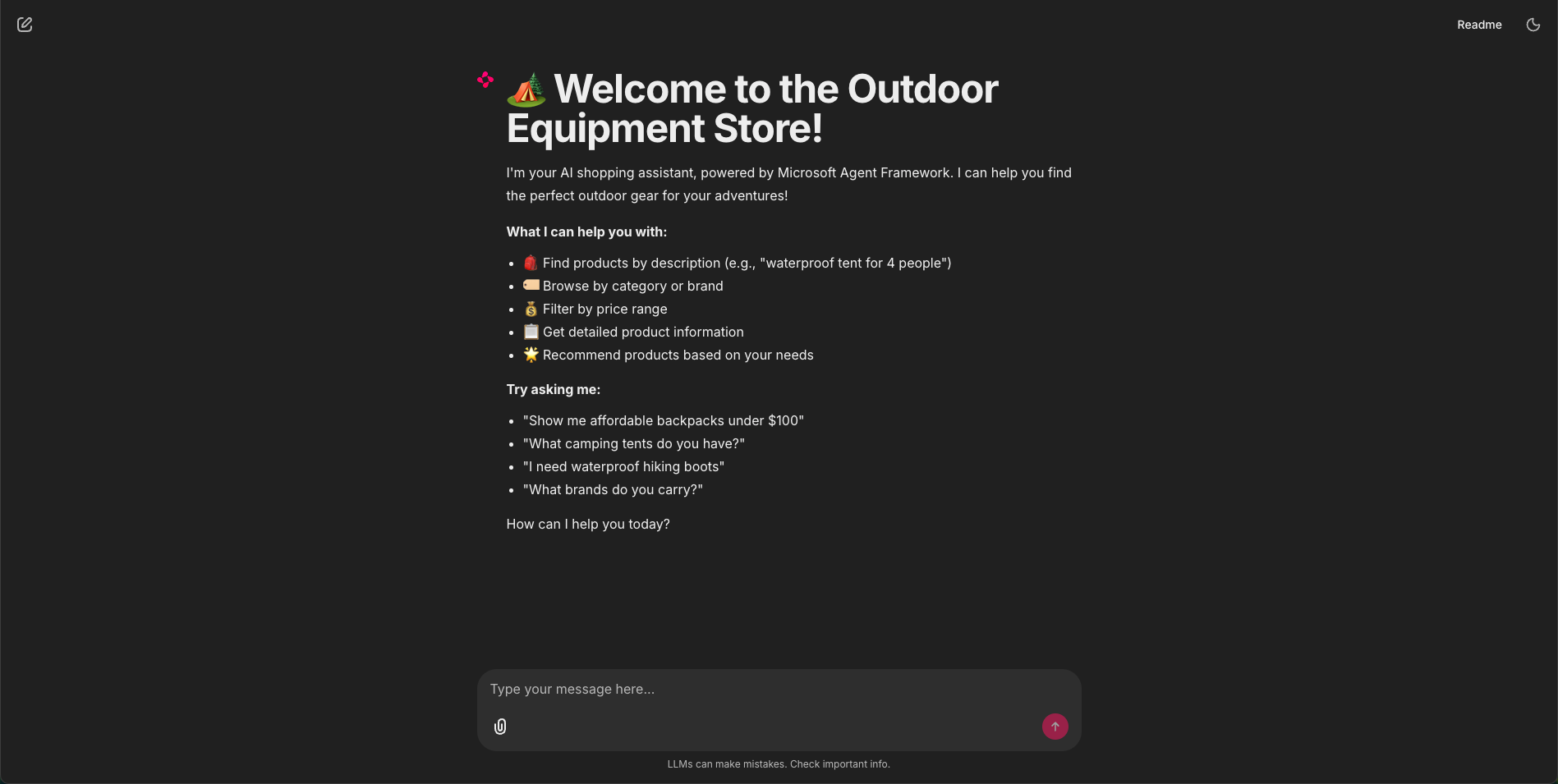
Related MCP server: MCP Tooling Lab
🌟 Key Features
Semantic Search: Uses embeddings for intelligent product matching
Multi-Filter Support: Category, brand, and price filtering
Natural Language: Understands queries like "affordable waterproof tent"
8 MCP Methods: Comprehensive product search capabilities
Scalable: Can handle thousands of products
Production-Ready: HTTP server with proper error handling
Well-Tested: Full test suite with 10 test cases
📋 MCP Server Methods
The system provides 8 powerful MCP methods:
# | Method Name | Description |
1 | search_products
| Search products using natural language |
2 | search_products_by_category
| Search within a specific category |
3 | search_products_by_brand
| Search products from a specific brand |
4 | search_products_by_category_and_brand
| Combined category and brand search |
5 | get_categories
| Get all available product categories |
6 | get_brands
| Get all available brands |
7 | get_product_description
| Get complete product information by name |
8 | search_products_with_price_filter
| Search with price constraints (less/greater than) |
🛠️ Technology Stack
ChromaDB: Vector database for semantic search
Azure OpenAI: Text embeddings and chat completions
FastMCP: HTTP MCP server framework
Microsoft Agent Framework: AI agent orchestration
Chainlit: Interactive chatbot UI
Python 3.11: Core programming language
Pandas: Data processing
Uvicorn: ASGI server
🚀 Quick Start
Prerequisites
Installation
Clone the repository:
git clone https://github.com/yourusername/Products-Recommendation-MCP-MAF.git
cd Products-Recommendation-MCP-MAF
Create and activate virtual environment:
python3.11 -m venv venv
source venv/bin/activate  # On Windows: venv\Scripts\activate
Install dependencies:
pip install -r requirements.txt
Configure environment variables:
Copy .env.example to .env and fill in your Azure OpenAI credentials:
Edit .env:
AZURE_OPENAI_ENDPOINT=https://your-resource.openai.azure.com
AZURE_OPENAI_API_KEY=your-api-key-here
AZURE_OPENAI_API_VERSION=2024-12-01-preview
AZURE_OPENAI_DEPLOYMENT_NAME=gpt-4o-mini
AZURE_OPENAI_EMBEDDING_DEPLOYMENT=text-embedding-ada-002
TOP_K=50
CHROMA_PERSIST_DIRECTORY=./chroma_db
Data Preparation
Create price categories:
python create_price_categories.py
This generates products_v2.csv with quantile-based price categories:
Budget-Friendly: ≤ Q1 (25th percentile)
Affordable: Q1 < price ≤ Q2 (median)
Mid-Range: Q2 < price ≤ Q3 (75th percentile)
Premium: > Q3
Index products into ChromaDB:
This creates embeddings and stores products in ChromaDB with metadata.
Running the System
Option 1: Test with MCP Client (Command Line)
Start the MCP Server (Terminal 1):
The server will be available at: http://localhost:8000/mcp
Test with Custom MCP Client (Terminal 2):
python test_mcp_client_custom.py
This runs a comprehensive test suite with 10 different scenarios.
Test with Microsoft Agent Framework (Terminal 2):
python test_mcp_client_maf.py
This tests the same scenarios using Microsoft Agent Framework.
Option 2: Interactive Chatbot with Chainlit (Recommended)
Start the MCP Server (Terminal 1):
Start the Chainlit Chatbot (Terminal 2):
chainlit run chainlit_app.py -w
The chatbot UI will open automatically at http://localhost:8000 (or another port).
Try these example queries:
"Show me waterproof tents under $300"
"What hiking boots do you have?"
"I need a lightweight backpack for day trips"
"What categories are available?"
"Find me products from the HikeMate brand"
📁 Project Structure
Products-Recommendation-MCP-MAF/
├── .chainlit/                        # Chainlit configuration
│   └── config.toml                   # UI and app settings
├── .env.example                      # Environment configuration template
├── .gitignore                        # Git ignore rules
├── README.md                         # This file
├── README_CHAINLIT.md                # Chainlit app documentation
├── requirements.txt                  # Python dependencies
├── products.csv                      # Original product data
├── create_price_categories.py        # Script to generate price categories
├── index_products.py                 # Script to index products in ChromaDB
├── mcp_server.py                     # FastMCP HTTP server
├── test_mcp_client_custom.py         # Custom MCP client test suite
├── test_mcp_client_maf.py            # Microsoft Agent Framework test suite
└── chainlit_app.py                   # Chainlit chatbot application
🧪 Testing Examples
Example 1: Natural Language Search
Query: "I'm looking for a waterproof tent for camping"
Tool: search_products
Result: Returns tents with waterproof features, ranked by relevance
Example 2: Category Filter
Query: "Show me hiking boots from the Hiking Footwear category"
Tool: search_products_by_category
Arguments: {query: "hiking boots", category: "Hiking Footwear"}
Example 3: Price Filter
Query: "Find hiking clothing items that cost less than 100 USD"
Tool: search_products_with_price_filter
Arguments: {
  query: "Hiking Clothing",
  price_operator: "less_than",
  price_threshold: 100
}
Example 4: Product Details
Query: "Tell me everything about the TrailMaster X4 Tent"
Tool: get_product_description
Arguments: {product_name: "TrailMaster X4 Tent"}
🔧 Configuration
Environment Variables
Variable | Description | Example |
AZURE_OPENAI_ENDPOINT
| Azure OpenAI endpoint URL | https://xxx.openai.azure.com
|
AZURE_OPENAI_API_KEY
| Azure OpenAI API key | your-key-here
|
AZURE_OPENAI_API_VERSION
| API version | 2024-12-01-preview
|
AZURE_OPENAI_DEPLOYMENT_NAME
| Chat model deployment | gpt-4o-mini
|
AZURE_OPENAI_EMBEDDING_DEPLOYMENT
| Embedding model deployment | text-embedding-ada-002
|
TOP_K
| Default number of results | 50
|
CHROMA_PERSIST_DIRECTORY
| ChromaDB storage path | ./chroma_db
|
📊 Data Schema
Products CSV Format
id,name,price,category,brand,description
1,TrailMaster X4 Tent,250.0,Tents,OutdoorLiving,"Unveiling the TrailMaster..."
ChromaDB Metadata
Each product is stored with:
name: Product name
category: Product category
brand: Product brand
price: Numeric price
price_category: Text price category (Budget-Friendly, Affordable, Mid-Range, Premium)
description: Full product description
Embedding Document Format
Documents for embedding concatenate:
{name} {category} {brand} {description} {price_category}
🔍 MCP Server API
search_products
Search for similar products using natural language.
Parameters:
query (string): Natural language search query
limit (integer, optional): Maximum results (default: TOP_K)
search_products_by_category
Search products within a specific category.
Parameters:
query (string): Search query
category (string): Category name
limit (integer, optional): Maximum results
search_products_by_brand
Search products from a specific brand.
Parameters:
query (string): Search query
brand (string): Brand name
limit (integer, optional): Maximum results
search_products_by_category_and_brand
Search with both category and brand filters.
Parameters:
query (string): Search query
category (string): Category name
brand (string): Brand name
limit (integer, optional): Maximum results
get_categories
Get all unique product categories.
Parameters: None
Returns: Sorted list of category names
get_brands
Get all unique product brands.
Parameters: None
Returns: Sorted list of brand names
get_product_description
Get complete product information by name.
Parameters:
Returns: Product metadata dictionary
search_products_with_price_filter
Search products with price constraints.
Parameters:
query (string): Search query
price_operator (string): "less_than", "greater_than", "less_or_equal", "greater_or_equal"
price_threshold (float): Price value to compare
limit (integer, optional): Maximum results
🛠️ Troubleshooting
ChromaDB collection not found
Solution: Run python index_products.py to create and populate the collection
MCP server connection refused
Solution: Ensure the server is running on port 8000 and not blocked by firewall
Azure OpenAI authentication error
Solution: Verify your API key and endpoint in .env file
No results from search
Solution: Check if products are indexed correctly by running the verification in index_products.py
📝 Development
Adding New Products
Add products to products.csv
Run python create_price_categories.py to regenerate price categories
Run python index_products.py to re-index all products
Modifying Search Behavior
Adjust TOP_K in .env to change default result count
Modify embedding document format in index_products.py
Customize price categories in create_price_categories.py
Extending MCP Methods
Add new tools in mcp_server.py using the @mcp.tool() decorator:
@mcp.tool()
def your_new_method(param: str) -> Dict:
    """Your method description"""
    # Implementation
    return result
🔐 Security
Store API keys securely in .env file (never commit to version control)
Use HTTPS in production deployments
Consider adding authentication to the MCP server
Implement rate limiting for public-facing deployments
📚 References
📄 License
This project is available under the MIT License.
🤝 Contributing
Contributions are welcome! Please:
Fork the repository
Create a feature branch
Test thoroughly with the provided test suite
Submit a pull request
Version: 1.0.0
Status: Production Ready ✅
