
Allows AI assistants to manage and operate Terraform environments, including reading configuration files, analyzing plan outputs, applying configurations, managing state, and creating/modifying configurations
Click on "Install Server".
Wait a few minutes for the server to deploy. Once ready, it will show a "Started" state.
In the chat, type
@followed by the MCP server name and your instructions, e.g., "@tfmcpanalyze my Terraform configuration for security issues"
That's it! The server will respond to your query, and you can continue using it as needed.
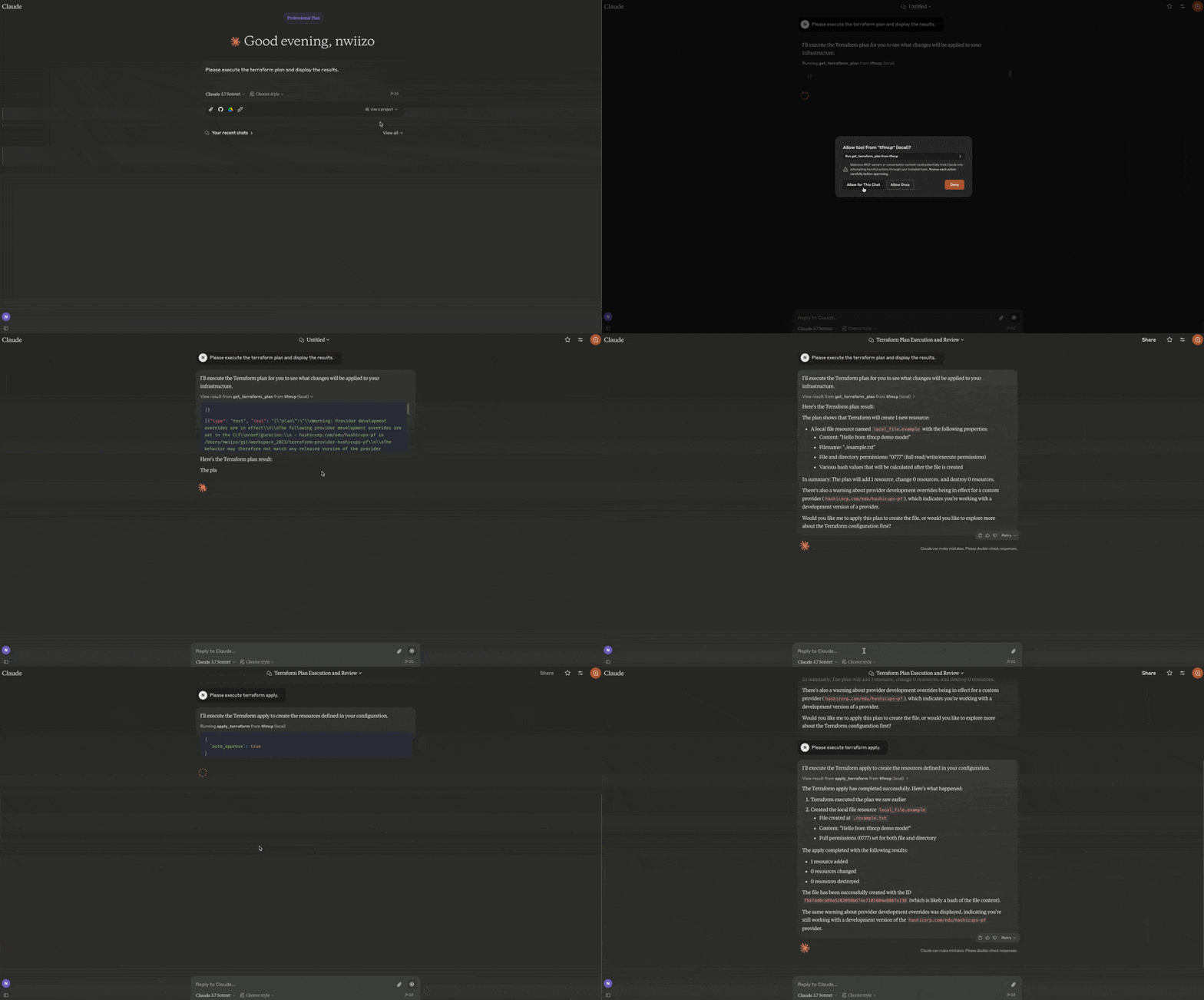
Here is a step-by-step guide with screenshots.
tfmcp: Terraform Model Context Protocol Tool
⚠️ This project includes production-ready security features but is still under active development. While the security system provides robust protection, please review all operations carefully in production environments. ⚠️
tfmcp is a command-line tool that helps you interact with Terraform via the Model Context Protocol (MCP). It allows LLMs to manage and operate your Terraform environments, including:
🎮 Demo
See tfmcp in action with Claude Desktop:
Reading Terraform configuration files
Analyzing Terraform plan outputs
Applying Terraform configurations
Managing Terraform state
Creating and modifying Terraform configurations
Related MCP server: terraform-cloud-mcp
🎉 Latest Release
The latest version of tfmcp (v0.1.9) is now available on Crates.io! You can easily install it using Cargo:
🆕 What's New in v0.1.9
📊 Plan Analysis: Structured plan analysis with risk scoring and recommendations
🔍 State Analysis: Deep state inspection with drift detection
📁 Workspace Management: Full terraform workspace support (list, show, new, select, delete)
📥 Import Helper: Guided resource import with config generation
✨ Code Formatting: terraform fmt integration
🔗 Dependency Graph: terraform graph visualization with DOT output
📤 Output Management: terraform output access
🏷️ Taint/Untaint: Resource taint management (with deprecation notices for 1.5+)
🔄 State Refresh: Explicit state refresh operations
📦 Provider Info: Detailed provider information with lock file parsing
🦀 Rust Edition 2024: Migrated to Rust Edition 2024 (requires Rust 1.85.0+)
Features
🚀 Terraform Integration Deeply integrates with the Terraform CLI to analyze and execute operations.
📄 MCP Server Capabilities Runs as a Model Context Protocol server, allowing AI assistants to access and manage Terraform.
🔬 Module Health Analysis Whitebox approach to Infrastructure as Code with cohesion/coupling analysis, health scoring, and refactoring suggestions based on software engineering principles.
📊 Resource Dependency Graph Visualize resource relationships including explicit depends_on and implicit reference dependencies.
📦 Module Registry Integration Search and explore Terraform modules from the registry, get module details and versions.
🔐 Enterprise Security Production-ready security controls with configurable policies, audit logging, and access restrictions.
📊 Advanced Analysis Detailed Terraform configuration analysis with best practice recommendations and security checks.
📋 Guideline Compliance (v0.1.8) Future Architect Terraform guidelines integration with compliance scoring, secret detection, and variable quality checks.
⚡️ Blazing Fast High-speed processing powered by the Rust ecosystem with optimized parsing and caching.
🛠️ Automatic Setup Automatically creates sample Terraform projects when needed, ensuring smooth operation even for new users.
🐳 Docker Support Run tfmcp in a containerized environment with all dependencies pre-installed.
Installation
From Source
From Crates.io
Using Docker
Requirements
Rust (edition 2021)
Terraform CLI installed and available in PATH
Claude Desktop (for AI assistant integration)
Docker (optional, for containerized deployment)
Usage
Using Docker
When using Docker, you can run tfmcp commands like this:
Integrating with Claude Desktop
To use tfmcp with Claude Desktop:
If you haven't already, install tfmcp:
cargo install tfmcpAlternatively, you can use Docker:
docker build -t tfmcp .Find the path to your installed tfmcp executable:
which tfmcpAdd the following configuration to
~/Library/Application\ Support/Claude/claude_desktop_config.json:
If you're using Docker with Claude Desktop, you can set up the configuration like this:
Restart Claude Desktop and enable the tfmcp tool.
tfmcp will automatically create a sample Terraform project in
~/terraformif one doesn't exist, ensuring Claude can start working with Terraform right away. The sample project is based on the examples included in theexample/demodirectory of this repository.
MCP Tools
tfmcp provides 31 MCP tools for AI assistants:
Core Terraform Operations
Tool | Description |
| Initialize Terraform working directory |
| Generate and show execution plan |
| NEW Analyze plan with risk scoring and recommendations |
| Apply Terraform configuration |
| Destroy Terraform-managed infrastructure |
| Validate configuration syntax |
| Detailed validation with guidelines |
| Show current state |
| NEW Analyze state with drift detection |
| List all managed resources |
| Change active project directory |
Workspace & State (v0.1.9)
Tool | Description |
| NEW Manage workspaces (list, show, new, select, delete) |
| NEW Import existing resources |
| NEW Taint/untaint resources |
| NEW Refresh state |
Code & Output (v0.1.9)
Tool | Description |
| NEW Format code |
| NEW Generate dependency graph |
| NEW Get output values |
| NEW Get provider info with lock file |
Analysis & Security
Tool | Description |
| Analyze configuration |
| Module health with cohesion/coupling metrics |
| Resource dependencies visualization |
| Refactoring suggestions |
| Security scan with secret detection |
Registry
Tool | Description |
| Search providers |
| Provider details |
| Provider documentation |
| Search modules |
| Module details |
| Latest module version |
| Latest provider version |
Logs and Troubleshooting
The tfmcp server logs are available at:
Common issues and solutions:
Claude can't connect to the server: Make sure the path to the tfmcp executable is correct in your configuration
Terraform project issues: tfmcp automatically creates a sample Terraform project if none is found
Method not found errors: MCP protocol support includes resources/list and prompts/list methods
Docker issues: If using Docker, ensure your container has proper volume mounts and permissions
Environment Variables
Core Configuration
TERRAFORM_DIR: Set this to specify a custom Terraform project directory. If not set, tfmcp will use the directory provided by command line arguments, configuration files, or fall back to~/terraform. You can also change the project directory at runtime using theset_terraform_directorytool.TFMCP_LOG_LEVEL: Set todebug,info,warn, orerrorto control logging verbosity.TFMCP_DEMO_MODE: Set totrueto enable demo mode with additional safety features.
Security Configuration
TFMCP_ALLOW_DANGEROUS_OPS: Set totrueto enable apply/destroy operations (default:false)TFMCP_ALLOW_AUTO_APPROVE: Set totrueto enable auto-approve for dangerous operations (default:false)TFMCP_MAX_RESOURCES: Set maximum number of resources that can be managed (default: 50)TFMCP_AUDIT_ENABLED: Set tofalseto disable audit logging (default:true)TFMCP_AUDIT_LOG_FILE: Custom path for audit log file (default:~/.tfmcp/audit.log)TFMCP_AUDIT_LOG_SENSITIVE: Set totrueto include sensitive information in audit logs (default:false)
Security Considerations
tfmcp includes comprehensive security features designed for production use:
🔒 Built-in Security Features
Access Controls: Automatic blocking of production/sensitive file patterns
Operation Restrictions: Dangerous operations (apply/destroy) disabled by default
Resource Limits: Configurable maximum resource count protection
Audit Logging: Complete operation tracking with timestamps and user identification
Directory Validation: Security policy enforcement for project directories
🛡️ Security Best Practices
Default Safety: Apply/destroy operations are disabled by default - explicitly enable only when needed
Review Plans: Always review Terraform plans before applying, especially AI-generated ones
IAM Boundaries: Use appropriate IAM permissions and role boundaries in cloud environments
Audit Monitoring: Regularly review audit logs at
~/.tfmcp/audit.logFile Patterns: Built-in protection against accessing
prod*,production*, andsecret*patternsDocker Security: When using containers, carefully consider volume mounts and exposed data
⚙️ Production Configuration
Contributing
Contributions are welcome! Please feel free to submit a Pull Request.
Fork the repository
Create your feature branch (
git checkout -b feature/amazing-feature)Run quality checks before committing:
cargo fmt --all cargo clippy --all-targets --all-features cargo test --all-featuresCommit your changes (
git commit -m 'Add some amazing feature')Push to the branch (
git push origin feature/amazing-feature)Open a Pull Request
Release Process
Releases are done manually (automated CI release is disabled):
Update version in
Cargo.tomlCreate GitHub release:
gh release create v0.1.x --title "v0.1.x - Title" --notes "Release notes"Publish to crates.io:
cargo publish
Roadmap
Here are some planned improvements and future features for tfmcp:
Completed
Basic Terraform Integration
Core integration with Terraform CLI for analyzing and executing operations.MCP Server Implementation
Initial implementation of the Model Context Protocol server for AI assistants.Automatic Project Creation
Added functionality to automatically create sample Terraform projects when needed.Claude Desktop Integration
Support for seamless integration with Claude Desktop.Core MCP Methods
Implementation of essential MCP methods including resources/list and prompts/list.Error Handling Improvements
Better error handling and recovery mechanisms for robust operation.Dynamic Project Directory Switching
Added ability to change the active Terraform project directory without restarting the service.Crates.io Publication
Published the package to Crates.io for easy installation via Cargo.Docker Support
Added containerization support for easier deployment and cross-platform compatibility.Security Enhancements Comprehensive security system with configurable policies, audit logging, access controls, and production-ready safety features.
Module Health Analysis (v0.1.6) Whitebox approach to IaC with cohesion/coupling metrics, health scoring, and refactoring suggestions.
Resource Dependency Graph (v0.1.6) Visualization of resource relationships including explicit and implicit dependencies.
Module Registry Integration (v0.1.6) Search and explore Terraform modules from the registry.
Comprehensive Testing Framework 85+ tests including integration tests with real Terraform configurations.
RMCP SDK Migration (v0.1.8) Migrated to official RMCP SDK with proper tool annotations for better MCP compliance.
Future Architect Guidelines (v0.1.8) Terraform coding standards compliance checks with secret detection and variable quality validation.
In Progress
Multi-Environment Support Add support for managing multiple Terraform environments, workspaces, and modules.
Planned
Expanded MCP Protocol Support Implement additional MCP methods and capabilities for richer integration with AI assistants.
Performance Optimization
Optimize resource usage and response times for large Terraform projects.Cost Estimation
Integrate with cloud provider pricing APIs to provide cost estimates for Terraform plans.Interactive TUI
Develop a terminal-based user interface for easier local usage and debugging.Integration with Other AI Platforms
Extend beyond Claude to support other AI assistants and platforms.Plugin System
Develop a plugin architecture to allow extensions of core functionality.
License
This project is licensed under the MIT License - see the LICENSE file for details.