Depwire


Your AI doesn't know your architecture. Depwire does.
What makes Depwire different
16 programming languages, plus Angular templates. Depwire parses symbols and builds dependency relationships across the constructs it supports. It records relationships it cannot resolve instead of inventing an edge.
Depwire builds a deterministic dependency graph from source parsing, without embeddings or similarity search. For a proposed change, it traverses the relationships present in that graph to show known dependents, import chains, and health movement. Results depend on the language constructs and files the parser can analyze.
Not a build graph either. Depwire tracks symbol-level relationships for What If simulation, graph-aware security scanning, and blast radius analysis.
Related MCP server: Graft
Contents
Depwire provides graph context to AI coding assistants. Parse a project to inspect recorded relationships, assess health, and simulate a proposed change.
⭐ If Depwire saves you from a broken build, star the repo — it helps this project grow.
Performance evidence
The previously published agent benchmark has been withdrawn after an audit found
that the task prompt exposed its answer key, the scored file set was narrower
than the change required by the monorepo, and one arm started in a different
working directory. Three corrected exploratory sessions have since been run;
they do not establish a performance or correctness advantage. No conclusion
from the withdrawn runs should be cited.
Audit and corrected harness →
The problem
AI coding tools are getting smarter. But they still have a fundamental blind spot: they don't know your architecture before they touch it.
For example, you ask an AI assistant to delete a utility file. It deletes it without warnings.
Then the build reveals downstream consumers that still import it.
The assistant saw one file without inspecting those consumers.
This isn't a model problem. It's a context problem. The AI is flying blind.
The infrastructure layer


Depwire is the context and safety layer for AI-generated code.
Depwire builds a dependency graph from supported source constructs using tree-sitter and serves it to AI assistants through 24 MCP tools.
How it works:
Local — the CLI analyzes source code on your machine and collects no usage telemetry. It does not upload source code, file names, graph data or analysis. Applicable security scans run dependency vulnerability and supply-chain checks by default; these may contact package registries and public advisory databases. connect_repo accesses GitHub when given a GitHub URL. The What If browser page loads D3 from a CDN. Cloud is a separate service.
Security scanner — runs local code checks and applicable dependency audits by default; no Depwire API key is required.
Token-efficient — Depwire serves pre-computed graph data so agents can request focused dependency context instead of broad file dumps.
Deterministic — tree-sitter provides consistent structural parsing without relying on model inference.
Start here
npm install -g depwire-cli
Three commands for a supported codebase:
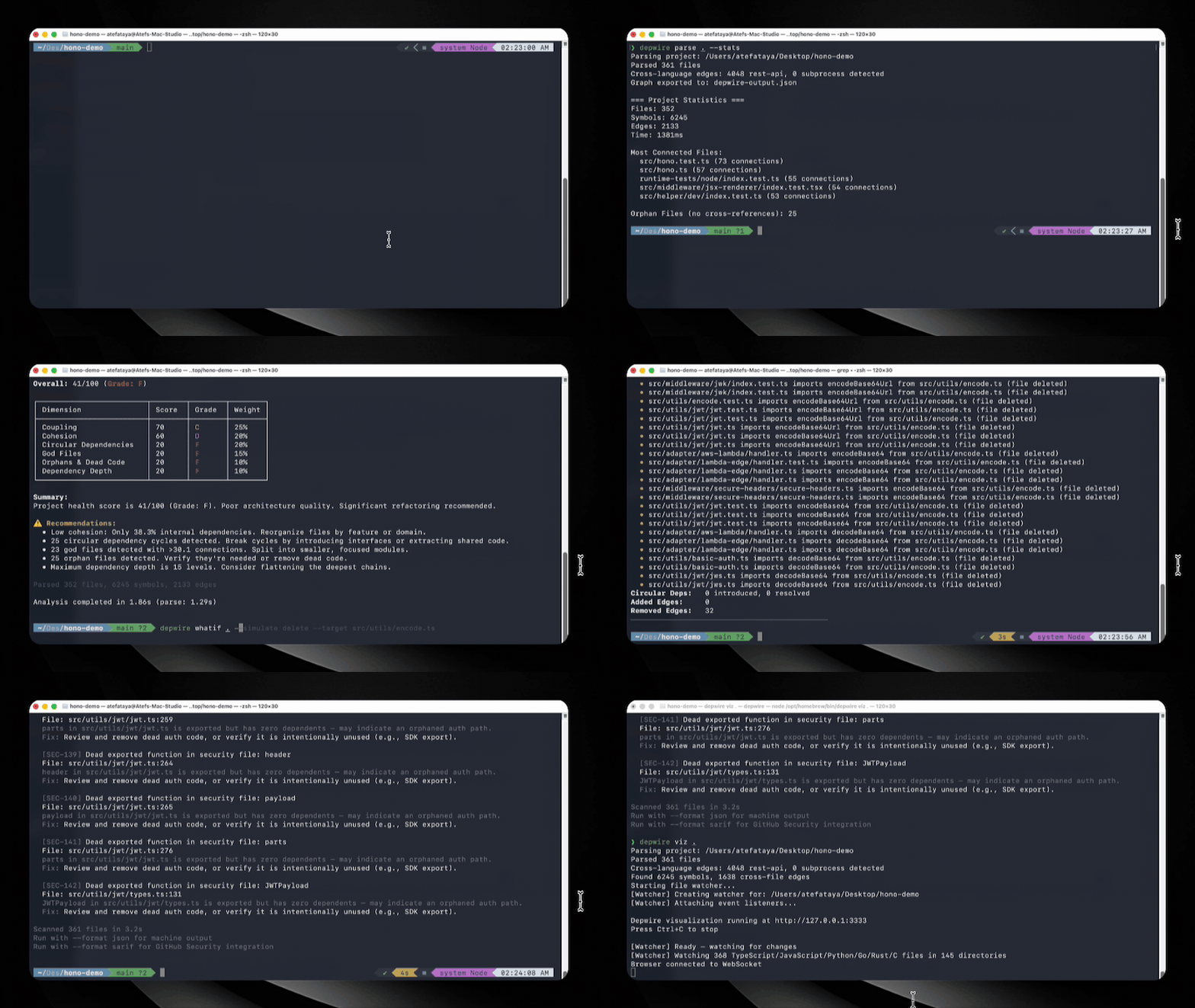
depwire whatif     # simulate a proposed change
depwire security   # scan for supported finding patterns
depwire viz        # view the recorded dependency graph
Tested on real-world projects
Project | Language | Files | Symbols | Edges | Health |
google/guice | Java (multi-module, 13 modules) | 647 | 30,592 | 10,081 | 31/100 |
honojs/hono | TypeScript | 352 | 6,462 | 2,194 | 41/100 |
apache/commons-lang | Java (single-module) | 624 | 29,723 | 9,037 | — |
pallets/flask | Python | 79 | 2,005 | 851 | — |
dart-lang/shelf | Dart | 108 | 1,639 | 219 | — |
rstudio/plumber | R | 197 | 1,194 | 219 | — |
payloadcms/payload | TypeScript | 645 | 9,292 | 3,511 | — |
Historical depwire parse runs on public repositories, last validated with v1.8.2 (June 2026).
Pre-1.9.0 measurement. v1.9.0 fixed parser bugs (double-emitted symbols in the TypeScript/Python/C#/C++/Java parsers, dropped type-only-import edges, false orphans) that directly affect symbol counts, edge counts, and health scores. Later releases changed graph contents and health methodology again. These numbers have not been re-measured and are not current results.
What If simulation
Know the blast radius before you touch anything.
depwire whatif . --simulate delete --target src/utils/encode.ts
Real output on honojs/hono — 352 files, 6,245 symbols:
Health Score:    41 → 41  (+0 → unchanged)
Affected Nodes:  29
Broken Imports:  30
• src/utils/jwt/jwt.ts imports decodeBase64Url
• src/adapter/aws-lambda/handler.ts imports encodeBase64
• src/utils/basic-auth.ts imports decodeBase64
[27 more...]
Removed Edges:   32
Pre-1.9.0 measurement — captured before the v1.9.0 parser fixes; not re-measured.
The simulation operates on a loaded graph without changing source files; loading or parsing the graph requires file I/O.
Five operations:
depwire whatif . --simulate delete --target src/utils/encode.ts
depwire whatif . --simulate move --target src/utils/encode.ts --destination src/core/encode.ts
depwire whatif . --simulate rename --target src/utils/encode.ts --destination src/utils/encoder.ts
depwire whatif . --simulate split --target src/services/auth.ts --symbols "validateToken,refreshToken"
depwire whatif . --simulate merge --target src/utils/helpers.ts --merge-target src/utils/formatters.ts
Run without --simulate to open the browser UI — side-by-side arc diagrams showing current vs simulated state.
Cross-module dependency intelligence
For multi-module Maven and Gradle projects, Depwire resolves imports across module boundaries — not just within a single module.
Example: simulating deletion of Injector.java in google/guice (a 13-module Java DI framework):
$ depwire whatif . --simulate delete --target core/src/com/google/inject/Injector.java

Action:          DELETE core/src/com/google/inject/Injector.java
Affected Nodes:  128
Broken Imports:  124  (cross-module: 106 across 10 extension modules)
Pre-1.9.0 measurement — google/guice is a Java project; the Java parser's double-emission bug (fixed in v1.9.0) affects this figure. Not re-measured.
Cross-module resolution lets impact analysis report supported relationships across module boundaries.
Supported build systems:
Maven (pom.xml with <modules> declarations, recursive nested modules)
Gradle (settings.gradle / settings.gradle.kts with include() declarations)
Both standard (src/main/java) and non-standard (src/) source layouts are supported.
Security scanner
Depwire's security scanner reports findings locally and can fail a configured CI gate.
depwire security .                        # full repo scan
depwire security . --target src/auth.ts   # single file
depwire security . --format sarif         # GitHub Security tab integration
depwire security . --fail-on high         # CI gate — exit 1 if HIGH or above
depwire security . --class secrets         # specific check only
depwire security . --no-dependency-audit   # skip dependency checks and their network requests
10 check categories — dependency CVEs, process safety, credential management, path safety, authentication safety, input validation, information disclosure, cryptography weaknesses, output encoding safety, and architecture-level risks.
Applicable security scans run dependency vulnerability and supply-chain checks by default; these may contact package registries and public advisory databases. To skip those checks and their network requests, use --no-dependency-audit; the other checks still run. The security_scan MCP tool and SDK accept dependencyAudit: false for the same behavior. Selecting classes that exclude dependency checks, such as --class secrets, also skips the audit request.
Graph-aware severity uses recorded reachability from MCP tools and HTTP routes when classifying findings.
Available as MCP tool security_scan and via depwire-cli/sdk.
Pre-action verification
Analyze a proposed change before applying it. Reports broken imports, cyclic-group changes when a resolved after-graph is available, health movement, and security findings. Export-only comparisons of edited content or unified diffs cannot establish cyclic-group safety: they return cyclicGroupChanges.status: not_comparable and do not certify the change as safe.
depwire verify-change --file src/auth.ts --content-from new-auth.ts
depwire verify-change --diff changes.patch
depwire verify-change --file src/auth.ts --content-from new-auth.ts --json
cat new-auth.ts | depwire verify-change --file src/auth.ts
CI integration:
depwire verify-change --diff pr.patch --fail-on-warnings --quiet
# exits 1 for medium risk, 2 for high risk
Available as MCP tool verify_change and CLI command depwire verify-change.
Structural diff between commits
Compare the dependency graph between any two git refs — branches, tags, commit hashes, HEAD~N.
depwire diff main feature/auth-refactor
depwire diff HEAD~5 HEAD --verbose
depwire diff v1.5.0 v1.6.0 --json | jq
The diff uses graph comparisons without an LLM. It temporarily stashes uncommitted changes and attempts to restore them after analysis; a failed restore is reported for manual recovery.
Options: --json (machine-readable), --verbose (every symbol/edge by name), --no-security / --no-health (faster runs).
Visualization
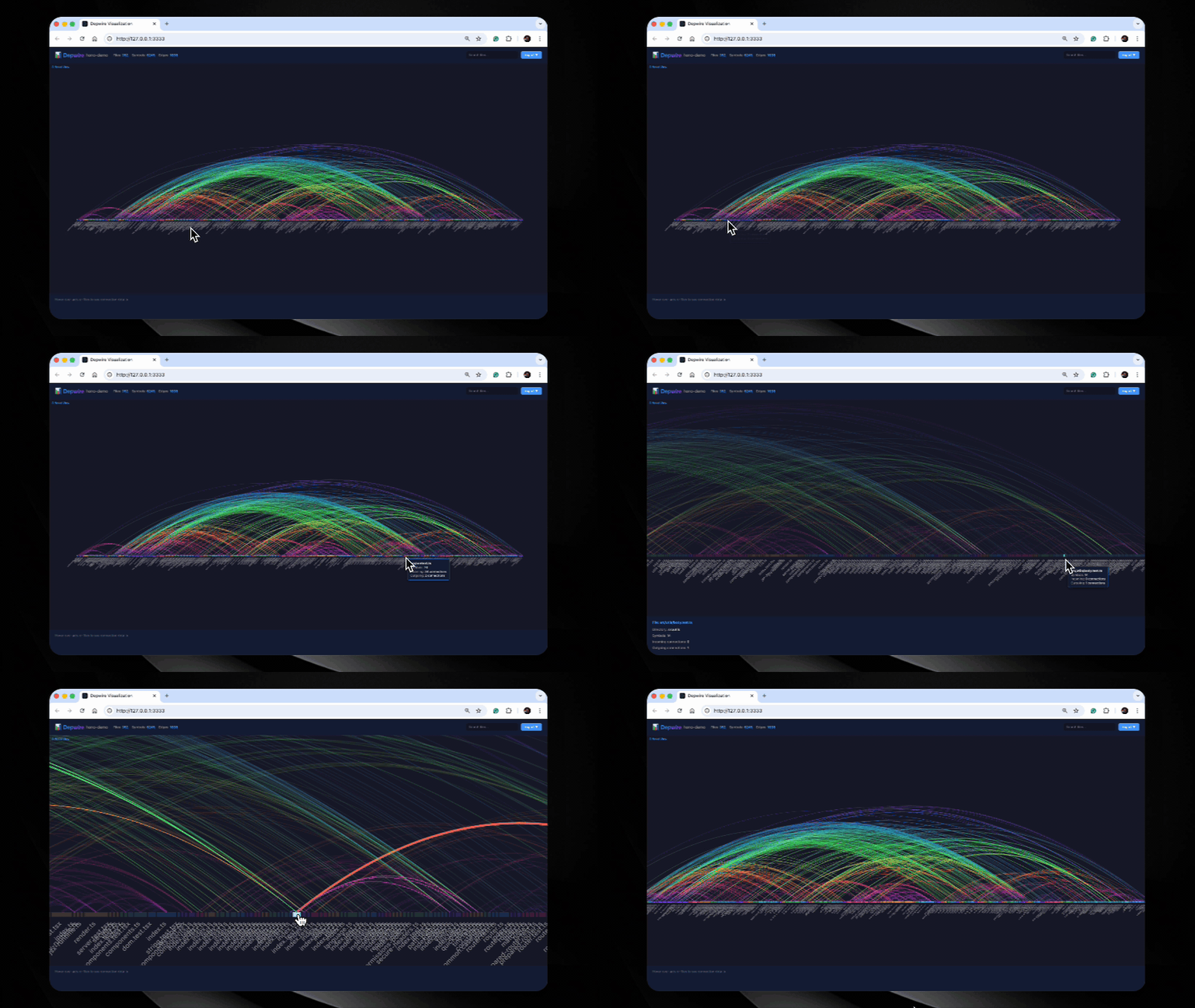
Interactive arc diagram of files and relationships present in the graph. Hover to inspect, click to filter, and export as PNG or SVG.
Temporal graph

Watch recorded architecture change over git history. A timeline slider moves through commits and updates the arc diagram.
All commands
Command | Description |
depwire viz
| Interactive arc diagram in browser |
depwire whatif
| Simulate changes before touching code |
depwire verify-change
| Analyze a proposed change — broken imports, health delta, security, and comparison limits |
depwire security
| Scan for vulnerabilities — graph-aware severity |
depwire health
| 0-100 architecture health score across 6 dimensions |
depwire dead-code
| Find dead-code candidates with confidence; JSON output includes reasonCode |
depwire docs
| Generate 13 architecture documents |
depwire temporal
| Visualize architecture evolution over git history |
depwire parse
| Parse and export dependency graph as JSON |
depwire prompt
| Get a graph-first workflow prompt for your AI agent |
depwire diff
| Structural diff between two git commits — symbols, edges, health, security |
depwire mcp
| Start MCP server for AI coding assistants |
Commands accept a project path; depwire parse uses the supplied directory or the current directory when omitted.
depwire prompt — graph-first workflow for AI agents
# Get the graph-first workflow prompt for your agent
depwire prompt                    # generic
depwire prompt --tool claude      # Claude Code optimized
depwire prompt --tool cline       # Cline optimized
depwire prompt --tool codex       # Codex optimized
Paste the output as your agent's system context before starting a complex task.
MCP server — AI integration
Connect Depwire to any MCP-compatible AI tool. Your AI gets 24 tools it can call autonomously.
Claude Desktop — add to ~/Library/Application Support/Claude/claude_desktop_config.json:
{
  "mcpServers": {
    "depwire": {
      "command": "npx",
      "args": ["-y", "depwire-cli", "mcp"]
    }
  }
}
Using a saved graph for MCP startup:
# Parse once (writes depwire-output.json)
depwire parse .

# Output defaults to the parsed project directory; --output takes precedence
depwire parse ./services/api --output ./artifacts

# MCP starts from the saved graph
depwire mcp .

# Flags:
depwire mcp . --from-cache   # error if no cache found
depwire mcp . --no-cache     # force full re-parse
depwire parse [directory] reads the specified directory, or cwd when omitted
(without walking up to an ancestor project). It writes depwire-output.json to
--output <dir> when provided, otherwise to [directory], otherwise cwd.
Relative paths are resolved from cwd; --output is a directory.
Parse outcome | Exit code | Result |
One or more files parsed successfully | 0 | Graph exported |
Some files parsed, some failed | 0 | Partial graph exported; non-fatal warning on stderr |
No files parsed (empty, unsupported, excluded, oversized, or all failed) | 2 | Clear stderr message; no graph exported |
Directory traversal, graph construction, or output write failed | 1 | Error on stderr |
SDK callers receive per-file failures in parseProject(...).errorFiles and must
check both length and errorFiles. The exported graph format is unchanged;
partial-parse diagnostics are not embedded in the JSON graph. An unsuccessful
parse does not replace or delete a previous output file: CI must check the exit
code before consuming that file.
Cursor — Settings → Features → Experimental → Enable MCP → Add Server:
Command: npx
Args: -y depwire-cli mcp
Auto-generated project context
After running depwire parse ., Depwire generates .depwire/AGENTS.md — a project-specific context file containing module structure, key files, health summary, and MCP quick-start commands.
To direct Claude Code to the generated context, reference it from your CLAUDE.md:
# In your project root CLAUDE.md:
echo "## Depwire Context" >> CLAUDE.md
echo "Read .depwire/AGENTS.md for codebase architecture." >> CLAUDE.md
The reference makes the generated project context available without an MCP tool call.
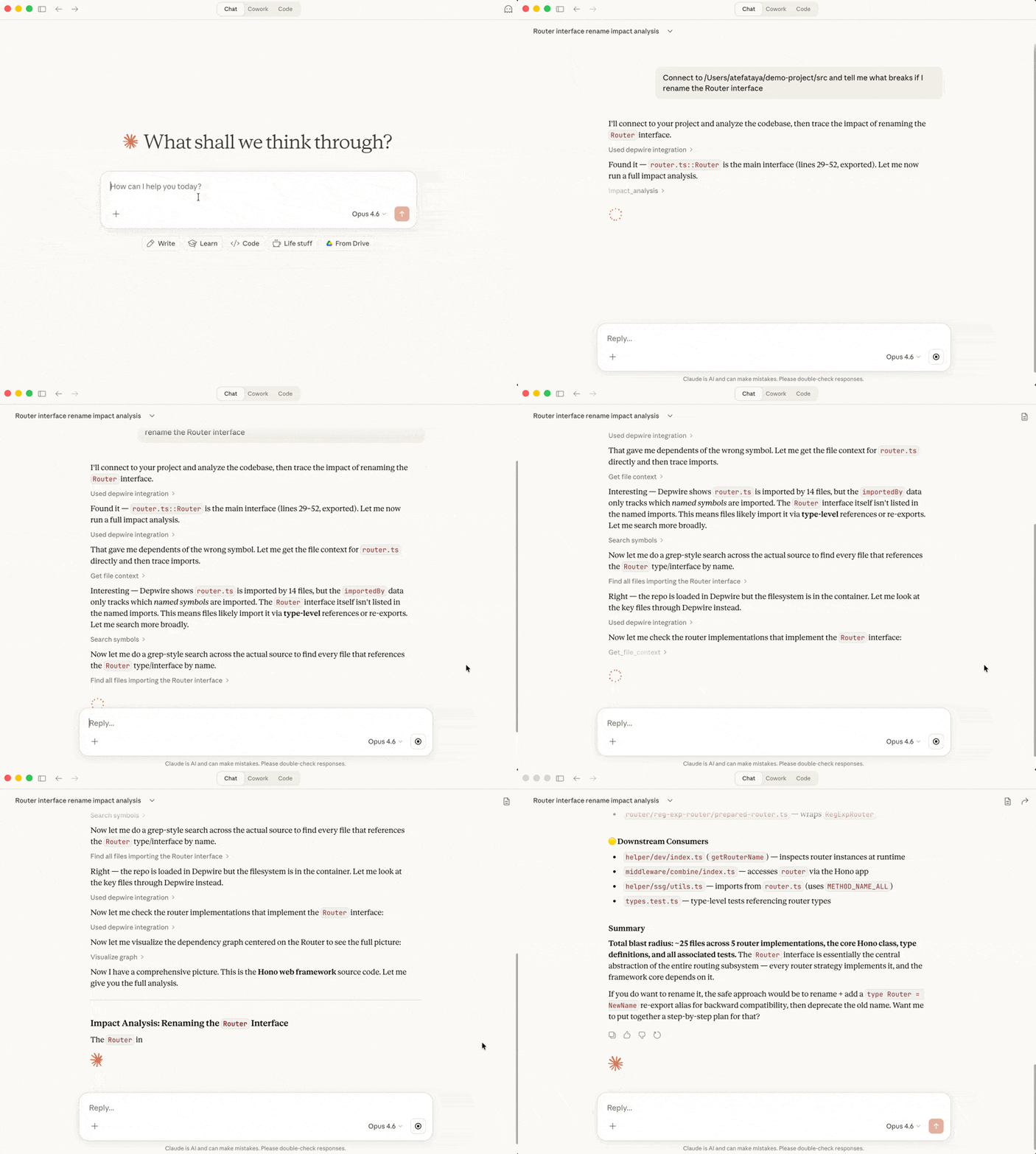
24 MCP tools
Tool | Description |
connect_repo
| Connect to any local project or GitHub repo |
get_architecture_summary
| High-level project overview |
get_file_context
| Full context — imports, exports, dependents. Includes cross-language connections. |
get_dependencies
| What does a symbol depend on? |
get_dependents
| What depends on this symbol? |
get_symbol_info
| Look up any symbol's details |
search_symbols
| Find symbols by name across the codebase |
list_files
| List all files with stats |
impact_analysis
| What breaks if you change a symbol? Cross-language edges included. |
visualize_graph
| Generate interactive arc diagram |
get_health_score
| 0-100 health score with recommendations |
find_dead_code
| Dead-code candidates with confidence and reasonCode evidence |
get_project_docs
| Retrieve auto-generated codebase documentation |
update_project_docs
| Regenerate documentation on demand |
get_temporal_graph
| Architecture evolution over git history |
simulate_change
| Simulate move/delete/rename/split/merge before touching code. Returns health delta, broken imports, affected nodes. Cross-language edges included. |
security_scan
| Scan for vulnerabilities with graph-aware severity elevation. No API key required. |
verify_change
| Safety report before applying code changes. Returns broken imports, cyclic-group changes (or an explicit unavailable reason), health delta, affected files. Also available as depwire verify-change CLI. |
claim_files
| Multi-agent coordination: declare intent to modify files so other clients avoid conflicts. |
release_files
| Release a previously made file claim. |
get_active_claims
| Query who is currently working on what. |
record_decision
| Save a structured decision for future sessions to reference. |
get_decisions
| Retrieve past decisions by query, session, file, or tag. |
affected_files
| Find files and tests affected by changing a file or symbol. |
.depwire/ runtime state
The coordination tools (claim_files, release_files, get_active_claims, record_decision, get_decisions) write runtime state to .depwire/claims.jsonl and .depwire/decisions.jsonl. Add these to your project's .gitignore:
.depwire/claims.jsonl
.depwire/decisions.jsonl
Cross-language edge detection
Depwire detects connections between files written in different languages.
For example, a supported TypeScript fetch('/api/users') call can match a Python @app.get('/api/users') route definition by path. That recorded edge can inform impact analysis if the route changes.
Supported patterns:
REST API edges — fetch/axios calls matched to Express, FastAPI, Flask, Gin route definitions
Subprocess edges — execSync/subprocess.run calls matched to target files in the graph
Recorded cross-language edges are used by What If simulation, impact analysis, security scanning, and visualization.
Architecture health score
The cyclicGroups dimension measures the proportion of graph-bearing files in
mutually dependent groups, plus the size of the largest group. It reports group
count, cyclic-file count, coverage, and largest-group size separately; group count
does not affect the score. Groups use the existing health edge policy: ordinary
type references are excluded, while legacy type-only import normalization is
retained. Witness paths illustrate each group without enumerating all cycles.
The previous cycle count was incomplete and depended on traversal order. It has
been removed, not redefined. Health results carry
dimensions_v methodology marker; trends across methodology boundaries
suppress improvement/regression deltas and explain the
change. Graph format remains 2. This correction does not imply every old
figure was wrong: acyclic graphs correctly had zero, and some counts coincided.
Simulation reports newly cyclic files, freed files, added/deleted cyclic files,
group merges/splits and internal edge changes separately. Merging two existing
groups is not a resolution; deleting a cyclic file is not freeing a surviving file.
The report scores six dimensions: coupling, cohesion, cyclic dependency groups,
god files, orphans and dead code, and dependency depth. It includes letter grades,
recommendations, and trends across comparable runs.
Note on v1.6.1 scoring change: The dead code scoring methodology was
corrected in v1.6.1 to only count exported symbols with zero dependents
as candidates for dead code. Previously, local variables and class
internals were incorrectly included, inflating dead code ratios for
codebases with internally-complex modules. Health scores from v1.6.1+
are not directly comparable to scores from earlier versions.
SDK
Depwire exposes a stable public API for programmatic use and CI pipelines:
import {
  parseProject,
  buildGraph,
  calculateHealthScore,
  analyzeDeadCode,
  generateDocs,
  scanSecurity,
  SimulationEngine,
  detectCrossLanguageEdges,
  searchSymbols,
  getImpact,
  getArchitectureSummary,
  DepwireSDKVersion
} from 'depwire-cli/sdk';
The SDK is the stable public API surface. All integrations should import from depwire-cli/sdk — never from internal paths.
Why Depwire
| Depwire | RAG-based tools | LLM scanning |
Approach | AST-derived dependency graph | Vector similarity | Direct file inspection |
Refactor context | Call and import relationships | Semantically retrieved chunks | Model-selected files |
Context shape | Focused graph queries | Retrieved text chunks | Variable |
Cross-language | REST + subprocess edges | Implementation-dependent | Model-dependent |
Security scanner | Graph-aware severity | Implementation-dependent | Model-dependent |
What If simulation | Available | Implementation-dependent | Model-dependent |
Multi-module JVM support | Cross-module resolution | Implementation-dependent | Model-dependent |
Local operation | Supported | Implementation-dependent | Implementation-dependent |
Language support
TypeScript, JavaScript, Python, Go, Rust, C, C#, Java, C++, Kotlin, PHP, Swift, Mojo, Ruby, Dart, R — 16 programming languages, plus Angular templates. Cross-language detection covers supported REST API and subprocess patterns. The parser descriptions below name supported constructs; they are not a guarantee that every relationship in an arbitrary repository is captured. The coverage boundary records checked and unchecked import forms for TypeScript, JavaScript, and Python. An independent source-AST CI ledger checks pinned import and re-export constructs in those three languages; it does not certify capture in arbitrary repositories or other languages.
Java / JVM — classes, interfaces, enums, records, annotations, inner classes, anonymous classes, lambda expressions, Maven pom.xml and Gradle build file dependency edges, Spring Boot cross-language edges (@GetMapping, @PostMapping, @RequestMapping), JAX-RS / Jakarta EE route detection, Spring WebFlux RouterFunction support.
C# / .NET — classes, interfaces, records, structs, enums, delegates, file-scoped namespaces, primary constructors, global usings, .csproj ProjectReference and PackageReference edges, ASP.NET Core cross-language edges (attribute routing + Minimal API).
C++ / Systems — classes, structs, unions, enums, namespaces, concepts, coroutines, C++20 modules, template support with parameter stripping. CMakeLists.txt, Conan, and vcpkg dependency edge parsing. Crow, Drogon, Pistache, and cpp-httplib cross-language route detection. Dead code detection with vtable and template exclusions. Health score checks: circular includes, missing header guards, god classes, raw pointer fields, missing virtual destructors. Security scanner: memory safety patterns, format string issues, memory management patterns, process execution safety patterns.
Kotlin / JVM — classes, data classes, sealed classes, objects, companion objects, value classes, type aliases, extension functions, enum classes, annotation classes. Coroutine awareness: suspend functions, GlobalScope detection, structured concurrency checks. build.gradle.kts, build.gradle, and settings.gradle.kts dependency parsing. Spring Boot, Ktor, Http4k, and Ktor Resources cross-language route detection. Android Retrofit outgoing edge detection. Dead code detection with Android lifecycle and Spring annotation exclusions. Security scanner: query safety patterns, credential management patterns, random number generation safety, not-null assertion abuse, Ktor missing auth blocks.
PHP / Web — functions, classes, methods, interfaces, traits, enums, namespaces, use statements, require/include dependency edges. Both procedural and OOP styles. Laravel (Route::get/post/put/delete/patch, middleware), Symfony (#[Route(...)]), Slim Framework, and WordPress REST API (register_rest_route) cross-language route detection. Guzzle and file_get_contents HTTP client edge detection. Dead code detection with WordPress hooks, Laravel service providers, Symfony controllers, and magic method exclusions (__construct, __get, __set, __call). Security scanner: query safety patterns, runtime evaluation safety patterns, process execution safety patterns, regex modifier vulnerabilities, serialization safety patterns, variable handling safety patterns, password hashing safety patterns, deprecated crypto libraries, weak PRNG in security contexts, credential management patterns.
Swift / Apple — functions, methods, initializers (init), deinitializers (deinit), classes, structs, enums, protocols, extensions, actors (Swift concurrency), properties (var, let), computed properties, type aliases, associated types. Package.swift (SPM) dependency parsing. Vapor, Hummingbird, and Perfect cross-language route detection. URLSession and Alamofire HTTP client edge detection. Dead code detection with AppDelegate/SceneDelegate lifecycle, SwiftUI View body, @IBAction/@IBOutlet, @objc, protocol conformance, Codable synthesis, XCTestCase, and @main entry point exclusions. Security scanner: query string safety via string interpolation, Process() execution safety, memory pointer safety patterns, UserDefaults storing sensitive data, CC_MD5/CC_SHA1 weak hashing, Insecure.MD5/SHA1 from CryptoKit, arc4random in crypto contexts, App Transport Security patterns, credential management patterns, hardcoded HTTP URLs.
Mojo / AI-native (strategic support) — fn (typed functions), def (Python-compatible functions), structs (value types), classes, traits (interfaces), alias (type aliases and compile-time constants), var/let declarations, import and from...import statements. Pattern-based parser (no tree-sitter-mojo available). Supports @value, @register_passable, @staticmethod decorators, inout/owned/borrowed parameter modifiers, SIMD/Tensor/DType type references. mojoproject.toml dependency parsing. Python interop detection (from python import). Cross-language route detection via Python framework interop (FastAPI/Starlette). Dead code detection with init/copyinit/moveinit lifecycle, trait implementations, MLIR dialect operations, and @export exclusions. Security scanner: Pointer[T] and DTypePointer memory safety, Python interop evaluation safety, uninitialized memory patterns, SIMD bounds safety, weak random via Python random module, hardcoded keys in alias declarations, hashlib via Python interop in crypto contexts.
Ruby / Web — method definitions (def, def self.), classes, modules, instance variables (@var), class variables (@@var), constants, attr_accessor/attr_reader/attr_writer, require/require_relative dependency edges, include/extend/prepend mixin edges, blocks, procs, lambdas, Struct and OpenStruct definitions, ActiveSupport::Concern support. Gemfile dependency parsing. Rails (get/post/put/patch/delete/resources/namespace in routes.rb), Sinatra (route + do blocks), Rack (map/run/use in config.ru), and Grape API cross-language route detection. Faraday, Net::HTTP, and HTTParty HTTP client edge detection. Dead code detection with Rails controller callbacks, ActiveRecord lifecycle callbacks, rake tasks, RSpec/Minitest methods, concerns (included/class_methods blocks), initialize, method_missing/respond_to_missing?, Pundit policy methods, and Devise strategy exclusions. Security scanner: string interpolation in database query methods, command execution safety patterns, runtime evaluation safety patterns, dynamic dispatch safety patterns, file operation safety patterns, YAML deserialization safety, Marshal deserialization safety, template rendering safety patterns, weak hash algorithms (Digest::MD5/SHA1), weak random (rand vs SecureRandom), credential management patterns, SSL verification patterns, weak cipher algorithms.
Dart / Flutter — classes, abstract classes, sealed classes (Dart 3.0+), mixins, extensions, enhanced enums, typedefs, records, top-level functions and variables, constructors (named and factory), methods, getters/setters, fields. import/export/part/part of/library directives with relative path resolution. pubspec.yaml dependency parsing. Flutter widget tree awareness: StatelessWidget, StatefulWidget, State subclass detection, build() method composition tracking. Shelf router, Aqueduct/Conduit, Angel framework, and Serverpod endpoint cross-language route detection. Dio, http package, Chopper (@Get/@Post), and Retrofit Dart (@GET/@POST) HTTP client edge detection. Dead code detection with Flutter widget lifecycle (initState, dispose, build, didChangeDependencies, didUpdateWidget), framework override methods, serialization methods (fromJson/toJson/copyWith), Riverpod providers, Bloc/Cubit event handlers, GetX controller lifecycle, test methods, and mock class exclusions. Security scanner: string interpolation in database queries, process execution safety, runtime reflection patterns, file path safety, JSON decoding validation, WebView JavaScript channel safety, platform channel validation, unencrypted local storage patterns, weak hashing for credentials, insecure random generation, credential management patterns, SSL certificate validation, insecure HTTP connections, and SharedPreferences vs FlutterSecureStorage patterns. Pattern-based parser (no tree-sitter-dart WASM available).
R / Statistics & Data Science — functions (including anonymous functions and closures), S3/S4/R5/R6 class definitions, methods, variable assignments (both <- and = forms), library/require/source dependency edges, NAMESPACE import/export directives, DESCRIPTION file dependency parsing. Pattern-based parser (tree-sitter-r unavailable on npm). Cross-language edge detection: plumber HTTP API route definitions (@get, @post, @put, @delete, @patch decorators) matched to client callers; Shiny reactive graph edges (server/UI function wiring, observe, reactive, eventReactive, renderXxx output bindings); outgoing HTTP client edges via httr (GET, POST, PUT, DELETE) and httr2 (request + req_perform); DBI database connection edges (dbConnect, dbGetQuery, dbExecute); reticulate Python interop edges (import_from_path, source_python, py_run_file). Dead code detection with S3/S4 generic registration exclusions, Shiny module server/UI functions, and testthat/RUnit test block exclusions. Security scanner: string interpolation in database query calls, system/system2/shell execution safety patterns, eval/parse runtime evaluation safety, file path handling safety, credential management patterns, weak PRNG in statistical-security contexts (sample/runif vs openssl for key material), and unvalidated input in plumber route handlers.
HTML / Angular templates — Angular component template parsing (*.component.html). Pairs each template with its sibling *.component.ts component automatically. Extracts component selectors (custom element tags), structural directives, attribute directives, event bindings, and pipe references from Angular template syntax. Emits uses edges from the template to the components and pipes it references. External/library components (Angular built-ins, PrimeNG, ngx-translate etc.) resolve to external:: markers and are excluded from the graph to avoid phantom nodes. Pattern-based parser (regex extraction of Angular template syntax).
GitHub Action — PR Impact Analysis
Depwire integrates into your CI/CD pipeline via the depwire-action GitHub Action.
When configured for pull requests, the Action posts a dependency impact report with recorded changes and health scores. It uses its configured CLI version, which may differ from the latest release.
Add to .github/workflows/depwire.yml:
name: Depwire PR Impact
on:
  pull_request:
    branches: [main]

permissions:
  contents: read
  pull-requests: write

jobs:
  depwire:
    runs-on: ubuntu-latest
    steps:
      - uses: actions/checkout@v4
        with:
          fetch-depth: 0
      - uses: actions/setup-node@v4
        with:
          node-version: '20'
      - uses: depwire/depwire-action@v1
        with:
          github-token: ${{ secrets.GITHUB_TOKEN }}
Block PRs that hurt your architecture:
- uses: depwire/depwire-action@v1
  with:
    github-token: ${{ secrets.GITHUB_TOKEN }}
    fail-on-score-drop: 5
GitHub Marketplace — depwire-action repo
pre-commit / prek hook
This repository ships a .pre-commit-hooks.yaml, so Depwire can be used as a remote hook with pre-commit and compatible runners such as prek — no repo: local wrapper around depwire-cli needed. Add to .pre-commit-config.yaml:
repos:
  - repo: https://github.com/depwire/depwire
    rev: v1.21.2
    hooks:
      - id: depwire
        args: ["parse", ".", "--stats"]
rev is a release tag that includes .pre-commit-hooks.yaml. The hook runs repository-level analysis (pass_filenames: false); parse . --stats is the default, so args is only needed to pass other CLI options or run another command, e.g. args: ["health", "."]. The runner installs the CLI from the tag on first use; subsequent parses can reuse .depwire/cache.db.
The hook only runs when a staged file is in a language or build manifest Depwire parses; commits that touch nothing parseable are reported as Skipped instead of failing with No parseable files found. Add depwire-output.json and .depwire/ to your .gitignore.
Cloud dashboard
app.depwire.dev — full dependency graph, health score, dead code report, and AI codebase chat in the browser. No local setup required.
VSCode Extension
Search Depwire in the VSCode Extensions panel or:
ext install depwire.depwire-vscode
View on Marketplace
Working on Mac and Windows. Free to install.
Free features:
Pro features ($9.99/month):
Health dimension breakdown (6 metrics)
Security scanner with graph-aware severity
Dead code detection
What If simulation
Verify Change — safety checks before committing
Structural diff between git commits
File context and dependency mapping
Temporal graph
Multi-agent coordination
Decision log
Subscribe at app.depwire.dev/subscribe.
Roadmap
Shipped
Arc diagram visualization
24 MCP tools
Multi-language support (TypeScript, JavaScript, Python, Go, Rust, C, C#, Java, C++, Kotlin, PHP, Swift, Mojo, Ruby, Dart, R, HTML/Angular)
Architecture health score
Dead code detection
Temporal graph
What If simulation — CLI + browser UI
Security scanner — graph-aware severity elevation
Cross-language edge detection — REST API + subprocess
Structural diff between commits — depwire diff
Public SDK — depwire-cli/sdk
Cloud dashboard — app.depwire.dev
PR Impact GitHub Action
VSCode extension — Mac + Windows, marketplace
HTML/Angular template parsing
Constructor/field dependency injection parsing (Angular services, injects edge kind)
Windows path normalization for all MCP tools
verify_change with explicit comparison limits for edited content and diffs
SQLite graph cache for faster warm parses
Fast MCP startup from persisted depwire-output.json
depwire prompt — workflow prompt for AI agents
Auto-generated .depwire/AGENTS.md project context after depwire parse
Coming next
Security posture
The parser reads source files without modifying or executing them. CLI commands can write derived artifacts such as graph output, the parse cache, and .depwire/AGENTS.md; coordination tools write their own runtime state.
Parses supported grammars with tree-sitter; some languages and Angular templates use pattern-based parsers
Visualization server binds to localhost only
The CLI does not upload source code, file names, graph data or analysis, and collects no usage telemetry. Applicable security scans perform dependency checks by default and may contact external vulnerability services. connect_repo accesses GitHub when given its URL; the What If browser page loads D3 from a CDN. Cloud is a separate service
Blocks access to sensitive system directories
See SECURITY.md for full details.
Contributing
Fork the repository
Create a feature branch
Add tests for new functionality
Submit a pull request
Sign the CLA (handled automatically on your first PR)
Author
Atef Ataya — AI architect, author, and creator of Depwire.
Depwire Action Token (DAT)
The Depwire Action Token (DAT) is a draft specification for signing AI agent actions. A CLI reference implementation is in progress; current Depwire releases do not issue DAT audit trails for every tool call, file change, or delegation.
License
Business Source License 1.1 — free for personal and internal company use. Converts to Apache 2.0 on February 25, 2029.
Commercial licensing: atef@depwire.dev
Built with tree-sitter, graphology, D3.js, and the Model Context Protocol.
Paths and file counts
Graph file paths, symbol-ID path prefixes, and file paths emitted by impact,
affected, verify-change, whatif, dead-code, security, and MCP tools use
POSIX / separators on every platform, relative to the analyzed project root.
Native absolute paths remain appropriate for filesystem IO, the projectRoot
metadata field, and output-directory arguments. Backslashes and leading ./ in
file queries are accepted. Absolute queries require the matching graph project
root. Filename case is preserved; distinct POSIX filenames are not case-folded.
The shared graph ingress boundary canonicalizes parsed records (including cache
records and resolver hints) before inter-file resolution, graph construction,
and JSON restoration. Watcher updates use that boundary too. SDK consumers that
construct graphology graphs directly must use canonical keys or load through
deserializeGraph; existing JSON graphs are normalized when loaded.
affected_files returns an error when a file cannot be found in the graph
(including excluded files or files with no graph nodes). A successfully resolved
file with no dependents returns an empty result. Check errors before interpreting
an empty result as a clean analysis. verify-change counts unique canonical
paths, including the changed file itself, in its blast radius.
Graph files / fileCount / totalFiles: unique files represented by graph
nodes, including structural file nodes. Architecture summaries, documentation,
graph JSON, and MCP use this definition. Filtered file listings count their
returned subset.
Parsed files / parsedFileCount (JSON metadata) / parsedFiles (MCP
architecture overview): files successfully parsed, including those with no
graph nodes. Failures remain in SDK errorFiles and do not count as parsed.
Older JSON may lack this count; it is omitted rather than inferred. Incremental
watcher mutations invalidate this count until the next full parse.
For example, 58 successful parses with three comment-only files produce
Parsed files: 58 and Graph files: 55. Architecture and MCP report 55 graph
files. This repository's architecture CLI entry is
depwire docs <path> --include architecture --stats; there is no standalone
architecture command. depwire parse <path> --stats prints graph statistics.
Graph format version is 2. The resolution cache is versioned independently;
resolution changes invalidate older cached parse records without changing the
graph format.


