
Click on "Install Server".
Wait a few minutes for the server to deploy. Once ready, it will show a "Started" state.
In the chat, type
@followed by the MCP server name and your instructions, e.g., "@My First MCPcalculate 15 * 3 + 7"
That's it! The server will respond to your query, and you can continue using it as needed.
Here is a step-by-step guide with screenshots.
my-first-mcp
MCP(Model Context Protocol) 서버 개발 튜토리얼 - 첫 번째 MCP 서버


소개
이 프로젝트는 MCP(Model Context Protocol) 서버 개발을 배우기 위한 튜토리얼입니다. Claude Code와 같은 AI 도구에서 사용할 수 있는 간단한 MCP 서버를 구현합니다.
제공 Tool
Tool | 설명 | 사용 예시 |
| 현재 시간 조회 | "지금 몇 시야?" |
| 사칙연산 계산기 | "123 + 456 계산해줘" |
| 랜덤 숫자 생성 | "로또 번호 뽑아줘" |
| 문자열 뒤집기 | "hello 뒤집어줘" |
| 서버 정보 조회 | "MCP 서버 정보" |
| 프로젝트 구조 분석 | "프로젝트 구조 보여줘" |
| 의존성 분석 | "package.json 분석해줘" |
| 코드 라인 수 통계 | "코드 라인 수 알려줘" |
| 서버 상태 조회 | "서버 상태 확인해줘" |
스크린샷
Claude Code에서 Tool 실행
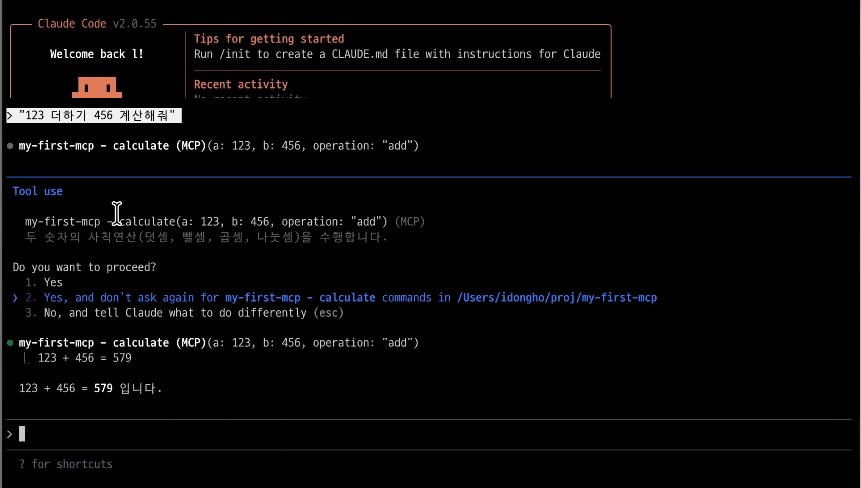
"123 더하기 456 계산해줘" → calculate Tool 실행 → "123 + 456 = 579 입니다"
MCP 서버 자동 감지
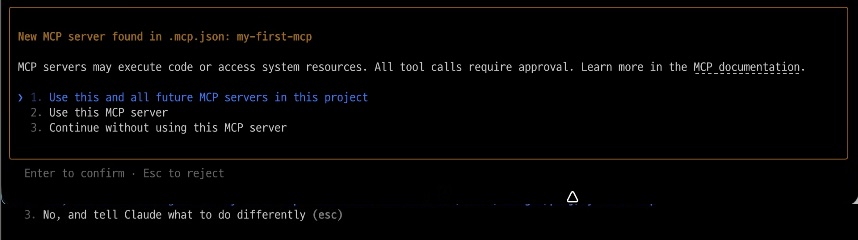
.mcp.json파일로 프로젝트 진입 시 자동 감지
MCP Inspector UI
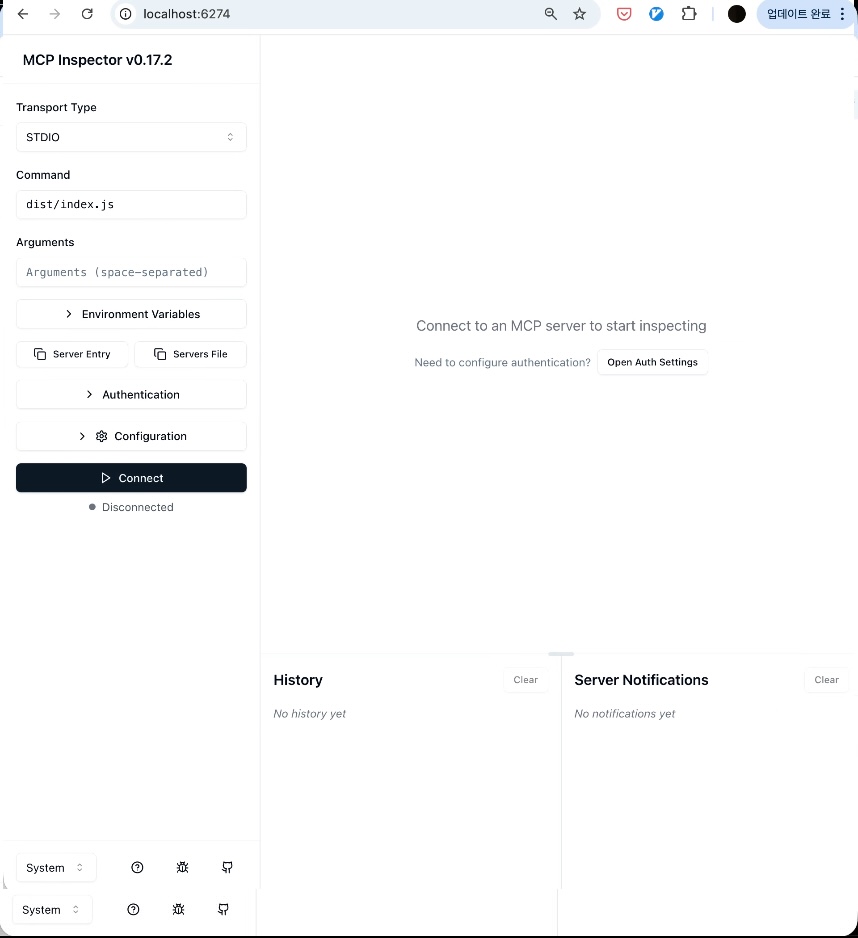
MCP Inspector로 서버 테스트 및 디버깅
MCP Inspector Tool 목록
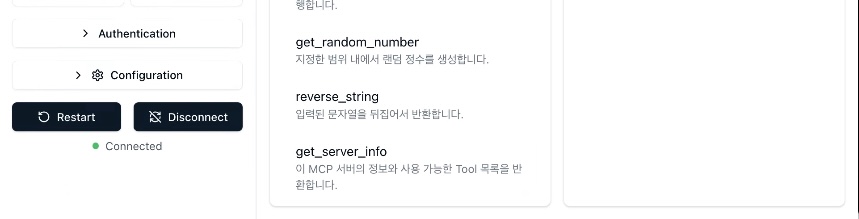
5개 Tool (get_current_time, calculate, get_random_number, reverse_string, get_server_info)
설치
요구사항
Node.js 20+
npm 또는 pnpm
설치 방법
# 저장소 클론
git clone https://github.com/dh1789/my-first-mcp.git
cd my-first-mcp

# 의존성 설치
npm install

# 빌드
npm run build
사용법
Claude Code에 연결
# MCP 서버 등록
claude mcp add my-first-mcp -- node /path/to/my-first-mcp/dist/index.js

# 연결 확인
claude mcp list
MCP Inspector로 테스트
npm run inspect
# 브라우저에서 http://localhost:6274 접속
직접 실행
npm start개발
프로젝트 구조
my-first-mcp/
├── src/
│   ├── index.ts              # MCP 서버 진입점
│   ├── tools.ts              # Day 1: 기본 Tool 로직
│   ├── resources.ts          # Day 2: Resource 로직
│   ├── prompts.ts            # Day 2: Prompt 로직
│   ├── project-analyzer.ts   # Day 3: 프로젝트 분석기
│   ├── advanced.ts           # Day 5: 고급 패턴 (캐싱, 보안, 로깅)
│   └── *.test.ts             # 유닛 테스트
├── dist/                     # 빌드 결과물
├── package.json
├── tsconfig.json
└── vitest.config.ts
스크립트
npm run build     # TypeScript 빌드
npm test          # 유닛 테스트 실행 (31 tests)
npm run test:watch # 테스트 watch 모드
npm run inspect   # MCP Inspector 실행
npm start         # 서버 실행
테스트
TDD 방식으로 120개 유닛 테스트가 포함되어 있습니다:
npm test

# 결과
# ✓ src/tools.test.ts (31 tests)
# ✓ src/resources.test.ts (11 tests)
# ✓ src/prompts.test.ts (13 tests)
# ✓ src/project-analyzer.test.ts (18 tests)
# ✓ src/advanced.test.ts (30 tests)
# ✓ src/package-config.test.ts (14 tests)
# ✓ src/shebang.test.ts (3 tests)
# Test Files  7 passed (7)
# Tests       120 passed (120)
기술 스택
Runtime: Node.js 20+
Language: TypeScript 5.7
MCP SDK: @modelcontextprotocol/sdk
Validation: zod
Testing: vitest
관련 문서
라이선스
MIT License - 자유롭게 사용, 수정, 배포할 수 있습니다.
기여
이슈와 PR을 환영합니다!
Fork
Feature branch 생성 (
git checkout -b feature/amazing-feature)Commit (
git commit -m 'Add amazing feature')Push (
git push origin feature/amazing-feature)Pull Request 생성
작성자
idongho - GitHub
Resources
Unclaimed servers have limited discoverability.
Looking for Admin?
If you are the server author, to access and configure the admin panel.