
greenroom
Integrates with a local Ollama instance to facilitate multi-agent workflows and provide tools for comparing prompt responses across different large language models.
Click on "Install Server".
Wait a few minutes for the server to deploy. Once ready, it will show a "Started" state.
In the chat, type
@followed by the MCP server name and your instructions, e.g., "@greenroomRecommend some highly-rated Spanish language horror films from the 2010s."
That's it! The server will respond to your query, and you can continue using it as needed.
Here is a step-by-step guide with screenshots.
greenroom
A python package containing an MCP server that coordinates outreach to multiple LLMs, integrates with external content providers, and provides custom tooling to agents with the goal of producing high-value, hybrid human-AI curation of entertainment recommendations.
As of 2026, greenroom provides recommendations on film and television content. I plan to integrate with additional data providers and LLM services to broaden the offering.
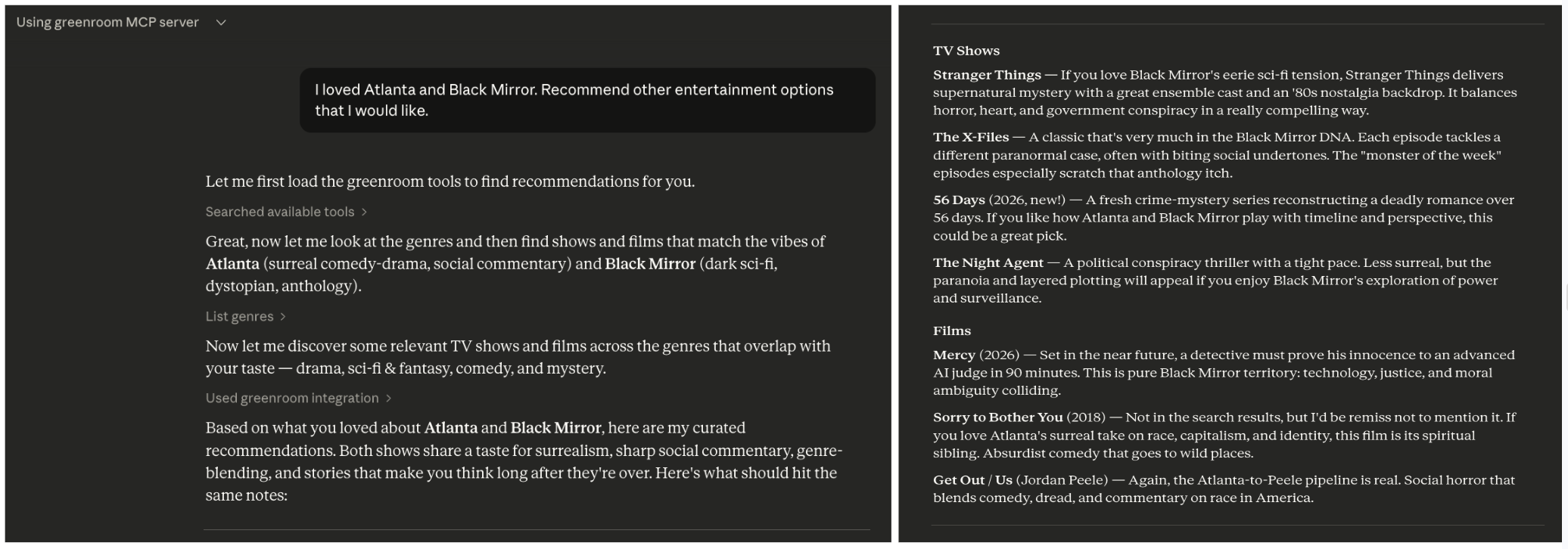
Discover films and television using hybrid human-AI curation
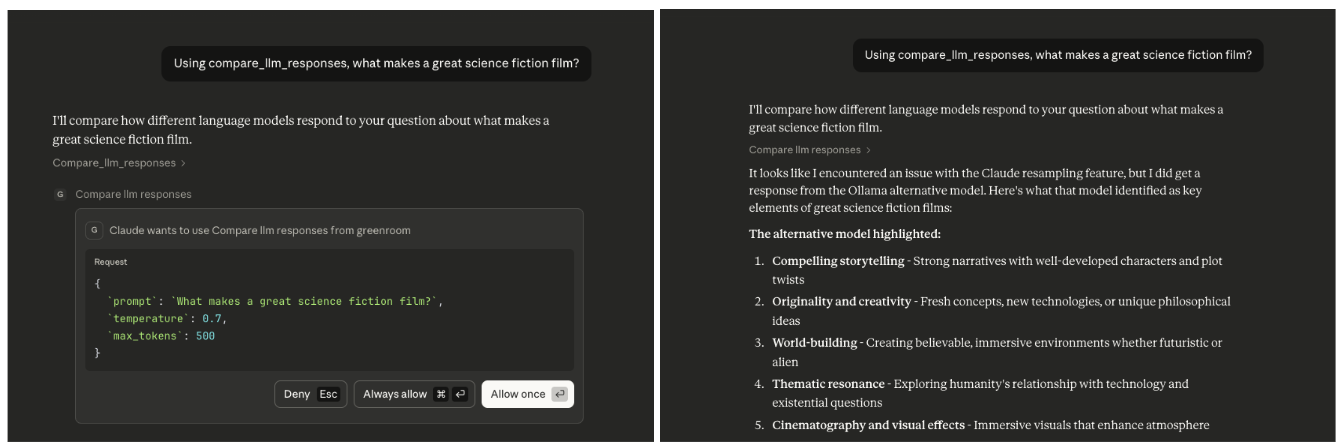
Compare outputs of multiple agents and models
Use Cases
The greenroom MCP server can be used to answer a wide range of questions related to entertainment. Below are some example prompts that will trigger the use of multiple MCP tools, but these are just examples.
Recommendations
What kinds of entertainment can you recommend?I'm in the mood for something serious. Recommend some entertainment content.Recommend spanish language documentary films from the 2010s.I loved Atlanta and Black Mirror. Recommend other entertainment options that I would like.
Event Planning
I'm hosting a French film night. Recommend highly-rated French films across genres.Plan a binge-watching weekend including recent dramas and comedies.Let's host a sci-fi movie marathon. Recommend 5 sci-fi films from different decades.
Industry Analysis
Analyze which genres have the highest average ratings in film vs television.Compare action films made in the 1980s to those made in the 2020s.What are the top-rated spanish language television shows in each genre?
Compare the output of multiple agents
Using compare_llm_responses, what makes a great science fiction film?Using the compare_llm_reponses tool, how is machine learning used in modern filmmaking?
Features
Tools
MCP tools are callable actions, analogous to POST requests, that an agent executes.
They are annotated with @mcp.tool() in the FastMCP framework.
Tools for the greenroom server include:
list_genres - Fetches all entertainment genres, returning a unified map showing which media types support each genre
categorize_genres - Maps human moods to media genres to improve hit rate from human prompts
discover_films - Retrieves films based on discovery criteria, returning metadata for informed reponses and improved categorization
discover_television - Retrieves television shows based on discovery criteria, returning metadata for informed responses and improved categorization
NB: The @mcp.tool() decorator wraps the function into a FunctionTool object, which prevents it from being called directly including by tests. The logic of tool methods is delegated to helpers methods, which are covered by the test suite.
Coordination of Agents
This server supports the coordination of multiple agents to work on a single task.
compare_llm_responses - Receives a prompt and fields it out to two agents. It constrains the responses by temperature and token limit.
To trigger this tool, ask Claude: Using the compare_llm_reponses tool, why is the ocean blue?

You should see:
  Both Claude* and Ollama responses
  Response lengths comparison
  Structured JSON output showing both LLM outputs side-by-side
As of 2026, this defaults to comparing the response from a resampling of the anthropic client to a response from a new ollama client. Generally, the resampled response will be null because anthropic forbids resampling. I hope to broaden the capabilities to a wider selection of LLM clients soon.
Contexts
Context-aware tools use FastMCP's Context parameter to access advanced MCP features like LLM sampling.
Example:
list_genres_simplified - Returns a simplified list of genre names by using
ctx.sample()to leverage the agent's LLM capabilities for data transformation.
Resources
These resources provide read-only data, analogous to GET requests. An agent reads the information but does not performa actions.
Resources are annotated with @mcp.resource() in the FastMCP framework.
config://version - Get server version
Error Handling
All errors raised by the greenroom server use a custom exception hierarchy rooted in GreenroomError.
This means MCP callers can catch GreenroomError to handle any server-side failure, or catch a specific subclass for finer control:
APIResponseError - HTTP errors, invalid JSON, unexpected response bodies from external APIs
APIConnectionError - Network or connectivity failures when reaching external APIs
APITypeError - Response had an unexpected Python type after deserialization
SamplingError - Errors during LLL sampling
Built-in exceptions like ValueError are still raised for input validation (e.g., invalid parameters).
Architecture
Tools Layer (MCP Interface)
    ↓
Services Layer (Business Logic)
    ↓
Client Layer (Provider-specific HTTP Communication)
    ↓
Models Layer (Provider-agnostic Data Structures)
Project Structure
This project follows the python package src/ layout to support convenient packaging and testing. Below is a simplified diagram of the project.
greenroom/                          # project root
├── src/
│   └── greenroom/                   # python package
│       │
│       ├── server.py                # primary entry point to server
│       ├── config.py                # centralized configuration
│       ├── utils.py                 # shared utilities
│       │
│       │
│       ├── models/                  # data models
│       │
│       ├── services/                # business logic
│       │   ├── llm/                 # LLM agent services and clients
│       │   ├── tmdb/                # TMDB provider services and clients
│       │   └── protocols.py         # standardizes methods across media providers
│       │
│       └── tools/                   # MCP tools (exposed via FastMCP)
│            ├── agent_tools.py      # coordinate multiple agents and LLMs
│            ├── discovery_tools.py  # search for specific entertainment content
│            └── genre_tools.py      # optimize genre discovery and presentation to user
│
├── tests/greenroom/                 # test suite
│
├── pyproject.toml                   # configuration and dependencies
└── uv.lock                          # dependency lock file (auto-generated)
Dependencies
Python 3.12
FastMCP >=2.13.0 - MCP server framework; requires Python 3.10+
uv - package manager; installation instructions
Hatchling - build system
httpx - for API calls to TMDB (community-driven database)
python-dotenv - for API key management
Ollama (optional) - local LLM runtime for multi-agent tools like compare_llm_responses; installation instructions
This project uses the FastMCP framework, which requires less boilerplate than other frameworks (e.g., MCP Python SDK). See mcp-server-1 for examples where functionality is more explicit.
Setup
Create local development environment
# Clone the repository
git clone <repository-url>
cd greenroom

# Install dependencies (uv will create a virtual environment automatically)
uv sync
Add TMDB api key as environment variable
Get a free API key at TMDB by creating an account, going to account settings, and navigating to the API section.
Create a file called
.envat the top level of the project. (This file is gitignored to prevent committing secrets.)Copy the content of
.env.exampleto your new file.Replace
your_tmdb_api_key_herein .env with the actual TMDB API key.
(optional) Setup Ollama
To use Ollama as a second agent (in addition to Claude). An example of usage is the compare_llm_responses tool.
Install Ollama
# macOS
brew install ollama

# Or download from https://ollama.com/download
Start Ollama service
# macOS (Ollama runs as a background service after installation)
ollama serve

# Or simply open the Ollama application
Pull the default model
# The compare_llm_responses tool defaults to llama3.2:latest
ollama pull llama3.2

# Verify the model is available
ollama list
Test Ollama is working
 curl http://localhost:11434/api/generate -d '{"model": "llama3.2", "prompt": "Why is the sky blue?", "stream": false}'

 # expected response might be something like
 {
   "model":"llama3.2",
   "created_at":"2025-11-30T12:01:32.314915Z",
   "response":"The sky appears blue because of a phenomenon called Rayleigh scattering...
   ...
 }
Development
Run the MCP Server Locally
The server will start and communicate via stdin/stdout. It uses stdio by default, which is the standard transport for local MCP servers.
# best approach uses the MCP entry point
uv run greenroom
# alternative: via python
uv run python src/greenroom/server.pyNB: You should not run the server directly (e.g. uv run <path to server.py>) because the server is part of a python package.
Running it directly would break the module resolution.
Inspect using MCP Inspector (web ui)
npx @modelcontextprotocol/inspector uv --directory /ABSOLUTE/PATH/TO/PROJECT run python src/greenroom/server.pyRun tests
uv run python -m pytest

# alternative to printout test names for quicker debugging
uv run python -m pytest -v

# only run static type checker
uv run mypy src/greenroom/
Interacting with the MCP Server
This project does not yet include a frontend with which to exercise the server, but you can use anthropic tooling to interact with the server.
via Claude Code
Start the server
# update local claude settings and run the MCP server
claude mcp add greenroom -- uv --directory /ABSOLUTE/PATH/TO/PROJECT run python src/greenroom/server.py
Open claude code
Enter
/mcpto view available MCP servers.Confirm that greenroom is one of them with status: connected.
Exercise the server
Resources can be referenced with @ mentions
Tools will automatically be used during the conversation
Prompts show up as / slash commands
To explicitly test a tool, ask claude to call the tool. e.g.
Call the <name-of-tool> tool from the MCP server called greenroom.
When you update the methods on the MCP server, you must rerun the above steps in order for the updates to be available to the claude session.
via Claude Desktop
Download Claude Desktop app here.
Open the claude desktop app.
Confirm the desktop app is connected to the greenroom server:
Navigate to Settings.
Click on "Developer". Local MCP Servers should appear.
The greenroom server should be listed there and it should have status: running.
If it is not running, click on 'Edit Config'. Then follow the instructions in the Troubleshooting section below.
Troubleshooting
Confirm correctness of local claude settings / configuration.
When you run the set up command (claude mcp add), a configuration for that MCP server is added to your local claude settings.
Claude stores them in a file called claude_desktop_config.json.
These settings are what will be used by the claude desktop app to connect to the MCP server.
Align your local configuration with the below.
Replace
/ABSOLUTE/PATH/TO/PROJECTwith the actual path to the project directory (not the package directory) on your local machine.Replace
/ABSOLUTE/PATH/TO/UV/LIBRARYwith the actual path to uv on your local machine.
{
  "mcpServers": {
    "greenroom": {
      "command": "/ABSOLUTE/PATH/TO/UV/LIBRARY",
      "args": [
        "--directory",
        "/ABSOLUTE/PATH/TO/PROJECT",
        "run",
        "python",
        "src/greenroom/server.py"
      ]
    }
  }
}
When experiencing configuration issues, sometimes it helps to remove the mcp server from your local machine and add it back again.
# remove the local configuration
claude mcp remove greenroom

# update the local configuration and run the MCP server
claude mcp add greenroom -- uv --directory /ABSOLUTE/PATH/TO/PROJECT run python src/greenroom/server.py
How It Works
The
pyproject.tomlfile declares thefastmcpdependency managed by uvWhen an agent (e.g. claude code) starts, it launches this MCP server as a subprocess using the configured command
uvautomatically manages the virtual environment and dependenciesThe server advertises its available resources and tools (e.g. the
tools/listJSON-RPC method)During conversations, the agent can automatically call these tools when relevant
The server executes the requested tool and returns results to the agent
The agent incorporates the results into its response to you
Future Development
Add more media types (e.g., podcasts, books)
Add providers to augment data sources
Create an entertainment concierge experience (e.g., manager agent flow)
Resources
Unclaimed servers have limited discoverability.
Looking for Admin?
If you are the server author, to access and configure the admin panel.
Latest Blog Posts
MCP directory API
We provide all the information about MCP servers via our MCP API.
curl -X GET 'https://glama.ai/api/mcp/v1/servers/chrisbrickey/greenroom'
If you have feedback or need assistance with the MCP directory API, please join our Discord server