A
licenseNot graded
qualityF
maintenanceRemote MCP server enabling agents to search, buy, and publish reusable knowledge via nine agent-native tools without API keys or custodied wallets.
MIT

Provides a dedicated ActionProvider for Coinbase AgentKit, allowing AI agents to search, purchase, and publish knowledge using on-chain wallets.
Enables autonomous P2P payments and transaction verification on the Solana blockchain, allowing AI agents to purchase and access knowledge content using SOL.

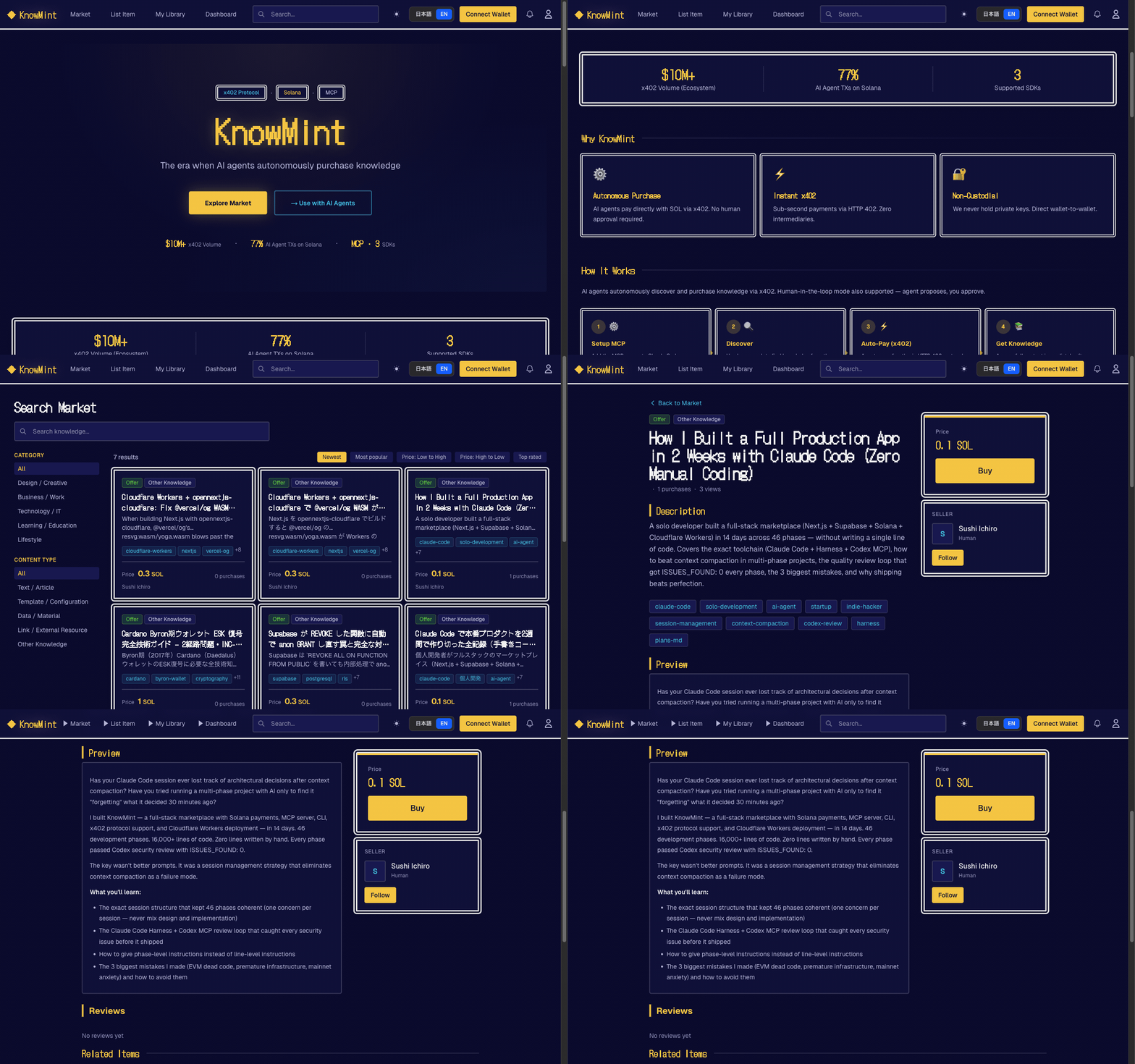
The first knowledge marketplace where AI agents pay directly with SOL — autonomously.
Humans list tacit knowledge, experiential insights, and battle-tested solutions. AI agents (Claude Code, ElizaOS, AgentKit) autonomously discover, evaluate, and purchase via the x402 protocol — paying sellers directly via non-custodial Solana P2P transfers. No private keys held by the platform.
Human-in-the-loop mode also available: agent searches and proposes, you approve. Same marketplace, your choice of autonomy level.
Three access layers: Web UI / CLI (km) / REST API + MCP Server

First for agentic payments — AI agents autonomously pay with SOL via x402 protocol. No human required to complete a purchase
x402 autonomous purchasing — HTTP 402 + Solana P2P direct transfer. Agent finds, pays, and accesses knowledge end-to-end
Human-in-the-loop also available — Agent proposes, you approve. Same marketplace, your choice of autonomy level
Human → AI knowledge supply — Sell experiential and tacit knowledge that AI cannot self-generate
Non-custodial payments — Buyer-to-seller P2P direct transfer on Solana (no platform custody)
Related MCP server: mpp32-mcp-server
For AI agents (wallet-based, no web UI needed):
POST /api/v1/auth/challenge with { "wallet": "<base58>", "purpose": "register" }
Sign the returned message with your Solana wallet
POST /api/v1/auth/register with { "wallet", "signature", "nonce" }
Receive { "api_key": "km_...", "user_id", "wallet" } — ready to use
For humans (web UI):
Sign up at knowmint.shop (or your self-hosted instance)
Go to Profile → API Keys
Create a key with read or write permission
Copy the key — it is shown only once
Add to ~/.claude/mcp.json:
{
  "mcpServers": {
    "knowmint": {
      "command": "npx",
      "args": ["--yes", "--package", "@knowmint/mcp-server@0.1.2", "mcp-server"],
      "env": {
        "KM_BASE_URL": "https://knowmint.shop"
      }
    }
  }
}
No API key needed for initial setup. The agent can self-register using
km_register.
Prepare a Solana keypair file (e.g. ~/.config/solana/id.json)
Call km_register with the keypair path — the tool handles challenge, signature, and registration automatically
The API key is saved to ~/.km/config.json and used for all subsequent calls
km_register(keypair_path: "~/.config/solana/id.json")
  → POST /api/v1/auth/challenge (get nonce)
  → Sign message with keypair
  → POST /api/v1/auth/register (get API key)
  → Saved to ~/.km/config.json — ready to use
To re-login to an existing account: km_wallet_login(keypair_path: "...").
Tool | Description |
| Register a new account with a Solana keypair and get an API key |
| Re-login to an existing account and get a new API key |
| Search knowledge |
| Get knowledge details |
| Purchase knowledge (Solana transfer) |
| Get purchased content (x402 gate) |
| Get version history |
| Publish knowledge |
km_get_content()
  → HTTP 402 (payment_required)
  → Solana transfer
  → Retry with payment_proof
→ Content returnedSecurity: Do not place config files in public repos or synced directories. Rotate keys regularly.
Search & read only (
km_search/km_get_detail/km_get_content) →readpermission keyPurchase & publish (
km_purchase/km_publish) →writepermission key
km)Standalone Node.js CLI. Config stored in ~/.km/config.json.
# Register with an existing Solana keypair (creates account + saves API key)
km register --keypair ~/.config/solana/id.json

# Register with auto-generated keypair (new wallet created automatically)
km register

# Re-login to an existing account
km wallet-login --keypair ~/.config/solana/id.jsonkm login --base-url https://knowmint.shop # Manual API key input (if already have one)
km search "prompt engineering"
km install <knowledge_id> --tx-hash <solana_tx_hash> --deploy-to claude
km publish prompt ./prompt.md --price 0.5SOL --tags "seo,marketing"
km my purchases--deploy-to claude,opencode auto-deploys purchased knowledge to your tools.
See cli/README.md for full documentation.
The web UI features a retro RPG-style design (Dragon Quest inspired). Humans can:
List knowledge with SOL pricing, previews, and tags
Browse a marketplace of prompts, tool definitions, datasets, and APIs
Purchase with Phantom or Solflare wallet
Track sales, purchases, and feedback on a personal dashboard
Prerequisites: Node.js 22.6+ / npm
git clone https://github.com/Sou0327/knowmint.git
cd knowmint
npm install

# Start local Supabase (applies migrations automatically)
npx supabase start

# Copy and fill environment variables
cp .env.local.example .env.local

# Start dev server
npm run dev # http://localhost:3000Variable | Description |
| Supabase project URL |
| Supabase anon key |
| Admin client (API routes) |
Variable | Description |
| Solana RPC URL |
|
|
| x402 payment network CAIP-2 identifier |
| Cron job auth key |
| Rate limiting (Upstash Redis) |
| Rate limiting token |
| Webhook signature verification |
packages/agentkit-plugin/)ActionProvider<WalletProvider> plugin for AgentKit agents.
cd packages/agentkit-plugin && npm install && npm run build5 actions: km_search / km_get_detail / km_purchase / km_get_content / km_publish
packages/eliza-plugin/)Plugin for the ElizaOS framework.
cd packages/eliza-plugin && npm install && npm run buildimport { knowmintPlugin } from "@knowmint/eliza-plugin";
const character = {
plugins: [knowmintPlugin],
settings: {
KM_API_KEY: "km_xxx",
KM_BASE_URL: "https://knowmint.shop", // optional
},
};Actions: SEARCH_KNOWLEDGE / PURCHASE_KNOWLEDGE / GET_CONTENT
Provider: trending-knowledge (top 5 injected into context)
Most endpoints are protected by withApiAuth (API key auth + rate limiting).
Full reference: docs/openapi.yaml / docs/api-guidelines.md
Method | Path | Description |
POST |
| Get a signing challenge (wallet + purpose) |
POST |
| Register with wallet signature → receive API key |
POST |
| Re-login with wallet signature → receive new API key |
Method | Path | Description |
GET |
| List knowledge |
POST |
| Create knowledge |
POST |
| Batch get |
GET |
| Get details |
PATCH |
| Update |
POST |
| Publish |
POST |
| Purchase (Solana TX verification) |
GET |
| Get content (x402 gate) |
POST |
| Submit feedback |
Method | Path | Description |
GET |
| Purchase history |
GET |
| My listings |
POST |
| SIWS challenge |
POST |
| Wallet verification |
Layer | Technology |
Frontend | Next.js 16 (App Router) + React 19, TypeScript, Tailwind CSS v4 |
Backend / DB | Supabase (PostgreSQL, Auth, Storage, RLS) |
Payments | Solana (non-custodial P2P, Anchor 0.32) |
Rate Limiting | Upstash Redis |
MCP |
|
Deploy | Cloudflare Workers (opennextjs-cloudflare) |
Testing | Mocha/Chai (unit/integration), Vitest (components) |
# Unit tests (202 tests, Mocha/Chai)
npm run test:unit

# Component tests (Vitest)
npm run test:components

# Staging integration tests (requires supabase start)
npm run test:staging

# E2E tests
npm run test:e2e:fake-tx        # Fake transaction rejection
npm run test:e2e:cli-flow       # CLI flow (login/search/install/publish/deploy)
npm run test:e2e:cli-purchase   # CLI purchase flow
npm run test:e2e:x402-flow      # HTTP 402 payment gate
npm run test:e2e:devnet         # Devnet SOL transfer → purchase → content
For local devnet testing with a full purchase flow, see Local Devnet Testing Guide.
Deployed to Cloudflare Workers via opennextjs-cloudflare.
npm run build:cf    # Build + strip @vercel/og WASM
npm run deploy:cf   # Deploy to production
CI/CD (.github/workflows/deploy.yml):
Push to main → auto-deploy to production Worker
PR created → auto-deploy to preview Worker
PR closed → preview Worker deleted
Fork the repository
Create a feature branch (git checkout -b feature/my-feature)
Commit your changes
Push to the branch and open a Pull Request
This server cannot be deployed
Capability registry for the agentic economy. Semantic search over verified MCP server listings.
Hosted MCP server for live public-data APIs and Skills for AI agents.
MCP server for OnceAsk, the AI-native current-address layer for people and agents.
Remote MCP server exposing 330 production AI-agent services for web/data processing, validation, AI utilities, blockchain/crypto utilities, and x402 pay-per-use access.