
A
licenseNot graded
qualityD
maintenanceA server that exposes Pi-hole functionality as tools for AI assistants, allowing them to retrieve local DNS settings and query history through natural language.
11
MIT

Provides tools for managing Pi-hole network-wide ad blocker, including DNS statistics monitoring, blocking control with timers, whitelist/blacklist management, query log viewing, and maintenance operations like gravity updates and cache flushing.
Click on "Deploy Server".
Wait a few minutes for the server to deploy. Once ready, it will show a "Started" state.
In the chat, type @ followed by the MCP server name and your instructions, e.g., "@MCP Pi-hole Server show me Pi-hole stats for the last hour"
That's it! The server will respond to your query, and you can continue using it as needed.
Here is a step-by-step guide with screenshots.


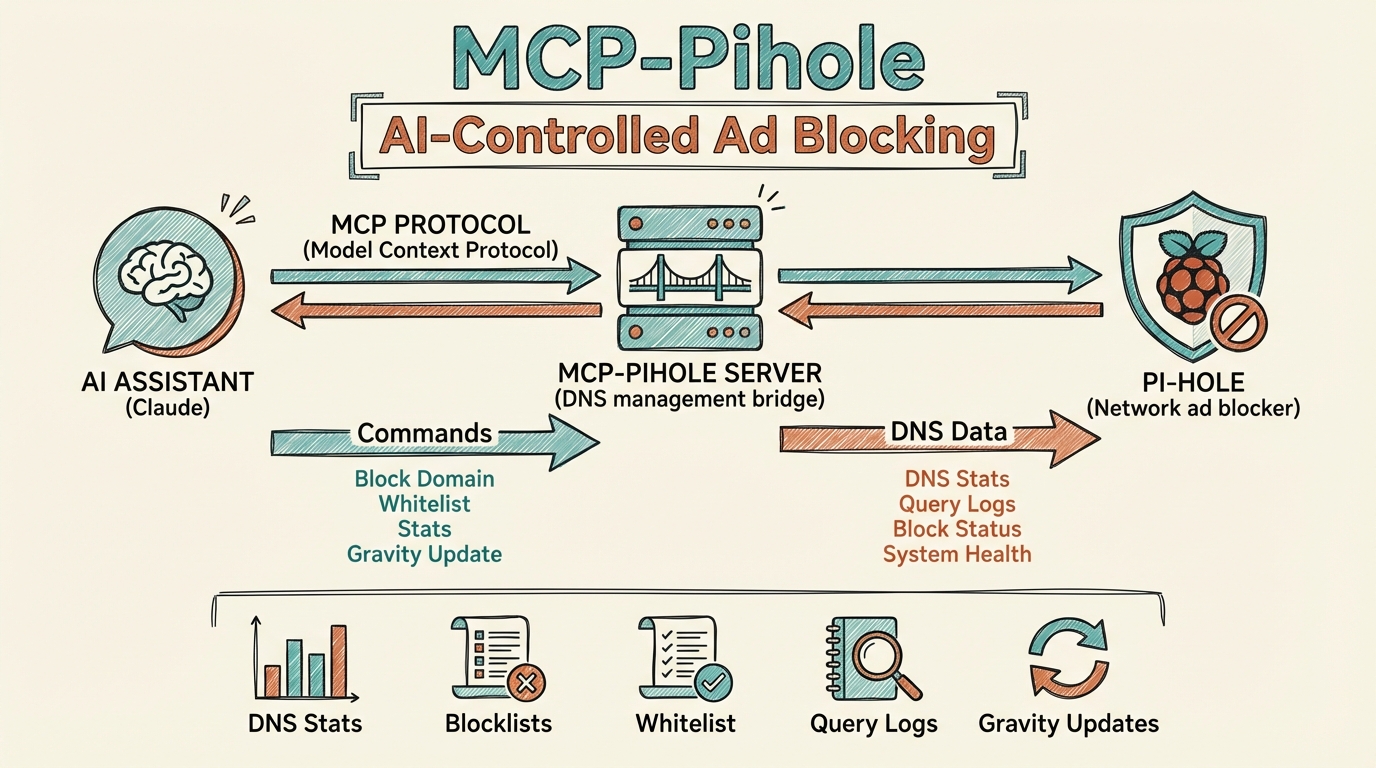
An MCP (Model Context Protocol) server that connects AI assistants like Claude to your Pi-hole network-wide ad blocker. Manage DNS blocking, view statistics, control whitelists/blacklists, and more through natural language.
If you're running Pi-hole on your network, this MCP server lets you:
Monitor DNS traffic - View query statistics, top blocked domains, and client activity
Control blocking - Enable/disable Pi-hole blocking instantly or with a timer
Manage lists - Add or remove domains from whitelist and blacklist without opening the web UI
View query logs - See recent DNS queries with detailed information
Maintain your Pi-hole - Update gravity (blocklists) and flush DNS cache
Related MCP server: Pi-hole MCP Server
Category | Tools |
Statistics | Query totals, blocking percentage, top domains, top clients |
Blocking Control | Enable, disable (with optional timer), check status |
Domain Lists | Whitelist/blacklist CRUD operations |
Query Log | Recent DNS queries with client, status, response time |
Maintenance | Update gravity, flush cache |
Visualizations | ASCII art dashboards and bar charts with ANSI colors |
Node.js 18+
Pi-hole v6 with API enabled
Pi-hole app password (generated in Pi-hole settings)
Network access to Pi-hole from your machine
npx mcp-pihole-serverOr install globally:
npm install -g mcp-pihole-servergit clone https://github.com/aplaceforallmystuff/mcp-pihole.git
cd mcp-pihole
npm install
npm run buildOpen your Pi-hole web interface
Go to Settings > API
Generate a new app password
Copy the password (it's only shown once)
Add to your Claude Desktop config file:
macOS: ~/Library/Application Support/Claude/claude_desktop_config.json
Windows: %APPDATA%\Claude\claude_desktop_config.json
{
  "mcpServers": {
    "pihole": {
      "command": "npx",
      "args": ["-y", "mcp-pihole-server"],
      "env": {
        "PIHOLE_URL": "http://your-pihole-address:8080",
        "PIHOLE_PASSWORD": "your-app-password"
      }
    }
  }
}Add to ~/.claude.json:
{
  "mcpServers": {
    "pihole": {
      "command": "npx",
      "args": ["-y", "mcp-pihole-server"],
      "env": {
        "PIHOLE_URL": "http://your-pihole-address:8080",
        "PIHOLE_PASSWORD": "your-app-password"
      }
    }
  }
}Variable | Description | Example |
| Pi-hole web interface URL |
|
| Pi-hole app password | Your app password from settings |
Once configured, you can interact with Pi-hole through natural language:
"Show me Pi-hole stats"
"What are the top blocked domains?"
"Which clients are making the most queries?"
"Is Pi-hole blocking enabled?"
"Disable Pi-hole for 5 minutes"
"Re-enable Pi-hole blocking"
"Add example.com to the whitelist"
"Block ads.trackersite.com"
"Show me all whitelisted domains"
"Show me the last 50 DNS queries"
"What domains has my phone been querying?"
"Show me Pi-hole stats with visualize: true"
"Get top blocked domains with visualization"
pihole_get_stats - Get comprehensive Pi-hole statistics
pihole_get_top_blocked - Get top blocked domains
pihole_get_top_permitted - Get top permitted domains
pihole_get_top_clients - Get top clients by query count
pihole_get_query_log - Get recent DNS queries
pihole_get_blocking_status - Check if blocking is enabled
pihole_enable_blocking - Enable DNS blocking
pihole_disable_blocking - Disable blocking (optionally with timer)
pihole_get_whitelist - List all whitelisted domains
pihole_get_blacklist - List all blacklisted domains
pihole_add_to_whitelist - Add domain to whitelist
pihole_add_to_blacklist - Add domain to blacklist
pihole_remove_from_whitelist - Remove domain from whitelist
pihole_remove_from_blacklist - Remove domain from blacklist
pihole_update_gravity - Update blocklists (gravity)
pihole_flush_cache - Flush DNS cache
This server supports colorful ASCII art visualizations rendered directly in your terminal using ANSI escape codes.
The following tools support the optional visualize: true parameter:
Tool | Visualization |
| Full dashboard with summary stats, top clients, blocked domains, and permitted domains |
| Red bar chart of blocked domains |
| Green bar chart of permitted domains |
| Blue bar chart of client activity |
Pass visualize: true to any supported tool:
{
  "name": "pihole_get_stats",
  "arguments": {
    "visualize": true
  }
}
When visualize is not set or false, tools return JSON data as usual.
╔════════════════════════════════════════════════════════════════════════════╗
║                         🛡️  PI-HOLE DASHBOARD                          ║
╠════════════════════════════════════════════════════════════════════════════╣
║                                                                            ║
║ 📊 SUMMARY                                                                 ║
║ ────────────────────────────────────────────────────────────────────────── ║
║ Total Queries:      73K             Domains Blocked:    2.4M               ║
║ Blocked:            22K             Active Clients:     28                 ║
║ Block Rate:         29.7%           Total Clients:      115                ║
╠════════════════════════════════════════════════════════════════════════════╣
║ 🔝 TOP CLIENTS                                                             ║
║ ────────────────────────────────────────────────────────────────────────── ║
║ 192.168.1.52     ████████████████████████████████████████   28K (38%)      ║
║ 192.168.1.51     ███████████████████▋                       14K (19%)      ║
╚════════════════════════════════════════════════════════════════════════════╝
(Colors appear in terminals that support ANSI escape codes)
# Run in development mode (auto-reloads)
npm run watch

# Build for production
npm run build

# Run the built version
node dist/index.jsEnsure both environment variables are set in your MCP config.
Your app password is invalid or expired. Generate a new one from Pi-hole Settings > API.
Session expired. The server will automatically re-authenticate, but if issues persist, check your password.
Ensure Pi-hole is running and the URL is correct. Check that you can access the Pi-hole web interface from your machine.
Contributions are welcome! Please see CONTRIBUTING.md for guidelines.
MIT License - see LICENSE for details.
Add a domain to the Pi-hole blacklist (block list)
Inputs: domain (required).
Add a domain to the Pi-hole whitelist (allow list)
Inputs: domain (required).
Disable Pi-hole DNS blocking, optionally for a specific duration
Inputs: duration.
Enable Pi-hole DNS blocking
Inputs: no named parameters.
Flush Pi-hole's DNS cache
Inputs: no named parameters.
Get all domains on the Pi-hole blacklist
Inputs: no named parameters.
Check if Pi-hole blocking is currently enabled or disabled
Inputs: no named parameters.
Get recent DNS queries from the query log
Inputs: count.
Get Pi-hole statistics including total queries, blocked queries, blocking percentage, active clients, and domains being blocked
Inputs: visualize.
Get the top blocked domains
Inputs: count, visualize.
Get the top clients by query count
Inputs: count, visualize.
Get the top permitted (allowed) domains
Inputs: count, visualize.
Get all domains on the Pi-hole whitelist
Inputs: no named parameters.
Remove a domain from the Pi-hole blacklist
Inputs: domain (required).
Remove a domain from the Pi-hole whitelist
Inputs: domain (required).
Update Pi-hole's gravity (refresh blocklists). This may take a minute to complete.
Inputs: no named parameters.
Recent tool additions, removals, and schema changes observed during successful MCP inspections.
Loading tool schema changelog…
Scored across 16 tools
Every tool has a clearly distinct purpose with no ambiguity. Tools are organized around specific actions on well-defined resources like blacklist, whitelist, blocking status, cache, logs, and statistics, making it easy for an agent to select the correct tool without confusion.
All tools follow a consistent 'pihole_verb_noun' pattern throughout, using snake_case and starting with the server prefix. This predictable naming scheme enhances readability and makes the tool set easy to navigate and understand.
With 16 tools, the server is well-scoped for managing a Pi-hole system, covering essential operations like blocking control, list management, statistics, and maintenance. Each tool earns its place by addressing a specific aspect of Pi-hole administration without being excessive or insufficient.
The tool surface provides complete CRUD/lifecycle coverage for Pi-hole management, including adding/removing from blacklist/whitelist, enabling/disabling blocking, flushing cache, updating gravity, and retrieving logs and stats. There are no obvious gaps that would hinder an agent's ability to perform core tasks.
Connects AI assistants to TrackingTime for querying time entries, projects, tasks, customers, and team data using natural language.
Connect AI assistants to your approved computer for files, commands, browser and desktop tasks.
Query your Logspot analytics, companies, and revenue from any AI assistant, and run your actions.
Connect AI assistants to authorized Windows and macOS devices for files, commands, and management.