
The replicant-mcp server enables AI assistants to comprehensively manage Android development environments through natural language commands, automating build, test, deployment, and UI testing workflows.
Capabilities include:
Build & Test: Build debug/release APKs/bundles, run unit and instrumented tests, introspect project structure (modules, variants, tasks), and retrieve detailed logs/errors from previous operations
Emulator Management: List, create, start, stop, and wipe Android Virtual Devices; manage snapshots (save, load, list, delete) for quick state restoration
Device Control: List connected devices, select active device, query device properties, and wait for device availability
App Management: Install, uninstall, launch, stop apps; clear app data and list installed packages
Log Analysis: Read and filter logcat output by package, tag, level, time range, or custom filters with progressive disclosure (summaries first, full details on demand)
UI Automation: Dump accessibility tree, find elements by text/properties, tap by coordinates/index, input text, capture screenshots, and perform accessibility checks
Shell Commands: Execute ADB shell commands with safety guards to prevent dangerous operations
Server Utilities: Manage internal cache (stats, clear, configure) and access built-in documentation via
rtfmfor any tool or categoryToken-Efficient Design: Progressive disclosure minimizes token usage while maintaining full access to detailed output when needed
Provides tools for interacting with the Android development environment, including emulator management, application installation, ADB shell command execution, Logcat log analysis, and UI automation via the accessibility tree.
Enables automated interaction with the Gradle build system to assemble APKs and bundles, run unit or instrumented tests, and retrieve detailed build results and logs.
Click on "Install Server".
Wait a few minutes for the server to deploy. Once ready, it will show a "Started" state.
In the chat, type
@followed by the MCP server name and your instructions, e.g., "@replicant-mcpBuild the debug APK and run it on the emulator"
That's it! The server will respond to your query, and you can continue using it as needed.
Here is a step-by-step guide with screenshots.
replicant-mcp
Let AI build, test, and debug your Android apps.


replicant-mcp is a Model Context Protocol server that gives AI assistants like Claude the ability to interact with your Android development environment. Build APKs, launch emulators, install apps, navigate UIs, and debug crashes—all through natural conversation.
Demo
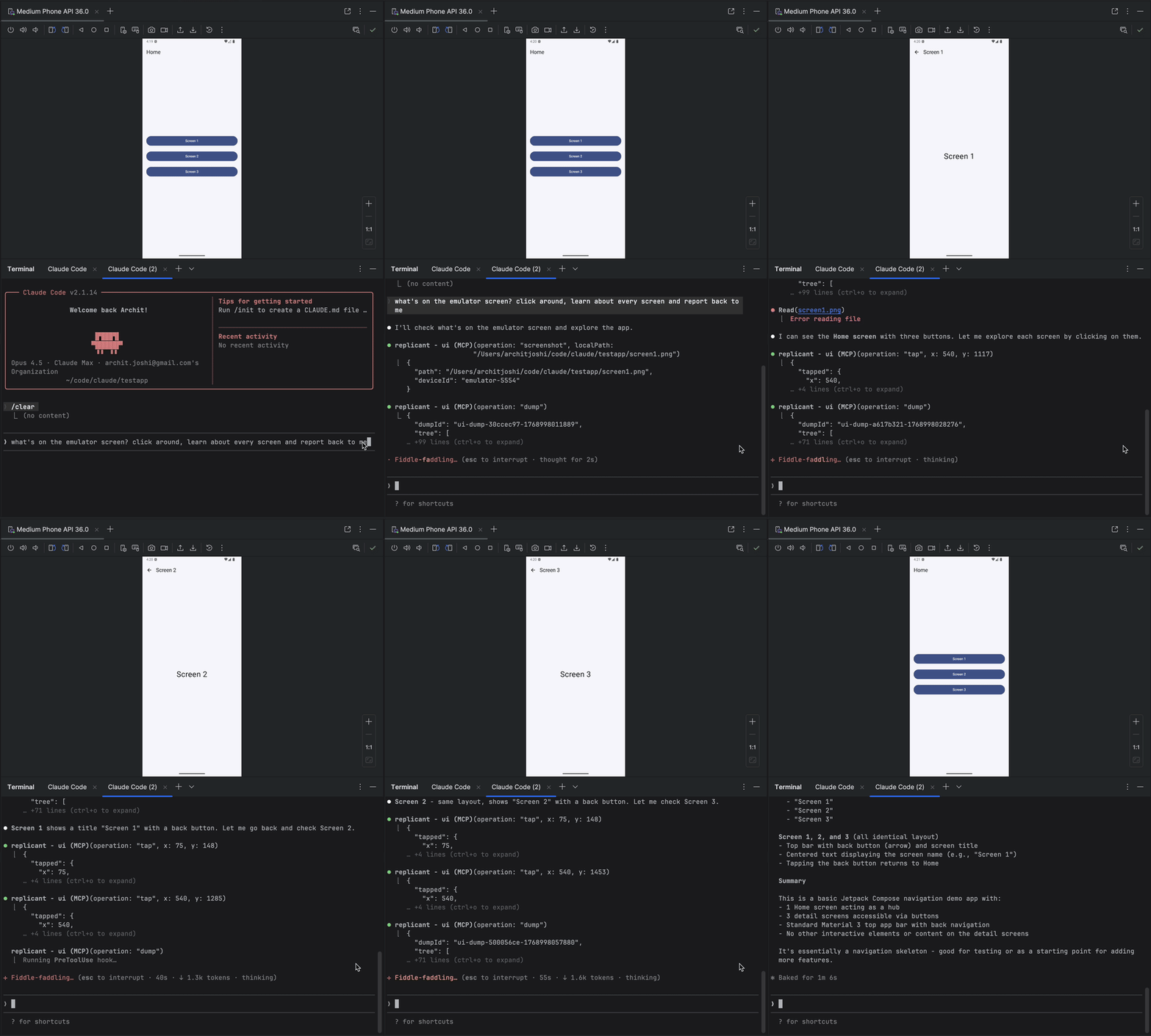
Why replicant-mcp?
Without replicant-mcp | With replicant-mcp |
"Run | "Build and run the app" |
Copy-paste logcat output, lose context | AI reads filtered logs directly |
Screenshot → describe UI → guess coordinates | AI sees accessibility tree, taps elements by text |
5,000 tokens of raw Gradle output | 50-token summary + details on demand |
Features
Category | Capabilities |
Build & Test | Build APKs/bundles, run unit and instrumented tests, list modules/variants/tasks |
Emulator | Create, start, stop, wipe emulators; save/load/delete snapshots |
Device Control | List connected devices, select active device, query device properties |
App Management | Install, uninstall, launch, stop apps; clear app data |
Log Analysis | Filter logcat by package, tag, level, time |
UI Automation | Accessibility-first element finding, spatial proximity search, tap, text input, screenshots |
Coming Soon
Custom build commands (project-specific overrides, auto-detect gradlew)
Video capture (start/stop recording, duration-based capture)
Raw screenshot mode for external context management
Quick Start
Prerequisites
Node.js 18+
Android SDK with
adbandemulatorin your PATHAn Android project with
gradlew(for build tools)
Installation
Updating
Setup
Claude Desktop
Add to ~/Library/Application Support/Claude/claude_desktop_config.json (macOS) or %APPDATA%\Claude\claude_desktop_config.json (Windows):
Claude Code
Cursor
Add to ~/.cursor/mcp.json (global) or .cursor/mcp.json (project):
Windsurf
Add to ~/.codeium/windsurf/mcp_config.json:
OpenAI Codex CLI
Add to ~/.codex/config.toml:
Or via CLI:
Note: Ensure
adbandemulatorare in your PATH, or setANDROID_HOMEenvironment variable. On macOS:~/Library/Android/sdk, on Linux:~/Android/Sdk.
Example
Design
replicant-mcp uses progressive disclosure (summaries first, details on demand) to minimize token usage, and accessibility-first UI automation for faster, cheaper, more reliable interactions than screenshot-based approaches. See docs/architecture.md for details.
More Info
Configuration: Set
REPLICANT_CONFIGfor advanced options. See docs/configuration.md.Troubleshooting: Common issues and solutions in docs/troubleshooting.md.
Tool documentation: Ask Claude to call
rtfmwith a category like "build", "adb", "emulator", or "ui".
Contributing
See CONTRIBUTING.md for development setup and guidelines.
Acknowledgments
Inspired by xc-mcp for iOS
Built on the Model Context Protocol
License
Questions? Open an issue
