
Provides comprehensive access to NHL data including player statistics, team standings, game scores, play-by-play information, schedules, playoff brackets, and league information through 40+ NHL API endpoints.
Click on "Install Server".
Wait a few minutes for the server to deploy. Once ready, it will show a "Started" state.
In the chat, type
@followed by the MCP server name and your instructions, e.g., "@NHL MCP ServerWhat are today's NHL scores?"
That's it! The server will respond to your query, and you can continue using it as needed.
Here is a step-by-step guide with screenshots.
NHL MCP Server
A comprehensive Model Context Protocol (MCP) server for the NHL API, built with FastMCP. This server provides access to all documented NHL API endpoints through MCP tools, enabling AI assistants to access live NHL data.
🏒 Features
This MCP server provides access to 40+ NHL API endpoints including:
Player Information
Player game logs (current and historical seasons)
Player detailed information and career statistics
Player spotlight and featured players
Player landing pages and biographical data
Statistics
Current and historical skater stats leaders
Current and historical goalie stats leaders
Customizable statistical categories and limits
Season and career totals
Team Information
Team standings (current and historical by date)
Team statistics and performance metrics
Team rosters with player details
Team schedules and upcoming games
Club statistics and team comparisons
Game Information
Daily scores and live scoreboards
Game play-by-play data with detailed events
Game boxscores and statistical summaries
Game stories and match summaries
Game landing pages
League Information
League schedules and season calendars
TV schedules and broadcast information
Streaming availability ("where to watch")
Network television schedules
Playoff Information
Playoff overviews and tournament brackets
Playoff schedules and series information
Postseason statistics and records
Additional Features
Season information and draft data
Meta information and API utilities
Team code references and format helpers
Comprehensive error handling
🚀 Installation
Clone or download this repository
Install the required dependencies:
Dependencies:
fastmcp>=2.8.0- FastMCP framework for MCP server creationrequests>=2.31.0- HTTP library for API callstyping-extensions- Enhanced type hints support
📖 Usage
Running the Server
Start the MCP server:
The server will start and listen for MCP connections.
MCP Client Configuration
Add this server to your MCP client configuration (e.g., Claude Desktop):
Testing the Server
Run the test scripts to verify functionality:
🛠️ Available Tools
The server exposes the following MCP tools:
Player Tools
get_player_info(player_id)- Get detailed player informationget_player_game_log(player_id, season, game_type)- Get player game logsget_player_spotlight()- Get featured players
Team Tools
get_standings_now()- Get current NHL standingsget_club_stats_now(team)- Get team statisticsget_team_roster(team)- Get team rosterget_team_schedule(team)- Get team schedule
Game Tools
get_daily_scores_now()- Get today's scoresget_play_by_play(game_id)- Get game play-by-playget_game_boxscore(game_id)- Get game boxscore
Statistics Tools
get_current_skater_stats_leaders()- Get skater stat leadersget_current_goalie_stats_leaders()- Get goalie stat leaders
Schedule Tools
get_schedule_now()- Get current scheduleget_tv_schedule_now()- Get TV schedule
Utility Tools
get_team_codes()- Get list of NHL team codesget_season_format_help()- Get format help for seasons and parameters
📋 Parameter Formats
Team Codes
Use standard NHL team abbreviations:
TOR(Toronto Maple Leafs),MTL(Montreal Canadiens)NYR(New York Rangers),BOS(Boston Bruins)EDM(Edmonton Oilers),CGY(Calgary Flames)And all other NHL teams
Season Format
Seasons use 8-digit format: YYYYYYYY
20232024for 2023-24 season20222023for 2022-23 season
Game Types
2- Regular season games3- Playoff games
Date Format
Use ISO date format: YYYY-MM-DD
2024-01-15for January 15, 2024
💡 Example Queries
Once connected to an MCP client, you can ask:
"What are the current NHL standings?"
"Show me Connor McDavid's stats this season"
"What games are on today?"
"Get the Toronto Maple Leafs roster"
"Who are the current goal scoring leaders?"
"Show me yesterday's game scores"
"Get the playoff bracket"
🏗️ Architecture
The project consists of:
nhl_api_client.py- Core NHL API client with 40+ endpoint functionsnhl_mcp_server.py- FastMCP server that exposes API functions as MCP toolstest_client.py- Test script for the NHL API clienttest_mcp_server.py- Test script for the MCP server backenddemo.py- Comprehensive demonstration of server capabilitiesrequirements.txt- Python dependenciesmcp_config_example.json- Example MCP client configuration
✅ Testing & Validation
The server has been thoroughly tested with:
Live NHL Data: All endpoints tested with current NHL season data
Error Handling: Robust error handling for API failures and invalid parameters
Response Validation: Proper handling of different response types (dict, list, etc.)
MCP Compliance: Full compatibility with MCP protocol standards
Test Results:
✅ 40+ NHL API endpoints working correctly
✅ Live data retrieval (standings, scores, player stats)
✅ MCP tool registration and exposure
✅ Error handling and validation
✅ Documentation and examples
🔧 Error Handling
The server includes comprehensive error handling:
HTTP Errors: Network timeouts, connection failures, API unavailability
JSON Parsing: Malformed responses and unexpected data structures
Parameter Validation: Invalid team codes, player IDs, and date formats
Rate Limiting: Graceful handling of API rate limits
All errors are returned as descriptive messages to help with debugging.
🤝 Contributing
Feel free to contribute by:
Adding new NHL API endpoints as they become available
Improving error handling and validation
Adding more comprehensive tests
Enhancing documentation and examples
Reporting bugs or suggesting improvements
📄 License
This project is open source. The NHL API is provided by the National Hockey League and is subject to their terms of service.
🖼️ Screenshots
NHL MCP Server in Action
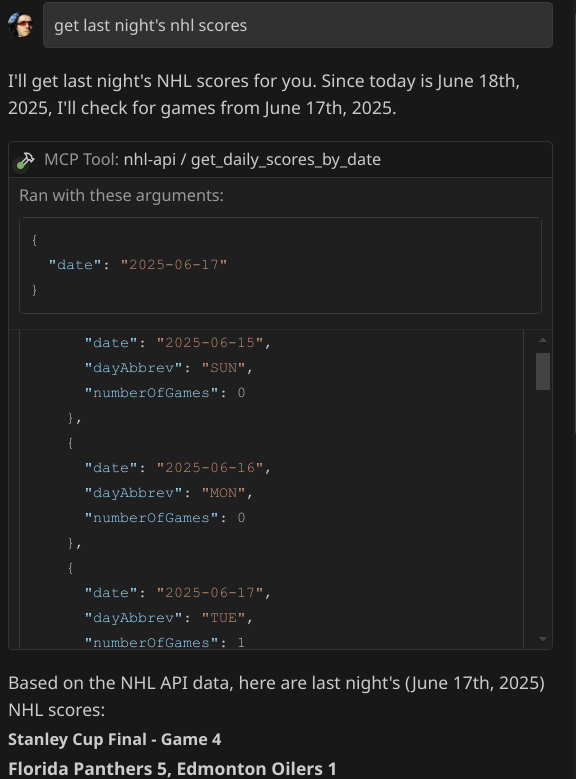
Screenshot showing the NHL MCP Server providing live NHL data including current standings, player information, game scores, and statistics. The server successfully integrates with MCP clients to bring comprehensive hockey data to AI assistants.
🏒 Ready to bring live NHL data to your AI assistant!
