
Click on "Install Server".
Wait a few minutes for the server to deploy. Once ready, it will show a "Started" state.
In the chat, type
@followed by the MCP server name and your instructions, e.g., "@Reltio MCP Serverfind potential matches for customer entity ID CUST12345"
That's it! The server will respond to your query, and you can continue using it as needed.
Here is a step-by-step guide with screenshots.

Reltio MCP Server – Developer Edition
Reltio MCP Server is a lightweight, plugin-based Model Context Protocol (MCP) server designed to perform advanced entity matching with language models in Reltio environments.
DISCLAIMER: By entering in your credentials and consuming the Reltio MCP Server – Developer Edition, you may be connecting to the Reltio Platform via API calls. Any and all API calls will be counted against the API call entitlements set out in your SaaS Subscription Agreement (the "Agreement") with Reltio. API calls in excess of those entitlements, including any API calls made while consuming the server, could result in Overages, as set out in the Agreement.
Table of Contents
Available Tools
Tool Name | Description |
| Search for entities with advanced filtering |
| Get detailed information about a Reltio entity by ID |
| Update specific attributes of an entity in Reltio |
| Find the match history for a specific entity |
| Get detailed information about a Reltio relation by ID |
| Merge multiple entities in Reltio |
| Mark an entity as not a match (reject the potential duplicate) |
| Export the merge tree for all entities in a specific tenant |
| Get the business configuration for a specific tenant |
| Get the permissions and security metadata for a specific tenant |
| Retrieve activity events related to entity merges with flexible filtering options |
| Get the tenant metadata details from the business configuration for a specific tenant |
| Get complete details about the data model definition from the business configuration for a specific tenant |
| Get the entity type definition for a specified entity type from the business configuration of a specific tenant |
| Get the change request type definition for a specified change request type from the business configuration of a specific tenant |
| Get the relation type definition for a specified relation type from the business configuration of a specific tenant |
| Get the interaction type definition for a specified interaction type from the business configuration of a specific tenant |
| Get the graph type definition for a specified graph type from the business configuration of a specific tenant |
| Get the grouping type definition for a specified grouping type from the business configuration of a specific tenant |
| Unified tool to find all potential matches by match rule, score range, or confidence level |
| Get the total, entity-level, and match-rule-level counts of potential matches in the tenant |
| Get detailed information about a Reltio entity along with its potential matches |
| Create one or more entities in a Reltio tenant using the Entities API |
| Get entity graph (hops) for a specific entity with comprehensive filtering and traversal options |
| Find all parent paths for a given entity, traversing the specified graph types |
| Create relationships between entities in Reltio |
| Delete a relation object from a tenant using the DELETE operation |
| Get entity connections/relations using Reltio connections API |
| Search for relationships in a tenant using the Relation Search API |
| Check if a user has been active in the system within a specified number of days |
| Get interactions for a Reltio entity by ID |
| Create interactions in the Reltio Platform |
| List lookups based on the given RDM lookup type |
| Get users by role and tenant |
| Get users by group and tenant |
| Get workflow tasks for a specific user with total count and detailed task information |
| Reassign a workflow task to a different user for load balancing and task distribution |
| Get possible assignees for specific tasks or based on filter/exclude criteria |
| Retrieve workflow tasks with comprehensive filtering options |
| Get complete details of a specific workflow task by ID |
| Start a process instance in Reltio workflow for any type of change requests created by user |
| Execute an action on a workflow task |
| Unmerge a contributor entity from a merged entity with optional tree behavior |
| Check if the MCP server is healthy |
| Display this help information |
Environment Configuration
Create a .env file in the root directory:
Server Prerequisites
Python ≥ 3.10
(Optional) Docker installed, only if you choose to run the server with Docker - See instructions below
(Optional) uv (python package manager) installed, only if you choose to run the server without Docker - See instructions below
Client Prerequisites
If you want to consume the server from Claude AI (Anthropic):
Claude Desktop App installed from claude.ai
Node.js
If you want to consume the server from a custom client (OpenAI, Gemini, Anthropic)
Go to the section below on Custom MCP Client Integration
Running the Server
Option 1: Manual Execution (RECOMMENDED)
Run this script to automate setup (virtualenv, install, Claude config injection):
If you are on Windows, open a terminal and run this command:
⚠️ Right-click
setup.bat→ Properties → Unblock → Run as Admin (if SmartScreen warning appears)
If you are on macOS / Linux, open a terminal and run this command:
You then might need to activate your newly-created virtual environment if it was not activated in your terminal already
After initial setup (it applies to Windows/macOS/Linux), run this command:
Open Claude (or your custom MCP Client) and start using it.
Option 2: With Docker
Make sure you have Docker installed (https://www.docker.com/products/docker-desktop/)
Open a terminal and run this command:
To configure Claude to use this MCP server, please go into the next section.
Integration with Claude Desktop App
You must follow these steps ONLY if you are running the server with docker (option 2 above). Option 1 does not require this subsequent step.
Step 1: Launch Claude Desktop
Open the Claude app on your system.
Step 2: Access Settings
If you are on Windows
Open Claude Desktop.
Click the hamburger menu (top-left).
Go to:
Settings → Developer → Edit Config.
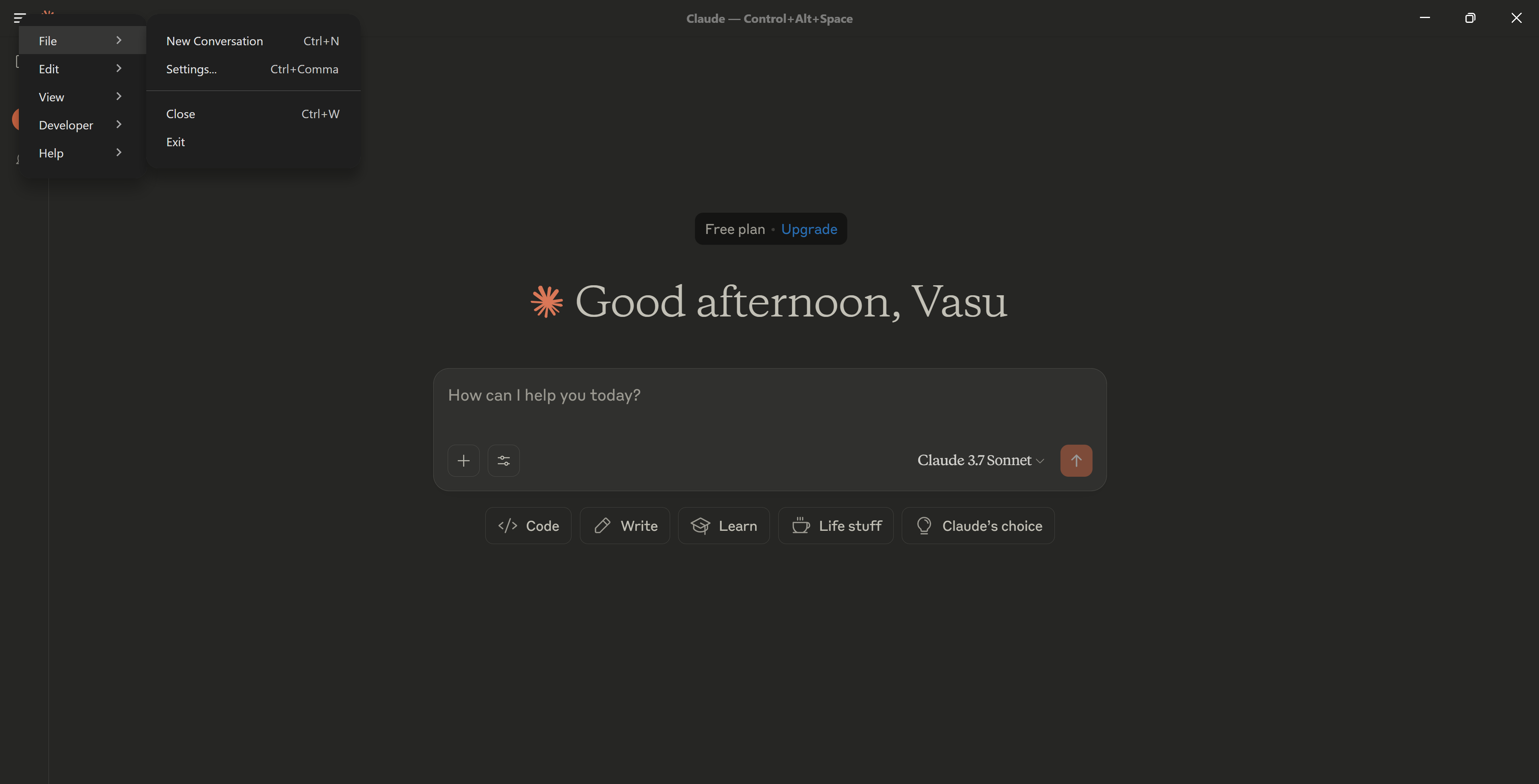
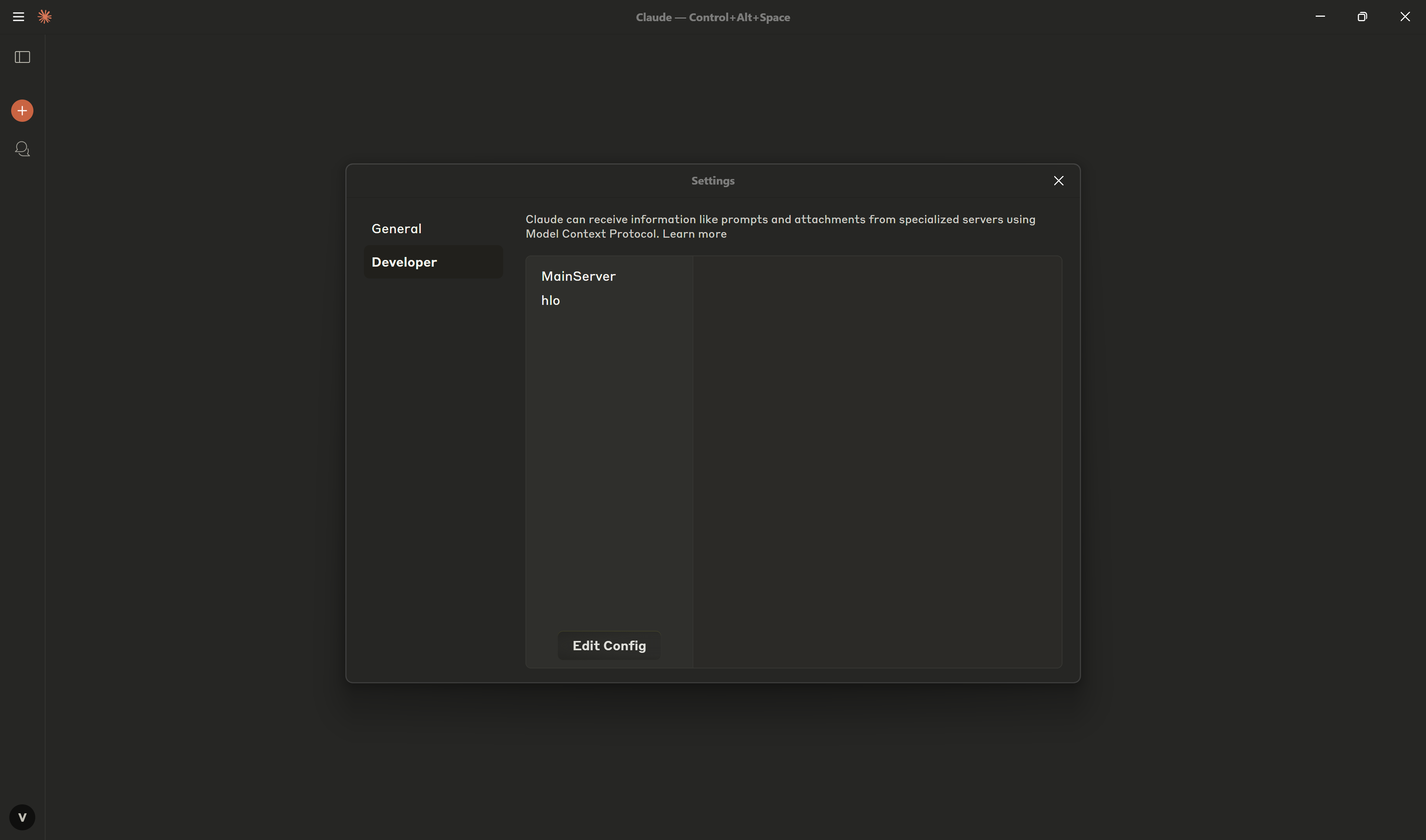
If you are on macOS
Open Claude Desktop.
Click
Claudefrom the macOS menu bar.Go to:
Settings → Developer → Edit Config.
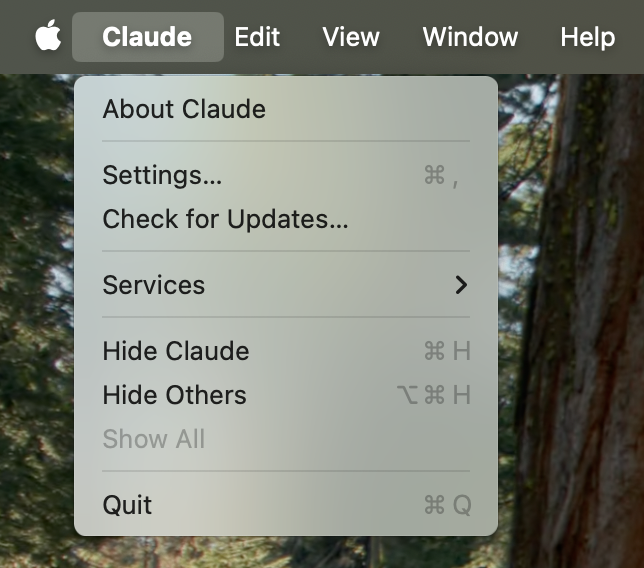
Add this entry to the claude_desktop_config.json file:
Always Restart the Claude Desktop app after making changes.
NOTE: ECONNREFUSED in Claude Logs? Check mcp-remote
If Claude logs show ECONNREFUSED, the mcp-remote service (possibly at http://localhost:8000/sse) might be the issue.
🔪 Kill mcp-remote Process
🐧 Linux / macOS
🪟 Windows (PowerShell)
Custom MCP Client Integration
Install dependencies:
Ensure your MCP server is running locally before executing clients.
Claude MCP Client
You will need:
Anthropic API Key (
sk-ant-api...)Claude Model ID (e.g.,
claude-3-opus-20240229)MCP Server URL (e.g.,
http://localhost:8000/sse)
Gemini MCP Client
Required:
Google API Key (
AIza...)Gemini Model ID (e.g.,
gemini-1.5-pro)MCP Server URL
OpenAI MCP Client
Required:
OpenAI API Key (
sk-...)OpenAI Model ID (
gpt-4-turbo)MCP Server URL
Testing
Run Tests via Docker
Or Run Locally
Test Suite
tests/unit/test_server.pytests/unit/test_server_structure.pytests/unit/test_server_error_handling.pytests/unit/test_tools_activity.pytests/unit/test_main.py
Agent Client
A CLI chat bot that connects to Reltio MCP server using OAuth 2.0 authentication and provides an interactive interface for querying Reltio data.
Prerequisites
Configuration
Edit the configuration constants in agent_client.py:
Running the Agent Client
The client will:
Open a browser for OAuth authentication
Establish connection to Reltio MCP server
Provide an interactive chat interface
Supported Models
Anthropic:
anthropic:claude-3-5-sonnet-20241022Google:
google_genai:gemini-2.0-flash-001OpenAI:
openai:gpt-4o-mini