
Skill Jack MCP dynamically integrates Agent Skills into LLMs, providing on-demand access to specialized instructions and resources through MCP tools and resources.
Activate Skills - Use the
skilltool to load complete SKILL.md content by name, providing your LLM with step-by-step instructions and guidance for specific tasksAccess Skill Resources - Use the
skill-resourcetool to read specific files (scripts, snippets, templates, references, assets), list available files, or load entire directories within a skillDynamic Discovery - Automatically detects and updates available skills from configured directories when SKILL.md files change, sending
tools/listChangednotifications to clientsResource URIs - Access skills via
skill://URIs for manual selection in MCP clients, supporting single files, directories, or the main SKILL.md contentReal-time Updates - Subscribe to resources for notifications when skill files change, enabling live updates via
notifications/resources/updatedProgressive Disclosure - Follows Agent Skills pattern—lightweight metadata (name, description, location) loads first, then full instructions and files as needed
Multiple Directories - Configure one or multiple skills directories with automatic scanning, deduplication, and searching across all sources
Security Features - Includes path traversal prevention, configurable file size limits, and directory depth limits, while treating skill content as trusted
Click on "Install Server".
Wait a few minutes for the server to deploy. Once ready, it will show a "Started" state.
In the chat, type
@followed by the MCP server name and your instructions, e.g., "@Skill Jack MCPload the 'mcp-server-ts' skill"
That's it! The server will respond to your query, and you can continue using it as needed.
Here is a step-by-step guide with screenshots.
Skilljack MCP
An MCP server that jacks Agent Skills directly into your LLM's brain.
Installation
Or run directly with npx:
From Source
Usage
Configuration and Skills Display UI
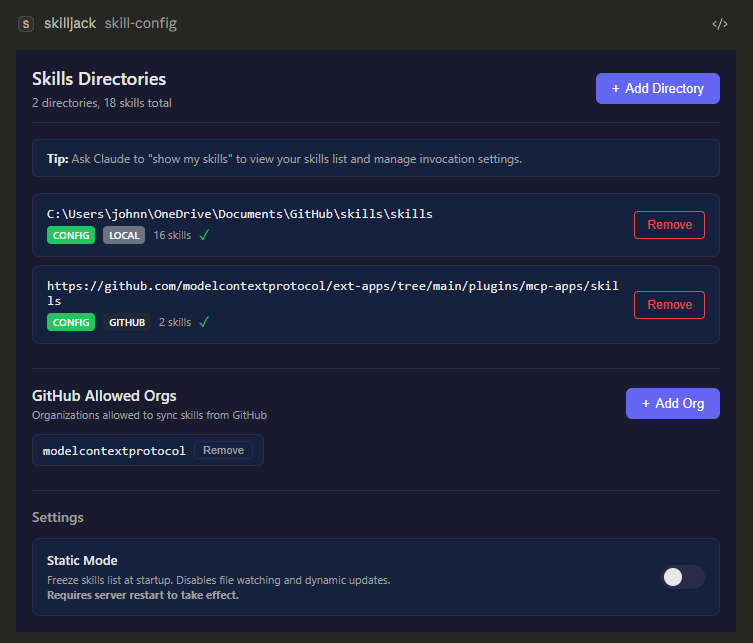
This server comes along with a MCP Apps-based UI for clients that support it. Instead of fiddling with config files or environment variables, you can just configure your skills locations and skill visiblity directly in your chat window.
(Screenshots below are from Claude Desktop in dark mode.)

Documentation
For complete documentation, just ask your assistant:
"how do I use skilljack?" or "how does skilljack work behind the scenes?"
This loads the full reference including tools, prompts, resources, configuration options, and architecture details.